warning HYUNDAI VERACRUZ 2007 Owners Manual
[x] Cancel search | Manufacturer: HYUNDAI, Model Year: 2007, Model line: VERACRUZ, Model: HYUNDAI VERACRUZ 2007Pages: 441, PDF Size: 7.99 MB
Page 183 of 441
4 101
Features of your vehicle
Recirculated air position
With the recirculated air
position selected, air from
the passenger compart-
ment will be drawn through
the heating system and
heated or cooled according
to the function selected.
Outside (fresh) air position
With the outside (fresh) air
position selected, air enters
the vehicle from outside and
is heated or cooled accord-
ing to the function selected.✽ ✽
NOTICEProlonged operation of the heater in the
recirculated air position (without air
conditioning selected) may cause fog-
ging of the windshield and side windows
and the air within the passenger com-
partment may become stale.
In addition, prolonged use of the air con-
ditioning with the recirculated air posi-
tion selected will result in excessively dry
air in the passenger compartment.
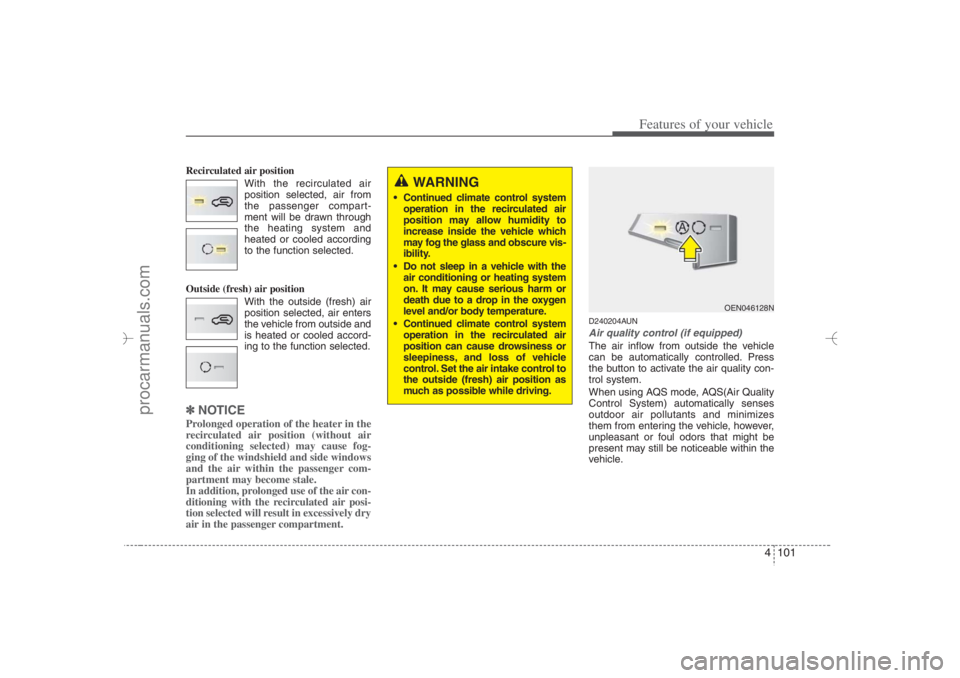
D240204AUNAir quality control (if equipped)The air inflow from outside the vehicle
can be automatically controlled. Press
the button to activate the air quality con-
trol system.
When using AQS mode, AQS(Air Quality
Control System) automatically senses
outdoor air pollutants and minimizes
them from entering the vehicle, however,
unpleasant or foul odors that might be
present may still be noticeable within the
vehicle.
WARNING
Continued climate control system
operation in the recirculated air
position may allow humidity to
increase inside the vehicle which
may fog the glass and obscure vis-
ibility.
Do not sleep in a vehicle with the
air conditioning or heating system
on. It may cause serious harm or
death due to a drop in the oxygen
level and/or body temperature.
Continued climate control system
operation in the recirculated air
position can cause drowsiness or
sleepiness, and loss of vehicle
control. Set the air intake control to
the outside (fresh) air position as
much as possible while driving.
OEN046128N
EN hma 4-84~120.qxd 11/27/2006 5:33 PM Page 101
procarmanuals.com
Page 188 of 441
Features of your vehicle106 4D250000AUN
For maximum defrosting, set the tem-
perature control to the extreme
right/hot position and the fan speed
control to the highest speed.
If warm air to the floor is desired while
defrosting or defogging, set the mode
to the floor-defrost position.
Before driving, clear all snow and ice
from the windshield, rear window, out-
side rear view mirrors, and all side win-
dows.
Clear all snow and ice from the hood
and air inlet in the cowl grill to improve
heater and defroster efficiency and to
reduce the probability of fogging up the
inside of the windshield.
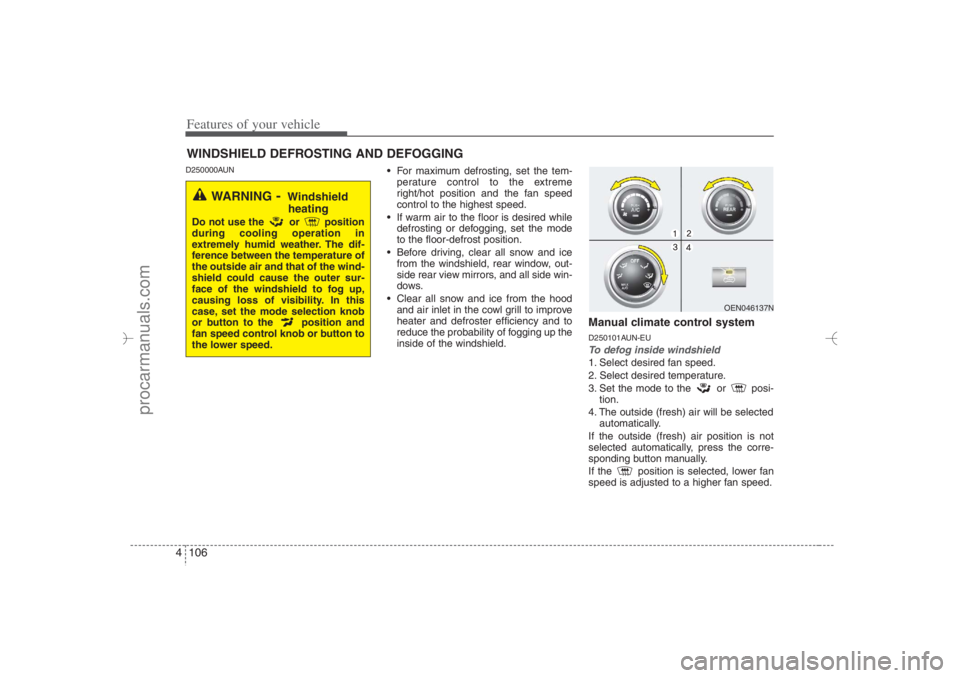
Manual climate control systemD250101AUN-EUTo defog inside windshield 1. Select desired fan speed.
2. Select desired temperature.
3. Set the mode to the or posi-
tion.
4. The outside (fresh) air will be selected
automatically.
If the outside (fresh) air position is not
selected automatically, press the corre-
sponding button manually.
If the position is selected, lower fan
speed is adjusted to a higher fan speed.
WINDSHIELD DEFROSTING AND DEFOGGING
OEN046137N
WARNING
- Windshield
heating
Do not use the or position
during cooling operation in
extremely humid weather. The dif-
ference between the temperature of
the outside air and that of the wind-
shield could cause the outer sur-
face of the windshield to fog up,
causing loss of visibility. In this
case, set the mode selection knob
or button to the position and
fan speed control knob or button to
the lower speed.
EN hma 4-84~120.qxd 11/27/2006 5:34 PM Page 106
procarmanuals.com
Page 191 of 441
4 109
Features of your vehicle
D270000AUNThese compartments can be used to
store small items required by the driver
or passengers.
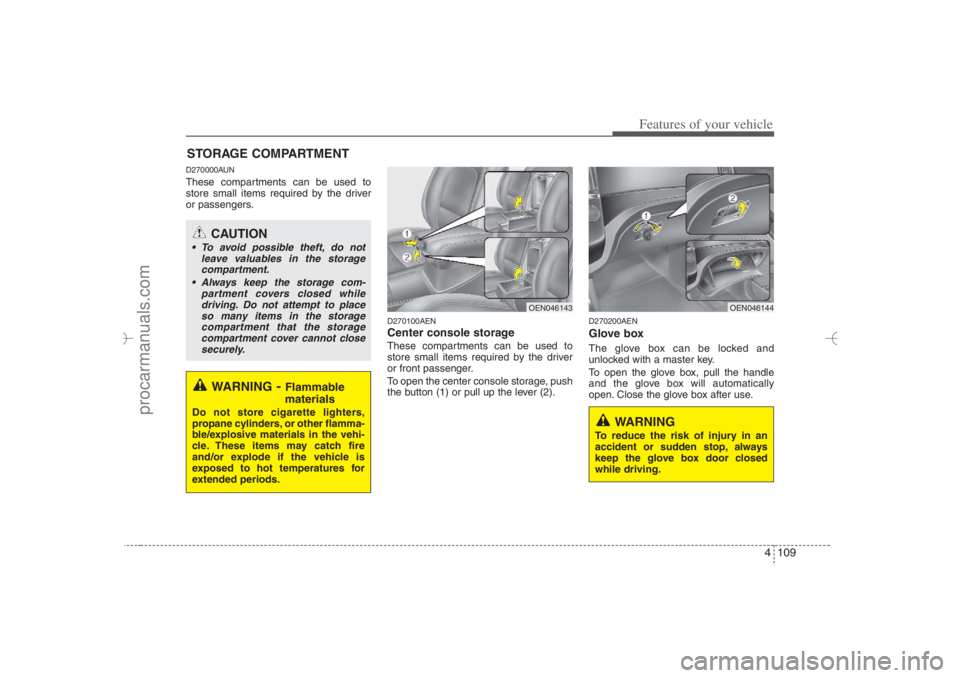
D270100AENCenter console storage These compartments can be used to
store small items required by the driver
or front passenger.
To open the center console storage, push
the button (1) or pull up the lever (2).
D270200AENGlove boxThe glove box can be locked and
unlocked with a master key.
To open the glove box, pull the handle
and the glove box will automatically
open. Close the glove box after use.
STORAGE COMPARTMENT
WARNING
- Flammable
materials
Do not store cigarette lighters,
propane cylinders, or other flamma-
ble/explosive materials in the vehi-
cle. These items may catch fire
and/or explode if the vehicle is
exposed to hot temperatures for
extended periods.
CAUTION
To avoid possible theft, do not
leave valuables in the storage
compartment.
Always keep the storage com-
partment covers closed while
driving. Do not attempt to place
so many items in the storage
compartment that the storage
compartment cover cannot close
securely.
OEN046144
OEN046143
WARNING
To reduce the risk of injury in an
accident or sudden stop, always
keep the glove box door closed
while driving.
EN hma 4-84~120.qxd 11/27/2006 5:35 PM Page 109
procarmanuals.com
Page 192 of 441
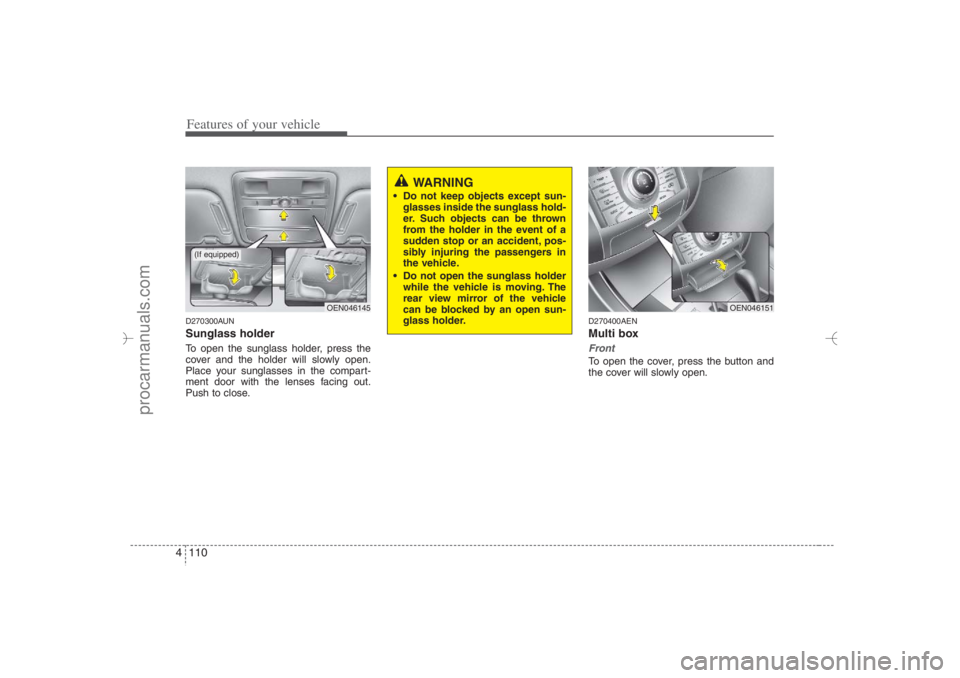
Features of your vehicle110 4D270300AUNSunglass holder To open the sunglass holder, press the
cover and the holder will slowly open.
Place your sunglasses in the compart-
ment door with the lenses facing out.
Push to close.
D270400AENMulti boxFrontTo open the cover, press the button and
the cover will slowly open.
OEN046145
OEN046151
WARNING
Do not keep objects except sun-
glasses inside the sunglass hold-
er. Such objects can be thrown
from the holder in the event of a
sudden stop or an accident, pos-
sibly injuring the passengers in
the vehicle.
Do not open the sunglass holder
while the vehicle is moving. The
rear view mirror of the vehicle
can be blocked by an open sun-
glass holder.
(If equipped)
EN hma 4-84~120.qxd 11/27/2006 5:36 PM Page 110
procarmanuals.com
Page 194 of 441
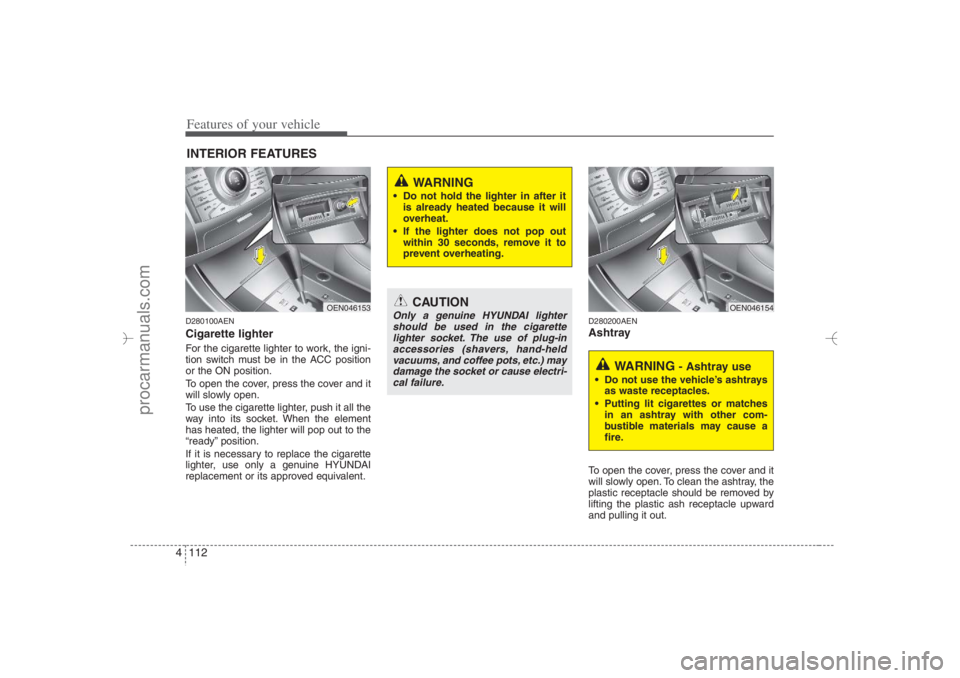
Features of your vehicle112 4D280100AENCigarette lighterFor the cigarette lighter to work, the igni-
tion switch must be in the ACC position
or the ON position.
To open the cover, press the cover and it
will slowly open.
To use the cigarette lighter, push it all the
way into its socket. When the element
has heated, the lighter will pop out to the
“ready” position.
If it is necessary to replace the cigarette
lighter, use only a genuine HYUNDAI
replacement or its approved equivalent.
D280200AENAshtrayTo open the cover, press the cover and it
will slowly open. To clean the ashtray, the
plastic receptacle should be removed by
lifting the plastic ash receptacle upward
and pulling it out.
INTERIOR FEATURES
CAUTION
Only a genuine HYUNDAI lighter
should be used in the cigarette
lighter socket. The use of plug-in
accessories (shavers, hand-held
vacuums, and coffee pots, etc.) may
damage the socket or cause electri-
cal failure.
WARNING
Do not hold the lighter in after it
is already heated because it will
overheat.
If the lighter does not pop out
within 30 seconds, remove it to
prevent overheating.
OEN046153
WARNING
- Ashtray use
Do not use the vehicle’s ashtrays
as waste receptacles.
Putting lit cigarettes or matches
in an ashtray with other com-
bustible materials may cause a
fire.
OEN046154
EN hma 4-84~120.qxd 11/27/2006 5:36 PM Page 112
procarmanuals.com
Page 195 of 441
4 113
Features of your vehicle
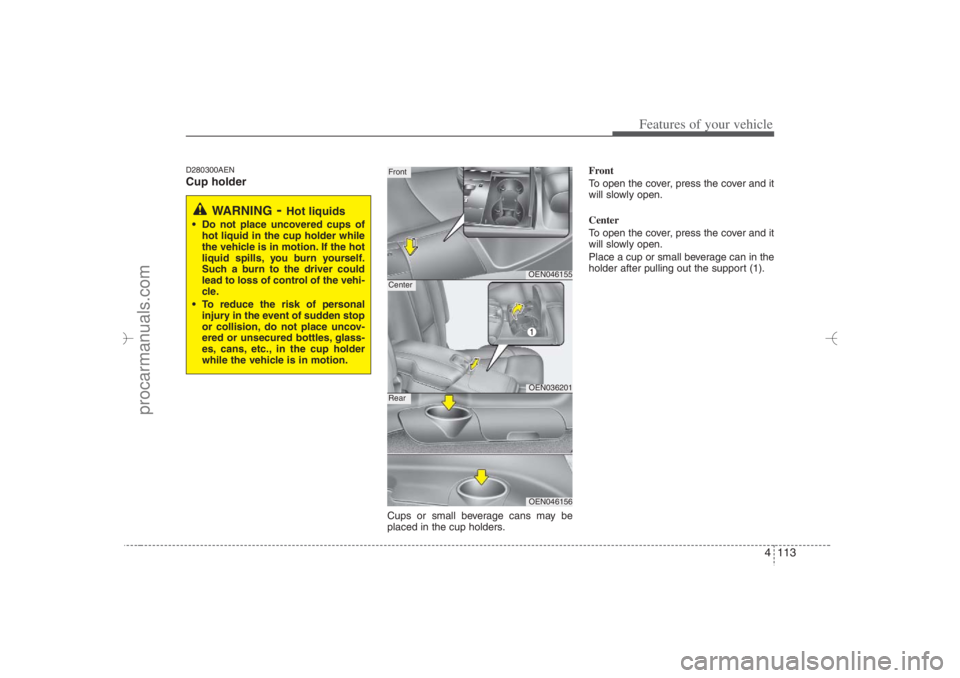
D280300AENCup holder
Cups or small beverage cans may be
placed in the cup holders.Front
To open the cover, press the cover and it
will slowly open.
Center
To open the cover, press the cover and it
will slowly open.
Place a cup or small beverage can in the
holder after pulling out the support (1).
WARNING
- Hot liquids
Do not place uncovered cups of
hot liquid in the cup holder while
the vehicle is in motion. If the hot
liquid spills, you burn yourself.
Such a burn to the driver could
lead to loss of control of the vehi-
cle.
To reduce the risk of personal
injury in the event of sudden stop
or collision, do not place uncov-
ered or unsecured bottles, glass-
es, cans, etc., in the cup holder
while the vehicle is in motion.
OEN046155OEN036201
FrontCenter
OEN046156
Rear
EN hma 4-84~120.qxd 11/27/2006 5:37 PM Page 113
procarmanuals.com
Page 197 of 441
4 115
Features of your vehicle
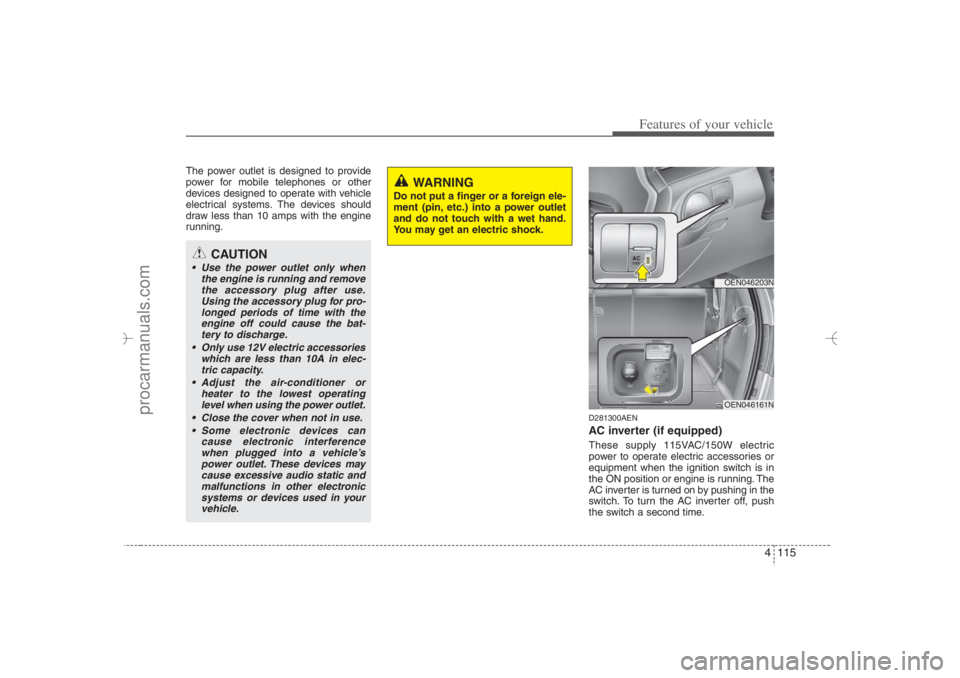
The power outlet is designed to provide
power for mobile telephones or other
devices designed to operate with vehicle
electrical systems. The devices should
draw less than 10 amps with the engine
running.
D281300AENAC inverter (if equipped)These supply 115VAC/150W electric
power to operate electric accessories or
equipment when the ignition switch is in
the ON position or engine is running. The
AC inverter is turned on by pushing in the
switch. To turn the AC inverter off, push
the switch a second time.
CAUTION
Use the power outlet only when
the engine is running and remove
the accessory plug after use.
Using the accessory plug for pro-
longed periods of time with the
engine off could cause the bat-
tery to discharge.
Only use 12V electric accessories
which are less than 10A in elec-
tric capacity.
Adjust the air-conditioner or
heater to the lowest operating
level when using the power outlet.
Close the cover when not in use.
Some electronic devices can
cause electronic interference
when plugged into a vehicle’s
power outlet. These devices may
cause excessive audio static and
malfunctions in other electronic
systems or devices used in your
vehicle.
WARNING
Do not put a finger or a foreign ele-
ment (pin, etc.) into a power outlet
and do not touch with a wet hand.
You may get an electric shock.
OEN046203NOEN046161N
EN hma 4-84~120.qxd 11/27/2006 5:38 PM Page 115
procarmanuals.com
Page 198 of 441
Features of your vehicle116 4✽
✽
NOTICEWhen pushing the AC inverter switch,
the switch indicator illumination is
delayed momentarily while the system
conducts a self-check.
WARNING
The AC inverter can be dangerous!
When using the AC inverter, care-
fully observe the following precau-
tions to avoid serious injuries.
Do not use heated electric prod-
ucts (coffeepot, toaster, heater,
iron, etc.).
Do not insert foreign objects into
or touch the AC inverter; you may
get shocked.
Do not let children operate or
touch the AC inverter.
When not using the AC inverter,
close the cover.
CAUTION
When not using the AC inverter,
make sure that the switch is
turned off, and is closed the AC
inverter cover.
Only use when the engine is run-
ning, and remove the plug from
the AC inverter after using the
accessory. Using when the
engine is not running or leaving
the accessory plugged in for long
time may cause the battery to dis-
charge.
Do not use electric accessories
or equipment with maximum elec-
tric power consumption greater
than 150W (115VAC).
(Continued)
(Continued)
Some electronic devices can
cause electronic interference
when plugged into the AC invert-
er. These devices may cause
excessive audio noise and mal-
functions in other electronic sys-
tems or devices used in your
vehicle.
Do not use broken electric acces-
sories or equipment, as they may
damage the AC inverter and vehi-
cle's electrical system.
Do not use two or more electric
accessories or equipment at the
same time.
When input voltage is under 11V,
the outlet LED and indicator will
blink, and will automatically turn
off.
EN hma 4-84~120.qxd 11/27/2006 5:38 PM Page 116
procarmanuals.com
Page 199 of 441
4 117
Features of your vehicle
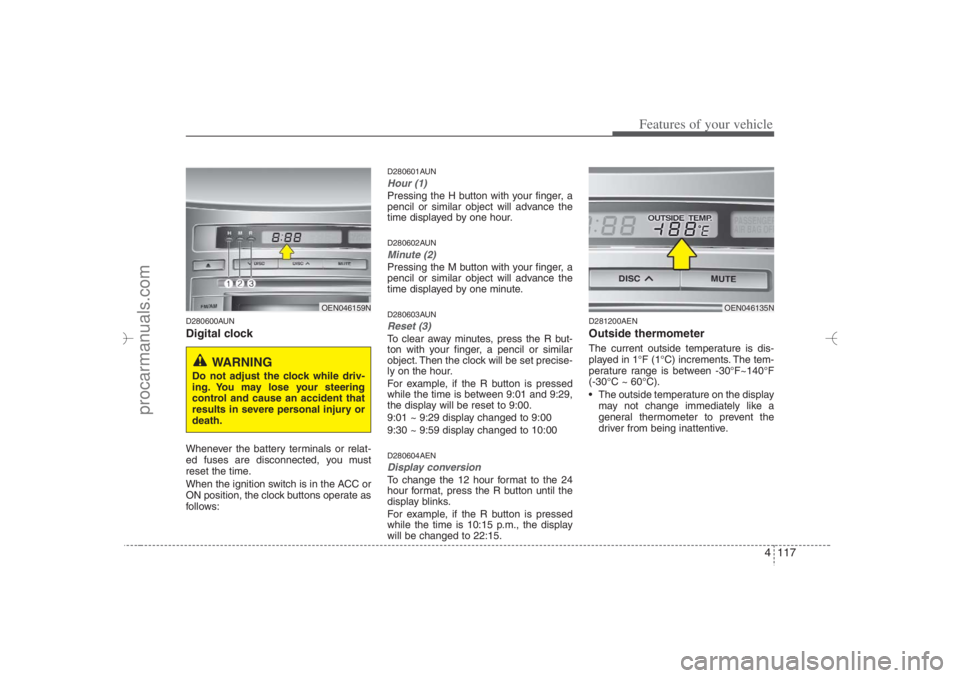
D280600AUNDigital clockWhenever the battery terminals or relat-
ed fuses are disconnected, you must
reset the time.
When the ignition switch is in the ACC or
ON position, the clock buttons operate as
follows:
D280601AUNHour (1)Pressing the H button with your finger, a
pencil or similar object will advance the
time displayed by one hour.D280602AUNMinute (2)Pressing the M button with your finger, a
pencil or similar object will advance the
time displayed by one minute.D280603AUNReset (3)To clear away minutes, press the R but-
ton with your finger, a pencil or similar
object. Then the clock will be set precise-
ly on the hour.
For example, if the R button is pressed
while the time is between 9:01 and 9:29,
the display will be reset to 9:00.
9:01 ~ 9:29 display changed to 9:00
9:30 ~ 9:59 display changed to 10:00D280604AENDisplay conversionTo change the 12 hour format to the 24
hour format, press the R button until the
display blinks.
For example, if the R button is pressed
while the time is 10:15 p.m., the display
will be changed to 22:15.
D281200AENOutside thermometerThe current outside temperature is dis-
played in 1°F (1°C) increments. The tem-
perature range is between -30°F~140°F
(-30°C ~ 60°C).
The outside temperature on the display
may not change immediately like a
general thermometer to prevent the
driver from being inattentive.
OEN046159N
WARNING
Do not adjust the clock while driv-
ing. You may lose your steering
control and cause an accident that
results in severe personal injury or
death.
OEN046135N
EN hma 4-84~120.qxd 11/27/2006 5:38 PM Page 117
procarmanuals.com
Page 201 of 441
4 119
Features of your vehicle
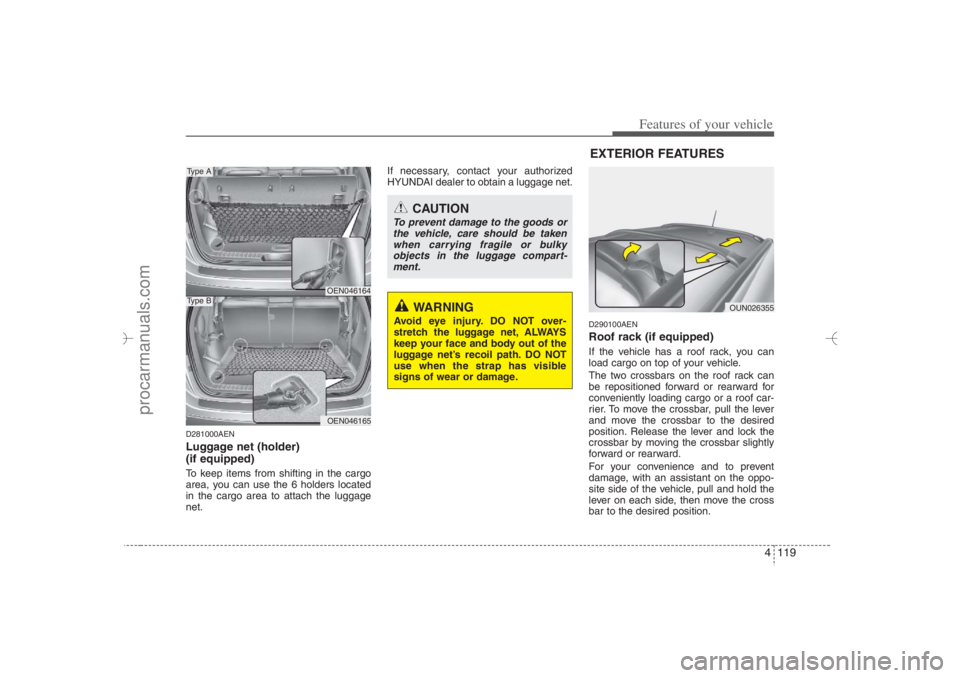
D281000AENLuggage net (holder)
(if equipped)To keep items from shifting in the cargo
area, you can use the 6 holders located
in the cargo area to attach the luggage
net.If necessary, contact your authorized
HYUNDAI dealer to obtain a luggage net.
D290100AENRoof rack (if equipped)If the vehicle has a roof rack, you can
load cargo on top of your vehicle.
The two crossbars on the roof rack can
be repositioned forward or rearward for
conveniently loading cargo or a roof car-
rier. To move the crossbar, pull the lever
and move the crossbar to the desired
position. Release the lever and lock the
crossbar by moving the crossbar slightly
forward or rearward.
For your convenience and to prevent
damage, with an assistant on the oppo-
site side of the vehicle, pull and hold the
lever on each side, then move the cross
bar to the desired position.
OEN046164OEN046165
Type AType B
CAUTION
To prevent damage to the goods or
the vehicle, care should be taken
when carrying fragile or bulky
objects in the luggage compart-
ment.
WARNING
Avoid eye injury. DO NOT over-
stretch the luggage net, ALWAYS
keep your face and body out of the
luggage net’s recoil path. DO NOT
use when the strap has visible
signs of wear or damage.
OUN026355
EXTERIOR FEATURES
EN hma 4-84~120.qxd 11/27/2006 5:38 PM Page 119
procarmanuals.com