audio HYUNDAI VERACRUZ 2007 User Guide
[x] Cancel search | Manufacturer: HYUNDAI, Model Year: 2007, Model line: VERACRUZ, Model: HYUNDAI VERACRUZ 2007Pages: 441, PDF Size: 7.99 MB
Page 209 of 441
4127
Features of your vehicle
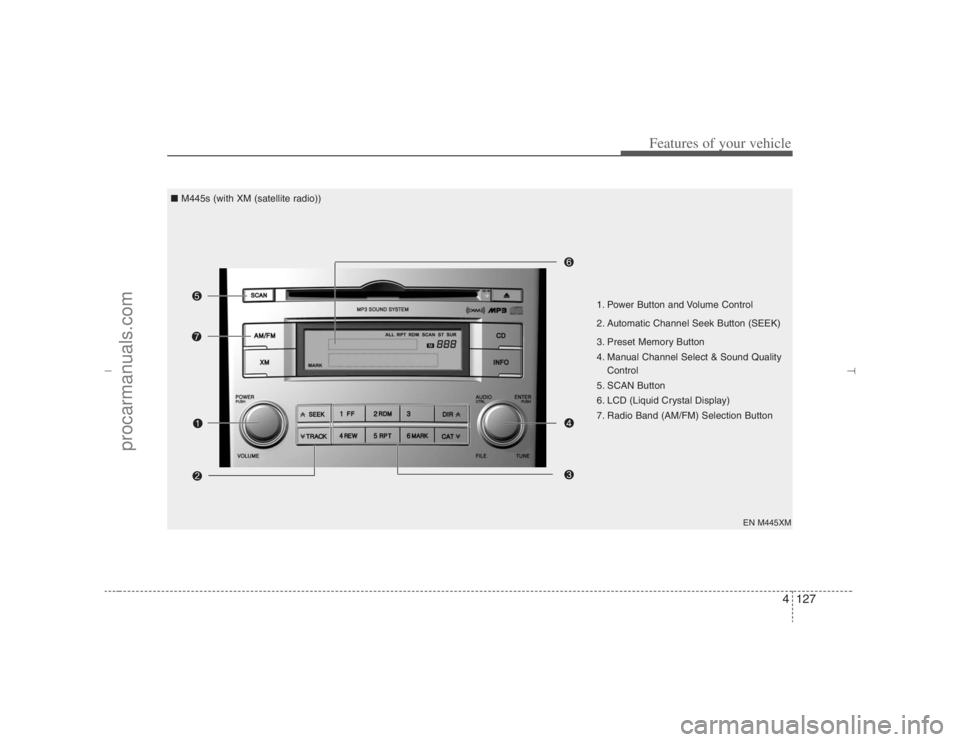
EN M445XM
1. Power Button and Volume Control
2. Automatic Channel Seek Button (SEEK)
3. Preset Memory Button
4. Manual Channel Select & Sound Quality
Control
5. SCAN Button
6. LCD (Liquid Crystal Display)
7. Radio Band (AM/FM) Selection Button ■ M445s (with XM (satellite radio))
EN hma 4-121~(Audio).qxd 11/28/2006 3:06 PM Page 127
procarmanuals.com
Page 210 of 441
Features of your vehicle128 4
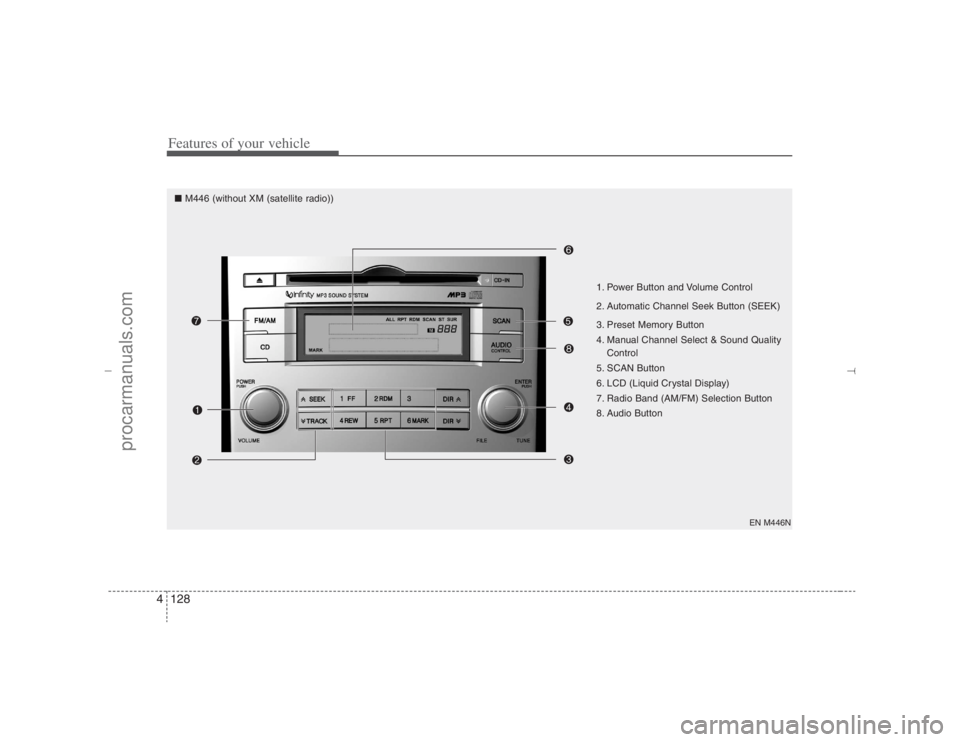
EN M446N
1. Power Button and Volume Control
2. Automatic Channel Seek Button (SEEK)
3. Preset Memory Button
4. Manual Channel Select & Sound Quality
Control
5. SCAN Button
6. LCD (Liquid Crystal Display)
7. Radio Band (AM/FM) Selection Button
8. Audio Button
■ M446 (without XM (satellite radio))
EN hma 4-121~(Audio).qxd 11/28/2006 3:06 PM Page 128
procarmanuals.com
Page 211 of 441
4129
Features of your vehicle
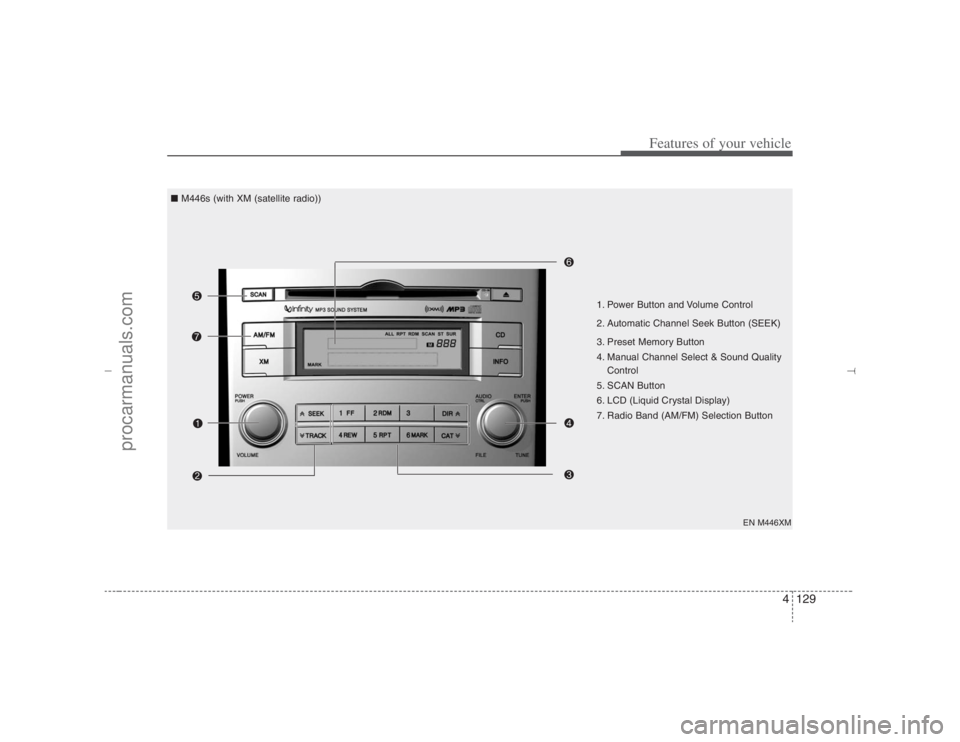
EN M446XM
1. Power Button and Volume Control
2. Automatic Channel Seek Button (SEEK)
3. Preset Memory Button
4. Manual Channel Select & Sound Quality
Control
5. SCAN Button
6. LCD (Liquid Crystal Display)
7. Radio Band (AM/FM) Selection Button ■ M446s (with XM (satellite radio))
EN hma 4-121~(Audio).qxd 11/28/2006 3:06 PM Page 129
procarmanuals.com
Page 212 of 441
Features of your vehicle130 41. Power Button and Volume
Control Used for turning on/off the audio sys-
tem.
Press this button when using the audio
system to turn off the power.
Turn the volume control clockwise to
increase volume and counterclock-
wise, to decrease. (The volume level is
displayed when adjusting the volume.)2. Automatic Channel Seek
Button (SEEK)Press this button to automatically find
and tune to next available channel.
(Press [ ] to automatically seek next
available channel in higher frequencies
and [ ] in lower frequencies.)✽ ✽
NOTICEIf the channel is not received well, use
the manual control (4).
3. Preset Memory ButtonPress this button and hold for less than
0.8 seconds to easily listen to the channel
memorized to the button. Also, when you
are listening to the channel other than the
channel memorized to the button using
TUNE or SEEK, press the button you
wish to memorize current channel to and
hold for more than 0.8 seconds until it
beeps to memorize the channel.4. Manual Channel Select &
Sound Quality ControlOnly M445s/M446s with XM(satellite
radio) When listening to a radio channel,
rotate this control to manually adjust
the frequency. Turn this control to the
right to increase the frequency and left,
to decrease.
This selects all functions related with
audio quality.
When listening to the audio system,
press this button to select following
sound qualities in respective order.
- BASS MIDDLE TREBLE
FADER BALANCE
EQUALIZER Current State
Rotate the control to adjust the sound
mode when adjusting sound quality.
Only M445/M446 without XM(satellite
radio) When listening to a radio channel,
rotate this control to manually adjust
the frequency. Turn this control to the
right to increase the frequency and left,
to decrease.
This selects all functions related with
audio quality.
Rotate the control to adjust the sound
mode when adjusting sound quality.5. SCAN ButtonPress this button to tune to all available
channels for 5 seconds each. (LCD will
display "SCAN") Press the button once
again to cancel scanning.6. LCD (Liquid Crystal Display)It displays the state of the system when
listening to the radio such as AM, FM1,
FM2, Stereo(ST), preset number, fre-
quency received, EQ mode (CLASSIC,
POP, ROCK, JAZZ) and SCAN status.
EN hma 4-121~(Audio).qxd 11/28/2006 3:06 PM Page 130
procarmanuals.com
Page 213 of 441
4131
Features of your vehicle
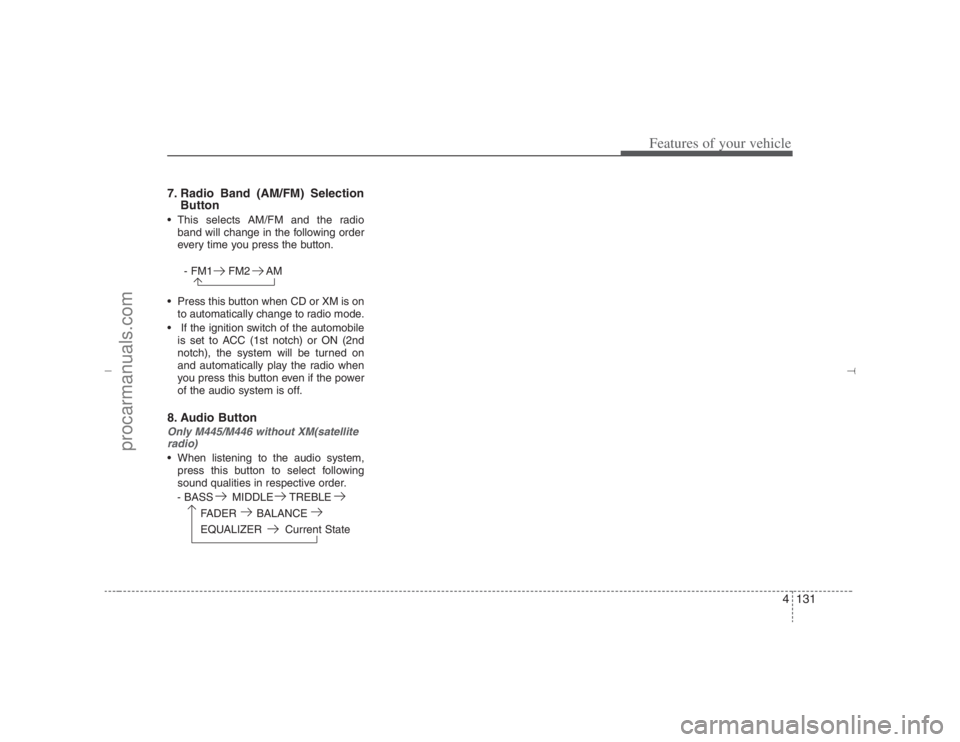
7. Radio Band (AM/FM) Selection
Button This selects AM/FM and the radio
band will change in the following order
every time you press the button.
- FM1 FM2 AM
Press this button when CD or XM is on
to automatically change to radio mode.
If the ignition switch of the automobile
is set to ACC (1st notch) or ON (2nd
notch), the system will be turned on
and automatically play the radio when
you press this button even if the power
of the audio system is off.8. Audio ButtonOnly M445/M446 without XM(satellite
radio) When listening to the audio system,
press this button to select following
sound qualities in respective order.
- BASS MIDDLE TREBLE
FADER BALANCE
EQUALIZER Current State
EN hma 4-121~(Audio).qxd 11/28/2006 3:06 PM Page 131
procarmanuals.com
Page 214 of 441
Features of your vehicle132 4
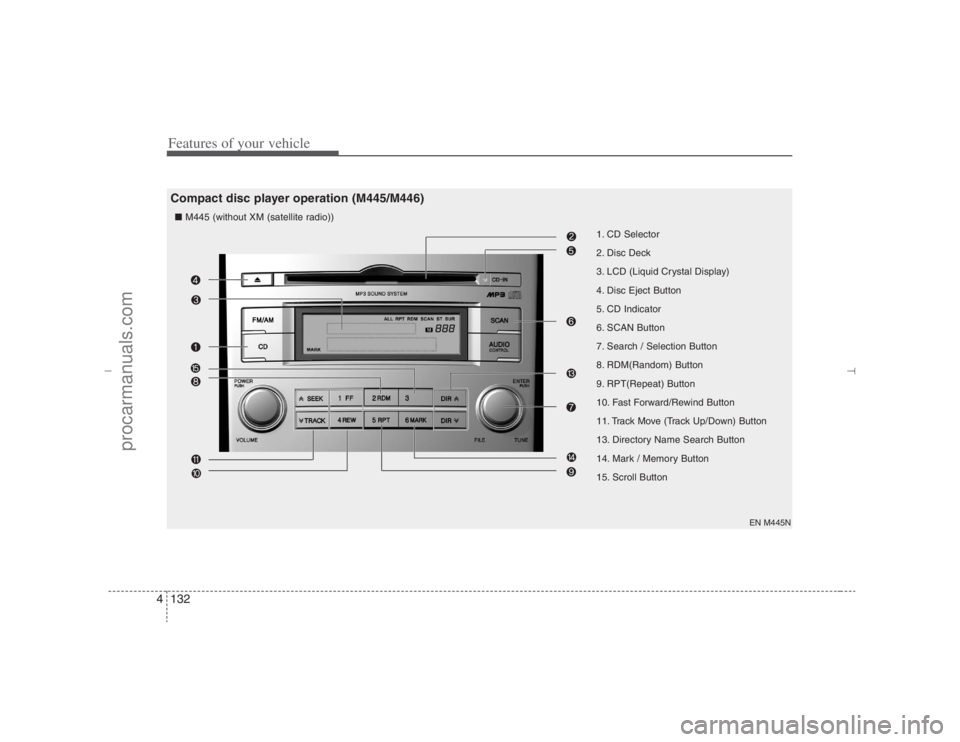
1. CD Selector
2. Disc Deck
3. LCD (Liquid Crystal Display)
4. Disc Eject Button
5. CD Indicator
6. SCAN Button
7. Search / Selection Button
8. RDM(Random) Button
9. RPT(Repeat) Button
10. Fast Forward/Rewind Button
11. Track Move (Track Up/Down) Button
13. Directory Name Search Button
14. Mark / Memory Button
15. Scroll Button
EN M445N
Compact disc player operation (M445/M446)■ M445 (without XM (satellite radio))
EN hma 4-121~(Audio).qxd 11/28/2006 3:06 PM Page 132
procarmanuals.com
Page 215 of 441
4133
Features of your vehicle
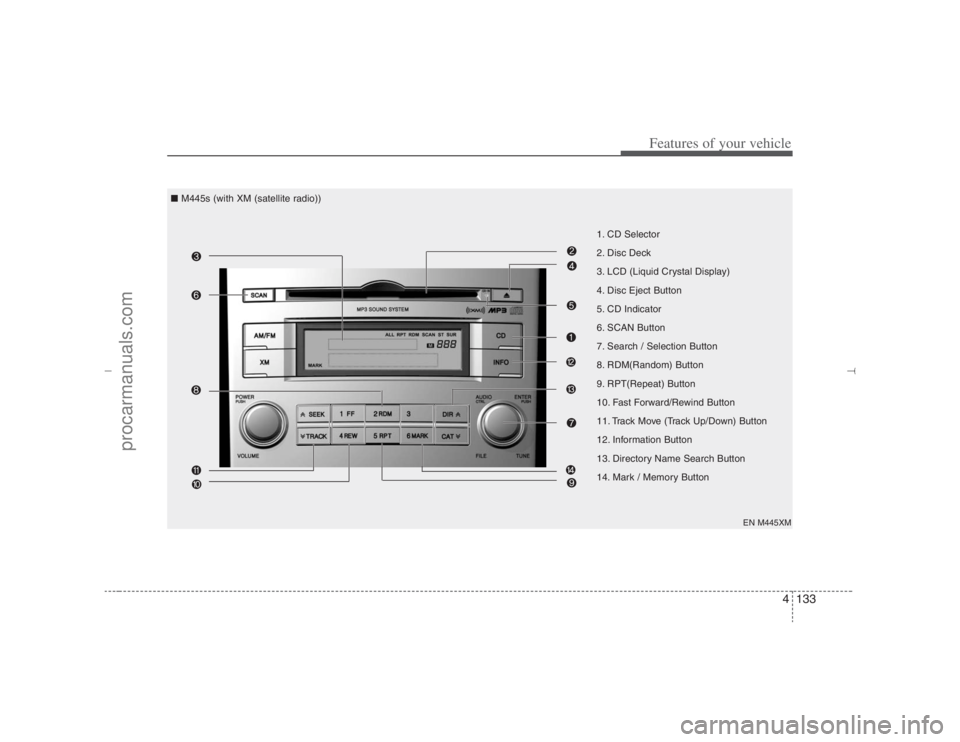
1. CD Selector
2. Disc Deck
3. LCD (Liquid Crystal Display)
4. Disc Eject Button
5. CD Indicator
6. SCAN Button
7. Search / Selection Button
8. RDM(Random) Button
9. RPT(Repeat) Button
10. Fast Forward/Rewind Button
11. Track Move (Track Up/Down) Button
12. Information Button
13. Directory Name Search Button
14. Mark / Memory Button
EN M445XM
■ M445s (with XM (satellite radio))
EN hma 4-121~(Audio).qxd 11/28/2006 3:07 PM Page 133
procarmanuals.com
Page 216 of 441
Features of your vehicle134 4
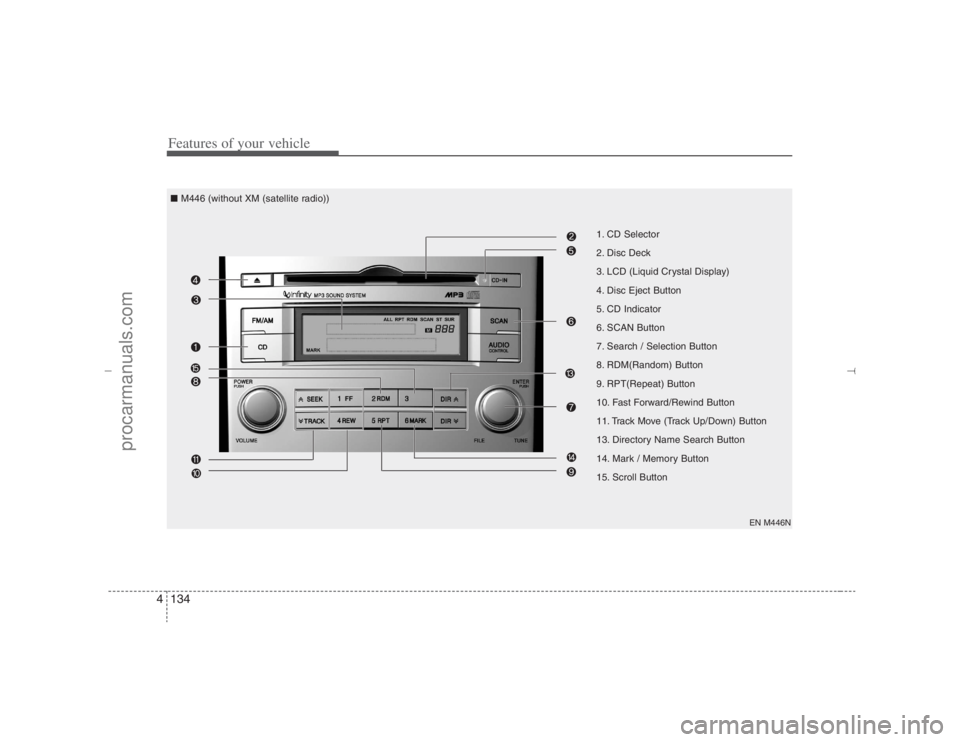
1. CD Selector
2. Disc Deck
3. LCD (Liquid Crystal Display)
4. Disc Eject Button
5. CD Indicator
6. SCAN Button
7. Search / Selection Button
8. RDM(Random) Button
9. RPT(Repeat) Button
10. Fast Forward/Rewind Button
11. Track Move (Track Up/Down) Button
13. Directory Name Search Button
14. Mark / Memory Button
15. Scroll Button
EN M446N
■ M446 (without XM (satellite radio))
EN hma 4-121~(Audio).qxd 11/28/2006 3:07 PM Page 134
procarmanuals.com
Page 217 of 441
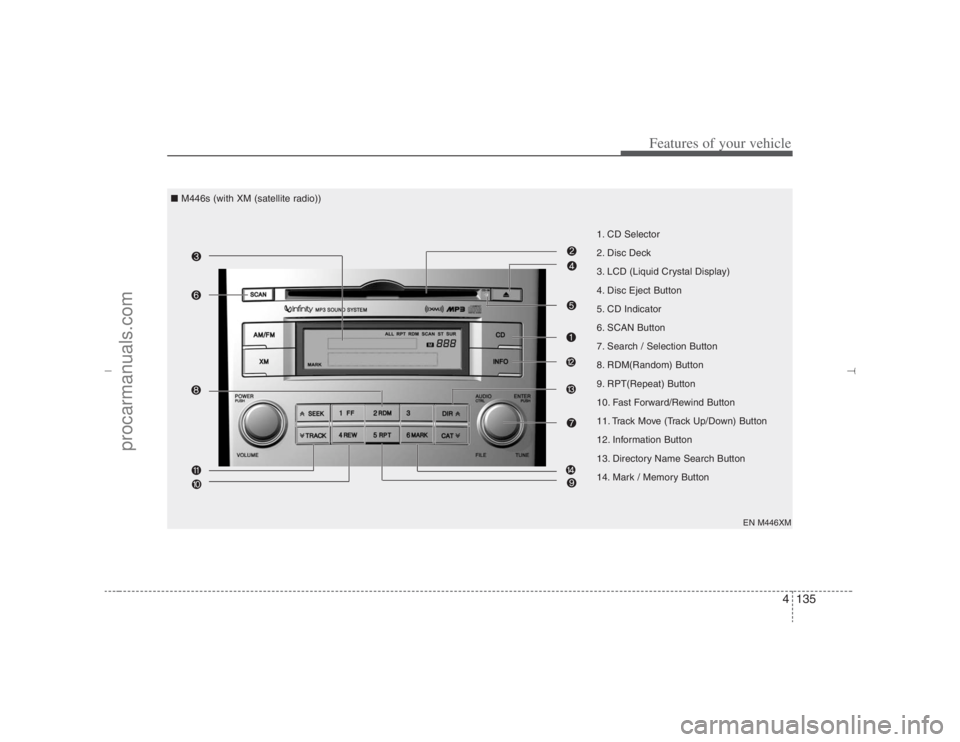
4135
Features of your vehicle
1. CD Selector
2. Disc Deck
3. LCD (Liquid Crystal Display)
4. Disc Eject Button
5. CD Indicator
6. SCAN Button
7. Search / Selection Button
8. RDM(Random) Button
9. RPT(Repeat) Button
10. Fast Forward/Rewind Button
11. Track Move (Track Up/Down) Button
12. Information Button
13. Directory Name Search Button
14. Mark / Memory Button
EN M446XM
■ M446s (with XM (satellite radio))
EN hma 4-121~(Audio).qxd 11/28/2006 3:07 PM Page 135
procarmanuals.com
Page 218 of 441
Features of your vehicle136 41. CD Selector The system will start playing the CD
when you press this button while radio
or XM is on. (If no CD is found, the LCD
will display "NO DISC" for 3 seconds.)
If the ignition switch of the automobile
is set to ACC (1st notch) or ON (2nd
notch), the system will be turned on
and automatically play the CD from the
last played part when you press this
button even if the power of the audio
system is off. (However, only when the
disc is placed inside the system)2. Disc DeckThis is the place you insert or eject the
CD. When the ignition switch of the auto-
mobile is set to ACC (1st notch) or ON
(2nd notch), if you push the disc in, the
power will be turned on and the CD will
be played. The CD player can play both
12cm and 8cm audio discs. if you insert
a video CD or Data CD then the LCD will
display "ERROR7" and it will turn to the
previous mode (radio or XM).✽ ✽
NOTICEMake sure the printed side of the disk
faces upward when you insert the disk.
3. LCD (Liquid Crystal Display)It displays the state of the song currently
played as well as the information of the
disc including the track, number, CD,
RPT, RDM, SCAN, runtime, and EQ
mode (CLASSIC, POP, ROCK, JAZZ).4. Disc Eject ButtonPress this button to eject the disk when
the disk is in the deck. If no CD is in the
deck, LCD will display “NO DISK” for 3
seconds. (The disk will be ejected when
you press this button even when the igni-
tion switch (ACC) of the automobile is set
to OFF or when the power of the audio
system is off.)✽ ✽
NOTICEForced Eject: When you press and hold
this button for more than 3 seconds, the
disk will be ejected by all means. (Use
this function only when the disk is not
ejected in the abnormal state.)
5. CD IndicatorThis indicator light will be on if the CD is
inside the deck whether the audio sys-
tem is on or off if the ignition switch of the
automobile is set to ACC (1st notch) or
ON (2nd notch). This light will go off
when the CD is ejected.6. SCAN ButtonWhen you press this button, the player
will play 10 seconds of each track (LCD
will display “SCAN”). Press it again to
cancel scanning.7. Search / Selection ButtonTurn the search control to the left or right
while playing CD then the track number
on the LCD will change correspondingly.
When you find the track you want to lis-
ten to, press the button to play the select-
ed song. (The search will be canceled
when you do not select the track within 5
seconds after searching the track.)8. RDM(Random) ButtonPress this button to play the songs in ran-
dom order regardless of the order of
tracks (LCD will display “RDM”). Press it
again to cancel random play.
EN hma 4-121~(Audio).qxd 11/28/2006 3:07 PM Page 136
procarmanuals.com