climate HYUNDAI VERACRUZ 2008 Owners Manual
[x] Cancel search | Manufacturer: HYUNDAI, Model Year: 2008, Model line: VERACRUZ, Model: HYUNDAI VERACRUZ 2008Pages: 440, PDF Size: 7.67 MB
Page 19 of 440
23
Your vehicle at a glance
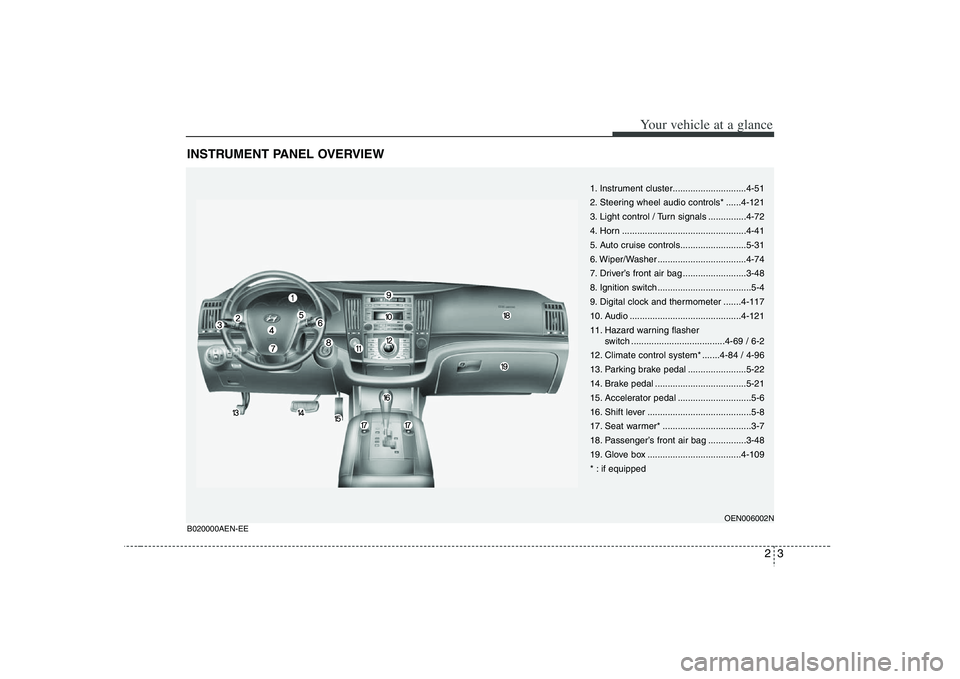
INSTRUMENT PANEL OVERVIEW
1. Instrument cluster.............................4-51
2. Steering wheel audio controls* ......4-121
3. Light control / Turn signals ...............4-72
4. Horn .................................................4-41
5. Auto cruise controls..........................5-31
6. Wiper/Washer ...................................4-74
7. Driver’s front air bag .........................3-48
8. Ignition switch .....................................5-4
9. Digital clock and thermometer .......4-117
10. Audio ............................................4-121
11. Hazard warning flasher
switch .....................................4-69 / 6-2
12. Climate control system* .......4-84 / 4-96
13. Parking brake pedal .......................5-22
14. Brake pedal ....................................5-21
15. Accelerator pedal .............................5-6
16. Shift lever .........................................5-8
17. Seat warmer* ...................................3-7
18. Passenger’s front air bag ...............3-48
19. Glove box .....................................4-109
* : if equipped
OEN006002N
B020000AEN-EE
Page 83 of 440
4
Keys / 4-3
Smart key / 4-4
Remote keyless entry / 4-8
Theft-alarm system / 4-12
Door locks / 4-14
Tailgate / 4-18
Windows / 4-25
Hood / 4-29
Fuel filler lid / 4-30
Sunroof / 4-32
Driver position memory system / 4-36
Power adjustable pedals / 4-38
Steering wheel / 4-39
Mirrors / 4-41
Instrument cluster / 4-51
Rear parking assist system / 4-67
Hazard warning flasher / 4-69
Lighting / 4-70
Wipers and washers / 4-74
Interior light / 4-78
Defroster / 4-83
Manual climate control system / 4-84
Automatic climate control system / 4-96
Features of your vehicle
Page 96 of 440
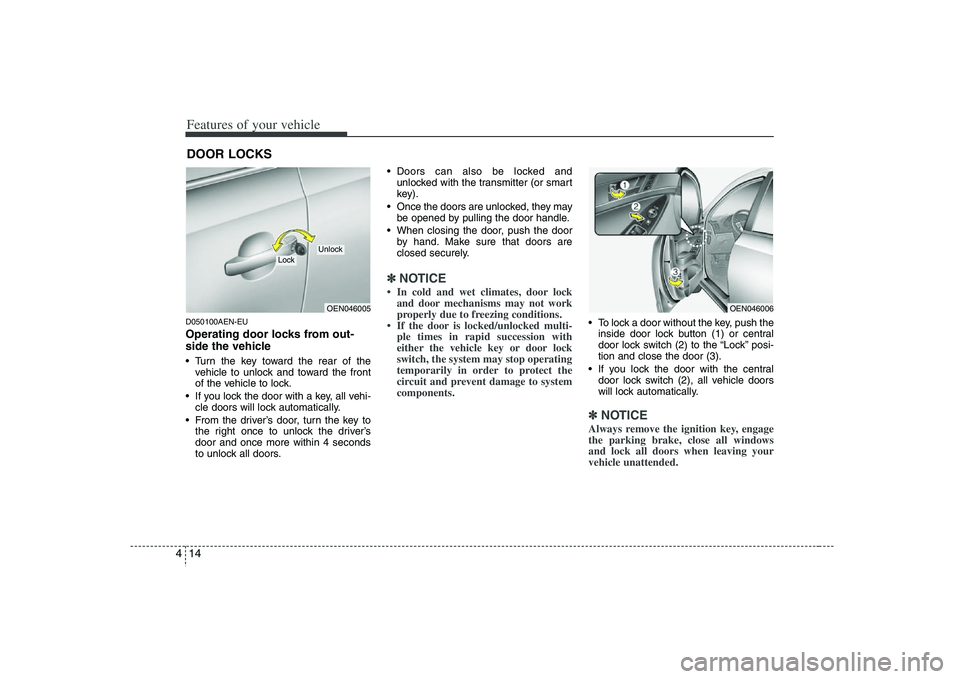
Features of your vehicle14 4D050100AEN-EUOperating door locks from out-
side the vehicle Turn the key toward the rear of the
vehicle to unlock and toward the front
of the vehicle to lock.
If you lock the door with a key, all vehi-
cle doors will lock automatically.
From the driver’s door, turn the key to
the right once to unlock the driver’s
door and once more within 4 seconds
to unlock all doors. Doors can also be locked and
unlocked with the transmitter (or smart
key).
Once the doors are unlocked, they may
be opened by pulling the door handle.
When closing the door, push the door
by hand. Make sure that doors are
closed securely.
✽ ✽
NOTICE• In cold and wet climates, door lock
and door mechanisms may not work
properly due to freezing conditions.
• If the door is locked/unlocked multi-
ple times in rapid succession with
either the vehicle key or door lock
switch, the system may stop operating
temporarily in order to protect the
circuit and prevent damage to system
components.
To lock a door without the key, push the
inside door lock button (1) or central
door lock switch (2
) to the “Lock” posi-
tion and close the door (3).
If you lock the door with the central
door lock switch (2), all vehicle doors
will lock automatically.✽ ✽
NOTICEAlways remove the ignition key, engage
the parking brake, close all windows
and lock all doors when leaving your
vehicle unattended.
DOOR LOCKS
OEN046005
Lock
Unlock
OEN046006
Page 100 of 440
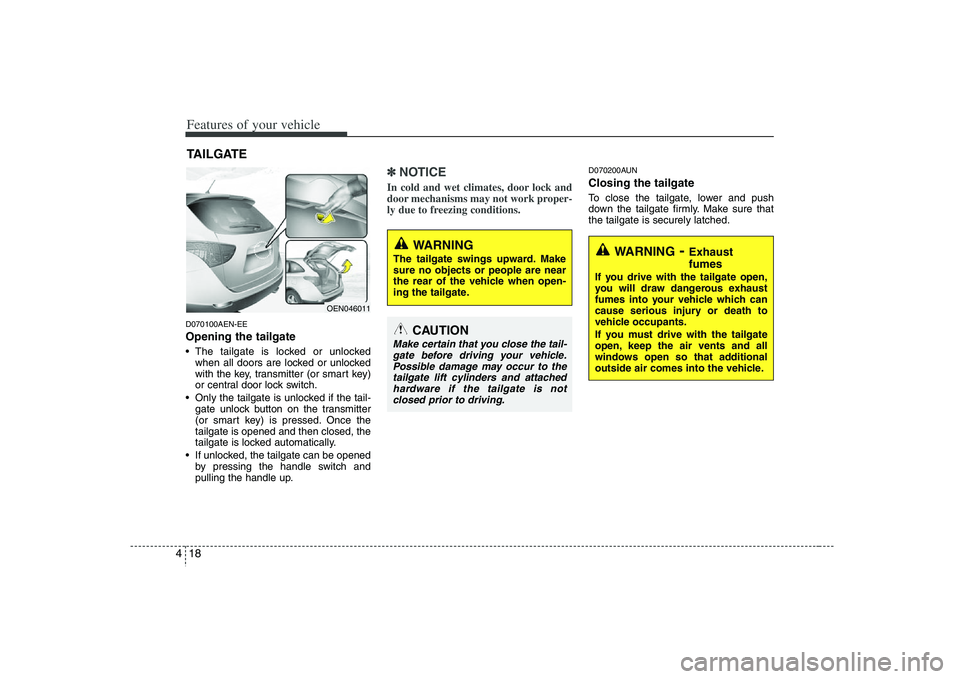
Features of your vehicle18 4D070100AEN-EEOpening the tailgate The tailgate is locked or unlocked
when all doors are locked or unlocked
with the key, transmitter (or smart key)
or central door lock switch.
Only the tailgate is unlocked if the tail-
gate unlock button on the transmitter
(or smart key) is pressed. Once the
tailgate is opened and then closed, the
tailgate is locked automatically.
If unlocked, the tailgate can be opened
by pressing the handle switch and
pulling the handle up.
✽ ✽
NOTICEIn cold and wet climates, door lock and
door mechanisms may not work proper-
ly due to freezing conditions.
D070200AUNClosing the tailgateTo close the tailgate, lower and push
down the tailgate firmly. Make sure that
the tailgate is securely latched.
TAILGATE
OEN046011
WARNING
The tailgate swings upward. Make
sure no objects or people are near
the rear of the vehicle when open-
ing the tailgate.
CAUTION
Make certain that you close the tail-
gate before driving your vehicle.
Possible damage may occur to the
tailgate lift cylinders and attached
hardware if the tailgate is not
closed prior to driving.
WARNING
- Exhaust
fumes
If you drive with the tailgate open,
you will draw dangerous exhaust
fumes into your vehicle which can
cause serious injury or death to
vehicle occupants.
If you must drive with the tailgate
open, keep the air vents and all
windows open so that additional
outside air comes into the vehicle.
Page 102 of 440
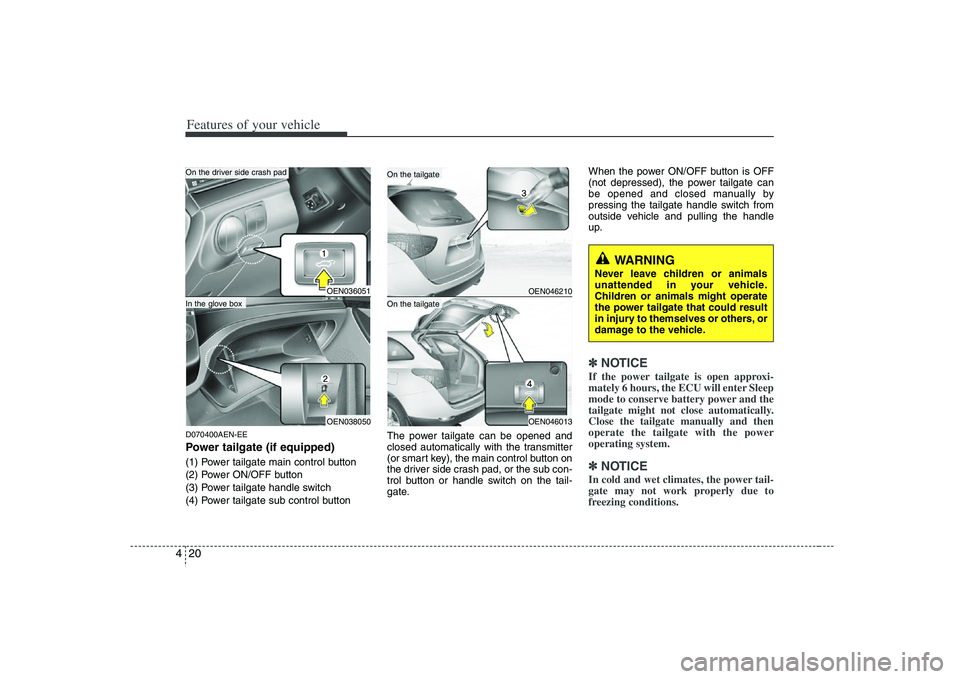
Features of your vehicle20 4D070400AEN-EEPower tailgate (if equipped)(1) Power tailgate main control button
(2) Power ON/OFF button
(3) Power tailgate handle switch
(4) Power tailgate sub control buttonThe power tailgate can be opened and
closed automatically with the transmitter
(or smart key), the main control button on
the driver side crash pad, or the sub con-
trol button or handle switch on the tail-
gate.When the power ON/OFF button is OFF
(not depressed), the power tailgate can
be opened and closed manually by
pressing the tailgate handle switch from
outside vehicle and pulling the handle
up.
✽ ✽
NOTICEIf the power tailgate is open approxi-
mately 6 hours, the ECU will enter Sleep
mode to conserve battery power and the
tailgate might not close automatically.
Close the tailgate manually and then
operate the tailgate with the power
operating system.✽ ✽
NOTICEIn cold and wet climates, the power tail-
gate may not work properly due to
freezing conditions.
WARNING
Never leave children or animals
unattended in your vehicle.
Children or animals might operate
the power tailgate that could result
in injury to themselves or others, or
damage to the vehicle.
OEN036051OEN038050
OEN046210
In the glove box
On the tailgate
OEN046013
On the tailgate
On the driver side crash pad
Page 107 of 440
425
Features of your vehicle
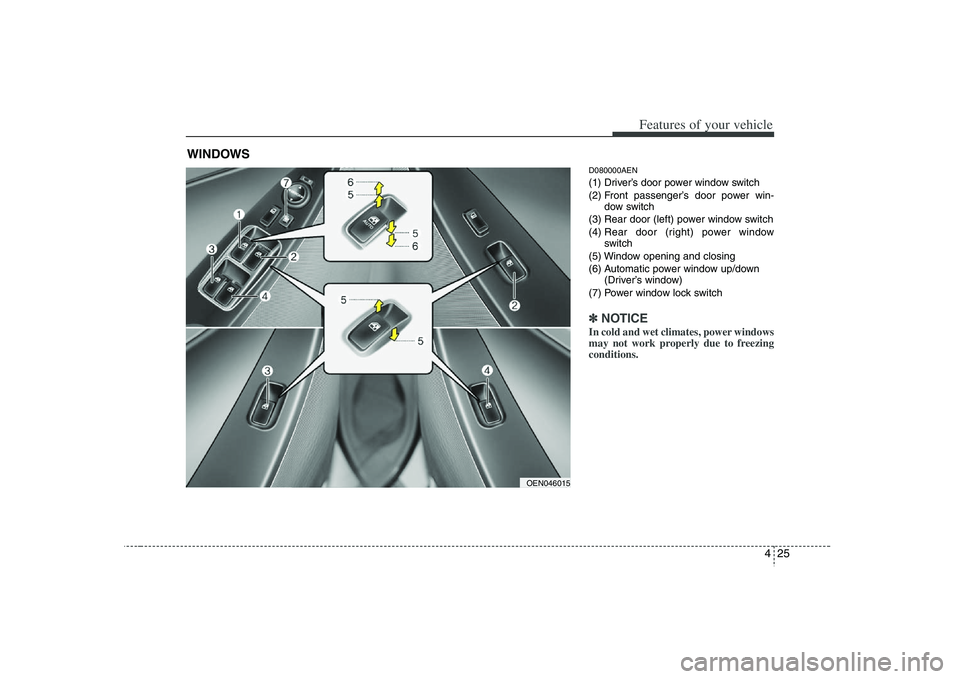
D080000AEN(1) Driver’s door power window switch
(2) Front passenger’s door power win-
dow switch
(3) Rear door (left) power window switch
(4) Rear door (right) power window
switch
(5) Window opening and closing
(6) Automatic power window up/down
(Driver’s window)
(7) Power window lock switch✽ ✽
NOTICEIn cold and wet climates, power windows
may not work properly due to freezing
conditions.
WINDOWS
OEN046015
Page 114 of 440
Features of your vehicle32 4
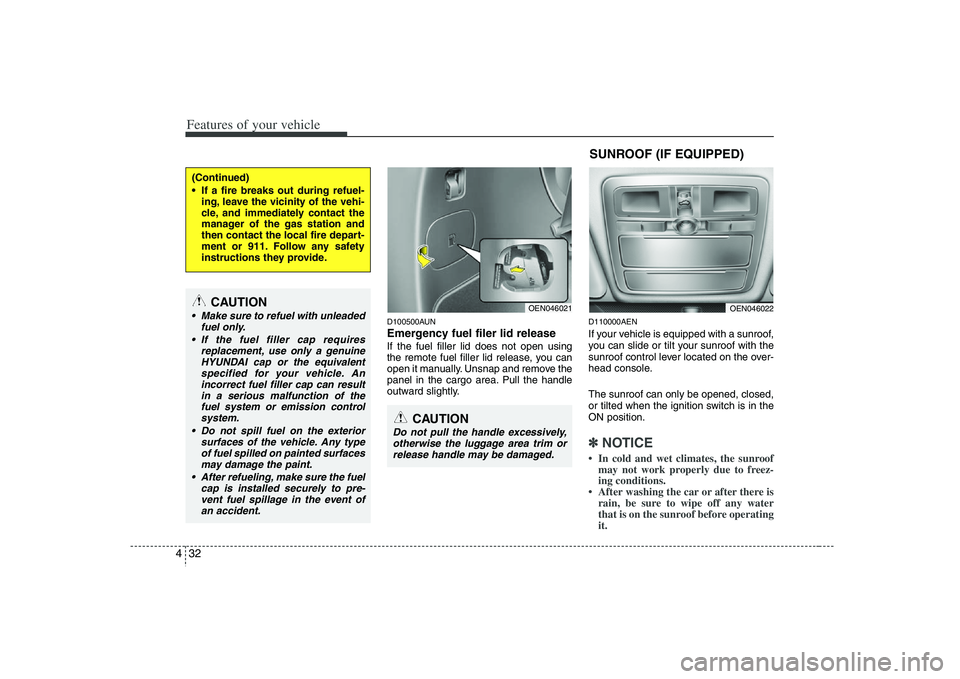
D100500AUNEmergency fuel filer lid releaseIf the fuel filler lid does not open using
the remote fuel filler lid release, you can
open it manually. Unsnap and remove the
panel in the cargo area. Pull the handle
outward slightly.
D110000AENIf your vehicle is equipped with a sunroof,
you can slide or tilt your sunroof with the
sunroof control lever located on the over-
head console.
The sunroof can only be opened, closed,
or tilted when the ignition switch is in the
ON position.✽ ✽
NOTICE• In cold and wet climates, the sunroof
may not work properly due to freez-
ing conditions.
• After washing the car or after there is
rain, be sure to wipe off any water
that is on the sunroof before operating
it.
(Continued)
If a fire breaks out during refuel-
ing, leave the vicinity of the vehi-
cle, and immediately contact the
manager of the gas station and
then contact the local fire depart-
ment or 911. Follow any safety
instructions they provide.
CAUTION
Make sure to refuel with unleaded
fuel only.
If the fuel filler cap requires
replacement, use only a genuine
HYUNDAI cap or the equivalent
specified for your vehicle. An
incorrect fuel filler cap can result
in a serious malfunction of the
fuel system or emission control
system.
Do not spill fuel on the exterior
surfaces of the vehicle. Any type
of fuel spilled on painted surfaces
may damage the paint.
After refueling, make sure the fuel
cap is installed securely to pre-
vent fuel spillage in the event of
an accident.
CAUTION
Do not pull the handle excessively,
otherwise the luggage area trim or
release handle may be damaged.
OEN046021
SUNROOF (IF EQUIPPED)
OEN046022
Page 166 of 440
Features of your vehicle84 4MANUAL CLIMATE CONTROL SYSTEM (IF EQUIPPED)
OEN046093N/OEN046095
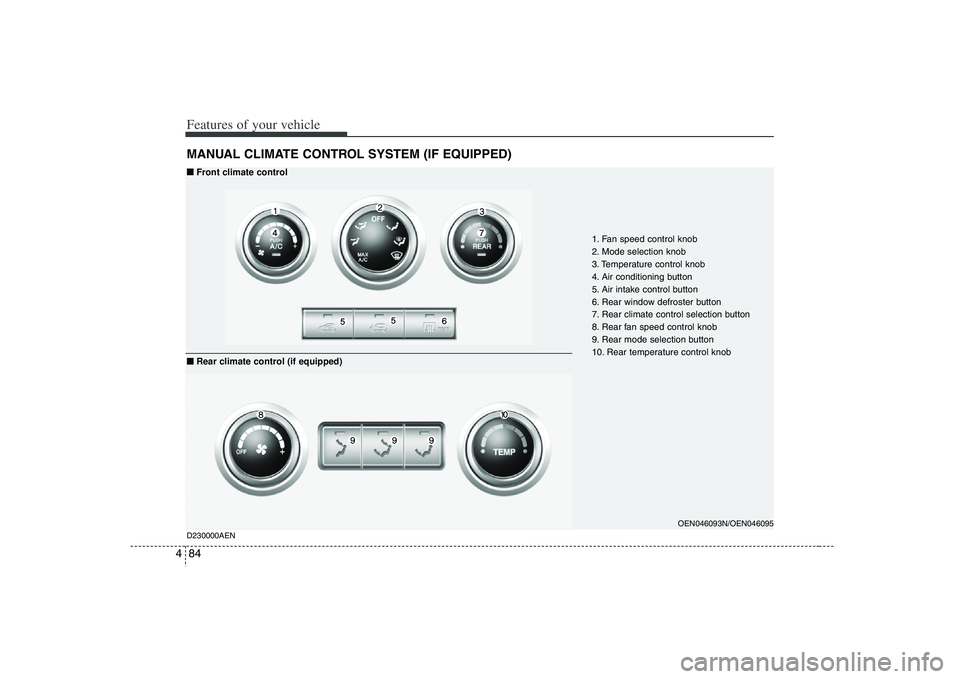
1. Fan speed control knob
2. Mode selection knob
3. Temperature control knob
4. Air conditioning button
5. Air intake control button
6. Rear window defroster button
7. Rear climate control selection button
8. Rear fan speed control knob
9. Rear mode selection button
10. Rear temperature control knob
D230000AEN■ ■
Front climate control
■ ■
Rear climate control (if equipped)
Page 168 of 440
Features of your vehicle86 4❈
❈
2nd row outlet vents (E)
• The air flow of the 2nd row outlet vents
is controlled by the front climate control
system and delivered through the
inside air duct of the front doors. If the
door is open or not closed completely,
the air flow of the 2nd row outlet vent is
not delivered properly. Make sure the
front doors are closed completely.
The air flow of the 2nd row outlet vents
may be weaker than the instrument
panel vents for the long air duct in the
front doors.
Close the air vents in cold weather. The
air flow of the 2nd row outlet vents may
cool a little during heating operation.
(Use the 2nd row outlet vents during
cooling operation.)
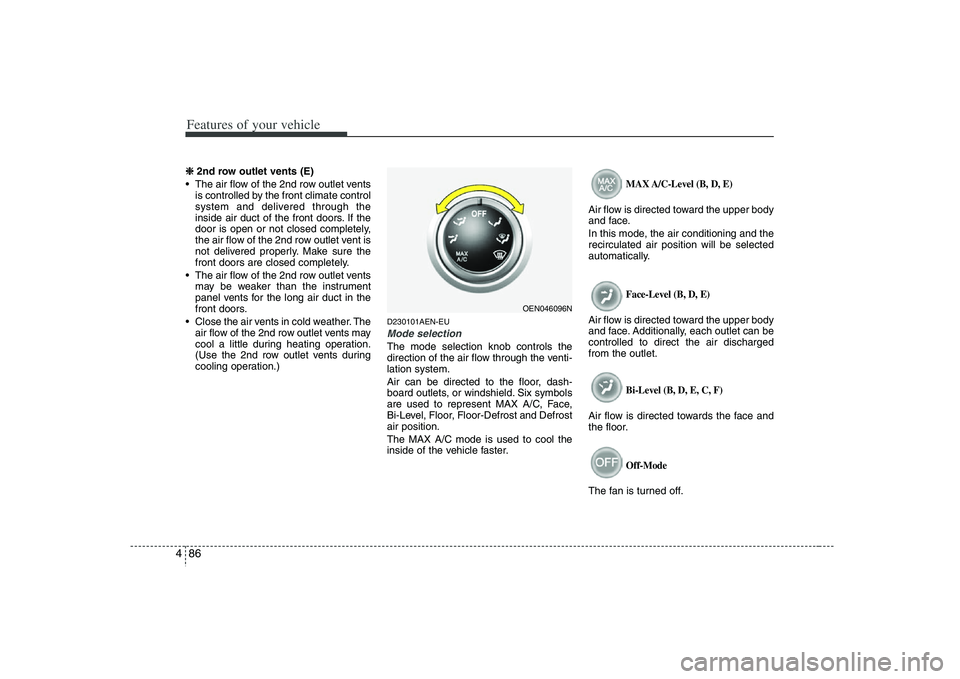
D230101AEN-EUMode selectionThe mode selection knob controls the
direction of the air flow through the venti-
lation system.
Air can be directed to the floor, dash-
board outlets, or windshield. Six symbols
are used to represent MAX A/C, Face,
Bi-Level, Floor, Floor-Defrost and Defrost
air position.
The MAX A/C mode is used to cool the
inside of the vehicle faster.
MAX A/C-Level (B, D, E)
Air flow is directed toward the upper body
and face.
In this mode, the air conditioning and the
recirculated air position will be selected
automatically.
Face-Level (B, D, E)
Air flow is directed toward the upper body
and face. Additionally, each outlet can be
controlled to direct the air discharged
from the outlet.
Bi-Level (B, D, E, C, F)
Air flow is directed towards the face and
the floor.
Off-Mode
The fan is turned off.
OEN046096N
Page 171 of 440
489
Features of your vehicle
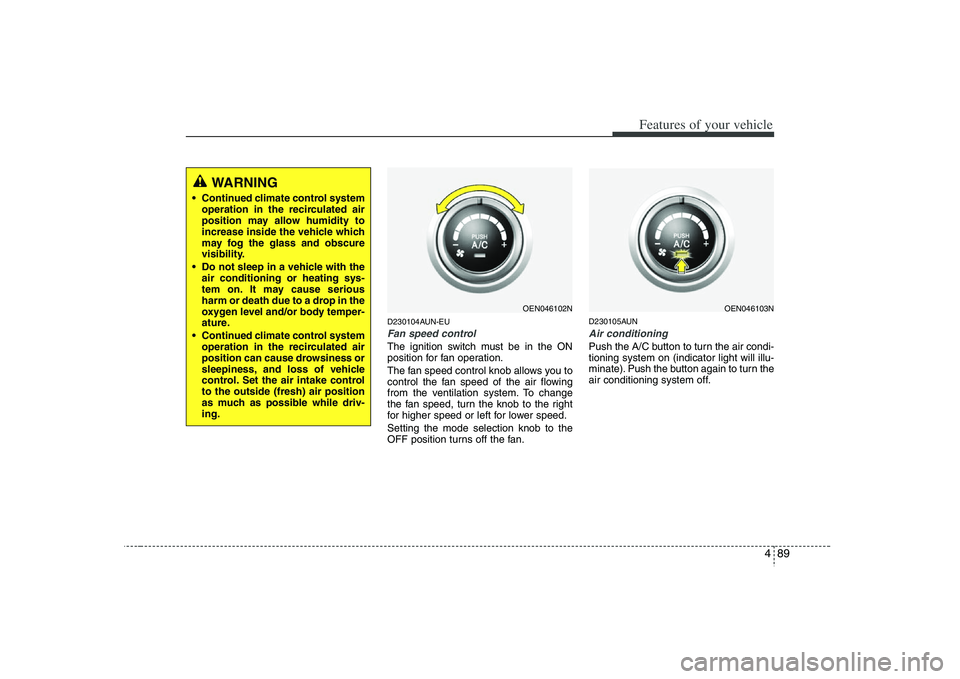
D230104AUN-EUFan speed controlThe ignition switch must be in the ON
position for fan operation.
The fan speed control knob allows you to
control the fan speed of the air flowing
from the ventilation system. To change
the fan speed, turn the knob to the right
for higher speed or left for lower speed.
Setting the mode selection knob to the
OFF position turns off the fan.
D230105AUNAir conditioning Push the A/C button to turn the air condi-
tioning system on (indicator light will illu-
minate). Push the button again to turn the
air conditioning system off.
WARNING
• Continued climate control system
operation in the recirculated air
position may allow humidity to
increase inside the vehicle which
may fog the glass and obscure
visibility.
Do not sleep in a vehicle with the
air conditioning or heating sys-
tem on. It may cause serious
harm or death due to a drop in the
oxygen level and/or body temper-
ature.
Continued climate control system
operation in the recirculated air
position can cause drowsiness or
sleepiness, and loss of vehicle
control. Set the air intake control
to the outside (fresh) air position
as much as possible while driv-
ing.
OEN046102N
OEN046103N