key HYUNDAI VERACRUZ 2010 Owner's Manual
[x] Cancel search | Manufacturer: HYUNDAI, Model Year: 2010, Model line: VERACRUZ, Model: HYUNDAI VERACRUZ 2010Pages: 425, PDF Size: 8.65 MB
Page 104 of 425
Features of your vehicle
22 4
D070402AEN-EE
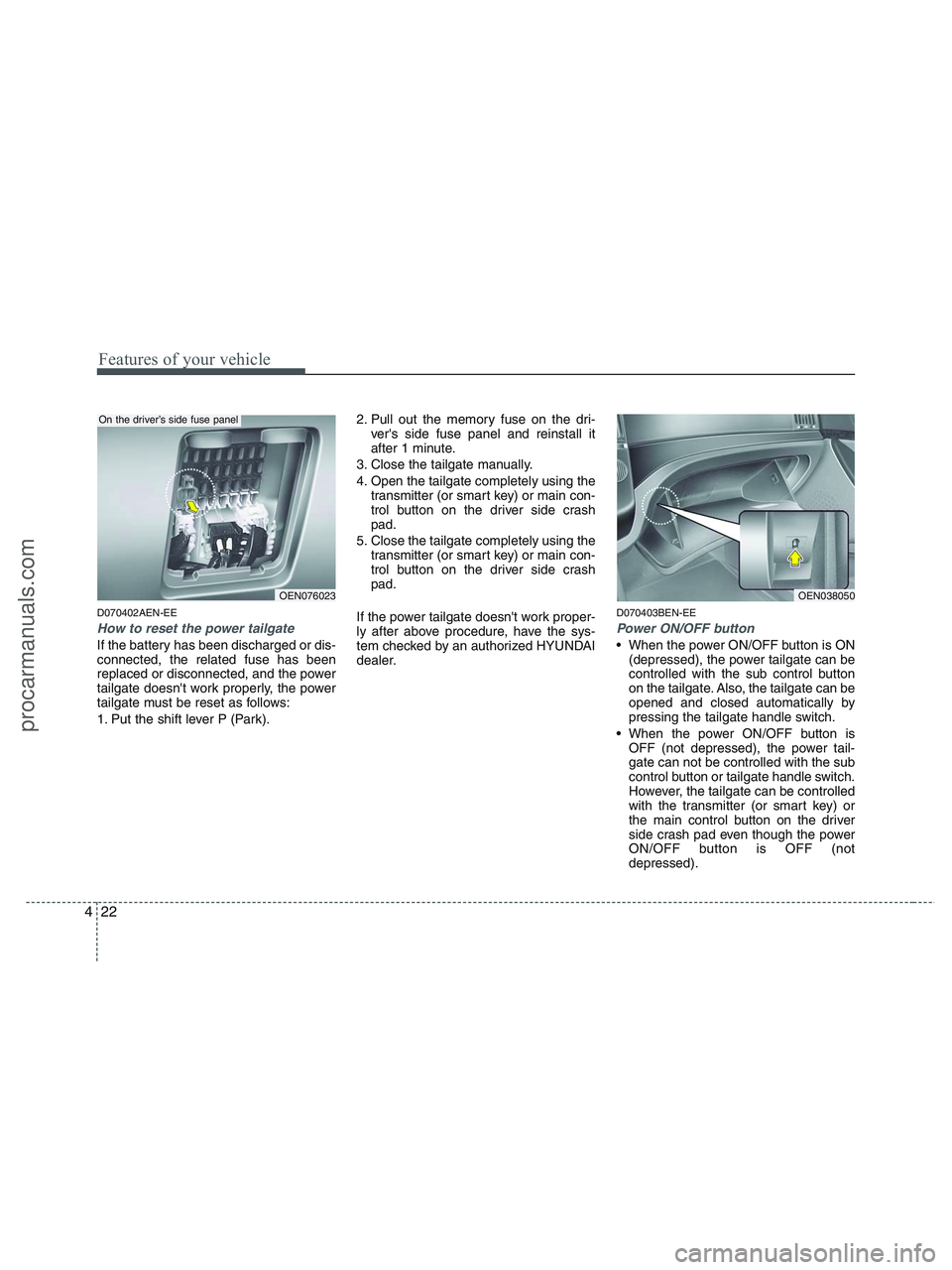
How to reset the power tailgate
If the battery has been discharged or dis-
connected, the related fuse has been
replaced or disconnected, and the power
tailgate doesn't work properly, the power
tailgate must be reset as follows:
1. Put the shift lever P (Park).2. Pull out the memory fuse on the dri-
ver's side fuse panel and reinstall it
after 1 minute.
3. Close the tailgate manually.
4. Open the tailgate completely using the
transmitter (or smart key) or main con-
trol button on the driver side crash
pad.
5. Close the tailgate completely using the
transmitter (or smart key) or main con-
trol button on the driver side crash
pad.
If the power tailgate doesn't work proper-
ly after above procedure, have the sys-
tem checked by an authorized HYUNDAI
dealer.
D070403BEN-EE
Power ON/OFF button
When the power ON/OFF button is ON
(depressed), the power tailgate can be
controlled with the sub control button
on the tailgate. Also, the tailgate can be
opened and closed automatically by
pressing the tailgate handle switch.
When the power ON/OFF button is
OFF (not depressed), the power tail-
gate can not be controlled with the sub
control button or tailgate handle switch.
However, the tailgate can be controlled
with the transmitter (or smart key) or
the main control button on the driver
side crash pad even though the power
ON/OFF button is OFF (not
depressed).
OEN038050OEN076023
On the driver’s side fuse panel
procarmanuals.com
Page 105 of 425
423
Features of your vehicle
Also, the tailgate can be opened or
closed manually by pressing the tail-
gate handle switch and pulling the han-
dle up or pushing the tailgate down-
ward.
D070404BEN-EE
Power tailgate operation
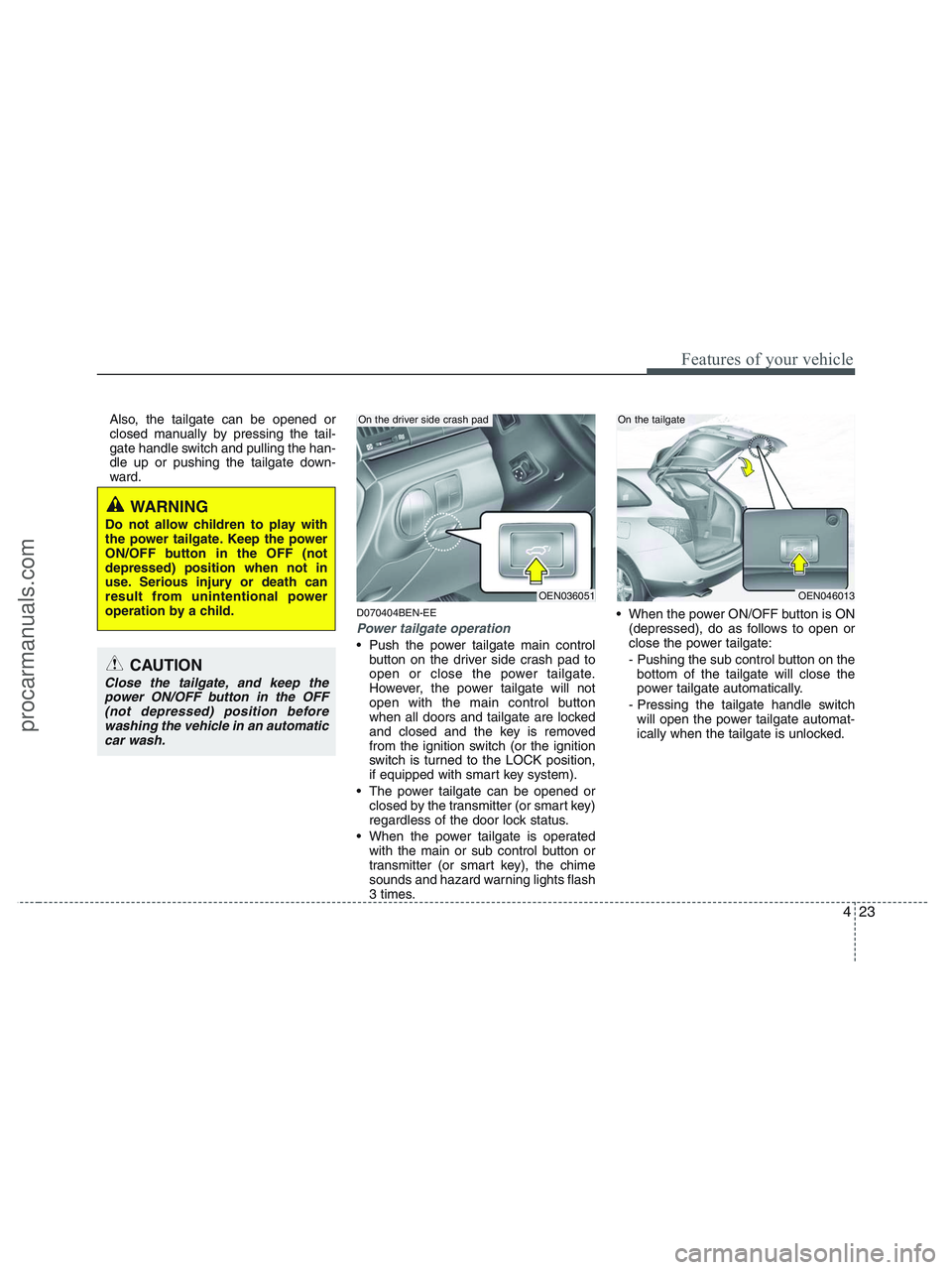
Push the power tailgate main control
button on the driver side crash pad to
open or close the power tailgate.
However, the power tailgate will not
open with the main control button
when all doors and tailgate are locked
and closed and the key is removed
from the ignition switch (or the ignition
switch is turned to the LOCK position,
if equipped with smart key system).
The power tailgate can be opened or
closed by the transmitter (or smart key)
regardless of the door lock status.
When the power tailgate is operated
with the main or sub control button or
transmitter (or smart key), the chime
sounds and hazard warning lights flash
3 times. When the power ON/OFF button is ON
(depressed), do as follows to open or
close the power tailgate:
- Pushing the sub control button on the
bottom of the tailgate will close the
power tailgate automatically.
- Pressing the tailgate handle switch
will open the power tailgate automat-
ically when the tailgate is unlocked.
OEN036051
On the driver side crash pad
OEN046013
On the tailgate
WARNING
Do not allow children to play with
the power tailgate. Keep the power
ON/OFF button in the OFF (not
depressed) position when not in
use. Serious injury or death can
result from unintentional power
operation by a child.
CAUTION
Close the tailgate, and keep the
power ON/OFF button in the OFF
(not depressed) position before
washing the vehicle in an automatic
car wash.
procarmanuals.com
Page 108 of 425
Features of your vehicle
26 4
D080100AUN
Power windows
The ignition switch must be in the ON
position for power windows to operate.
Each door has a power window switch
that controls the door's window. The driv-
er has a power window lock switch which
can block the operation of passenger
windows. The power windows can be
operated for approximately 30 seconds
after the ignition key is removed or turned
to the ACC or LOCK position. However, if
the front doors are opened, the power
windows cannot be operated within the
30 second period after the ignition key
removal.
✽ ✽
NOTICE
While driving with the rear windows
down or with the sunroof (if equipped)
in an open (or partially open) position,
your vehicle may demonstrate a wind
buffeting or pulsation noise. This noise
is a normal occurrence and can be
reduced or eliminated by taking the fol-
lowing actions. If the noise occurs with
one or both of the rear windows down,
partially lower both front windows
approximately one inch. If you experi-
ence the noise with the sunroof open,
slightly reduce the size of the sunroof
opening.
D080101AUN
Window opening and closing
The driver’s door has a master power
window switch that controls all the win-
dows in the vehicle.
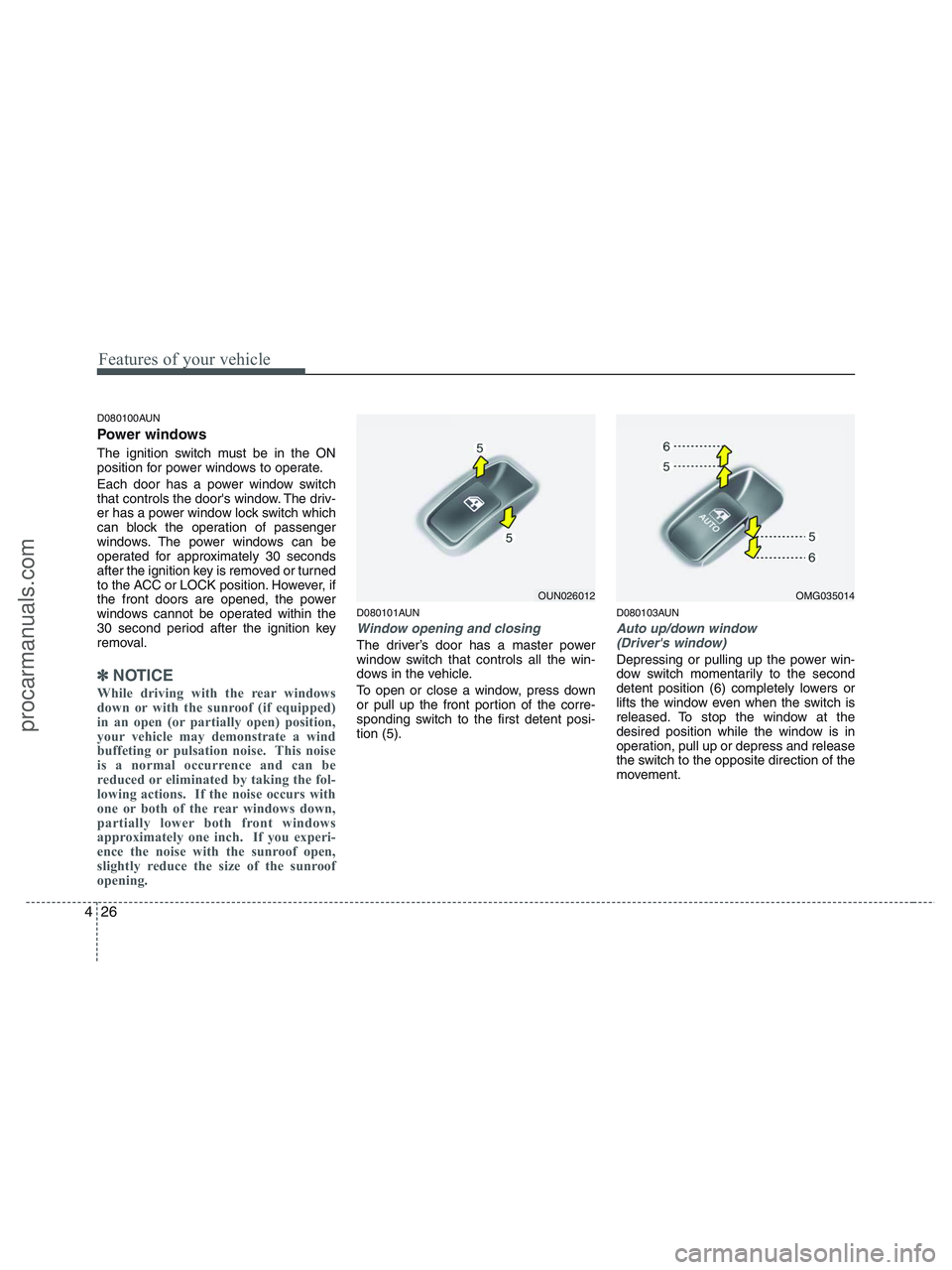
To open or close a window, press down
or pull up the front portion of the corre-
sponding switch to the first detent posi-
tion (5).
D080103AUN
Auto up/down window
(Driver's window)
Depressing or pulling up the power win-
dow switch momentarily to the second
detent position (6) completely lowers or
lifts the window even when the switch is
released. To stop the window at the
desired position while the window is in
operation, pull up or depress and release
the switch to the opposite direction of the
movement.
OUN026012OMG035014
procarmanuals.com
Page 110 of 425
Features of your vehicle
28 4
D080104AUN
Power window lock button
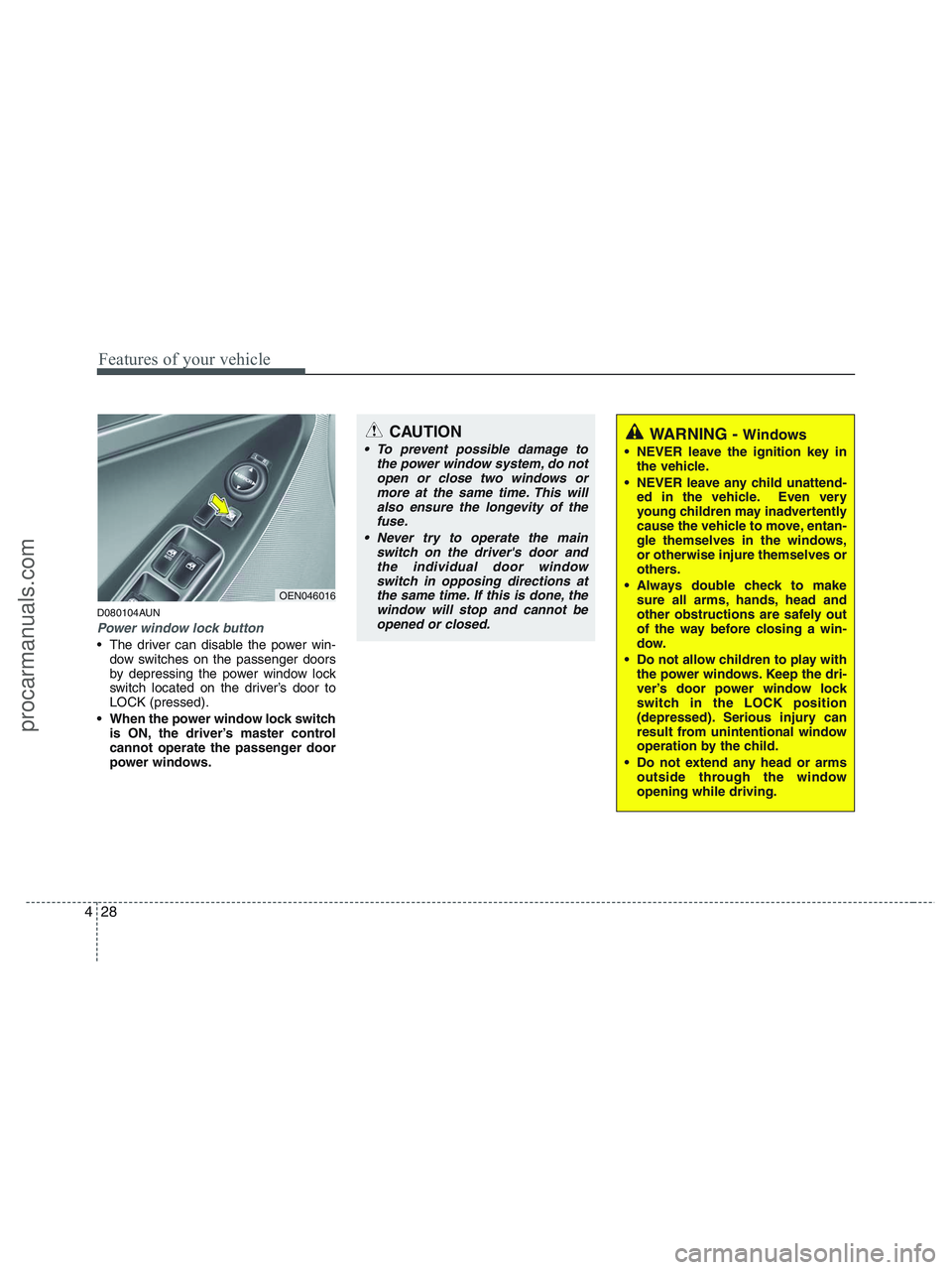
The driver can disable the power win-
dow switches on the passenger doors
by depressing the power window lock
switch located on the driver’s door to
LOCK (pressed).
When the power window lock switch
is ON, the driver’s master control
cannot operate the passenger door
power windows.
OEN046016
CAUTION
To prevent possible damage to
the power window system, do not
open or close two windows or
more at the same time. This will
also ensure the longevity of the
fuse.
Never try to operate the main
switch on the driver's door and
the individual door window
switch in opposing directions at
the same time. If this is done, the
window will stop and cannot be
opened or closed.WARNING - Windows
NEVER leave the ignition key in
the vehicle.
NEVER leave any child unattend-
ed in the vehicle. Even very
young children may inadvertently
cause the vehicle to move, entan-
gle themselves in the windows,
or otherwise injure themselves or
others.
Always double check to make
sure all arms, hands, head and
other obstructions are safely out
of the way before closing a win-
dow.
Do not allow children to play with
the power windows. Keep the dri-
ver’s door power window lock
switch in the LOCK position
(depressed). Serious injury can
result from unintentional window
operation by the child.
Do not extend any head or arms
outside through the window
opening while driving.
procarmanuals.com
Page 119 of 425
437
Features of your vehicle
D120102AHM-EE
Recalling positions from memory
1. Shift the transmisson shift lever into P
(Park) under one of the followings:
The ignition switch is ON.
The driver’s door is opened while the
ignition switch is in the LOCK or ACC
position.
Within 30 seconds after the driver’s
door is closed while the ignition switch
is in the LOCK or ACC position.
2. To recall the position in memory, press
the desired memory button (1 or 2).
The system will beep once, then the
driver seat, outside rearview mirror
and steering wheel will automatically
adjust to the stored positions.
Adjusting one of the control knobs for the
driver seat, outside rearview mirror and
steering wheel while the system is recall-
ing the stored positions will cause the
movement for that component to stop
and move in the direction that the control
knob is moved. Other components will
continue to the recalled position.
D120300AEN-EE
Easy access function
(if equipped)
With the shift lever in P position, the sys-
tem will move the steering wheel forward
or rearward automatically so you can
comfortably enter and exit the vehicle.
Without smart key system
- It will move the steering wheel away
from the driver when the ignition key
is removed.
- It will move the steering wheel toward
the driver when the ignition key is
inserted.
With smart key system
- It will move the steering wheel away
from the driver when the ignition
switch is turned to the LOCK position.
- It will move the steering wheel toward
the driver when the ignition switch is
turned to the ACC position.
✽ ✽
NOTICE
An authorized HYUNDAI dealer can
select the easy access function of the dri-
ver’s power seat.
If you want this feature, consult an
authorized HYUNDAI dealer.
D120400AEN
Reverse parking aid function
(if equipped)
While the vehicle is moving backward,
the outside rearview mirror(s) will move
downward to aid reverse parking.
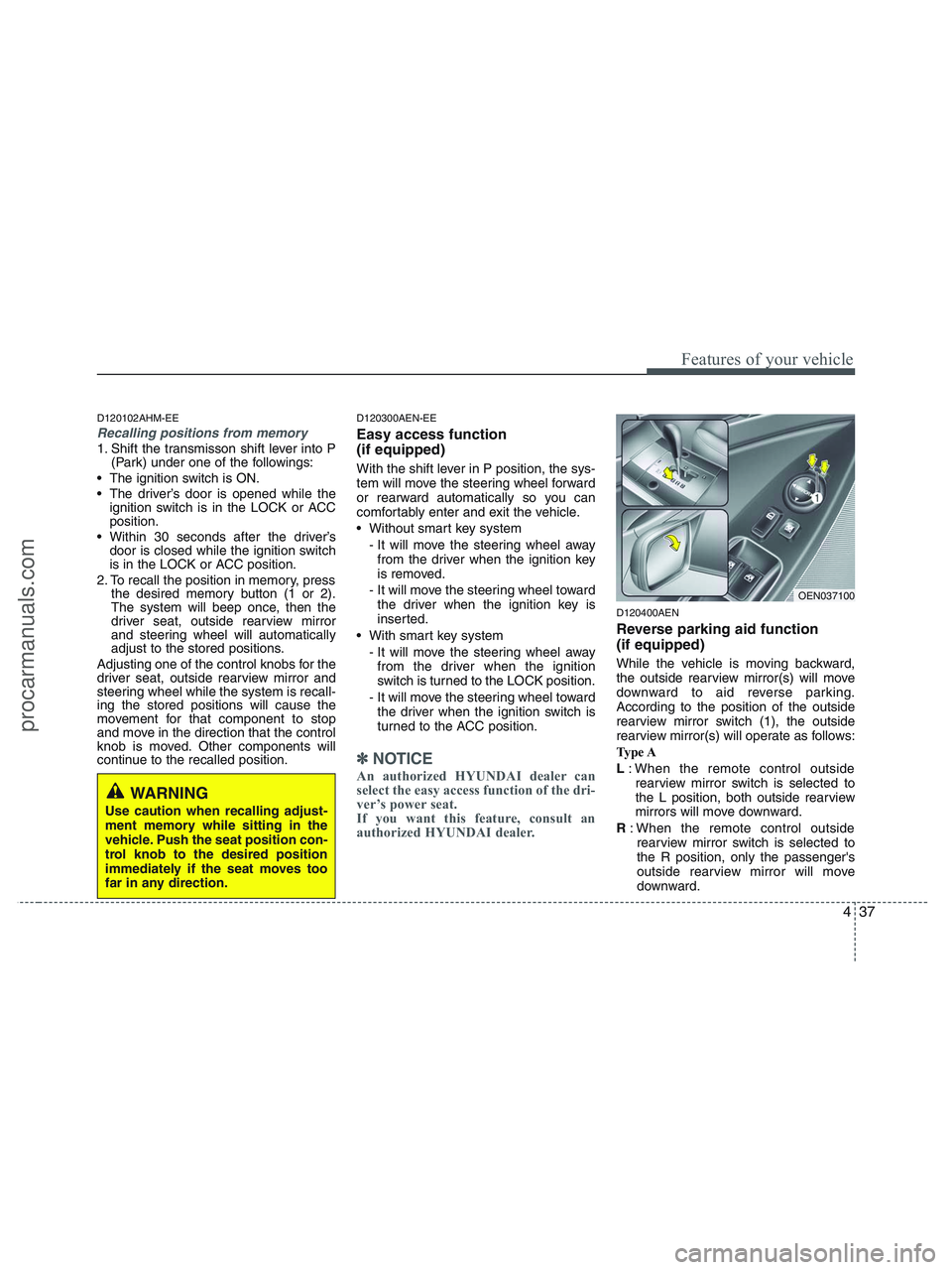
According to the position of the outside
rearview mirror switch (1), the outside
rearview mirror(s) will operate as follows:
Type A
L: When the remote control outside
rearview mirror switch is selected to
the L position, both outside rearview
mirrors will move downward.
R: When the remote control outside
rearview mirror switch is selected to
the R position, only the passenger's
outside rearview mirror will move
downward.
WARNING
Use caution when recalling adjust-
ment memory while sitting in the
vehicle. Push the seat position con-
trol knob to the desired position
immediately if the seat moves too
far in any direction.
OEN037100
procarmanuals.com
Page 145 of 425
463
Features of your vehicle
D150316AEN
Door and tailgate ajar
warning light
This warning light illuminates when a
door (or tailgate) is not closed securely
with the ignition switch in any position.
The warning light indicates which door
(or tailgate) is open.
D150317DEN-EU
Immobilizer indicator
(if equipped)
If any of the following occurs in a vehicle
equipped with the smart key, the immobi-
lizer indicator illuminates, blinks or the
light goes off.
When the smart key is in the vehicle, if
the ignition switch is depressed, the
indicator will illuminate for a few min-
utes to indicate that you will be able to
start the engine, and if the ignition
switch is turned to the ON position, the
indicator will illuminate until the engine
is started. However, when the smart
key is not in the vehicle, if the ignition
switch is depressed, the indicator will
blink for a few minutes to indicate that
you will not be able to start the engine,
and the ignition switch is not rotated.
When the ignition switch is turned to
the ON position from the ACC position
without the smart key in the vehicle,
the indicator light turns off after blink-
ing.
When the ignition switch is turned to
the ON position and the indicator turns
off after 2 seconds, the system may
have a problem. Have the vehicle
checked by an authorized HYUNDAI
dealer. When the battery is weak, if the igni-
tion switch is depressed, the indicator
will blink and you will not be able to
start the engine. However, you may still
be able to start the engine by inserting
the smart key in the ignition switch. If
smart key system related parts have a
problem, the indicator blinks.
procarmanuals.com
Page 147 of 425
465
Features of your vehicle
D150323AUN-EU
ESC indicator (Electronic
Stability Control)
The ESC indicator will illuminate when
the ignition switch is turned ON, but
should go off after approximately 3 sec-
onds. When the ESC is on, it monitors
the driving conditions and under normal
driving conditions, the ESC light will
remain off. When a slippery or low trac-
tion condition is encountered, the ESC
will operate, and the ESC indicator will
blink to indicate the ESC is operating.
D150324AEN-EU
ESC OFF indicator
The ESC OFF indicator will illuminate
when the ignition switch is turned ON,
but should go off after approximately 3
seconds. To switch to ESC OFF mode,
press the ESC OFF button. The ESC
OFF indicator will illuminate indicating
the ESC is deactivated. If this indicator
stays on when ESC OFF is not selected,
the ESC may have a malfunction. Take
your car to an authorized HYUNDAI deal-
er and have the system checked.
D150325AEN
Cruise indicator
CRUISE indicator
The indicator light illuminates when the
cruise control system is enabled.
The cruise indicator light in the instru-
ment cluster is illuminated when the
cruise control ON-OFF button on the
steering wheel is pushed.
The indicator light turns off when the
cruise control ON-OFF button is pushed
again. For more information about the
use of cruise control, refer to “Cruise
control system” in section 5.Cruise SET indicator
The indicator light illuminates when the
cruise function switch (COAST/SET or
RES/ACCEL) is ON.
The cruise SET indicator light in the
instrument cluster is illuminated when
the cruise control switch (COAST/SET or
RES/ACCEL) is pushed. The cruise SET
indicator light does not illuminate when
the cruise control switch (CANCEL) is
pushed or the system is disengaged.
D150327AUN
Key reminder warning chime
If the driver’s door is opened while the
ignition key is left in the ignition switch
(ACC or LOCK position), the key
reminder warning chime will sound. This
is to prevent you from locking your keys
in the vehicle. The chime sounds until the
key is removed from the ignition switch or
the driver’s door is closed.
ESC
ESC
OFF
SET
CRUISE
procarmanuals.com
Page 148 of 425
Features of your vehicle
66 4
D150336BEN-EU
AWD system warning light
(if equipped)
When the ignition switch is turned to the
ON position, the AWD system warning
light will come on and then go off in a few
seconds.
D150337AEN-EU
AWD LOCK indicator
(if equipped)
The AWD LOCK indicator light is illumi-
nated when the AWD LOCK button is
pushed. The purpose of this AWD LOCK
mode is to increase the drive power
when driving on dry road surfaces, wet
pavement, snow-covered roads and/or
off-road. The AWD LOCK indicator light
is turned off by pushing the button again
D150338BEN
KEY OUT indicator
(if equipped)
When the ignition switch is in the ACC or
ON position, if any door is open, the sys-
tem checks for the smart key. If the
smart key is not in the vehicle, the indi-
cator will blink, and if all doors are
closed, the chime will also sound for
about 5 seconds. The indicator will turn
off while the vehicle is moving. Keep the
smart key in the vehicle.
CAUTION
If the AWD system warning light
( ) illuminates, this indicates that
there is a malfunction in the AWD
system. If this occurs, have your
vehicle checked by an authorized
HYUNDAI dealer as soon as possi-
ble.
KEY
OUT
CAUTION
Do not use AWD LOCK mode on dry
paved roads or highway, it can
cause noise, vibration or damage of
AWD related parts.
AW D
LOCK
procarmanuals.com
Page 151 of 425
469
Features of your vehicle
✽ ✽
NOTICE
This system can only sense objects with-
in the range and location of the sensors;
It can not detect objects in other areas
where sensors are not installed. Also,
small or slim objects, such as poles or
objects located between sensors may not
be detected by the sensors.
Always visually check behind the vehi-
cle when backing up.
Be sure to inform any drivers of the
vehicle that may be unfamiliar with the
system regarding the systems capabili-
ties and limitations.
D170400AEN
Self-diagnosis
If you don’t hear an audible warning
sound or if the buzzer sounds intermit-
tently when shifting the gear to the R
(Reverse) position, this may indicate a
malfunction in the rear parking assist sys-
tem. If this occurs, have your vehicle
checked by an authorized HYUNDAI
dealer as soon as possible.
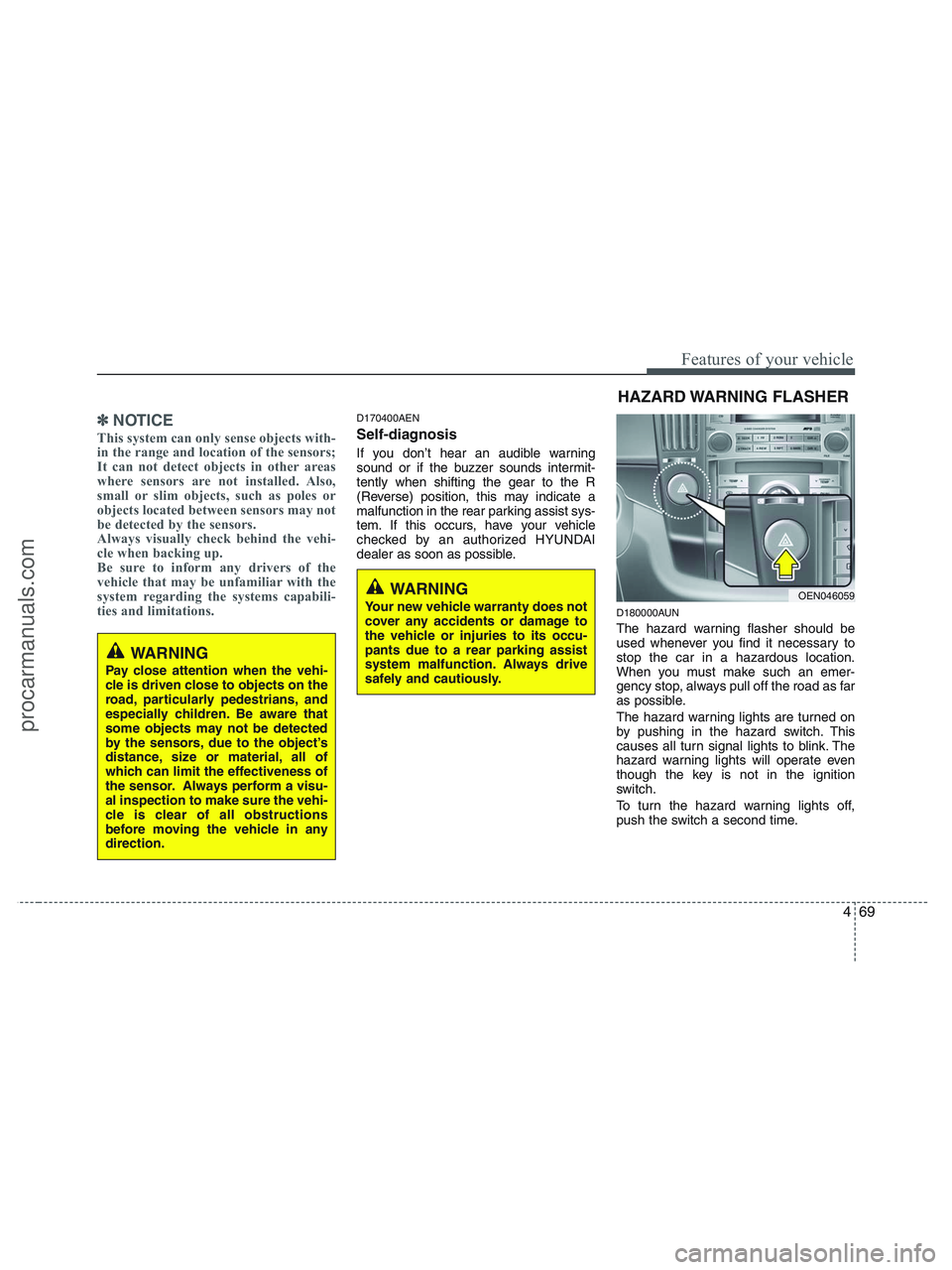
D180000AUN
The hazard warning flasher should be
used whenever you find it necessary to
stop the car in a hazardous location.
When you must make such an emer-
gency stop, always pull off the road as far
as possible.
The hazard warning lights are turned on
by pushing in the hazard switch. This
causes all turn signal lights to blink. The
hazard warning lights will operate even
though the key is not in the ignition
switch.
To turn the hazard warning lights off,
push the switch a second time.
WARNING
Pay close attention when the vehi-
cle is driven close to objects on the
road, particularly pedestrians, and
especially children. Be aware that
some objects may not be detected
by the sensors, due to the object’s
distance, size or material, all of
which can limit the effectiveness of
the sensor. Always perform a visu-
al inspection to make sure the vehi-
cle is clear of all obstructions
before moving the vehicle in any
direction.
WARNING
Your new vehicle warranty does not
cover any accidents or damage to
the vehicle or injuries to its occu-
pants due to a rear parking assist
system malfunction. Always drive
safely and cautiously.
HAZARD WARNING FLASHER
OEN046059
procarmanuals.com
Page 152 of 425
Features of your vehicle
70 4
D190100AUN
Battery saver function
The purpose of this feature is to pre-
vent the battery from being dis-
charged. The system automatically
turns off the exterior lights when the
driver removes the ignition key and
opens the driver-side door.
With this feature, the parking lights will
be turned off automatically if the driver
parks on the side of road at night.
If necessary, to keep the lights on
when the ignition key is removed, per-
form the following:
1) Open the driver-side door.
2) Turn the parking lights OFF and ON
again using the light switch on the
steering column.
D190200AEN
Headlight escort function
(if equipped)
The headlights (and/or taillights) remain
on for approximately 20 minutes after the
ignition key is removed or turned to the
ACC or LOCK position. However, if the
driver’s door is opened and closed, the
headlights are turned off after 30 sec-
onds.The headlights can be turned off by
pressing the lock button on the transmit-
ter (or smart key) twice or turning off the
light switch from the headlight or Auto
light position.
D190300AEN
Rescue mode function
(if equipped)
If your vehicle has any problem on the
vehicle network system, the headlights
(low beam) turn on automatically with the
ignition switch in the ON position even
though the headlight switch is not turned
on. At this time, the emergency lighting is
not turned off when the headlight switch
is turned off.
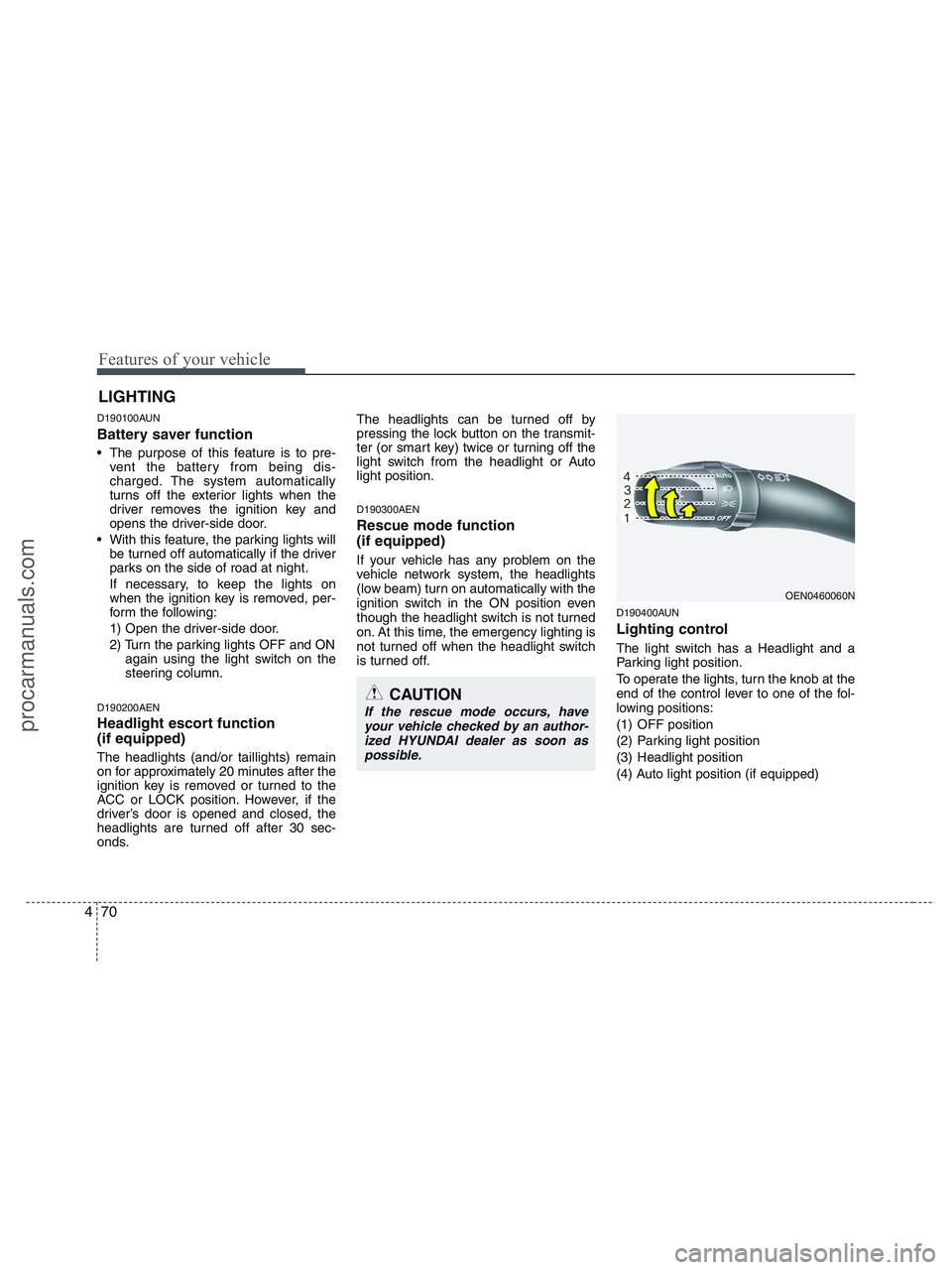
D190400AUN
Lighting control
The light switch has a Headlight and a
Parking light position.
To operate the lights, turn the knob at the
end of the control lever to one of the fol-
lowing positions:
(1) OFF position
(2) Parking light position
(3) Headlight position
(4) Auto light position (if equipped)
LIGHTING
CAUTION
If the rescue mode occurs, have
your vehicle checked by an author-
ized HYUNDAI dealer as soon as
possible.
OEN0460060N
procarmanuals.com