ECO mode HYUNDAI VERACRUZ 2011 User Guide
[x] Cancel search | Manufacturer: HYUNDAI, Model Year: 2011, Model line: VERACRUZ, Model: HYUNDAI VERACRUZ 2011Pages: 419, PDF Size: 47.93 MB
Page 184 of 419
Features of your vehicle
106
4
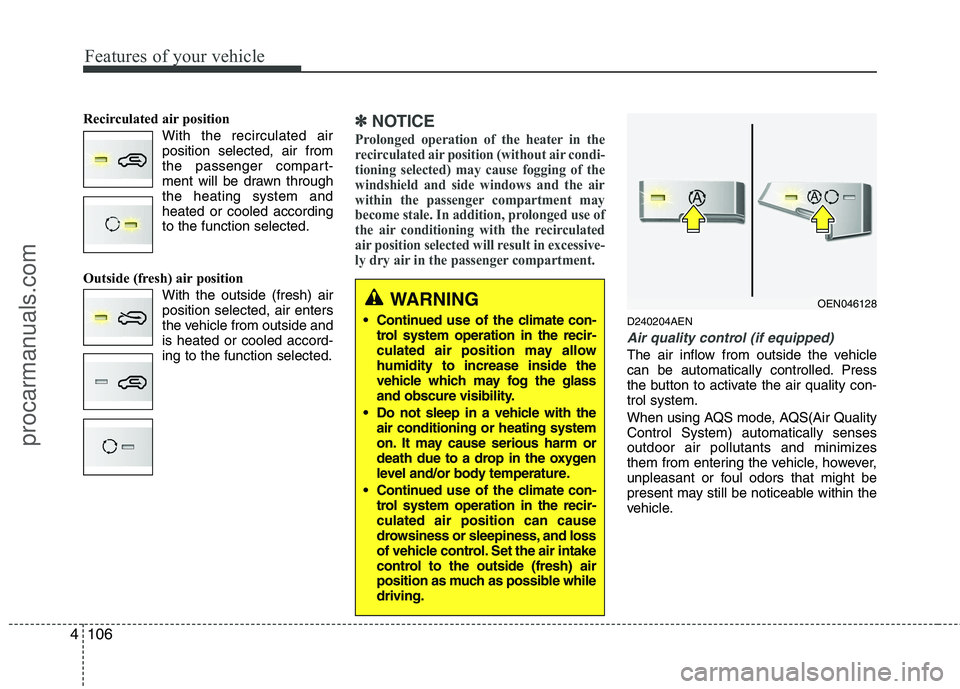
Recirculated air position
With the recirculated airposition selected, air from
the passenger compart-
ment will be drawn throughthe heating system andheated or cooled accordingto the function selected.
Outside (fresh) air position With the outside (fresh) airposition selected, air enters
the vehicle from outside andis heated or cooled accord-ing to the function selected.✽✽NOTICE
Prolonged operation of the heater in the
recirculated air position (without air condi-
tioning selected) may cause fogging of the
windshield and side windows and the air
within the passenger compartment may
become stale. In addition, prolonged use of
the air conditioning with the recirculated
air position selected will result in excessive-
ly dry air in the passenger compartment.
D240204AEN
Air quality control (if equipped)
The air inflow from outside the vehicle
can be automatically controlled. Press
the button to activate the air quality con-trol system.
When using AQS mode, AQS(Air Quality Control System) automatically senses
outdoor air pollutants and minimizes
them from entering the vehicle, however,
unpleasant or foul odors that might be
present may still be noticeable within the
vehicle.
WARNING
Continued use of the climate con-
trol system operation in the recir-
culated air position may allowhumidity to increase inside the
vehicle which may fog the glass
and obscure visibility.
Do not sleep in a vehicle with the air conditioning or heating system
on. It may cause serious harm or
death due to a drop in the oxygen
level and/or body temperature.
Continued use of the climate con-
trol system operation in the recir-culated air position can cause
drowsiness or sleepiness, and loss
of vehicle control. Set the air intake
control to the outside (fresh) air
position as much as possible whiledriving.OEN046128
procarmanuals.com
Page 185 of 419
4107
Features of your vehicle
Exhaust gas cutoff mode :
Air enters the vehicle from the outside.
If exhaust gas enters the vehicle from the
outside, the exhaust gas cutoff mode is
automatically converted from the outsideair position to the recirculated air position
to prevent exhaust gas from entering the
vehicle.
✽✽NOTICE
It should be noted that prolonged oper-
ation of the heating system in recircula-
tion mode will give rise to misting of the
windshield and side windows and the air
within the passenger compartment will
become stale. In addition, prolonged use
of the air conditioning with the recircu-
lation mode selected may result in the
air within the passenger compartment
becoming excessively dry.
D240205AUN
Fan speed control
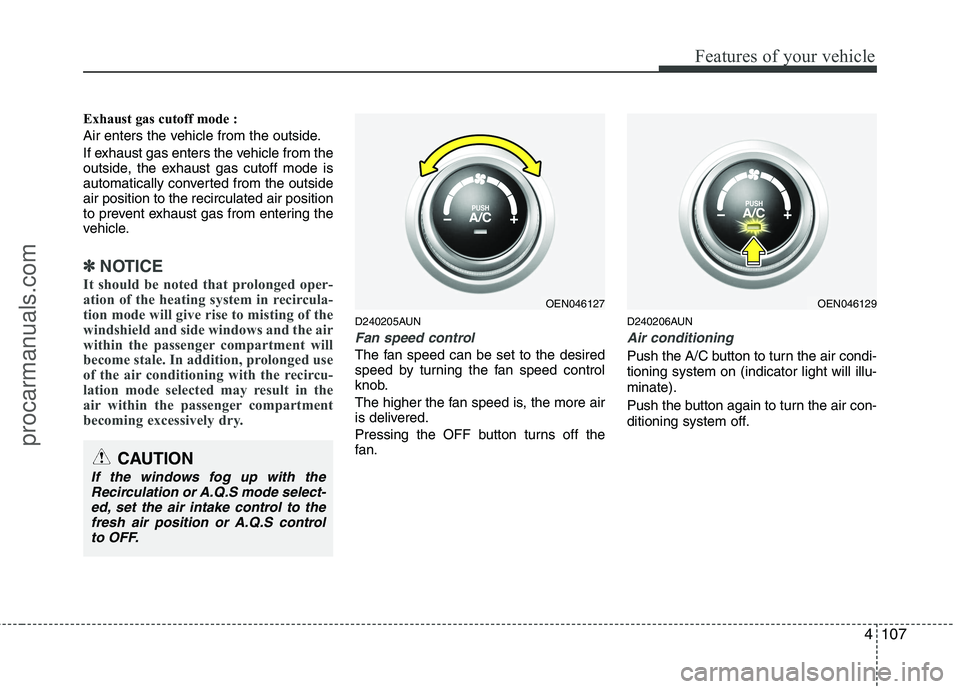
The fan speed can be set to the desired
speed by turning the fan speed control
knob.
The higher the fan speed is, the more air
is delivered.
Pressing the OFF button turns off the
fan. D240206AUN
Air conditioning
Push the A/C button to turn the air condi- tioning system on (indicator light will illu-minate).
Push the button again to turn the air con-
ditioning system off.
CAUTION
If the windows fog up with the
Recirculation or A.Q.S mode select-ed, set the air intake control to the
fresh air position or A.Q.S controlto OFF.
OEN046127OEN046129
procarmanuals.com
Page 186 of 419
Features of your vehicle
108
4
D240208AUN
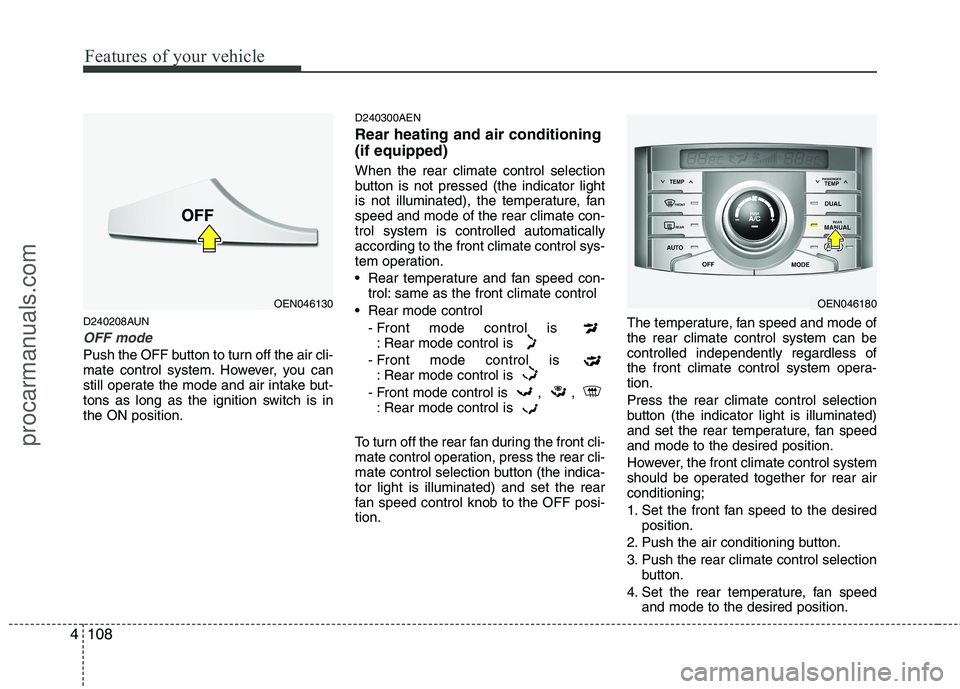
OFF mode
Push the OFF button to turn off the air cli-
mate control system. However, you can
still operate the mode and air intake but-
tons as long as the ignition switch is inthe ON position. D240300AEN Rear heating and air conditioning (if equipped) When the rear climate control selection
button is not pressed (the indicator light
is not illuminated), the temperature, fanspeed and mode of the rear climate con-trol system is controlled automaticallyaccording to the front climate control sys-
tem operation.
Rear temperature and fan speed con-
trol: same as the front climate control
Rear mode control - Front mode control is : Rear mode control is
- Front mode control is : Rear mode control is
- Front mode control is , , : Rear mode control is
To turn off the rear fan during the front cli-
mate control operation, press the rear cli-
mate control selection button (the indica-tor light is illuminated) and set the rear
fan speed control knob to the OFF posi-tion. The temperature, fan speed and mode ofthe rear climate control system can becontrolled independently regardless of
the front climate control system opera-tion. Press the rear climate control selection
button (the indicator light is illuminated)
and set the rear temperature, fan speedand mode to the desired position.
However, the front climate control system
should be operated together for rear airconditioning;
1. Set the front fan speed to the desired
position.
2. Push the air conditioning button.
3. Push the rear climate control selection button.
4. Set the rear temperature, fan speed and mode to the desired position.
OEN046180OEN046130
procarmanuals.com
Page 191 of 419
4113
Features of your vehicle
D250300AEN
Defogging logic
To reduce the probability of fogging up
the inside of the windshield, the air intakeor air conditioning are controlled auto-
matically according to certain conditions
such as or position.
To cancel or return the defogging logic,
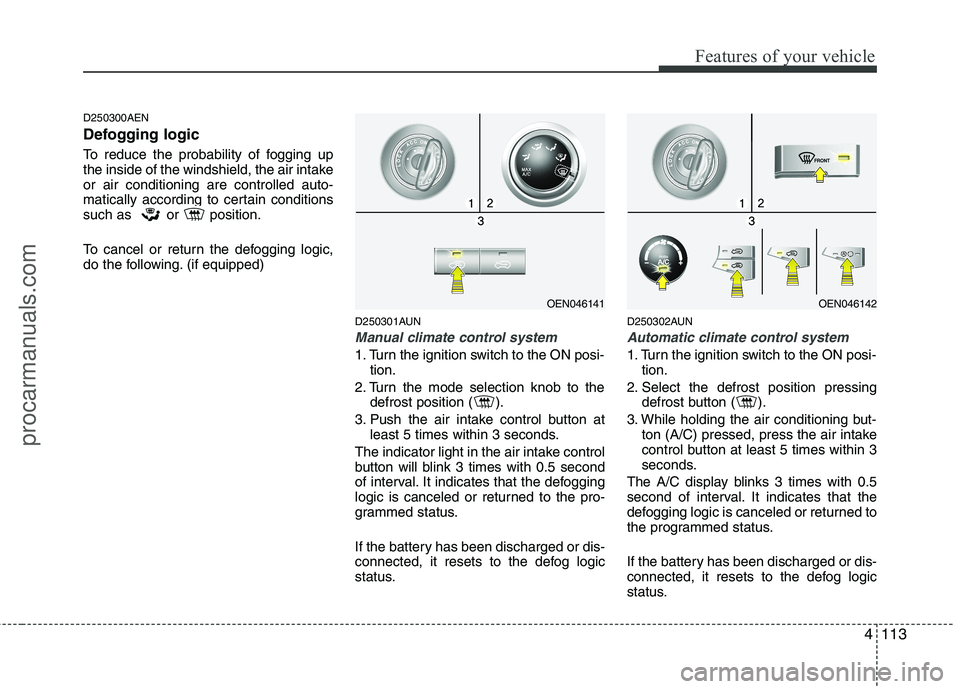
do the following. (if equipped)D250301AUN
Manual climate control system
1. Turn the ignition switch to the ON posi-tion.
2. Turn the mode selection knob to the defrost position ( ).
3. Push the air intake control button at least 5 times within 3 seconds.
The indicator light in the air intake control
button will blink 3 times with 0.5 second
of interval. It indicates that the defogging
logic is canceled or returned to the pro-
grammed status.
If the battery has been discharged or dis-
connected, it resets to the defog logic
status. D250302AUN
Automatic climate control system
1. Turn the ignition switch to the ON posi-
tion.
2. Select the defrost position pressing defrost button ( ).
3. While holding the air conditioning but- ton (A/C) pressed, press the air intake
control button at least 5 times within 3
seconds.
The A/C display blinks 3 times with 0.5
second of interval. It indicates that the
defogging logic is canceled or returned to
the programmed status.
If the battery has been discharged or dis-
connected, it resets to the defog logic
status.
OEN046141OEN046142
procarmanuals.com
Page 205 of 419
4127
Features of your vehicle
D300202AEN
MODE
Press the button to select Radio or CD (compact disc). D300204AEN
VOLUME (VOL +/-)
• Press the up button (+) to increase vol-ume.
Press the down button (-) to decrease volume.
D300205AEN
MUTE
Press the MUTE button to cancel the sound.
Press the MUTE button again to acti- vate the sound.
D300203AEN
SEEK/PRESET ( / )
If the SEEK/PRESET button is pressed
for 0.8 second or more, it will work as fol-
lows in each mode.
RADIO mode
It will function as the AUTO SEEK select
button. CDP mode
It will function as the FF/REW button.
CDC mode
It will function as the DISC UP/DOWN
button.
If the SEEK/PRESET button is pressed
for less than 0.8 second, it will work as
follows in each mode.
RADIO mode
It will function as the PRESET STATION
select buttons.
CDP mode
It will function as the TRACK UP/DOWN
button.
CDC mode
It will function as the TRACK UP/DOWN
button.
Detailed information for audio control
buttons is described in the followingpages in this section.
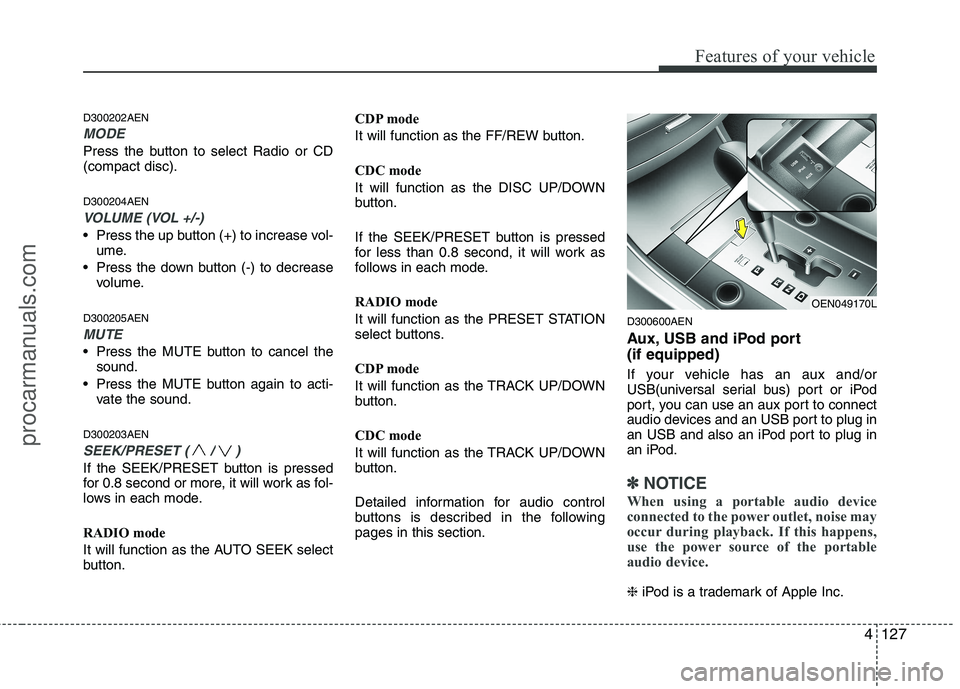
D300600AEN
Aux, USB and iPod port (if equipped)
If your vehicle has an aux and/or
USB(universal serial bus) port or iPod
port, you can use an aux port to connect
audio devices and an USB port to plug in
an USB and also an iPod port to plug in
an iPod.
✽✽
NOTICE
When using a portable audio device
connected to the power outlet, noise may
occur during playback. If this happens,
use the power source of the portable
audio device.
❈ iPod is a trademark of Apple Inc.
OEN049170L
procarmanuals.com
Page 214 of 419
Features of your vehicle
136
4
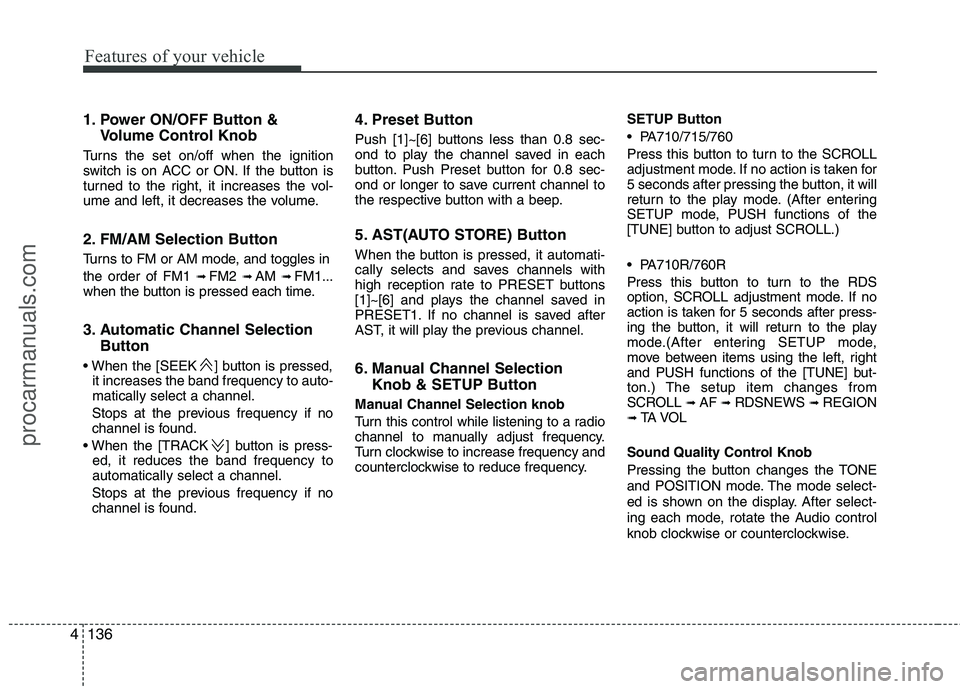
1. Power ON/OFF Button &
Volume Control Knob
Turns the set on/off when the ignition
switch is on ACC or ON. If the button is
turned to the right, it increases the vol-
ume and left, it decreases the volume.
2. FM/AM Selection Button
Turns to FM or AM mode, and toggles in the order of FM1 ➟ FM2 ➟ AM ➟ FM1...
when the button is pressed each time.
3. Automatic Channel Selection
Button
] button is pressed, it increases the band frequency to auto- matically select a channel.
Stops at the previous frequency if no
channel is found.
] button is press- ed, it reduces the band frequency toautomatically select a channel.
Stops at the previous frequency if no
channel is found. 4. Preset Button
Push [1]~[6] buttons less than 0.8 sec-
ond to play the channel saved in each
button. Push Preset button for 0.8 sec-
ond or longer to save current channel to
the respective button with a beep.
5. AST(AUTO STORE) Button
When the button is pressed, it automati-
cally selects and saves channels with
high reception rate to PRESET buttons
[1]~[6] and plays the channel saved in
PRESET1. If no channel is saved after
AST, it will play the previous channel.
6. Manual Channel Selection
Knob & SETUP Button
Manual Channel Selection knob
Turn this control while listening to a radio
channel to manually adjust frequency.
Turn clockwise to increase frequency and
counterclockwise to reduce frequency. SETUP Button
PA710/715/760
Press this button to turn to the SCROLL
adjustment mode. If no action is taken for
5 seconds after pressing the button, it will
return to the play mode. (After entering
SETUP mode, PUSH functions of the
[TUNE] button to adjust SCROLL.)
PA710R/760R
Press this button to turn to the RDS
option, SCROLL adjustment mode. If no
action is taken for 5 seconds after press-
ing the button, it will return to the play
mode.(After entering SETUP mode,
move between items using the left, right
and PUSH functions of the [TUNE] but-
ton.) The setup item changes from
SCROLL
➟
AF ➟ RDSNEWS ➟ REGION
➟ TA V O L
Sound Quality Control Knob
Pressing the button changes the TONE
and POSITION mode. The mode select-
ed is shown on the display. After select-
ing each mode, rotate the Audio control
knob clockwise or counterclockwise.
procarmanuals.com
Page 221 of 419
4143
Features of your vehicle
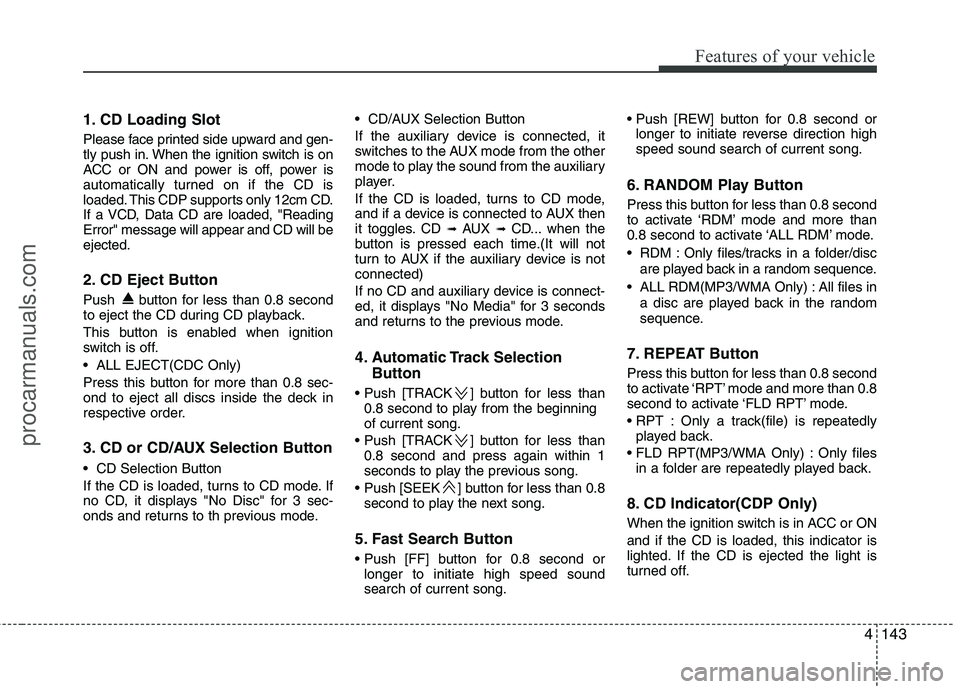
1. CD Loading Slot
Please face printed side upward and gen-
tly push in. When the ignition switch is on
ACC or ON and power is off, power is
automatically turned on if the CD is
loaded. This CDP supports only 12cm CD.
If a VCD, Data CD are loaded, "ReadingError" message will appear and CD will beejected.
2. CD Eject Button
Push button for less than 0.8 second
to eject the CD during CD playback.
This button is enabled when ignition
switch is off.
ALL EJECT(CDC Only)
Press this button for more than 0.8 sec-
ond to eject all discs inside the deck in
respective order.
3. CD or CD/AUX Selection Button
CD Selection Button
If the CD is loaded, turns to CD mode. If
no CD, it displays "No Disc" for 3 sec-
onds and returns to th previous mode. CD/AUX Selection Button
If the auxiliary device is connected, it
switches to the AUX mode from the other
mode to play the sound from the auxiliary
player.
If the CD is loaded, turns to CD mode,
and if a device is connected to AUX then
it toggles. CD
➟
AUX ➟ CD... when the
button is pressed each time.(It will not
turn to AUX if the auxiliary device is notconnected)
If no CD and auxiliary device is connect-
ed, it displays "No Media" for 3 seconds
and returns to the previous mode.
4. Automatic Track Selection
Button
] button for less than 0.8 second to play from the beginning of current song.
] button for less than 0.8 second and press again within 1
seconds to play the previous song.
] button for less than 0.8 second to play the next song.
5. Fast Search Button
longer to initiate high speed sound search of current song.
longer to initiate reverse direction highspeed sound search of current song.
6. RANDOM Play Button
Press this button for less than 0.8 second
to activate ‘RDM’ mode and more than
0.8 second to activate ‘ALL RDM’ mode.
RDM : Only files/tracks in a folder/disc are played back in a random sequence.
ALL RDM(MP3/WMA Only) : All files in a disc are played back in the random
sequence.
7. REPEAT Button
Press this button for less than 0.8 second
to activate ‘RPT’ mode and more than 0.8
second to activate ‘FLD RPT’ mode.
Only a track(file) is repeatedly played back.
Only files in a folder are repeatedly played back.
8. CD Indicator(CDP Only)
When the ignition switch is in ACC or ON and if the CD is loaded, this indicator is
lighted. If the CD is ejected the light is
turned off.
procarmanuals.com
Page 222 of 419
Features of your vehicle
144
4
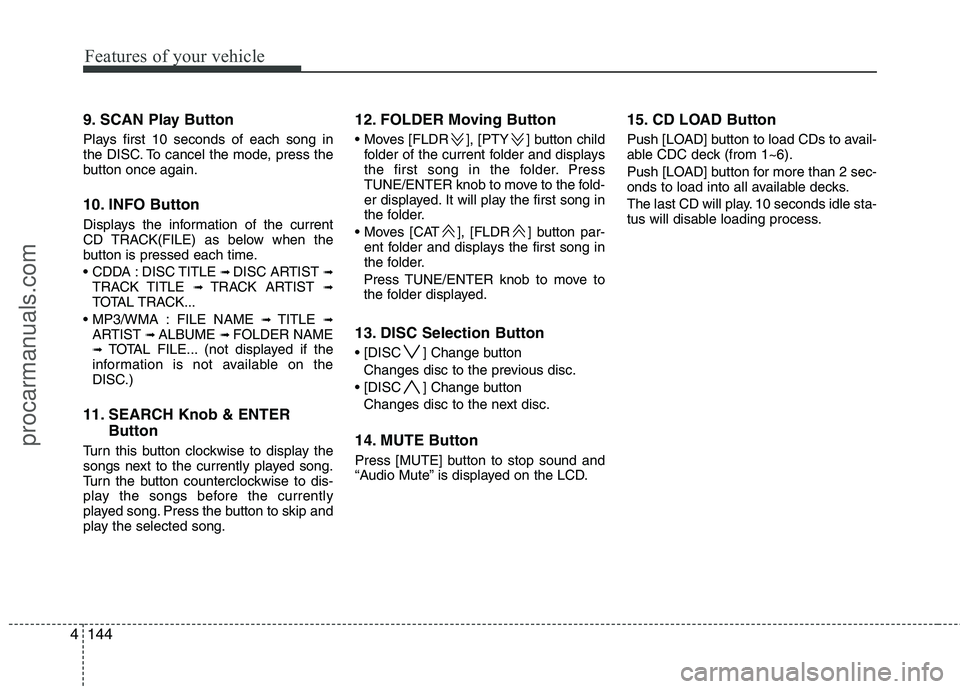
9. SCAN Play Button
Plays first 10 seconds of each song in
the DISC. To cancel the mode, press the
button once again.
10. INFO Button
Displays the information of the current
CD TRACK(FILE) as below when the
button is pressed each time.
DISC TITLE ➟
DISC ARTIST ➟
TRACK TITLE ➟ TRACK ARTIST ➟
TOTAL TRACK...
FILE NAME ➟ TITLE ➟
ARTIST ➟ ALBUME ➟ FOLDER NAME
➟ TOTAL FILE... (not displayed if the
information is not available on the
DISC.)
11. SEARCH Knob & ENTER Button
Turn this button clockwise to display the
songs next to the currently played song.
Turn the button counterclockwise to dis-
play the songs before the currently
played song. Press the button to skip and
play the selected song. 12. FOLDER Moving Button
], [PTY ] button child
folder of the current folder and displays
the first song in the folder. Press
TUNE/ENTER knob to move to the fold-
er displayed. It will play the first song in
the folder.
], [FLDR ] button par- ent folder and displays the first song in
the folder.
Press TUNE/ENTER knob to move to
the folder displayed.
13. DISC Selection Button
] Change button Changes disc to the previous disc.
] Change button Changes disc to the next disc.
14. MUTE Button
Press [MUTE] button to stop sound and
“Audio Mute” is displayed on the LCD. 15. CD LOAD Button
Push [LOAD] button to load CDs to avail-
able CDC deck (from 1~6).
Push [LOAD] button for more than 2 sec-
onds to load into all available decks.
The last CD will play. 10 seconds idle sta-
tus will disable loading process.
procarmanuals.com
Page 223 of 419
4145
Features of your vehicle
CAUTION - Using USBdevice
To use an external USB device,make sure the device is not con-
nected when starting up the vehi-cle and connect the device afterstarting up.
If you start the engine when the USB device is connected, it maydamage the USB device. (USBflashdrives are very sensitive to electric shock)
If the vehicle is started up or turned off while the external USBdevice is connected, the externalUSB device may not work.
It may not play inauthentic MP3 or WMA files.
1) It can only play MP3 files with the compression rate between8Kbps~320Kbps.
2) It can only play WMA music files with the compression rate
between 8Kbps~320Kbps.
Take precautions for static elec- tricity when connecting or dis-connecting the external USBdevice.
(Continued)
(Continued) An encoded MP3 PLAYER is not recognizable.
Depending on the condition of the external USB device, the con-
nected external USB device can be unrecognizable.
When the formatted byte/sector setting of External USB devices isnot either 512BYTE or 2048BYTE,
then the device will not be recog- nized.
Use only a USB device formatted to FAT 12/16/32.
USB devices without USB I/F authentication may not be recog-nizable.
Make sure the USB connection terminal does not come in con-tact with the human body or any
object.
If you repeatedly connecting or disconnecting USB device in ashort period of time, it may breakthe device.
You might hear a strange noise when connecting or disconnect-ing a USB device.
(Continued)(Continued) If you disconnect the external USB device during playback inUSB mode, the external USBdevice can be damaged or mal-
function. Therefore, disconnectthe external USB device when the audio is turned off or in another
mode.
Depending on the type and capacity of the external USBdevice or the type of the filesstored in the device, there is a dif-
ference in the time taken forrecognition of the device, but this is not an indicator of trouble andyou only have to wait.
Do not use the USB device for purpose other than playing musicfiles.
Use of USB accessories such as recharger or heater using USB I/F
may lower performance or cause trouble.
(Continued)
procarmanuals.com
Page 230 of 419
Features of your vehicle
152
4
1. INFO Selection Button
Displays the information of the file cur-
rently played in the order of FILE NAME➟ TITLE ➟ ARTIST ➟ ALBUM ➟ FOLD-
ER ➟ TOTAL FILE ➟ NORMAL DISPLAY
➟ FILE NAME ➟... (Displays no informa-
tion if the file has no song information.)
2. TRACK Moving Button
] button for less than 0.8 second to play from the begin-
ning of the song currently played. Press
the button for less than 0.8 second and
press it again within 1 seconds to move
and play the previous track.
] button for less than 0.8 second to move to the next-
track.
3. RANDOM Playback Button
Press this button for less than 0.8 second
to activate 'RDM' mode and more than
0.8 second to activate 'ALL RDM' mode.
Only files in a folder are played back in a random sequence.
All files in a USB memory are played back in the random
sequence. 4. REPEAT Button
Press this button for less than 0.8 second
to activate 'RPT' mode and more than
0.8 second to activate 'FLD RPT' mode.
Only a file is repeatedly played
back.
Only files in a folder are repeatedly played back.
5. USB Selection Button
If USB is connected, it switches to the
USB mode from the other mode to play
the song files stored in the USB.
If no CD and auxiliary device is connect-
ed, it displays "No Media" for 3 seconds
and returns to the previous mode.
6. FOLDER Moving Button
], [PTY ] button sub folder of the current folder and displays
the first song in the folder.
Press TUNE/ENTER knob to move to
the folder displayed. It will play the first
song in the folder.
], [FLDR ] button main folder and displays the first song in the
folder.
Press TUNE/ENTER knob to move to
the folder displayed. 7. SEARCH Knob & ENTER
Button
Turn this button clockwise to display the
songs next to the currently played song.
Turn the button counterclockwise to dis-
play the songs before the currently
played song.
Press the button to skip and play the selected song.
8. SCAN Selection Button
Plays 10 seconds of each song in the
USB device.
Press the button once again to cancel scanning.
9. Fast Search Button
Push [FF] button for 0.8 second or longer to initiate high speed sound search ofcurrent song.
Push [REW] button for 0.8 second or
longer to initiate reverse direction highspeed sound search of current song.
10. MUTE Button
Press [MUTE] to stop sound and “Audio
Mute” is displayed on the LCD.
procarmanuals.com