audio HYUNDAI VERACRUZ 2011 Owner's Manual
[x] Cancel search | Manufacturer: HYUNDAI, Model Year: 2011, Model line: VERACRUZ, Model: HYUNDAI VERACRUZ 2011Pages: 419, PDF Size: 47.93 MB
Page 230 of 419
Features of your vehicle
152
4
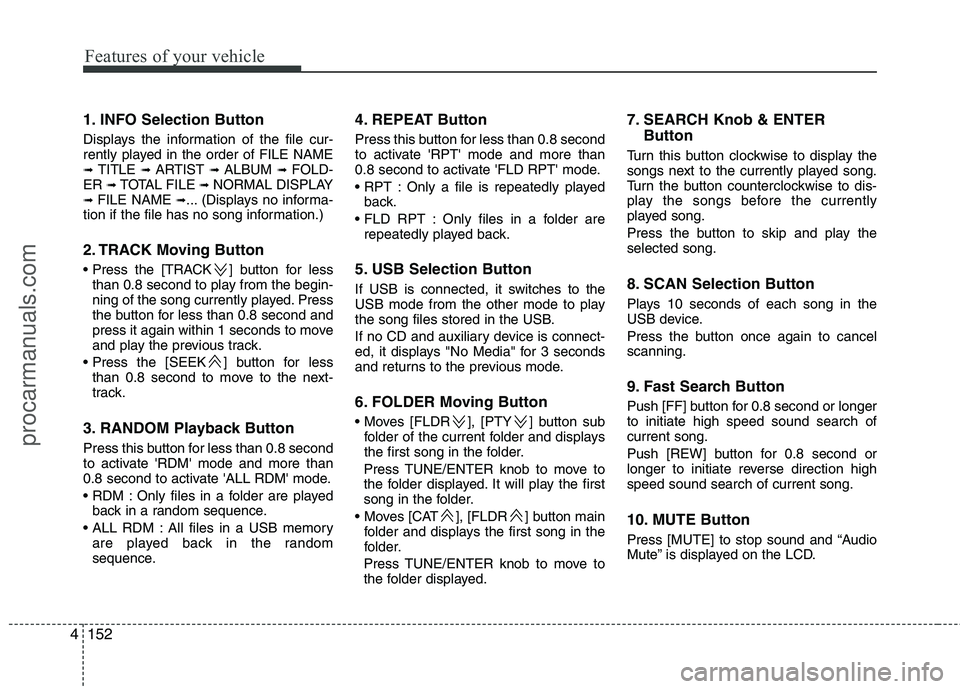
1. INFO Selection Button
Displays the information of the file cur-
rently played in the order of FILE NAME➟ TITLE ➟ ARTIST ➟ ALBUM ➟ FOLD-
ER ➟ TOTAL FILE ➟ NORMAL DISPLAY
➟ FILE NAME ➟... (Displays no informa-
tion if the file has no song information.)
2. TRACK Moving Button
] button for less than 0.8 second to play from the begin-
ning of the song currently played. Press
the button for less than 0.8 second and
press it again within 1 seconds to move
and play the previous track.
] button for less than 0.8 second to move to the next-
track.
3. RANDOM Playback Button
Press this button for less than 0.8 second
to activate 'RDM' mode and more than
0.8 second to activate 'ALL RDM' mode.
Only files in a folder are played back in a random sequence.
All files in a USB memory are played back in the random
sequence. 4. REPEAT Button
Press this button for less than 0.8 second
to activate 'RPT' mode and more than
0.8 second to activate 'FLD RPT' mode.
Only a file is repeatedly played
back.
Only files in a folder are repeatedly played back.
5. USB Selection Button
If USB is connected, it switches to the
USB mode from the other mode to play
the song files stored in the USB.
If no CD and auxiliary device is connect-
ed, it displays "No Media" for 3 seconds
and returns to the previous mode.
6. FOLDER Moving Button
], [PTY ] button sub folder of the current folder and displays
the first song in the folder.
Press TUNE/ENTER knob to move to
the folder displayed. It will play the first
song in the folder.
], [FLDR ] button main folder and displays the first song in the
folder.
Press TUNE/ENTER knob to move to
the folder displayed. 7. SEARCH Knob & ENTER
Button
Turn this button clockwise to display the
songs next to the currently played song.
Turn the button counterclockwise to dis-
play the songs before the currently
played song.
Press the button to skip and play the selected song.
8. SCAN Selection Button
Plays 10 seconds of each song in the
USB device.
Press the button once again to cancel scanning.
9. Fast Search Button
Push [FF] button for 0.8 second or longer to initiate high speed sound search ofcurrent song.
Push [REW] button for 0.8 second or
longer to initiate reverse direction highspeed sound search of current song.
10. MUTE Button
Press [MUTE] to stop sound and “Audio
Mute” is displayed on the LCD.
procarmanuals.com
Page 236 of 419
Features of your vehicle
158
4
Using an iPod when the exclusive cable is
connected to the multiple terminal inside
the consol on the right hand side of the
driver's seat.
When the iPod is connected, the 'iPod'
icon will be displayed on the top left cor-
ner of the display screen.
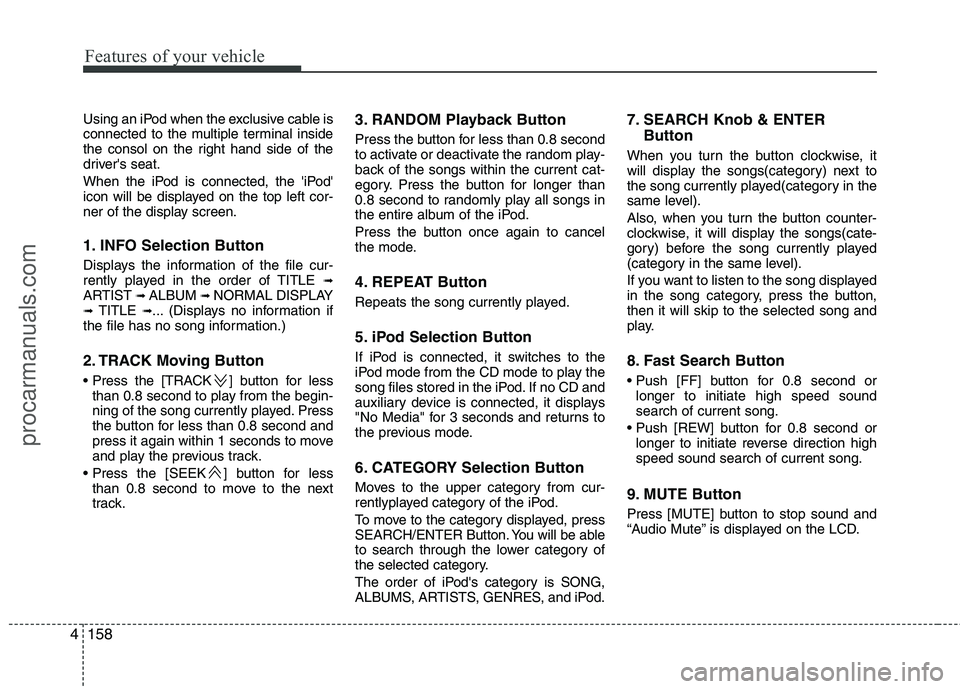
1. INFO Selection Button
Displays the information of the file cur-
rently played in the order of TITLE ➟
ARTIST ➟ ALBUM ➟ NORMAL DISPLAY
➟ TITLE ➟... (Displays no information if
the file has no song information.)
2. TRACK Moving Button
] button for less
than 0.8 second to play from the begin-
ning of the song currently played. Press
the button for less than 0.8 second and
press it again within 1 seconds to move
and play the previous track.
] button for less than 0.8 second to move to the next
track. 3. RANDOM Playback Button
Press the button for less than 0.8 second
to activate or deactivate the random play-
back of the songs within the current cat-
egory. Press the button for longer than
0.8 second to randomly play all songs in
the entire album of the iPod.
Press the button once again to cancel
the mode.
4. REPEAT Button
Repeats the song currently played.
5. iPod Selection Button
If iPod is connected, it switches to the
iPod mode from the CD mode to play the
song files stored in the iPod. If no CD and
auxiliary device is connected, it displays
"No Media" for 3 seconds and returns to
the previous mode.
6. CATEGORY Selection Button
Moves to the upper category from cur-
rentlyplayed category of the iPod.
To move to the category displayed, press
SEARCH/ENTER Button. You will be able
to search through the lower category of
the selected category.
The order of iPod's category is SONG,
ALBUMS, ARTISTS, GENRES, and iPod. 7. SEARCH Knob & ENTER
Button
When you turn the button clockwise, it
will display the songs(category) next to
the song currently played(category in the
same level).
Also, when you turn the button counter-
clockwise, it will display the songs(cate-
gory) before the song currently played
(category in the same level).
If you want to listen to the song displayed
in the song category, press the button,then it will skip to the selected song and
play.
8. Fast Search Button
longer to initiate high speed sound search of current song.
longer to initiate reverse direction highspeed sound search of current song.
9. MUTE Button
Press [MUTE] button to stop sound and
“Audio Mute” is displayed on the LCD.
procarmanuals.com
Page 237 of 419
4159
Features of your vehicle
✽✽NOTICE - Using iPod
device
Some iPod models might not sup- port the communication protocol
and the files will not be played.
(iPod models supported: Mini, 4G,
Photo, Nano, 5G)
The order of search or playback of songs in the iPod can be different
from the order searched in the
audio system.
If the iPod crashes due to its own trouble, reset the iPod. (Reset:
Refer to iPod manual)
An iPod may not operate normally
on low battery.CAUTION - Using iPod
device
You need the power cable exclu-sive for an iPod in order to oper-
ate an iPod with the buttons onthe audio system. The PC cable provided by Apple may cause amalfunction and do not use it for
vehicle use.
When connecting the device with an iPod cable, push in the jackfully to not to interfere with com-
munication.
When adjusting the sound effects of an iPod and the audio system,the sound effects of both devices will overlap and might reduce or
distort the quality of the sound.
Deactivate (turn off) the equalizer function of an iPod when adjust-ing the audio system’s volume,and turn off the equalizer of the
audio system when using the equalizer of an iPod.
(Continued)
(Continued) When the iPod cable is connected, the system can be switched to theAUX mode even without the iPoddevice and can cause noise.
Disconnect the iPod cable whenyou are not using the iPod device.
When the iPod is not used for the audio system, the iPod cable has
to be separate from iPod devies.Origin display of iPod may not be displayed.
procarmanuals.com
Page 363 of 419
Maintenance
46
7
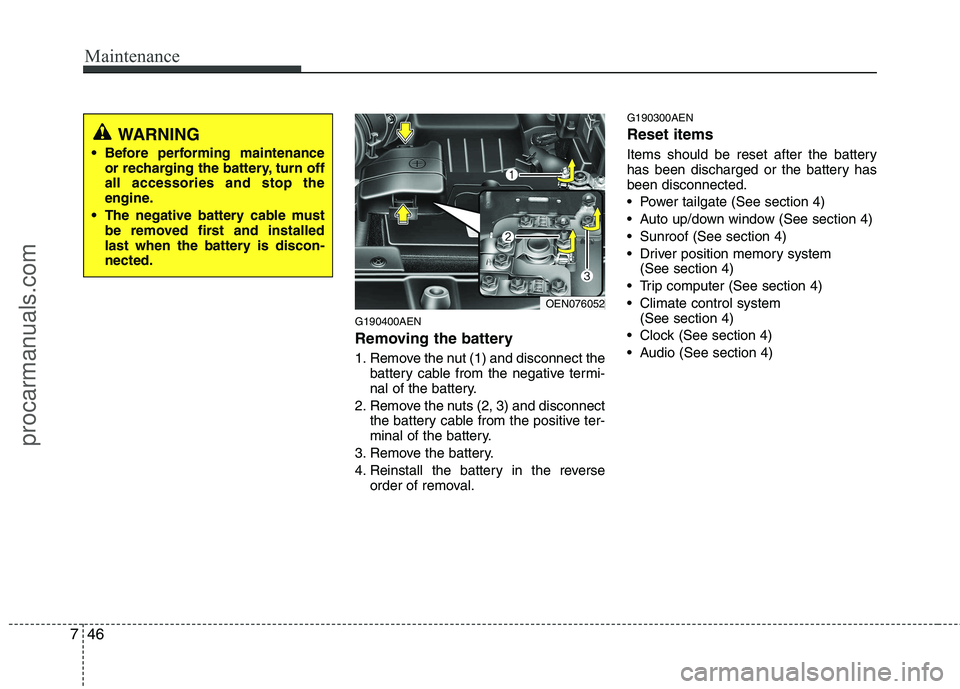
G190400AEN
Removing the battery
1. Remove the nut (1) and disconnect the
battery cable from the negative termi-
nal of the battery.
2. Remove the nuts (2, 3) and disconnect the battery cable from the positive ter-
minal of the battery.
3. Remove the battery.
4. Reinstall the battery in the reverse order of removal. G190300AEN Reset items
Items should be reset after the battery
has been discharged or the battery hasbeen disconnected.
Power tailgate (See section 4)
Auto up/down window (See section 4)
Sunroof (See section 4)
Driver position memory system
(See section 4)
Trip computer (See section 4)
Climate control system (See section 4)
Clock (See section 4)
Audio (See section 4)
OEN076052
WARNING
Before performing maintenance or recharging the battery, turn off all accessories and stop the
engine.
The negative battery cable must be removed first and installed
last when the battery is discon-nected.
procarmanuals.com
Page 376 of 419
759
Maintenance
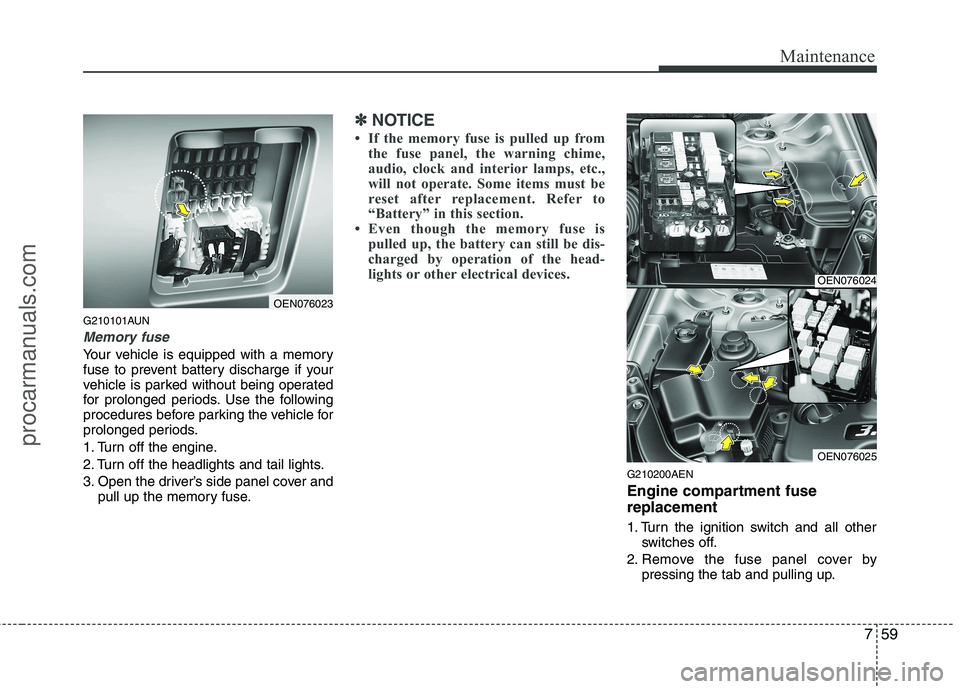
G210101AUN
Memory fuse
Your vehicle is equipped with a memory
fuse to prevent battery discharge if your
vehicle is parked without being operated
for prolonged periods. Use the following
procedures before parking the vehicle for
prolonged periods.
1. Turn off the engine.
2. Turn off the headlights and tail lights.
3. Open the driver’s side panel cover andpull up the memory fuse.
✽✽ NOTICE
If the memory fuse is pulled up from the fuse panel, the warning chime,
audio, clock and interior lamps, etc.,
will not operate. Some items must be
reset after replacement. Refer to
“Battery” in this section.
Even though the memory fuse is
pulled up, the battery can still be dis-
charged by operation of the head-
lights or other electrical devices.
G210200AEN
Engine compartment fuse replacement
1. Turn the ignition switch and all other switches off.
2. Remove the fuse panel cover by pressing the tab and pulling up.
OEN076023
OEN076024
OEN076025
procarmanuals.com
Page 379 of 419
Maintenance
62
7
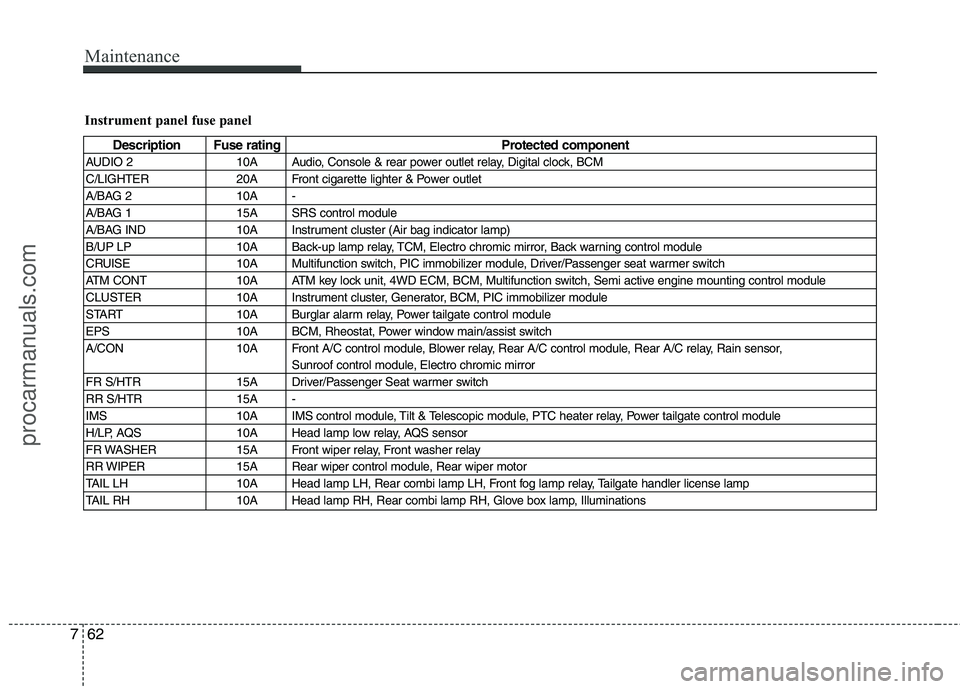
Instrument panel fuse panel
Description Fuse rating Protected component
AUDIO 2 10A Audio, Console & rear power outlet relay, Digital clock, BCM
C/LIGHTER 20A Front cigarette lighter & Power outlet
A/BAG 2 10A -
A/BAG 1 15A SRS control module
A/BAG IND 10A Instrument cluster (Air bag indicator lamp)
B/UP LP 10A Back-up lamp relay, TCM, Electro chromic mirror, Back warning control module
CRUISE 10A Multifunction switch, PIC immobilizer module, Driver/Passenger seat warmer switch
ATM CONT 10A ATM key lock unit, 4WD ECM, BCM, Multifunction switch, Semi active engine mounting control module
CLUSTER 10A Instrument cluster, Generator, BCM, PIC immobilizer module
START 10A Burglar alarm relay, Power tailgate control module
EPS 10A BCM, Rheostat, Power window main/assist switch
A/CON 10A Front A/C control module, Blower relay, Rear A/C control module, Rear A/C relay, Rain sensor, Sunroof control module, Electro chromic mirror
FR S/HTR 15A Driver/Passenger Seat warmer switch
RR S/HTR 15A -
IMS 10A IMS control module, Tilt & Telescopic module, PTC heater relay, Power tailgate control module
H/LP, AQS 10A Head lamp low relay, AQS sensor
FR WASHER 15A Front wiper relay, Front washer relay
RR WIPER 15A Rear wiper control module, Rear wiper motor
TAIL LH 10A Head lamp LH, Rear combi lamp LH, Front fog lamp relay, Tailgate handler license lamp
TAIL RH 10A Head lamp RH, Rear combi lamp RH, Glove box lamp, Illuminations
procarmanuals.com
Page 380 of 419
763
Maintenance
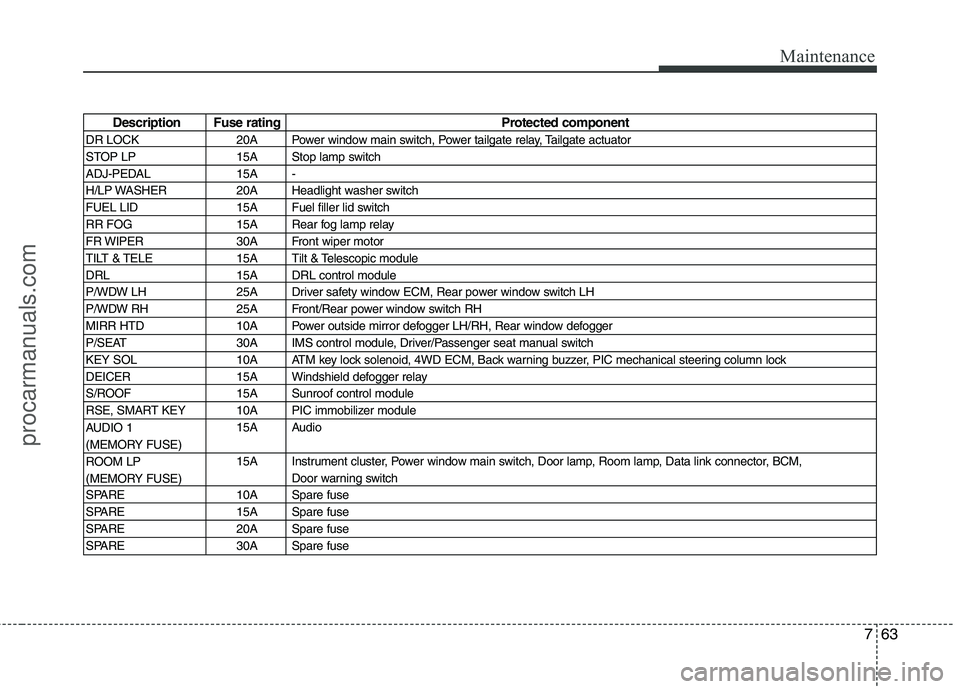
Description Fuse ratingProtected component
DR LOCK 20A Power window main switch, Power tailgate relay, Tailgate actuator
STOP LP 15A Stop lamp switch
ADJ-PEDAL 15A -
H/LP WASHER 20A Headlight washer switch
FUEL LID 15A Fuel filler lid switch
RR FOG 15A Rear fog lamp relay
FR WIPER 30A Front wiper motor
TILT & TELE 15A Tilt & Telescopic module
DRL 15A DRL control module
P/WDW LH 25A Driver safety window ECM, Rear power window switch LH
P/WDW RH 25A Front/Rear power window switch RH
MIRR HTD 10A Power outside mirror defogger LH/RH, Rear window defogger
P/SEAT 30A IMS control module, Driver/Passenger seat manual switch
KEY SOL 10A ATM key lock solenoid, 4WD ECM, Back warning buzzer, PIC mechanical steering column lock
DEICER 15A Windshield defogger relay
S/ROOF 15A Sunroof control module
RSE, SMART KEY 10A PIC immobilizer module 15A Audio
15A Instrument cluster, Power window main switch, Door lamp, Room lamp, Data link connector, BCM, Door warning switch
SPARE 10A Spare fuse
SPARE 15A Spare fuse
SPARE 20A Spare fuse
SPARE 30A Spare fuse
AUDIO 1
(MEMORY FUSE)
ROOM LP
(MEMORY FUSE)
procarmanuals.com
Page 381 of 419

Maintenance
64
7
Engine compartment main fuse panel
Description Fuse rating Protected component
IGN 1 40A Ignition switch(ACC, IG1)
IGN 2 40A Start relay, Ignition switch(IG2, START)
I/P B+1 50A Fuse(DR LOCK 20A, STOP LP 15A, TAIL LH/RH 10A)
I/P B+2 50A Fuse(P/SEAT 30A, KEY SOL 10A, SUNROOF 15A, RSE/SMART KEY 10A, DEICER 15A), Memory fuse (AUDIO1 15A, ROOM LP 15A)
P/WDW 40A Fuse(P/WDW LH/RH 25A)
BLOWER 40A Blower relay
RR HTD 40A Rear defogger relay, Fuse(MIRR HTD 10A)
ECU 30A Engine control relay (ECU DSL 20A/IGN COIL 20A, ECU2 10A, SNSR1 15A, SNSR2 15A, SNSR3 15A)
ABS 1 40A ABS/ESP control module, Multipurpose check connector
ABS 2 40A ABS/ESP control module, Multipurpose check connector
TCU 1 15A TCM
TPMS 10A Semi active engine mounting solenoid
B/ALARM 10A Burglar alarm horn relay
F/PUMP 20A Fuel pump relay T/SIG 15A BCM
A/CON 10A A/C relay
ECU 1 10A ECM(GSL)
IGN COIL (GSL) 20A Ignition coil #1~#6, Condenser
SNSR 1 (GSL) 15A ECM(GSL), Mass air flow sensor, Oil control valve, Immobilizer module, PCSV, VIV
SNSR 2 (GSL) 15A Fuel pump relay, Oxygen sensor #1~#4
SNSR 3 (GSL) 10A Injector #1~#6, Condenser/Radiator fan relay, A/C relay
ECU 2 (GSL) 10A ECM(GSL)
ECU DSL 20A ECM(DSL), PTC heater relay #1(DSL)
procarmanuals.com
Page 411 of 419
Index
2
I
Air bags ···········································································3-39
Air bag warning label................................................3-60
Air bag warning light ................................................3-42
Curtain air bag ..........................................................3-52
Driver's and passenger's front air bag ......................3-45
Side impact air bag....................................................3-51
Air cleaner·······································································7-38
Alarm system ··································································4-11
Antenna ·········································································4-125
Anti-lock brake system (ABS)········································5-24
Appearance care······························································7-76 Exterior care ······························································7-76
Interior care ·······························································7-81
Armrest ···········································································3-13
Ashtray ··········································································4-117
Audio system ································································4-125 Antenna ···································································4-125
Aux, USB and iPod ·················································4-127
Steering wheel audio control ··································4-126
Automatic climate control system ································4-101 Air conditioning ······················································4-107
Automatic heating and air conditioning··················4-102
Manual heating and air conditioning ······················4-103
Automatic transaxle ··························································5-9 Shift lock system ·······················································5-12
Sports mode·······························································5-11 Battery ·············································································7-44
Battery saver function ·····················································4-73
Before driving ···································································5-3
Bottle holders, see cup holders ·····································4-118
Brake system ···································································5-21
Anti-lock brake system (ABS) ··································5-24
Electronic stability program (ESP) ···························5-26
Parking brake·····························································5-22
Power brakes ·····························································5-21
Brakes fluid ·····································································7-34
Bulb replacement ····························································7-67 Front fog light bulb replacement·······························7-70
Headlight bulb replacement ······································7-68
High mounted stop light replacement ·······················7-74
Interior light bulb replacement··································7-75
License plate light bulb replacement ························7-74
Position light bulb replacement·································7-69
Puddle lamp and door courtesy lamp bulb replacement ···························································7-74
Rear combination light bulb replacement ·················7-71
Side repeater light bulb replacement·························7-70
Turn signal light bulb replacement ···························7-69
Bulb wattage ·····································································8-2
AB
procarmanuals.com
Page 417 of 419
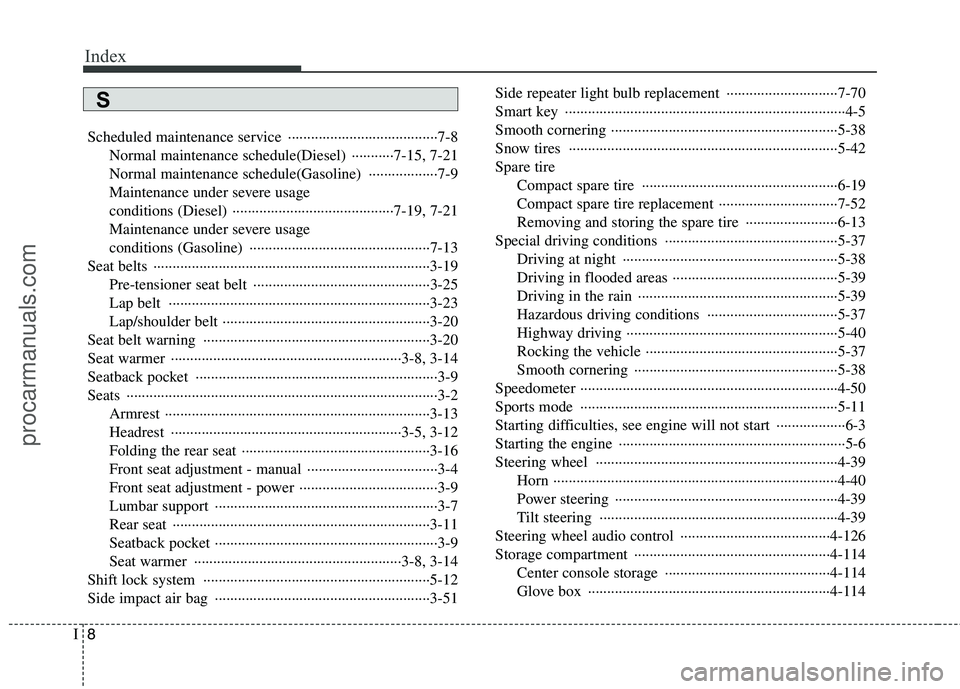
Index
8
I
Scheduled maintenance service ·······································7-8
Normal maintenance schedule(Diesel) ···········7-15, 7-21
Normal maintenance schedule(Gasoline) ··················7-9
Maintenance under severe usage
conditions (Diesel) ··········································7-19, 7-21
Maintenance under severe usage
conditions (Gasoline) ···············································7-13
Seat belts ········································································3-19 Pre-tensioner seat belt ··············································3-25
Lap belt ····································································3-23
Lap/shoulder belt ······················································3-20
Seat belt warning ···························································3-20
Seat warmer ····························································3-8, 3-14
Seatback pocket ·······························································3-9Seats ·················································································3-2 Armrest ·····································································3-13
Headrest ····························································3-5, 3-12
Folding the rear seat ·················································3-16
Front seat adjustment - manual ··································3-4
Front seat adjustment - power ····································3-9
Lumbar support ··························································3-7
Rear seat ···································································3-11
Seatback pocket ··························································3-9
Seat warmer ······················································3-8, 3-14
Shift lock system ···························································5-12
Side impact air bag ························································3-51 Side repeater light bulb replacement ·····························7-70
Smart key ·········································································4-5
Smooth cornering ···························································5-38
Snow tires ······································································5-42Spare tire
Compact spare tire ···················································6-19
Compact spare tire replacement ·······························7-52
Removing and storing the spare tire ························6-13
Special driving conditions ·············································5-37 Driving at night ························································5-38
Driving in flooded areas ···········································5-39
Driving in the rain ····················································5-39
Hazardous driving conditions ··································5-37
Highway driving ·······················································5-40
Rocking the vehicle ··················································5-37
Smooth cornering ·····················································5-38
Speedometer ···································································4-50
Sports mode ···································································5-11
Starting difficulties, see engine will not start ··················6-3
Starting the engine ···························································5-6
Steering wheel ·······························································4-39 Horn ··········································································4-40
Power steering ··························································4-39
Tilt steering ······························································4-39
Steering wheel audio control ·······································4-126
Storage compartment ···················································4-114 Center console storage ···········································4-114
Glove box ·······························································4-114
S
procarmanuals.com