battery HYUNDAI VERACRUZ 2012 User Guide
[x] Cancel search | Manufacturer: HYUNDAI, Model Year: 2012, Model line: VERACRUZ, Model: HYUNDAI VERACRUZ 2012Pages: 429, PDF Size: 7.11 MB
Page 119 of 429
435
Features of your vehicle
Resetting the sunroof
Whenever the vehicle battery is discon-
nected or discharged, or related fuse is
blown, you must reset your sunroof sys-
tem as follows:
1. Turn the ignition switch to the ONposition and close the sunroof com-
pletely.
2. Release the control lever.
3. Pull and hold the control lever down- ward until the sunroof tilts and slightly
moves up and down. Then, release
the lever.
4. Pull and hold the control lever down- ward until the sunroof is operated as
follows;
TILT DOWN → SLIDE OPEN →
SLIDE CLOSE
Then, release the control lever.
When this is complete, the sunroof sys-
tem is reset.
❈ For more detailed information, contact
an authorized HYUNDAI dealer.CAUTION
If the sunroof is not reset when the
vehicle battery is disconnected ordischarged, or related fuse isblown, the sunroof may operateimproperly.
procarmanuals.com
Page 129 of 429
445
Features of your vehicle
1. Press and hold the button for morethan 6 seconds. When the compass
memory is cleared a "C" will appear in
the display.
2. To calibrate the compass, drive the vehicle in 2 complete circles at less
than 5 mph (8 km/h).
Integrated HomeLink
®Wireless Control
System
The HomeLink® Wireless Control
System provides a convenient way to
replace up to three hand-held radio-fre-
quency (RF) transmitters with a single
built-in device. This innovative feature will
learn the radio frequency codes of most
current transmitters to operate devices
such as gate operators, garage door
openers, entry door locks, security sys-
tems, even home lighting. Both standard
and rolling code-equipped transmitters
can be programmed by following the out-
lined procedures. Additional HomeLink
®
information can be found at: www.home-
link.com or by calling 1-800-355-3515. Retain the original transmitter of the RF
device you are programming for use in
other vehicles as well as for future
HomeLink
®programming. It is also sug-
gested that upon the sale of the vehicle,
the programmed HomeLink
®buttons be
erased for security purposes. Programming HomeLink
®
✽ ✽
NOTICE
• When programming a garage door
opener, it is advised to park the vehi-
cle outside of the garage.
• It is recommended that a new battery be placed in the hand-held transmit-
ter of the device being programmed to
HomeLink
®for quicker training and
accurate transmission of the radio-
frequency signal.
• Some vehicles may require the igni- tion switch to be turned to the second
(or "accessories") position for pro-
gramming and/or operation of
HomeLink.
• In the event that there are still pro- gramming difficulties or questions
after following the programming steps
listed below, contact HomeLink
®at:
www.homelink.com or 1-800-355-
3515.
CAUTION
Before programming HomeLink®to
a garage door opener or gate oper- ator, make sure that people andobjects are out of the way of thedevice to prevent potential harm or damage. Do not use HomeLink
®
with any garage door opener thatlacks the safety stop and reversefeatures required by U.S. federalsafety standards (this includes anygarage door opener model manu-factured before April 1, 1982). Agarage door that cannot detect an object - signaling the door to stopand reverse - does not meet currentU.S. federal safety standards. Usinga garage door opener without these features increases the risk of seri-ous injury or death.
procarmanuals.com
Page 142 of 429
Features of your vehicle
58
4
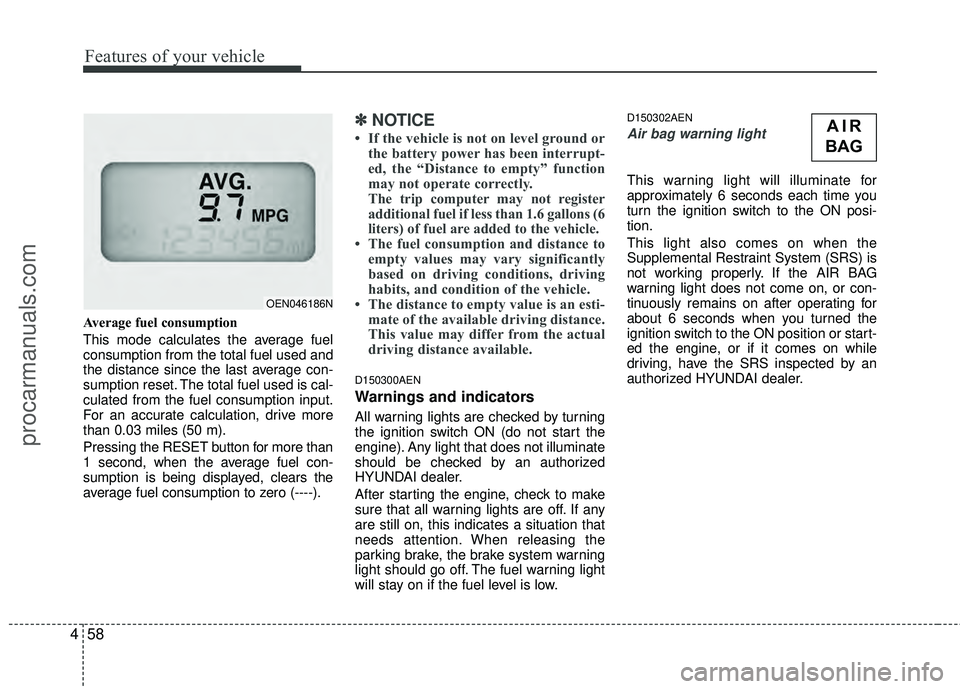
Average fuel consumption
This mode calculates the average fuel
consumption from the total fuel used and
the distance since the last average con-
sumption reset. The total fuel used is cal-
culated from the fuel consumption input.
For an accurate calculation, drive more
than 0.03 miles (50 m).
Pressing the RESET button for more than
1 second, when the average fuel con-
sumption is being displayed, clears the
average fuel consumption to zero (----).
✽ ✽
NOTICE
• If the vehicle is not on level ground or
the battery power has been interrupt-
ed, the “Distance to empty” function
may not operate correctly.
The trip computer may not register
additional fuel if less than 1.6 gallons (6
liters) of fuel are added to the vehicle.
• The fuel consumption and distance to empty values may vary significantly
based on driving conditions, driving
habits, and condition of the vehicle.
• The distance to empty value is an esti- mate of the available driving distance.
This value may differ from the actual
driving distance available.
D150300AEN
Warnings and indicators
All warning lights are checked by turning
the ignition switch ON (do not start the
engine). Any light that does not illuminate
should be checked by an authorized
HYUNDAI dealer.
After starting the engine, check to make
sure that all warning lights are off. If any
are still on, this indicates a situation that
needs attention. When releasing the
parking brake, the brake system warning
light should go off. The fuel warning light
will stay on if the fuel level is low.
D150302AEN
Air bag warning light
This warning light will illuminate for
approximately 6 seconds each time you
turn the ignition switch to the ON posi-
tion.
This light also comes on when the
Supplemental Restraint System (SRS) is
not working properly. If the AIR BAG
warning light does not come on, or con-
tinuously remains on after operating for
about 6 seconds when you turned the
ignition switch to the ON position or start-
ed the engine, or if it comes on while
driving, have the SRS inspected by an
authorized HYUNDAI dealer.
OEN046186N
AIR
BAG
procarmanuals.com
Page 147 of 429
463
Features of your vehicle
D150316AEN
Door and tailgate ajarwarning light
This warning light illuminates when a
door (or tailgate) is not closed securely
with the ignition switch in any position.
The warning light indicates which door
(or tailgate) is open.
D150317DEN-EU
Immobilizer indicator (if equipped)
If any of the following occurs in a vehicle
equipped with the smart key, the immobi-
lizer indicator illuminates, blinks or the
light goes off.
When the smart key is in the vehicle, if the ignition switch is depressed, the
indicator will illuminate for a few min-
utes to indicate that you will be able to
start the engine, and if the ignition
switch is turned to the ON position, the
indicator will illuminate until the engine
is started. However, when the smart
key is not in the vehicle, if the ignition
switch is depressed, the indicator will
blink for a few minutes to indicate that
you will not be able to start the engine,
and the ignition switch is not rotated.
When the ignition switch is turned to the ON position from the ACC position
without the smart key in the vehicle,
the indicator light turns off after blink-
ing.
When the ignition switch is turned to the ON position and the indicator turns
off after 2 seconds, the system may
have a problem. Have the vehicle
checked by an authorized HYUNDAI
dealer. When the battery is weak, if the igni-
tion switch is depressed, the indicator
will blink and you will not be able to
start the engine. However, you may still
be able to start the engine by inserting
the smart key in the ignition switch. If
smart key system related parts have a
problem, the indicator blinks.
procarmanuals.com
Page 154 of 429
Features of your vehicle
70
4
D190100AUN
Battery saver function
The purpose of this feature is to prevent
the battery from being discharged. The
system automatically turns off the park-
ing lights when the driver removes the
ignition key and opens the driver-side
door (in that order).
With this feature, the parking lights will be turned off automatically if the driver
parks on the side of road at night.
If necessary, to keep the lights on
when the ignition key is removed, per-
form the following:
1) Open the driver-side door.
2) Turn the parking lights OFF and ON again using the light switch on the
steering column.
D190200AEN
Headlight escort function
(if equipped)
The headlights (and/or taillights) remain
on for approximately 20 minutes after the
ignition key is removed or turned to the
ACC or LOCK position. However, if the dri-
ver’s door is opened and closed, the
headlights are turned off after 30 seconds.
The headlights can be turned off by
pressing the lock button on the transmit-
ter (or smart key) twice or turning off the
light switch from the headlight or Auto
light position.
D190300AEN
Rescue mode function
(if equipped)
If your vehicle has any problem on the
vehicle network system, the headlights
(low beam) turn on automatically with the
ignition switch in the ON position even
though the headlight switch is not turned
on. At this time, the emergency lighting is
not turned off when the headlight switch
is turned off.
D190400AUN
Lighting control
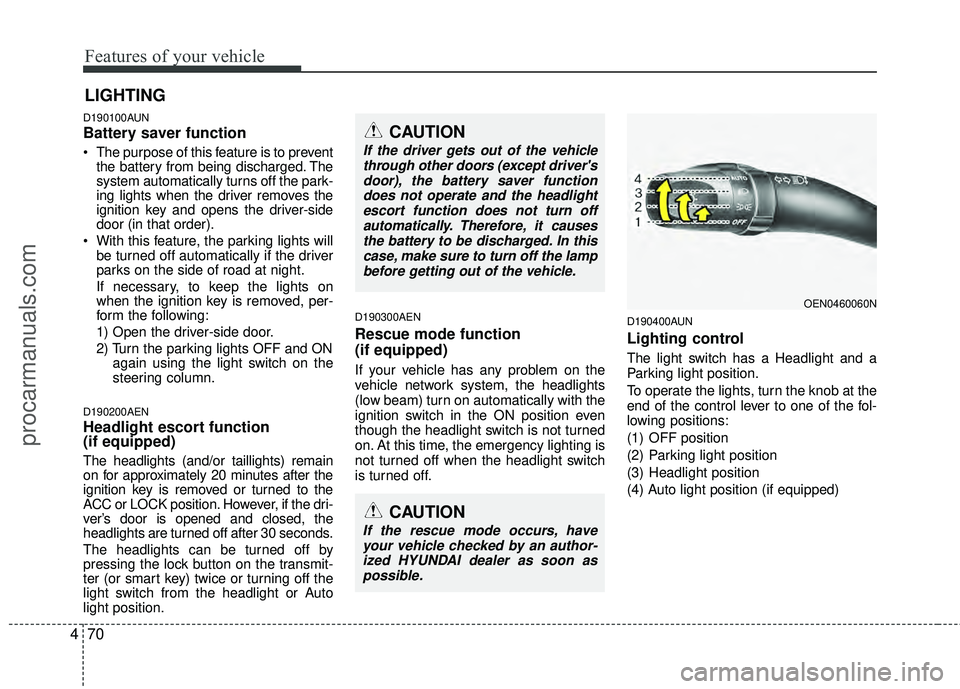
The light switch has a Headlight and a
Parking light position.
To operate the lights, turn the knob at the
end of the control lever to one of the fol-
lowing positions:
(1) OFF position
(2) Parking light position
(3) Headlight position
(4) Auto light position (if equipped)
LIGHTING
CAUTION
If the rescue mode occurs, have
your vehicle checked by an author-ized HYUNDAI dealer as soon aspossible.
OEN0460060N
CAUTION
If the driver gets out of the vehiclethrough other doors (except driver'sdoor), the battery saver functiondoes not operate and the headlightescort function does not turn off automatically. Therefore, it causesthe battery to be discharged. In thiscase, make sure to turn off the lampbefore getting out of the vehicle.
procarmanuals.com
Page 156 of 429
Features of your vehicle
72
4
D190500AUN
High beam operation
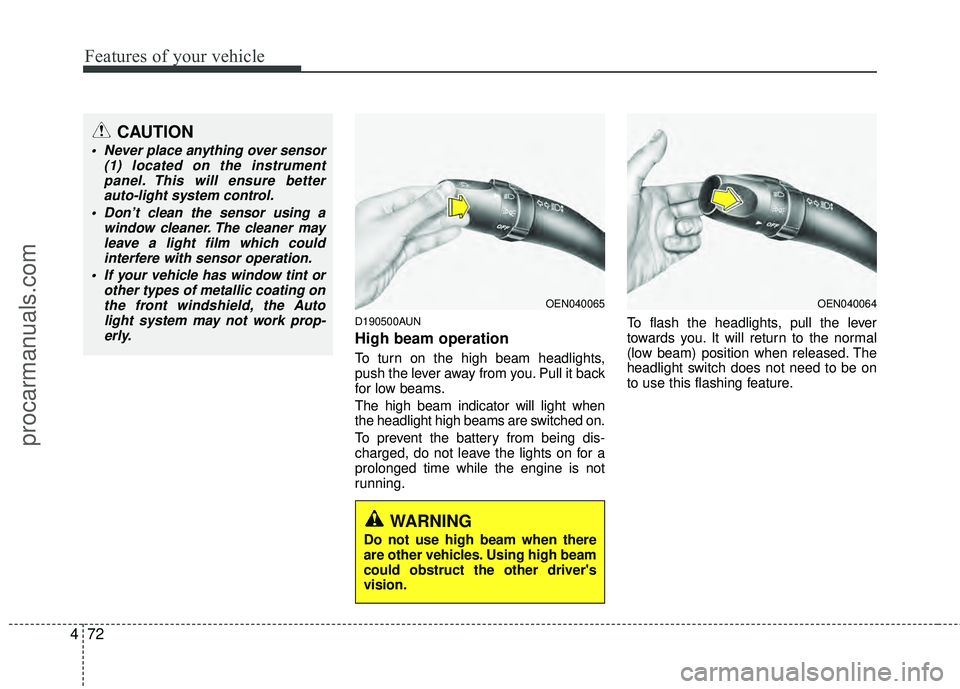
To turn on the high beam headlights,
push the lever away from you. Pull it back
for low beams.
The high beam indicator will light when
the headlight high beams are switched on.
To prevent the battery from being dis-
charged, do not leave the lights on for a
prolonged time while the engine is not
running. To flash the headlights, pull the lever
towards you. It will return to the normal
(low beam) position when released. The
headlight switch does not need to be on
to use this flashing feature.
CAUTION
Never place anything over sensor
(1) located on the instrumentpanel. This will ensure betterauto-light system control.
Don’t clean the sensor using a window cleaner. The cleaner mayleave a light film which could interfere with sensor operation.
If your vehicle has window tint or other types of metallic coating onthe front windshield, the Autolight system may not work prop-erly.
OEN040065OEN040064
WARNING
Do not use high beam when there
are other vehicles. Using high beam
could obstruct the other driver's
vision.
procarmanuals.com
Page 162 of 429
Features of your vehicle
78
4
D200300AEN-EE
Rear window wiper and washer
switch (if equipped)
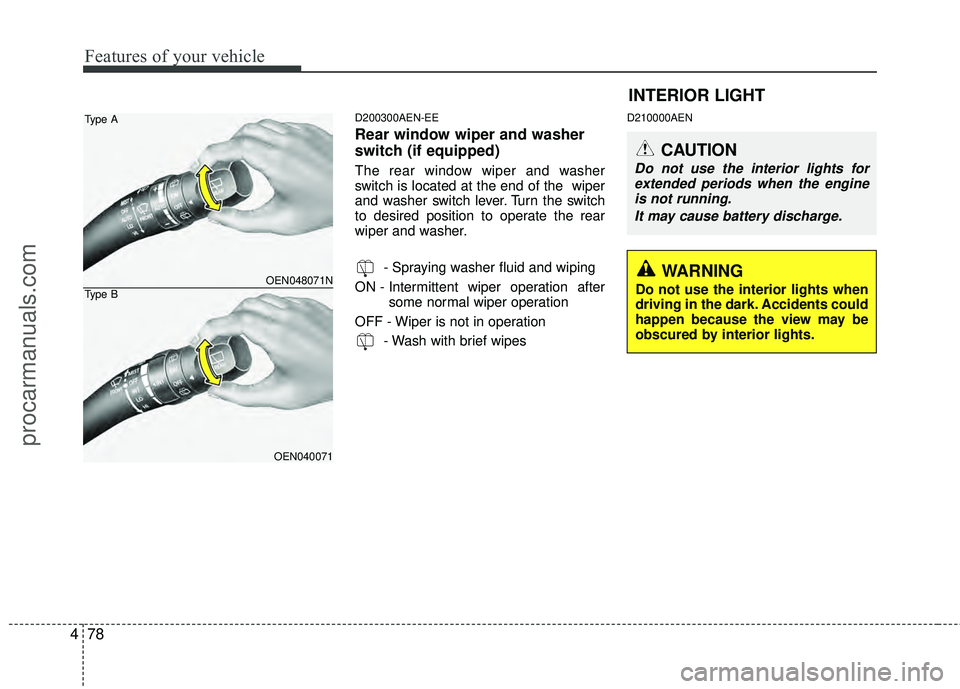
The rear window wiper and washer
switch is located at the end of the wiper
and washer switch lever. Turn the switch
to desired position to operate the rear
wiper and washer.
- Spraying washer fluid and wiping
ON - Intermittent wiper operation after some normal wiper operation
OFF - Wiper is not in operation - Wash with brief wipes
D210000AEN
INTERIOR LIGHT
CAUTION
Do not use the interior lights forextended periods when the engineis not running.
It may cause battery discharge.
OEN048071N
OEN040071
Type A
Type B
WARNING
Do not use the interior lights when
driving in the dark. Accidents could
happen because the view may be
obscured by interior lights.
procarmanuals.com
Page 184 of 429
Features of your vehicle
100
4
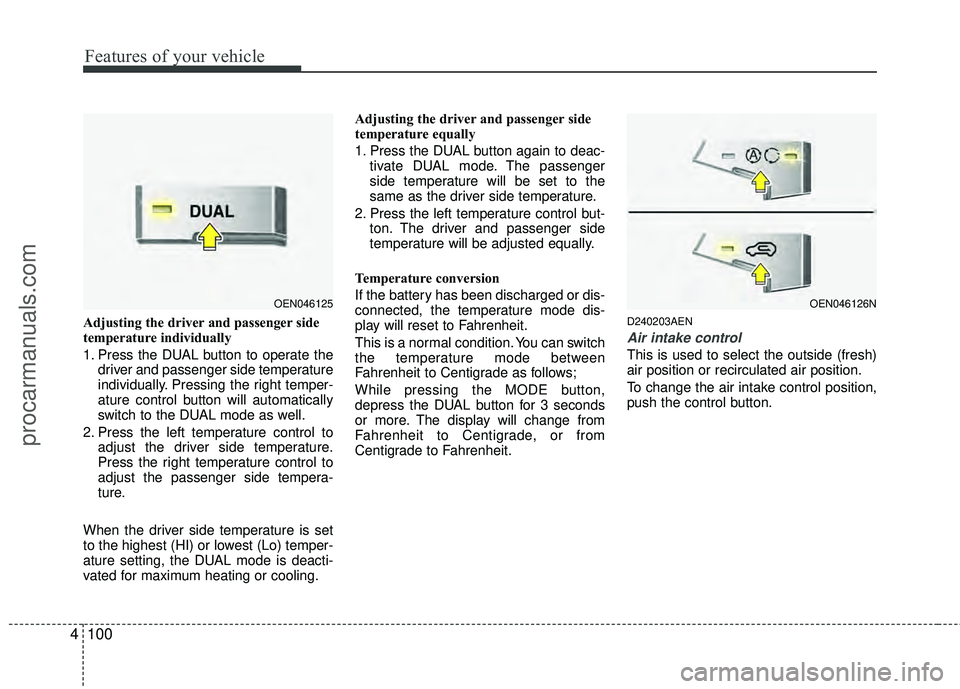
Adjusting the driver and passenger side
temperature individually
1. Press the DUAL button to operate the
driver and passenger side temperature
individually. Pressing the right temper-
ature control button will automatically
switch to the DUAL mode as well.
2. Press the left temperature control to adjust the driver side temperature.
Press the right temperature control to
adjust the passenger side tempera-
ture.
When the driver side temperature is set
to the highest (HI) or lowest (Lo) temper-
ature setting, the DUAL mode is deacti-
vated for maximum heating or cooling. Adjusting the driver and passenger side
temperature equally
1. Press the DUAL button again to deac-
tivate DUAL mode. The passenger
side temperature will be set to the
same as the driver side temperature.
2. Press the left temperature control but- ton. The driver and passenger side
temperature will be adjusted equally.
Temperature conversion
If the battery has been discharged or dis-
connected, the temperature mode dis-
play will reset to Fahrenheit.
This is a normal condition. You can switch
the temperature mode between
Fahrenheit to Centigrade as follows;
While pressing the MODE button,
depress the DUAL button for 3 seconds
or more. The display will change from
Fahrenheit to Centigrade, or from
Centigrade to Fahrenheit.D240203AEN
Air intake control
This is used to select the outside (fresh)
air position or recirculated air position.
To change the air intake control position,
push the control button.
OEN046125OEN046126N
procarmanuals.com
Page 192 of 429
Features of your vehicle
108
4
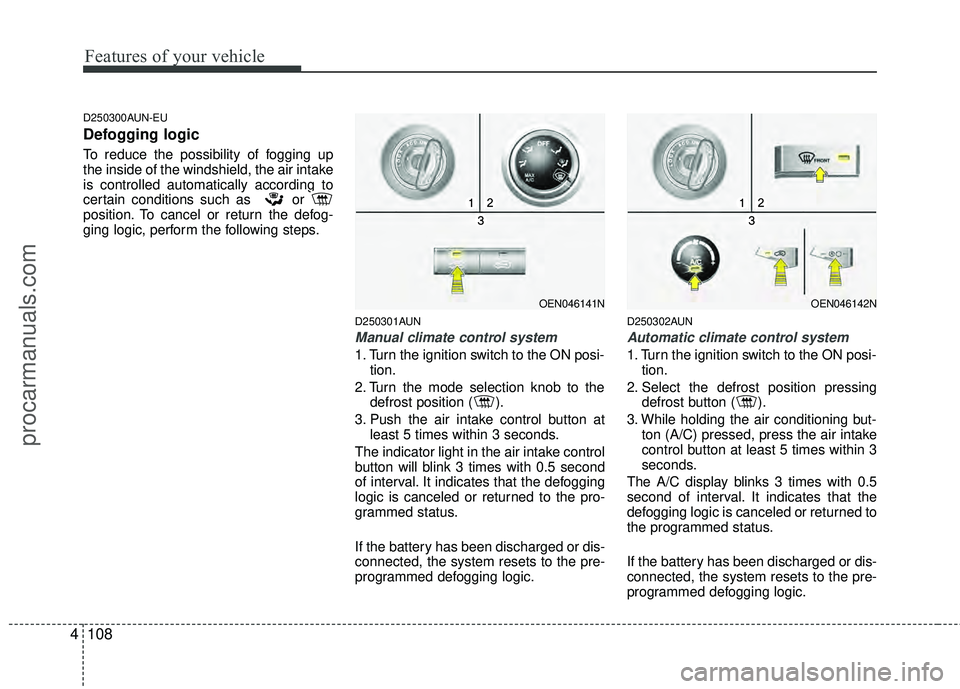
D250300AUN-EU
Defogging logic
To reduce the possibility of fogging up
the inside of the windshield, the air intake
is controlled automatically according to
certain conditions such as or
position. To cancel or return the defog-
ging logic, perform the following steps.
D250301AUN
Manual climate control system
1. Turn the ignition switch to the ON posi-
tion.
2. Turn the mode selection knob to the defrost position ( ).
3. Push the air intake control button at least 5 times within 3 seconds.
The indicator light in the air intake control
button will blink 3 times with 0.5 second
of interval. It indicates that the defogging
logic is canceled or returned to the pro-
grammed status.
If the battery has been discharged or dis-
connected, the system resets to the pre-
programmed defogging logic.
D250302AUN
Automatic climate control system
1. Turn the ignition switch to the ON posi- tion.
2. Select the defrost position pressing defrost button ( ).
3. While holding the air conditioning but- ton (A/C) pressed, press the air intake
control button at least 5 times within 3
seconds.
The A/C display blinks 3 times with 0.5
second of interval. It indicates that the
defogging logic is canceled or returned to
the programmed status.
If the battery has been discharged or dis-
connected, the system resets to the pre-
programmed defogging logic.
OEN046141NOEN046142N
procarmanuals.com
Page 198 of 429
Features of your vehicle
114
4
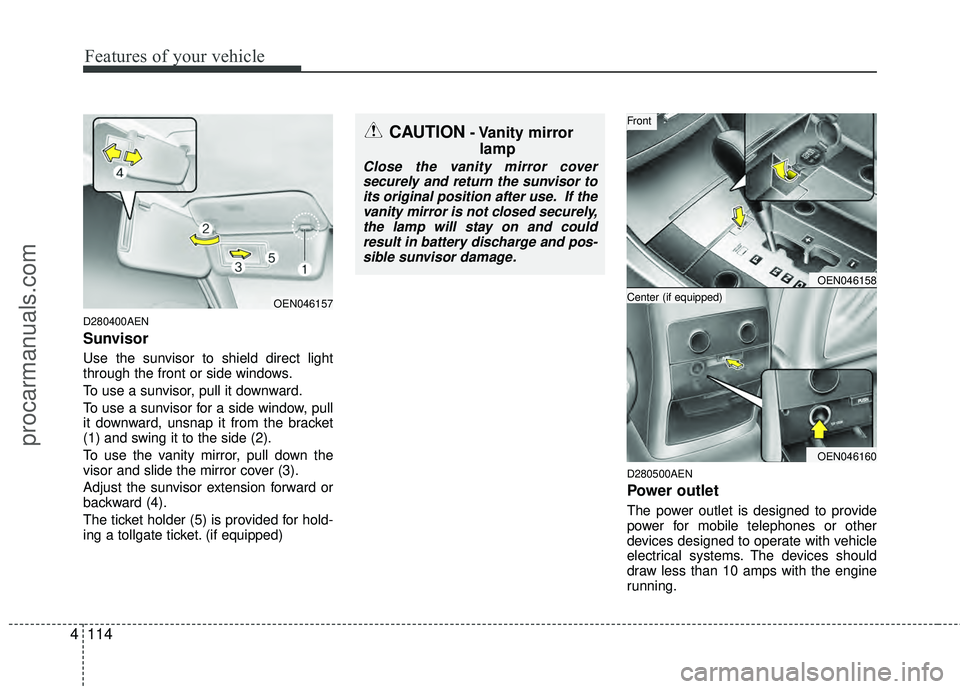
D280400AEN
Sunvisor
Use the sunvisor to shield direct light
through the front or side windows.
To use a sunvisor, pull it downward.
To use a sunvisor for a side window, pull
it downward, unsnap it from the bracket
(1) and swing it to the side (2).
To use the vanity mirror, pull down the
visor and slide the mirror cover (3).
Adjust the sunvisor extension forward or
backward (4).
The ticket holder (5) is provided for hold-
ing a tollgate ticket. (if equipped)
D280500AEN
Power outlet
The power outlet is designed to provide
power for mobile telephones or other
devices designed to operate with vehicle
electrical systems. The devices should
draw less than 10 amps with the engine
running.
OEN046157
CAUTION- Vanity mirror
lamp
Close the vanity mirror cover
securely and return the sunvisor toits original position after use. If thevanity mirror is not closed securely,the lamp will stay on and could result in battery discharge and pos-sible sunvisor damage.
OEN046158
OEN046160
Center (if equipped)
Front
procarmanuals.com