reset HYUNDAI VERACRUZ 2012 User Guide
[x] Cancel search | Manufacturer: HYUNDAI, Model Year: 2012, Model line: VERACRUZ, Model: HYUNDAI VERACRUZ 2012Pages: 429, PDF Size: 7.11 MB
Page 200 of 429
Features of your vehicle
116
4
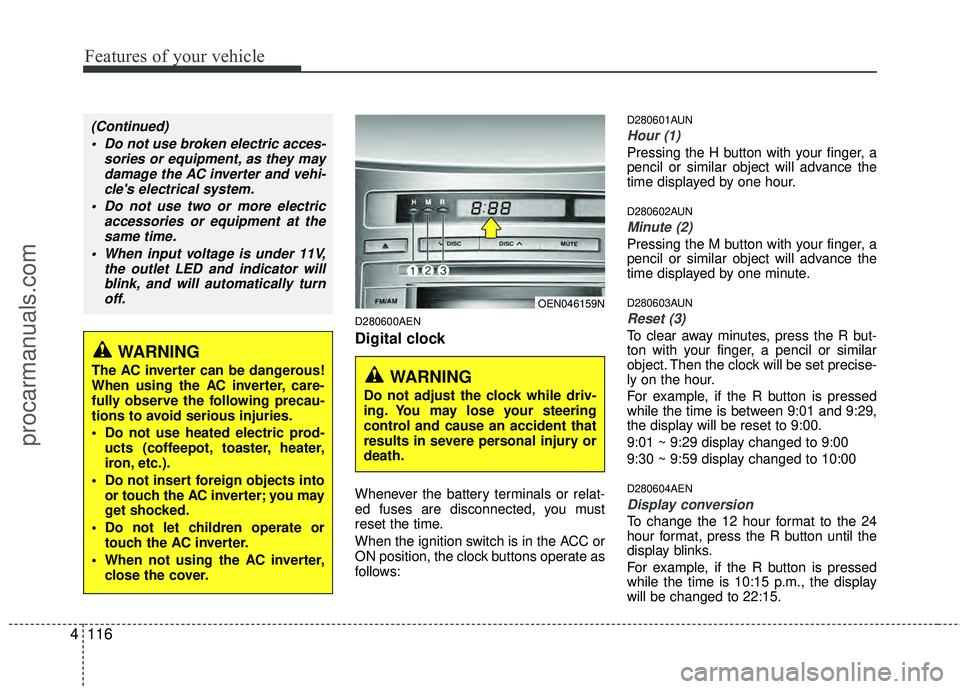
D280600AEN
Digital clock
Whenever the battery terminals or relat-
ed fuses are disconnected, you must
reset the time.
When the ignition switch is in the ACC or
ON position, the clock buttons operate as
follows:
D280601AUN
Hour (1)
Pressing the H button with your finger, a
pencil or similar object will advance the
time displayed by one hour.
D280602AUN
Minute (2)
Pressing the M button with your finger, a
pencil or similar object will advance the
time displayed by one minute.
D280603AUN
Reset (3)
To clear away minutes, press the R but-
ton with your finger, a pencil or similar
object. Then the clock will be set precise-
ly on the hour.
For example, if the R button is pressed
while the time is between 9:01 and 9:29,
the display will be reset to 9:00.
9:01 ~ 9:29 display changed to 9:00
9:30 ~ 9:59 display changed to 10:00
D280604AEN
Display conversion
To change the 12 hour format to the 24
hour format, press the R button until the
display blinks.
For example, if the R button is pressed
while the time is 10:15 p.m., the display
will be changed to 22:15.
WARNING
The AC inverter can be dangerous!
When using the AC inverter, care-
fully observe the following precau-
tions to avoid serious injuries.
Do not use heated electric prod-
ucts (coffeepot, toaster, heater,
iron, etc.).
Do not insert foreign objects into or touch the AC inverter; you may
get shocked.
Do not let children operate or touch the AC inverter.
When not using the AC inverter, close the cover.
(Continued)
Do not use broken electric acces- sories or equipment, as they maydamage the AC inverter and vehi-cle's electrical system.
Do not use two or more electric accessories or equipment at thesame time.
When input voltage is under 11V, the outlet LED and indicator willblink, and will automatically turnoff.
OEN046159N
WARNING
Do not adjust the clock while driv-
ing. You may lose your steering
control and cause an accident that
results in severe personal injury or
death.
procarmanuals.com
Page 201 of 429
4117
Features of your vehicle
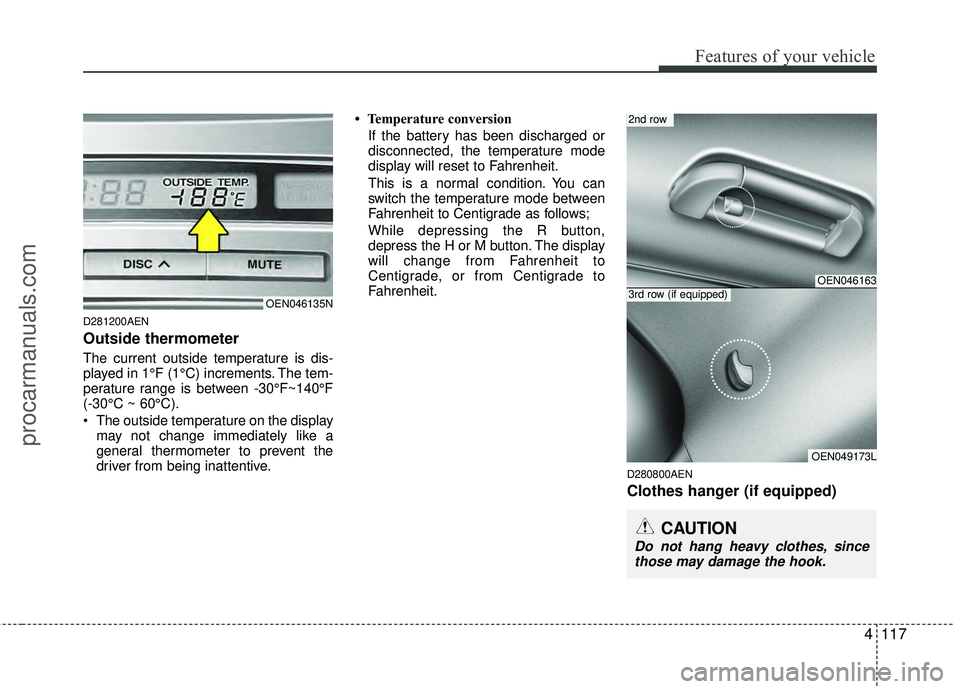
D281200AEN
Outside thermometer
The current outside temperature is dis-
played in 1°F (1°C) increments. The tem-
perature range is between -30°F~140°F
(-30°C ~ 60°C).
The outside temperature on the displaymay not change immediately like a
general thermometer to prevent the
driver from being inattentive. • Temperature conversion
If the battery has been discharged or
disconnected, the temperature mode
display will reset to Fahrenheit.
This is a normal condition. You can
switch the temperature mode between
Fahrenheit to Centigrade as follows;
While depressing the R button,
depress the H or M button. The display
will change from Fahrenheit to
Centigrade, or from Centigrade to
Fahrenheit.
D280800AEN
Clothes hanger (if equipped)
OEN046135N
CAUTION
Do not hang heavy clothes, sincethose may damage the hook.
OEN046163
OEN049173L
2nd row
3rd row (if equipped)
procarmanuals.com
Page 205 of 429
4121
Features of your vehicle
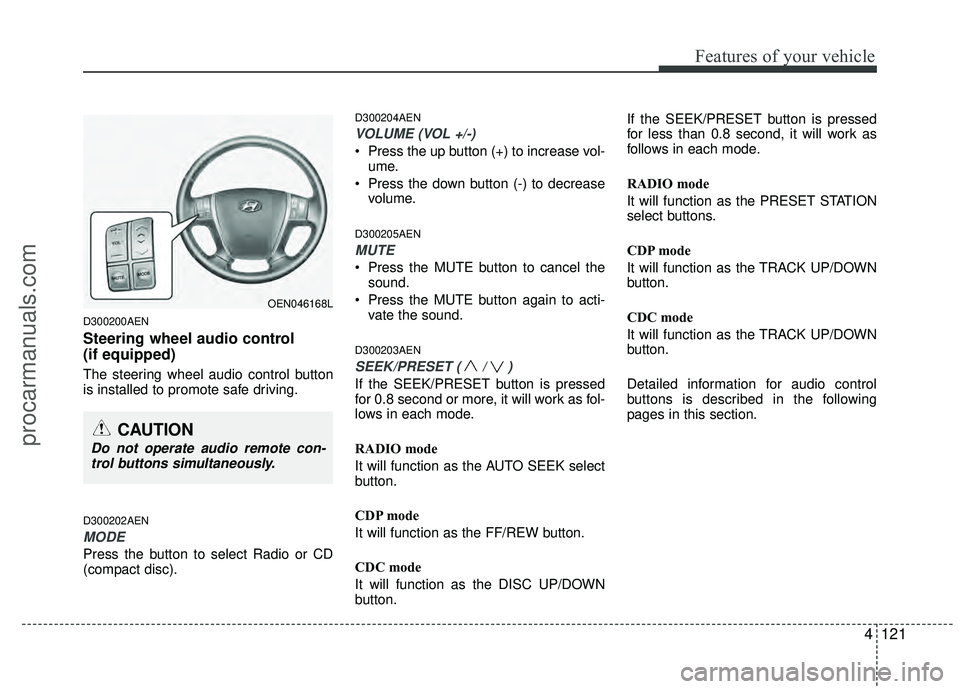
D300200AEN
Steering wheel audio control
(if equipped)
The steering wheel audio control button
is installed to promote safe driving.
D300202AEN
MODE
Press the button to select Radio or CD
(compact disc).
D300204AEN
VOLUME (VOL +/-)
• Press the up button (+) to increase vol-ume.
Press the down button (-) to decrease volume.
D300205AEN
MUTE
Press the MUTE button to cancel thesound.
Press the MUTE button again to acti- vate the sound.
D300203AEN
SEEK/PRESET ( / )
If the SEEK/PRESET button is pressed
for 0.8 second or more, it will work as fol-
lows in each mode.
RADIO mode
It will function as the AUTO SEEK select
button.
CDP mode
It will function as the FF/REW button.
CDC mode
It will function as the DISC UP/DOWN
button. If the SEEK/PRESET button is pressed
for less than 0.8 second, it will work as
follows in each mode.
RADIO mode
It will function as the PRESET STATION
select buttons.
CDP mode
It will function as the TRACK UP/DOWN
button.
CDC mode
It will function as the TRACK UP/DOWN
button.
Detailed information for audio control
buttons is described in the following
pages in this section.
OEN046168L
CAUTION
Do not operate audio remote con-
trol buttons simultaneously.
procarmanuals.com
Page 210 of 429
Features of your vehicle
126
4
A-200ENL
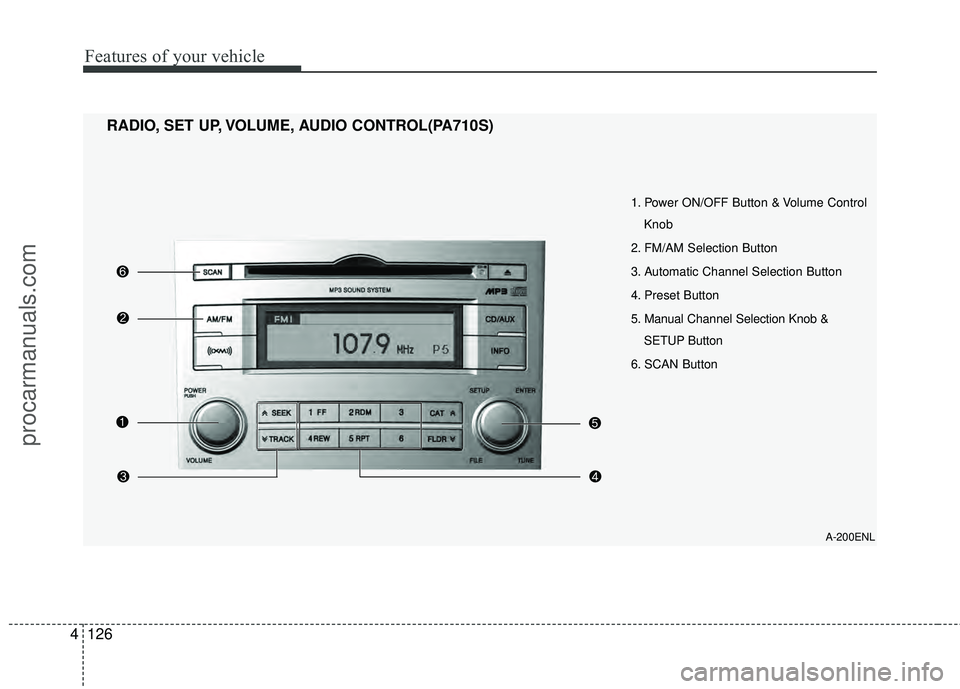
1. Power ON/OFF Button & Volume Control
Knob
2. FM/AM Selection Button
3. Automatic Channel Selection Button
4. Preset Button
5. Manual Channel Selection Knob & SETUP Button
6. SCAN Button
RADIO, SET UP, VOLUME, AUDIO CONTROL(PA710S)
procarmanuals.com
Page 211 of 429
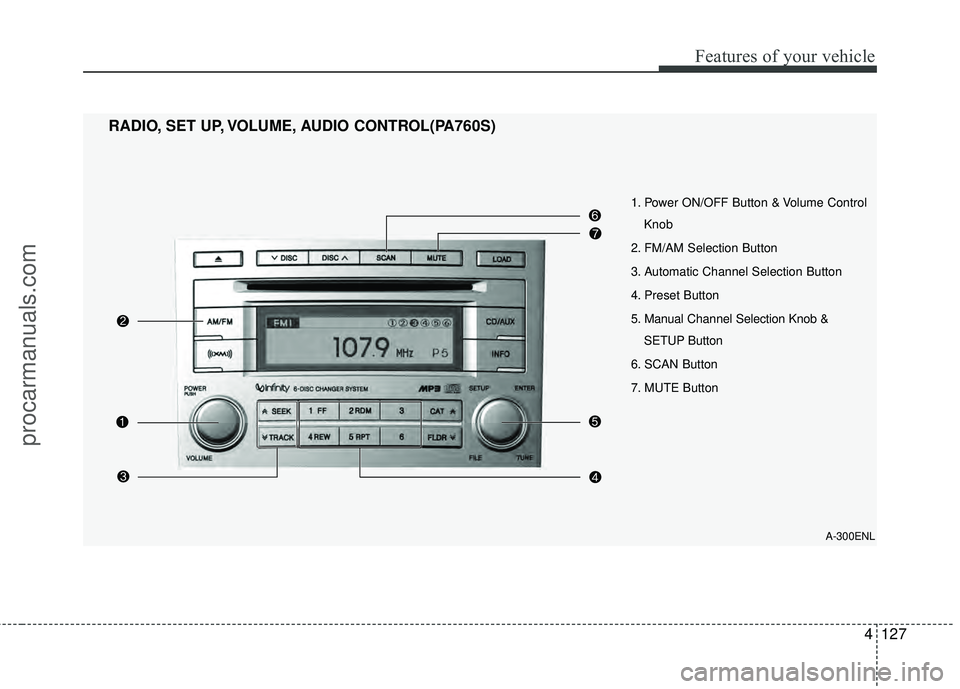
4127
Features of your vehicle
1. Power ON/OFF Button & Volume ControlKnob
2. FM/AM Selection Button
3. Automatic Channel Selection Button
4. Preset Button
5. Manual Channel Selection Knob & SETUP Button
6. SCAN Button
7. MUTE Button
RADIO, SET UP, VOLUME, AUDIO CONTROL(PA760S)
A-300ENL
procarmanuals.com
Page 212 of 429
Features of your vehicle
128
4
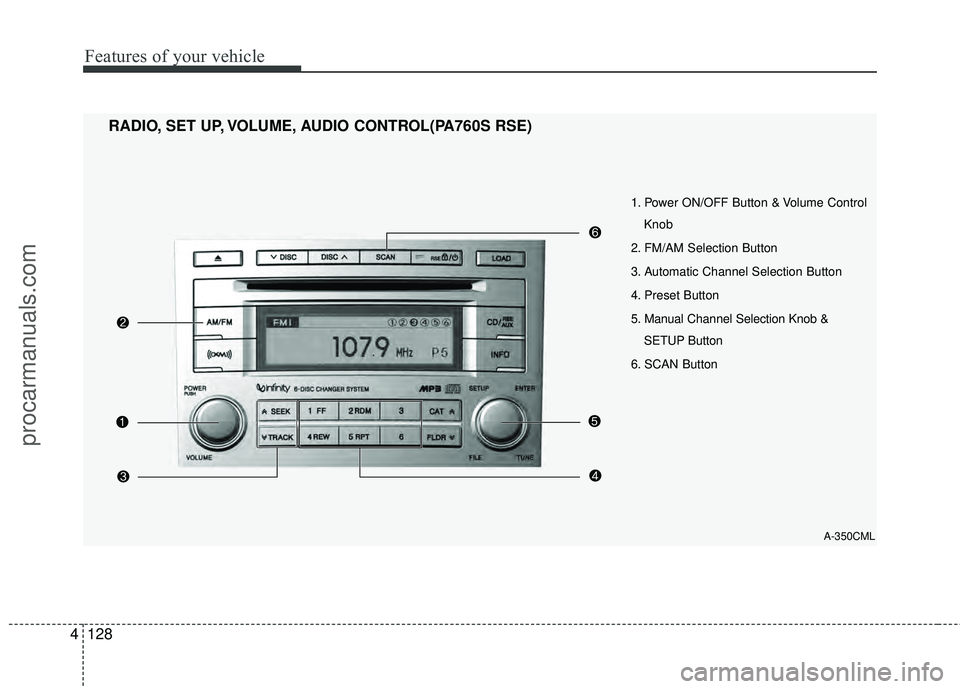
1. Power ON/OFF Button & Volume Control
Knob
2. FM/AM Selection Button
3. Automatic Channel Selection Button
4. Preset Button
5. Manual Channel Selection Knob & SETUP Button
6. SCAN Button
RADIO, SET UP, VOLUME, AUDIO CONTROL(PA760S RSE)
A-350CML
procarmanuals.com
Page 213 of 429
4129
Features of your vehicle
1. Power ON/OFF Button &Volume Control Knob
Turns the set on/off when the ignition
switch is on ACC or ON. If the button is
turned to the right, it increases the vol-
ume and left, it decreases the volume.
2. FM/AM Selection Button
Turns to FM or AM mode, and toggles in
the order of FM1
➟ FM2 ➟ AM ➟ FM1...
when the button is pressed each time.
3. Automatic Channel Selection Button
] button is pressed,
it increases the band frequency to auto-
matically select a channel.
Stops at the previous frequency if no
channel is found.
] button is press- ed, it reduces the band frequency to
automatically select a channel.
Stops at the previous frequency if no
channel is found.
4. Preset Button
Push [1]~[6] buttons less than 0.8 sec-
ond to play the channel saved in each
button. Push Preset button for 0.8 sec-
ond or longer to save current channel to
the respective button with a beep.
5. Manual Channel Selection Knob & SETUP Button
Manual Channel Selection knob
Turn this control while listening to a radio
channel to manually adjust frequency.
Turn clockwise to increase frequency and
counterclockwise to reduce frequency.
SETUP Button
Press this button to turn to the XM
option, SCROLL and adjustment mode. If
no action is taken for 5 seconds after
pressing the button, it will return to the
play mode.(After entering SETUP mode,
move between items using the left, right
and PUSH functions of the [TUNE] but-
ton.)
The setup item changes from SCROLL
➟ XM...
Press this button to turn to the XM option,
SCROLL, SURROUND and adjustment
mode. If no action is taken for 5 seconds
after pressing the button, it will return to
the play mode.(After entering SETUP
mode, move between items using the left,
right and PUSH functions of the [TUNE]
button.)
The setup item changes from SCROLL
➟SURROUND ➟ XM...
Sound Quality Control Knob
Pressing the button changes the TONE
and POSITION mode. The mode select-
ed is shown on the display. After select-
ing each mode, rotate the Audio control
knob clockwise or counterclockwise.
BASS Control
To increase the BASS, rotate the knob
clockwise, while to decrease the BASS,
rotate the knob counterclockwise.
MIDDLE Control
To increase the MIDDLE, rotate the knob
clockwise, while to decrease the MID-
DLE, rotate the knob counterclockwise.
procarmanuals.com
Page 230 of 429
Features of your vehicle
146
4
✽
✽
NOTICE - Using the iPod®
device
• Some iPod®models might not support
the communication protocol and the
files will not be played. (iPod
®models
supported: Mini, 4G, Photo, Nano, 5G)
• The order of search or playback of songs in the iPod
®can be different
from the order searched in the audio
system.
• If the iPod
®crashes due to its own
trouble, reset the iPod®. (Reset: Refer
to iPod®manual)
• An iPod®may not operate normally
on low battery.
CAUTION IN USING THE
iPod®DEVICE
You need the power cable exclu-
sive for an iPod®in order to oper-
ate the iPod®with the buttons on
the audio system. The PC cable provided by Apple may cause amalfunction and should not beused in the vehicle.
When connecting the device with the iPod
®cable, push in the jack
fully.
When adjusting the sound effects of the iPod
®and the audio sys-
tem, the sound effects of both devices may overlap and distortthe quality of the sound.
Deactivate (turn off) the equalizer function of the iPod
®when adjust-
ing the audio system's volume, and turn off the equalizer of theaudio system when using the equalizer of the iPod
®.
(Continued)
(Continued) When the iPod®cable is connect-
ed, the system can be switched to the AUX mode even without theiPod
®device and may cause
noise. Disconnect the iPod®cable
when not using the iPod®device.
When the iPod®is not used with
the audio system, the iPod®cable
should be removed from the iPod®.
procarmanuals.com
Page 231 of 429
4147
Features of your vehicle
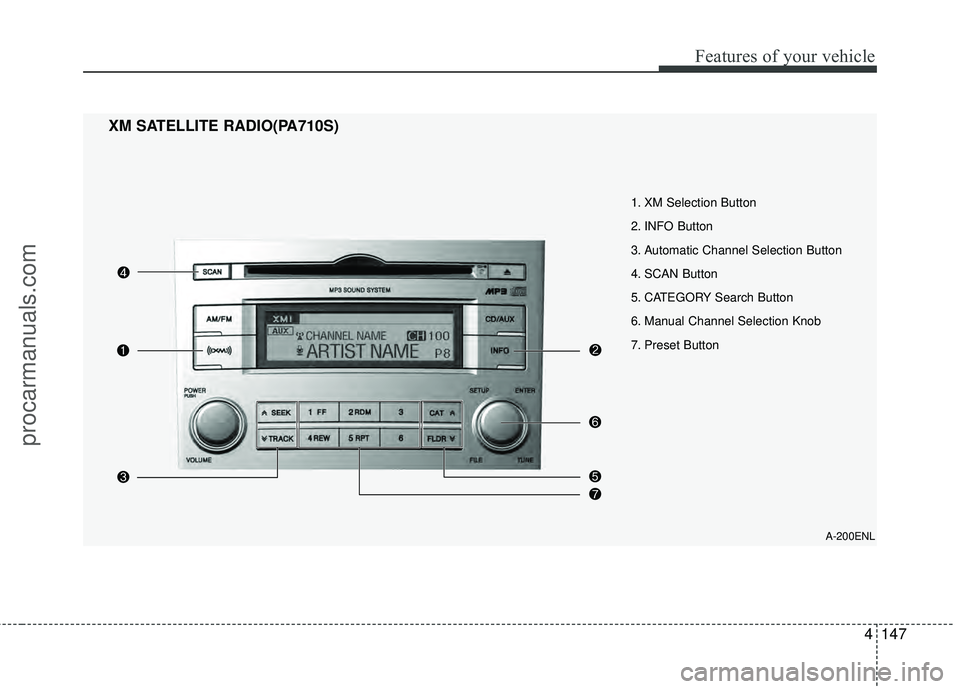
1. XM Selection Button
2. INFO Button
3. Automatic Channel Selection Button
4. SCAN Button
5. CATEGORY Search Button
6. Manual Channel Selection Knob
7. Preset Button
XM SATELLITE RADIO(PA710S)
A-200ENL
procarmanuals.com
Page 232 of 429
Features of your vehicle
148
4
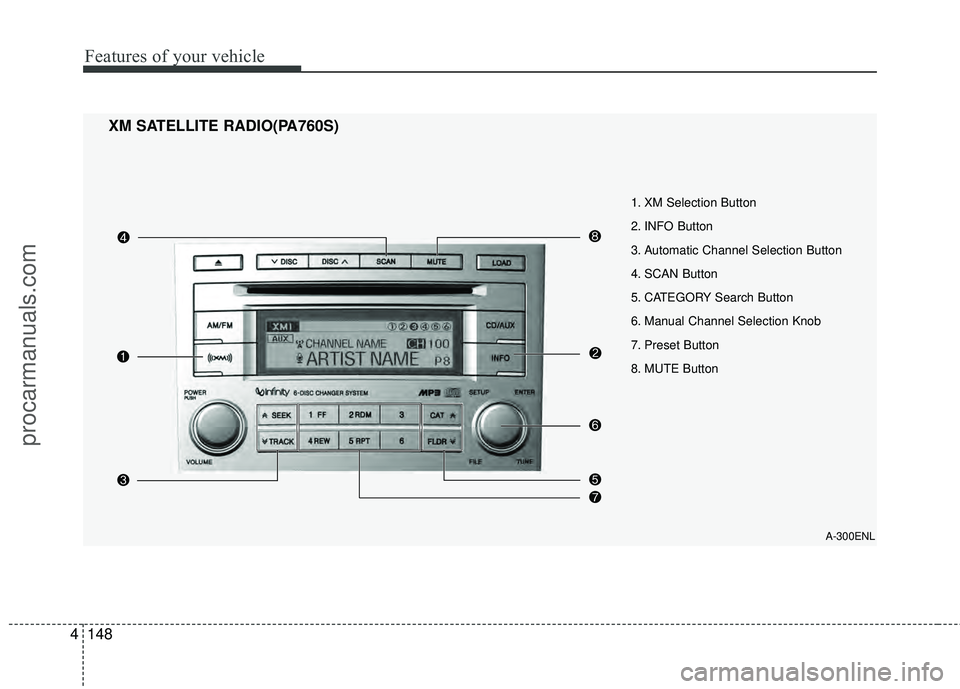
XM SATELLITE RADIO(PA760S)
A-300ENL
1. XM Selection Button
2. INFO Button
3. Automatic Channel Selection Button
4. SCAN Button
5. CATEGORY Search Button
6. Manual Channel Selection Knob
7. Preset Button
8. MUTE Button
procarmanuals.com