audio HYUNDAI VERACRUZ 2012 Owner's Guide
[x] Cancel search | Manufacturer: HYUNDAI, Model Year: 2012, Model line: VERACRUZ, Model: HYUNDAI VERACRUZ 2012Pages: 429, PDF Size: 7.11 MB
Page 258 of 429
Features of your vehicle
174
4
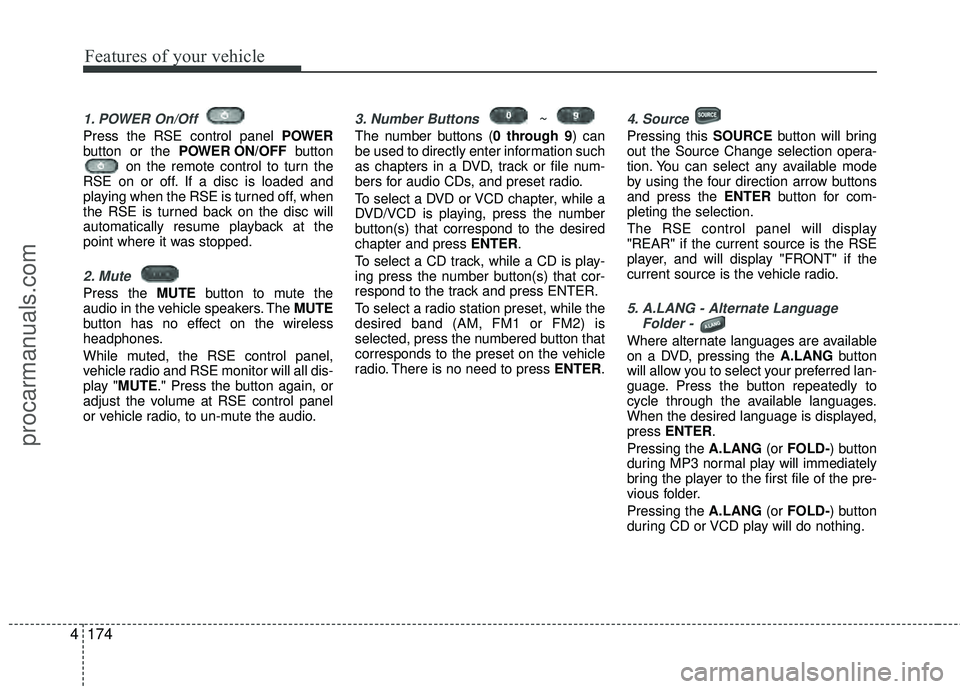
1. POWER On/Off
Press the RSE control panel POWER
button or the POWER ON/OFF button
on the remote control to turn the
RSE on or off. If a disc is loaded and
playing when the RSE is turned off, when
the RSE is turned back on the disc will
automatically resume playback at the
point where it was stopped.
2. Mute
Press the MUTE button to mute the
audio in the vehicle speakers. The MUTE
button has no effect on the wireless
headphones.
While muted, the RSE control panel,
vehicle radio and RSE monitor will all dis-
play "MUTE." Press the button again, or
adjust the volume at RSE control panel
or vehicle radio, to un-mute the audio.
3. Number Buttons ~
The number buttons ( 0 through 9) can
be used to directly enter information such
as chapters in a DVD, track or file num-
bers for audio CDs, and preset radio.
To select a DVD or VCD chapter, while a
DVD/VCD is playing, press the number
button(s) that correspond to the desired
chapter and press ENTER.
To select a CD track, while a CD is play-
ing press the number button(s) that cor-
respond to the track and press ENTER.
To select a radio station preset, while the
desired band (AM, FM1 or FM2) is
selected, press the numbered button that
corresponds to the preset on the vehicle
radio. There is no need to press ENTER.
4. Source
Pressing this SOURCE button will bring
out the Source Change selection opera-
tion. You can select any available mode
by using the four direction arrow buttons
and press the ENTER button for com-
pleting the selection.
The RSE control panel will display
"REAR" if the current source is the RSE
player, and will display "FRONT" if the
current source is the vehicle radio.
5. A.LANG - Alternate Language Folder -
Where alternate languages are available
on a DVD, pressing the A.LANG button
will allow you to select your preferred lan-
guage. Press the button repeatedly to
cycle through the available languages.
When the desired language is displayed,
press ENTER.
Pressing the A.LANG (or FOLD-) button
during MP3 normal play will immediately
bring the player to the first file of the pre-
vious folder.
Pressing the A.LANG (or FOLD-) button
during CD or VCD play will do nothing.
procarmanuals.com
Page 259 of 429
4175
Features of your vehicle
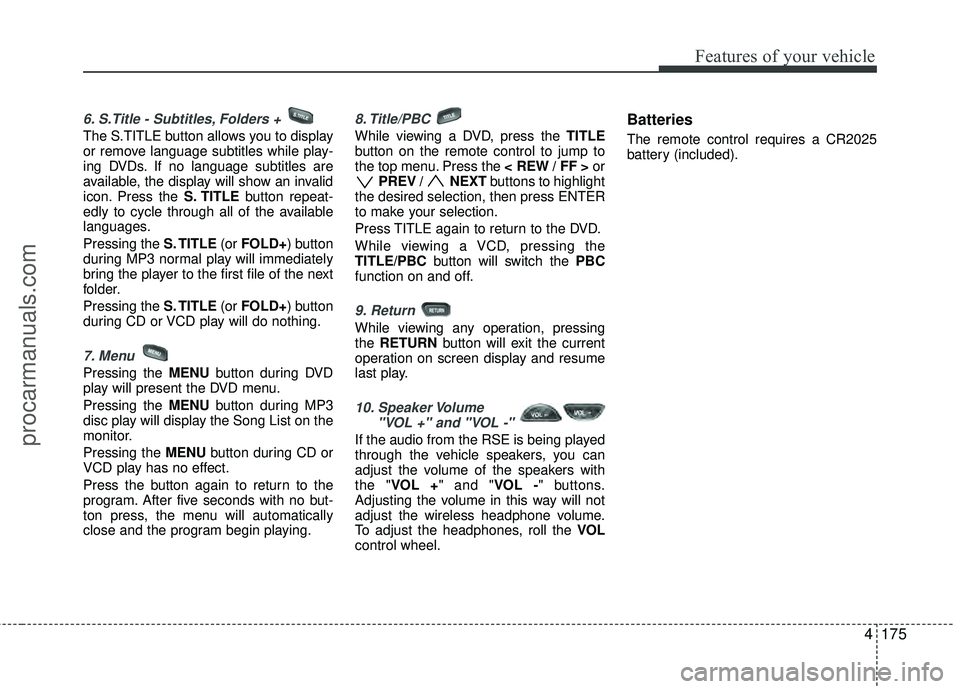
6. S.Title - Subtitles, Folders +
The S.TITLE button allows you to display
or remove language subtitles while play-
ing DVDs. If no language subtitles are
available, the display will show an invalid
icon. Press the S. TITLEbutton repeat-
edly to cycle through all of the available
languages.
Pressing the S. TITLE (or FOLD+) button
during MP3 normal play will immediately
bring the player to the first file of the next
folder.
Pressing the S. TITLE (or FOLD+) button
during CD or VCD play will do nothing.
7. Menu
Pressing the MENU button during DVD
play will present the DVD menu.
Pressing the MENU button during MP3
disc play will display the Song List on the
monitor.
Pressing the MENU button during CD or
VCD play has no effect.
Press the button again to return to the
program. After five seconds with no but-
ton press, the menu will automatically
close and the program begin playing.
8. Title/PBC
While viewing a DVD, press the TITLE
button on the remote control to jump to
the top menu. Press the < REW / FF > or
PREV / NEXT buttons to highlight
the desired selection, then press ENTER
to make your selection.
Press TITLE again to return to the DVD.
While viewing a VCD, pressing the
TITLE/PBC button will switch the PBC
function on and off.
9. Return
While viewing any operation, pressing
the RETURN button will exit the current
operation on screen display and resume
last play.
10. Speaker Volume "VOL +" and "VOL -"
If the audio from the RSE is being played
through the vehicle speakers, you can
adjust the volume of the speakers with
the "VOL +" and "VOL -" buttons.
Adjusting the volume in this way will not
adjust the wireless headphone volume.
To adjust the headphones, roll the VOL
control wheel.
Batteries
The remote control requires a CR2025
battery (included).
procarmanuals.com
Page 260 of 429
Features of your vehicle
176
4
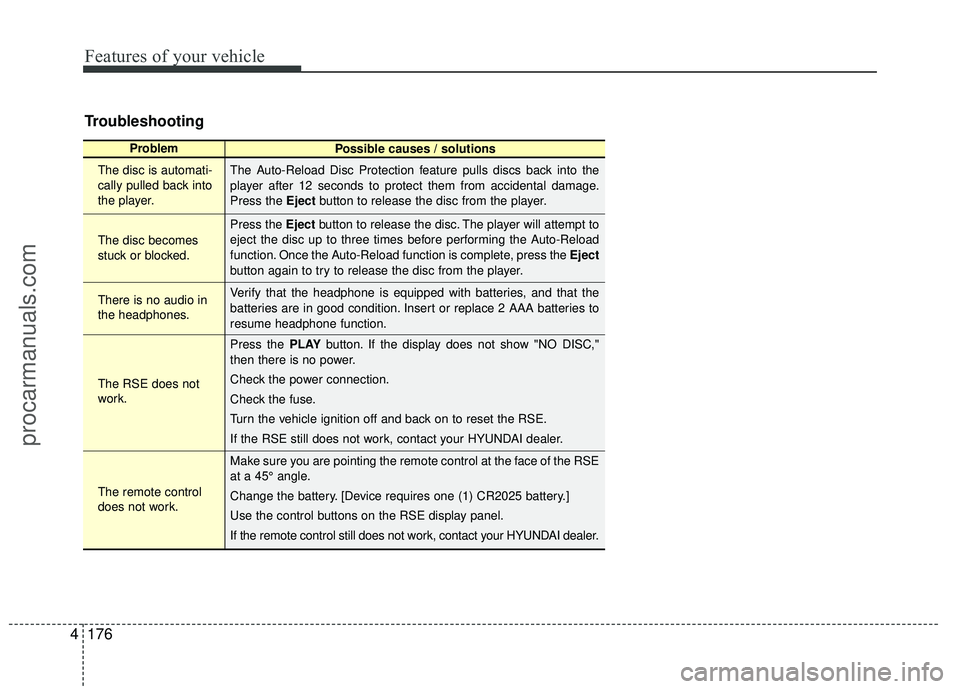
Troubleshooting
Problem
Possible causes / solutions
The disc is automati-
cally pulled back into
the player.
The disc becomes
stuck or blocked.
There is no audio in
the headphones.
The RSE does not
work.
The remote control
does not work. The Auto-Reload Disc Protection feature pulls discs back into the
player after 12 seconds to protect them from accidental damage.
Press the Eject
button to release the disc from the player.
Press the Eject button to release the disc. The player will attempt to
eject the disc up to three times before performing the Auto-Reload
function. Once the Auto-Reload function is complete, press the Eject
button again to try to release the disc from the player.
Verify that the headphone is equipped with batteries, and that the
batteries are in good condition. Insert or replace 2 AAA batteries to
resume headphone function.
Press the PLAY button. If the display does not show "NO DISC,"
then there is no power.
Check the power connection.
Check the fuse.
Turn the vehicle ignition off and back on to reset the RSE.
If the RSE still does not work, contact your HYUNDAI dealer.
Make sure you are pointing the remote control at the face of the RSE
at a 45° angle.
Change the battery. [Device requires one (1) CR2025 battery.]
Use the control buttons on the RSE display panel.
If the remote control still does not work, contact your HYUNDAI dealer.
procarmanuals.com
Page 264 of 429
Driving your vehicle
45
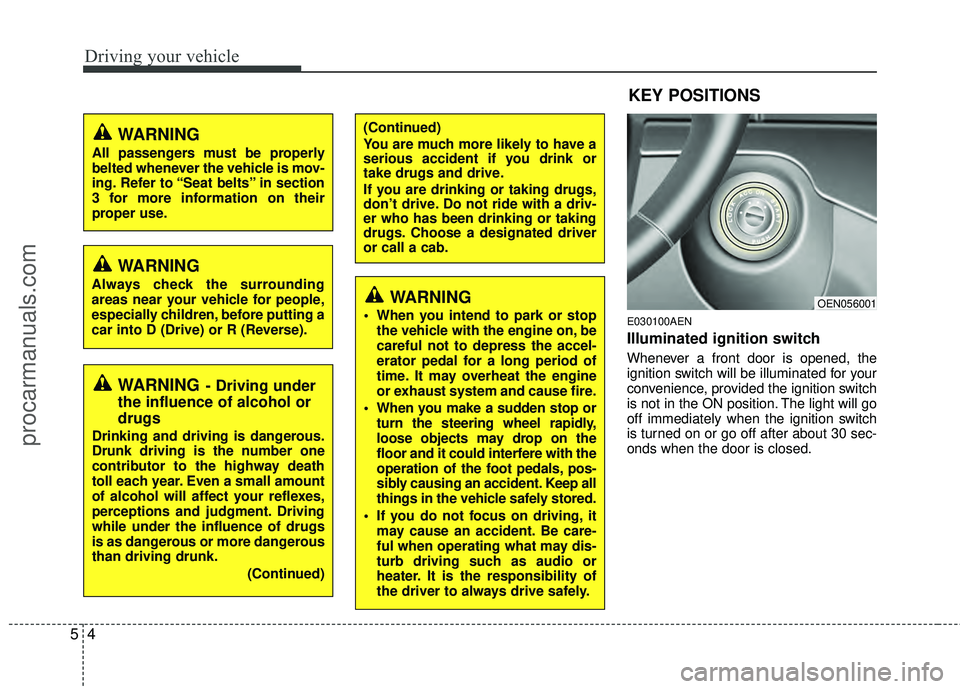
E030100AEN
Illuminated ignition switch
Whenever a front door is opened, the
ignition switch will be illuminated for your
convenience, provided the ignition switch
is not in the ON position. The light will go
off immediately when the ignition switch
is turned on or go off after about 30 sec-
onds when the door is closed.
OEN056001
WARNING- Driving under
the influence of alcohol or
drugs
Drinking and driving is dangerous.
Drunk driving is the number one
contributor to the highway death
toll each year. Even a small amount
of alcohol will affect your reflexes,
perceptions and judgment. Driving
while under the influence of drugs
is as dangerous or more dangerous
than driving drunk.
(Continued)
(Continued)
You are much more likely to have a
serious accident if you drink or
take drugs and drive.
If you are drinking or taking drugs,
don’t drive. Do not ride with a driv-
er who has been drinking or taking
drugs. Choose a designated driver
or call a cab.
KEY POSITIONS
WARNING
When you intend to park or stopthe vehicle with the engine on, be
careful not to depress the accel-
erator pedal for a long period of
time. It may overheat the engine
or exhaust system and cause fire.
When you make a sudden stop or turn the steering wheel rapidly,
loose objects may drop on the
floor and it could interfere with the
operation of the foot pedals, pos-
sibly causing an accident. Keep all
things in the vehicle safely stored.
If you do not focus on driving, it may cause an accident. Be care-
ful when operating what may dis-
turb driving such as audio or
heater. It is the responsibility of
the driver to always drive safely.
WARNING
All passengers must be properly
belted whenever the vehicle is mov-
ing. Refer to “Seat belts” in section
3 for more information on their
proper use.
WARNING
Always check the surrounding
areas near your vehicle for people,
especially children, before putting a
car into D (Drive) or R (Reverse).
procarmanuals.com
Page 372 of 429
729
Maintenance
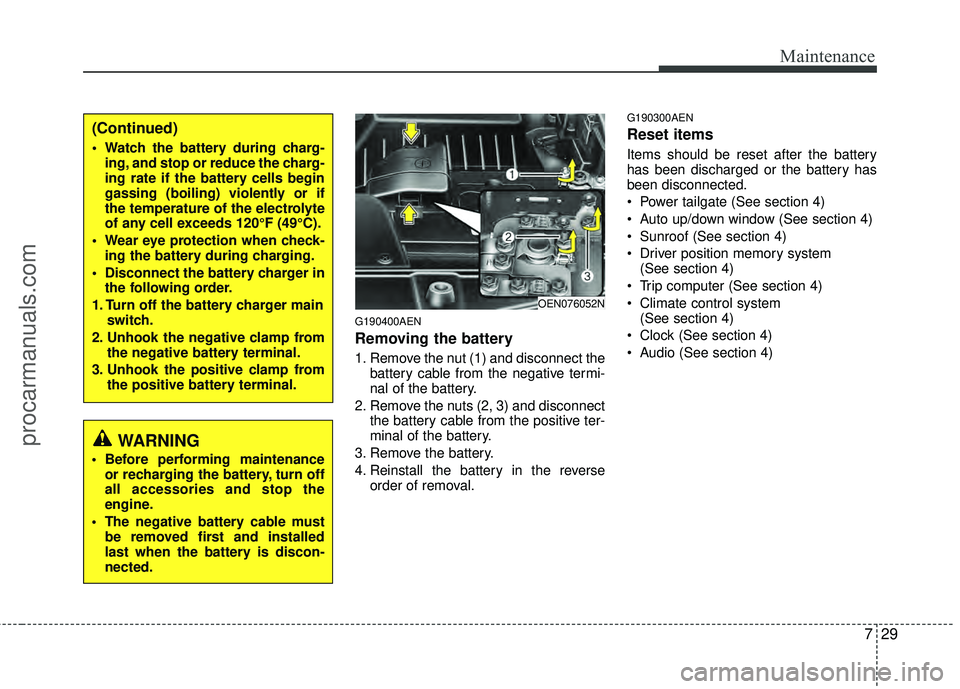
G190400AEN
Removing the battery
1. Remove the nut (1) and disconnect thebattery cable from the negative termi-
nal of the battery.
2. Remove the nuts (2, 3) and disconnect the battery cable from the positive ter-
minal of the battery.
3. Remove the battery.
4. Reinstall the battery in the reverse order of removal.
G190300AEN
Reset items
Items should be reset after the battery
has been discharged or the battery has
been disconnected.
Power tailgate (See section 4)
Auto up/down window (See section 4)
Sunroof (See section 4)
Driver position memory system (See section 4)
Trip computer (See section 4)
Climate control system (See section 4)
Clock (See section 4)
Audio (See section 4)
OEN076052N
(Continued)
Watch the battery during charg- ing, and stop or reduce the charg-
ing rate if the battery cells begin
gassing (boiling) violently or if
the temperature of the electrolyte
of any cell exceeds 120°F (49°C).
Wear eye protection when check- ing the battery during charging.
Disconnect the battery charger in the following order.
1. Turn off the battery charger main switch.
2. Unhook the negative clamp from the negative battery terminal.
3. Unhook the positive clamp from the positive battery terminal.
WARNING
Before performing maintenanceor recharging the battery, turn off
all accessories and stop the
engine.
The negative battery cable must be removed first and installed
last when the battery is discon-
nected.
procarmanuals.com
Page 388 of 429
745
Maintenance
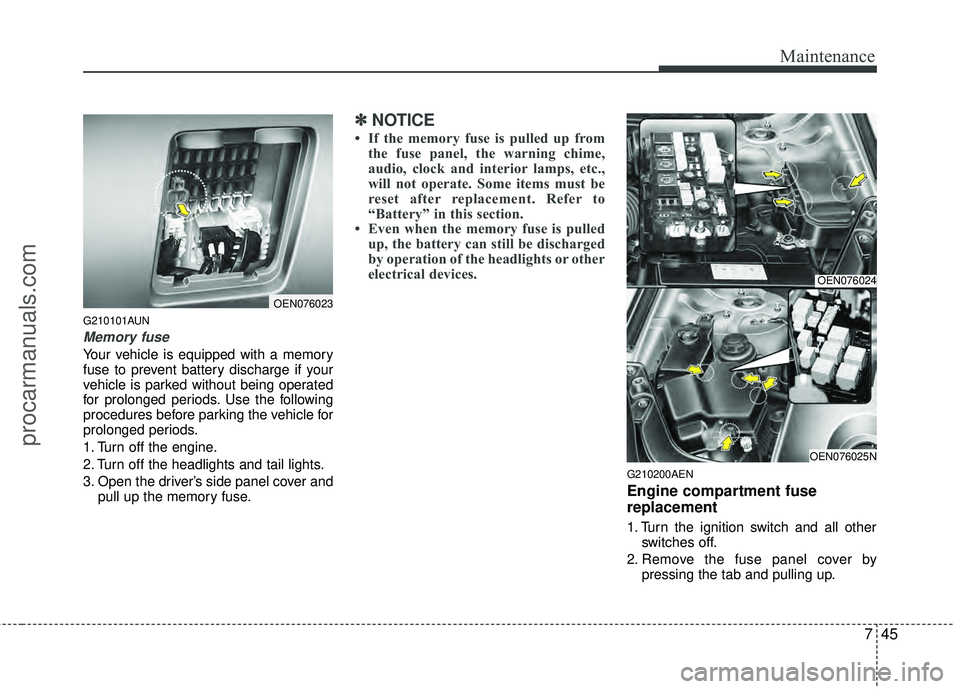
G210101AUN
Memory fuse
Your vehicle is equipped with a memory
fuse to prevent battery discharge if your
vehicle is parked without being operated
for prolonged periods. Use the following
procedures before parking the vehicle for
prolonged periods.
1. Turn off the engine.
2. Turn off the headlights and tail lights.
3. Open the driver’s side panel cover andpull up the memory fuse.
✽ ✽NOTICE
• If the memory fuse is pulled up from
the fuse panel, the warning chime,
audio, clock and interior lamps, etc.,
will not operate. Some items must be
reset after replacement. Refer to
“Battery” in this section.
• Even when the memory fuse is pulled up, the battery can still be discharged
by operation of the headlights or other
electrical devices.
G210200AEN
Engine compartment fuse
replacement
1. Turn the ignition switch and all other
switches off.
2. Remove the fuse panel cover by pressing the tab and pulling up.
OEN076023
OEN076024
OEN076025N
procarmanuals.com
Page 391 of 429
Maintenance
48
7
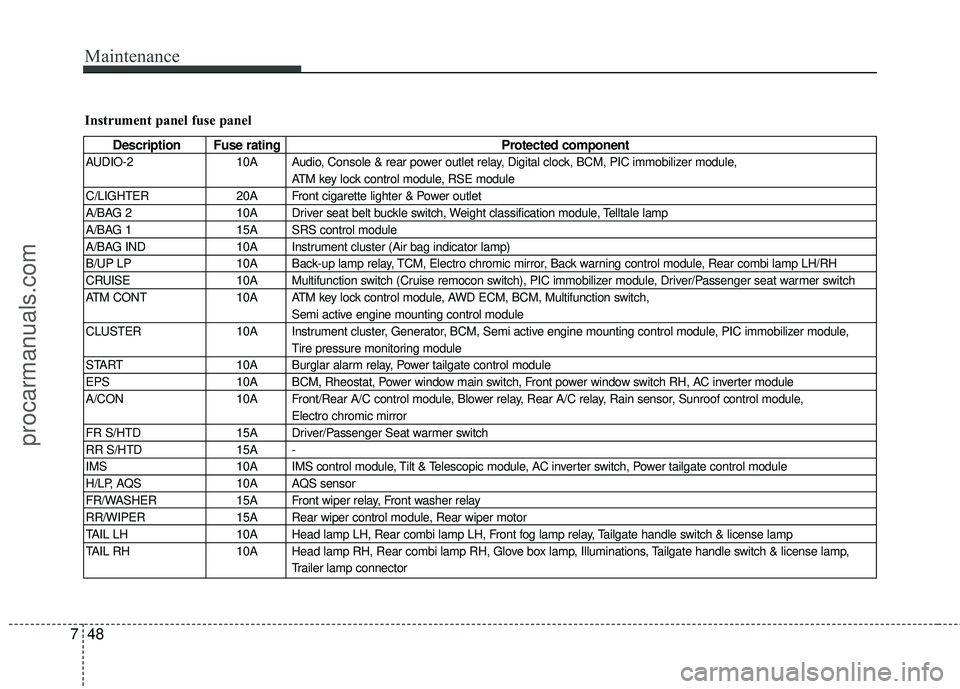
Instrument panel fuse panel
Description Fuse rating Protected component
AUDIO-2 10A Audio, Console & rear power outlet relay, Digital clock, BCM, PIC immobilizer module,
ATM key lock control module, RSE module
C/LIGHTER 20A Front cigarette lighter & Power outlet
A/BAG 2 10A Driver seat belt buckle switch, Weight classification module, Telltale lamp
A/BAG 1 15A SRS control module
A/BAG IND 10A Instrument cluster (Air bag indicator lamp)
B/UP LP 10A Back-up lamp relay, TCM, Electro chromic mirror, Back warning control module, Rear combi lamp LH/RH
CRUISE 10A Multifunction switch (Cruise remocon switch), PIC immobilizer module, Driver/Passenger seat warmer switch
ATM CONT 10A ATM key lock control module, AWD ECM, BCM, Multifunction switch,
Semi active engine mounting control module
CLUSTER 10A Instrument cluster, Generator, BCM, Semi active engine mounting control module, PIC immobilizer module,
Tire pressure monitoring module
START 10A Burglar alarm relay, Power tailgate control module
EPS 10A BCM, Rheostat, Power window main switch, Front power window switch RH, AC inverter module
A/CON 10A Front/Rear A/C control module, Blower relay, Rear A/C relay, Rain sensor, Sunroof control module,
Electro chromic mirror
FR S/HTD 15A Driver/Passenger Seat warmer switch
RR S/HTD 15A -
IMS 10A IMS control module, Tilt & Telescopic module, AC inverter switch, Power tailgate control module
H/LP, AQS 10A AQS sensor
FR/WASHER 15A Front wiper relay, Front washer relay
RR/WIPER 15A Rear wiper control module, Rear wiper motor
TAIL LH 10A Head lamp LH, Rear combi lamp LH, Front fog lamp relay, Tailgate handle switch & license lamp
TAIL RH 10A Head lamp RH, Rear combi lamp RH, Glove box lamp, Illuminations, Tailgate handle switch & license lamp,
Trailer lamp connector
procarmanuals.com
Page 392 of 429
749
Maintenance
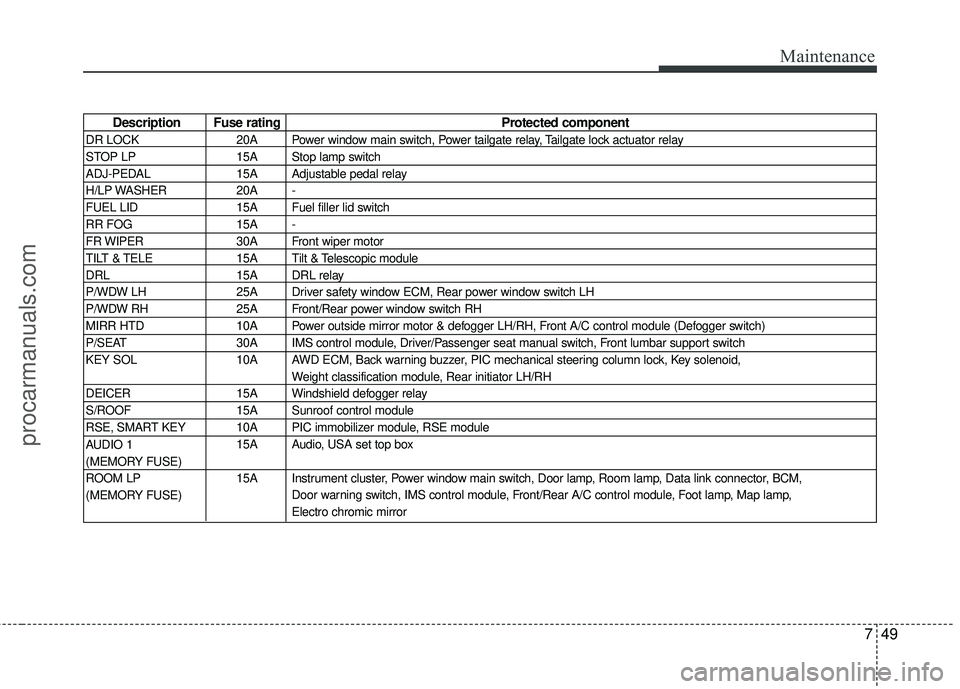
Description Fuse ratingProtected component
DR LOCK 20A Power window main switch, Power tailgate relay, Tailgate lock actuator relay
STOP LP 15A Stop lamp switch
ADJ-PEDAL 15A Adjustable pedal relay
H/LP WASHER 20A -
FUEL LID 15A Fuel filler lid switch
RR FOG 15A -
FR WIPER 30A Front wiper motor
TILT & TELE 15A Tilt & Telescopic module
DRL 15A DRL relay
P/WDW LH 25A Driver safety window ECM, Rear power window switch LH
P/WDW RH 25A Front/Rear power window switch RH
MIRR HTD 10A Power outside mirror motor & defogger LH/RH, Front A/C control module (Defogger switch)
P/SEAT 30A IMS control module, Driver/Passenger seat manual switch, Front lumbar support switch
KEY SOL 10A AWD ECM, Back warning buzzer, PIC mechanical steering column lock, Key solenoid,
Weight classification module, Rear initiator LH/RH
DEICER 15A Windshield defogger relay
S/ROOF 15A Sunroof control module
RSE, SMART KEY 10A PIC immobilizer module, RSE module 15A Audio, USA set top box
15A Instrument cluster, Power window main switch, Door lamp, Room lamp, Data link connector, BCM, Door warning switch, IMS control module, Front/Rear A/C control module, Foot lamp, Map lamp,
Electro chromic mirror
AUDIO 1
(MEMORY FUSE)
ROOM LP
(MEMORY FUSE)
procarmanuals.com
Page 393 of 429
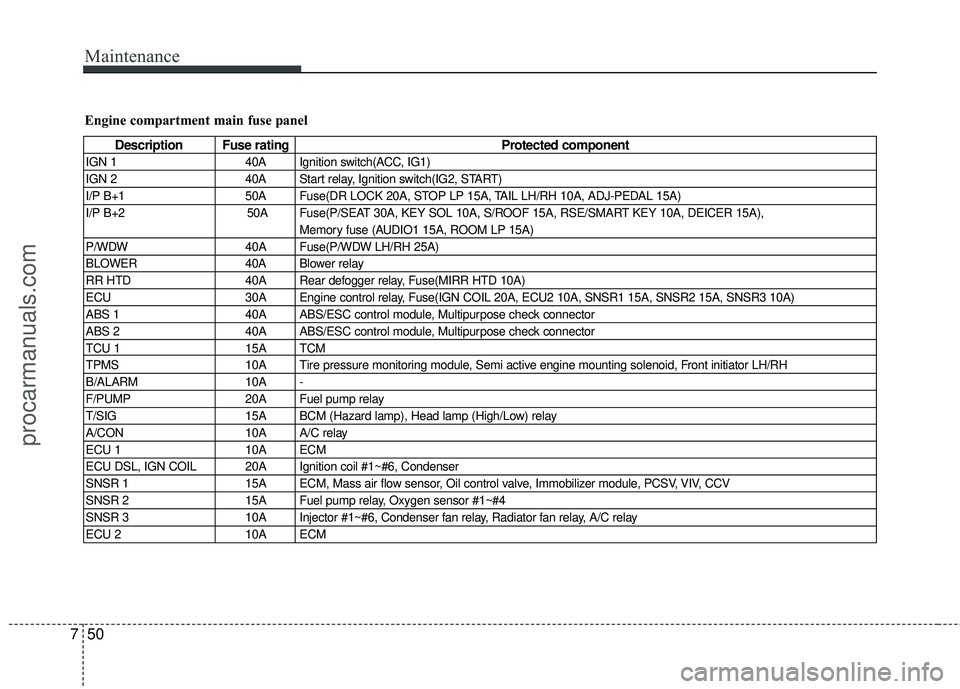
Maintenance
50
7
Engine compartment main fuse panel
Description Fuse rating Protected component
IGN 1 40A Ignition switch(ACC, IG1)
IGN 2 40A Start relay, Ignition switch(IG2, START)
I/P B+1 50A Fuse(DR LOCK 20A, STOP LP 15A, TAIL LH/RH 10A, ADJ-PEDAL 15A)
I/P B+2 50A Fuse(P/SEAT 30A, KEY SOL 10A, S/ROOF 15A, RSE/SMART KEY 10A, DEICER 15A),
Memory fuse (AUDIO1 15A, ROOM LP 15A)
P/WDW 40A Fuse(P/WDW LH/RH 25A)
BLOWER 40A Blower relay
RR HTD 40A Rear defogger relay, Fuse(MIRR HTD 10A)
ECU 30A Engine control relay, Fuse(IGN COIL 20A, ECU2 10A, SNSR1 15A, SNSR2 15A, SNSR3 10A)
ABS 1 40A ABS/ESC control module, Multipurpose check connector
ABS 2 40A ABS/ESC control module, Multipurpose check connector
TCU 1 15A TCM
TPMS 10A Tire pressure monitoring module, Semi active engine mounting solenoid, Front initiator LH/RH
B/ALARM 10A -
F/PUMP 20A Fuel pump relay
T/SIG 15A BCM (Hazard lamp), Head lamp (High/Low) relay
A/CON 10A A/C relay
ECU 1 10A ECM
ECU DSL, IGN COIL 20A Ignition coil #1~#6, Condenser
SNSR 1 15A ECM, Mass air flow sensor, Oil control valve, Immobilizer module, PCSV, VIV, CCV
SNSR 2 15A Fuel pump relay, Oxygen sensor #1~#4
SNSR 3 10A Injector #1~#6, Condenser fan relay, Radiator fan relay, A/C relay
ECU 2 10A ECM
procarmanuals.com
Page 422 of 429

Index
2I
Air bags-advanced supplemental restraint system ········3-41Air bag warning label ··················\
··················\
··············3-66
Air bag warning light ··················\
··················\
··············3-44
Curtain air bag ··················\
··················\
··················\
·······3-58
Driver's and passenger's front air bag··········\
················3-52
Occupant classification system ··················\
·················3-47\
Side impact air bag ··················\
··················\
··················\
3-56
Air cleaner ··················\
··················\
··················\
···············7-21
All wheel drive (AWD)··················\
··················\
··············5-14
Appearance care··················\
··················\
··················\
·······7-59 Exterior care ··················\
··················\
··················\
··········7-59
Interior care ··················\
··················\
··················\
···········7-64
Audio system ··················\
··················\
··················\
·········4-120 Antenna··················\
··················\
··················\
················4-120
Steering wheel audio control ··················\
··················\
·4-121
Automatic climate control system ··················\
···············4-96 Air conditioning ··················\
··················\
··················\
··4-102
Automatic heating and air conditioning ··················\
····4-97
Manual heating and air conditioning··················\
·········4-98
Rear heating and air conditioning ··················\
···········4-103
Automatic transaxle ··················\
··················\
··················\
···5-8 Ignition key interlock system ··················\
··················\
··5-12
Shift lock system ··················\
··················\
··················\
···5-12
Sports mode ··················\
··················\
··················\
···········5-11 Battery··················\
··················\
··················\
··················\
····7-27
Before driving ··················\
··················\
··················\
············5-3
Brake system··················\
··················\
··················\
············5-21
Anti-lock brake system (ABS) ··················\
··················\
5-24
Electronic stability control (ESC) ··················\
·············5-26
Parking brake ··················\
··················\
··················\
·········5-22
Power brakes··················\
··················\
··················\
··········5-21
Brakes fluid··················\
··················\
··················\
··············7-18
Bulb wattage ··················\
··················\
··················\
··············8-2
California Perchlorate Notice ··················\
··················\
··· 7-68
Child restraint system ··················\
··················\
················3-33 Placing a passenger seat belt into the auto lock mode ··················\
··················\
···············3-36
Securing a child restraint seat with tether anchor system··················\
··················\
·············3-38
Securing a child restraint seat with child seat lower anchor system ··················\
··············3-39
Climate control air filter ··················\
··················\
············7-22
Consumer information ··················\
··················\
·················8-8
Cruise control system ··················\
··················\
················5-31
Defroster ··················\
··················\
··················\
··················\
4-83
Dimensions ··················\
··················\
··················\
················8-2
Door locks··················\
··················\
··················\
················4-14
AB
C
D
procarmanuals.com