instrument panel HYUNDAI XG350 2005 User Guide
[x] Cancel search | Manufacturer: HYUNDAI, Model Year: 2005, Model line: XG350, Model: HYUNDAI XG350 2005Pages: 247, PDF Size: 7.28 MB
Page 66 of 247
1FEATURES OF YOUR HYUNDAI54
INSTRUMENT PANEL LIGHT
CONTROLB410A01A-AAT(RHEOSTAT)
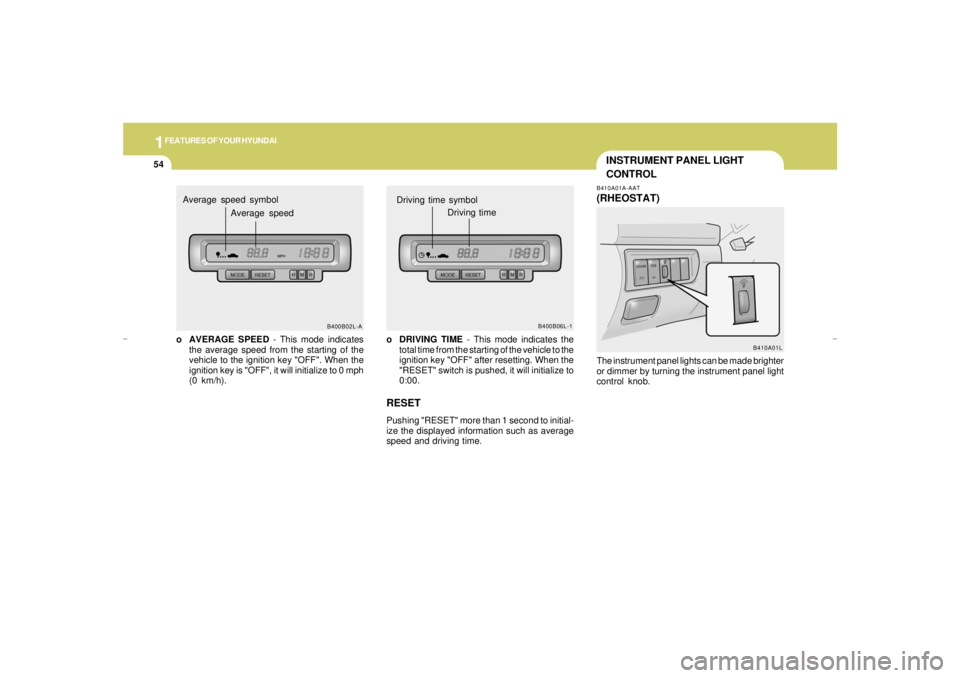
o DRIVING TIME - This mode indicates the
total time from the starting of the vehicle to the
ignition key "OFF" after resetting. When the
"RESET" switch is pushed, it will initialize to
0:00.RESETPushing "RESET" more than 1 second to initial-
ize the displayed information such as average
speed and driving time.
B400B06L-1
Driving time symbol
Driving time
B410A01L
o AVERAGE SPEED - This mode indicates
the average speed from the starting of the
vehicle to the ignition key "OFF". When the
ignition key is "OFF", it will initialize to 0 mph
(0 km/h).
B400B02L-A
Average speed symbol
Average speed
The instrument panel lights can be made brighter
or dimmer by turning the instrument panel light
control knob.
xgflhma-1.p656/16/04, 3:03 PM 54
Page 79 of 247
1
FEATURES OF YOUR HYUNDAI
67
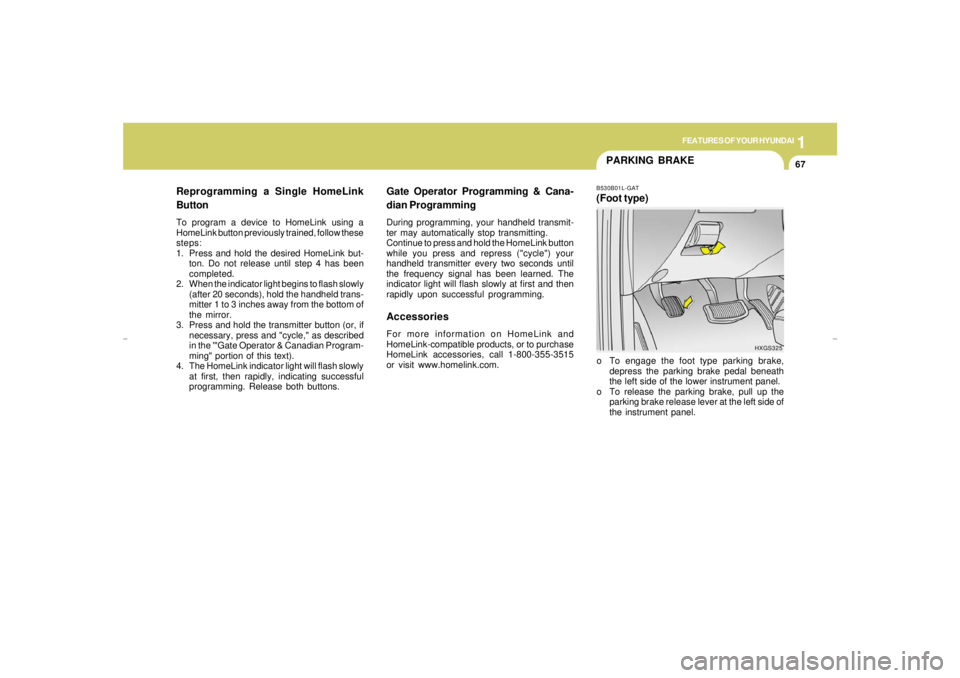
PARKING BRAKEB530B01L-GAT(Foot type)o To engage the foot type parking brake,
depress the parking brake pedal beneath
the left side of the lower instrument panel.
o To release the parking brake, pull up the
parking brake release lever at the left side of
the instrument panel.
Gate Operator Programming & Cana-
dian ProgrammingDuring programming, your handheld transmit-
ter may automatically stop transmitting.
Continue to press and hold the HomeLink button
while you press and repress ("cycle") your
handheld transmitter every two seconds until
the frequency signal has been learned. The
indicator light will flash slowly at first and then
rapidly upon successful programming.AccessoriesFor more information on HomeLink and
HomeLink-compatible products, or to purchase
HomeLink accessories, call 1-800-355-3515
or visit www.homelink.com.
HXGS325
Reprogramming a Single HomeLink
ButtonTo program a device to HomeLink using a
HomeLink button previously trained, follow these
steps:
1. Press and hold the desired HomeLink but-
ton. Do not release until step 4 has been
completed.
2. When the indicator light begins to flash slowly
(after 20 seconds), hold the handheld trans-
mitter 1 to 3 inches away from the bottom of
the mirror.
3. Press and hold the transmitter button (or, if
necessary, press and "cycle," as described
in the '"Gate Operator & Canadian Program-
ming" portion of this text).
4. The HomeLink indicator light will flash slowly
at first, then rapidly, indicating successful
programming. Release both buttons.
xgflhma-1.p656/16/04, 3:03 PM 67
Page 99 of 247
1
FEATURES OF YOUR HYUNDAI
87
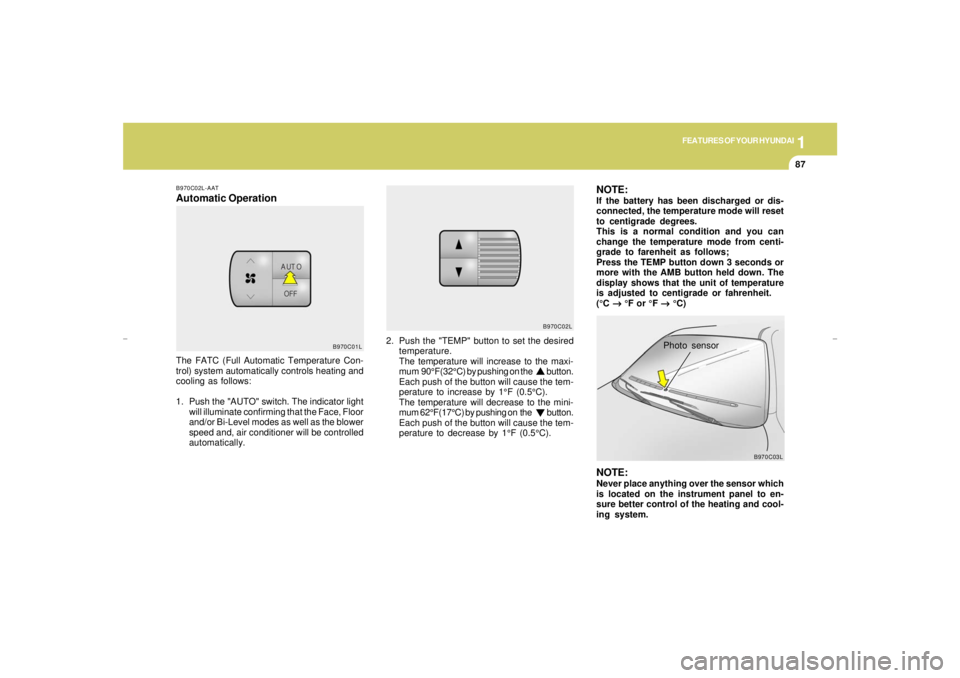
B970C02L-AATAutomatic Operation
2. Push the "TEMP" button to set the desired
temperature.
The temperature will increase to the maxi-
mum 90°F(32°C) by pushing on the button.
Each push of the button will cause the tem-
perature to increase by 1°F (0.5°C).
The temperature will decrease to the mini-
mum 62°F(17°C) by pushing on the button.
Each push of the button will cause the tem-
perature to decrease by 1°F (0.5°C). The FATC (Full Automatic Temperature Con-
trol) system automatically controls heating and
cooling as follows:
1. Push the "AUTO" switch. The indicator light
will illuminate confirming that the Face, Floor
and/or Bi-Level modes as well as the blower
speed and, air conditioner will be controlled
automatically.
NOTE:If the battery has been discharged or dis-
connected, the temperature mode will reset
to centigrade degrees.
This is a normal condition and you can
change the temperature mode from centi-
grade to farenheit as follows;
Press the TEMP button down 3 seconds or
more with the AMB button held down. The
display shows that the unit of temperature
is adjusted to centigrade or fahrenheit.
(°C
→ →→ →
→ °F or °F
→ →→ →
→ °C)NOTE:Never place anything over the sensor which
is located on the instrument panel to en-
sure better control of the heating and cool-
ing system.
Photo sensor
B970C01LB970C02L
B970C03L
xgflhma-1.p656/16/04, 3:04 PM 87
Page 140 of 247
2
DRIVING YOUR HYUNDAI
10
!
C130A01O-BATGOOD BRAKING PRACTICES
WARNING:Nothing should be carried on top of the
shelf panel behind the rear seat. If there
were an accident or a sudden stop, such
objects could move forward and cause
damage to the vehicle or injure the occu-
pants.
o After being parked, check to be sure the
parking brake is not engaged and that the
parking brake indicator light is out before
driving away.
o Driving through water may get the brakes
wet. They can also get wet when the car is
washed. Wet brakes can be dangerous!
Your car will not stop as quickly if the brakes
are wet. Wet brakes may cause the car to
pull to one side. To dry the brakes, apply the
brakes lightly until the braking action returns
to normal, taking care to keep the car under
control at all times. If the braking action does
not return to normal, stop as soon as it is safe
to do so and call your Hyundai dealer for
assistance.
C300D02L-GATIndicators and WarningThe indicators should illuminate when the igni-
tion key is turned to "ON" or "START" but should
go out after three seconds.
If the indicators do not illuminate, or the TCS or
TCS-OFF indicator does not go out after 3
seconds, have it checked by an authorized
dealer.
Should there be any unusual conditions in the
device while driving, TCS-OFF indicator illumi-
nates as a warning.
If TCS-OFF indicator illuminates, pull your car
to a safe place and stop the engine.
Then, start the engine again to check if the TCS-
OFF indicator goes out.
If the indicator remains lit even after the engine
has been started, have your car checked by an
authorized Hyundai dealer.NOTE:1) When the TCS-OFF indicator illuminates,
traction control is automatically deacti-
vated for safety.
2) This warning function is not provided
when the driver selects the TCS-OFF
mode.
C300B01L-GATTCS ON/OFF ModeIn the TCS ON mode, the indicator in the
instrument cluster will not be illuminated.
To switch the TCS OFF mode, press the TCS
switch . The SLIP control will be deactivated and
the TCS indicator in the instrument cluster will
be illuminated.NOTE:1) The TCS mode will automatically be
turned ON after the engine is turned off
and restarted.
2) When the traction control is operating
properly, you can feel a slight pulsation
in the vehicle. This is only the effect of
brake control and indicates nothing
unusual.
3) When the engine starts, a click is heard
from the engine compartment; however,
this is only the sound of traction control
being checked.
4) When moving out of the mud or fresh
snow, pressing the accelerator pedal
may not cause the engine speed to in-
crease due to TCS operation.
xgflhma-2.p656/16/04, 3:00 PM 10
Page 198 of 247
6
DO-IT-YOURSELF MAINTENANCE
18
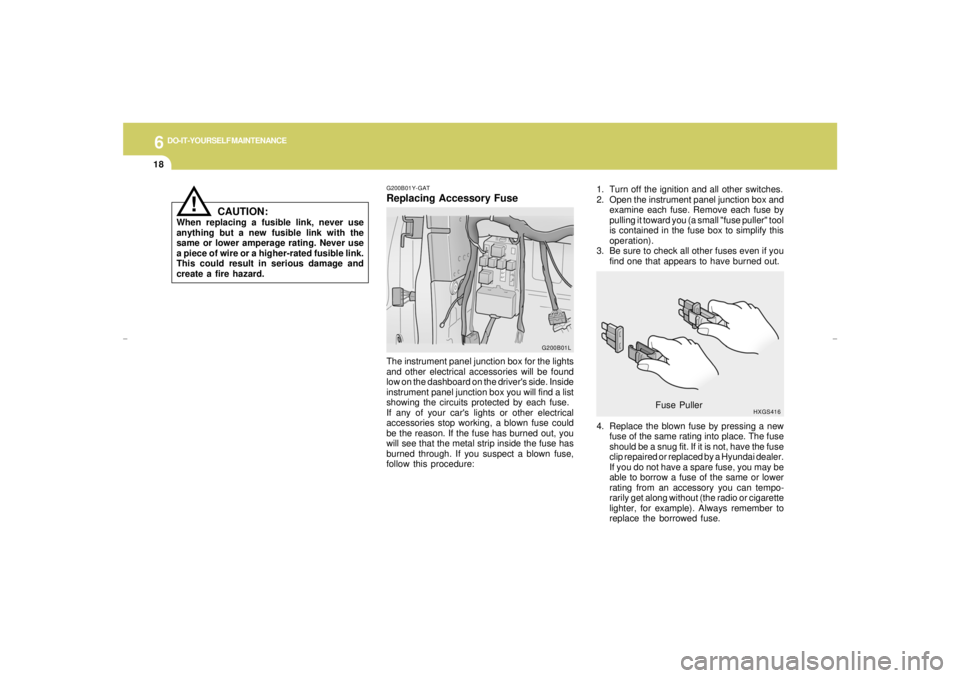
1. Turn off the ignition and all other switches.
2. Open the instrument panel junction box and
examine each fuse. Remove each fuse by
pulling it toward you (a small "fuse puller" tool
is contained in the fuse box to simplify this
operation).
3. Be sure to check all other fuses even if you
find one that appears to have burned out.
4. Replace the blown fuse by pressing a new
fuse of the same rating into place. The fuse
should be a snug fit. If it is not, have the fuse
clip repaired or replaced by a Hyundai dealer.
If you do not have a spare fuse, you may be
able to borrow a fuse of the same or lower
rating from an accessory you can tempo-
rarily get along without (the radio or cigarette
lighter, for example). Always remember to
replace the borrowed fuse.
HXGS416
Fuse Puller
G200B01Y-GATReplacing Accessory Fuse
!
The instrument panel junction box for the lights
and other electrical accessories will be found
low on the dashboard on the driver's side. Inside
instrument panel junction box you will find a list
showing the circuits protected by each fuse.
If any of your car's lights or other electrical
accessories stop working, a blown fuse could
be the reason. If the fuse has burned out, you
will see that the metal strip inside the fuse has
burned through. If you suspect a blown fuse,
follow this procedure:
CAUTION:
When replacing a fusible link, never use
anything but a new fusible link with the
same or lower amperage rating. Never use
a piece of wire or a higher-rated fusible link.
This could result in serious damage and
create a fire hazard.
G200B01L
xgflhma-6.p656/16/04, 2:58 PM 18
Page 215 of 247
6
DO-IT-YOURSELF MAINTENANCE
35
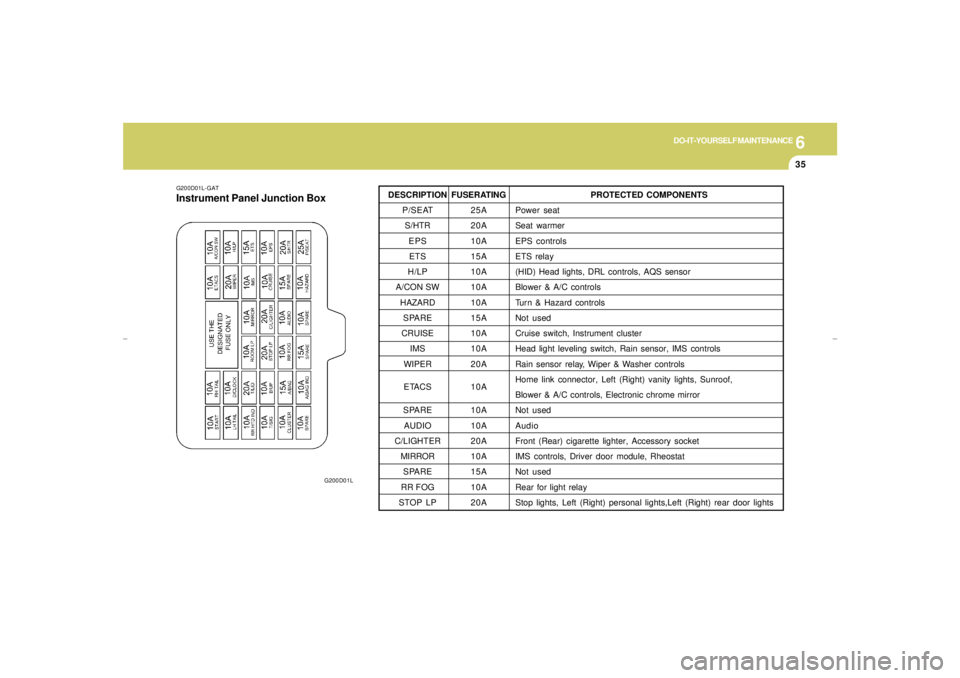
G200D01L-GATInstrument Panel Junction Box
G200D01L
FUSERATING
25A
20A
10A
15A
10A
10A
10A
15A
10A
10A
20A
10A
10A
10A
20A
10A
15A
10A
20APROTECTED COMPONENTS
Power seat
Seat warmer
EPS controls
ETS relay
(HID) Head lights, DRL controls, AQS sensor
Blower & A/C controls
Turn & Hazard controls
Not used
Cruise switch, Instrument cluster
Head light leveling switch, Rain sensor, IMS controls
Rain sensor relay, Wiper & Washer controls
Home link connector, Left (Right) vanity lights, Sunroof,
Blower & A/C controls, Electronic chrome mirror
Not used
Audio
Front (Rear) cigarette lighter, Accessory socket
IMS controls, Driver door module, Rheostat
Not used
Rear for light relay
Stop lights, Left (Right) personal lights,Left (Right) rear door lights
DESCRIPTION
P/SEAT
S/HTR
EPS
ETS
H/LP
A/CON SW
HAZARD
SPARE
CRUISE
IMS
WIPER
ETACS
SPARE
AUDIO
C/LIGHTER
MIRROR
SPARE
RR FOG
STOP LP
xgflhma-6.p656/16/04, 2:59 PM 35
Page 222 of 247
8
CONSUMER INFORMATION & REPORTING SAFETY DEFECTS2
VEHICLE IDENTIFICATION
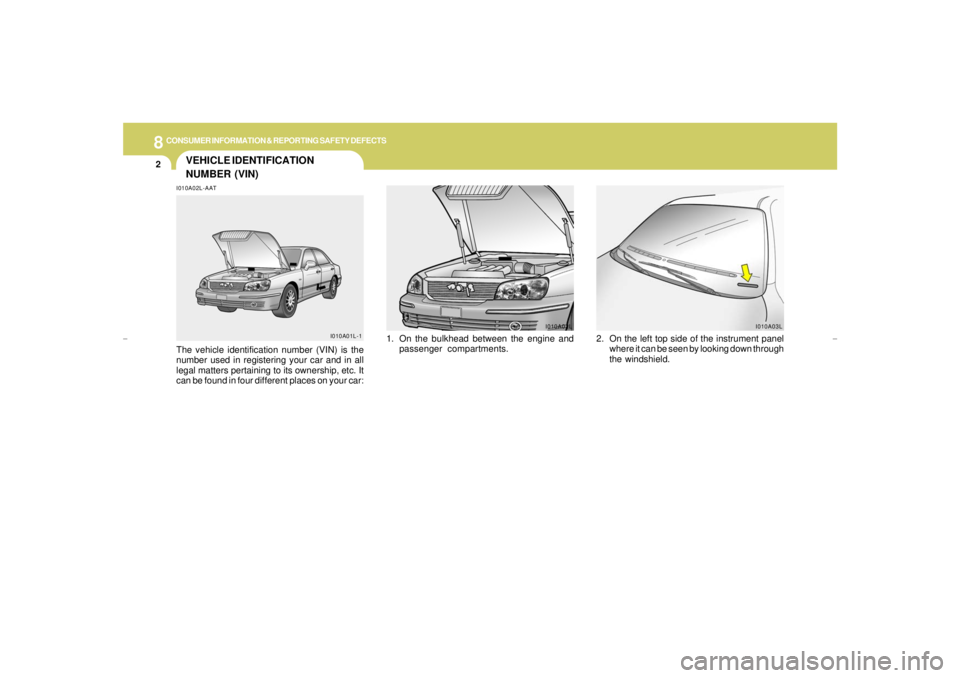
NUMBER (VIN)I010A02L-AATThe vehicle identification number (VIN) is the
number used in registering your car and in all
legal matters pertaining to its ownership, etc. It
can be found in four different places on your car:
I010A01L-1
1. On the bulkhead between the engine and
passenger compartments.
I010A02L
2. On the left top side of the instrument panel
where it can be seen by looking down through
the windshield.
I010A03L
xgflhma-8.p656/16/04, 2:57 PM 2
Page 244 of 247
10
INDEX
4
J
Jump Starting..................................................................................... 3-3
K
Key .................................................................................................... 1-3
If you lose your keys...................................................................3-13
Positions............................................................................... 2-3 ~ 2-4
L
Lubrication Chart ................................................................................. 9-4
M
Maintenance Intervals
Explanation of scheduled maintenance items...................... 5-7 ~ 5-9
Maintenance under severe usage conditions ................................ 5-6
Scheduled maintenance........................................................ 5-4 ~ 5-5
Service requirements ..................................................................... 5-2
Mirrors
Day-night inside rear view ...........................................................1-61
Outside rearview mirror heater ....................................................1-61
O
Odometer..........................................................................................1-45
Outside rearview mirror ....................................................................1-60 H
Hazard Warning System...................................................................1-50
Headlight Aiming Adjustment ............................................................6-21
Heating and Ventilation ..........................................................1-78 ~ 1-85
Air flow control............................................. 1-80 ~ 1-82, 1-90 ~ 1-91
Air intake control ............................................................... 1-79 ~ 1-80
Bi-level heating ............................................................................1-83
Fan speed control ............................................................... 1-79, 1-88
Temperature control .....................................................................1-82
High-Mounted Rear Stop light ...........................................................1-68
Homelink Mirror................................................................................ 1-62
Hood Release...................................................................................1-72
Horn..................................................................................................1-74
I
Ignition Switch..................................................................................... 2-3
Illuminated Ignition Switch................................................................... 1-4
Instrument Cluster and Indicator Lights............................................1-38
Instrument Panel Light Control (Rheostat).......................................1-52
Intergrated Memory System (I. M. S) ...............................................1-14
Interior Light
Interior light ..................................................................................1-58
Map light ......................................................................................1-58
Personal light...............................................................................1-59
Intermittent Wiper..............................................................................1-49xgflhma-10.p656/16/04, 3:01 PM 4