ignition INFINITI EX 2012 User Guide
[x] Cancel search | Manufacturer: INFINITI, Model Year: 2012, Model line: EX, Model: INFINITI EX 2012Pages: 506, PDF Size: 7.27 MB
Page 83 of 506

2-10Instruments and controls
km/h). You can also calibrate the compass
by driving your vehicle on your everyday
route. The compass will be calibrated once
it has tracked 3 complete circles.
To turn on and off the compass manually,
push the
switch*Awhile the ignition
switch is in the ON position.
SIC0611B
Zone map
Page 86 of 506

All-Wheel Drive (AWD) warning
light (AWD models)
GUID-020674DF-0D6E-43D6-93CA-BA1DAE13E576warning light comes on when the
ignition switch is pushed to ON. It turns off
soon after the engine is started.
If the AWD system malfunctions, or the
diameter of the front and the rear wheels
are different, the warning light will either
remain illuminated or blink. (See “All-
Wheel Drive (AWD)” in the“5. Starting
and driving” section.)
CAUTION
.If the warning light comes on while
driving there may be a malfunction in
the AWD system. Reduce the vehicle
speed and have your vehicle checked by
an INFINITI retailer as soon as possible.
. If the AWD warning light blinks on when
you are driving:
—blinks rapidly (about twice a sec-
ond):
Pull off the road in a safe area, and
idle the engine. The driving mode will
change to 2WD to prevent the AWD system from malfunctioning. If the
warning light turns off, you can drive
again.
—blinks slowly (about once every 2
seconds):
Pull off the road in a safe area, and
idle the engine. Check that all tire
sizes are the same, tire pressure is
correct and tires are not worn.
. If the warning light is still on after the
above operations, have your vehicle
checked by an INFINITI retailer as soon
as possible.
orAnti-lock Braking
System (ABS) warning light
GUID-4801E09C-7844-45DD-8805-45FB68BDD622
Automatic transmission check
warning light
GUID-CEE36713-A0BA-4361-B558-81FE7B72F168
orBrake warning lightGUID-94AD6FCA-DAAE-4E85-8624-D3E39027F22F
Page 89 of 506

2-16Instruments and controls
WARNING
.If the light does not illuminate with the
ignition switch pushed ON, have the
vehicle checked by an INFINITI retailer as
soon as possible. .
If the light illuminates while driving,
avoid sudden steering maneuvers or
abrupt braking, reduce vehicle speed,
pull off the road to a safe location and
stop the vehicle as soon as possible.
Driving with under-inflated tires may
permanently damage the tires and in-
crease the likelihood of tire failure.
Serious vehicle damage could occur
and may lead to an accident and could
result in serious personal injury. Check
the tire pressure for all four tires. Adjust
the tire pressure to the recommended
COLD tire pressure shown on the Tire
and Loading Information label to turn
the low tire pressure warning light OFF. If
the light still illuminates while driving
after adjusting the tire pressure, a tire
may be flat. If you have a flat tire,
replace it with a spare tire as soon as
possible.
. When a spare tire is mounted or a wheel
is replaced, the TPMS will not function
and the low tire pressure warning light
will flash for approximately 1 minute.
The light will remain on after 1 minute.
Contact your INFINITI retailer as soon as
possible for tire replacement and/or
system resetting.
Page 94 of 506
you when leaving the vehicle.
Light reminder chimeGUID-1B22F352-E676-4579-BB46-88A9F17E26A1
orposition and the ignition switch
in the ACC, OFF or LOCK position.
Turn the light switch off when you leave the
vehicle.
Parking brake reminder chimeGUID-963DEE0A-5736-4637-8320-7F5EB75D7F6D
SIC3252
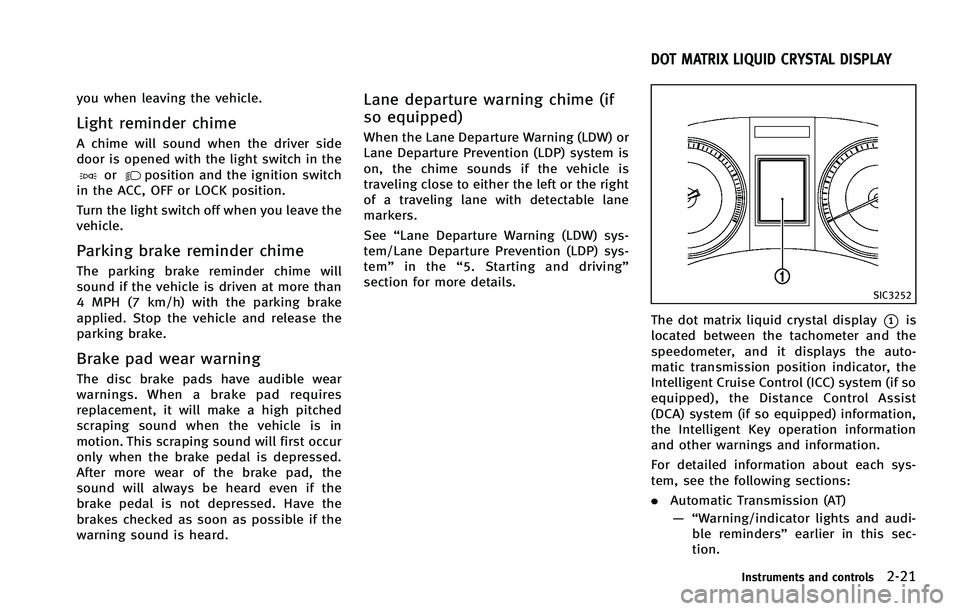
The dot matrix liquid crystal display*1is
located between the tachometer and the
speedometer, and it displays the auto-
matic transmission position indicator, the
Intelligent Cruise Control (ICC) system (if so
equipped), the Distance Control Assist
(DCA) system (if so equipped) information,
the Intelligent Key operation information
and other warnings and information.
For detailed information about each sys-
tem, see the following sections:
. Automatic Transmission (AT)
— “Warning/indicator lights and audi- ble reminders” earlier in this sec-
tion.
Instruments and controls2-21
DOT MATRIX LIQUID CRYSTAL DISPLAY
Page 95 of 506

2-22Instruments and controls
— “Driving the vehicle”in the“5.
Starting and driving” section.
. Intelligent Cruise Control (ICC) system
— “Intelligent Cruise Control (ICC) sys- tem (FULL SPEED RANGE)” in the“5.
Starting and driving” section.
. Distance Control Assist (DCA) system
— “Distance Control Assist (DCA) sys- tem” in the “5. Starting and driving”
section.
. Intelligent Key system
— “Intelligent key system” in the“3.
Pre-driving checks and adjust-
ments” section.
— “Push-button ignition switch” in the
“5. Starting and driving” section.
Page 101 of 506

2-28Instruments and controls
SIC3625
TRIP COMPUTERGUID-F349FA3E-7C63-464E-A7BA-9C3BA79F4A98
switch
*Bswitch
When the ignition switch is pushed to the
ON position, modes of the trip computer
can be selected by pushing the
switch
*A.
Each time the
switch*Ais pushed, the
display will change as follows: Current fuel consumption
?Average fuel
consumption and speed ?Elapsed time
and trip odometer ?Distance to empty
(dte) ?Outside air temperature (ICY) ?
Setting ?Warning check
1. Current fuel consumptionGUID-0C64924E-9423-4FBE-B06E-3EDAC1782F16
switch*Bfor longer than 1 second.
(The average speed is also reset at the
same time.)
The display is updated every 30 seconds.
At about the first 1/3 mile (500 m) after a
reset, the display shows “——”.
Speed:
GUID-4D508F5D-FA8E-49D6-A9E2-6F8E76C17033
switch*Bfor longer than 1 second. (The average fuel consumption is also reset
at the same time.)
The display is updated every 30 seconds.
The first 30 seconds after a reset, the
display shows
“——”.
3. Elapsed time and trip odometer
(mls or km)
GUID-7B6DF817-1239-4EB4-BB98-947F770BFD3B
switch*Bfor
longer than 1 second. (The trip odometer is
also reset at the same time.)
Trip odometer:
GUID-4D508F5D-FA8E-49D6-A9E2-6F8E76C17033
switch*Bfor longer than 1
second. (The elapsed time is also reset at
the same time.)
4. Distance to empty (dte —mls or
km)
GUID-1CFB7162-2FAD-422A-B566-38D27E38D5BC
Page 102 of 506

amount of fuel in the fuel tank and the
actual fuel consumption.
The display is updated every 30 seconds.
The dte mode includes a low range warning
feature. If the fuel level is low, the warning
is displayed on the screen.
When the fuel level drops even lower, the
dte display will change to“——”.
. If the amount of fuel added is small, the
display just before the ignition switch
is pushed to the OFF position may
continue to be displayed.
. When driving uphill or rounding curves,
the fuel in the tank shifts, which may
momentarily change the display.
5. Outside air temperature (ICY —8F
or 8C)
GUID-67DA9682-5773-4AE5-AD0E-853FAC3D4415
switch*Aandswitch*Bare
used in the setting mode to select and
decide a menu.
SKIP:
GUID-4D508F5D-FA8E-49D6-A9E2-6F8E76C17033switch*Ato move to the
warning check mode.
Push the
switch*Bto select other
menus.
ALERT:
GUID-4D508F5D-FA8E-49D6-A9E2-6F8E76C17033
Page 109 of 506

2-36Instruments and controls
SIC3267
HEADLIGHT SWITCHGUID-1E8879F5-5A4D-4E61-BAC0-CA3E944F7242
position:
The front park, side marker, tail,
license plate and instrument lights
will come on.
*2Turn the switch to theposition:
Headlights will come on and all the
other lights remain on.
SIC3268
Autolight systemGUID-DEC1CC37-DB21-41AE-9624-D6735779F294
orposition. The autolight system can turn on the
headlights automatically when it is dark
and turn off the headlights when it is light.
If the ignition switch is pushed to the OFF
position and one of the doors is opened
and this condition is continued, the head-
lights remain on for 5 minutes.
Automatic headlights off delay:
GUID-4D508F5D-FA8E-49D6-A9E2-6F8E76C17033
Page 110 of 506

SAA0642A
Be sure not to put anything on top of the
photo sensor
*Alocated on the top of the
instrument panel. The photo sensor con-
trols the autolight; if it is covered, the
photo sensor reacts as if it is dark and the
headlights will illuminate.
SIC3269
Headlight beam selectGUID-EA7A0F6C-B5B7-4790-B290-65E1EB4D3057
position. Pull it back to select the
low beam.
*3Pulling the lever toward you will flash
the headlight high beam even when
the headlight switch is in the OFF
position.
Battery saver systemGUID-664B23EC-0053-44E4-A83B-5CAB720E9A9C
orposition and the ignition switch
in the ACC, OFF or LOCK position.
When the headlight switch is in the
orposition while the ignition switch is in
the ON position, the lights will automati-
cally turn off 5 minutes after the ignition
switch has been pushed to the OFF
position.
When the headlight switch remains in the
orposition after the lights
automatically turn off, the lights will turn
on when the ignition switch is pushed to
the ON position.
CAUTION
. When you turn on the headlight switch
again after the lights automatically turn
off, the lights will not turn off auto-
matically. Be sure to turn the light
switch to the OFF position when you
leave the vehicle for extended periods of
time, otherwise the battery will be
discharged.
Instruments and controls2-37
Page 111 of 506
2-38Instruments and controls
position. Turn the headlight switch to theposition for full illumination when
driving at night.
If the parking brake is applied before the
engine is started, the daytime running
lights do not illuminate. The daytime
running lights illuminate once the parking
brake is released. The daytime running
lights will remain on until the ignition
switch is pushed to the OFF position.
WARNING
When the daytime running light system is
active, tail lights on your vehicle are not on.
It is necessary at dusk to turn on your headlights. Failure to do so could cause an
accident injuring yourself and others.
Adaptive Front lighting System
(AFS) (if so equipped)
GUID-B262714A-208E-426E-A47D-5D395AB017A0