door lock INFINITI EX 2012 Owners Manual
[x] Cancel search | Manufacturer: INFINITI, Model Year: 2012, Model line: EX, Model: INFINITI EX 2012Pages: 506, PDF Size: 7.27 MB
Page 10 of 506
GUID-C0DAB6C4-2638-4210-92D1-C51ED7B201A0
SSI0383
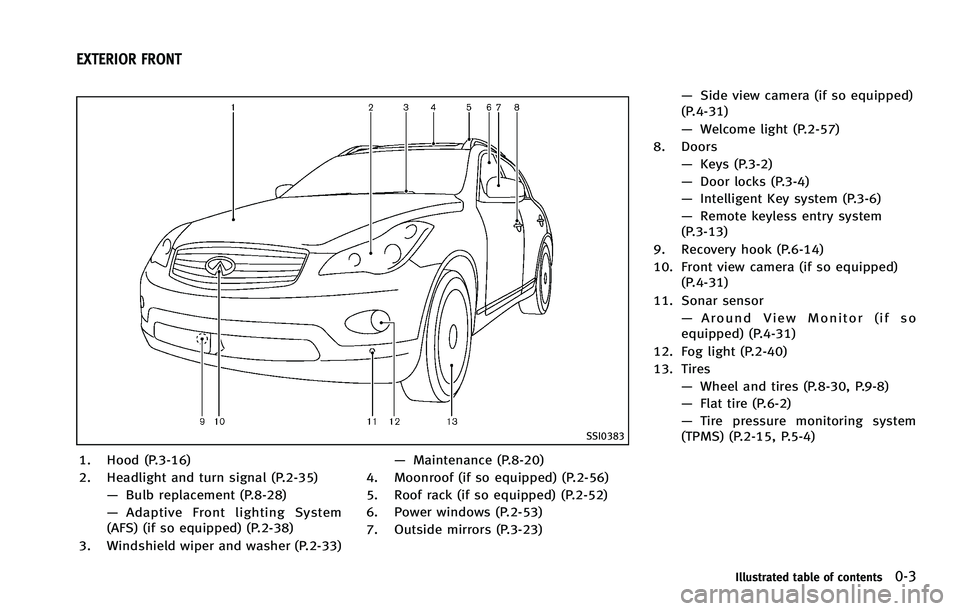
1. Hood (P.3-16)
2. Headlight and turn signal (P.2-35)—Bulb replacement (P.8-28)
— Adaptive Front lighting System
(AFS) (if so equipped) (P.2-38)
3. Windshield wiper and washer (P.2-33) —
Maintenance (P.8-20)
4. Moonroof (if so equipped) (P.2-56)
5. Roof rack (if so equipped) (P.2-52)
6. Power windows (P.2-53)
7. Outside mirrors (P.3-23) —
Side view camera (if so equipped)
(P.4-31)
— Welcome light (P.2-57)
8. Doors —Keys (P.3-2)
— Door locks (P.3-4)
— Intelligent Key system (P.3-6)
— Remote keyless entry system
(P.3-13)
9. Recovery hook (P.6-14)
10. Front view camera (if so equipped) (P.4-31)
11. Sonar sensor —Around View Monitor (if so
equipped) (P.4-31)
12. Fog light (P.2-40)
13. Tires —Wheel and tires (P.8-30, P.9-8)
— Flat tire (P.6-2)
— Tire pressure monitoring system
(TPMS) (P.2-15, P.5-4)
Illustrated table of contents0-3
EXTERIOR FRONT
Page 11 of 506

0-4Illustrated table of contents
GUID-22C3CD44-5E1E-4FA8-BA99-B089AFCA0ADD
JVC0192X
1. Rearview camera (if so equipped)(P.4-24, P.4-31)
2. Lift gate (P.3-17) —Intelligent Key system (P.3-6)
— Remote keyless entry system
(P.3-13) 3. Rear window defroster (P.2-35)
4. High-mounted stop light (bulb repla-
cement) (P.8-26)
5. Rear window wiper and washer (P.2-34)
—Maintenance (P.8-21) 6. Antenna (P.4-97)
7. Sonar sensor
—Around View Monitor (if so
equipped) (P.4-31)
8. Rear combination light (bulb replace- ment) (P.8-26)
9. Fuel-filler door (P.3-17) —Fuel recommendation (P.9-3)
10. Child safety rear door locks (P.3-6)
EXTERIOR REAR
Page 126 of 506

WARNING
.Drive extra carefully when the vehicle is
loaded at or near the cargo carrying
capacity, especially if the significant
portion of that load is carried on the
roof rack.
. Heavy loading of the roof rack has the
potential to affect the vehicle stability
and handling during sudden or unusual
handling maneuvers.
. Roof rack load should be evenly dis-
tributed.
. Do not exceed maximum roof rack load
weight capacity.
. Properly secure all cargo with ropes or
straps to help prevent it from sliding or
shifting. In a sudden stop or collision,
unsecured cargo could cause personal
injury.
CAUTION
Use care when placing or removing items
from the roof rack. If you cannot comfortably
lift the items onto the roof rack from the
ground, use a ladder or stool.
GUID-C17FF611-9489-44AF-8A8E-A9D7C6C3FC14
WARNING
.Make sure that all passengers have their
hands, etc. inside the vehicle while it is
in motion and before closing the win-
dows. Use the window lock switch to
prevent unexpected use of the power
windows.
. Do not leave children unattended inside
the vehicle. They could unknowingly
activate switches or controls and be-
come trapped in the window. Unat-
tended children could become involved
in serious accidents.
The power windows operate when the
ignition switch is in the ON position or for
about 45 seconds after the ignition switch
is pushed to the OFF position. If the
driver’s or front passenger’s door is
opened during this period of about 45
seconds, power to the windows is can-
celed.
Instruments and controls2-53
WINDOWS
Page 131 of 506
2-58Instruments and controls
4. A chime sounds when the setting iscompleted.
Once the welcome light function is active,
the puddle light
*Aand the passenger
cabin illumination will illuminate when you
approach the vehicle with the Intelligent
Key (within approximately 3.3 feet (1 m) of
the antenna built inside the door handles)
and the following conditions are met.
. All doors are closed and locked.
. The ignition switch is in the LOCK or OFF
position.
. The Intelligent Key is outside the
vehicle.
. The puddle light operates within a set
duration.
The welcome light function will be deacti-
vated automatically if it does not operate
within a set duration to prevent battery
discharge. Note that the duration is set to
14 days.
GUID-830CFA4B-7BC2-4EB5-B729-3DEBD5B2F404
SIC3249
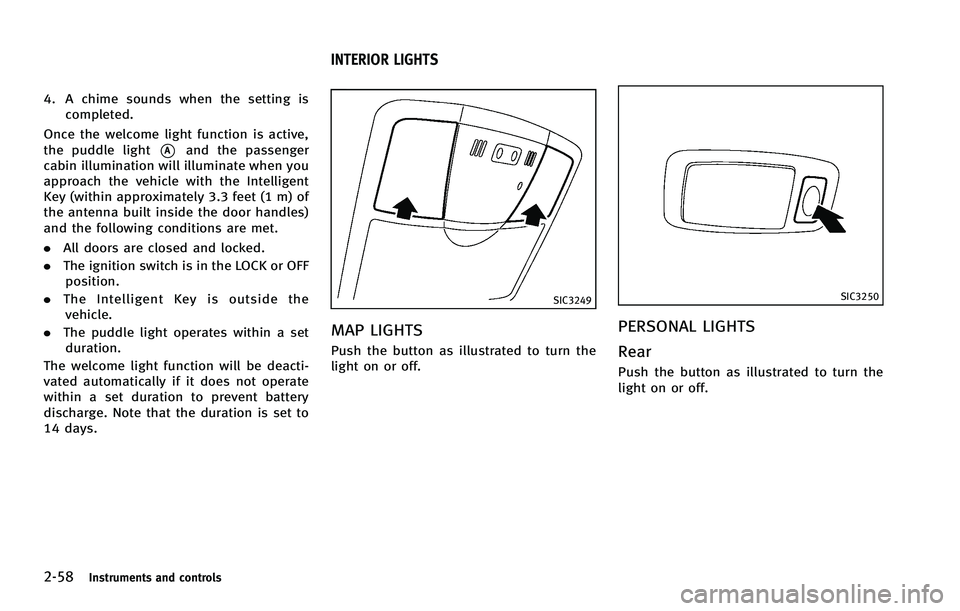
MAP LIGHTSGUID-90C1CDC9-88EE-483F-A6B5-9B7CF87C9FA8
SIC3250
PERSONAL LIGHTSGUID-427C090A-E791-4E67-B530-6B20EBFA79D8
Page 141 of 506

3-4Pre-driving checks and adjustments
GUID-11122824-7934-4DF7-86A9-789D6D5A76D9
WARNING
.Always have the doors locked while
driving. Along with the use of seat belts,
this provides greater safety in the event
of an accident by helping to prevent
persons from being thrown from the
vehicle. This also helps keep children
and others from unintentionally opening
the doors, and will help keep out
intruders.
. Before opening any door, always look for
and avoid oncoming traffic.
. Do not leave children unattended inside
the vehicle. They could unknowingly
activate switches or controls. Unat-
tended children could become involved
in serious accidents.
SPA2457B
LOCKING WITH MECHANICAL KEYGUID-8D2C47AE-C287-4DD6-951C-782C83FEEC80
Page 142 of 506

SPA1814
LOCKING WITH INSIDE LOCK KNOBGUID-255D9901-3D39-4A29-9FE4-4091268E9F68
SPA2300
LOCKING WITH POWER DOOR LOCK
SWITCH
GUID-8EAF60ED-D5E7-4774-93AB-0D2EB135EEB0
Page 143 of 506

3-6Pre-driving checks and adjustments
position (UNLOCK) for
more than 5 seconds.
4. When activated, the hazard indicator will flash twice. When deactivated, the
hazard indicator will flash once.
5. The ignition switch must be placed in the OFF and ON position again between
each setting change.
When the automatic door unlock system is
deactivated, the doors do not unlock when
the ignition switch is placed in the OFF
position. To unlock the door manually, use
the inside lock knob or the power door lock
switch (driver’s or front passenger’s side).
SPA2535
CHILD SAFETY REAR DOOR LOCKGUID-7AF8CF4F-8984-4F1B-86CF-38E6A6F2CFAE
WARNING
. Radio waves could adversely affect
electric medical equipment. Those who
use a pacemaker should contact the
electric medical equipment manufacturer
for the possible influences before use.
. The Intelligent Key transmits radio
waves when the buttons are pushed.
The FAA advises that the radio waves
may affect aircraft navigation and com-
munication systems. Do not operate the
Intelligent Key while on an airplane.
Make sure that the buttons are not
operated unintentionally when the unit
is stored for a flight.
The Intelligent Key system can operate all
the door locks using the remote controller
function or pushing the request switch on
the vehicle without taking the key out from
a pocket or purse. The operating environ-
ment and/or conditions may affect the
Intelligent Key system operation.
Be sure to read the following before using
the Intelligent Key system.
INTELLIGENT KEY SYSTEM
Page 146 of 506

SPA2326
DOOR LOCKS UNLOCKS PRECAU-
TION
GUID-C6C856C3-F25E-4C98-B0F6-1AE1E402F286
SPA2408
INTELLIGENT KEY OPERATIONGUID-B99EAFB4-82A5-4BD9-9044-7364ECA22FDE
Page 147 of 506

3-10Pre-driving checks and adjustments
SPA2467
SPA2410
When you carry the Intelligent Key with
you, you can lock or unlock all doors by
pushing the door handle request switch
(driver’s or front passenger’s)
*Aor the lift
gate request switch
*Bwithin the range of
operation.
When you lock or unlock the doors or the
lift gate, the hazard indicator will flash and
the horn (or the outside chime) will sound
as a confirmation. For details, see “Setting
hazard indicator and horn mode” later in
this section.
Locking doors and fuel-filler doorGUID-F0F78CD9-1EF7-40B4-9DC9-C75B12BAF4C5
Page 148 of 506

the request switch is pushed, all doors will
be locked automatically after another 1
minute.
.Opening any door
. Pushing the ignition switch
BATTERY SAVER SYSTEMGUID-11E244CA-71F1-41F6-9717-7B263886BC6E