fuel INFINITI EX 2012 Owners Manual
[x] Cancel search | Manufacturer: INFINITI, Model Year: 2012, Model line: EX, Model: INFINITI EX 2012Pages: 506, PDF Size: 7.27 MB
Page 11 of 506

0-4Illustrated table of contents
GUID-22C3CD44-5E1E-4FA8-BA99-B089AFCA0ADD
JVC0192X
1. Rearview camera (if so equipped)(P.4-24, P.4-31)
2. Lift gate (P.3-17) —Intelligent Key system (P.3-6)
— Remote keyless entry system
(P.3-13) 3. Rear window defroster (P.2-35)
4. High-mounted stop light (bulb repla-
cement) (P.8-26)
5. Rear window wiper and washer (P.2-34)
—Maintenance (P.8-21) 6. Antenna (P.4-97)
7. Sonar sensor
—Around View Monitor (if so
equipped) (P.4-31)
8. Rear combination light (bulb replace- ment) (P.8-26)
9. Fuel-filler door (P.3-17) —Fuel recommendation (P.9-3)
10. Child safety rear door locks (P.3-6)
EXTERIOR REAR
Page 16 of 506
GUID-3BE4B18C-D795-4C40-8E5B-093AD417BB16
SIC4694
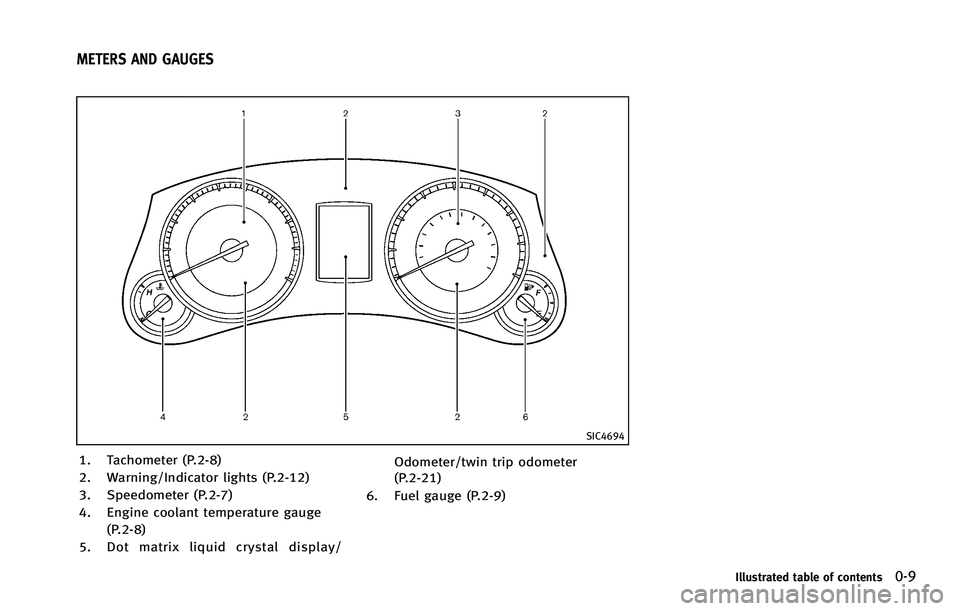
1. Tachometer (P.2-8)
2. Warning/Indicator lights (P.2-12)
3. Speedometer (P.2-7)
4. Engine coolant temperature gauge(P.2-8)
5. Dot matrix liquid crystal display/ Odometer/twin trip odometer
(P.2-21)
6. Fuel gauge (P.2-9)
Illustrated table of contents0-9
METERS AND GAUGES
Page 79 of 506
2-6Instruments and controls
GUID-C6F284D6-D7CC-4225-A943-62BD4F86D632
SIC4694
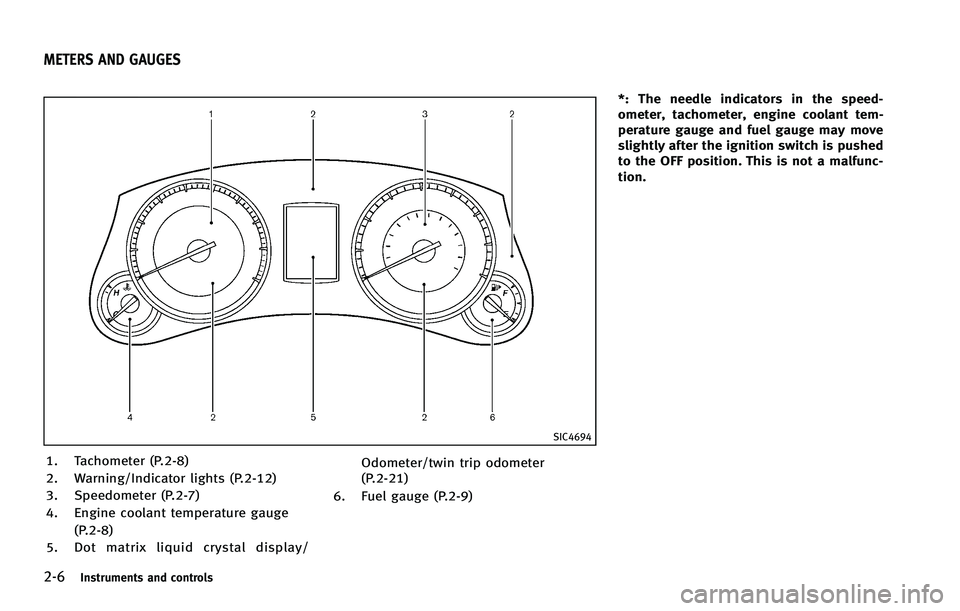
1. Tachometer (P.2-8)
2. Warning/Indicator lights (P.2-12)
3. Speedometer (P.2-7)
4. Engine coolant temperature gauge(P.2-8)
5. Dot matrix liquid crystal display/ Odometer/twin trip odometer
(P.2-21)
6. Fuel gauge (P.2-9) *: The needle indicators in the speed-
ometer, tachometer, engine coolant tem-
perature gauge and fuel gauge may move
slightly after the ignition switch is pushed
to the OFF position. This is not a malfunc-
tion.
METERS AND GAUGES
Page 82 of 506

SIC4698
FUEL GAUGEGUID-21651BBF-6DB3-4D04-8567-E365BC8B6357
appears on the
dot matrix liquid crystal display when the
fuel tank is getting low. Refuel as soon as it is convenient, preferably before the gauge
reaches
“E”. There will be a small reserve
of fuel in the tank when the fuel gauge
needle reaches “E”.
The
indicates that the fuel-filler door is
located on the passenger’s side of the
vehicle.
CAUTION
. If the vehicle runs out of fuel, themalfunction indicator light (MIL) may
come on. Refuel as soon as possible.
After a few driving trips, the
light
should turn off. If the light remains on
after a few driving trips, have the vehicle
inspected by an INFINITI retailer.
. For additional information, see “Mal-
function Indicator Light (MIL)” later in
this section.
GUID-D8945414-BD5D-4E71-A0E6-FFB70D2503A0
SIC3181
When the ignition switch is pushed to the
ON position, the compass display
*Bwill
indicate the direction of the vehicle’s
heading.
NOS1741
Page 93 of 506

2-20Instruments and controls
light should turn off
after a few driving trips. If thelight
does not turn off after a few driving
trips, have the vehicle inspected by an
INFINITI retailer. You do not need to
have your vehicle towed to the retailer.
. Malfunction indicator light blinking —
An engine misfire has been detected
which may damage the emission con-
trol system.
To reduce or avoid emission control system damage:
1) Do not drive at speeds above 45
MPH (72 km/h).
2) Avoid hard acceleration or decelera- tion.
3) Avoid steep uphill grades.
4) If possible, reduce the amount of cargo being hauled or towed.
The malfunction indicator light may
stop blinking and remain on.
Have the vehicle inspected by an
INFINITI retailer. You do not need to
have your vehicle towed to the retailer.
CAUTION
Continued vehicle operation without having
the emission control system checked and
repaired as necessary could lead to poor
driveability, reduced fuel economy, and
possible damage to the emission control
system.
Security indicator lightGUID-F283CFB3-5490-40E8-A11A-48F8F334CA30
Turn signal/hazard indicator
lights
GUID-03F65A59-AF9A-4CAE-937B-1BFA717FB4C0
Vehicle Dynamic Control (VDC)
off indicator light
GUID-FD6F2BFB-B634-4CE2-B8F8-10BADA39BBF3
Page 101 of 506

2-28Instruments and controls
SIC3625
TRIP COMPUTERGUID-F349FA3E-7C63-464E-A7BA-9C3BA79F4A98
switch
*Bswitch
When the ignition switch is pushed to the
ON position, modes of the trip computer
can be selected by pushing the
switch
*A.
Each time the
switch*Ais pushed, the
display will change as follows: Current fuel consumption
?Average fuel
consumption and speed ?Elapsed time
and trip odometer ?Distance to empty
(dte) ?Outside air temperature (ICY) ?
Setting ?Warning check
1. Current fuel consumptionGUID-0C64924E-9423-4FBE-B06E-3EDAC1782F16
switch*Bfor longer than 1 second.
(The average speed is also reset at the
same time.)
The display is updated every 30 seconds.
At about the first 1/3 mile (500 m) after a
reset, the display shows “——”.
Speed:
GUID-4D508F5D-FA8E-49D6-A9E2-6F8E76C17033
switch*Bfor longer than 1 second. (The average fuel consumption is also reset
at the same time.)
The display is updated every 30 seconds.
The first 30 seconds after a reset, the
display shows
“——”.
3. Elapsed time and trip odometer
(mls or km)
GUID-7B6DF817-1239-4EB4-BB98-947F770BFD3B
switch*Bfor
longer than 1 second. (The trip odometer is
also reset at the same time.)
Trip odometer:
GUID-4D508F5D-FA8E-49D6-A9E2-6F8E76C17033
switch*Bfor longer than 1
second. (The elapsed time is also reset at
the same time.)
4. Distance to empty (dte —mls or
km)
GUID-1CFB7162-2FAD-422A-B566-38D27E38D5BC
Page 102 of 506

amount of fuel in the fuel tank and the
actual fuel consumption.
The display is updated every 30 seconds.
The dte mode includes a low range warning
feature. If the fuel level is low, the warning
is displayed on the screen.
When the fuel level drops even lower, the
dte display will change to“——”.
. If the amount of fuel added is small, the
display just before the ignition switch
is pushed to the OFF position may
continue to be displayed.
. When driving uphill or rounding curves,
the fuel in the tank shifts, which may
momentarily change the display.
5. Outside air temperature (ICY —8F
or 8C)
GUID-67DA9682-5773-4AE5-AD0E-853FAC3D4415
switch*Aandswitch*Bare
used in the setting mode to select and
decide a menu.
SKIP:
GUID-4D508F5D-FA8E-49D6-A9E2-6F8E76C17033switch*Ato move to the
warning check mode.
Push the
switch*Bto select other
menus.
ALERT:
GUID-4D508F5D-FA8E-49D6-A9E2-6F8E76C17033
Page 147 of 506

3-10Pre-driving checks and adjustments
SPA2467
SPA2410
When you carry the Intelligent Key with
you, you can lock or unlock all doors by
pushing the door handle request switch
(driver’s or front passenger’s)
*Aor the lift
gate request switch
*Bwithin the range of
operation.
When you lock or unlock the doors or the
lift gate, the hazard indicator will flash and
the horn (or the outside chime) will sound
as a confirmation. For details, see “Setting
hazard indicator and horn mode” later in
this section.
Locking doors and fuel-filler doorGUID-F0F78CD9-1EF7-40B4-9DC9-C75B12BAF4C5
Page 150 of 506

GUID-15E71DED-7DD0-411C-86F6-371302C7A6CA
WARNING
The Intelligent Key transmits radio waves
when the buttons are pushed. The FAA
advises that the radio waves may affect
aircraft navigation and communication sys-
tems. Do not operate the Intelligent Key
while on an airplane. Make sure that the
buttons are not operated unintentionally
when the unit is stored for a flight.
It is possible to lock/unlock all doors, fuel-
filler door, activate the panic alarm and
open the windows by pushing the buttons
on the Intelligent Key from outside the
vehicle.
Before locking the doors, make sure the
Intelligent Key is not left in the vehicle.
The LOCK/UNLOCK button on the Intelli-
gent Key can operate at a distance of
approximately 33 ft (10 m) from the
vehicle. (The effective distance depends
upon the conditions around the vehicle.)
As many as 4 Intelligent Keys can be used
with one vehicle. For information concern-
ing the purchase and use of additional
Intelligent Keys, contact an INFINITI retai-
ler.The lock and unlock buttons on the
Intelligent Key will not operate when:
.
the distance between the Intelligent Key
and the vehicle is over 33 ft (10 m).
. the Intelligent Key battery runs down.
After locking with the remote keyless entry
function, pull the door handle to make sure
the doors are securely locked.
The LOCK/UNLOCK operating range varies
depending on the environment. To securely
operate the lock and unlock buttons,
approach the vehicle to about 3 ft (1 m)
from the door.SPA2252
HOW TO USE REMOTE KEYLESS
ENTRY SYSTEM
GUID-58013B2A-5102-4FF4-B0F0-389777C7FFE8
Page 151 of 506

3-14Pre-driving checks and adjustments
2. Close all the doors and the lift gate.*2
3. Push the LOCK
button*1on the
Intelligent Key.
4. All the doors, the lift gate and fuel-filler door will lock.
5. The hazard indicator flashes twice and the horn chirps once.
*1: Doors will lock with the Intelligent Key
while the ignition switch is in the ACC or
ON position.
*2: Doors will not lock with the Intelligent
Key while any door is open.
Unlocking doors and fuel-filler doorGUID-CC8A76D2-67AD-47FD-971C-B7968A47AF43button*2on the
Intelligent Key once.
2. The hazard indicator flashes once. The driver’s door and fuel-filler door will
unlock.
3. Push the UNLOCK
button on the
Intelligent Key again within 60 sec-
onds.
4. The hazard indicator flashes once
again. All the doors and the lift gate
will unlock.
All doors will be locked automatically
unless one of the following operations is performed within 1 minute after pushing
the UNLOCK
button on the Intelligent
Key while the doors are locked. If during
this 1-minute time period, the UNLOCK
button on the Intelligent Key is pushed, all
doors will be locked automatically after
another 1 minute.
. Opening any door
. Pushing the ignition switch
Opening windowsGUID-5EC2B4D4-B4E8-45C1-8DE2-0264577A95E7button operation also
allows you to open a window that is
equipped with the automatic open/close
function. (See “Power windows” in the“2.
Instruments and controls” section.)
To open the windows, push the door
UNLOCK
button on the Intelligent Key
for about 3 seconds after the door is
unlocked.
To stop opening, release the UNLOCK
button.
Window cannot be closed using the In-
telligent Key.
The door window can be opened or closed
by turning the mechanical key in a door
lock. (See “Doors”earlier in this section.)
Using panic alarmGUID-FE75BEE6-6D84-4ABA-84F5-F47AE2443FA4
button*3on the
Intelligent key for more than 1 second.
2. The theft warning alarm and headlights will stay on for 25 seconds.
3. The panic alarm stops when:
.It has run for 25 seconds, or.Any of the buttons on the Intelligent key are pushed. (Note: Panic button
should be pushed for more than 1
second.)
Setting hazard indicator and horn
mode
GUID-D73804FB-D84D-4B1E-80B6-E36BCC932468
button*1is pushed, the
hazard indicator flashes twice and the horn
chirps once. When the UNLOCK
button
*2is pushed, the hazard indicator flashes
once.
If horns are not necessary, the system can
be switched to the hazard indicator mode.