garage door opener INFINITI EX 2012 Owners Manual
[x] Cancel search | Manufacturer: INFINITI, Model Year: 2012, Model line: EX, Model: INFINITI EX 2012Pages: 506, PDF Size: 7.27 MB
Page 133 of 506
2-60Instruments and controls
GUID-E3368CF8-A3EF-4DAC-9176-8558DF7C9907
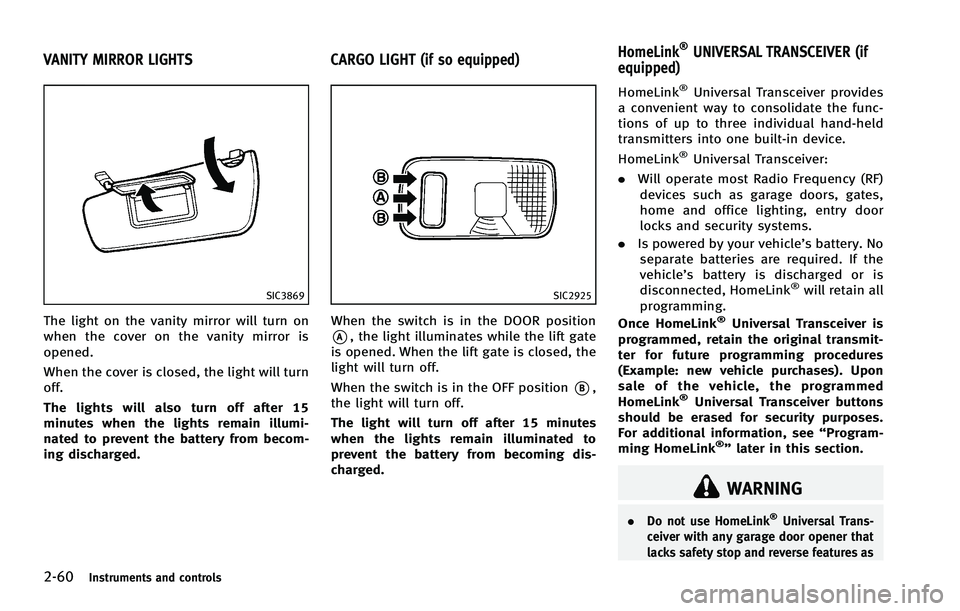
SIC3869
The light on the vanity mirror will turn on
when the cover on the vanity mirror is
opened.
When the cover is closed, the light will turn
off.
The lights will also turn off after 15
minutes when the lights remain illumi-
nated to prevent the battery from becom-
ing discharged.
GUID-65B14C49-101C-46AA-9AC8-BE69E9C5943F
SIC2925
When the switch is in the DOOR position
*A, the light illuminates while the lift gate
is opened. When the lift gate is closed, the
light will turn off.
When the switch is in the OFF position
*B,
the light will turn off.
The light will turn off after 15 minutes
when the lights remain illuminated to
prevent the battery from becoming dis-
charged.
GUID-BBDE6354-59FD-4B7D-831F-DCCDCD8C2E6F
WARNING
. Do not use HomeLink®Universal Trans-
ceiver with any garage door opener that
lacks safety stop and reverse features as
VANITY MIRROR LIGHTS CARGO LIGHT (if so equipped) HomeLink®UNIVERSAL TRANSCEIVER (if
equipped)
Page 135 of 506

2-62Instruments and controls
SIC3183
3. Using both hands, simultaneously pushand hold both the HomeLink®button
you want to program and the hand-held
transmitter button.
DO NOT release the buttons until step 4
has been completed.
4. Hold down both buttons until the
indicator light on HomeLink
®flashes,
changing from a “slow blink”to a
“rapid blink”. This could take up to 90
seconds. When the indicator light
blinks rapidly, both buttons may be
released. The rapidly flashing light
indicates successful programming. To
activate the garage door or other programmed device, push and hold
the programmed HomeLink
®button -
releasing when the device begins to
activate.
5. If the indicator light on HomeLink
®
blinks rapidly for two seconds and then
turns solid, HomeLink®has picked up a
“rolling code” garage door opener
signal. You will need to proceed with
the next steps to train HomeLink
®,
completing the programming may re-
quire a ladder and another person for
convenience.
6. Push and release the program button located on the garage door opener’s
motor to activate the “training mode”.
This button is usually located near the
antenna wire that hangs down from the
motor. If the wire originates from under
a light lens, you will need to remove the
lens to access the training button.
NOTE:
Once you have pushed and released
the training button on the garage door
opener’s motor and the “training light”
is lit, you have 30 seconds in which to
perform step 7. For convenience, use
the help of a second person to assist
when performing this step. 7. Quickly (within 30 seconds of pushing
and releasing the garage door opener
training button) and firmly push and
release the HomeLink
®button you’ve
just programmed. Push and release the
HomeLink
®button up to three times to
complete the training.
8. Your HomeLink
®button should now be
programmed. To program the remaining
HomeLink
®buttons for additional door
or gate openers, follow steps 2 through
8 only.
NOTE:
Do not repeat step 1 unless you want to
“clear” all previously programmed
HomeLink
®buttons.
If you have any questions or are having
difficulty programming your HomeLink
®
buttons, please refer to the HomeLink®
web site at: www.homelink.com or call 1-
800-355-3515.