light INFINITI EX 2013 Owner's Manual
[x] Cancel search | Manufacturer: INFINITI, Model Year: 2013, Model line: EX, Model: INFINITI EX 2013Pages: 498, PDF Size: 2.5 MB
Page 319 of 498
5-8Starting and driving
visually inspect the tires for wear and
damage. See“Wheels and tires” in the“8.
Maintenance and do-it-yourself” section of
this manual.
If a tire rapidly loses air pressure or
“blows-out” while driving maintain control
of the vehicle by following the procedure
below. Please note that this procedure is
only a general guide. The vehicle must be
driven as appropriate based on the condi-
tions of the vehicle, road and traffic.
WARNING
The following actions can increase the
chance of losing control of the vehicle if
there is a sudden loss of tire air pressure.
Losing control of the vehicle may cause a
collision and result in personal injury.
. The vehicle generally moves or pulls in
the direction of the flat tire.
. Do not rapidly apply the brakes.
. Do not rapidly release the accelerator
pedal.
. Do not rapidly turn the steering wheel.
1. Remain calm and do not overreact. 2. Maintain a firm grip on the steering
wheel with both hands and try to hold a
straight course.
3. When appropriate, slowly release the accelerator pedal to gradually slow the
vehicle.
4. Gradually steer the vehicle to a safe location off the road and away from
traffic if possible.
5. Lightly apply the brake pedal to gradu- ally stop the vehicle.
6. Turn on the hazard warning flashers and either contact a roadside emer-
gency service to change the tire or see
“Changing a flat tire” in the“6. In case
of emergency” section of this Owner’s
Manual.
DRINKING ALCOHOL/DRUGS AND
DRIVING
WARNING
Never drive under the influence of alcohol or
drugs. Alcohol in the bloodstream reduces
coordination, delays reaction time and im-
pairs judgement. Driving after drinking
alcohol increases the likelihood of being involved in an accident injuring yourself and
others. Additionally, if you are injured in an
accident, alcohol can increase the severity
of the injury.
INFINITI is committed to safe driving.
However, you must choose not to drive
under the influence of alcohol. Every year
thousands of people are injured or killed in
alcohol-related accidents. Although the
local laws vary on what is considered to
be legally intoxicated, the fact is that
alcohol affects all people differently and
most people underestimate the effects of
alcohol.
Remember, drinking and driving don’t mix!
And that is true for drugs, too (over-the-
counter, prescription, and illegal drugs).
Don’t drive if your ability to operate your
vehicle is impaired by alcohol, drugs, or
some other physical condition.
Page 323 of 498
5-12Starting and driving
SSD0785
INTELLIGENT KEY BATTERY DIS-
CHARGE
If the battery of the Intelligent Key is
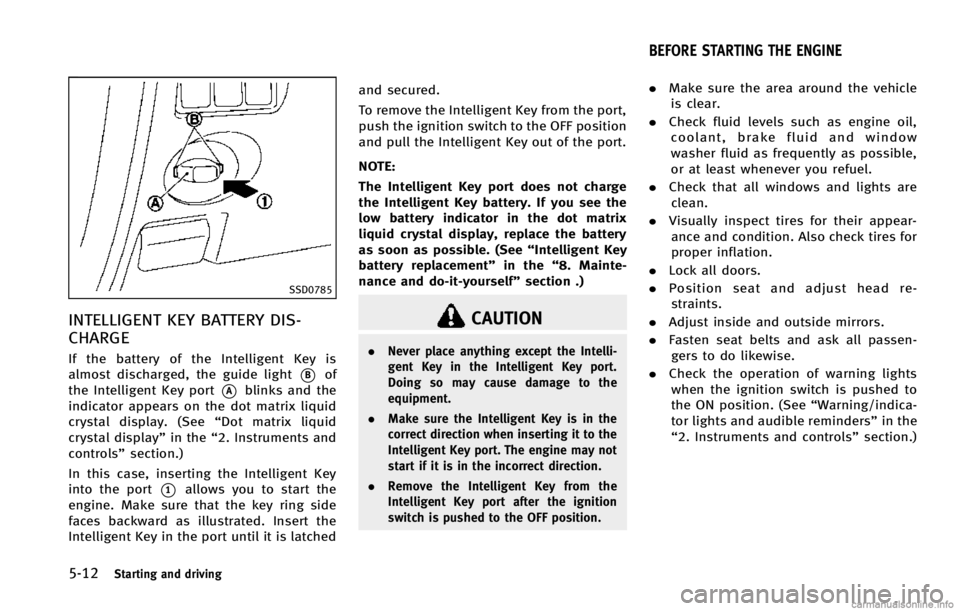
almost discharged, the guide light
*Bof
the Intelligent Key port
*Ablinks and the
indicator appears on the dot matrix liquid
crystal display. (See “Dot matrix liquid
crystal display” in the“2. Instruments and
controls” section.)
In this case, inserting the Intelligent Key
into the port
*1allows you to start the
engine. Make sure that the key ring side
faces backward as illustrated. Insert the
Intelligent Key in the port until it is latched and secured.
To remove the Intelligent Key from the port,
push the ignition switch to the OFF position
and pull the Intelligent Key out of the port.
NOTE:
The Intelligent Key port does not charge
the Intelligent Key battery. If you see the
low battery indicator in the dot matrix
liquid crystal display, replace the battery
as soon as possible. (See
“Intelligent Key
battery replacement” in the“8. Mainte-
nance and do-it-yourself” section .)
CAUTION
.Never place anything except the Intelli-
gent Key in the Intelligent Key port.
Doing so may cause damage to the
equipment.
. Make sure the Intelligent Key is in the
correct direction when inserting it to the
Intelligent Key port. The engine may not
start if it is in the incorrect direction.
. Remove the Intelligent Key from the
Intelligent Key port after the ignition
switch is pushed to the OFF position.
.Make sure the area around the vehicle
is clear.
. Check fluid levels such as engine oil,
coolant, brake fluid and window
washer fluid as frequently as possible,
or at least whenever you refuel.
. Check that all windows and lights are
clean.
. Visually inspect tires for their appear-
ance and condition. Also check tires for
proper inflation.
. Lock all doors.
. Position seat and adjust head re-
straints.
. Adjust inside and outside mirrors.
. Fasten seat belts and ask all passen-
gers to do likewise.
. Check the operation of warning lights
when the ignition switch is pushed to
the ON position. (See “Warning/indica-
tor lights and audible reminders” in the
“2. Instruments and controls” section.)
BEFORE STARTING THE ENGINE
Page 327 of 498

5-16Starting and driving
DS (Drive Sport) mode
Move the selector lever from D (Drive) to
the left into the manual shift gate. The
transmission position indicator in the
meter shows“DS”.
In the DS (Drive Sport) mode, the transmis-
sion changes to the “sporty”driving shift
operation, creating a more aggressive
acceleration feeling than the D (Drive)
mode and providing a gear change sensa-
tion when the driver accelerates quickly.
When the driver selects the manual shift
mode using the selector lever during the
DS (Drive Sport) mode operation, the driver
must move the selector lever from DS
(Drive Sport) to D (Drive) and back again
to re-select the DS (Drive Sport) mode.
Manual shift mode
When the selector lever is in the DS (Drive
Sport) position, the transmission is ready
for the manual shift mode. Shift ranges can
be selected manually by moving the
selector lever up or down.
When shifting up, move the selector lever
to the + (up) side. The transmission shifts
to the higher range.
When shifting down, move the selector lever to the
−(down) side. The transmis-
sion shifts to the lower range.
When canceling the manual shift mode,
return the selector lever to the D (Drive)
position. The transmission returns to the
normal driving mode.
In the manual shift mode, the shift range is
displayed on the position indicator in the
meter.
Shift ranges up or down one by one as
follows:
M1 ?M2?M3?M4?M5?M6?M7
///// /
M7 (7th):
Use these positions for all normal forward
driving at highway speeds.
M6 (6th) andM5 (5th):
Use this position when driving up long
slopes, or for engine braking when driving
down long slopes.
M4 (4th),M3 (3rd) andM2 (2nd):
Use these positions for hill climbing or
engine braking on downhill grades.
M1 (1st):
Use this position when climbing steep hills
slowly or driving slowly through deep snow, or for maximum engine braking on
steep downhill grades.
.
Remember not to drive at high speeds
for extended periods of time in lower
than 7th gear. This reduces fuel econ-
omy.
. Moving the selector lever rapidly to the
same side twice will shift the ranges in
succession. However, if this motion is
done rapidly, the second shifting may
not be completed properly.
. In the manual shift mode, the transmis-
sion may not shift to the selected gear
or may automatically shift to the other
gear depending on conditions. This
helps maintain driving performance
and reduces the chance of vehicle
damage or loss of control.
. When the transmission does not shift
to the selected gear, the Automatic
Transmission (AT) position indicator
light (on the dot matrix liquid crystal
display) will blink and the buzzer will
sound.
. In the manual shift mode, the transmis-
sion automatically shifts down to 1st
gear before the vehicle comes to a
stop. When accelerating again, it is
necessary to shift up to the desired
Page 330 of 498

SPA2331
To apply:Fully depress the parking brake
pedal
*1.
To release:
1. Firmly apply the foot brake
*2.
2. Depress the parking brake pedal
*1
and the parking brake will be released.
3. Before driving, be sure the brake warning light goes out. The Lane Departure Warning (LDW) sys-
tem/Lane Departure Prevention (LDP) sys-
tem will operate when the vehicle is driven
at speeds of approximately 45 MPH (72
km/h) and above, and when it is traveling
close to either the left or the right of a
traveling lane.
Each system functions as follows:
.
Lane Departure Warning (LDW) system
— warns the driver with a warning light
and chime that the vehicle is beginning
to leave the driving lane.
. Lane Departure Prevention (LDP) system
— warns the driver by a warning light
and chime, and helps assist the driver
to return the vehicle to the center of the
traveling lane by applying brake control
to the left or right wheels individually
(for a short period of time).
SSD0697
SSD1166
Starting and driving5-19
LANE DEPARTURE WARNING (LDW)
SYSTEM/LANE DEPARTURE PREVENTION
(LDP) SYSTEM (if so equipped)
Page 331 of 498
5-20Starting and driving
The LDW and LDP systems monitor the lane
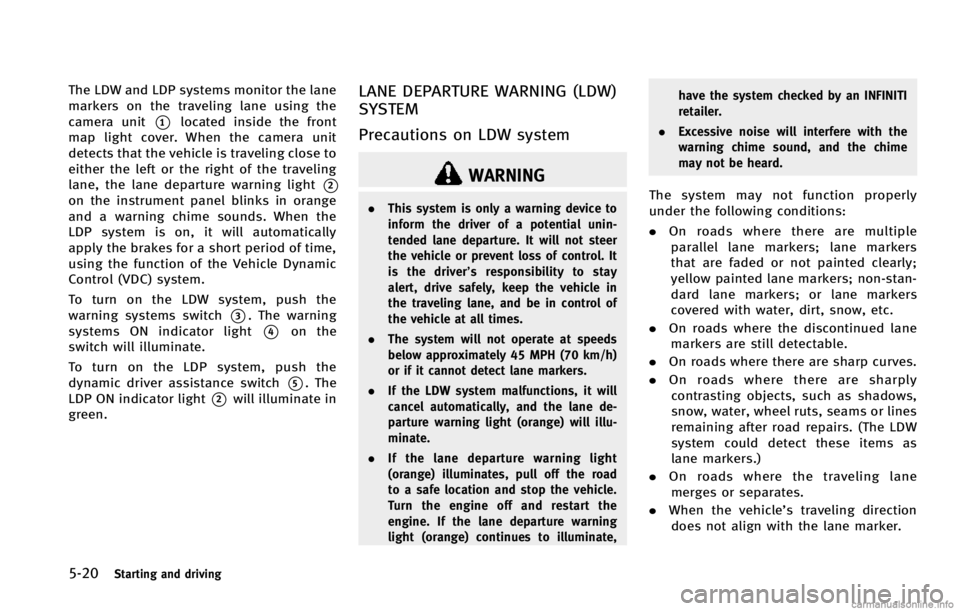
markers on the traveling lane using the
camera unit
*1located inside the front
map light cover. When the camera unit
detects that the vehicle is traveling close to
either the left or the right of the traveling
lane, the lane departure warning light
*2
on the instrument panel blinks in orange
and a warning chime sounds. When the
LDP system is on, it will automatically
apply the brakes for a short period of time,
using the function of the Vehicle Dynamic
Control (VDC) system.
To turn on the LDW system, push the
warning systems switch
*3. The warning
systems ON indicator light
*4on the
switch will illuminate.
To turn on the LDP system, push the
dynamic driver assistance switch
*5. The
LDP ON indicator light
*2will illuminate in
green.
LANE DEPARTURE WARNING (LDW)
SYSTEM
Precautions on LDW system
WARNING
. This system is only a warning device to
inform the driver of a potential unin-
tended lane departure. It will not steer
the vehicle or prevent loss of control. It
is the driver’ s responsibility to stay
alert, drive safely, keep the vehicle in
the traveling lane, and be in control of
the vehicle at all times.
. The system will not operate at speeds
below approximately 45 MPH (70 km/h)
or if it cannot detect lane markers.
. If the LDW system malfunctions, it will
cancel automatically, and the lane de-
parture warning light (orange) will illu-
minate.
. If the lane departure warning light
(orange) illuminates, pull off the road
to a safe location and stop the vehicle.
Turn the engine off and restart the
engine. If the lane departure warning
light (orange) continues to illuminate, have the system checked by an INFINITI
retailer.
. Excessive noise will interfere with the
warning chime sound, and the chime
may not be heard.The system may not function properly
under the following conditions:
.On roads where there are multiple
parallel lane markers; lane markers
that are faded or not painted clearly;
yellow painted lane markers; non-stan-
dard lane markers; or lane markers
covered with water, dirt, snow, etc.
. On roads where the discontinued lane
markers are still detectable.
. On roads where there are sharp curves.
. On roads where there are sharply
contrasting objects, such as shadows,
snow, water, wheel ruts, seams or lines
remaining after road repairs. (The LDW
system could detect these items as
lane markers.)
. On roads where the traveling lane
merges or separates.
. When the vehicle’s traveling direction
does not align with the lane marker.
Page 332 of 498

.When traveling close to the vehicle in
front of you, which obstructs the lane
camera unit detection range.
. When rain, snow or dirt adheres to the
windshield in front of the lane camera
unit.
. When the headlights are not bright due
to dirt on the lens or if the aiming is not
adjusted properly.
. When strong light enters the lane
camera unit. (For example, the light
directly shines on the front of the
vehicle at sunrise or sunset.)
. When a sudden change in brightness
occurs. (For example, when the vehicle
enters or exits a tunnel or under a
bridge.)
SSD0672
Lane departure warning light (orange)
SSD1156
Warning systems switch
LDW system operation
The LDW system provides a lane departure
warning function when the vehicle is driven
at speeds of approximately 45 MPH (70
km/h) and above. When the vehicle
approaches either the left or the right side
of the traveling lane, a warning chime will
sound and the lane departure warning light
(orange) on the instrument panel will blink
to alert the driver.
The warning function will stop when the
vehicle returns inside of the lane markers.
When you operate the lane change signal
and change traveling lanes in the direction
of the signal, the LDW system temporarily
suspends operation. It will become oper-
able again approximately 2 seconds after
the lane change signal is turned off.
When the vehicle speed lowers to less than
approximately 45 MPH (70 km/h), the LDW
system will not provide a warning.
The LDW system has an automatic setting
mode and a manual setting mode. The
setting mode can be changed. In the
automatic setting mode, the LDW system
is automatically turned on when the igni-
tion switch is pushed to the ON position.
When the LDW system is on, the warning
Starting and driving5-21
Page 333 of 498

5-22Starting and driving
systems ON indicator*1on the warning
systems switch illuminates. To cancel the
LDW system, push the warning systems
switch. The warning systems ON indicator
will turn off. To turn on the system, push
the warning systems switch again. This
switch will turn on and off the LDW, BSW
and FCW systems at the same time.
In the manual setting mode, you need to
push the warning systems switch to turn
on the system after the ignition switch is
pushed to the ON position.
The setting mode can be changed using
the warning systems switch. To change the
setting mode, push and hold the warning
systems switch for more than 4 seconds
when the warning systems ON indicator is
off. When the mode is changed, a chime
sounds and the lane departure warning
light (orange) flashes.
Temporary disabled status at high
temperature
If the vehicle is parked in direct sunlight
under high temperature conditions (over
approximately 1048 F (408C) and then
started, the LDW system may be deacti-
vated automatically. The lane departure
warning light (orange) on the switch will flash.
When the interior temperature is reduced,
the LDW system will resume operating
automatically and the warning systems
ON indicator will stop flashing.
LANE DEPARTURE PREVENTION
(LDP) SYSTEM
Precautions on LDP system
WARNING
.
The LDP system will not steer the vehicle
or prevent loss of control. It is the
driver’s responsibility to stay alert, drive
safely, keep the vehicle in the traveling
lane, and be in control of vehicle at all
times.
. The LDP system is primarily intended for
use on well-developed freeways or high-
ways. It may not detect the lane markers
in certain roads, weather or driving
conditions.
. Using the LDP system under some
conditions of road, lane marker or
weather, or when you change lanes
without using the lane change signal
could lead to an unexpected system operation. In such conditions, you need
to correct the vehicle’s direction with
your steering operation to avoid acci-
dents.
. When the LDP system is operating, avoid
excessive or sudden steering maneu-
vers. Otherwise, you could lose control
of the vehicle.
. The LDP system will not operate at
speeds below approximately 45 MPH
(70 km/h) or if it cannot detect lane
markers.
. The LDP system may not function
properly under the following conditions,
and do not use the LDP system:
—During bad weather (rain, fog, snow,
wind, etc.).
—When driving on slippery roads,
such as on ice or snow, etc.
—When driving on winding or uneven roads.
—When there is a lane closure due to
road repairs.
—When driving in a makeshift lane.
—When driving on roads where thelane width is too narrow.
Page 334 of 498
—When driving without normal tireconditions (for example, tire wear,
low tire pressure, installation of
spare tire, tire chains, non-standard
wheels).
—When the vehicle is equipped with
nonoriginal brake parts or suspen-
sion parts.
. If the LDP system malfunctions, it will
cancel automatically. The lane departure
warning light (orange) on the instrument
panel will illuminate.
. If the lane departure warning light
(orange) illuminates, pull off the road
to a safe location and stop the vehicle.
Turn the engine off and restart the
engine. If the warning light (orange)
continues to illuminate, have the LDP
system checked by an INFINITI retailer.
. Excessive noise will interfere with the
warning chime sound, and the chime
may not be heard.
The functions of the LDP system (warning
and brake control assist) may or may not
operate properly under the following con-
ditions: .
On roads where there are multiple
parallel lane markers; lane markers
that are faded or not painted clearly;
yellow painted lane markers; non-stan-
dard lane markers; or lane markers
covered with water, dirt, snow, etc.
. On roads where discontinued lane
markers are still detectable.
. On roads where there are sharp curves.
. On roads where there are sharply
contrasting objects, such as shadows,
snow, water, wheel ruts, seams or lines
remaining after road repairs. (The LDP
system could detect these items as
lane markers.)
. On roads where the traveling lane
merges or separates.
. When the vehicle’s traveling direction
does not align with the lane marker.
. When traveling close to the vehicle in
front of you, which obstructs the lane
camera unit detection range.
. When rain, snow or dirt adheres to the
windshield in front of the lane camera
unit.
. When the headlights are not bright due
to dirt on the lens or if the aiming is not
adjusted properly. .
When strong light enters the lane
camera unit. (For example, the light
directly shines on the front of the
vehicle at sunrise or sunset.)
. When a sudden change in brightness
occurs. (For example, when the vehicle
enters or exits a tunnel or under a
bridge.)
While the LDP system is operating, you
may hear a sound of brake operation. This
is normal and indicates that the LDP
system is operating properly.
Starting and driving5-23
Page 335 of 498

5-24Starting and driving
SSD0672
LDP ON indicator light (green)/ Warninglight (orange)
LDP system operation
The LDP system provides a lane departure
warning and brake control assistance when
the vehicle is driven at speeds of approxi-
mately 45 MPH (70 km/h) and above.
When the vehicle approaches either the left
or the right side of the traveling lane, a
warning chime will sound and the lane
departure warning light (orange) on the
instrument panel will blink to alert the
driver. Then, the LDP system will automa-
tically apply the brakes for a short period
of time to help assist the driver to return the vehicle to the center of the traveling
lane.
The warning and assist functions will stop
when the vehicle returns to a position
inside of the lane marker.
SSD0898
Dynamic driver assistance switch
The LDP system turns on when you push
the dynamic driver assistance switch on
the steering wheel after starting the
engine. The LDP ON indicator light (green)
on the instrument panel will illuminate.
Push the dynamic driver assistance switch
again to turn off the LDP system. The LDP
ON indicator light will turn off.
Page 336 of 498

SSD0884
SSD0885
Changing the dynamic driver as-
sistance switch settings
1. Push the SETTING*1button and high-
light the “Driver Assistance” key on the
display using the INFINITI controller.
Then push the ENTER
*2button.
2. Highlight the “Dynamic Assistance set-
tings” key, and push the ENTER
*2
button.
SSD0886
3. To set the LDP system to on or off,
highlight the “Lane Departure Preven-
tion” key, select ON or OFF and push
the ENTER
*2button.
If you set all of the systems to disable and
push the dynamic driver assistance switch,
the indicator of the disabled system will
blink for approximately 4 seconds and turn
off. (See “Distance Control Assist (DCA)
system” later in this section for DCA
system.)
Starting and driving5-25