fog light INFINITI EX 2013 User Guide
[x] Cancel search | Manufacturer: INFINITI, Model Year: 2013, Model line: EX, Model: INFINITI EX 2013Pages: 498, PDF Size: 2.5 MB
Page 214 of 498

ture. (The DUAL indicator light
will illuminate and“DUAL”will
appear on the display.)
.To set separate desired tempera- tures for the driver and front pas-
senger, push the “DUAL”button, the
indicator light illuminates, and then
turn the corresponding temperature
control dial.
.To cancel the separate temperature setting, push the “DUAL”button, the
indicator light turns off, and the
driver’s side temperature setting will
be applied to both the driver’s and
front passenger’s sides.
A visible mist may be seen coming from the
ventilators in hot, humid conditions as the
air is cooled rapidly. This does not indicate
a malfunction.
Heating (A/C off):
1. Push the “AUTO”button.
(The AUTO indicator light will illuminate
and “AUTO” will appear on the display.)
2. If the A/C indicator light illuminates, push the “A/C”button.
(The A/C indicator light will turn off.)
3. Turn the temperature control dial to set the desired temperature.
.When the DUAL indicator light isturned off:
— Pushing the driver’s side “AUTO”
button changes both the driver’s
and front passenger’s side tem-
perature.
— Pushing the passenger’ s side
“DUAL” button changes only the
front passenger’s side tempera-
ture. (The DUAL indicator light
will illuminate and “DUAL”will
appear on the display.)
.To set separate desired tempera- tures for the driver and front pas-
senger, push the “DUAL”button, the
indicator light illuminates, and then
turn the corresponding temperature
control dial.
.To cancel the separate temperature setting, push the “DUAL”button, the
indicator light turns off, and the
driver’s side temperature setting will
be applied to both the driver’s and
front passenger’s sides.
.Do not set the temperature lower than the outside air temperature.
Doing so may cause the temperature
not to be controlled properly.
.If the windows fog up, use dehumi-dified heating instead of the A/C off
heating.
Dehumidified defrosting/defogging:
1. Push the “
”button. (The indicator
light will illuminate.)
2. Turn the temperature control dial to set the desired temperature.
.To remove frost from the outsidesurface of the windshield quickly,
set the temperature control and fan
speed control to their maximum
position.
.After the windshield is cleared, pushthe “AUTO” button to set to the
automatic mode.
.When the “”button is pushed,
the air conditioner will automatically
turn on when the outside air tem-
perature is above 238F( −58C) to
defog the windshield. The air recir-
culation mode will automatically
turn off. The outside air circulation
mode will be selected to improve the
defogging performance.
Monitor, climate, audio, phone and voice recognition systems4-49
Page 333 of 498

5-22Starting and driving
systems ON indicator*1on the warning
systems switch illuminates. To cancel the
LDW system, push the warning systems
switch. The warning systems ON indicator
will turn off. To turn on the system, push
the warning systems switch again. This
switch will turn on and off the LDW, BSW
and FCW systems at the same time.
In the manual setting mode, you need to
push the warning systems switch to turn
on the system after the ignition switch is
pushed to the ON position.
The setting mode can be changed using
the warning systems switch. To change the
setting mode, push and hold the warning
systems switch for more than 4 seconds
when the warning systems ON indicator is
off. When the mode is changed, a chime
sounds and the lane departure warning
light (orange) flashes.
Temporary disabled status at high
temperature
If the vehicle is parked in direct sunlight
under high temperature conditions (over
approximately 1048 F (408C) and then
started, the LDW system may be deacti-
vated automatically. The lane departure
warning light (orange) on the switch will flash.
When the interior temperature is reduced,
the LDW system will resume operating
automatically and the warning systems
ON indicator will stop flashing.
LANE DEPARTURE PREVENTION
(LDP) SYSTEM
Precautions on LDP system
WARNING
.
The LDP system will not steer the vehicle
or prevent loss of control. It is the
driver’s responsibility to stay alert, drive
safely, keep the vehicle in the traveling
lane, and be in control of vehicle at all
times.
. The LDP system is primarily intended for
use on well-developed freeways or high-
ways. It may not detect the lane markers
in certain roads, weather or driving
conditions.
. Using the LDP system under some
conditions of road, lane marker or
weather, or when you change lanes
without using the lane change signal
could lead to an unexpected system operation. In such conditions, you need
to correct the vehicle’s direction with
your steering operation to avoid acci-
dents.
. When the LDP system is operating, avoid
excessive or sudden steering maneu-
vers. Otherwise, you could lose control
of the vehicle.
. The LDP system will not operate at
speeds below approximately 45 MPH
(70 km/h) or if it cannot detect lane
markers.
. The LDP system may not function
properly under the following conditions,
and do not use the LDP system:
—During bad weather (rain, fog, snow,
wind, etc.).
—When driving on slippery roads,
such as on ice or snow, etc.
—When driving on winding or uneven roads.
—When there is a lane closure due to
road repairs.
—When driving in a makeshift lane.
—When driving on roads where thelane width is too narrow.
Page 344 of 498

SSD1037
Entering from the side
The BSW indicator light illuminates if a
vehicle enters the detection zone from
either side.
NOTE:
The radar sensors may not detect a vehicle
which is traveling at about the same speed
as your vehicle when it enters the detec-
tion zone.
SSD1038
If the driver activates the turn signal, then
the BSW indicator light flashes and a
chime will sound twice.
NOTE:
If the driver activates the turn signal
before a vehicle enters the detection zone,
the BSW indicator light will flash but no
chime will sound when another vehicle is
detected.
BSW temporarily not available
When radar blockage is detected, the BSW
system will be turned off automatically, a
beep will sound and the BSW system
warning light will blink. The BSW systemis not available until the condition no
longer exists.
The radar sensors may be blocked by
temporary ambient conditions such as
splashing water, mist or fog. The blocked
condition may also be caused by objects
such as ice, frost or dirt obstructing the
radar sensors.
Action to take:
When the above condition no longer exists,
the BSW system will resume automatically.
If the warning light continues to blink, have
the BSW system checked by an INFINITI
retailer.
BSW MALFUNCTION
When the BSW system malfunctions, it will
be turned off automatically, a beep will
sound and the BSW system warning light
will illuminate.
Action to take:
Stop the vehicle in a safe location, turn the
engine off and restart the engine.
If the warning light continues to illuminate,
have the BSW system checked by an
INFINITI retailer.
Starting and driving5-33
Page 349 of 498
5-38Starting and driving
SELECTING THE VEHICLE-TO-VEHI-
CLE DISTANCE CONTROL MODE
To choose the vehicle-to-vehicle distance
control mode
*1, quickly push and release
the MAIN switch
*A.
VEHICLE-TO-VEHICLE DISTANCE
CONTROL MODE
In the vehicle-to-vehicle distance control
mode, the Intelligent Cruise Control (ICC)
system automatically maintains a selected
distance from the vehicle traveling in front
of you according to that vehicle’s speed
(up to the set speed), or at the set speed
when the road ahead is clear.
With ICC, the driver can maintain the same
speed as other vehicles without the con-
stant need to adjust the set speed as you
would with a normal cruise control system.
SSD0701
PRECAUTIONS ON VEHICLE-TO-VE-
HICLE DISTANCE CONTROL MODE
The system is intended to enhance the
operation of the vehicle when following a
vehicle traveling in the same lane and
direction.
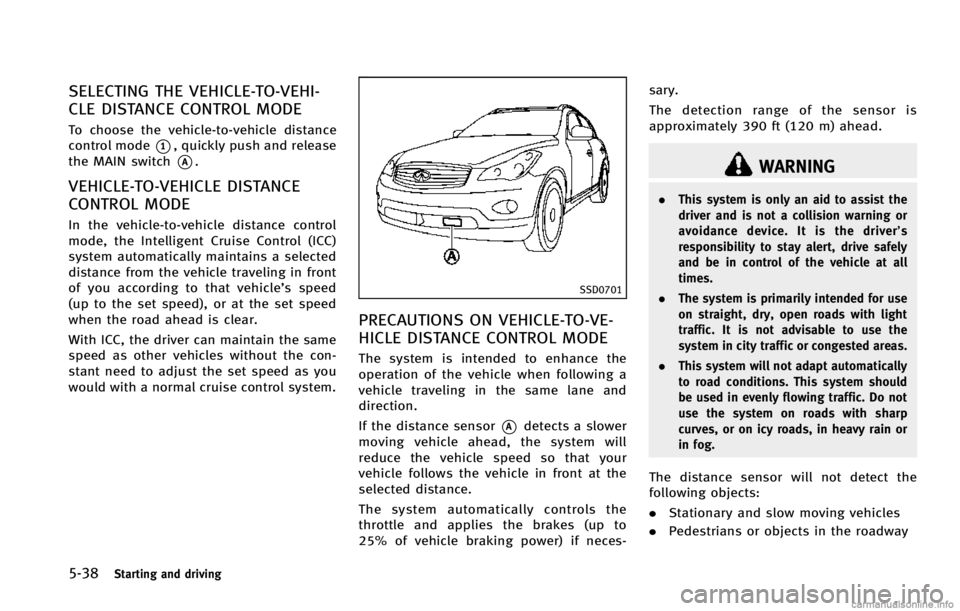
If the distance sensor
*Adetects a slower
moving vehicle ahead, the system will
reduce the vehicle speed so that your
vehicle follows the vehicle in front at the
selected distance.
The system automatically controls the
throttle and applies the brakes (up to
25% of vehicle braking power) if neces- sary.
The detection range of the sensor is
approximately 390 ft (120 m) ahead.
WARNING
.
This system is only an aid to assist the
driver and is not a collision warning or
avoidance device. It is the driver’ s
responsibility to stay alert, drive safely
and be in control of the vehicle at all
times.
. The system is primarily intended for use
on straight, dry, open roads with light
traffic. It is not advisable to use the
system in city traffic or congested areas.
. This system will not adapt automatically
to road conditions. This system should
be used in evenly flowing traffic. Do not
use the system on roads with sharp
curves, or on icy roads, in heavy rain or
in fog.
The distance sensor will not detect the
following objects:
.Stationary and slow moving vehicles
. Pedestrians or objects in the roadway
Page 350 of 498
.Oncoming vehicles in the same lane
. Motorcycles traveling offset in the travel
lane
WARNING
. As there is a performance limit to the
distance control function, never rely
solely on the Intelligent Cruise Control
system. This system does not correct
careless, inattentive or absent-minded
driving, or overcome poor visibility in
rain, fog, or other bad weather. Decele-
rate the vehicle speed by depressing the
brake pedal, depending on the distance
to the vehicle ahead and the surround-
ing circumstances in order to maintain a
safe distance between vehicles.
. If the vehicle ahead comes to a stop, the
vehicle decelerates to a standstill within
the limitations of the system. The
system will cancel once it judges that
the vehicle has come to a standstill and
sound a warning chime. To prevent the
vehicle from moving, the driver must
depress the brake pedal.
. The system may not detect the vehicle in
front of you in certain road or weather conditions. To avoid accidents, never use
the Intelligent Cruise Control system
under the following conditions:
—On roads where the traffic is heavy
or there are sharp curves
—On slippery road surfaces such as
on ice or snow, etc.
—During bad weather (rain, fog, snow,etc.)
When the windshield wiper is oper-
ated at the low speed (LO) or high
speed (HI) position, the Intelligent
Cruise Control system is automati-
cally canceled.
—When strong light (for example, atsunrise or sunset) is directly shining
on the front of the vehicle
—When rain, snow or dirt adhere to
the system sensor
—On steep downhill roads (the vehi-cle may go beyond the set vehicle
speed and frequent braking may
result in overheating the brakes)
—On repeated uphill and downhillroads
—When traffic conditions make itdifficult to keep a proper distance
between vehicles because of fre-
quent acceleration or deceleration
. In some road or traffic conditions, a
vehicle or object can unexpectedly come
into the sensor detection zone and cause
automatic braking. You may need to
control the distance from other vehicles
using the accelerator pedal. Always stay
alert and avoid using the ICC system
when it is not recommended in this
section.
Starting and driving5-39
Page 371 of 498

5-60Starting and driving
The detection range of the sensor is
approximately 390 ft (120 m) ahead.
WARNING
.This system is only an aid to assist the
driver and is not a collision warning or
avoidance device. It is the driver’ s
responsibility to stay alert, drive safely
and be in control of the vehicle at all
times.
. This system will not adapt automatically
to road conditions. Do not use the
system on roads with sharp curves, or
on icy roads, in heavy rain or in fog.
The distance sensor will not detect the
following objects:
.Stationary and slow moving vehicles
. Pedestrians or objects in the roadway
. Oncoming vehicles in the same lane
. Motorcycles traveling offset in the travel
lane
WARNING
. As there is a performance limit to the
distance control function, never rely
solely on the Distance Control Assist
system. This system does not correct
careless, inattentive or absent-minded
driving, or overcome poor visibility in
rain, fog, or other bad weather. Decele-
rate the vehicle speed by depressing the
brake pedal, depending on the distance
to the vehicle ahead and the surround-
ing circumstances in order to maintain a
safe distance between vehicles.
. The system may not detect the vehicle in
front of you in certain road or weather
conditions. To avoid accidents, never use
the Distance Control Assist system
under the following conditions:
—On roads with sharp curves
—On slippery road surfaces such as
on ice or snow, etc.
—During bad weather (rain, fog, snow,etc.)
—When strong light (for example, atsunrise or sunset) is directly shining
on the front of the vehicle
—When rain, snow or dirt adhere tothe system sensor
—On steep downhill roads (frequentbraking may result in overheating
the brakes)
—On repeated uphill and downhill
roads
. In some road or traffic conditions, a
vehicle or object can unexpectedly come
into the sensor detection zone and cause
automatic braking. You may need to
control the distance from other vehicles
using the accelerator pedal. Always stay
alert and avoid using the DCA system
when it is not recommended in this
section.
Page 383 of 498

5-72Starting and driving
SSD1156
Warning systems switch
The FCW system uses the distance sensor
*Alocated below the front bumper to
measure the distance to the vehicle ahead.
When the system judges that your vehicle
is getting close to the vehicle ahead in the
travel lane, the vehicle ahead detection
indicator light on the instrument panel
blinks and a warning chime sounds.
The FCW system will be turned on/off by
pushing the warning systems switch. The
warning systems indicator light
*1on the
switch will illuminate when the system
turns on.
PRECAUTIONS ON FCW SYSTEM
WARNING
. The FCW system is intended to warn you
before a collision but will not avoid a
collision. It is the driver’s responsibility
to stay alert, drive safely and be in
control of the vehicle at all times.
. As there is a performance limit, the
system may not provide a warning in
certain conditions.
. The system will not detect the following
objects:
—Pedestrians, animals or obstacles in
the roadway
—Oncoming vehicles in the same lane
. The system will not detect another
vehicle under the following conditions:
—When the sensor gets dirty and it is
impossible to detect the distance
from the vehicle ahead.
—When driving into a strong light (forexample, sunlight)
. The sensor generally detects the signals
returned from the reflectors on a vehicle ahead. Therefore, the system may not
function properly under the following
conditions:
—When the reflectors of the vehicle
ahead are positioned high or close to
each other (including a small vehicle
such as motorcycles).
—When the sensor gets dirty or it isimpossible to detect the distance
from the vehicle ahead.
—When the reflectors on the vehicleahead are missing, damaged or
covered.
—When the reflectors of the vehicle
ahead are covered with dirt, snow or
road spray.
—When visibility is low (such as rain,fog, snow, etc.).
—When snow or road spray fromtraveling vehicles is splashed.
—When dense exhaust or other smoke (black smoke) from vehicles reduces
the visibility of the sensor.
—When excessively heavy baggage isloaded in the rear seat or the
luggage room of your vehicle.
Page 394 of 498

.This system will not operate when the
vehicle is moving at approximately 20
MPH (32 km/h) or less.
. The pre-pressure function ceases when
the following conditions are met:
— When the driver depresses the
accelerator pedal or the brake ped-
al.
— If the driver does not operate the
accelerator or brake pedal within
approximately 1 second.
SSD0338
. The sensor will not detect:
— Pedestrians or objects in the road-
way
— Oncoming vehicles in the same lane
— Motorcycles traveling offset in the
travel lane as illustrated
WARNING
. This system is only an aid to assist
braking operation and is not a collision
warning or avoidance device. It is the
driver’s responsibility to stay alert, drive
safely and be in control of the vehicle at all times.
. As there is a performance limit to the
Preview Function, never rely solely on
this system. This system does not
correct careless inattentive or absent-
minded driving, or overcome poor visi-
bility in rain, fog, or other bad weather.
Reduce vehicle speed by depressing the
brake pedal, in order to maintain a safe
distance between vehicles.
. The system may not detect the vehicle in
front of you in certain road or weather
conditions. The Preview Function may
not operate properly under the following
conditions. The vehicle is still driveable
under normal conditions and the Brake
Assist will operate.
—When rain, snow or dirt adhere to
the system sensor
—When strong light (for example, atsunrise or sunset) is directly shining
on the front of the vehicle
—Winding or hilly roads may causethe sensor to temporarily not detect
a vehicle in the same lane or may
detect objects or vehicles in other
lanes.
Starting and driving5-83
Page 449 of 498

8-26Maintenance and do-it-yourself
SDI2192
1. Front parking light
2. Headlight (high-beam)
3. Headlight (low-beam)
4. Map light
5. Rear personal light
6. Fog light
7. Front turn signal light
8. Front side marker light
9. Puddle light
10. Step light
11. High-mounted stop light
12. Back-up light
13. Rear combination light (tail/stop/sidemarker light)
14. Cargo light (sidewall)
15. Cargo light (lift gate)
16. License plate light
17. Rear turn signal light
LIGHTS
Page 450 of 498
HEADLIGHTS
Replacing
Fog may temporarily form inside the lens of
the exterior lights in the rain or in a car
wash. A temperature difference between
the inside and the outside of the lens
causes the fog. This is not a malfunction. If
large drops of water collect inside the lens,
contact an INFINITI retailer.
Xenon headlight bulb (if so equipped):
If replacement is required, see an INFINITI
retailer.
WARNING
HIGH VOLTAGE
When xenon headlights are on, they pro-
duce a high voltage. To prevent an electric
shock, never attempt to modify or disas-
semble. Always have your xenon headlights
replaced at an INFINITI retailer. For addi-
tional information, see “Headlight and turn
signal switch” in the“2. Instruments and
controls” section.
Halogen headlight bulb (if so equipped):
The headlight is a semi-sealed beam type
which uses a replaceable headlight (halo-
gen) bulb. If replacement is required, see
an INFINITI retailer for servicing.
CAUTION
.High pressure halogen gas is sealed
inside the bulb. The bulb may break if
the glass envelope is scratched or the
bulb is dropped.
. Only touch the plastic base when hand-
ling the bulb. Never touch the glass
envelope. Touching the glass could sig-
nificantly affect bulb life and/or head-
light performance.
. Do not leave the bulb out of the head-
light reflector for a long period of time
as dust, moisture, and smoke may enter
the headlight body and affect the
performance of the headlight.
. Aiming is not necessary after replacing
the bulb. When aiming adjustment is
necessary, contact an INFINITI retailer.
Maintenance and do-it-yourself8-27