transmission INFINITI EX 2013 User Guide
[x] Cancel search | Manufacturer: INFINITI, Model Year: 2013, Model line: EX, Model: INFINITI EX 2013Pages: 498, PDF Size: 2.5 MB
Page 283 of 498

4-118Monitor, climate, audio, phone and voice recognition systems
2. Sit in the driver’s seat with the enginerunning, the parking brake on, and the
transmission in Park.
3. Press the
button.
4. Speak: “Help”. The system acknowl-
edges the command and announces
the next set of available commands.
5. Speak: "Voice Adaptation". The system acknowledges the command and dis-
plays the voice adaptation mode
screen.
6. Voice memory A or memory B is selected automatically. If both memory
locations are already in use, the system
will prompt you to overwrite one.
Follow the instructions provided by
the system.
7. When preparation is complete and you are ready to begin, press the
button.
8. The voice adaptation mode will be explained. Follow the instructions pro-
vided by the system.
9. When training is finished, the system will tell you an adequate number of
phrases have been recorded.
10. The system will ask you to say your name. Follow the instructions to regis- ter your name.
11. The system will announce that voice adaptation has been completed and
the system is ready.
The voice adaptation mode will stop if:
. The
button is pressed in voice
adaptation mode.
. The vehicle is driven during voice
adaptation mode.
. The ignition switch is turned to the OFF
or LOCK position. INFINITI Voice Recognition allows hands-
free operation of the Phone, Navigation,
Information and Audio systems in one of
two modes, Standard Mode or Alternate
Command Mode.
In Standard Mode, commands that are
available are always shown on the display
and announced by the system. You can
complete your desired operation by simply
following the prompts given by the system.
(See
“INFINITI Voice Recognition Standard
Mode” later in this section for details.)
For advanced operation, you can use the
Alternate Command Mode. (See “INFINITI
Voice Recognition Alternate Command
Mode” later in this section for details.)
When this mode is active, an expanded list
of commands can be spoken after pushing
the TALK
switch, and the voice
command menu prompts are turned off.
Review the expanded command list, which
is available when this mode is active. Note
that in this mode the recognition success
rate may be affected as the number of
available commands and the ways of
speaking each command are increased.
To switch one mode to another, see each
mode description later in this section.
To improve the recognition success rate
INFINITI VOICE RECOGNITION SYSTEM
(models with navigation system)
Page 312 of 498

5 Starting and driving
Precautions when starting and driving ................. 5-3Exhaust gas (carbon monoxide) ....................... 5-3
Three-way catalyst........................................... 5-3
Tire Pressure Monitoring System (TPMS).......... 5-4
Avoiding collision and rollover......................... 5-6
On-pavement and off-road
driving precautions.......................................... 5-7
Off-road recovery............................................. 5-7
Rapid air pressure loss ................................... 5-7
Drinking alcohol/drugs and driving ................. 5-8
All-Wheel Drive (AWD) driving safety precautions
(for AWD models) ........................................... 5-9
Push-button ignition switch ................................. 5-9
Operating range for engine start function ...... 5-10
Push-button ignition switch operation ........... 5-10
Push-button ignition switch positions ............ 5-11
Emergency engine shut off ............................ 5-11
Intelligent Key battery discharge ................... 5-12
Before starting the engine ................................. 5-12
Starting the engine ............................................ 5-13
Driving the vehicle ............................................. 5-14 Automatic transmission ................................. 5-14
Parking brake .................................................... 5-18 Lane Departure Warning (LDW) system/
Lane Departure Prevention (LDP) system
(if so equipped) ................................................ 5-19
Lane Departure Warning (LDW) system......... 5-20
Lane Departure Prevention (LDP) system ...... 5-22
Lane camera unit maintenance .................... 5-27
Blind Spot Warning (BSW) system (if
so equipped)..................................................... 5-27 BSW system operation ................................. 5-29
BSW driving situations................................. 5-30
BSW malfunction ......................................... 5-33
System maintenance.................................... 5-34
Cruise control.................................................... 5-34
Precautions on cruise control....................... 5-34
Cruise control operations ............................. 5-35
Intelligent Cruise Control (ICC) system
(FULL SPEED RANGE) (if so equipped) ................ 5-36 Selecting the vehicle-to-vehicle distance
control mode ............................................... 5-38
Vehicle-to-vehicle distance control mode...... 5-38
Precautions on vehicle-to-vehicle distance
control mode ............................................... 5-38
Vehicle-to-vehicle distance control
mode operation ........................................... 5-40
Page 320 of 498
ALL-WHEEL DRIVE (AWD) DRIVING
SAFETY PRECAUTIONS (for AWD
models)
WARNING
.Do not drive beyond the performance
capability of the tires, even with AWD
engaged. Accelerating quickly, sharp
steering maneuvers or sudden braking
may cause loss of control.
. Always use tires of the same type, size,
brand, construction (bias, bias-belted or
radial), and tread pattern on all four
wheels. Install tire chains on the rear
wheels when driving on slippery roads
and drive carefully.
. This vehicle is not designed for offroad
(rough road) use. Do not drive on sandy
or muddy roads that tires may get stuck
in.
. For AWD equipped vehicles, do not
attempt to raise two wheels off the
ground and shift the transmission to
any D (Drive) or R (Reverse) position with
the engine running. Doing so may result
in drivetrain damage or unexpected
vehicle movement which could result in serious vehicle damage or personal
injury.
. Do not attempt to test an AWD equipped
vehicle on a 2-wheel dynamometer,
(such as the dynamometers used by
some states for emissions testing), or
similar equipment even if the other two
wheels are raised off the ground. Make
sure you inform test facility personnel
that your vehicle is equipped with AWD
before it is placed on a dynamometer.
Using the wrong test equipment may
result in drivetrain damage or unex-
pected vehicle movement which could
result in serious vehicle damage or
personal injury.
. When a wheel is off the ground due to an
unlevel surface, do not spin the wheel
excessively.
WARNING
Do not operate the push-button ignition
switch while driving the vehicle except in an
emergency. (The engine will stop when the
ignition switch is pushed 3 consecutive
times or the ignition switch is pushed and
held for more than 2 seconds.) If the engine
stops while the vehicle is being driven, this
could lead to a crash and serious injury.
Before operating the push-button ignition
switch, be sure to move the selector lever
to the P (Park) position.
Starting and driving5-9
PUSH-BUTTON IGNITION SWITCH
Page 325 of 498
5-14Starting and driving
AUTOMATIC TRANSMISSION
7 speed automatic transmission
The automatic transmission in your vehicle
is electronically controlled by a transmis-
sion control module to produce maximum
efficiency and smooth operation.
Shown on the following pages are the
recommended operating procedures for
this transmission. Follow these procedures
for maximum vehicle performance and
driving enjoyment.
Starting the vehicle
After starting the engine, fully depress the
foot brake pedal and push the selector
lever button before shifting the selector
lever to the R (Reverse), N (Neutral), D
(Drive), DS (Drive Sport) or Manual shift
mode position. Be sure the vehicle is fully
stopped before attempting to shift the
selector lever.
This automatic transmission model is
designed so that the foot brake pedal
must be depressed before shifting from P
(Park) to any drive position while the
ignition switch position is ON.The selector lever cannot be moved out of
the P (Park) position and into any of the
other gear positions if the ignition switch
is pushed to the LOCK, OFF or ACC
position.
1. Keep the foot brake pedal depressed
and push the selector lever button to
shift into a driving gear.
2. Release the parking brake and foot brake, then gradually start the vehicle
in motion.
WARNING
. Do not depress the accelerator pedal
while shifting from P (Park) or N
(Neutral) to R (Reverse), D (Drive), DS
(Drive Sport) or manual shift mode.
Always depress the brake pedal until
shifting is completed. Failure to do so
could cause you to lose control and have
an accident.
. Cold engine idle speed is high, so use
caution when shifting into a forward or
reverse gear before the engine has
warmed up.
. Never shift to P (Park) or R (Reverse)
while vehicle is moving forward. Never shift to P (Park), D (Drive) or DS (Drive
Sport) while vehicle is moving rearward.
Failure to do so could cause you to lose
control and have an accident.
CAUTION
.
Except in an emergency, do not shift to
the N (Neutral) position while driving.
Coasting with the transmission in the N
(Neutral) position may cause serious
damage to the transmission.
. When stopping the vehicle on an uphill
grade, do not hold the vehicle by
depressing the accelerator pedal. The
foot brake should be used for this
purpose.
. Do not downshift abruptly on slippery
roads. This may cause a loss of control.
DRIVING THE VEHICLE
Page 326 of 498

SSD0712
Selector lever
To move the selector lever,
: Push the button while depressing the brake pedal,
: Push the button,
: Just move the selector lever.
Shifting
After starting the engine, fully depress the
brake pedal and shift the selector lever
from P (Park) to R (Reverse), N (Neutral), D
(Drive), DS (Drive Sport) or Manual shift
mode position.
Push the button to shift into P (Park) or R
(Reverse). All other positions can be
selected without pushing the button.
WARNING
Apply the parking brake if the selector lever
is in any position while the engine is not
running. Failure to do so could cause the
vehicle to move unexpectedly or roll away
and result in serious personal injury or
property damage.
CAUTION
Make sure the vehicle is completely stopped
and the transmission is in the P (Park)
position.
P (Park) position:
Use this selector position when the vehicle
is parked or when starting the engine.
Make sure the vehicle is completely
stopped. The brake pedal must be de-
pressed and the selector lever button
pushed in to move the selector lever from
the N (Neutral) position or any drive
position to the P (Park) position. Apply
the parking brake. When parking on a hill,
apply the parking brake first, then move the selector lever to the P (Park) position.
CAUTION
Use this position only when the vehicle is
completely stopped.
R (Reverse):
Use this position to back up. Always be
sure the vehicle is completely stopped
before selecting the R (Reverse) position.
The brake pedal must be depressed and
the selector lever button pushed in to
move the selector lever from the P (Park)
position, the N (Neutral) position or any
drive position to the R (Reverse) position.
N (Neutral):
Neither forward nor reverse gear is en-
gaged. The engine can be started in this
position. You may shift to the N (Neutral)
position and restart a stalled engine while
the vehicle is moving.
D (Drive):
Use this position for all normal forward
driving.
Starting and driving5-15
Page 327 of 498

5-16Starting and driving
DS (Drive Sport) mode
Move the selector lever from D (Drive) to
the left into the manual shift gate. The
transmission position indicator in the
meter shows“DS”.
In the DS (Drive Sport) mode, the transmis-
sion changes to the “sporty”driving shift
operation, creating a more aggressive
acceleration feeling than the D (Drive)
mode and providing a gear change sensa-
tion when the driver accelerates quickly.
When the driver selects the manual shift
mode using the selector lever during the
DS (Drive Sport) mode operation, the driver
must move the selector lever from DS
(Drive Sport) to D (Drive) and back again
to re-select the DS (Drive Sport) mode.
Manual shift mode
When the selector lever is in the DS (Drive
Sport) position, the transmission is ready
for the manual shift mode. Shift ranges can
be selected manually by moving the
selector lever up or down.
When shifting up, move the selector lever
to the + (up) side. The transmission shifts
to the higher range.
When shifting down, move the selector lever to the
−(down) side. The transmis-
sion shifts to the lower range.
When canceling the manual shift mode,
return the selector lever to the D (Drive)
position. The transmission returns to the
normal driving mode.
In the manual shift mode, the shift range is
displayed on the position indicator in the
meter.
Shift ranges up or down one by one as
follows:
M1 ?M2?M3?M4?M5?M6?M7
///// /
M7 (7th):
Use these positions for all normal forward
driving at highway speeds.
M6 (6th) andM5 (5th):
Use this position when driving up long
slopes, or for engine braking when driving
down long slopes.
M4 (4th),M3 (3rd) andM2 (2nd):
Use these positions for hill climbing or
engine braking on downhill grades.
M1 (1st):
Use this position when climbing steep hills
slowly or driving slowly through deep snow, or for maximum engine braking on
steep downhill grades.
.
Remember not to drive at high speeds
for extended periods of time in lower
than 7th gear. This reduces fuel econ-
omy.
. Moving the selector lever rapidly to the
same side twice will shift the ranges in
succession. However, if this motion is
done rapidly, the second shifting may
not be completed properly.
. In the manual shift mode, the transmis-
sion may not shift to the selected gear
or may automatically shift to the other
gear depending on conditions. This
helps maintain driving performance
and reduces the chance of vehicle
damage or loss of control.
. When the transmission does not shift
to the selected gear, the Automatic
Transmission (AT) position indicator
light (on the dot matrix liquid crystal
display) will blink and the buzzer will
sound.
. In the manual shift mode, the transmis-
sion automatically shifts down to 1st
gear before the vehicle comes to a
stop. When accelerating again, it is
necessary to shift up to the desired
Page 328 of 498

range.
Accelerator downshift—In D (Drive)
position —
For passing or hill climbing, fully depress
the accelerator pedal to the floor. This
shifts the transmission down into the lower
gear, depending on the vehicle speed.
Fail-safe
When the fail-safe operation occurs, note
that the transmission will be locked in any
of the forward gears according to the
condition.
If the vehicle is driven under extreme
conditions, such as excessive wheel spin-
ning and subsequent hard braking, the
fail-safe system may be activated. This will
occur even if all electrical circuits are
functioning properly. In this case, push
the ignition switch to the OFF position and
wait for 3 seconds. Then push the ignition
switch back to the ON position. The vehicle
should return to its normal operating
condition. If it does not return to its
normal operating condition, have an
INFINITI retailer check the transmission
and repair if necessary.
SSD0713
Shift lock release
If the battery charge is low or discharged,
the selector lever may not be moved from
the P (Park) position even with the brake
pedal depressed and the selector lever
button pushed.
To move the selector lever, perform the
following procedure:
1. Push the ignition switch to the OFF or
LOCK position.
2. Apply the parking brake.
3. Remove the shift lock cover
*Ausing a
suitable tool. 4. Push down the shift lock
*Bas
illustrated.
5. Push the selector lever button
*Cand
move the selector lever to N (Neutral)
position
*Dwhile holding down the
shift lock.
Push the ignition switch to the ON posi-
tion. Now the vehicle may be moved to the
desired location.
If the lever cannot be moved out of P
(Park), have an INFINITI retailer check the
automatic transmission system as soon as
possible.
Adaptive shift control (ASC)
The adaptive shift control system automa-
tically operates when the transmission is
in the "D" (drive) and "DS" (Drive Sport)
position and selects an appropriate gear
depending on the road conditions such as
uphill, downhill or curving roads.
Control on uphill and curving roads:
A low gear is maintained that suits the
degree of the slope or curve to allow
smooth driving with a small number of
shifts.
Starting and driving5-17
Page 329 of 498
5-18Starting and driving
Control on downhill roads:
The adaptive shift control system shifts to
a low gear that suits the degree of the
slope, and uses the engine braking to
reduce the number of times that the brake
must be used.
Control on winding roads:
A low gear is maintained on continuous
curves that involve repeated acceleration
and deceleration, so that smooth accelera-
tion is available instantly when the accel-
erator pedal is depressed.
NOTE:
.Adaptive shift control may not operate
when the transmission oil temperature
is low immediately after the start of
driving or when it is very hot.
. During some driving situations, hard
braking for example, the adaptive shift
control may automatically operate. The
transmission may automatically shift
to a lower gear for engine braking. This
increases engine speed but not vehicle
speed. Vehicle speed is controlled by
the accelerator pedal when the vehicle
is in the Adaptive shift control mode.
. When the adaptive shift control oper-
ates, the transmission sometimes maintains a lower gear for a longer
period of time than when adaptive shift
control is not operating. Engine speed
will be higher for a specific vehicle
speed while ASC system is operating
than when ASC is not operating.WARNING
.
Be sure the parking brake is fully
released before driving. Failure to do so
can cause brake failure and lead to an
accident.
. Do not release the parking brake from
outside the vehicle.
. Do not use the gear shift in place of the
parking brake. When parking, be sure
the parking brake is fully engaged.
. Do not leave children unattended in a
vehicle. They could release the parking
brake and cause an accident.
PARKING BRAKE
Page 390 of 498
SSD0336
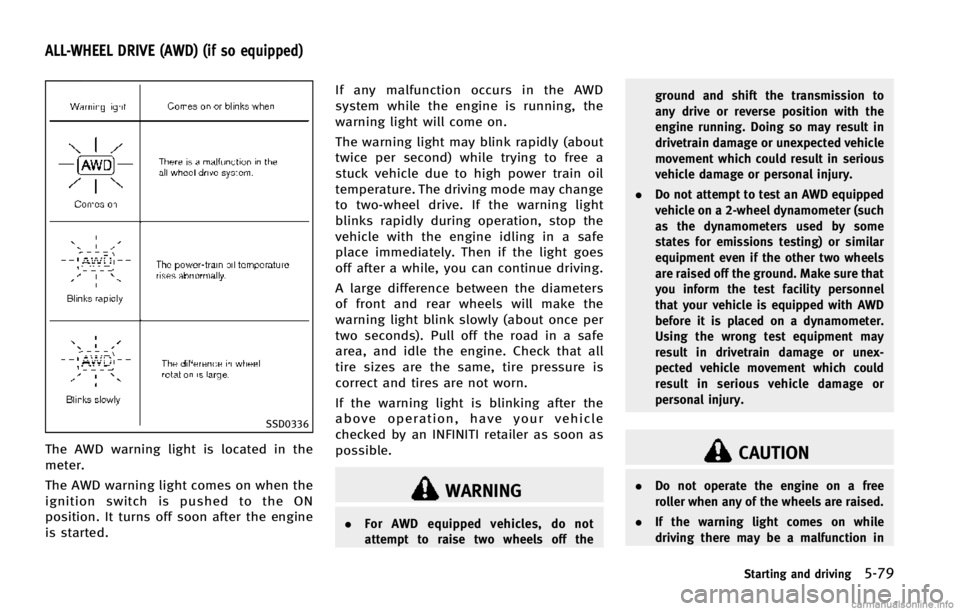
The AWD warning light is located in the
meter.
The AWD warning light comes on when the
ignition switch is pushed to the ON
position. It turns off soon after the engine
is started.If any malfunction occurs in the AWD
system while the engine is running, the
warning light will come on.
The warning light may blink rapidly (about
twice per second) while trying to free a
stuck vehicle due to high power train oil
temperature. The driving mode may change
to two-wheel drive. If the warning light
blinks rapidly during operation, stop the
vehicle with the engine idling in a safe
place immediately. Then if the light goes
off after a while, you can continue driving.
A large difference between the diameters
of front and rear wheels will make the
warning light blink slowly (about once per
two seconds). Pull off the road in a safe
area, and idle the engine. Check that all
tire sizes are the same, tire pressure is
correct and tires are not worn.
If the warning light is blinking after the
above operation, have your vehicle
checked by an INFINITI retailer as soon as
possible.
WARNING
.
For AWD equipped vehicles, do not
attempt to raise two wheels off the ground and shift the transmission to
any drive or reverse position with the
engine running. Doing so may result in
drivetrain damage or unexpected vehicle
movement which could result in serious
vehicle damage or personal injury.
. Do not attempt to test an AWD equipped
vehicle on a 2-wheel dynamometer (such
as the dynamometers used by some
states for emissions testing) or similar
equipment even if the other two wheels
are raised off the ground. Make sure that
you inform the test facility personnel
that your vehicle is equipped with AWD
before it is placed on a dynamometer.
Using the wrong test equipment may
result in drivetrain damage or unex-
pected vehicle movement which could
result in serious vehicle damage or
personal injury.
CAUTION
.Do not operate the engine on a free
roller when any of the wheels are raised.
. If the warning light comes on while
driving there may be a malfunction in
Starting and driving5-79
ALL-WHEEL DRIVE (AWD) (if so equipped)
Page 391 of 498

5-80Starting and driving
the AWD system. Reduce the vehicle
speed and have your vehicle checked by
an INFINITI retailer as soon as possible.
. If the warning light remains on after the
above operation, have your vehicle
checked by an INFINITI retailer as soon
as possible.
. The power train may be damaged if you
continue driving with the warning light
blinking.
SD1006MA
WARNING
.Do not stop or park the vehicle over
flammable materials such as dry grass,
waste paper or rags. They may ignite and
cause a fire.
. Never leave the engine running while the
vehicle is unattended.
. Do not leave children unattended inside
the vehicle. They could unknowingly
activate switches or controls. Unat-
tended children could become involved
in serious accidents. .
Safe parking procedures require that
both the parking brake be applied and
the transmission be placed in the P
(Park) position. Failure to do so could
cause the vehicle to move unexpectedly
or roll away and result in an accident.
. Make sure the automatic transmission
selector lever has been pushed as far
forward as it can go and cannot be
moved without depressing the foot
brake pedal.
1. Firmly apply the parking brake.
PARKING/PARKING ON HILLS