mirror INFINITI EX 2013 Owner's Guide
[x] Cancel search | Manufacturer: INFINITI, Model Year: 2013, Model line: EX, Model: INFINITI EX 2013Pages: 498, PDF Size: 2.5 MB
Page 202 of 498
without navigation) turned on, the non-
viewable area
*2is highlighted in yellow
for 7 seconds after the bird-eye view is
displayed.
When the corner of the vehicle moves
closer to an object, the corner sonar
indicator
*3appears.
WARNING
. Objects in the bird-eye view will appear
further than the actual distance because
the bird-eye view is a pseudo view that
is processed by combining the views
from the cameras on the outside mirrors,
the front and the rear of the vehicle.
. Tall objects, such as a curb or vehicle,
may be misaligned or not displayed at
the seam of the views.
. Objects that are above the camera
cannot be displayed.
. The view for the bird-eye view may be
misaligned when the camera position
alters.
. A line on the ground may be misaligned
and is not seen as being straight at the
seam of the views. The misalignment will
increase as the line proceeds away from the vehicle.
SAA1842
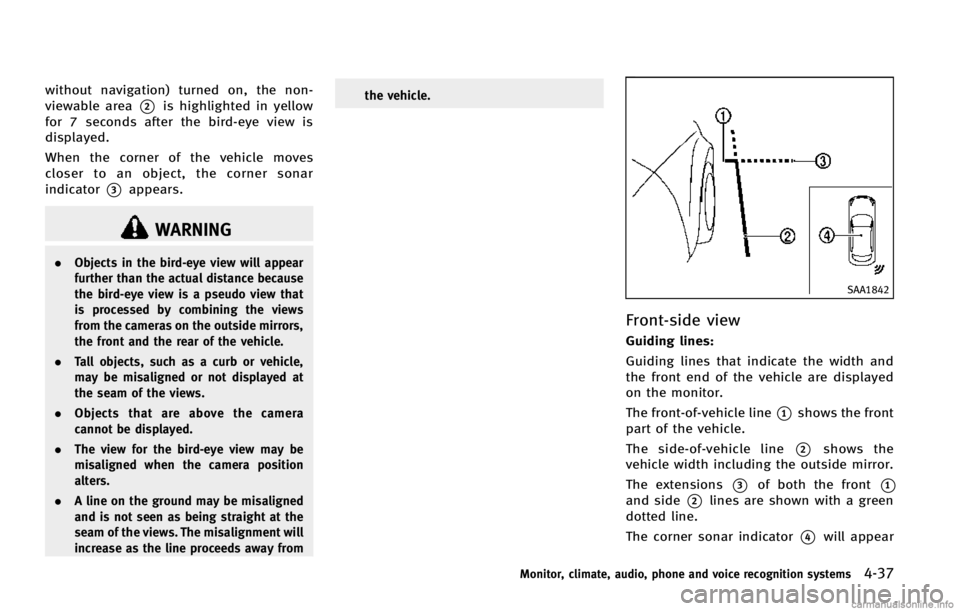
Front-side view
Guiding lines:
Guiding lines that indicate the width and
the front end of the vehicle are displayed
on the monitor.
The front-of-vehicle line
*1shows the front
part of the vehicle.
The side-of-vehicle line
*2shows the
vehicle width including the outside mirror.
The extensions
*3of both the front*1
and side*2lines are shown with a green
dotted line.
The corner sonar indicator
*4will appear
Monitor, climate, audio, phone and voice recognition systems4-37
Page 210 of 498

You can individually set the driver and front
passenger side temperature using each
temperature control button.
SAA1527
Type A
AUTOMATIC CLIMATE CONTROL
(Type A)
Automatic operation
1.“AUTO” automatic climate control ON
button/Temperature control dial (dri-
ver side)
2. “A/C” air conditioner ON/OFF button
3. “
”fan speed increase button
4. “
”front defroster button
5. “MODE” manual air flow control but-
ton
6. “DUAL” zone control ON/OFF button/
Temperature control dial (passenger side)
7. “OFF” button for climate control sys-
tem
8. “
”fan speed decrease button
9. “
”rear window defroster button
(See “Rear window and outside mirror
defroster switch” in the“2. Instru-
ments and controls” section.)
10. “
”intake air control button
Cooling and/or dehumidified heating
(AUTO):
This mode may be used all year round. The
system works automatically to control the
Monitor, climate, audio, phone and voice recognition systems4-45
Page 213 of 498

4-48Monitor, climate, audio, phone and voice recognition systems
SAA3568
Type B
AUTOMATIC CLIMATE CONTROL (Type B)
Automatic operation (AUTO)
1.“AUTO” automatic climate control ON
button/Temperature control dial (dri-
ver side)
2. “A/C” air conditioner ON/OFF button
3. “
”fan speed increase button
4. “
”front defroster button
5. “MODE” manual air flow control but-
ton
6. “DUAL” zone control ON/OFF button/
Temperature control dial (passenger
side) 7.
“OFF” button for climate control sys-
tem*
8. “
”fan speed decrease button
9. “
”rear window defroster button
(See “Rear window and outside mirror
defroster switch” in the“2. Instru-
ments and controls” section.)
10. “
”auto-recirculation button/
intake air control button
The AUTO mode may be used year-round
as the system automatically controls con-
stant temperature, air flow distribution and
fan speed after the desired temperature is set manually.
To turn off the heater and air conditioner,
push the
“OFF”button.
Cooling and dehumidified heating:
1. Push the “AUTO”button.
(The AUTO indicator light will illuminate
and “AUTO” will appear on the display.)
2. If the A/C indicator light does not illuminate, push the “A/C”button.
(The A/C indicator light will illuminate.)
3. Turn the temperature control dial (dri- ver’s side) to set the desired tempera-
ture.
.The temperature can be set withinthe following range.
— For U.S.: 60 to 908F
— For Canada: 18 to 328C
.When the DUAL indicator light is
turned off:
— Pushing the driver’s side “AUTO”
button changes both the driver’s
and front passenger’s side tem-
perature.
— Pushing the passenger’ s side
“DUAL” button changes only the
front passenger’s side tempera-
Page 269 of 498
4-104Monitor, climate, audio, phone and voice recognition systems
WARNING
.Use a phone after stopping your vehicle
in a safe location. If you have to use a
phone while driving, exercise extreme
caution at all times so full attention may
be given to vehicle operation.
. If you find yourself unable to devote full
attention to vehicle operation while
talking on the phone, pull off the road
to a safe location and stop your vehicle
before doing so.
CAUTION
To avoid draining the vehicle battery, use a
phone after starting the engine.
Your vehicle is equipped with Bluetooth®
Hands-Free Phone System. If you are an
owner of a Bluetooth®enabled cellular
phone, you can set up the wireless
connection between your cellular phone
and the in-vehicle phone module. With
Bluetooth
®wireless technology, you can
make or receive a telephone call with your
cellular phone in your pocket. Once your cellular phone is paired to the
in-vehicle phone module, no phone con-
necting procedure is required. Your phone
is automatically connected with the in-
vehicle phone module when the ignition
switch is pushed to the
“ON”position with
the registered cellular phone turned on
and carried in the vehicle.
You can register up to 5 different Blue-
tooth
®cellular phones in the in-vehicle
phone module. However, you can talk on
only one cellular phone at a time.
When a call is active, the audio system and
microphone (located in the ceiling in front
of the rearview mirror) are used for the
handsfree communications.
If the audio system is being used at the
time, the audio mode will mute and will
stay muted until the active call is ended.
The INFINITI Voice Recognition system
supports the phone commands, so dialing
a phone number using your voice is
possible.
Before using the Bluetooth
®Hands-Free
Phone System, refer to the following notes.
. Wireless LAN (Wi-Fi) and the Bluetooth
®
functions share the same frequency
band (2.4 GHz). Using the Bluetooth®
and the wireless LAN functions at the
same time may slow down or discon-
nect the communication and cause
undesired noise. It is recommended
that you turn off the wireless LAN (Wi-
Fi) when using the Bluetooth
®func-
tions.
. Set up the wireless connection between
a cellular phone and the in-vehicle
phone module before using the Blue-
tooth
®Hands-Free Phone System.
. Some Bluetooth®enabled cellular
phones may not be recognized by the
in-vehicle phone module.
. You will not be able to use a hands-free
phone under the following conditions:
— Your vehicle is outside of the tele-
phone service area.
— Your vehicle is in an area where it is
difficult to receive radio waves; such
as in a tunnel, in an underground
parking garage, behind a tall build-
ing or in a mountainous area.
— Your cellular phone is locked in
order not to be dialed.
. When the radio wave condition is not
ideal or ambient sound is too loud, it
may be difficult to hear the other
person’s voice during a call.
Bluetooth®HANDS-FREE PHONE SYSTEM
(models without navigation system) (if so
equipped)
Page 273 of 498

4-108Monitor, climate, audio, phone and voice recognition systems
command recognition mode.
4. The system acknowledges the com- mand and announces the next set of
available commands.
5. After the tone sounds, speak the phone number.
6. When you have finished speaking the phone number, the system repeats it
back and announces the available
commands.
7. After system responds, speak “Dial”
and the system dials the spoken
numbers.
Operating tips:
. Voice commands cannot be accepted
when the icon is
.
. If the command is not recognized, the
system announces, “Please say again”.
Repeat the command in a clear voice.
. Push the
switch or the BACKbutton
once to return to the previous screen.
. If you want to cancel the command,
push the
switch. The message
“ Voice input is canceled” will be
announced. If you want to adjust the
volume of the system feedback, push
the volume control buttons [+] or [−]on
the steering wheel or use the audio system volume knob while the system
is making an announcement.
How to speak commands:
The Voice Recognition System requires a
certain way to speak voice commands.
Speak normally and clearly in the direction
of the microphone (located in front of the
rearview mirror). Every digit of the number
must be spoken individually and in a
normal manner. The hands-free mode will
work best when the telephone number is
spoken in blocks of three to five digits.
After each spoken block is terminated, the
system will repeat the three to five digits
and wait for you to speak the next digit or
block of digits required for the telephone
number.
See “List of voice commands” later in this
section for the appropriate commands that
can be spoken for the hands-free mode
system.
Example:
In order to initiate a call, speak “Phone-
book”.
INFO
. If you are controlling the telephone
system by voice command for the first
time or do not know the appropriate voice command, speak
“Help” . The
system announces the available com-
mands.
. When you speak numbers, you can
speak both “zero”or“oh” for“0”.
Personal vocabulary (voicetags): Voice Recognition System is equipped with
the function called “voicetags”, which can
be associated with the phone number and
name in the phonebook. Using the voice
tag will automatically generate a speed
dial to the registered number.
See “Phonebook registration” earlier in
this section.
You can call the identified number using
the following command: “Dial”followed by
the voice tag.
Dialling a name with a voice tag:
It is possible to call up a name via a voice
tag instead of a number, provided the
name and number of your correspondent
has been previously stored in the phone-
book.
Dial via a voice tag, according to the
following procedure.
1. Push the
switch.
Page 323 of 498
5-12Starting and driving
SSD0785
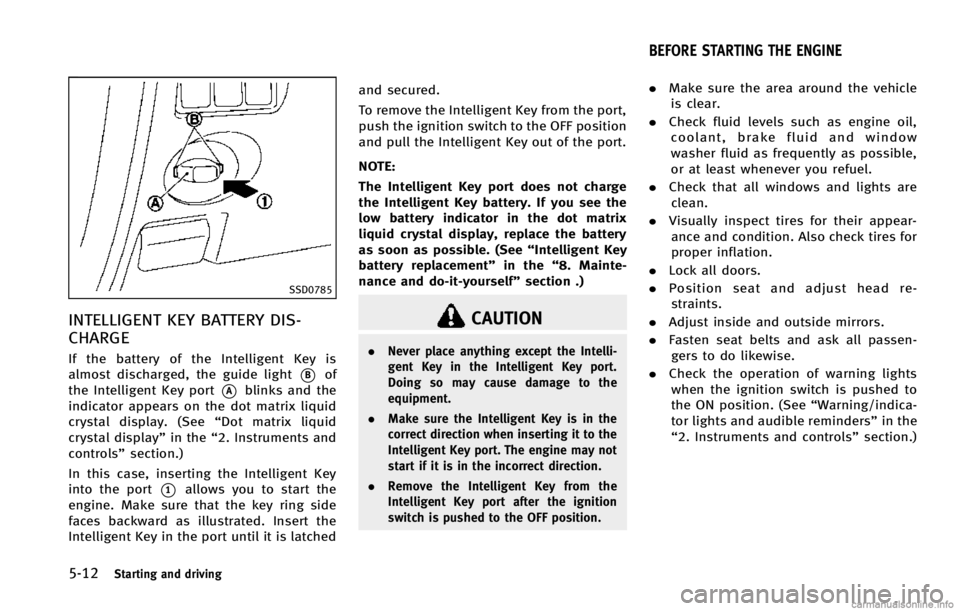
INTELLIGENT KEY BATTERY DIS-
CHARGE
If the battery of the Intelligent Key is
almost discharged, the guide light
*Bof
the Intelligent Key port
*Ablinks and the
indicator appears on the dot matrix liquid
crystal display. (See “Dot matrix liquid
crystal display” in the“2. Instruments and
controls” section.)
In this case, inserting the Intelligent Key
into the port
*1allows you to start the
engine. Make sure that the key ring side
faces backward as illustrated. Insert the
Intelligent Key in the port until it is latched and secured.
To remove the Intelligent Key from the port,
push the ignition switch to the OFF position
and pull the Intelligent Key out of the port.
NOTE:
The Intelligent Key port does not charge
the Intelligent Key battery. If you see the
low battery indicator in the dot matrix
liquid crystal display, replace the battery
as soon as possible. (See
“Intelligent Key
battery replacement” in the“8. Mainte-
nance and do-it-yourself” section .)
CAUTION
.Never place anything except the Intelli-
gent Key in the Intelligent Key port.
Doing so may cause damage to the
equipment.
. Make sure the Intelligent Key is in the
correct direction when inserting it to the
Intelligent Key port. The engine may not
start if it is in the incorrect direction.
. Remove the Intelligent Key from the
Intelligent Key port after the ignition
switch is pushed to the OFF position.
.Make sure the area around the vehicle
is clear.
. Check fluid levels such as engine oil,
coolant, brake fluid and window
washer fluid as frequently as possible,
or at least whenever you refuel.
. Check that all windows and lights are
clean.
. Visually inspect tires for their appear-
ance and condition. Also check tires for
proper inflation.
. Lock all doors.
. Position seat and adjust head re-
straints.
. Adjust inside and outside mirrors.
. Fasten seat belts and ask all passen-
gers to do likewise.
. Check the operation of warning lights
when the ignition switch is pushed to
the ON position. (See “Warning/indica-
tor lights and audible reminders” in the
“2. Instruments and controls” section.)
BEFORE STARTING THE ENGINE
Page 338 of 498

SSD0453
LANE CAMERA UNIT MAINTENANCE
The lane camera unit*1for the LDW/LDP
system is located inside the map light
cover. To keep the proper operation of the
LDW/LDP systems and prevent a system
malfunction, be sure to observe the follow-
ing:
. Always keep the windshield clean.
. Do not attach a sticker (including
transparent material) or install an
accessory near the camera unit.
. Do not place reflective materials, such
as white paper or a mirror, on the
instrument panel. The reflection of sunlight may adversely affect the cam-
era unit’s capability of detecting the
lane markers.
. Do not strike or damage the areas
around the camera unit. Do not touch
the camera lens or remove the screw
located on the camera unit. If the
camera unit is damaged due to an
accident, contact an INFINITI retailer. The Blind Spot Warning (BSW) system can
help alert the driver of other vehicles in
adjacent lanes when changing lanes.
Starting and driving5-27
BLIND SPOT WARNING (BSW) SYSTEM (if
so equipped)
Page 339 of 498

5-28Starting and driving
SSD1155
The BSW system uses radar sensors*A
installed near the rear bumper to detect
other vehicles beside your vehicle in an
adjacent lane.
SSD1030
Detection zone
The radar sensors can detect vehicles on
either side of your vehicle within the
detection zone shown as illustrated. This
detection zone starts from the outside
mirror of your vehicle and extends approxi-
mately 10 ft (3.0 m) behind the rear
bumper, and approximately 10 ft (3.0 m)
sideways.
The BSW system operates above approxi-
mately 20 MPH (32 km/h). If the radar
sensors detect a vehicle in the detection
zone, the BSW indicator light illuminates. If
the driver then activates the turn signal, a
chime will sound twice and the BSW
indicator light will flash.
WARNING
. The BSW system is not a replacement for
proper driving procedure and is not
designed to prevent contact with vehi-
cles or objects. When changing lanes,
always use the side and rear mirrors and
turn and look in the direction you will
move to ensure it is safe to change
lanes. Never rely solely on the BSW
system.
. The BSW system may not provide a
warning for vehicles that pass through
the detection zone quickly.
Page 340 of 498

SSD1086
BSW indicator light
SSD1156
Warning systems switch
SSD1029
BSW system warning light
BSW SYSTEM OPERATION
If the radar sensors detect a vehicle in the
detection zone, the BSW indicator light
next to the outside mirror will illuminate in
the direction of the detected vehicle. If the
turn signal is then activated, the BSW
indicator light flashes and a chime sounds
twice. The indicator light continues to flash
until the detected vehicle leaves the
detection zone.
The BSW indicator lights illuminate for a
few seconds when the ignition switch is
pushed to the ON position.The brightness of the BSW indicator lights
is adjusted automatically depending on the
brightness of the ambient light.
A chime sounds if the radar sensors have
already detected vehicles when the driver
activates the turn signal. If a vehicle comes
into the detection zone after the driver
activates the turn signal, then only the
BSW indicator light flashes and no chime
sounds. (See
“BSW driving situations”
later in this section)
The BSW system is automatically turned on
when the engine is started and the warning
systems ON indicator light
*1illuminates
on the switch. You can turn the BSW system
off by pushing the warning systems switch
on the instrumental panel. This switch will
turn on and off the LDW, BSW and FCW
systems at the same time.
NOTE:
If you continue to push the warning
systems switch from off to on for over 4
seconds, a chime will sound. This will
change the default status of the LDW, BSW
and FCW systems to OFF so that these
systems will not automatically turn on
when the engine is started. If this proce-
dure is repeated, the default status will
Starting and driving5-29
Page 341 of 498

5-30Starting and driving
return to ON.
WARNING
Excessive noise (for example, audio system
volume, open vehicle window) will interfere
with the chime sound, and it may not be
heard.
.The radar sensors may not be able to
detect and activate BSW when certain
objects are present such as:
— Pedestrians, bicycles, animals
— Several types of vehicles such as
motorcycles
— Oncoming vehicles
— Vehicles remaining in the detection
zone when you accelerate from a
stop
(See “BSW driving situations” later
in this section)
— A vehicle merging into an adjacent
lane at a speed approximately the
same as your vehicle
(See “BSW driving situations” later
in this section)
— A vehicle approaching rapidly from
behind. (See
“BSW driving situations” later
in this section)
— A vehicle which your vehicle over-
takes rapidly.
(See “BSW driving situations” later
in this section)
. Severe weather or road spray condi-
tions may reduce the ability of the
radar to detect other vehicles.
. The radar sensors detection zone is
designed based on a standard lane
width. When driving in a wider lane, the
radar sensors may not detect vehicles
in an adjacent lane. When driving in a
narrow lane, the radar sensors may
detect vehicles driving two lanes away.
. The radar sensors are designed to
ignore most stationary objects, how-
ever objects such as guardrails, walls,
foliage and parked vehicles may occa-
sionally be detected. This is a normal
operating condition.
SSD1026
BSW DRIVING SITUATIONS
Another vehicle approaching from
behind
The BSW indicator light illuminates if a
vehicle enters the detection zone from
behind in an adjacent lane.
However, if the overtaking vehicle is
traveling much faster than your vehicle,
the indicator light may not illuminate
before the detected vehicle is beside your
vehicle. Always use the side and rear
mirrors and turn and look in the direction
your vehicle will move to ensure it is safe
to change lanes.