seats INFINITI EX 2013 Repair Manual
[x] Cancel search | Manufacturer: INFINITI, Model Year: 2013, Model line: EX, Model: INFINITI EX 2013Pages: 498, PDF Size: 2.5 MB
Page 112 of 498

SSS0911
The front seats are warmed by built-in
heaters. The switches located on the center
console can be operated independently of
each other.
1. Start the engine.
2. Turn the control knob
*Ato the right*1
and select the desired heat range..For high heat, turn the knob to theright
*1..For low heat, turn the knob to the left
*2..The indicator light*Bwill illuminate
when the heater is on.
3. To turn off the heater, return the knob to the OFF position
*3. Make sure that
the indicator light turns off.
The heater is controlled by a thermostat,
automatically turning the heater on and
off. The indicator light will remain on as
long as the switch is on.
When the vehicle’s interior is warmed, or
before you leave the vehicle, be sure to
turn off the switch.
SSD1156
The warning systems switch will turn on
and off the Lane Departure Warning (LDW)
system, the Blind Spot Warning (BSW)
system and the Forward Collision Warning
(FCW) system at the same time.
The LDW system will sound a warning
chime and blink the lane departure warn-
ing light (orange) to alert the driver if the
vehicle is traveling close to either the left
or the right of a traveling lane with
detectable lane markers. (See “Lane De-
parture Warning (LDW) system/Lane De-
parture Prevention (LDP) system” in the“5.
Starting and driving” section.)
The BSW system will illuminate the Blind
Instruments and controls2-41
WARNING SYSTEMS SWITCH (if so
equipped)
Page 122 of 498
straps to help prevent it from sliding or
shifting. Do not place cargo higher than
the seatbacks. In a sudden stop or
collision, unsecured cargo could cause
personal injury.
. If the cargo cover contacts the top tether
strap when it is attached to the top
tether anchor, remove the cargo cover
from the vehicle or secure it on the cargo
floor below its attachment location. If
the cargo cover is not removed, it may
damage the top tether strap during a
collision. Your child could be seriously
injured or killed in a collision if the child
restraint top tether strap is damaged.
. Do not allow cargo to contact the top
tether strap when it is attached to the
top tether anchor. Properly secure the
cargo so it does not contact the top
tether strap. Cargo that is not properly
secured or cargo that contacts the top
tether strap may damage the top tether
strap during a collision. Your child could
be seriously injured or killed in a
collision if the child restraint top tether
strap is damaged.
. Do not use the cargo cover if the rear
seats are folded down.
SIC3639
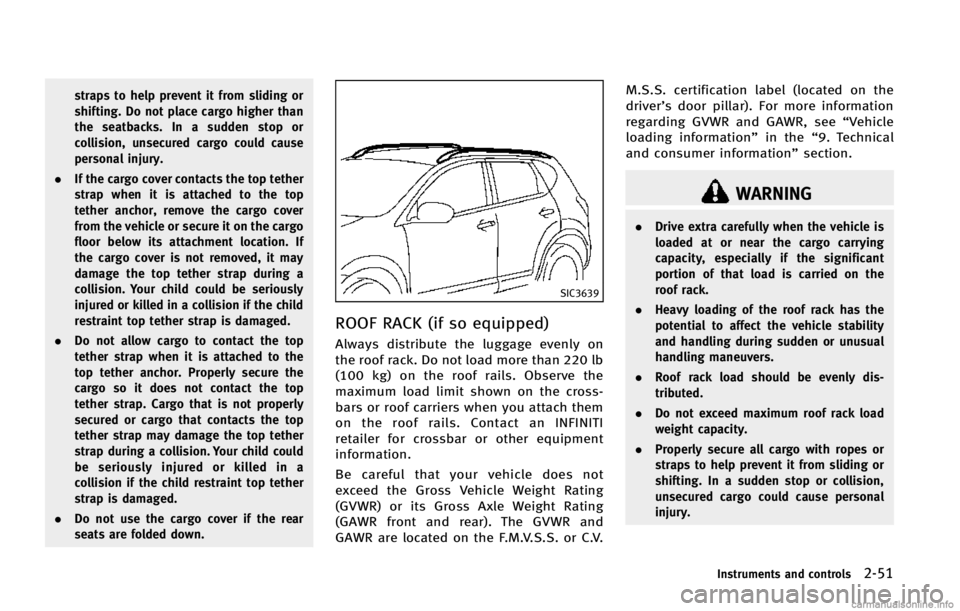
ROOF RACK (if so equipped)
Always distribute the luggage evenly on
the roof rack. Do not load more than 220 lb
(100 kg) on the roof rails. Observe the
maximum load limit shown on the cross-
bars or roof carriers when you attach them
on the roof rails. Contact an INFINITI
retailer for crossbar or other equipment
information.
Be careful that your vehicle does not
exceed the Gross Vehicle Weight Rating
(GVWR) or its Gross Axle Weight Rating
(GAWR front and rear). The GVWR and
GAWR are located on the F.M.V.S.S. or C.V. M.S.S. certification label (located on the
driver’s door pillar). For more information
regarding GVWR and GAWR, see “Vehicle
loading information” in the“9. Technical
and consumer information” section.
WARNING
.Drive extra carefully when the vehicle is
loaded at or near the cargo carrying
capacity, especially if the significant
portion of that load is carried on the
roof rack.
. Heavy loading of the roof rack has the
potential to affect the vehicle stability
and handling during sudden or unusual
handling maneuvers.
. Roof rack load should be evenly dis-
tributed.
. Do not exceed maximum roof rack load
weight capacity.
. Properly secure all cargo with ropes or
straps to help prevent it from sliding or
shifting. In a sudden stop or collision,
unsecured cargo could cause personal
injury.
Instruments and controls2-51
Page 163 of 498

3-28Pre-driving checks and adjustments
holding the SET switch for more than 10
seconds while the ignition switch is in the
ACC position.
The indicator lights on the memory
switches (1 and 2) will blink once when
the function is canceled, and the indicator
lights will blink twice when the function is
activated.
MEMORY STORAGE
Two positions for the driver’s seat, steering
column and outside mirrors can be stored
in the automatic drive positioner memory.
Follow these procedures to use the mem-
ory system.
1. Move the selector lever to the P (Park) position.
2. Push the ignition switch to the ON position.
3. Adjust the driver’s seat, steering col- umn and outside mirrors to the desired
positions by manually operating each
adjusting switch. For additional infor-
mation, see “Seats”in the“1. Safety —
Seats, seat belts and supplemental
restraint system” section and“Tilt/
telescopic column” earlier in this sec-
tion and “Outside mirrors” earlier in
this section. 4. Push the SET switch and, within 5
seconds, push the memory switch (1
or 2) fully for at least 1 second.
The indicator light for the pushed
memory switch will stay on for approxi-
mately 5 seconds after pushing the
switch.
If memory is stored in the same
memory switch, the previous memory
will be deleted.
Linking Intelligent Key to a stored
memory position
The Intelligent Key can be linked to a
stored memory position with the following
procedure.
1. Follow the steps for storing a memoryposition.
2. While the indicator light for the memory switch being set is illuminated for 5
seconds, push the UNLOCK
button
on the Intelligent Key. If the indicator
light blinks, the Intelligent Key is linked
to that memory setting.
Push the ignition switch to the OFF posi-
tion, and then push the UNLOCK
button on the Intelligent Key. The driver’s
seat, steering wheel and outside mirrors will move to the memorized position or to
the exit position when the entry/exit
function is set to active.
Confirming memory storage
.
Push the ignition switch to the ON
position and push the SET switch. If
the main memory has not been stored,
the indicator light will come on for
approximately 0.5 second. When the
memory has stored in position, the
indicator light will stay on for approxi-
mately 5 seconds.
. If the battery cable is disconnected, or if
the fuse opens, the memory will be
canceled. In this case, reset the desired
position using the previous procedure.
. If optional Intelligent Keys are added to
your vehicle, the memory storage pro-
cedure to switch 1 or 2 and linking
Intelligent Key procedure to a stored
memory position should be performed
again for each Intelligent Key. For
additional Intelligent Key information,
see “Keys” earlier in this section.
Page 225 of 498

4-60Monitor, climate, audio, phone and voice recognition systems
device. USB devices should be purchased
separately as necessary.
This system cannot be used to format USB
devices. To format a USB device, use a
personal computer.
In some states/area, the USB device for the
front seats plays only sound without
images for regulatory reasons, even when
the vehicle is parked.
This system supports various USB memory
devices, USB hard drives and iPod
®
players. Some USB devices may not be
supported by this system.
.Partitioned USB devices may not be
played correctly.
. Some characters used in other lan-
guages (Chinese, Japanese, etc.) are
not displayed properly on display.
Using English language characters with
a USB device is recommended.
General notes for USB use:
. The USB device may not function when
the passenger compartment tempera-
ture is extremely high. Lower the
temperature before use.
. During cold weather or rainy days, the
player may malfunction due to humid-
ity. If this occurs, remove the USB device and dehumidify or ventilate the
USB player completely.
. Do not connect a USB device if a
connector, cable or USB port is wet.
Allow the connector, cable, and USB
port to dry completely before connect-
ing the USB device. (Wait for 24 hours
or more until it is dry.) If the connector
and USB port are exposed to fluids
other than water, evaporative residue
may cause a short circuit between the
connector pins and USB port. In this
case, replace the cable and USB port.
Otherwise damage to the USB device
and a loss of function may occur.
. If the cable is damaged (insulation cut,
connectors cracked, contamination
such as liquids, dust, dirt, etc. in the
connectors), do not use the cable.
Replace the cable with a new one.
. Do not put a USB device in a location
where static electricity occurs, electrical
noise is generated or hot air from the
air conditioner blows directly on it.
Doing so may cause the data stored on
the USB device to be corrupted.
Notes for iPod
®use:
iPod®is a trademark of Apple Inc.,
registered in the U.S. and other countries. .
Improperly plugging in the iPod
®may
cause a checkmark to be displayed on
and off (flickering). Always make sure
that the iPod
®is connected properly.
. An iPod nano®(1st Generation) may
remain in fast forward or rewind mode
if it is connected during a seek opera-
tion. In this case, please manually reset
the iPod
®.
. An iPod nano®(2nd Generation) will
continue to fast-forward or rewind if it
is disconnected during a seek opera-
tion.
. An incorrect song title may appear when
the Play Mode is changed while using
an iPod nano
®(2nd Generation)
. Audiobooks may not play in the same
order as they appear on an iPod
®.
. Large video files cause slow responses
in an iPod
®. The vehicle center display
may momentarily black out, but will
soon recover.
. If an iPod
®automatically selects large
video files while in the shuffle mode,
the vehicle center display may momen-
tarily black out, but will soon recover.
Page 317 of 498
5-6Starting and driving
proper operation of the TPMS.
. Do not inject any tire liquid or aerosol
tire sealant into the tires, as this may
cause a malfunction of the tire pressure
sensors.
CAUTION
.The TPMS may not function properly
when the wheels are equipped with tire
chains or the wheels are buried in snow.
. Do not place metalized film or any metal
parts (antenna, etc.) on the windows.
This may cause poor reception of the
signals from the tire pressure sensors,
and the TPMS will not function properly.
Some devices and transmitters may tem-
porarily interfere with the operation of the
TPMS and cause the low tire pressure
warning light to illuminate. Some exam-
ples are:
.Facilities or electric devices using simi-
lar radio frequencies are near the
vehicle.
. If a transmitter set to similar frequen-
cies is being used in or near the vehicle.
. If a computer (or similar equipment) or
a DC/AC converter is being used in or
near the vehicle.
FCC Notice:
For USA:
This device complies with Part 15 of the
FCC Rules. Operation is subject to the
following two conditions: (1) This device
may not cause harmful interference, and
(2) this device must accept any interfer-
ence received, including interference that
may cause undesired operation.
Note: Changes or modifications not ex-
pressly approved by the party responsible
for compliance could void the user’ s
authority to operate the equipment.
For Canada:
This device complies with RSS-210 of
Industry Canada. Operation is subject to
the following two conditions: (1) this
device may not cause interference, and
(2) this device must accept any interfer-
ence, including interference that may
cause undesired operation of the device.
AVOIDING COLLISION AND ROLL-
OVER
WARNING
Failure to operate this vehicle in a safe and
prudent manner may result in loss of control
or an accident.
Be alert and drive defensively at all times.
Obey all traffic regulations. Avoid exces-
sive speed, high speed cornering, or
sudden steering maneuvers, because
these driving practices could cause you to
lose control of your vehicle. As with any
vehicle, a loss of control could result in a
collision with other vehicles or objects, or
cause the vehicle to rollover, particularly if
the loss of control causes the vehicle to
slide sideways. Be attentive at all times,
and avoid driving when tired. Never drive
when under the influence of alcohol or
drugs (including prescription or over-the-
counter drugs which may cause drowsi-
ness). Always wear your seat belt as
outlined in the “Seat belts”in the“1.
Safety —Seats, seat belts and supple-
mental restraint system” section of this
manual, and also instruct your passengers
Page 419 of 498

7-4Appearance and care
ambient temperature.
. Rinse the wheel to completely remove
the cleaner within 15 minutes after the
cleaner is applied.
CHROME PARTS
Clean chrome parts regularly with a non-
abrasive chrome polish to maintain the
finish.
TIRE DRESSING
INFINITI does not recommend the use of
tire dressings. Tire manufacturers apply a
coating to the tires to help reduce dis-
coloration of the rubber. If a tire dressing is
applied to the tires, it may react with the
coating and form a compound. This com-
pound may come off the tire while driving
and stain the vehicle paint.
If you choose to use a tire dressing, take
the following precautions:
.Use a water-based tire dressing. The
coating on the tire dissolves more
easily with an oil-based tire dressing.
. Apply a light coat of tire dressing to
help prevent it from entering the tire
tread/grooves (where it would be diffi-
cult to remove). .
Wipe off excess tire dressing using a
dry towel. Make sure the tire dressing
is completely removed from the tire
tread/grooves.
. Allow the tire dressing to dry as
recommended by tire dressing manu-
facturer. Occasionally remove loose dust from the
interior trim, plastic parts and seats using
a vacuum cleaner or soft bristled brush.
Wipe the vinyl and leather surfaces with a
clean, soft cloth dampened in mild soap
solution, then wipe clean with a dry soft
cloth.
Regular care and cleaning is required in
order to maintain the appearance of the
leather.
Before using any fabric protector, read the
manufacturer’
s recommendations. Some
fabric protectors contain chemicals that
may stain or bleach the seat material.
Use a cloth dampened only with water, to
clean the meter and gauge lens.
WARNING
Do not use water or acidic cleaners (hot
steam cleaners) on the seat. This can
damage the seat or occupant classification
sensors. This can also affect the operation
of the air bag system and result in serious
personal injury.
CLEANING INTERIOR
Page 421 of 498

7-6Appearance and care
SAI0039
Floor mat positioning aid
This model includes front floor mat brack-
ets to act as floor mat positioning aid.
NISSAN floor mats have been specially
designed for your vehicle model. The front
floor mats have grommet holes in them. To
install, simply position the mat by placing
the floor mat bracket through the floor mat
grommet hole while centering the mat in
the floorwell.
Periodically check to make certain that the
mats are properly positioned.
SAI0055
Bracket positions
The illustration shows the location of the
floor mat brackets.
SEAT BELTS
The seat belts can be cleaned by wiping
them with a sponge dampened in a mild
soap solution. Allow the belts to dry
completely before using them.
See “Seat belts” in the“1. Safety —Seats,
seat belts and supplemental restraint
system” section.
WARNING
Do not allow wet seat belts to roll up in the
retractor. NEVER use bleach, dye, or chemi-
cal solvents to clean the seat belts, since
these materials may severely weaken the
seat belt webbing.
Page 426 of 498

is released.
When driving in areas using road salt or
other corrosive materials, check lubrication
frequently.
Lights*:Clean the headlights on a regular
basis. Make sure that the headlights, stop
lights, tail lights, turn signal lights, and
other lights are all operating properly and
installed securely. Also check headlight
aim.
Road wheel nuts (lug nuts)*: When check-
ing the tires, make sure no wheel nuts are
missing, and check for any loose wheel
nuts. Tighten if necessary.
Tire rotation*: Tires should be rotated
every 7,500 miles (12,000 km).
Tires*: Check the pressure with a gauge
often and always prior to long distance
trips. If necessary, adjust the pressure in
all tires, including the spare, to the
pressure specified. Check carefully for
damage, cuts or excessive wear.
Tire Pressure Monitoring System (TPMS)
transmitter components: Replace the TPMS
transmitter grommet seal, valve core and
cap when the tires are replaced due to
wear or age.
Tire, wheel alignment and balance: If thevehicle should pull to either side while
driving on a straight and level road, or if
you detect uneven or abnormal tire wear,
there may be a need for wheel alignment.
If the steering wheel or seat vibrates at
normal highway speeds, wheel balancing
may be needed.
For additional information regarding tires,
refer to
“Important Tire Safety Information”
(US) or “Tire Safety Information” (Canada)
in the INFINITI Warranty Information Book-
let.
Windshield: Clean the windshield on a
regular basis. Check the windshield at
least every six months for cracks or other
damage. Have a damaged windshield
repaired by a qualified repair facility.
Windshield wiper blades*: Check for
cracks or wear if they do not wipe properly.
Inside the vehicle
The maintenance items listed here should
be checked on a regular basis, such as
when performing periodic maintenance,
cleaning the vehicle, etc.
Accelerator pedal: Check the pedal for
smooth operation and make sure the pedal
does not catch or require uneven effort. Keep the floor mat away from the pedal.
Automatic transmission P (Park) mechan-
ism:
On a fairly steep hill, check that your
vehicle is held securely with the selector
lever in the P (Park) position without
applying any brakes.
Brake pedal: Check the pedal for smooth
operation. If the brake pedal suddenly
goes down further than normal, the pedal
feels spongy or the vehicle seems to take
longer to stop, see an INFINITI retailer
immediately. Keep the floor mat away from
the pedal.
Brakes: Check that the brakes do not pull
the vehicle to one side when applied.
Parking brake: Check the parking brake
operation regularly. The vehicle should be
securely held on a fairly steep hill with only
the parking brake applied. If the parking
brake needs adjusted, see an INFINITI
retailer.
Seat belts: Check that all parts of the seat
belt system (for example, buckles, an-
chors, adjuster and retractors) operate
properly and smoothly, and are installed
securely. Check the belt webbing for cuts,
fraying, wear or damage.
Seats: Check seat position controls such as
Maintenance and do-it-yourself8-3
Page 479 of 498
9-14Technical and consumer information
6. Insert a flat-blade screwdriver into thegrommet hole to add 908 turn onto the
part
*E.
7. Insert a J-nut into the license plate bracket before placing the license plate
bracket on the fascia.
8. Install the license plate bracket with screws.
9. Install the license plate with bolts that are no longer than 0.55 in (14 mm).WARNING
.It is extremely dangerous to ride
in a cargo area inside the vehicle.
In a collision, people riding in
these areas are more likely to be
seriously injured or killed.
. Do not allow people to ride in any
area of vehicle that is not
equipped with seats and seat
belts.
. Be sure everyone in your vehicle is
in a seat and using a seat belt
properly.
TERMS
It is important to familiarize yourself
with the following terms before
loading your vehicle:
.Curb Weight (actual weight of your
vehicle) - vehicle weight includ-
ing: standard and optional equip-
ment, fluids, emergency tools,
and spare tire assembly. This weight
does not include passen-
gers and cargo.
.GVW (Gross Vehicle Weight) - curb weight plus the combined weight
of passengers and cargo.
.GVWR (Gross Vehicle Weight Rat-ing) - maximum total combined
weight of the unloaded vehicle,
passengers, luggage, hitch, trailer
tongue load and any other op-
tional equipment. This informa-
tion is located on the F.M.V.S.S./
C.M.V.S.S. label.
.GAWR (Gross Axle Weight Rating) -maximum weight (load) limit spe-
cified for the front or rear axle.
This information is located on the
F.M.V.S.S./C.M.V.S.S. label.
.GCWR (Gross Combined WeightRating) - The maximum total
weight rating of the vehicle, pas-
sengers, cargo, and trailer.
.Vehicle Capacity Weight, Loadlimit, Total load capacity - max-
imum total weight limit specified
VEHICLE LOADING INFORMATION
Page 488 of 498

10 Index
A
ABS (Anti-lock Braking System) ......................... 5-85
Adaptive front lighting system (AFS) .................. 2-37
Advanced air bag system .................................. 1-42
Aiming control, Adaptive front lighting
system (AFS) ..................................................... 2-37
Air bag systemAdvanced air bag system ............................. 1-42
Front passenger air bag and status light ...... 1-44
Front-seat mounted side-impact
supplemental air bag system ....................... 1-47
Roof-mounted curtain side-impact
supplemental air bag system ....................... 1-47
Air bag warning labels ...................................... 1-50
Air bag warning light ............................... 1-50, 2-15
Air cleaner housing filter ................................... 8-19
Air conditioner
Air conditioner service ................................. 4-52
Air conditioner specification label ................ 9-12
Air conditioning system refrigerant and
lubricant recommendations .................. 4-52, 9-6
Automatic climate control ............................ 4-44
In-cabin microfilter ....................................... 4-52
Alarm, How to stop alarm (see vehicle
security system) ................................................ 2-30
Alcohol, drugs and driving .................................. 5-8
All-wheel drive (AWD) ........................................ 5-79
All-wheel drive (AWD) warning light .................. 2-11
Antenna ............................................................ 4-92
Anti-lock Braking System (ABS) ......................... 5-85 Anti-lock braking system (ABS) warning light .... 2-11
Appearance care
Exterior appearance care ................................ 7-2
Interior appearance care ................................ 7-4
Armrest ............................................................. 1-10
Around view monitor ......................................... 4-31
Audible reminders ............................................ 2-19
Audio operation precautions ............................. 4-53
Audio system .................................................... 4-53 Steering wheel audio controls ...................... 4-90
Autolight system ............................................... 2-35
Automatic Automatic climate control .................. 4-45, 4-48
Automatic transmission fluid (ATF) ............... 8-12
Climate control ............................................ 4-44
Door locks ..................................................... 3-5
Drive positioner ........................................... 3-26
Driving with automatic transmission ............ 5-14
Moonroof ..................................................... 2-55
Seat positioner ............................................ 3-26
Average fuel consumption and speed ................ 2-27
Avoiding collision and rollover ............................ 5-6
B
Back door (See lift gate) ................................... 3-18
Battery .............................................................. 8-15 Battery saver system ................................... 2-37
Intelligent Key .............................................. 8-24
Variable voltage control system ................... 8-17 Before starting the engine ................................ 5-12
Belts (See drive belts) ....................................... 8-17
Blind Spot Warning (BSW) system ..................... 5-27
Blind Spot Warning (BSW) system
warning light .................................................... 2-11
Bluetooth
®hands-free phone system
(models with navigation system) ....................... 4-93
Bluetooth
®hands-free phone system
(models without navigation system) ................ 4-104
Bluetooth
®streaming audio ............................. 4-82
Booster seats .................................................... 1-34
Brake Anti-lock Braking System (ABS) .................... 5-85
Brake fluid ................................................... 8-13
Brake system ............................................... 5-81
Parking brake operation ............................... 5-18
Warning light ............................................... 2-11
Break-in schedule ............................................. 5-78
Brightness control Display ON/OFF button ................................ 4-10
Instrument panel ......................................... 2-38
Bulb check/instrument panel ............................ 2-10
Bulb replacement .............................................. 8-26
C
Cabin air filter ................................................... 4-52
Capacities and recommended fuel/lubricants ...... 9-2
Car phone or CB radio ...................................... 4-93
Card holder ....................................................... 2-48