air condition INFINITI FX 2012 User Guide
[x] Cancel search | Manufacturer: INFINITI, Model Year: 2012, Model line: FX, Model: INFINITI FX 2012Pages: 522, PDF Size: 3.51 MB
Page 86 of 522
“Engine oil”(P.8-11).)
CAUTION
Running the engine with the engine oil
pressure warning light on could cause
serious damage to the engine almost
immediately. Such damage is not covered
by warranty. Turn off the engine as soon as
it is safe to do so.
Intelligent Cruise Control (ICC)
system warning light (orange; if so
equipped)
This light comes on if there is a malfunc-
tion in the Intelligent Cruise Control (ICC)
system.
If the warning light comes on, park the
vehicle in a safe place. Turn the engine off,
restart the engine, resume driving and set
the ICC system again.
If it is not possible to set the system or the
indicator stays on, it may indicate that the
system is malfunctioning. Although the
vehicle is still driveable under normal
conditions, have the vehicle checked at
an INFINITI retailer.
Intelligent Key system warning
light
After the ignition switch is pushed to the
ON position, this light comes on for about
2 seconds and then turns off.
This light warns of a malfunction with the
Intelligent Key system.
If the light comes on while the engine is
stopped, it may be impossible to start the
engine. If the light comes on while the
engine is running, you can drive the
vehicle. However in these cases, contact
an INFINITI retailer for repair as soon as
possible.
Lane departure warning light
(orange; if so equipped)
When the ignition switch is pushed to the
ON position, the light will come on in
orange, turn green, and then turn off. This
indicates that the Lane Departure Warning
(LDW) and Lane Departure Prevention (LDP)
systems are operational.
While the LDW and/or LDP system is on,
the light will blink in orange and a warning
chime will sound if the vehicle is traveling
close to either the left or the right of a
traveling lane with detectable lane mar- kers.
If the light comes on in orange and remains
on, it may indicate that the LDW and LDP
systems are not functioning properly.
Although the vehicle is still driveable, have
the systems checked by an INFINITI retailer.
See
“Lane Departure Warning (LDW) sys-
tem/Lane Departure Prevention (LDP) sys-
tem” (P.5-21).
Low tire pressure warning
light
Your vehicle is equipped with a Tire
Pressure Monitoring System (TPMS) that
monitors the tire pressure of all tires
except the spare.
The low tire pressure warning light warns
of low tire pressure or indicates that the
TPMS is not functioning properly.
After the ignition switch is pushed ON, this
light illuminates for about 1 second and
turns off.
Low tire pressure warning:
If the vehicle is being driven with low tire
pressure, the warning light will illuminate.
A CHECK TIRE PRESSURE warning also
appears on the dot matrix liquid crystal
display. If you select the tire pressure
Instruments and controls2-15
Page 88 of 522
CAUTION
.The TPMS is not a substitute for the
regular tire pressure check. Be sure to
check the tire pressure regularly.
. If the vehicle is being driven at speeds of
less than 16 MPH (25 km/h), the TPMS
may not operate correctly.
. Be sure to install the specified size of
tires to the four wheels correctly.
Master warning light
When the ignition switch is in the ON
position, the master warning light illumi-
nates if any of the following are displayed
on the dot matrix liquid crystal display:
.No key warning
. Low fuel warning
. Low washer fluid warning
. Parking brake release warning
. Door/lift gate open warning
. Loose fuel cap warning
. Check tire pressure warning
See “Dot matrix liquid crystal display” (P.2-
21).
Preview Function warning light
(orange; if so equipped)
The light comes on if there is a malfunction
in the Brake Assist (with Preview Function)
system.
If the warning light comes on, park the
vehicle in a safe place. Turn the engine off,
restart the engine, then resume driving.
If it is not possible to set the ICC system or
the Preview Function warning light re-
mains on, it may indicate that the system
is malfunctioning. Although the vehicle is
still driveable under normal conditions,
have the vehicle checked at an INFINITI
retailer.
Rear Active Steer warning light
(if so equipped)
If the light comes on while the engine is
running, it may indicate that there is a
malfunction with the Rear Active Steer
portion of the steering system. Have the
system checked by an INFINITI retailer.
For further information about the Rear
Active Steer system, see “Rear active steer
system” (P.5-85).
If a malfunction occurs in the system, the
Rear Active Steer function will cease but driving can be continued.
If the light comes on while you are driving,
contact an INFINITI retailer for repair.
Seat belt warning light and
chime
The light and chime remind you to fasten
seat belts. The light illuminates whenever
the ignition switch is pushed to the ON
position, and will remain illuminated until
the driver’s seat belt is fastened. At the
same time, the chime will sound for about
6 seconds unless the driver’s seat belt is
securely fastened.
The seat belt warning light for the front
passenger will illuminate if the seat belt is
not fastened when the front passenger’s
seat is occupied. For about 5 seconds after
the ignition switch is in the ON position,
the system does not activate the warning
light for the front passenger.
See “Seat belts” (P.1-11) for precautions
on seat belt usage.
Supplemental air bag warning
light
After pushing the ignition switch to the ON
position, the supplemental air bag warning
light will illuminate. The supplemental air
Instruments and controls2-17
Page 89 of 522
2-18Instruments and controls
bag warning light will turn off after about 7
seconds if the front-impact air bag and
side air bag, curtain air bag systems and/
or pretensioner seat belt are operational.
If any of the following conditions occur, the
front air bag, side air bag, curtain and
rollover air bag and pretensioner systems
needs servicing and your vehicle must be
taken to your nearest INFINITI retailer.
.The supplemental air bag warning light
remains on after approximately 7 sec-
onds.
. The supplemental air bag warning light
flashes intermittently.
. The supplemental air bag warning light
does not come on at all.
Unless checked and repaired, the supple-
mental restraint system (air bag system)
and/or the pretensioners may not function
properly.
For additional information, see “Supple-
mental restraint system” (P.1-37).
WARNING
If the supplemental air bag warning light is
on, it could mean that the front air bag, side
air bag, curtain and rollover air bag systems and/or pretensioner systems will not oper-
ate in an accident. To help avoid injury to
yourself or others, have your vehicle
checked by a retailer as soon as possible.
Vehicle Dynamic Control (VDC)
warning light
The light will blink when the VDC system or
the traction control system is operating,
thus alerting the driver that the vehicle is
nearing its traction limits. The road surface
may be slippery.
When the vehicle dynamic control warning
light illuminates when the vehicle dynamic
control system is turned on, this light
alerts the driver to the fact that the vehicle
dynamic control system’s fail-safe mode is
operating, for example the vehicle dynamic
control system may not be functioning
properly. Have the system checked by an
INFINITI retailer. If a malfunction occurs in
the system, the vehicle dynamic control
system function will be canceled but the
vehicle is still driveable. For additional
information, see “Vehicle Dynamic Control
(VDC) system” (P.5-83).
INDICATOR LIGHTS
Adaptive Front lighting System
(AFS) indicator light (if so
equipped)
When the ignition switch is pushed to the
ON position, the Adaptive Front lighting
System (AFS) indicator light will illuminate.
The light will turn off in about 1 second if
the AFS is operational.
If the AFS indicator light blinks, it may
indicate the AFS is not functioning prop-
erly. Have the system checked by an
INFINITI retailer.
See “Adaptive Front lighting System (AFS)”
(P.2-40).
Automatic transmission posi-
tion indicator light
When the ignition switch is pushed to the
“ON” position, the indicator shows the
automatic selector position.
In the manual shift mode, when the
transmission does not shift to the selected
gear due to a transmission protection
mode, the AT position indicator light will
blink and a chime will sound.
See “Automatic transmission” (P.5-15) for
Page 90 of 522
further details.
Exterior light indicator
This indicator illuminates when the head-
light switch is turned to the AUTO,orposition and the front parking lights,
instrument panel lights, rear combination
lights, license plate lights or headlights are
on. The indicator turns off when these
lights are turned off.
Front passenger air bag status
light
The front passenger air bag status light
() will be lit and the passenger front air
bag will be OFF depending on how the front
passenger seat is being used.
For front passenger air bag status light
operation, see “INFINITI advanced air bag
system (front seats)” (P.1-42) of this
manual.
High beam indicator light
This light comes on when the headlight
high beam is on and goes out when the low
beam is selected.
Intelligent Brake Assist (IBA)
off indicator light (if so equipped)
The light illuminates when the Intelligent
Brake Assist (IBA) off switch is pushed to
OFF. This indicates that the Intelligent
Brake Assist (IBA) system is not operating.
When the IBA off indicator light illuminates
while the system is turned on (without the
warning chime sound), this light indicates
that the system control is temporarily
unavailable.
When the IBA off indicator light illuminates
with the warning chime sound while the
IBA system is turned on, this light indicates
that the system may not be functioning
properly. Park the vehicle in a safe place.
Check to see if the laser sensor is clean.
Turn the engine off, then restart the
engine.
If the IBA off indicator light illuminates
after following the procedures above, it
may indicate that the system is malfunc-
tioning. Although the vehicle is still drive-
able under normal conditions, have the
vehicle checked at an INFINITI retailer. (See
“Intelligent Brake Assist (IBA) system” (P.5-
70).)
Lane Departure Prevention
(LDP) ON indicator light (green; if so
equipped)
The light comes on in green when the Lane
Departure Prevention (LDP) system is
turned on. The light turns off when the
system is turned off.
NOTE:
This light is common with the lane
departure warning light (orange). (See
“Lane departure warning light” (P.2-15).)
For more details, see “Lane Departure
Warning (LDW) system/Lane Departure
Prevention (LDP) system” (P.5-21).
Malfunction Indicator Light
(MIL)
If the malfunction indicator light comes on
steady or blinks while the engine is
running, it may indicate a potential emis-
sion control malfunction.
The malfunction indicator light may also
come on steady if the fuel-filler cap is loose
or missing, or if the vehicle runs out of fuel.
Check to make sure the fuel-filler cap is
installed and closed tightly, and that the
vehicle has at least 3 US gallons (14 liters)
of fuel in the fuel tank.
Instruments and controls2-19
Page 100 of 522
actual fuel consumption.
The display is updated every 30 seconds.
The dte mode includes a low range warning
feature. If the fuel level is low, the warning
is displayed on the screen.
When the fuel level drops even lower, the
dte display will change to“——”.
. If the amount of fuel added is small, the
display just before the ignition switch
is pushed to the OFF position may
continue to be displayed.
. When driving uphill or rounding curves,
the fuel in the tank shifts, which may
momentarily change the display.
5. Outside air temperature (ICY —8F
or 8C)
The outside air temperature is displayed in
8For 8C in the range of −22 to 1318F(−30
to 558C).
The outside air temperature mode includes
a low temperature warning feature. If the
outside air temperature is below 378 F
(38C), the warning is displayed on the
screen.
The outside temperature sensor is located
in front of the radiator. The sensor may be
affected by road or engine heat, wind directions and other driving conditions.
The display may differ from the actual
outside temperature or the temperature
displayed on various signs or billboards.
6. Setting
Setting cannot be made while driving. A
message
“Setting can only be operated
when stopped” is also displayed on the
dot matrix crystal display.
The
switch*Aandswitch*Bare
used in the setting mode to select and
decide a menu.
SKIP:
Push the
switch*Ato move to the
warning check mode.
Push the
switch*Bto select other
menus.
ALERT:
There are 3 submenus under the alert
menu.
. BACK
Select this submenu to return to the top
page of the setting mode.
. TIME TO REST
Select this submenu to specify when
the “TIME TO REST” indicator activates. .
ICY
Select this submenu to display the low
outside temperature warning.
MAINTENANCE:
There are 5 submenus under the main-
tenance menu.
. BACK
Select this submenu to return to the top
page of the setting mode.
. ENGINE OIL
Select this submenu to set or reset the
distance for changing the engine oil.
. OIL FILTER
Select this submenu to set or reset the
distance for replacing the oil filter.
. TIRE
Select this submenu to set or reset the
distance for replacing tires.
. OTHER
Select this submenu and set or reset
the distance for replacing items other
than the engine oil, oil filter and tires.
CUSTOMIZE:
There are 4 submenus under the display
menu.
Instruments and controls2-29
Page 120 of 522
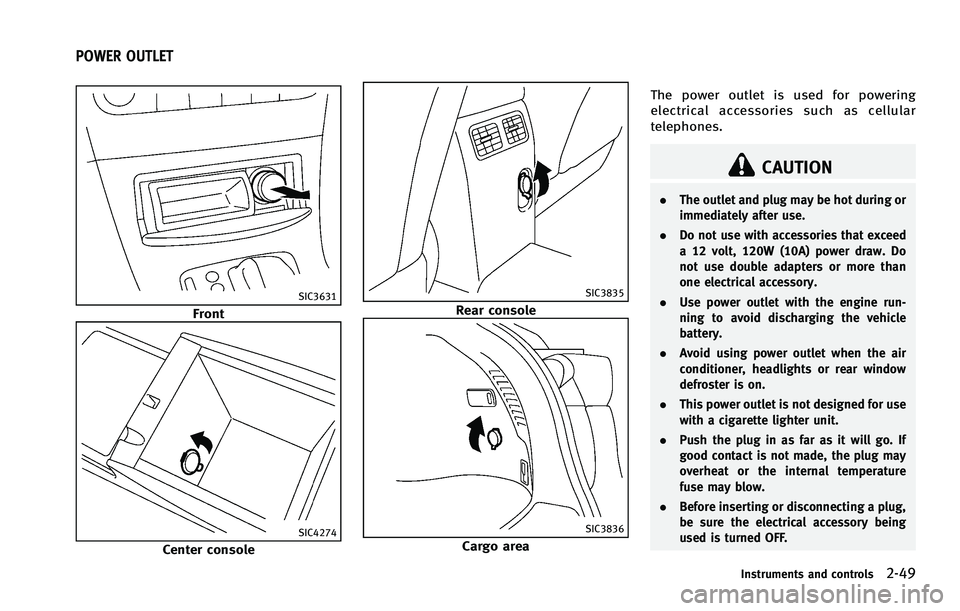
SIC3631
Front
SIC4274
Center console
SIC3835
Rear console
SIC3836
Cargo areaThe power outlet is used for powering
electrical accessories such as cellular
telephones.
CAUTION
.
The outlet and plug may be hot during or
immediately after use.
. Do not use with accessories that exceed
a 12 volt, 120W (10A) power draw. Do
not use double adapters or more than
one electrical accessory.
. Use power outlet with the engine run-
ning to avoid discharging the vehicle
battery.
. Avoid using power outlet when the air
conditioner, headlights or rear window
defroster is on.
. This power outlet is not designed for use
with a cigarette lighter unit.
. Push the plug in as far as it will go. If
good contact is not made, the plug may
overheat or the internal temperature
fuse may blow.
. Before inserting or disconnecting a plug,
be sure the electrical accessory being
used is turned OFF.
Instruments and controls2-49
POWER OUTLET
Page 139 of 522
2-68Instruments and controls
PROGRAMMING TROUBLE-DIAGNO-
SIS
If HomeLink®does not quickly learn the
hand-held transmitter information:
. replace the hand-held transmitter bat-
teries with new batteries.
. position the hand-held transmitter with
its battery area facing away from the
HomeLink
®surface.
. push and hold both the HomeLink®and
hand-held transmitter buttons without
interruption.
. position the hand-held transmitter 2 to
5 in (50 to 127 mm) away from the
HomeLink
®surface. Hold the transmit-
ter in that position for up to 15
seconds. If HomeLink
®is not pro-
grammed within that time, try holding
the transmitter in another position -
keeping the indicator light in view at all
times.
If you continue to have programming
difficulties, please contact the INFINITI
Consumer Affairs Department. The phone
numbers are located in the Foreword of
this Owner’s Manual.
CLEARING THE PROGRAMMED IN-
FORMATION
Individual buttons cannot be cleared,
however to clear all programming, push
and hold the two outside buttons and
release when the indicator light begins to
flash (in approximately 20 seconds).
REPROGRAMMING A SINGLE
HomeLink®BUTTON
To reprogram a HomeLink®Universal
Transceiver button, complete the following.
1. Push and hold the desired HomeLink
®
button. Do notrelease the button until
step 4 has been completed.
2. When the indicator light begins to flash slowly (after 20 seconds), position the
hand-held transmitter 2 to 5 in (50 to
127 mm) away from the HomeLink
®
surface.
3. Push and hold the hand-held transmit- ter button.
4. The HomeLink
®indicator light will
flash, first slowly and then rapidly.
When the indicator light begins to flash
rapidly, release both buttons.
The HomeLink
®Universal Transceiver but-
ton has now been reprogrammed. The new device can be activated by pushing the
HomeLink
®button that was just pro-
grammed. This procedure will not affect
any other programmed HomeLink
®but-
tons.
IF YOUR VEHICLE IS STOLEN
If your vehicle is stolen, you should change
the codes of any non-rolling code device
that has been programmed into
HomeLink
®. Consult the Owner’s Manual
of each device or call the manufacturer or
retailer of those devices for additional
information.
When your vehicle is recovered, you will
need to reprogram the HomeLink
®Uni-
versal Transceiver with your new transmit-
ter information.
FCC Notice:
For USA:
This device complies with Part 15 of the
FCC Rules. Operation is subject to the
following two conditions: (1) This device
may not cause harmful interference, and
(2) this device must accept any interfer-
ence received, including interference that
may cause undesired operation.
Page 148 of 522
WARNING
.Radio waves could adversely affect
electric medical equipment. Those who
use a pacemaker should contact the
electric medical equipment manufacturer
for the possible influences before use.
. The Intelligent Key transmits radio
waves when the buttons are pushed.
The FAA advises that the radio waves
may affect aircraft navigation and com-
munication systems. Do not operate the
Intelligent Key while on an airplane.
Make sure the buttons are not operated
unintentionally when the unit is stored
during a flight.
The Intelligent Key system can operate all
doors and the lift gate using the remote
controller function or pushing the request
switch on the vehicle without taking the
key out from a pocket or purse. The
operating environment and/or conditions
may affect the Intelligent Key system
operation.
Be sure to read the following before using
the Intelligent Key system.
CAUTION
.Be sure to carry the Intelligent Key with
you when operating the vehicle.
. Never leave the Intelligent Key in the
vehicle when you leave the vehicle.
The Intelligent Key is always communicat-
ing with the vehicle as it receives radio
waves. The Intelligent Key system trans-
mits weak radio waves. Environmental
conditions may interfere with the operation
of the Intelligent Key system under the
following operating conditions.
.When operating near a location where
strong radio waves are transmitted,
such as a TV tower, power station and
broadcasting station.
. When in possession of wireless equip-
ment, such as a cellular telephone,
transceiver, and CB radio.
. When the Intelligent Key is in contact
with or covered by metallic materials.
. When any type of radio wave remote
control is used nearby.
. When the Intelligent Key is placed near
an electric appliance such as a perso- nal computer.
. When the vehicle is parked near a
parking meter.
In such cases, correct the operating condi-
tions before using the Intelligent Key
function or use the mechanical key.
Although the life of the battery varies
depending on the operating conditions,
the battery’s life is approximately 2 years.
If the battery is discharged, replace it with
a new one.
When the Intelligent Key battery is almost
discharged, insert the Intelligent Key into
the Intelligent Key port to start the engine.
Replace the discharged battery with a new
one as soon as possible. For more details,
see “Push-button ignition switch” (P.5-10).
Since the Intelligent Key is continuously
receiving radio waves, if the key is left near
equipment which transmits strong radio
waves, such as signals from a TV and
personal computer, the battery life may
become shorter.
For information regarding replacement of a
battery, see “Intelligent Key battery repla-
cement” (P.8-27).
As many as 4 Intelligent Keys can be
registered and used with one vehicle. For
Pre-driving checks and adjustments3-7
INTELLIGENT KEY SYSTEM
Page 155 of 522
3-14Pre-driving checks and adjustments
WARNING
The Intelligent Key transmits radio waves
when the buttons are pushed. The FAA
advises that radio waves may affect aircraft
navigation and communication systems. Do
not operate the Intelligent Key while on an
airplane. Make sure the buttons are not
operated unintentionally when the unit is
stored for a flight.
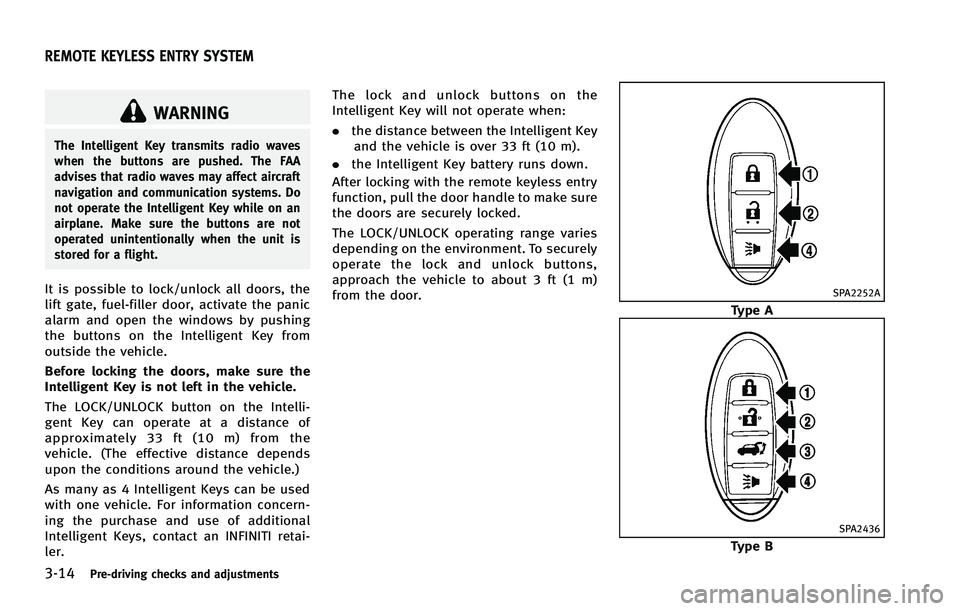
It is possible to lock/unlock all doors, the
lift gate, fuel-filler door, activate the panic
alarm and open the windows by pushing
the buttons on the Intelligent Key from
outside the vehicle.
Before locking the doors, make sure the
Intelligent Key is not left in the vehicle.
The LOCK/UNLOCK button on the Intelli-
gent Key can operate at a distance of
approximately 33 ft (10 m) from the
vehicle. (The effective distance depends
upon the conditions around the vehicle.)
As many as 4 Intelligent Keys can be used
with one vehicle. For information concern-
ing the purchase and use of additional
Intelligent Keys, contact an INFINITI retai-
ler.The lock and unlock buttons on the
Intelligent Key will not operate when:
.
the distance between the Intelligent Key
and the vehicle is over 33 ft (10 m).
. the Intelligent Key battery runs down.
After locking with the remote keyless entry
function, pull the door handle to make sure
the doors are securely locked.
The LOCK/UNLOCK operating range varies
depending on the environment. To securely
operate the lock and unlock buttons,
approach the vehicle to about 3 ft (1 m)
from the door.SPA2252A
Type A
SPA2436
Type B
REMOTE KEYLESS ENTRY SYSTEM
Page 220 of 522

WARNING
.The air conditioner cooling function
operates only when the engine is run-
ning.
. Do not leave children or adults who
would normally require the support of
others alone in your vehicle. Pets should
not be left alone either. On hot, sunny
days, temperatures in a closed vehicle
could quickly become high enough to
cause severe or possibly fatal injuries to
people or animals.
. Do not use the recirculation mode for
long periods as it may cause the interior
air to become stale and the windows to
fog up.
Start the engine and operate the automatic
climate control system.
When the “STATUS”button is pushed, the
automatic climate control status screen
will appear. (See “How to use STATUS
button” (P.4-9).)
SAA2723
Models with navigation system
SAA1520
Models without navigation system You can individually set the driver and front
passenger side temperature using each
temperature control button.
Monitor, climate, audio, phone and voice recognition systems4-43
AUTOMATIC CLIMATE CONTROL