buttons INFINITI FX 2012 User Guide
[x] Cancel search | Manufacturer: INFINITI, Model Year: 2012, Model line: FX, Model: INFINITI FX 2012Pages: 522, PDF Size: 3.51 MB
Page 179 of 522
Steering-wheel-mounted controls for audio.... 4-91Antenna ........................................................ 4-92
Car phone or CB radio ....................................... 4-93
Bluetooth
®Hands-Free Phone System
(models with navigation system)........................ 4-94
Regulatory information .................................. 4-95
Voice commands ........................................... 4-96
Control buttons ............................................. 4-96
Connecting procedure.................................... 4-96 Phone selection............................................. 4-97Vehicle phonebook ........................................ 4-97
Making a call .............................................. 4-100
Receiving a call ........................................... 4-101
During a call ............................................... 4-101
Phone setting .............................................. 4-102
Troubleshooting guide ................................. 4-104
Bluetooth
®Hands-Free Phone System
(models without navigation system)................. 4-105
Regulatory information ................................ 4-106 Control buttons.......................................... 4-107
Voice Recognition System .......................... 4-107
Pairing procedure ...................................... 4-112
Phonebook registration .............................. 4-113
Making a call ............................................. 4-114
Receiving a call.......................................... 4-114
During a call .............................................. 4-114
Phone operation ........................................ 4-115
Speaker adaptation mode .......................... 4-118
INFINITI Voice Recognition System
(models with navigation system) ..................... 4-120
INFINITI Voice Recognition
Standard Mode .......................................... 4-120
Using the system ....................................... 4-123
INFINITI Voice Recognition Alternate
Command Mode......................................... 4-132 Using the system ....................................... 4-141
Troubleshooting guide ............................... 4-147
Page 180 of 522
WARNING
.Do not disassemble or modify this
system. If you do, it may result in
accidents, fire, or electric shock.
. Do not use this system if you notice any
abnormality, such as a frozen screen or
lack of sound. Continued use of the
system may result in accident, fire or
electric shock.
. In case you notice any foreign object in
the system hardware, spill liquid on it,
or notice smoke or smell coming from it,
stop using the system immediately and
contact your nearest INFINITI retailer.
Ignoring such conditions may lead to
accidents, fire, or electric shock.
. Park the vehicle in a safe location and
apply the parking brake to view the
images on the front center display
screen.
Do not attempt to operate the system in
extreme temperature conditions [below
−48F( −208C) and above 1588F (708C)].
Operating this system under these condi-
tions may result in system malfunctions.
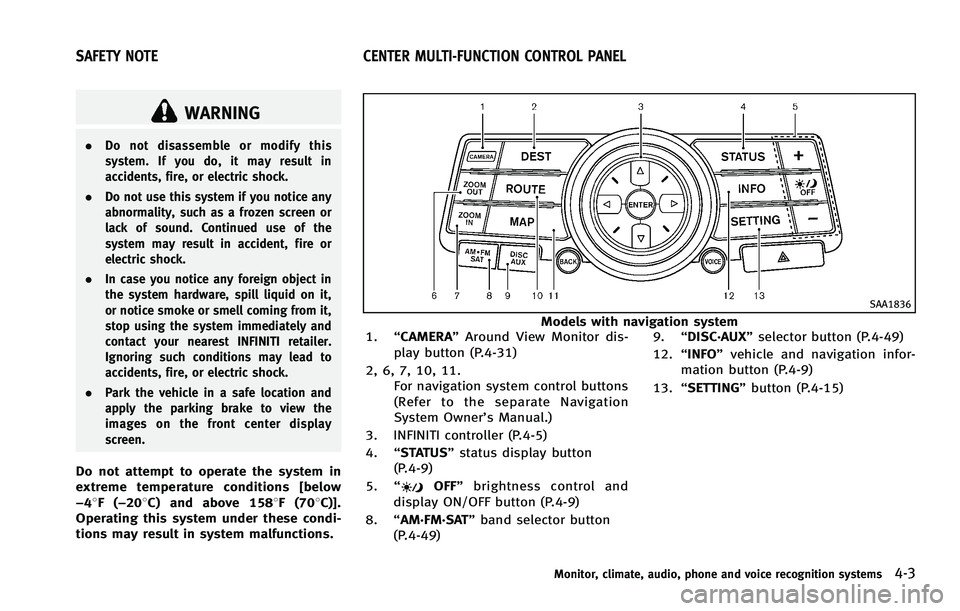
SAA1836
Models with navigation system
1. “CAMERA” Around View Monitor dis-
play button (P.4-31)
2, 6, 7, 10, 11. For navigation system control buttons
(Refer to the separate Navigation
System Owner’s Manual.)
3. INFINITI controller (P.4-5)
4. “STATUS” status display button
(P.4-9)
5. “
OFF” brightness control and
display ON/OFF button (P.4-9)
8. “AM·FM·SAT” band selector button
(P.4-49) 9.
“DISC·AUX” selector button (P.4-49)
12. “INFO” vehicle and navigation infor-
mation button (P.4-9)
13. “SETTING” button (P.4-15)
Monitor, climate, audio, phone and voice recognition systems4-3
SAFETY NOTE CENTER MULTI-FUNCTION CONTROL PANEL
Page 182 of 522

HOW TO USE INFINITI CONTROLLER
Choose an item on the display using the
main directional buttons
*2(or additional
directional buttons
*6models with navi-
gation system) or center dial
*3, and push
the ENTER button
*1for operation.
If you push the BACKbutton
*4before the
setup is completed, the setup will be
canceled and/or the display will return to
the previous screen. This button can also
be used to delete characters that have
been input.
After the setup is completed, push the
BACK button
*4and return to the previous
screen.
For the VOICEbutton
*5functions, refer to
the separate Navigation System Owner’s
Manual.
HOW TO USE TOUCH SCREEN
(models with navigation system)
CAUTION
. The glass screen on the liquid crystal
display may break if it is hit with a hard
or sharp object. If the glass screen
breaks, do not touch it. Doing so could result in an injury.
. To clean the display, use a soft, dry
cloth. If additional cleaning is necessary,
use a small amount of neutral detergent
with a soft cloth. Never use a rough
cloth, alcohol, benzine, thinner or any
kind of solvent or paper towel with a
chemical cleaning agent. They will
scratch or deteriorate the panel.
. Do not splash any liquid such as water
or car fragrance on the display. Contact
with liquid will cause the system to
malfunction.
To ensure safe driving, some functions
cannot be operated while driving.
The on-screen functions that are not
available while driving will be “grayed
out” or muted.
Park the vehicle in a safe location and then
operate the navigation system.
WARNING
. ALWAYS give your full attention to
driving.
. Avoid using vehicle features that could distract you. If distracted, you could lose
control of your vehicle and cause an
accident.
Monitor, climate, audio, phone and voice recognition systems4-5
Page 223 of 522

4-46Monitor, climate, audio, phone and voice recognition systems
Manual operation
Fan speed control:
Push the fan speed increase“
”or
decrease “”buttons to manually con-
trol the fan speed.
Push the “AUTO” button to return to
automatic control of the fan speed.
Air recirculation:
Push the intake air control button to
recirculate interior air inside the vehicle.
The indicator light on the “
”side will
illuminate.
The air recirculation mode cannot be
activated when the air conditioner is in
the front defrosting mode “
”.
Outside air circulation:
Push the intake air control button to draw
outside air into the passenger compart-
ment. The indicator light on the “
”side
will turn off and “”(if so equipped) will
illuminate.
Automatic intake air control:
In the AUTO mode, the intake air will be
controlled automatically. To manually con-
trol the intake air, push the intake air
control button. .
Without Advanced Climate Control Sys-
tem (ACCS):
To return to the automatic control
mode, push the intake air control
button for about 2 seconds. The in-
dicator lights (both air recirculation
“
” and outside air circulation
“” sides) will flash twice, and then
the intake air will be controlled auto-
matically.
. With Advanced Climate Control System
(ACCS):
To return to the automatic control
mode, push the intake air control
button until the indicator light on the
“
” side illuminates. The Advanced
Climate Control System (ACCS) turns on
and the intake air will be controlled
automatically.
Air flow control:
Pushing the “MODE” manual air flow
control button selects the air outlet to:
: Air flows from center and side ventilators.
: Air flows from center and side ventilators and foot outlets.
: Air flows mainly from foot outlets.
: Air flows from defroster and foot outlets.
To turn the system off
Push the “OFF”button.
Advanced Climate Control System
(ACCS) (if so equipped)
The Advanced Climate Control System
(ACCS) keeps the air inside of the vehicle
clean, using the ion control and the
automatic air intake control with outside
odor and exhaust gas detecting sensor.
Page 239 of 522
4-62Monitor, climate, audio, phone and voice recognition systems
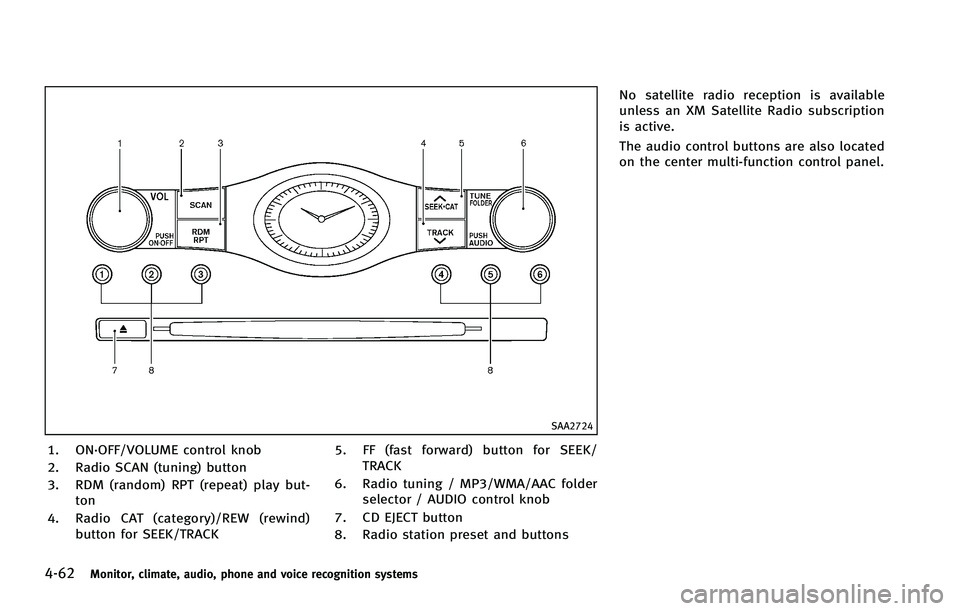
SAA2724
1. ON·OFF/VOLUME control knob
2. Radio SCAN (tuning) button
3. RDM (random) RPT (repeat) play but-ton
4. Radio CAT (category)/REW (rewind) button for SEEK/TRACK 5. FF (fast forward) button for SEEK/
TRACK
6. Radio tuning / MP3/WMA/AAC folder selector / AUDIO control knob
7. CD EJECT button
8. Radio station preset and buttons No satellite radio reception is available
unless an XM Satellite Radio subscription
is active.
The audio control buttons are also located
on the center multi-function control panel.
Page 242 of 522
.LOADING (When the initial setting is
performed)
. UPDATING (When the satellite radio
subscription is not active)
SCAN tuning:
Push the SCAN tuning button to tune from
low to high frequencies and stop at each
broadcasting station/channel for 5 sec-
onds. Pushing the button again during this
5 seconds period will stop SCAN tuning
and the radio will remain tuned to that
station/channel.
If the SCAN tuning button is not pushed
within 5 seconds, SCAN tuning moves to
the next station/channel.
*1to*6Station memory operations:
12 stations/channels can be set for the FM
band (6 each for FM1 and FM2), 18 for XM
radio (6 each for XM1, XM2 and XM3) and 6
stations can be set for the AM band.
1. Choose the radio band using the radio band select button.
2. Tune to the desired station/channel using the SEEK·CAT, TRACK, SCAN
button or the radio TUNE knob.
3. Push and hold the desired station preset button
*1to*6until the radio mutes.
4. The station indicator will then come on and the sound will resume. Memorizing
is now complete.
5. Other buttons can be set in the same manner.
If the battery cable is disconnected, or if
the fuse opens, the radio memory will be
erased. In that case, reset the desired
stations/channels.
List (AM and FM radio) (models with
navigation system):
When the “List”key on the display is
selected while the FM or AM radio is being
played, the preset station list will be
displayed.
If 1 of the 6 preset stations listed is
touched and held, the current station will
be stored as the new preset.
Menu (XM Satellite Radio) (models with
navigation system):
When the “Menu”key on the display is
selected while the XM Satellite Radio is
being played, the menu list will be
displayed.
The following items are available. .
Preset List
Displays the preset channel list. If 1 of
the 6 preset stations listed is touched
and held, the current station will be
stored as the new preset.
. Customize Channel List
Selects specific channels to skip while
using the TUNE, SEEK/CATEGORY or
Menu-Categories feature.
. Favorite Artists & Songs
Stores the current artist or song that is
being played. Touch the “Alert”key to
be reminded when the stored artist or
song is playing on a station while
listening to XM.
. Categories
Selecting a category will go to the first
channel in that category as defined by
XM Radio.
. Direct Tune
Inputs the channel number by using a
keypad.
Text (models without navigation system):
When the “Text”key is selected with the
INFINITI controller on the display and then
the ENTER button is pushed while the
satellite radio is being played, the text
information listed below will be displayed
Monitor, climate, audio, phone and voice recognition systems4-65
Page 258 of 522

.Second generation iPod Classic®(firm-
ware version 2.0 PC)
. First generation iPod touch
®(firmware
version 2.1)
. Second generation iPod touch
®(firm-
ware version 2.1.1)
. First generation iPod nano
®(firmware
version 1.3.1)
. Second generation iPod nano
®(firm-
ware version 1.1.3)
. Third generation iPod nano
®(firmware
version 1.1 PC)
. Third generation iPhone
®(firmware
version 2.1)
Make sure that the iPod
®version is
updated.
Audio main operation
Push the ignition switch to the ACC or ON
position. Then, push the DISC·AUX or AUX
button repeatedly to switch to the iPod
®
mode.
If the system has been turned off while the
iPod
®was playing, pushing the ON·OFF
button will start the iPod®.
orPLAY:
When the DISC·AUX or AUX button is pushed with the system off and the iPod
®
connected, the system will turn on. If
another audio source is playing and the
iPod
®is connected, push the DISC·AUX or
AUX button repeatedly until the center
display changes to the iPod
®mode.
Interface:
The interface for iPod
®operation shown on
the vehicle center display is similar to the
iPod
®interface. Use the INFINITI controller
and the ENTER or BACK button to play the
iPod
®with your favorite settings.
The following items can be chosen from the
menu list screen. For further information
about each item, see the iPod
®Owner’s
Manual.
. Now Playing
. Playlists
. Artists
. Albums
. Songs
. Podcasts
. Genres
. Composers
. Audiobooks
. Shuffle Songs The following touch-panel buttons shown
on the screen are also available:
.
: returns to the previous screen.
.
: plays/pauses the music selected.
Next/Previous Track and Fast-
Forward/Rewind:
Push the FF or REW button for more than
1.5 seconds while a iPod
®is being played
to fast-forward or rewind through the track.
When the button is released, the iPod
®will
return to the normal play speed.
When the FF button is pushed for less than
1.5 seconds while the iPod
®audio device
is being played, the next track will be
played.
When the REW button is pushed for less
than 1.5 seconds within 3 seconds after
the current track started playing, the
previous track will be played.
When the REW button is pushed for less
than 1.5 seconds after 3 seconds from
when the current track started playing, the
beginning of the current track will be
played.
The INFINITI controller can also be used to
select tracks when the iPod
®is playing.
Monitor, climate, audio, phone and voice recognition systems4-81
Page 273 of 522
4-96Monitor, climate, audio, phone and voice recognition systems
must accept any interference, including
interference that may cause undesired
operation of the device.
. This Class B digital apparatus meets all
requirements of the Canadian Interfer-
ence-Causing Equipment Regulations.
Bluetooth trademark:
Bluetooth®is a trademark
owned by Bluetooth SIG, Inc.,
and licensed to Clarion Co., Ltd.
VOICE COMMANDS
You can use voice commands to operate
various Bluetooth®Hands-Free Phone Sys-
tem features using the INFINITI Voice
Recognition system.
For more details, see “INFINITI Voice
Recognition System (models with naviga-
tion system)” (P.4-120).SAA2248
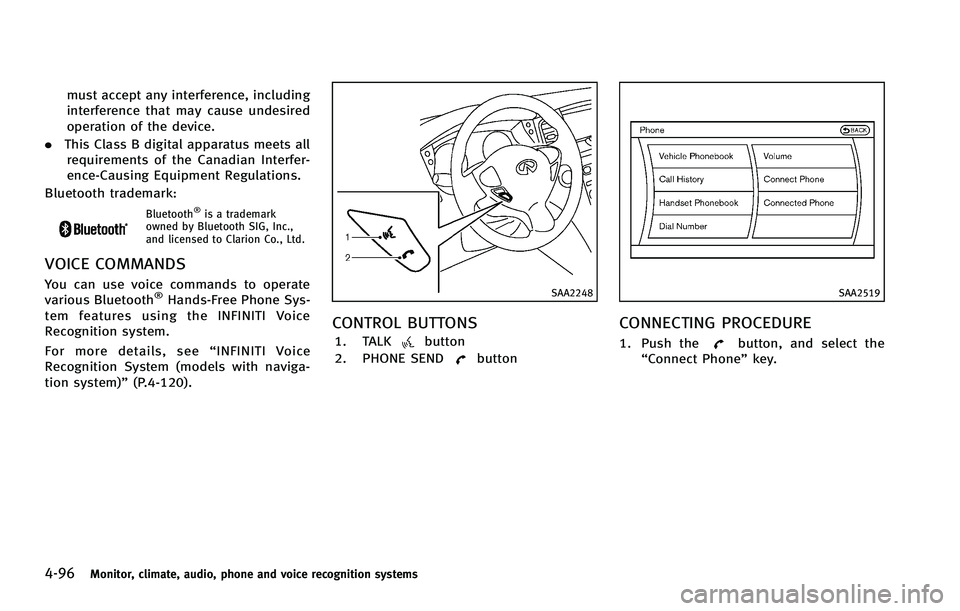
CONTROL BUTTONS
1. TALKbutton
2. PHONE SEND
button
SAA2519
CONNECTING PROCEDURE
1. Push thebutton, and select the
“Connect Phone” key.
Page 284 of 522

Bluetooth®is a trademark
owned by Bluetooth SIG, Inc.,
and licensed to Visteon Cor-
poration.
SAA2634
CONTROL BUTTONS
1. PHONE SENDbutton
Push the button to initiate a VR
session or answer an incoming call.
You can also use the button to skip
through system feedback and to enter
commands during a call.
2. PHONE END
button
Push the button to cancel a VR
session or end a call.
VOICE RECOGNITION SYSTEM
You can also use the Bluetooth®hands-
free phone system with Voice Recognition
System.
INFO
. The available voice commands are only
applicable to the relevant language set
in the LANGUAGE setting screen. (See
“How to use SETTING button” (P.4-15).)
. If the vehicle is in motion, some
commands may not be available so full
attention may be given to vehicle
operation.
Using system
Initialization:
When the ignition switch is pushed to the
ON position, Voice Recognition System is
initialized, which may take up to one
minute. When completed, the system is
ready to accept voice commands. If the
switch on the steering wheel is pushed
before the initialization completes, the
system will not accept any command.
Before starting:
To get the best performance out of the
Voice Recognition System, observe the
following:
Monitor, climate, audio, phone and voice recognition systems4-107
Page 286 of 522

command recognition mode.
4. The system acknowledges the com- mand and announces the next set of
available commands.
5. After the tone sounds, speak the phone number.
6. When you have finished speaking the phone number, the system repeats it
back and announces the available
commands.
7. After system responds, speak “Dial”
and the system dials the spoken
numbers.
Operating tips:
. Voice commands cannot be accepted
when the icon is
.
. If the command is not recognized, the
system announces, “Please say again”.
Repeat the command in a clear voice.
. Push the
switch or the BACKbutton
once to return to the previous screen.
. If you want to cancel the command,
push the
switch. The message
“ Voice input is canceled” will be
announced. If you want to adjust the
volume of the system feedback, push
the volume control buttons [+] or [−]on
the steering wheel or use the audio system volume knob while the system
is making an announcement.
How to speak commands:
The Voice Recognition System requires a
certain way to speak voice commands.
Speak normally and clearly in the direction
of the microphone (located in front of the
rearview mirror). Every digit of the number
must be spoken individually and in a
normal manner. The hands-free mode will
work best when the telephone number is
spoken in blocks of three to five digits.
After each spoken block is terminated, the
system will repeat the three to five digits
and wait for you to speak the next digit or
block of digits required for the telephone
number.
See “List of voice commands” (P.4-111) for
the appropriate commands that can be
spoken for the hands-free mode system.
Example:
In order to initiate a call, speak “Phone-
book”.
INFO
. If you are controlling the telephone
system by voice command for the first
time or do not know the appropriate
voice command, speak “Help” . The system announces the available com-
mands.
. When you speak numbers, you can
speak both “zero”or“oh” for“0”.
Personal vocabulary (voicetags):
Voice Recognition System is equipped with
the function called “voicetags”, which can
be associated with the phone number and
name in the phonebook. Using the voice
tag will automatically generate a speed
dial to the registered number.
See “Phonebook registration” (P.4-113).
You can call the identified number using
the following command: “Dial”followed by
the voice tag.
Dialling a name with a voice tag:
It is possible to call up a name via a voice
tag instead of a number, provided the
name and number of your correspondent
have been previously stored in the phone-
book.
Dial via a voice tag, according to the
following procedure.
1. Push the
switch.
2. The system replies “please say a
command after the beep. Available
commands are: Call, Phonebook, Re-
Monitor, climate, audio, phone and voice recognition systems4-109