battery INFINITI FX 2012 Owner's Manual
[x] Cancel search | Manufacturer: INFINITI, Model Year: 2012, Model line: FX, Model: INFINITI FX 2012Pages: 522, PDF Size: 3.51 MB
Page 155 of 522
3-14Pre-driving checks and adjustments
WARNING
The Intelligent Key transmits radio waves
when the buttons are pushed. The FAA
advises that radio waves may affect aircraft
navigation and communication systems. Do
not operate the Intelligent Key while on an
airplane. Make sure the buttons are not
operated unintentionally when the unit is
stored for a flight.
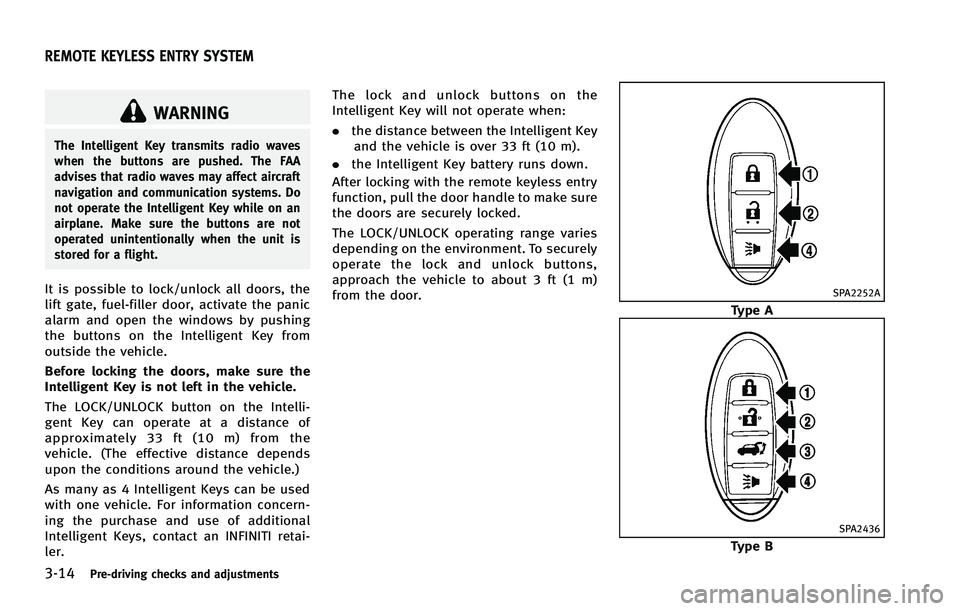
It is possible to lock/unlock all doors, the
lift gate, fuel-filler door, activate the panic
alarm and open the windows by pushing
the buttons on the Intelligent Key from
outside the vehicle.
Before locking the doors, make sure the
Intelligent Key is not left in the vehicle.
The LOCK/UNLOCK button on the Intelli-
gent Key can operate at a distance of
approximately 33 ft (10 m) from the
vehicle. (The effective distance depends
upon the conditions around the vehicle.)
As many as 4 Intelligent Keys can be used
with one vehicle. For information concern-
ing the purchase and use of additional
Intelligent Keys, contact an INFINITI retai-
ler.The lock and unlock buttons on the
Intelligent Key will not operate when:
.
the distance between the Intelligent Key
and the vehicle is over 33 ft (10 m).
. the Intelligent Key battery runs down.
After locking with the remote keyless entry
function, pull the door handle to make sure
the doors are securely locked.
The LOCK/UNLOCK operating range varies
depending on the environment. To securely
operate the lock and unlock buttons,
approach the vehicle to about 3 ft (1 m)
from the door.SPA2252A
Type A
SPA2436
Type B
REMOTE KEYLESS ENTRY SYSTEM
Page 160 of 522
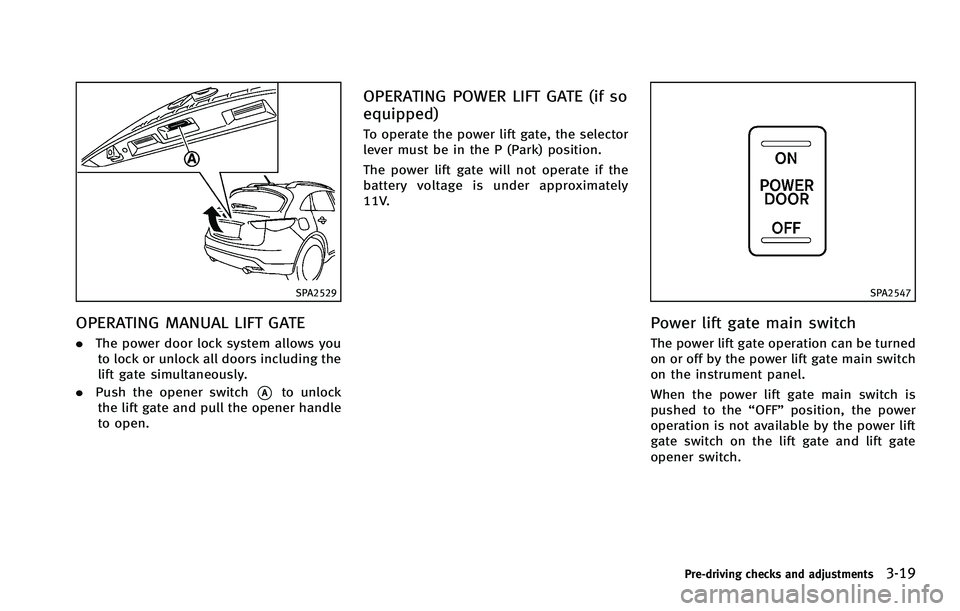
SPA2529
OPERATING MANUAL LIFT GATE
.The power door lock system allows you
to lock or unlock all doors including the
lift gate simultaneously.
. Push the opener switch
*Ato unlock
the lift gate and pull the opener handle
to open.
OPERATING POWER LIFT GATE (if so
equipped)
To operate the power lift gate, the selector
lever must be in the P (Park) position.
The power lift gate will not operate if the
battery voltage is under approximately
11V.
SPA2547
Power lift gate main switch
The power lift gate operation can be turned
on or off by the power lift gate main switch
on the instrument panel.
When the power lift gate main switch is
pushed to the “OFF”position, the power
operation is not available by the power lift
gate switch on the lift gate and lift gate
opener switch.
Pre-driving checks and adjustments3-19
Page 164 of 522
6. Push and hold the power lift gateswitch
*2on the lower part of the lift
gate for 3 seconds to set the user
selected open position. A chime will
sound when setting is successful.
7. Fully close the lift gate.
The lift gate will open and stop at the user
selected position.
CAUTION
. Do not lean against a partially opened
lift gate. The lift gate may close un-
expectedly and may result in personal
injury.
. If the vehicle was driven by another
person, confirm the garage mode func-
tion before opening the lift gate in a
location with low clearance. The lift gate
can be damaged if the previous driver
changed or canceled the setting.
. If the switch is pressed two times
quickly (1 second or less) when opening
the lift gate from the fully closed
position, the system may not recognize
the second switch press. The lift gate
will continue to open. This is normal
operation and does not indicate a mal- function. However, this may result in
minor personal injury if someone is
behind the vehicle when the switch is
activated, or damage to the lift gate.
NOTE:
.
To avoid damaging the lift gate system,
do not manually force the lift gate to
open or close when the lift gate is
moving. When manually operating the
lift gate from the full close or full open
position, do not use excessive force.
Using excessive force may damage the
system.
. Do not install accessories such as bike
racks onto the lift gate. The additional
weight of these accessories may cause
the lift gate to operate slowly or to not
open completely. This is a normal
operation and does not indicate a
malfunction. The lift gate will operate
normally when the accessory is re-
moved.
. If the lift gate is opened when the
vehicle is parked on a steep slope, the
lift gate may not open to the expected
position. This is a normal operation
and does not indicate a malfunction. .
If the automatic lift gate is operated
continuously for approximately 180
seconds, the system automatically
turns off to prevent overheating. The
lift gate cannot be opened using the
switches. The system resets and opera-
tion returns to normal after approxi-
mately 180 seconds. This is a normal
operation and does not indicate a
malfunction.
. The lift gate may automatically reverse
direction if the lift gate is operating
and passengers enter/exit the vehicle.
This is a normal operation and does
not indicate a malfunction.
. The lift gate must be operated manually
if the battery is disconnected or
discharged.
. If the lift gate is not activated due to a
low voltage (less than approximately
11V), operate the lift gate with the
engine running.
Manual mode
If power operation is not available, the lift
gate can be operated manually. Power
operation may not be available if multiple
obstacles have been detected in a single
power cycle or if the battery voltage is low.
Pre-driving checks and adjustments3-23
Page 165 of 522

3-24Pre-driving checks and adjustments
When the power lift gate main switch is in
the OFF position, the lift gate can be
opened manually by pushing the lift gate
opener switch. If the power lift gate opener
switch is pushed during power open or
close, the power operation will be canceled
and the lift gate can be operated manually.
AUTO CLOSURE
If the lift gate is pulled down to a partly
open position, the lift gate will pull itself to
the closed position.
Do not apply excessive force when the
auto closure is operating. Excessive force
applied may cause the mechanism to
malfunction.
CAUTION
.The lift gate will automatically close
from a partly open position. To avoid
pinching, keep hands and fingers away
from lift gate opening.
. Do not let children operate the lift gate.
SPA2522
LIFT GATE RELEASE LEVER
If the lift gate cannot be opened with the
door lock switch due to a discharged
battery, follow these steps.
1. Remove the cover
*Ainside of the lift
gate using a suitable tool.
2. Move the lever
*Bas illustrated to
open the lift gate.
Contact an INFINITI retailer as soon as
possible for repair.
SPA2523
OPENING THE FUEL-FILLER DOOR
To open the fuel-filler door, unlock the fuel-
filler door by using one of the following
operations, then push the left side of the
door.
. Push the driver’s door handle request
switch with the Intelligent Key carried
with you.
. Push the passenger’ s door handle
request switch or lift gate request
switch twice with the Intelligent Key
carried with you.
. Push the UNLOCK button on the Intelli-
gent Key.
FUEL-FILLER DOOR
Page 174 of 522
Cancel or activate entry/exit func-
tion
The selector lever must be in the P (Park)
position with the ignition switch in the OFF
position.
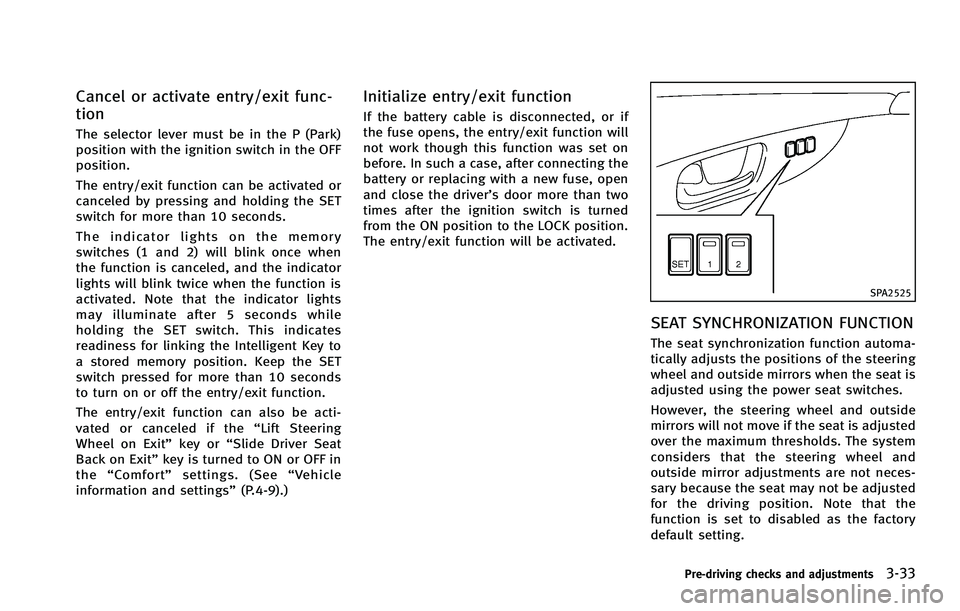
The entry/exit function can be activated or
canceled by pressing and holding the SET
switch for more than 10 seconds.
The indicator lights on the memory
switches (1 and 2) will blink once when
the function is canceled, and the indicator
lights will blink twice when the function is
activated. Note that the indicator lights
may illuminate after 5 seconds while
holding the SET switch. This indicates
readiness for linking the Intelligent Key to
a stored memory position. Keep the SET
switch pressed for more than 10 seconds
to turn on or off the entry/exit function.
The entry/exit function can also be acti-
vated or canceled if the“Lift Steering
Wheel on Exit” key or“Slide Driver Seat
Back on Exit” key is turned to ON or OFF in
the “Comfort” settings. (See “Vehicle
information and settings” (P.4-9).)
Initialize entry/exit function
If the battery cable is disconnected, or if
the fuse opens, the entry/exit function will
not work though this function was set on
before. In such a case, after connecting the
battery or replacing with a new fuse, open
and close the driver’s door more than two
times after the ignition switch is turned
from the ON position to the LOCK position.
The entry/exit function will be activated.
SPA2525
SEAT SYNCHRONIZATION FUNCTION
The seat synchronization function automa-
tically adjusts the positions of the steering
wheel and outside mirrors when the seat is
adjusted using the power seat switches.
However, the steering wheel and outside
mirrors will not move if the seat is adjusted
over the maximum thresholds. The system
considers that the steering wheel and
outside mirror adjustments are not neces-
sary because the seat may not be adjusted
for the driving position. Note that the
function is set to disabled as the factory
default setting.
Pre-driving checks and adjustments3-33
Page 176 of 522
Push the ignition switch to the OFF posi-
tion, and then push thebutton on the
Intelligent Key. The driver’s seat, steering
wheel and outside mirrors will move to the
memorized position or to the exit position
when the entry/exit function is set to
active.
Confirming memory storage
. Push the ignition switch to the ON
position and push the SET switch. If
the main memory has not been stored,
the indicator light will come on for
approximately 0.5 second. When the
memory has stored in position, the
indicator light will stay on for approxi-
mately 5 seconds.
. If the battery cable is disconnected, or if
the fuse opens, the memory will be
canceled. In this case, reset the desired
position using the previous procedure.
. If optional Intelligent Keys are added to
your vehicle, the memory storage pro-
cedure to switch 1 or 2 and linking
Intelligent Key procedure to a stored
memory position should be performed
again for each Intelligent Key. For
additional Intelligent Key information,
see “Keys” (P.3-2).
Selecting the memorized position
1. Move the selector lever to the P (Park)
position.
2. Use one of the following methods to move the driver’ s seat, the outside
mirrors and the steering wheel.
.Push the ignition switch to the ON position and push the memory
switch (1 or 2) fully for at least 1
second.
.Within 45 seconds of opening thedriver’ s door, push the memory
switch (1 or 2) fully for at least 1
second.
The driver’s seat, steering column and
outside mirrors will move to the mem-
orized position or to the exit position
when the entry/exit function is set to
active with the indicator light flashing,
and then the light will stay on for
approximately 5 seconds.
SYSTEM OPERATION
The automatic drive positioner system will
not work or will stop operating under the
following conditions:
. When the vehicle speed is above 4 MPH
(7 km/h). .
When the adjusting switch for the
driver’s seat and steering column is
turned on while the automatic drive
positioner is operating.
. When the memory switch 1 or 2 is not
pushed for at least 1 second.
. When the seat, steering column and
outside mirrors have already been
moved to the memorized position.
. When no position is stored in the
memory switch.
. When the engine is started while
moving the automatic drive positioner.
. When the AT selector lever is moved
from the P (Park) position to any other
position. (However, it will not be
canceled if the switch is pushed while
the seat and steering column are
returning to the previous positions
(entry/exit function).)
. When the driver’s door remains open
for more than 45 seconds and the
ignition switch is not in the ON posi-
tion.
. The seat synchronization function is
automatically disabled if the outside
mirrors or steering wheel reaches its
maximum adjustment.
Pre-driving checks and adjustments3-35
Page 181 of 522
4-4Monitor, climate, audio, phone and voice recognition systems
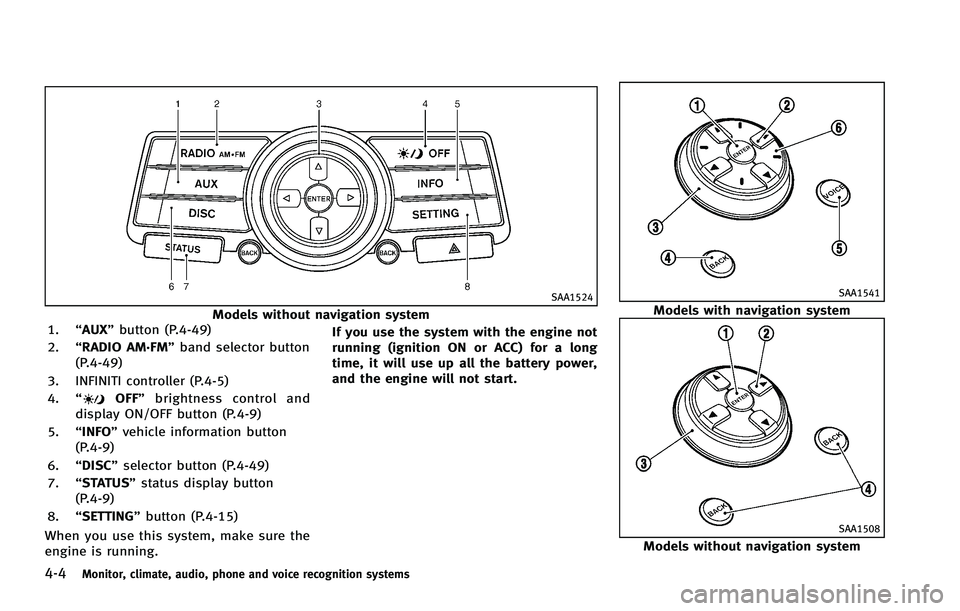
SAA1524
Models without navigation system
1. “AUX” button (P.4-49)
2. “RADIO AM·FM” band selector button
(P.4-49)
3. INFINITI controller (P.4-5)
4. “
OFF” brightness control and
display ON/OFF button (P.4-9)
5. “INFO” vehicle information button
(P.4-9)
6. “DISC” selector button (P.4-49)
7. “STATUS” status display button
(P.4-9)
8. “SETTING” button (P.4-15)
When you use this system, make sure the
engine is running. If you use the system with the engine not
running (ignition ON or ACC) for a long
time, it will use up all the battery power,
and the engine will not start.
SAA1541
Models with navigation system
SAA1508
Models without navigation system
Page 227 of 522
4-50Monitor, climate, audio, phone and voice recognition systems
from a station transmitter, the signals will
tend to fade and/or drift.
Static and flutter: During signal interfer-
ence from buildings, large hills or due to
antenna position, usually in conjunction
with increased distance from the station
transmitter, static or flutter can be heard.
This can be reduced by lowering the treble
setting to reduce the treble response.
Multipath reception: Because of the reflec-
tive characteristics of FM signals, direct
and reflected signals reach the receiver at
the same time. The signals may cancel
each other, resulting in momentary flutter
or loss of sound.
AM radio reception:
AM signals, because of their low frequency,
can bend around objects and skip along
the ground. In addition, the signals can be
bounced off the ionosphere and bent back
to earth. Because of these characteristics.
AM signals are also subject to interference
as they travel from transmitter to receiver.
Fading: Occurs while the vehicle is passing
through freeway underpasses or in areas
with many tall buildings. It can also occur
for several seconds during ionospheric
turbulence even in areas where no obsta-cles exist.
Static: Caused by thunderstorms, electrical
power lines, electric signs and even traffic
lights.
Satellite radio reception:
When the satellite radio is used for the first
time or the battery has been replaced, the
satellite radio may not work properly. This
is not a malfunction. Wait more than 10
minutes with the satellite radio ON and the
vehicle outside of any metal or large
building for the satellite radio to receive
all of the necessary data.
The satellite radio mode requires an active
XM Satellite Radio
®subscription. The
satellite radio is not available in Alaska,
Hawaii and Guam.
The satellite radio performance may be
affected if cargo carried on the roof blocks
the satellite radio signal.
If possible, do not put cargo near the
satellite antenna.
A build up of ice on the satellite radio
antenna can affect satellite radio perfor-
mance. Remove the ice to restore satellite
radio reception.
SAA0480
Compact Disc (CD) player
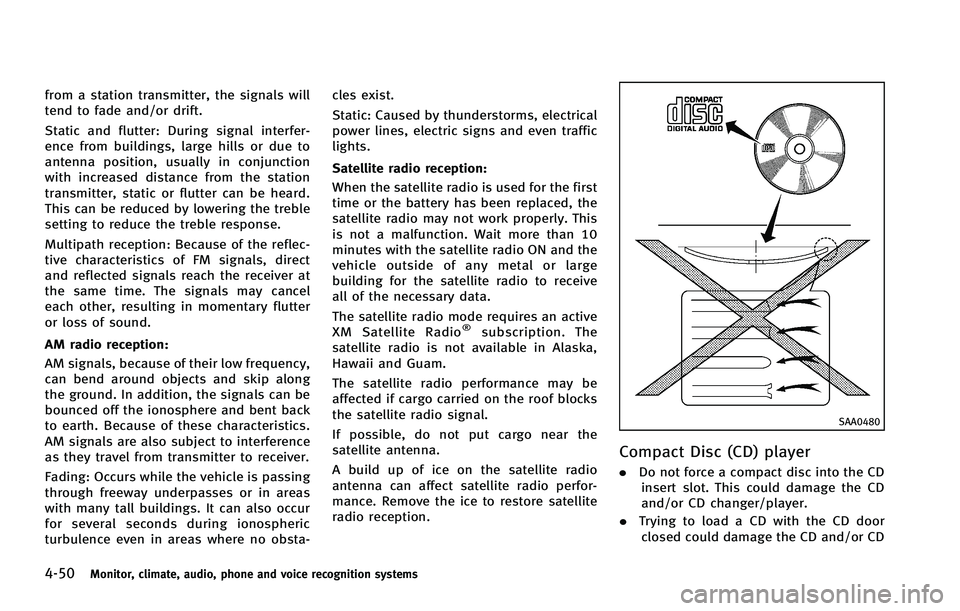
. Do not force a compact disc into the CD
insert slot. This could damage the CD
and/or CD changer/player.
. Trying to load a CD with the CD door
closed could damage the CD and/or CD
Page 238 of 522
.While an audio device is connected
through a Bluetooth®wireless connec-
tion, the battery power of the device
may discharge quicker than usual.
. This system supports the Bluetooth
®
Audio Distribution Profile (A2DP,
AVRCP).
. Wireless LAN (Wi-Fi) and the Bluetooth
®
functions share the same frequency
band (2.4 GHz). Using the Bluetooth®
and the wireless LAN functions at the
same time may slow down or discon-
nect the communication and cause
undesired noise. It is recommended
that you turn off the wireless LAN (Wi-
Fi) when using the Bluetooth
®func-
tions.
. Bluetooth
®is a trademark owned by
Bluetooth SIG, Inc. and licensed to
Clarion Co., Ltd.
Music Box®(if so equipped)
Recording:
. Note that data that is lost and not
stored to the hard drive/flash memory
due to system damage, improper op-
eration or malfunction is not under
warranty. .
Vehicle owners are not permitted to
record music without permission of the
owner of the copyright except for
personal use.
. Check if the music is appropriately
recorded to the hard drive/flash mem-
ory after recording when the compact
disc cannot be rerecorded.
. Some music cannot be recorded de-
pending on the disc condition due to
high-speed recording.
. Jumping sounds may be recorded when
a compact disc is recorded while
driving on rough roads and excessive
vibration occurs.
. A mark indicating jumping sounds is
displayed if jumping sounds are re-
corded.
. No sounds may be recorded if jumping
sounds occurs or the disc is in poor
condition.
. Tracks that include Serial Copy Manage-
ment System (SCMS) are not recorded.
. If a compact disc is scratched or dirty, it
may not be recorded, jumping sounds
may occur or it may take a long time to
record. Automatic title download:
. The title information that is automati-
cally downloaded may differ from the
actual title.
. When newly released compact discs are
recorded, their title information may
not be downloaded.
. The title information on the hard drive/
flash memory can be updated. (See
“Playing recorded songs” (P.4-84).)
Monitor, climate, audio, phone and voice recognition systems4-61
Page 242 of 522
.LOADING (When the initial setting is
performed)
. UPDATING (When the satellite radio
subscription is not active)
SCAN tuning:
Push the SCAN tuning button to tune from
low to high frequencies and stop at each
broadcasting station/channel for 5 sec-
onds. Pushing the button again during this
5 seconds period will stop SCAN tuning
and the radio will remain tuned to that
station/channel.
If the SCAN tuning button is not pushed
within 5 seconds, SCAN tuning moves to
the next station/channel.
*1to*6Station memory operations:
12 stations/channels can be set for the FM
band (6 each for FM1 and FM2), 18 for XM
radio (6 each for XM1, XM2 and XM3) and 6
stations can be set for the AM band.
1. Choose the radio band using the radio band select button.
2. Tune to the desired station/channel using the SEEK·CAT, TRACK, SCAN
button or the radio TUNE knob.
3. Push and hold the desired station preset button
*1to*6until the radio mutes.
4. The station indicator will then come on and the sound will resume. Memorizing
is now complete.
5. Other buttons can be set in the same manner.
If the battery cable is disconnected, or if
the fuse opens, the radio memory will be
erased. In that case, reset the desired
stations/channels.
List (AM and FM radio) (models with
navigation system):
When the “List”key on the display is
selected while the FM or AM radio is being
played, the preset station list will be
displayed.
If 1 of the 6 preset stations listed is
touched and held, the current station will
be stored as the new preset.
Menu (XM Satellite Radio) (models with
navigation system):
When the “Menu”key on the display is
selected while the XM Satellite Radio is
being played, the menu list will be
displayed.
The following items are available. .
Preset List
Displays the preset channel list. If 1 of
the 6 preset stations listed is touched
and held, the current station will be
stored as the new preset.
. Customize Channel List
Selects specific channels to skip while
using the TUNE, SEEK/CATEGORY or
Menu-Categories feature.
. Favorite Artists & Songs
Stores the current artist or song that is
being played. Touch the “Alert”key to
be reminded when the stored artist or
song is playing on a station while
listening to XM.
. Categories
Selecting a category will go to the first
channel in that category as defined by
XM Radio.
. Direct Tune
Inputs the channel number by using a
keypad.
Text (models without navigation system):
When the “Text”key is selected with the
INFINITI controller on the display and then
the ENTER button is pushed while the
satellite radio is being played, the text
information listed below will be displayed
Monitor, climate, audio, phone and voice recognition systems4-65