instrument panel INFINITI FX 2012 Owner's Manual
[x] Cancel search | Manufacturer: INFINITI, Model Year: 2012, Model line: FX, Model: INFINITI FX 2012Pages: 522, PDF Size: 3.51 MB
Page 161 of 522

3-20Pre-driving checks and adjustments
SPA2843
Power lift gate switch—Instrument panel
SPA2877
Lift gate opener switch
SPA2463
Power lift gate button —Intelligent Key
SPA2440
Power lift gate switch —Lift gate
Power open
When the lift gate is fully closed, the lift
gate will fully open automatically by
performing one of the following opera-
tions:
. Pushing the power lift gate switch
*Aon the instrument panel.
. Pushing the lift gate opener switch
*B.
. Pushing the power lift gate button
*Con the Intelligent Key for more than 1
second.
The hazard flashes 4 times and the outside
chime sounds when the lift gate starts
opening.
NOTE:
The lift gate can be opened by the power
lift gate switch
*A, the power lift gate
opener switch
*Bor the power lift gate
button
*Ceven if the lift gate is
locked. The lift gate will individually
unlock and open.
Power close
When the lift gate is fully opened, the lift
gate will fully close automatically by
performing one of the following opera-
tions:
Page 162 of 522

.Pushing the power lift gate switch*Aon the instrument panel.
. Pushing the power lift gate button
*Con the Intelligent Key for more than 1
second.
. Pushing the power lift gate switch
*Don the lower part of the lift gate.
The hazard flashes 4 times and the outside
chime sounds when the lift gate starts
closing.
NOTE:
When the lift gate is closed, it remains
unlocked. Manually lock the lift gate.
Reverse function
The power lift gate will reverse immediately
if one of the following actions is performed
during power open or power close.
. pushing the power lift gate switch
*Aon the instrument panel
. pushing the power lift gate button
*Con the Intelligent Key
. pushing the power lift gate switch
*Don the lower part of the lift gate
The outside chime sounds when the lift
gate starts to reverse.
The power lift gate button
*Con the
Intelligent Key cannot be operated when the ignition switch is in the ON position.
Auto reverse function
The auto-reverse function enables the lift
gate to automatically reverse when some-
thing is caught in the lift gate as it is
opening or closing. When the control unit
detects an obstacle, the lift gate will
reverse and return to the full open or full
close position.
If a second obstacle is detected, the lift
gate motion will stop and the drive motor
will disengage. The lift gate will enter the
manual mode.
A pinch sensor is mounted on each side of
the lift gate. If an obstacle is detected by
the pinch sensor during power close, the
lift gate will reverse and return to the full
open position immediately.
NOTE:
If the pinch sensor is damaged or
removed, the power close function will
not operate.
WARNING
There is a small distance immediately before
the closed position that cannot be detected.
Make sure that all passengers keep their
hands, etc., clear from the lift gate opening
before closing the lift gate.
Pre-driving checks and adjustments3-21
Page 163 of 522

3-22Pre-driving checks and adjustments
SPA2879
SPA2880
*1Lift gate opener switch
*2Power lift gate switch—Lift gate
*3Power lift gate switch —Instrument
panel
*4Power lift gate main switch
Middle stop function
The power lift gate can be set to stop at a
mid-open range. To activate the system,
perform the following procedures.
1. Press the power lift gate main switch
*4to the ON position on the instrument
panel.
2. Push the lift gate opener switch
*1to
open or close the lift gate. 3. Push lift gate opener switch again. The
lift gate will stop at user selected
position when lift gate is opening or
closing.
4. The lift gate will fully open when the lift gate opener switch
*1is pressed
again.
5. The lift gate will fully close when the lift gate switch
*2on the lower part of the
lift gate is pressed.
Garage mode system
The garage mode system allows the lift
gate to open to a user selected position. To
set the garage mode system, perform the
following procedures:
1. Put the selector lever in the P (Park)
position.
2. Make sure the lift gate is fully closed.
3. Press the power lift gate main switch
*4to the ON position on the instrument
panel.
4. Push the lift gate opener switch
*1.
5. Move the lift gate manually or operate the power lift gate from the fully closed
position to the user selected open
position you want to set the system.
Page 172 of 522
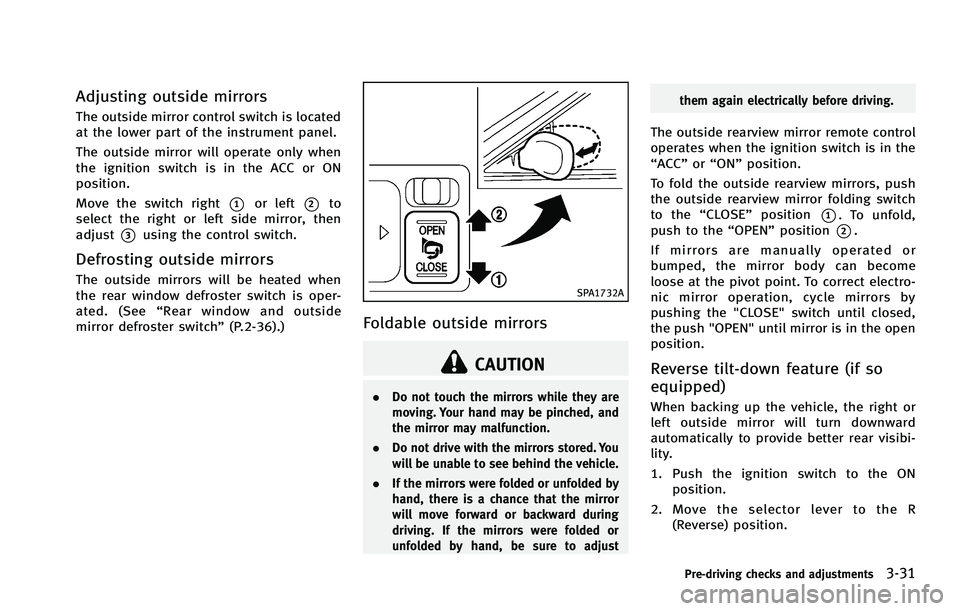
Adjusting outside mirrors
The outside mirror control switch is located
at the lower part of the instrument panel.
The outside mirror will operate only when
the ignition switch is in the ACC or ON
position.
Move the switch right
*1or left*2to
select the right or left side mirror, then
adjust
*3using the control switch.
Defrosting outside mirrors
The outside mirrors will be heated when
the rear window defroster switch is oper-
ated. (See “Rear window and outside
mirror defroster switch” (P.2-36).)SPA1732A
Foldable outside mirrors
CAUTION
.Do not touch the mirrors while they are
moving. Your hand may be pinched, and
the mirror may malfunction.
. Do not drive with the mirrors stored. You
will be unable to see behind the vehicle.
. If the mirrors were folded or unfolded by
hand, there is a chance that the mirror
will move forward or backward during
driving. If the mirrors were folded or
unfolded by hand, be sure to adjust them again electrically before driving.
The outside rearview mirror remote control
operates when the ignition switch is in the
“ACC”
or“ON” position.
To fold the outside rearview mirrors, push
the outside rearview mirror folding switch
to the “CLOSE” position
*1. To unfold,
push to the “OPEN”position
*2.
If mirrors are manually operated or
bumped, the mirror body can become
loose at the pivot point. To correct electro-
nic mirror operation, cycle mirrors by
pushing the "CLOSE" switch until closed,
the push "OPEN" until mirror is in the open
position.
Reverse tilt-down feature (if so
equipped)
When backing up the vehicle, the right or
left outside mirror will turn downward
automatically to provide better rear visibi-
lity.
1. Push the ignition switch to the ON position.
2. Move the selector lever to the R (Reverse) position.
Pre-driving checks and adjustments3-31
Page 225 of 522
4-48Monitor, climate, audio, phone and voice recognition systems
SAA1983
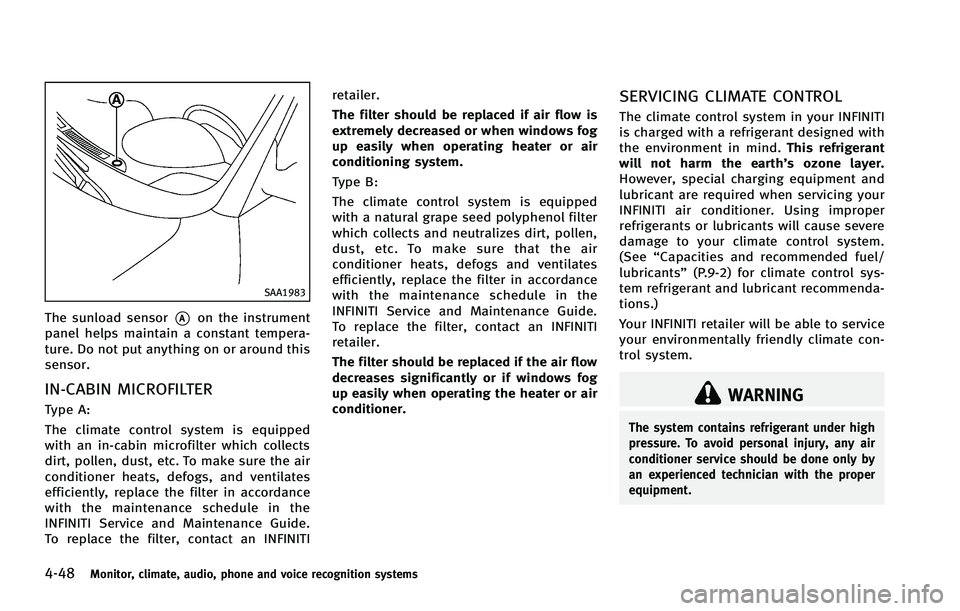
The sunload sensor*Aon the instrument
panel helps maintain a constant tempera-
ture. Do not put anything on or around this
sensor.
IN-CABIN MICROFILTER
Type A:
The climate control system is equipped
with an in-cabin microfilter which collects
dirt, pollen, dust, etc. To make sure the air
conditioner heats, defogs, and ventilates
efficiently, replace the filter in accordance
with the maintenance schedule in the
INFINITI Service and Maintenance Guide.
To replace the filter, contact an INFINITI retailer.
The filter should be replaced if air flow is
extremely decreased or when windows fog
up easily when operating heater or air
conditioning system.
Type B:
The climate control system is equipped
with a natural grape seed polyphenol filter
which collects and neutralizes dirt, pollen,
dust, etc. To make sure that the air
conditioner heats, defogs and ventilates
efficiently, replace the filter in accordance
with the maintenance schedule in the
INFINITI Service and Maintenance Guide.
To replace the filter, contact an INFINITI
retailer.
The filter should be replaced if the air flow
decreases significantly or if windows fog
up easily when operating the heater or air
conditioner.
SERVICING CLIMATE CONTROL
The climate control system in your INFINITI
is charged with a refrigerant designed with
the environment in mind.
This refrigerant
will not harm the earth’s ozone layer.
However, special charging equipment and
lubricant are required when servicing your
INFINITI air conditioner. Using improper
refrigerants or lubricants will cause severe
damage to your climate control system.
(See “Capacities and recommended fuel/
lubricants” (P.9-2) for climate control sys-
tem refrigerant and lubricant recommenda-
tions.)
Your INFINITI retailer will be able to service
your environmentally friendly climate con-
trol system.
WARNING
The system contains refrigerant under high
pressure. To avoid personal injury, any air
conditioner service should be done only by
an experienced technician with the proper
equipment.
Page 246 of 522
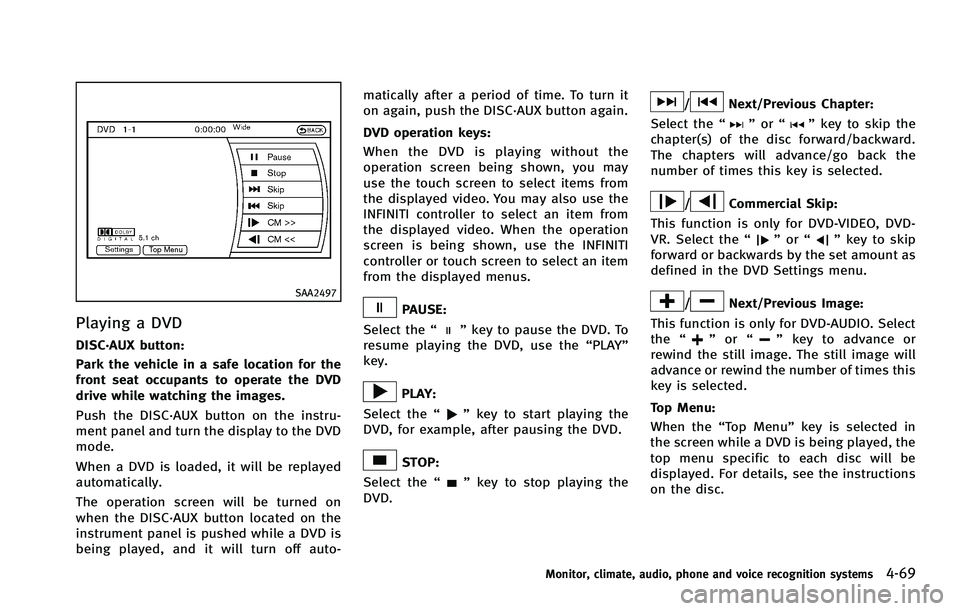
SAA2497
Playing a DVD
DISC·AUX button:
Park the vehicle in a safe location for the
front seat occupants to operate the DVD
drive while watching the images.
Push the DISC·AUX button on the instru-
ment panel and turn the display to the DVD
mode.
When a DVD is loaded, it will be replayed
automatically.
The operation screen will be turned on
when the DISC·AUX button located on the
instrument panel is pushed while a DVD is
being played, and it will turn off auto-matically after a period of time. To turn it
on again, push the DISC·AUX button again.
DVD operation keys:
When the DVD is playing without the
operation screen being shown, you may
use the touch screen to select items from
the displayed video. You may also use the
INFINITI controller to select an item from
the displayed video. When the operation
screen is being shown, use the INFINITI
controller or touch screen to select an item
from the displayed menus.
PAUSE:
Select the “
”key to pause the DVD. To
resume playing the DVD, use the “PLAY”
key.
PLAY:
Select the “
”key to start playing the
DVD, for example, after pausing the DVD.
STOP:
Select the “
”key to stop playing the
DVD.
/Next/Previous Chapter:
Select the “
”or “”key to skip the
chapter(s) of the disc forward/backward.
The chapters will advance/go back the
number of times this key is selected.
/Commercial Skip:
This function is only for DVD-VIDEO, DVD-
VR. Select the “
”or “”key to skip
forward or backwards by the set amount as
defined in the DVD Settings menu.
/Next/Previous Image:
This function is only for DVD-AUDIO. Select
the “
”or “”key to advance or
rewind the still image. The still image will
advance or rewind the number of times this
key is selected.
Top Menu:
When the “Top Menu” key is selected in
the screen while a DVD is being played, the
top menu specific to each disc will be
displayed. For details, see the instructions
on the disc.
Monitor, climate, audio, phone and voice recognition systems4-69
Page 279 of 522

4-102Monitor, climate, audio, phone and voice recognition systems
.Cancel Mute
This will appear after “Mute”is se-
lected. Mute will be canceled.
. Switch Call*
Select “Switch Call” to answer another
incoming call. By selecting “Hang up”,
you can end a call and can speak to a
caller who is on hold again.
* This function may not be usable,
depending on the model of phone
To adjust the person’s voice to be louder or
quieter, push the volume control switch (+
or −) on the steering wheel or turn the
volume control knob on the instrument
panel while talking on the phone. This
adjustment is also available in the SETTING
mode.
JVH0136M
PHONE SETTING
To set up the Bluetooth®Hands-Free
Phone System to your preferred settings,
push the SETTING button on the instrument
panel and select the “PHONE”key.
Edit Vehicle Phonebook
To edit the vehicle phonebook, use the
same procedure as described in “Vehicle
phonebook” (P.4-97).
Delete Phonebook
The vehicle phonebook entries can be
deleted all at the same time or one by one.
Download Handset Phonebook
Download the contacts registered in a
Bluetooth®cellular phone. Availability of
this function depends on each cellular
phone. The memory downloading proce-
dure from the cellular phone also varies
according to each cellular phone. See
cellular phone Owner’s Manual for details.
When “Auto Download” is active, the
system will automatically re-download the
entries registered in the phone everytime it
is paired with the vehicle, even after you
delete the entries from your vehicle’ s
handset memory.
Volume & Ringtone
The following kinds of phone volume can
be set.
. Ringtone/Incoming Call/Outgoing Call
To increase or decrease the volume,
select the “Ringtone”, “Incoming Call”
or “Outgoing Call” key and adjust it
with the INFINITI controller.
. Automatic Hold
When this function is activated, an
incoming phone call is automatically
held.
Page 298 of 522
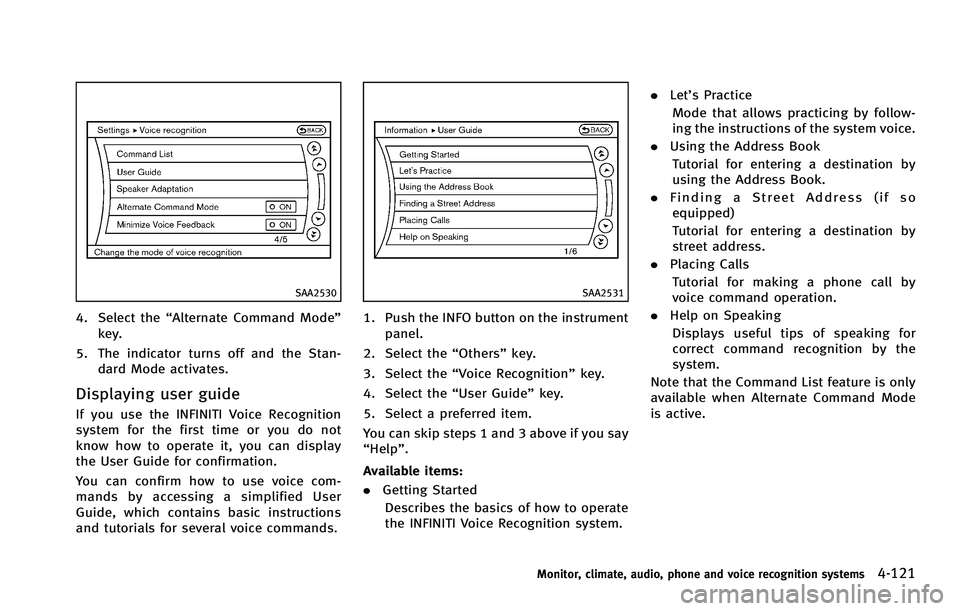
SAA2530
4. Select the“Alternate Command Mode”
key.
5. The indicator turns off and the Stan- dard Mode activates.
Displaying user guide
If you use the INFINITI Voice Recognition
system for the first time or you do not
know how to operate it, you can display
the User Guide for confirmation.
You can confirm how to use voice com-
mands by accessing a simplified User
Guide, which contains basic instructions
and tutorials for several voice commands.
SAA2531
1. Push the INFO button on the instrument
panel.
2. Select the “Others”key.
3. Select the “Voice Recognition” key.
4. Select the “User Guide”key.
5. Select a preferred item.
You can skip steps 1 and 3 above if you say
“Help”.
Available items:
. Getting Started
Describes the basics of how to operate
the INFINITI Voice Recognition system. .
Let’s Practice
Mode that allows practicing by follow-
ing the instructions of the system voice.
. Using the Address Book
Tutorial for entering a destination by
using the Address Book.
. Finding a Street Address (if so
equipped)
Tutorial for entering a destination by
street address.
. Placing Calls
Tutorial for making a phone call by
voice command operation.
. Help on Speaking
Displays useful tips of speaking for
correct command recognition by the
system.
Note that the Command List feature is only
available when Alternate Command Mode
is active.
Monitor, climate, audio, phone and voice recognition systems4-121
Page 310 of 522

JVH0137M
Activating Alternate Command
Mode
When the Standard Mode is active, perform
the following steps to switch to the
Alternate Command Mode.
1. Push the SETTING button on the instru-ment panel.
2. Highlight the “Others”key.
3. Highlight the “Voice Recognition” key.
SAA2543
4. Highlight the“Alternate Command
Mode” key.
5. The confirmation message is displayed on the screen. Push the “OK”key to
activate the Alternate Command Mode.
Displaying command list
If you are controlling the system by voice
commands for the first time or do not know
the appropriate voice command, perform
the following procedure for displaying the
voice command list (available only in
Alternate Command Mode).
SAA2544
1. Push the INFO button on the instrument
panel.
2. Select the “Others”key.
3. Select the “Voice Recognition” key.
4. Select the “Command List” key.
Monitor, climate, audio, phone and voice recognition systems4-133
Page 318 of 522
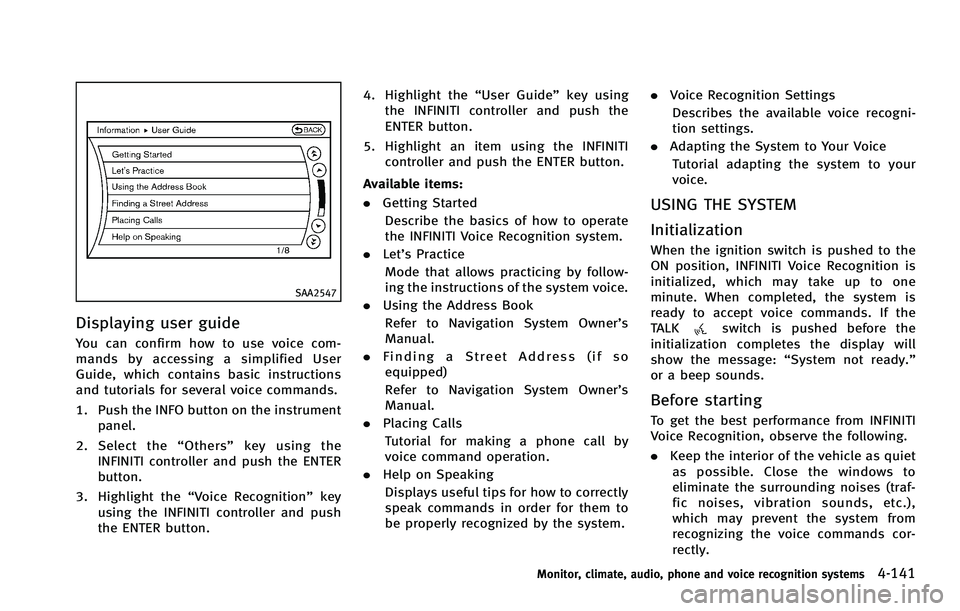
SAA2547
Displaying user guide
You can confirm how to use voice com-
mands by accessing a simplified User
Guide, which contains basic instructions
and tutorials for several voice commands.
1. Push the INFO button on the instrumentpanel.
2. Select the “Others” key using the
INFINITI controller and push the ENTER
button.
3. Highlight the “Voice Recognition” key
using the INFINITI controller and push
the ENTER button. 4. Highlight the
“User Guide”key using
the INFINITI controller and push the
ENTER button.
5. Highlight an item using the INFINITI controller and push the ENTER button.
Available items:
. Getting Started
Describe the basics of how to operate
the INFINITI Voice Recognition system.
. Let’s Practice
Mode that allows practicing by follow-
ing the instructions of the system voice.
. Using the Address Book
Refer to Navigation System Owner’s
Manual.
. Finding a Street Address (if so
equipped)
Refer to Navigation System Owner’s
Manual.
. Placing Calls
Tutorial for making a phone call by
voice command operation.
. Help on Speaking
Displays useful tips for how to correctly
speak commands in order for them to
be properly recognized by the system. .
Voice Recognition Settings
Describes the available voice recogni-
tion settings.
. Adapting the System to Your Voice
Tutorial adapting the system to your
voice.
USING THE SYSTEM
Initialization
When the ignition switch is pushed to the
ON position, INFINITI Voice Recognition is
initialized, which may take up to one
minute. When completed, the system is
ready to accept voice commands. If the
TALK
switch is pushed before the
initialization completes the display will
show the message: “System not ready.”
or a beep sounds.
Before starting
To get the best performance from INFINITI
Voice Recognition, observe the following.
. Keep the interior of the vehicle as quiet
as possible. Close the windows to
eliminate the surrounding noises (traf-
fic noises, vibration sounds, etc.),
which may prevent the system from
recognizing the voice commands cor-
rectly.
Monitor, climate, audio, phone and voice recognition systems4-141