key INFINITI FX 2012 Service Manual
[x] Cancel search | Manufacturer: INFINITI, Model Year: 2012, Model line: FX, Model: INFINITI FX 2012Pages: 522, PDF Size: 3.51 MB
Page 175 of 522
3-34Pre-driving checks and adjustments
The seat synchronization function operates
under the following conditions:
.The ignition switch is in the ON posi-
tion.
. The selector lever is in the P (Park)
position.
If the outside mirrors or the steering wheel
reaches its maximum adjustment, the
function is automatically disabled. Restart
the function by selecting a previously
stored seat memory position using the
memory switches (1 or 2). An Intelligent
Key that was previously linked to the
stored seat memory can also be used to
restart the function.
If a seat position was not previously stored
in the seat memory, restart the function by
adjusting the steering wheel and outside
mirrors manually for your best driving
position and then drive the vehicle above
4 MPH (7 km/h).
Cancel or activate seat synchroni-
zation function
The selector lever must be in the P (Park)
position with the ignition switch in the ACC
position.
The seat synchronization function can be
activated or canceled by pushing and holding the SET switch for more than 10
seconds while the ignition switch is in the
ACC position.
The indicator lights on the memory
switches (1 and 2) will blink once when
the function is canceled, and the indicator
lights will blink twice when the function is
activated. Note that the indicator lights
may illuminate after 5 seconds while
holding the SET switch. This indicates
readiness for linking the Intelligent Key to
a stored memory position. Keep the SET
switch pushed for more than 10 seconds to
turn on or off the seat synchronization
function.
MEMORY STORAGE
Two positions for the driver’s seat, steering
column and outside mirrors can be stored
in the automatic drive positioner memory.
Follow these procedures to use the mem-
ory system.
1. Move the selector lever to the P (Park) position.
2. Push the ignition switch to the ON position.
3. Adjust the driver’s seat, steering col- umn and outside mirrors to the desired
positions by manually operating each adjusting switch. For additional infor-
mation, see
“Seat belts” (P.1-11) and
“Tilt/telescopic steering” (P.3-27) and
“Outside mirrors” (P.3-30).
4. Push the SET switch and, within 5 seconds, push the memory switch (1
or 2) fully for at least 1 second.
The indicator light for the pushed
memory switch will stay on for approxi-
mately 5 seconds after pushing the
switch.
If memory is stored in the same
memory switch, the previous memory
will be deleted.
Linking Intelligent Key to a stored
memory position
The Intelligent Key can be linked to a
stored memory position with the following
procedure.
1. Follow the steps for storing a memoryposition.
2. While the indicator light for the memory switch being set is illuminated for 5
seconds, push the
button on the
Intelligent Key. If the indicator light
blinks, the Intelligent Key is linked to
that memory setting.
Page 176 of 522
Push the ignition switch to the OFF posi-
tion, and then push thebutton on the
Intelligent Key. The driver’s seat, steering
wheel and outside mirrors will move to the
memorized position or to the exit position
when the entry/exit function is set to
active.
Confirming memory storage
. Push the ignition switch to the ON
position and push the SET switch. If
the main memory has not been stored,
the indicator light will come on for
approximately 0.5 second. When the
memory has stored in position, the
indicator light will stay on for approxi-
mately 5 seconds.
. If the battery cable is disconnected, or if
the fuse opens, the memory will be
canceled. In this case, reset the desired
position using the previous procedure.
. If optional Intelligent Keys are added to
your vehicle, the memory storage pro-
cedure to switch 1 or 2 and linking
Intelligent Key procedure to a stored
memory position should be performed
again for each Intelligent Key. For
additional Intelligent Key information,
see “Keys” (P.3-2).
Selecting the memorized position
1. Move the selector lever to the P (Park)
position.
2. Use one of the following methods to move the driver’ s seat, the outside
mirrors and the steering wheel.
.Push the ignition switch to the ON position and push the memory
switch (1 or 2) fully for at least 1
second.
.Within 45 seconds of opening thedriver’ s door, push the memory
switch (1 or 2) fully for at least 1
second.
The driver’s seat, steering column and
outside mirrors will move to the mem-
orized position or to the exit position
when the entry/exit function is set to
active with the indicator light flashing,
and then the light will stay on for
approximately 5 seconds.
SYSTEM OPERATION
The automatic drive positioner system will
not work or will stop operating under the
following conditions:
. When the vehicle speed is above 4 MPH
(7 km/h). .
When the adjusting switch for the
driver’s seat and steering column is
turned on while the automatic drive
positioner is operating.
. When the memory switch 1 or 2 is not
pushed for at least 1 second.
. When the seat, steering column and
outside mirrors have already been
moved to the memorized position.
. When no position is stored in the
memory switch.
. When the engine is started while
moving the automatic drive positioner.
. When the AT selector lever is moved
from the P (Park) position to any other
position. (However, it will not be
canceled if the switch is pushed while
the seat and steering column are
returning to the previous positions
(entry/exit function).)
. When the driver’s door remains open
for more than 45 seconds and the
ignition switch is not in the ON posi-
tion.
. The seat synchronization function is
automatically disabled if the outside
mirrors or steering wheel reaches its
maximum adjustment.
Pre-driving checks and adjustments3-35
Page 185 of 522

4-8Monitor, climate, audio, phone and voice recognition systems
SAA2477
Models with navigation system
SAA1510
Models without navigation system
HOW TO SELECT MENUS ON THE
SCREEN
Vehicle functions are viewed on the display
screen in menus. To select each key item,
highlight the preferred item using the
INFINITI controller and push the ENTER
button.
Whenever a menu selection is made or
menu item is highlighted, different areas
on the screen provide you with important
information. See the following for details.
1. Header:Shows the path used to get to the
current screen.
2. Menu Selections: Shows the options to choose within
that menu screen.
3. UP/DOWN Movement indicator: Shows that the INFINITI controller may
be used to move UP/DOWN on the
screen and select more options.
4. Menu Items Counter: Shows the total number of items listed
across all pages for the current menu.
5. Footer/Information Line: Provides more information (if available) about the menu selection currently
highlighted.
Page 188 of 522
Fuel Economy information
The approximate distance to empty, aver-
age fuel economy and current fuel econo-
my will be displayed for reference.
To reset the average fuel economy (Avg
Fuel Econ), select the“Reset Fuel Eco”or
“Reset” key.
If the “Fuel Eco History” or“View” key is
selected, the average fuel consumption
history will be displayed in graph form
along with the average for the previous
Reset-to-Reset period.
The unit can be converted between “US”
and “Metric”. (See “How to use SETTING
button” (P.4-15).)
The fuel economy information may differ
from the information displayed on the dot
matrix liquid crystal display. This is due to
the timing difference in updating the
information and does not indicate a mal-
function.
SAA2829
Models with navigation system
SAA1077
Models without navigation system
TIRE PRESSURE information
WARNING
. When a spare tire is mounted or a wheel
is replaced, tire pressure will not be
indicated, the TPMS will not function
and the low tire pressure warning light
will flash for approximately 1 minute.
The light will remain on after 1 minute.
Contact your INFINITI retailer as soon as
possible for tire replacement and/or
system resetting.
. Replacing tires with those not originally
specified by INFINITI could affect the
proper operation of the TPMS.
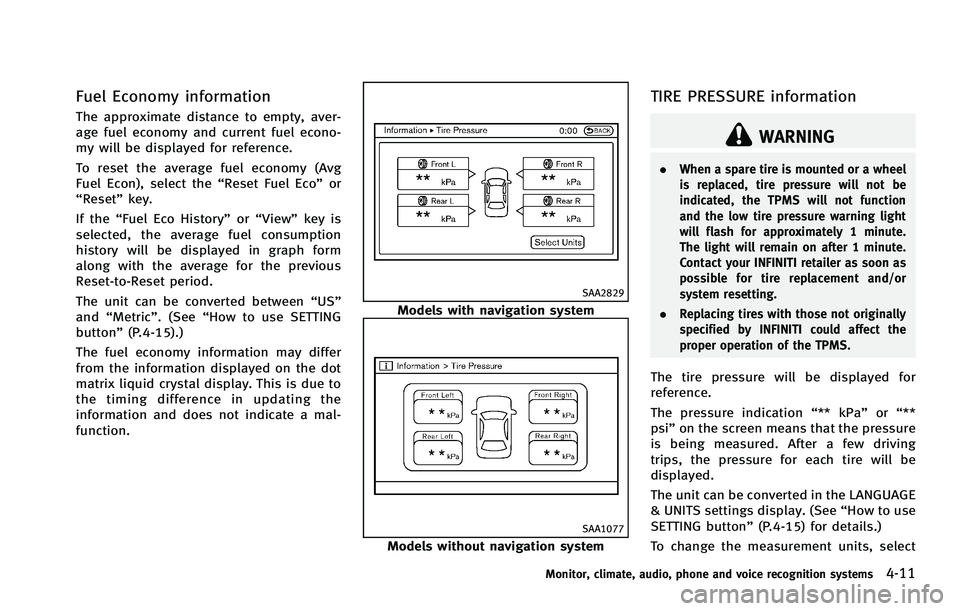
The tire pressure will be displayed for
reference.
The pressure indication “** kPa”or“**
psi ”on the screen means that the pressure
is being measured. After a few driving
trips, the pressure for each tire will be
displayed.
The unit can be converted in the LANGUAGE
& UNITS settings display. (See “How to use
SETTING button” (P.4-15) for details.)
To change the measurement units, select
Monitor, climate, audio, phone and voice recognition systems4-11
Page 189 of 522
4-12Monitor, climate, audio, phone and voice recognition systems
the“Select Units” key (models with navi-
gation system) with the INFINITI controller
and push the ENTERbutton (models with
navigation system).
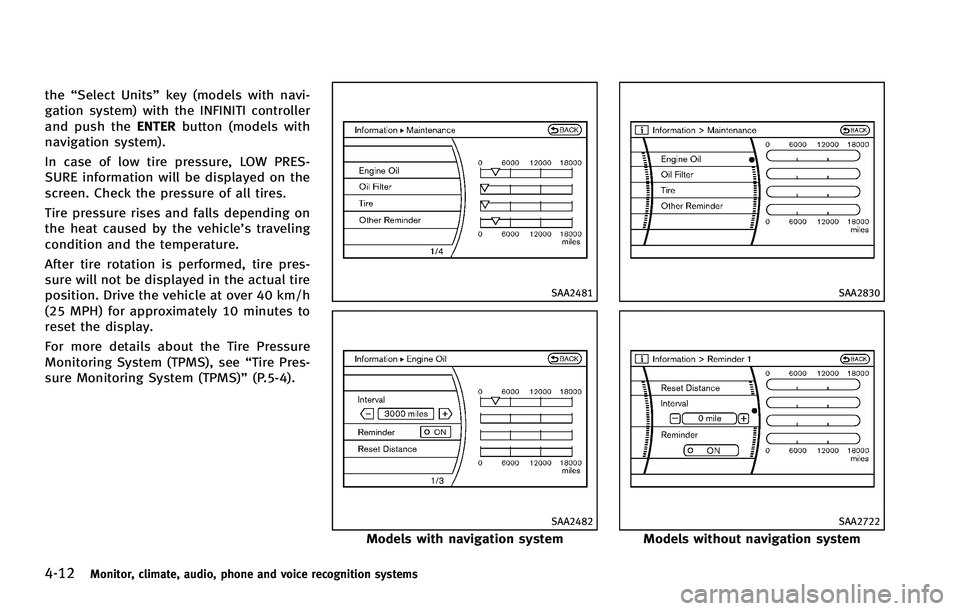
In case of low tire pressure, LOW PRES-
SURE information will be displayed on the
screen. Check the pressure of all tires.
Tire pressure rises and falls depending on
the heat caused by the vehicle’s traveling
condition and the temperature.
After tire rotation is performed, tire pres-
sure will not be displayed in the actual tire
position. Drive the vehicle at over 40 km/h
(25 MPH) for approximately 10 minutes to
reset the display.
For more details about the Tire Pressure
Monitoring System (TPMS), see “Tire Pres-
sure Monitoring System (TPMS)” (P.5-4).
SAA2481
SAA2482
Models with navigation system
SAA2830
SAA2722
Models without navigation system
Page 190 of 522
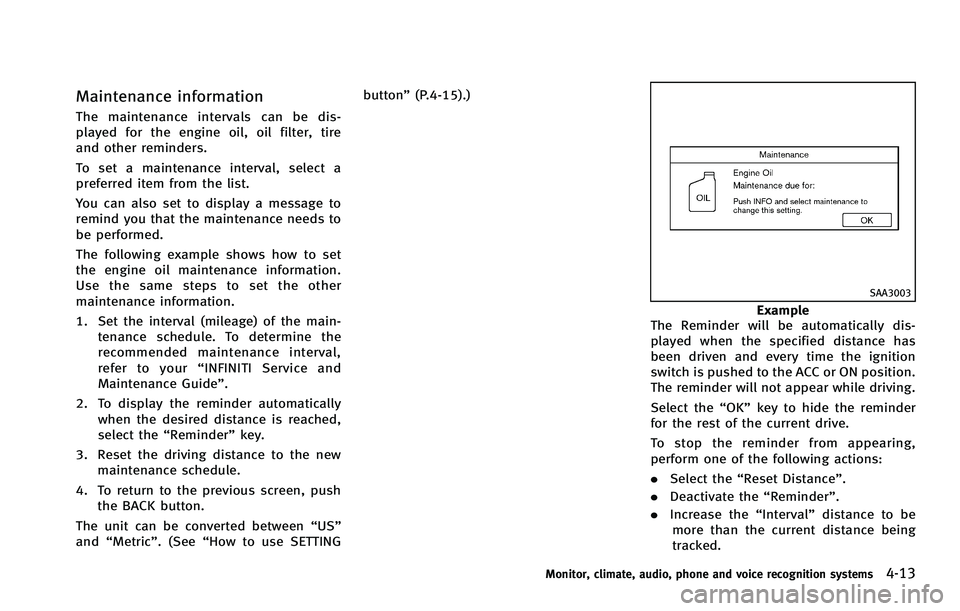
Maintenance information
The maintenance intervals can be dis-
played for the engine oil, oil filter, tire
and other reminders.
To set a maintenance interval, select a
preferred item from the list.
You can also set to display a message to
remind you that the maintenance needs to
be performed.
The following example shows how to set
the engine oil maintenance information.
Use the same steps to set the other
maintenance information.
1. Set the interval (mileage) of the main-tenance schedule. To determine the
recommended maintenance interval,
refer to your “INFINITI Service and
Maintenance Guide”.
2. To display the reminder automatically when the desired distance is reached,
select the “Reminder” key.
3. Reset the driving distance to the new maintenance schedule.
4. To return to the previous screen, push the BACK button.
The unit can be converted between “US”
and “Metric”. (See “How to use SETTING button”
(P.4-15).)
SAA3003
Example
The Reminder will be automatically dis-
played when the specified distance has
been driven and every time the ignition
switch is pushed to the ACC or ON position.
The reminder will not appear while driving.
Select the “OK”key to hide the reminder
for the rest of the current drive.
To stop the reminder from appearing,
perform one of the following actions:
. Select the “Reset Distance”.
. Deactivate the “Reminder”.
. Increase the “Interval”distance to be
more than the current distance being
tracked.
Monitor, climate, audio, phone and voice recognition systems4-13
Page 191 of 522

4-14Monitor, climate, audio, phone and voice recognition systems
SAA3145
Others information (models with
navigation system)
The Others information display will appear
when pushing the INFO button and select-
ing the“Others” key.
Navigation Version: For the details of this item, see the
separate Navigation System Owner’s Man-
ual.
When the ignition switch is in the ignition
position, the “Navigation Version” key is
displayed after pushing the INFO button. GPS Position:
For the details of this item, see the
separate Navigation System Owner’s Man-
ual.
Voice Recognition:
For the details of this item, see “INFINITI
Voice Recognition System (models with
navigation system)” (P.4-120).
SAA2484
Models with navigation system
SAA2604
Models without navigation system
Page 192 of 522

HOW TO USE SETTING BUTTON
The display as illustrated will appear when
the SETTING button is pushed.
Designs and items displayed on the screen
may vary depending on the models.
For navigation settings, refer to the sepa-
rate Navigation System Owner’s Manual.
SAA2485
Models with navigation system
SAA2618
Models without navigation system
Audio settings
The display as illustrated will appear when
pushing the SETTING button and selecting
the“Audio” key.
Bass/Treble/Balance/Fade:
To adjust the speaker tone quality and
sound balance, select the “Bass”,“Treble”,
“Balance ”or “Fade” key and adjust it with
the INFINITI controller.
These items can also be adjusted by
pushing and turning the AUDIO knob.
Speed Sensitive Vol.:
The audio system’s volume is increased
with the vehicle speed. Select the “Speed
Sensitive Vol.” and adjust the effect level
with the INFINITI controller. The Speed
Sensitive Volume function is turned off
when the level is set to OFF. Increasing the
value will cause the volume to increase
faster with vehicle speed.
Driver’s Audio Stage (if so equipped):
When this feature is turned to ON, better
sound will be provided to the driver’ s
position. The driver can enjoy a more crisp
and clear sound that is specialized for the
driver’s position. The effect of this feature
depends on the type of music that is
Monitor, climate, audio, phone and voice recognition systems4-15
Page 193 of 522
4-16Monitor, climate, audio, phone and voice recognition systems
played. For some music, it may be difficult
to realize the effect of this feature.
DivX
®Registration Code (models with
navigation system):
The registration code for a device that is
used to download DivX
®files will be
displayed on the screen. If a disc is loaded
or a USB memory is connected to the audio
system, this function will not be activated.
Display Album Cover Art (models with
navigation system):
When this item is turned to ON, the album
cover image is displayed when playing
compressed music files through a CD, DVD
or USB device. When the image is not
properly embedded in the file or device,
the image will not be displayed.
Phone settings (models with navi-
gation system)
For details of the “Phone”settings, see
“ Bluetooth®Hands-Free Phone System
(models with navigation system)” (P.4-94).
Bluetooth settings (models with
navigation system)
For details of the“Bluetooth”settings, see
“ Bluetooth®Hands-Free Phone System (models with navigation system)”
(P.4-94).
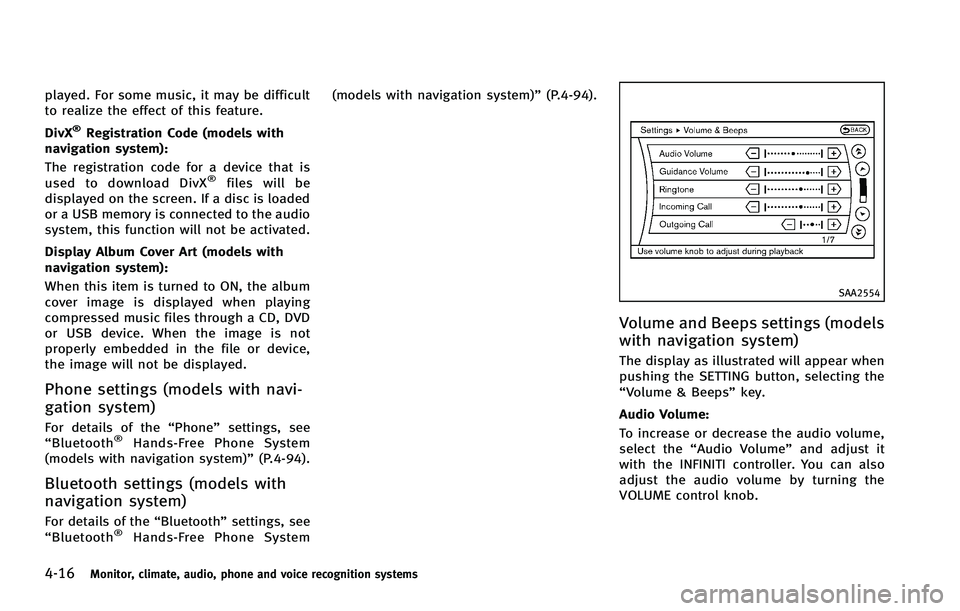
SAA2554
Volume and Beeps settings (models
with navigation system)
The display as illustrated will appear when
pushing the SETTING button, selecting the
“Volume & Beeps”key.
Audio Volume:
To increase or decrease the audio volume,
select the “Audio Volume” and adjust it
with the INFINITI controller. You can also
adjust the audio volume by turning the
VOLUME control knob.
Page 194 of 522
Guidance Volume:
To adjust the guidance voice volume, select
the“Guidance Volume” and adjust it with
the INFINITI controller.
You can also adjust the guidance voice
volume by turning the VOLUME control
knob while voice guidance is being an-
nounced.
Ringtone/Incoming Call/Outgoing Call:
For the details of these items, see “Blue-
tooth
®Hands-Free Phone System (models
with navigation system)” (P.4-94).
Switch Beeps:
When this item is turned to ON, you will
hear a beep sound when you use a button.
Guidance Voice:
When this item is turned to ON, you will
hear voice guidance in the navigation
operation or in other operations.
NOTE:
When the voice guidance is being an-
nounced during audio playback, turning
the volume knob does not adjust the
music level; it adjusts the guidance
volume level. If voice guidance is not
being heard, please check the Guidance
Volume level.
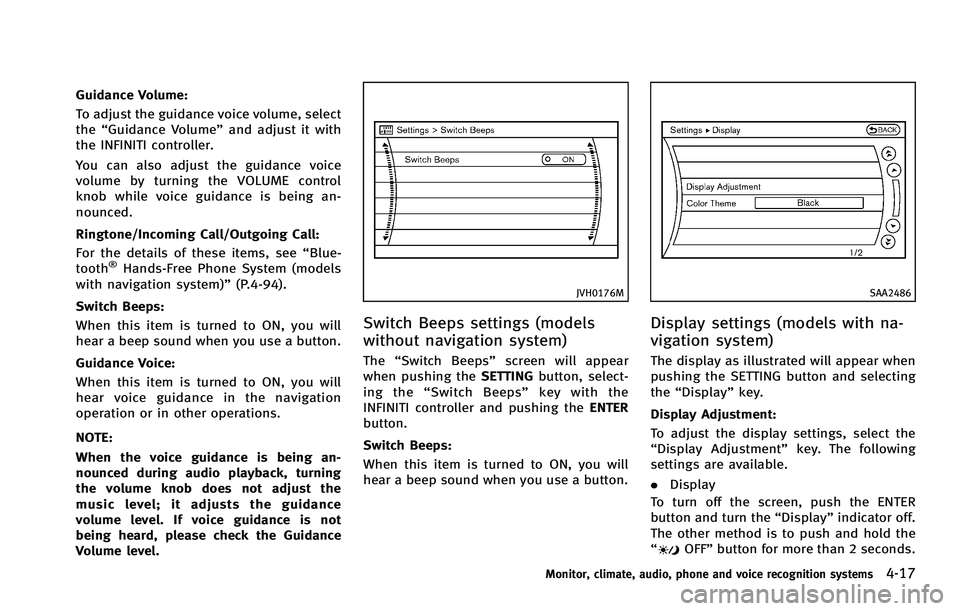
JVH0176M
Switch Beeps settings (models
without navigation system)
The “Switch Beeps” screen will appear
when pushing the SETTINGbutton, select-
ing the “Switch Beeps” key with the
INFINITI controller and pushing the ENTER
button.
Switch Beeps:
When this item is turned to ON, you will
hear a beep sound when you use a button.
SAA2486
Display settings (models with na-
vigation system)
The display as illustrated will appear when
pushing the SETTING button and selecting
the “Display” key.
Display Adjustment:
To adjust the display settings, select the
“Display Adjustment” key. The following
settings are available.
. Display
To turn off the screen, push the ENTER
button and turn the “Display”indicator off.
The other method is to push and hold the
“
OFF” button for more than 2 seconds.
Monitor, climate, audio, phone and voice recognition systems4-17