instrument panel INFINITI FX 2013 User Guide
[x] Cancel search | Manufacturer: INFINITI, Model Year: 2013, Model line: FX, Model: INFINITI FX 2013Pages: 522, PDF Size: 7.53 MB
Page 153 of 522

3-12Pre-driving checks and adjustments
switch on the instrument panel or lower
part of the lift gate. See“Lift gate”(P.3-18).
BATTERY SAVER SYSTEMGUID-786D2EEA-5854-4E6B-9C0A-3296C3FF1B0A
Page 159 of 522

3-18Pre-driving checks and adjustments
GUID-FE000314-D7F0-4AD6-AF71-5B82F75F04B0
JVP0103X
1. Pull the hood lock release handle*1
located below the instrument panel;
the hood will then spring up slightly.
2. Pull the lever
*2up at the front of the
hood with your fingertips and raise the
hood.
3. When closing the hood, slowly close the hood down to latch both the right
and left locks. Push the hood down to
lock the hood securely into place.
WARNING
. Make sure the hood is completely closed
and latched before driving. Failure to do
so could cause the hood to fly open and
result in an accident.
. If you see steam or smoke coming from
the engine compartment, to avoid injury
do not open the hood.
GUID-EC94A04A-3559-4474-821D-9E1BE1DBE3F1
WARNING
.Always be sure the lift gate has been
closed securely to prevent it from open-
ing while driving.
. Do not drive with the lift gate open. This
could allow dangerous exhaust gases to
be drawn into the vehicle. See “Exhaust
gas (carbon monoxide)” (P.5-3) of this
manual.
. Do not leave children unattended inside
the vehicle. They could unknowingly
activate switches or controls. Unat-
tended children could become involved
in serious accidents.
. Always be sure that hands and feet are
clear of the door frame to avoid injury
while closing the lift gate.
HOOD LIFT GATE
Page 160 of 522

OPERATING POWER LIFT GATEGUID-35B29182-0FF6-42A9-B62E-4541B5E1C075
SPA2547
Power lift gate main switchGUID-FE0D0D13-F8D5-41FC-9FEC-CE57F3DA2CD9
SPA2843
Power lift gate switch—Instrument panel
SPA2877
Lift gate opener switch
Pre-driving checks and adjustments3-19
Page 163 of 522
3-22Pre-driving checks and adjustments
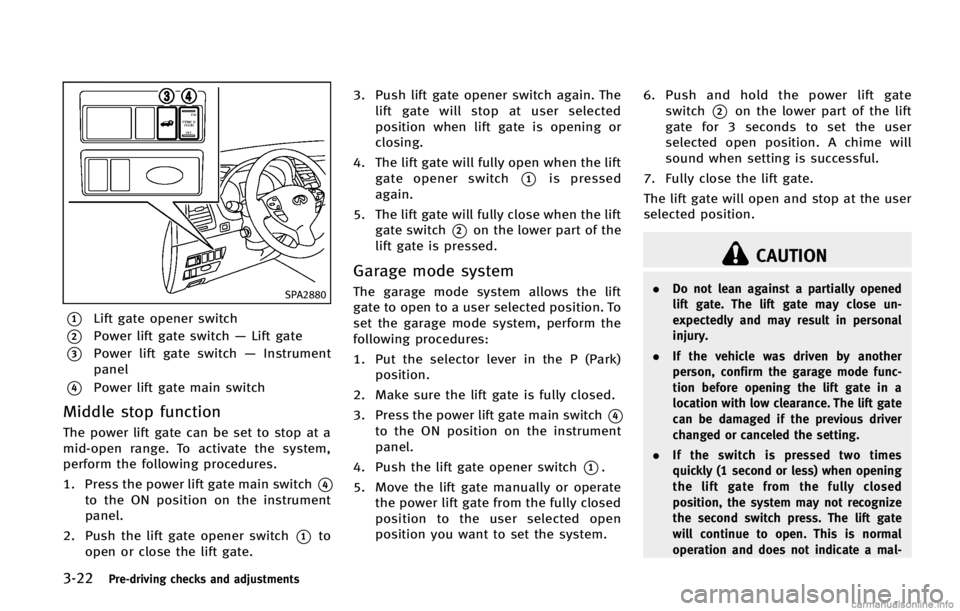
SPA2880
*1Lift gate opener switch
*2Power lift gate switch—Lift gate
*3Power lift gate switch —Instrument
panel
*4Power lift gate main switch
Middle stop functionGUID-561FA377-9F56-46DD-82FB-59720771965F
CAUTION
. Do not lean against a partially opened
lift gate. The lift gate may close un-
expectedly and may result in personal
injury.
. If the vehicle was driven by another
person, confirm the garage mode func-
tion before opening the lift gate in a
location with low clearance. The lift gate
can be damaged if the previous driver
changed or canceled the setting.
. If the switch is pressed two times
quickly (1 second or less) when opening
the lift gate from the fully closed
position, the system may not recognize
the second switch press. The lift gate
will continue to open. This is normal
operation and does not indicate a mal-
Page 231 of 522
4-54Monitor, climate, audio, phone and voice recognition systems
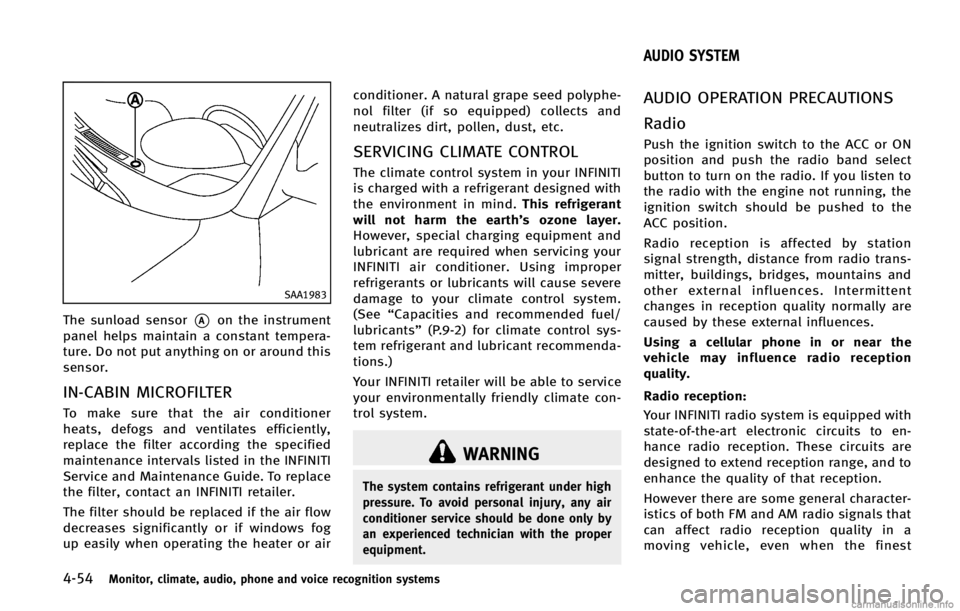
SAA1983
The sunload sensor*Aon the instrument
panel helps maintain a constant tempera-
ture. Do not put anything on or around this
sensor.
IN-CABIN MICROFILTERGUID-B5FB0932-D5C6-4573-A11E-E201E99F47D1
WARNING
The system contains refrigerant under high
pressure. To avoid personal injury, any air
conditioner service should be done only by
an experienced technician with the proper
equipment.
GUID-3EAB71B4-A10F-4A54-9F10-43B665795E96
Page 297 of 522

4-120Monitor, climate, audio, phone and voice recognition systems
SAA2530
4. Select the“Alternate Command Mode”
key.
5. The indicator turns off and the Stan- dard Mode activates.
Displaying user guideGUID-BB6A08D4-0739-466D-9C42-841BD18D531E
SAA2531
1. Push the INFO button on the instrument
panel.
2. Select the “Others”key.
3. Select the “Voice Recognition” key.
4. Select the “User Guide”key.
5. Select a preferred item.
You can skip steps 1 and 3 above if you say
“Help”.
Available items:
GUID-D73A39BF-43C8-459F-9C24-47B7F579C407
Page 309 of 522

4-132Monitor, climate, audio, phone and voice recognition systems
JVH0137M
Activating Alternate Command
Mode
GUID-EF112A55-FA80-4F29-AE0D-AB5292D985F6
SAA2543
4.Highlight the “Alternate Command
Mode” key.
5. The confirmation message is displayed on the screen. Push the “OK”key to
activate the Alternate Command Mode.
Displaying command listGUID-0B3454AB-0AB8-4B9F-B781-0E4A33190003
SAA2544
1. Push the INFO button on the instrument
panel.
2. Select the “Others”key.
3. Select the “Voice Recognition” key.
4. Select the “Command List” key.
Page 349 of 522

5-26Starting and driving
SSD0672
LDP ON indicator light (green)/ Warninglight (orange)
LDP system operationGUID-A0FBDA55-1A13-4B54-8692-FD3F53246940
SSD0912
Dynamic driver assistance switch
To turn on the LDP system, push the
dynamic driver assistance switch on the
steering wheel after starting the engine.
The LDP ON indicator light (green) on the
instrument panel will illuminate. Push the
dynamic driver assistance switch again to
turn off the LDP system. The LDP ON
indicator light will turn off.
The dynamic driver assistance switch is
used as both the LDP and DCA system.
When the dynamic driver assistance switch
is pushed, the DCA system will also turn on
or off simultaneously. The LDP system can
be individually set to on or off on the
display. If the system is set to off, the
Page 354 of 522

COAST/SET switch and release it. (The
CRUISE SET indicator will come on in the
instrument panel.) Take your foot off the
accelerator pedal. Your vehicle will main-
tain the set speed.
.To pass another vehicle, depress the
accelerator pedal. When you release
the pedal, the vehicle will return to the
previously set speed.
. The vehicle may not maintain the set
speed on winding or hilly roads. If this
happens, drive without the cruise con-
trol.
To cancel the preset speed, follow any of
these methods:
1. Push the CANCEL button. The SET
indicator will go out.
2. Tap the brake pedal. The SET indicator will go out.
3. Move the selector lever to the N
(Neutral) position. The SET indicator
will go out.
4. Turn the MAIN switch off. Both the CRUISE indicator and SET indicator will
go out.
. If you depress the brake pedal while
pushing the ACCELERATE/RESUME or
COAST/SET switch and reset at the cruising speed, the cruise control will
disengage. Turn the MAIN switch off
once and then turn it on again.
. The cruise control will automatically
cancel if the vehicle slows more than
8 MPH (13 km/h) below the set speed.
. If you move the selector lever to the N
(Neutral) position, the cruise control
will be canceled.
To reset at a faster cruising speed, use one
of the following methods:
. Depress the accelerator pedal. When
the vehicle attains the desired speed,
push and release the COAST/SET
switch.
. Push and hold the ACCELERATE/RE-
SUME switch. When the vehicle attains
the speed you desire, release the
switch.
. Push, then quickly release the ACCEL-
ERATE/RESUME switch. Each time you
do this, the set speed will increase by
about 1 MPH (1.6 km/h).
To reset at a slower cruising speed, use
one of the following methods:
. Lightly tap the brake pedal. When the
vehicle attains the desired speed, push
the COAST/SET switch and release it. .
Push and hold the COAST/SET switch.
Release the switch when the vehicle
slows down to the desired speed.
. Push, then quickly release the COAST/
SET switch. Each time you do this, the
set speed will decrease by about 1 MPH
(1.6 km/h).
To resume the preset speed, push and
release the ACCELERATE/RESUME switch.
The vehicle will resume the last set
cruising speed when the vehicle speed is
over 25 MPH (40 km/h).
Starting and driving5-31
Page 391 of 522

5-68Starting and driving
SSD1156
Warning systems switch
The FCW system uses the distance sensor
*Alocated below the front bumper to
measure the distance to the vehicle ahead.
When the system judges that your vehicle
is getting close to the vehicle ahead in the
travel lane, the vehicle ahead detection
indicator light on the instrument panel
blinks and a warning chime sounds.
The FCW system will be turned on/off by
pushing the warning systems switch. The
warning systems ON indicator light
*1on
the switch will illuminate when the system
turns on.
PRECAUTIONS ON FCW SYSTEMGUID-900DF3B0-1E06-4D16-AD92-2F3F31C98251
WARNING
. The FCW system is intended to warn you
before a collision but will not avoid a
collision. It is the driver’s responsibility
to stay alert, drive safely and be in
control of the vehicle at all times.
. As there is a performance limit, the
system may not provide a warning in
certain conditions.
. The system will not detect the following
objects:
—Pedestrians, animals or obstacles in
the roadway
—Oncoming vehicles in the same lane
. The system will not detect another
vehicle under the following conditions:
—When the sensor gets dirty and it is
impossible to detect the distance
from the vehicle ahead.
—When driving into a strong light (forexample, sunlight)
. The sensor generally detects the signals
returned from the reflectors on a vehicle ahead. Therefore, the system may not
function properly under the following
conditions:
—When the reflectors of the vehicle
ahead are positioned high or close to
each other (including a small vehicle
such as motorcycles).
—When the sensor gets dirty or it isimpossible to detect the distance
from the vehicle ahead.
—When the reflectors on the vehicleahead are missing, damaged or
covered.
—When the reflectors of the vehicle
ahead are covered with dirt, snow or
road spray.
—When visibility is low (such as rain,fog, snow, etc.).
—When snow or road spray fromtraveling vehicles is splashed.
—When dense exhaust or other smoke (black smoke) from vehicles reduces
the visibility of the sensor.
—When excessively heavy baggage isloaded in the rear seat or the
luggage room of your vehicle.