lights INFINITI FX 2013 User Guide
[x] Cancel search | Manufacturer: INFINITI, Model Year: 2013, Model line: FX, Model: INFINITI FX 2013Pages: 522, PDF Size: 7.53 MB
Page 111 of 522
2-40Instruments and controls
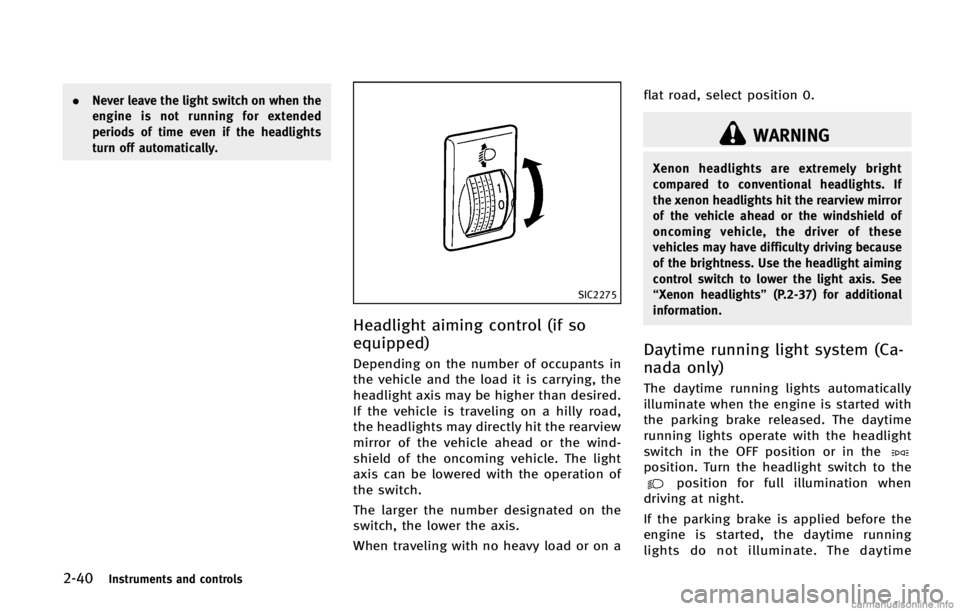
SIC2275
Headlight aiming control (if so
equipped)
GUID-980E128C-206E-49A3-8E40-A7785E7ED87C
WARNING
Xenon headlights are extremely bright
compared to conventional headlights. If
the xenon headlights hit the rearview mirror
of the vehicle ahead or the windshield of
oncoming vehicle, the driver of these
vehicles may have difficulty driving because
of the brightness. Use the headlight aiming
control switch to lower the light axis. See
“Xenon headlights”(P.2-37) for additional
information.
Daytime running light system (Ca-
nada only)
GUID-6BE117E5-533D-42FF-9E30-D7292D09AE24
position. Turn the headlight switch to theposition for full illumination when
driving at night.
If the parking brake is applied before the
engine is started, the daytime running
lights do not illuminate. The daytime
Page 112 of 522

WARNING
When the daytime running light system is
active, tail lights on your vehicle are not on.
It is necessary at dusk to turn on your
headlights. Failure to do so could cause an
accident injuring yourself and others.
Adaptive Front lighting System
(AFS) (if so equipped)
GUID-CC9669F2-A06F-4A8C-8372-7623264E84F3
SIC3270
Instruments and controls2-41
Page 114 of 522
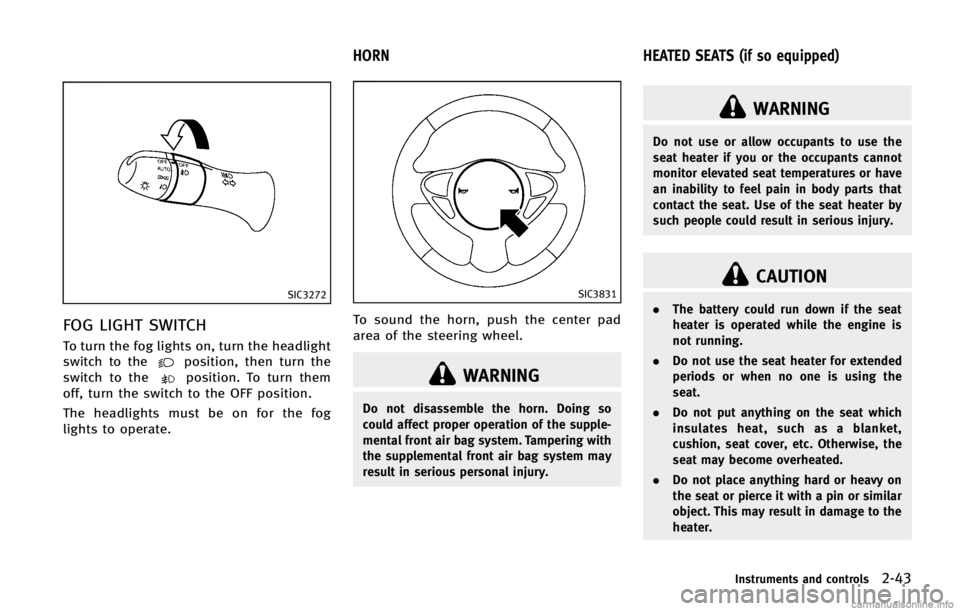
SIC3272
FOG LIGHT SWITCHGUID-7C40B8ED-E7B4-4FFF-853D-2184E65B51DC
position, then turn the
switch to theposition. To turn them
off, turn the switch to the OFF position.
The headlights must be on for the fog
lights to operate.
GUID-968A83E9-A8C5-453D-88B2-4441E889A01A
SIC3831
To sound the horn, push the center pad
area of the steering wheel.
WARNING
Do not disassemble the horn. Doing so
could affect proper operation of the supple-
mental front air bag system. Tampering with
the supplemental front air bag system may
result in serious personal injury.
GUID-00DFCACE-2206-4FDD-877E-00B1DA043944
WARNING
Do not use or allow occupants to use the
seat heater if you or the occupants cannot
monitor elevated seat temperatures or have
an inability to feel pain in body parts that
contact the seat. Use of the seat heater by
such people could result in serious injury.
CAUTION
. The battery could run down if the seat
heater is operated while the engine is
not running.
. Do not use the seat heater for extended
periods or when no one is using the
seat.
. Do not put anything on the seat which
insulates heat, such as a blanket,
cushion, seat cover, etc. Otherwise, the
seat may become overheated.
. Do not place anything hard or heavy on
the seat or pierce it with a pin or similar
object. This may result in damage to the
heater.
Instruments and controls2-43
HORN HEATED SEATS (if so equipped)
Page 121 of 522
2-50Instruments and controls
CAUTION
.The outlet and plug may be hot during or
immediately after use.
. Do not use with accessories that exceed
a 12 volt, 120W (10A) power draw. Do
not use double adapters or more than
one electrical accessory.
. Use power outlet with the engine run-
ning to avoid discharging the vehicle
battery.
. Avoid using power outlet when the air
conditioner, headlights or rear window
defroster is on.
. This power outlet is not designed for use
with a cigarette lighter unit.
. Push the plug in as far as it will go. If
good contact is not made, the plug may
overheat or the internal temperature
fuse may blow.
. Before inserting or disconnecting a plug,
be sure the electrical accessory being
used is turned OFF. .
When not in use, be sure to close the
cap. Do not allow water or any other
liquid to contact the outlet.
GUID-8EEEA6B4-CDF3-4FBB-B8B5-B29FAB461BC4
CAUTION
.Avoid abrupt starting and braking when
the cup holder is being used to prevent
spilling the drink. If the liquid is hot, it
can scald you or your passenger.
. Use only soft cups in the cup holder.
Hard objects can injure you in an
accident.
. Do not recline the rear seatback when
you use the cup holders on the rear
armrest. Doing so may cause the bev-
erages to spill over, and if they are hot,
they may scald the passengers.
STORAGE
Page 134 of 522

GUID-6FD80748-9586-4C48-AB1E-B9A2EC82667D
SIC3642
To activate or deactivate the welcome light
function, perform the following procedure.
1. Push the ignition switch to the ONposition.
2. Open the driver’s side door.
3. Push the door handle request switch on the driver’s side door handle for more
than 5 seconds with the driver’s door
open.
4. A chime sounds when the setting is completed.
Once the welcome light function is active,
the puddle light
*Aand the passenger
cabin illumination will illuminate when you approach the vehicle with the Intelligent
Key (within approximately 3.3 feet (1 m) of
the antenna built inside the door handles)
and the following conditions are met.
.
All doors are closed and locked.
. The ignition switch is in the LOCK or OFF
position.
. The Intelligent Key is outside the
vehicle.
. The puddle light operates within a set
duration.
BATTERY SAVER SYSTEMGUID-712F9156-BC02-4594-B993-5BDABDCC4D1FSIC3249
MAP LIGHTSGUID-C9EC00C8-0559-4418-BB16-A1849077A148
Page 135 of 522

2-64Instruments and controls
SIC3250
PERSONAL LIGHTSGUID-0C0F640C-E28C-4C80-A359-ED9156EF8799
SIC3251
INTERIOR LIGHT CONTROL SWITCHGUID-5472874C-63B7-4BAB-B073-477FF060309D
Page 136 of 522

CAUTION
Do not use for extended periods of time with
the engine stopped. This could result in a
discharged battery.
GUID-EA8F0FF8-ECD8-4ABD-96D8-9478339E89CB
SIC3869
The light on the vanity mirror will turn on
when the cover on the vanity mirror is
opened.
When the cover is closed, the light will turn
off.
The lights will also turn off after a period
of time when the lights remain illuminated
to prevent the battery from becoming
discharged.
GUID-393CF4A3-A8FF-45FD-9DF7-2C6830877CC8
SIC2925
When the switch is in the DOOR position
*A, the light illuminates while the lift gate
is opened. When the lift gate is closed, the
light will turn off.
When the switch is in the OFF position
*B,
the light will turn off.
The light will turn off after a period of time
when the lights remain illuminated to
prevent the battery from becoming dis-
charged.
Instruments and controls2-65
VANITY MIRROR LIGHTS CARGO LIGHT
Page 157 of 522

3-16Pre-driving checks and adjustments
be operated when the ignition switch is in
the ON position.
Using panic alarmGUID-9452550C-005D-4C29-9F19-31ED802F61C3
button*4on the
Intelligent Key for more than 1 second.
2. The theft warning alarm and headlights will stay on for 25 seconds.
3. The panic alarm stops when:
.It has run for 25 seconds, or.Any of the buttons on the Intelligent Key is pushed. (Note: Panic button
should be pushed for more than 1
second.)
Setting hazard indicator and horn
mode
GUID-6D7D657E-6950-47DE-AA61-DC0F16C51E9E
button*1is pushed, the
hazard indicator flashes twice and the horn
chirps once. When the UNLOCK
button
*2is pushed, the hazard indicator flashes
once. If horns are not necessary, the system can
be switched to the hazard indicator mode.
In hazard indicator mode, when the LOCK
button is pushed, the hazard indicator
flashes twice. When the UNLOCK
button is pushed, neither the hazard
indicator nor the horn operates.
Page 175 of 522

3-34Pre-driving checks and adjustments
holding the SET switch for more than 10
seconds while the ignition switch is in the
ACC position.
The indicator lights on the memory
switches (1 and 2) will blink once when
the function is canceled, and the indicator
lights will blink twice when the function is
activated. Note that the indicator lights
may illuminate after 5 seconds while
holding the SET switch. This indicates
readiness for linking the Intelligent Key to
a stored memory position. Keep the SET
switch pushed for more than 10 seconds to
turn on or off the seat synchronization
function.
MEMORY STORAGEGUID-7C0BBA0A-C562-4C67-B0C1-457131FC41EB
button on the
Intelligent Key. If the indicator light
blinks, the Intelligent Key is linked to
that memory setting. Push the ignition switch to the OFF posi-
tion, and then push the
button on the
Intelligent Key. The driver’s seat, steering
wheel and outside mirrors will move to the
memorized position or to the exit position
when the entry/exit function is set to
active.
Confirming memory storageGUID-E77C3565-8BEE-460B-9BBC-75EC608F88AD
Page 233 of 522

4-56Monitor, climate, audio, phone and voice recognition systems
cles exist.
Static: Caused by thunderstorms, electrical
power lines, electric signs and even traffic
lights.
Satellite radio reception:
GUID-D73A39BF-43C8-459F-9C24-47B7F579C407
SAA0480
Compact Disc (CD) playerGUID-6AF0CEF7-0537-49F1-93DC-31D7E9697380