wheel INFINITI FX 2013 User Guide
[x] Cancel search | Manufacturer: INFINITI, Model Year: 2013, Model line: FX, Model: INFINITI FX 2013Pages: 522, PDF Size: 7.53 MB
Page 83 of 522

2-12Instruments and controls
GUID-3B7E2B79-E712-41D2-976D-4E1B161E68FC
All-Wheel Drive (AWD) warning light (AWD
models)*Lane departure warning light
(orange)*Front passenger air bag status light
Anti-lock Braking System (ABS) warning
lightLow tire pressure warning lightHigh beam indicator light
Master warning lightIntelligent Brake Assist (IBA) off indicator
light*
Automatic transmission check warning lightPreview Function warning light (orange)*Lane Departure Prevention (LDP) ON indica-
tor light (green)*
Brake warning lightRear Active Steer warning light*Malfunction Indicator Light (MIL)
Seat belt warning lightSecurity indicator light
Charge warning lightSupplemental air bag warning lightSPORT mode indicator light*
Distance Control Assist (DCA) system warn-
ing light (orange)*Vehicle Dynamic Control (VDC) warning lightTurn signal/hazard indicator lights
Engine oil pressure warning lightAdaptive Front lighting System (AFS) indi-
cator light*Vehicle Dynamic Control (VDC) off indicator
light
Intelligent Cruise Control (ICC) system
warning light (orange)*Automatic transmission position indicator
light*: if so equipped
Intelligent Key warning lightExterior light indicator
CHECKING BULBSGUID-FCD7FF45-DCC8-41AD-86CC-E12DA130279A
,or,,,,,,
The following lights come on briefly and then go off (if so equipped):
,or,,,,,,,,
If any light does not come on, it may
indicate a burned-out bulb or an open
circuit in the electrical system. Have the
system checked by an INFINITI retailer.
Some indicators and warnings are also
displayed on the dot matrix crystal display between the speedometer and tachometer.
(See
“Dot matrix liquid crystal display”
(P.2-21).)
WARNING/INDICATOR LIGHTS AND
AUDIBLE REMINDERS
Page 84 of 522
All-Wheel Drive (AWD) warning
light (AWD models)
GUID-34B5C08F-9F8A-41FB-8888-5ADA4E0614B0warning light comes on when the
ignition switch is pushed to ON. It turns off
soon after the engine is started.
If the AWD system malfunctions, or the
diameter of the front and the rear wheels
are different, the warning light will either
remain illuminated or blink. (See “All-
Wheel Drive (AWD)” (P.5-75).)
CAUTION
.If the warning light comes on while
driving there may be a malfunction in
the AWD system. Reduce the vehicle
speed and have your vehicle checked by
an INFINITI retailer as soon as possible.
. If the AWD warning light blinks on when
you are driving:
—blinks rapidly (about twice a sec-
ond):
Pull off the road in a safe area, and
idle the engine. The driving mode will
change to 2WD to prevent the AWD
system from malfunctioning. If the warning light turns off, you can drive
again.
—blinks slowly (about once every 2
seconds):
Pull off the road in a safe area, and
idle the engine. Check that all tire
sizes are the same, tire pressure is
correct and tires are not worn.
. If the warning light is still on after the
above operations, have your vehicle
checked by an INFINITI retailer as soon
as possible.
orAnti-lock Braking
System (ABS) warning light
GUID-68529AFA-E8CD-454B-94E5-DC063FB6B3A9
Automatic transmission check
warning light
GUID-60799B3B-6B0F-4F32-8B2E-91DFF1BDB69B
orBrake warning lightGUID-E4C4A31D-A21C-45A9-A0DE-1E09CBCD04AE
Page 87 of 522
2-16Instruments and controls
WARNING
.If the light does not illuminate with the
ignition switch pushed ON, have the
vehicle checked by an INFINITI retailer as
soon as possible.
. If the light illuminates or LOW PRESSURE
information is displayed on the monitor
screen while driving, avoid sudden
steering maneuvers or abrupt braking,
reduce vehicle speed, pull off the road to
a safe location and stop the vehicle as
soon as possible. Driving with under-
inflated tires may permanently damage
the tires and increase the likelihood of tire failure. Serious vehicle damage
could occur and may lead to an accident
and could result in serious personal
injury. Check the tire pressure for all
four tires. Adjust the tire pressure to the
recommended COLD tire pressure shown
on the Tire and Loading Information
label to turn the low tire pressure
warning light OFF. If the light still
illuminates while driving after adjusting
the tire pressure, a tire may be flat. If
you have a flat tire, replace it with a
spare tire as soon as possible.
. When a spare tire is mounted or a wheel
is replaced, the TPMS will not function
and the low tire pressure warning light
will flash for approximately 1 minute.
The light will remain on after 1 minute.
Contact your INFINITI retailer as soon as
possible for tire replacement and/or
system resetting.
. Replacing tires with those not originally
specified by INFINITI could affect the
proper operation of the TPMS.
Page 88 of 522

CAUTION
.The TPMS is not a substitute for the
regular tire pressure check. Be sure to
check the tire pressure regularly.
. If the vehicle is being driven at speeds of
less than 16 MPH (25 km/h), the TPMS
may not operate correctly.
. Be sure to install the specified size of
tires to the four wheels correctly.
Master warning lightGUID-CD915495-D673-4754-B2B9-9FC6949E20F2
Preview Function warning light
(orange; if so equipped)
GUID-AFA514AE-F114-4D29-8E29-B2AF7E9C218D
Rear Active Steer warning light
(if so equipped)
GUID-7FABA633-6A51-49B4-9CC7-4597968E3617
Seat belt warning light and
chime
GUID-1597B4ED-A2EA-4D00-8CDC-EAC8280D87E0
Supplemental air bag warning
light
GUID-DE9DE567-7877-4536-B3D4-DF96485A455B
Page 97 of 522

2-26Instruments and controls
SIC3281
INDICATORS FOR MAINTENANCEGUID-1E75CBB4-79E6-499A-AACC-03BBC065F39F
WARNING
The tire replacement indicator is not a
substitute for regular tire checks, including
tire pressure checks. See“Changing wheels
and tires”(P.8-39). Many factors including
tire inflation, alignment, driving habits and
Page 114 of 522
SIC3272
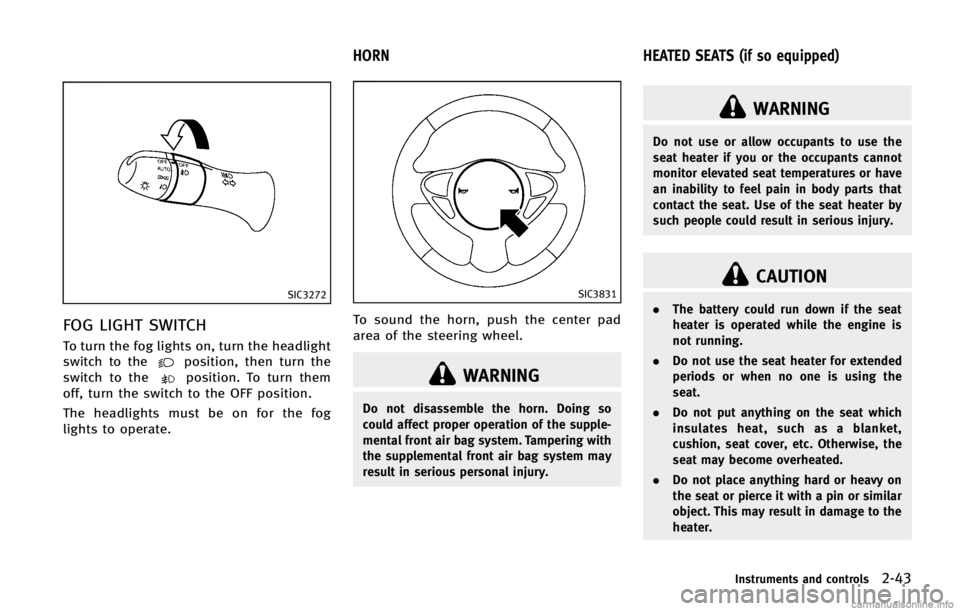
FOG LIGHT SWITCHGUID-7C40B8ED-E7B4-4FFF-853D-2184E65B51DC
position, then turn the
switch to theposition. To turn them
off, turn the switch to the OFF position.
The headlights must be on for the fog
lights to operate.
GUID-968A83E9-A8C5-453D-88B2-4441E889A01A
SIC3831
To sound the horn, push the center pad
area of the steering wheel.
WARNING
Do not disassemble the horn. Doing so
could affect proper operation of the supple-
mental front air bag system. Tampering with
the supplemental front air bag system may
result in serious personal injury.
GUID-00DFCACE-2206-4FDD-877E-00B1DA043944
WARNING
Do not use or allow occupants to use the
seat heater if you or the occupants cannot
monitor elevated seat temperatures or have
an inability to feel pain in body parts that
contact the seat. Use of the seat heater by
such people could result in serious injury.
CAUTION
. The battery could run down if the seat
heater is operated while the engine is
not running.
. Do not use the seat heater for extended
periods or when no one is using the
seat.
. Do not put anything on the seat which
insulates heat, such as a blanket,
cushion, seat cover, etc. Otherwise, the
seat may become overheated.
. Do not place anything hard or heavy on
the seat or pierce it with a pin or similar
object. This may result in damage to the
heater.
Instruments and controls2-43
HORN HEATED SEATS (if so equipped)
Page 118 of 522

GUID-B4FC340E-572F-4017-AB0F-18864F086100
SIC3602
For driving or starting the vehicle on snowy
roads or slippery areas, turn on the SNOW
mode switch. The indicator light
*1on the
switch will illuminate. When the SNOW
mode is activated, engine output is con-
trolled to avoid wheel spin.
Turn off the SNOW mode for normal
driving.
GUID-3A70661A-85E6-42C5-972D-9CBD43DA4B06
SIC3848
The Continuous Damping Control optimizes
the damping force and helps minimize the
movement of the vehicle body. It helps
stable driving when the vehicle moves up
and down on large rolling roads or when
the vehicle body leans during cornering
with a high centrifugal force.
The damping force will automatically ad-
just according to the road surface and
driving conditions.
The damping force of the shock absorbers
can be adjusted to the level you desire. Set
the switch to the position you desire while
the ignition switch is ON.
AUTO MODEGUID-706CBD66-BBA8-4870-AE78-7DC376B28461
Page 119 of 522

2-48Instruments and controls
GUID-737068A6-79F1-4242-A5D8-DD8B33CBC7DE
SIC3844
The vehicle should be driven with the
Intelligent Brake Assist (IBA) system on
for most driving conditions.
The Intelligent Brake Assist (IBA) system
will sound a warning chime to alert the
driver when the vehicle is traveling too
close to the vehicle ahead and will apply
the brake control if necessary.
To turn off the system, push the IBA OFF
switch. The
indicator will illuminate.
The IBA system will remain in the last ON
or OFF state it was left in until it is
manually changed by pushing the IBA OFF
switch.
GUID-0E75EF3A-E6E0-4B47-9774-CB5CF10EBEA4
JVS0033X
The vehicle should be driven with the
Vehicle Dynamic Control (VDC) system on
for most driving conditions.
If the vehicle is stuck in mud or snow, the
VDC system reduces the engine output to
reduce wheel spin. The engine speed will
be reduced even if the accelerator is
depressed to the floor. If maximum engine
power is needed to free a stuck vehicle,
turn the VDC system off.
To turn off the VDC system, push the VDC
OFF switch. The
indicator will illumi-
nate.
Push the VDC OFF switch again or restart the engine to turn on the system. (See
“Vehicle Dynamic Control (VDC) system”
(P.5-83).)
INTELLIGENT BRAKE ASSIST (IBA) OFF
SWITCH (if so equipped)
VEHICLE DYNAMIC CONTROL (VDC) OFF
SWITCH
Page 168 of 522

GUID-95892D7A-9426-4BF3-9790-B203F407E3FE
WARNING
.Do not adjust the steering wheel while
driving. You could lose control of your
vehicle and cause an accident.
. Do not adjust the steering wheel any
closer to you than is necessary for
proper steering operation and comfort.
The driver’s air bag inflates with great
force. If you are unrestrained, leaning
forward, sitting sideways or out of
position in any way, you are at greater
risk of injury or death in a crash. You
may also receive serious or fatal injuries
from the air bag if you are up against it
when it inflates. Always sit back against
the seatback and as far away as practical
from the steering wheel. Always use the
seat belts.
SPA2468
MANUAL OPERATION (if so
equipped)
GUID-787CBCE4-B0EC-4963-BCA9-4A15AC724857
SPA2456
ELECTRIC OPERATION (if so
equipped)
GUID-EFC03EC6-E524-4349-95B2-2D3116BF9E96
Page 175 of 522

3-34Pre-driving checks and adjustments
holding the SET switch for more than 10
seconds while the ignition switch is in the
ACC position.
The indicator lights on the memory
switches (1 and 2) will blink once when
the function is canceled, and the indicator
lights will blink twice when the function is
activated. Note that the indicator lights
may illuminate after 5 seconds while
holding the SET switch. This indicates
readiness for linking the Intelligent Key to
a stored memory position. Keep the SET
switch pushed for more than 10 seconds to
turn on or off the seat synchronization
function.
MEMORY STORAGEGUID-7C0BBA0A-C562-4C67-B0C1-457131FC41EB
button on the
Intelligent Key. If the indicator light
blinks, the Intelligent Key is linked to
that memory setting. Push the ignition switch to the OFF posi-
tion, and then push the
button on the
Intelligent Key. The driver’s seat, steering
wheel and outside mirrors will move to the
memorized position or to the exit position
when the entry/exit function is set to
active.
Confirming memory storageGUID-E77C3565-8BEE-460B-9BBC-75EC608F88AD