lock INFINITI FX 2013 Owner's Guide
[x] Cancel search | Manufacturer: INFINITI, Model Year: 2013, Model line: FX, Model: INFINITI FX 2013Pages: 522, PDF Size: 7.53 MB
Page 92 of 522

are not operating.
AUDIBLE REMINDERSGUID-C0FA3258-142A-4A63-A081-BEA4082ED041
orposition and the ignition switch
in the ACC, OFF or LOCK position.
Turn the light switch off when you leave the
vehicle.
Parking brake reminder chimeGUID-A8E0CFE9-4B3C-4682-9102-FA10802A7450
SIC3827
The dot matrix liquid crystal display*1is
located between the tachometer and the
speedometer, and it displays the auto-
matic transmission position indicator, the
Intelligent Cruise Control (ICC) system (if so
equipped), the Distance Control Assist
(DCA) system (if so equipped) information,
the Intelligent Key operation information
and other warnings and information.
For detailed information about each sys-
tem, see the following sections:
. Automatic Transmission (AT)
— “Warning/indicator lights and audi- ble reminders” (P.2-12).
Instruments and controls2-21
DOT MATRIX LIQUID CRYSTAL DISPLAY
Page 110 of 522

SIC3269
Headlight beam selectGUID-0984DF8F-E44E-4829-A38E-A0F35820F936
position. Pull it back to select the
low beam.
*3Pulling the lever toward you will flash
the headlight high beam even when
the headlight switch is in the OFF
position.
Battery saver systemGUID-2697CA72-C2E4-4E8F-A093-1D2ACD8835B1
orposition and the ignition switch
in the ACC, OFF or LOCK position.
When the headlight switch is in the
orposition while the ignition switch is in
the ON position, the lights will automati-
cally turn off within a period of time after
the ignition switch has been pushed to the
OFF position.
When the headlight switch remains in the
orposition after the lights
automatically turn off, the lights will turn
on when the ignition switch is pushed to
the ON position.
CAUTION
. When you turn on the headlight switch
again after the lights automatically turn
off, the lights will not turn off auto-
matically. Be sure to turn the light
switch to the OFF position when you
leave the vehicle for extended periods of
time, otherwise the battery will be
discharged.
Instruments and controls2-39
Page 120 of 522

GUID-BB3EAA65-63CC-4F32-9A1D-5C8D3DCEDC45
SIC3325
If the power supply is disconnected, the
clock will not indicate the correct time.
Readjust the time.
ADJUSTING THE TIMEGUID-74DEF1C7-F832-4803-9312-6291A6683AFA
SIC3631
Front
SIC4274
Center console
SIC3835
Rear console
SIC3836
Cargo area
Instruments and controls2-49
CLOCKPOWER OUTLET
Page 123 of 522
2-52Instruments and controls
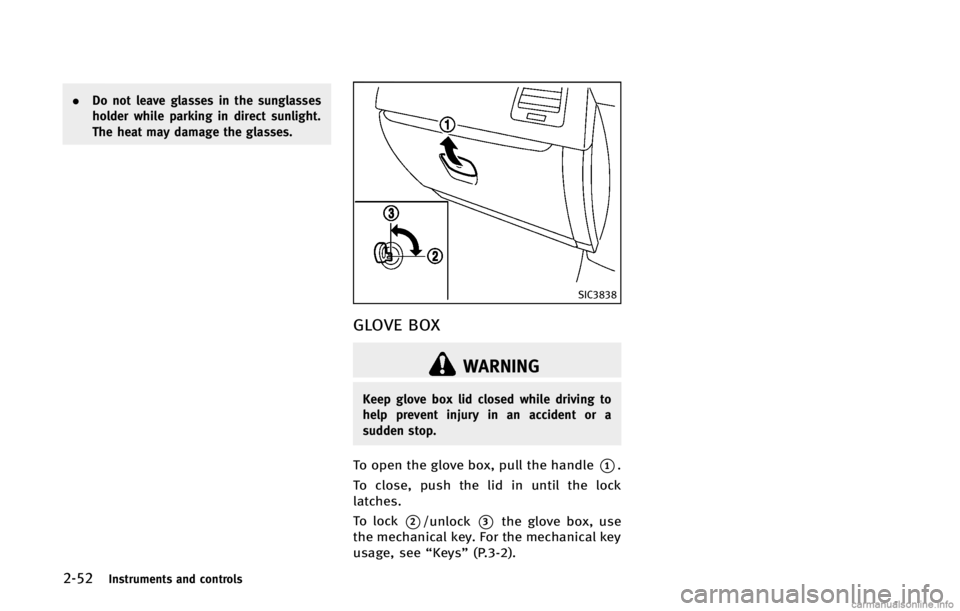
SIC3838
GLOVE BOXGUID-E830851B-9B72-4851-862E-E49D0F8A1F76
WARNING
Keep glove box lid closed while driving to
help prevent injury in an accident or a
sudden stop.
To open the glove box, pull the handle*1.
To close, push the lid in until the lock
latches.
To lock
*2/unlock*3the glove box, use
the mechanical key. For the mechanical key
usage, see “Keys”(P.3-2).
Page 130 of 522

GUID-F2B513F0-C5CA-4602-990F-EB320D693D5A
WARNING
.Make sure that all passengers have their
hands, etc. inside the vehicle while it is
in motion and before closing the win-
dows. Use the window lock switch to
prevent unexpected use of the power
windows.
. Do not leave children unattended inside
the vehicle. They could unknowingly
activate switches or controls and be-
come trapped in the window. Unat-
tended children could become involved
in serious accidents.
The power windows operate when the
ignition switch is in the ON position or for
about 45 seconds after the ignition switch
is pushed to the OFF position. If the
driver’s or front passenger’s door is
opened during this period of about 45
seconds, power to the windows is can-
celed.
SIC3640
1. Driver side window
2. Front passenger side window
3. Rear left passenger side window
4. Rear right passenger side window
5. Window lock button
Main power window switch (driver’s
side)
GUID-2A50DF3B-1016-4951-849E-2963D98443A6
Page 134 of 522

GUID-6FD80748-9586-4C48-AB1E-B9A2EC82667D
SIC3642
To activate or deactivate the welcome light
function, perform the following procedure.
1. Push the ignition switch to the ONposition.
2. Open the driver’s side door.
3. Push the door handle request switch on the driver’s side door handle for more
than 5 seconds with the driver’s door
open.
4. A chime sounds when the setting is completed.
Once the welcome light function is active,
the puddle light
*Aand the passenger
cabin illumination will illuminate when you approach the vehicle with the Intelligent
Key (within approximately 3.3 feet (1 m) of
the antenna built inside the door handles)
and the following conditions are met.
.
All doors are closed and locked.
. The ignition switch is in the LOCK or OFF
position.
. The Intelligent Key is outside the
vehicle.
. The puddle light operates within a set
duration.
BATTERY SAVER SYSTEMGUID-712F9156-BC02-4594-B993-5BDABDCC4D1FSIC3249
MAP LIGHTSGUID-C9EC00C8-0559-4418-BB16-A1849077A148
Page 145 of 522

3-4Pre-driving checks and adjustments
GUID-42F0E4A6-FA32-4223-BC12-35C12246924D
WARNING
.Always have the doors locked while
driving. Along with the use of seat belts,
this provides greater safety in the event
of an accident by helping to prevent
persons from being thrown from the
vehicle. This also helps keep children
and others from unintentionally opening
the doors, and will help keep out
intruders.
. Before opening any door, always look for
and avoid oncoming traffic.
. Do not leave children unattended inside
the vehicle. They could unknowingly
activate switches or controls. Unat-
tended children could become involved
in serious accidents.
SPA2457B
LOCKING WITH MECHANICAL KEYGUID-9FEE2B70-3744-4B47-8E20-FA87C03E7460
Page 146 of 522

SPA1814
LOCKING WITH INSIDE LOCK KNOBGUID-638A341C-9915-43A6-92C9-E0267232AFCA
SPA2300
LOCKING WITH POWER DOOR LOCK
SWITCH
GUID-D3825552-B753-42A7-8784-6E8FE1DFBBE8
Page 147 of 522

3-6Pre-driving checks and adjustments
position (UNLOCK) for
more than 5 seconds.
4. When activated, the hazard indicator will flash twice. When deactivated, the
hazard indicator will flash once.
5. The ignition switch must be placed in the OFF and ON position again between
each setting change.
When the automatic door unlock system is
deactivated, the doors do not unlock when
the ignition switch is placed in the OFF
position. To unlock the door manually, use
the inside lock knob or the power door lock
switch (driver’s or front passenger’s side).
SPA2528
CHILD SAFETY REAR DOOR LOCKGUID-F725FE82-FC76-4F5A-97F1-EC80C2874E3A
WARNING
. Radio waves could adversely affect
electric medical equipment. Those who
use a pacemaker should contact the
electric medical equipment manufacturer
for the possible influences before use.
. The Intelligent Key transmits radio
waves when the buttons are pushed.
The FAA advises that the radio waves
may affect aircraft navigation and com-
munication systems. Do not operate the
Intelligent Key while on an airplane.
Make sure the buttons are not operated
unintentionally when the unit is stored
during a flight.
The Intelligent Key system can operate all
doors and the lift gate using the remote
controller function or pushing the request
switch on the vehicle without taking the
key out from a pocket or purse. The
operating environment and/or conditions
may affect the Intelligent Key system
operation.
Be sure to read the following before using
the Intelligent Key system.
INTELLIGENT KEY SYSTEM
Page 150 of 522

SPA2326
DOOR LOCKS/UNLOCKS PRECAU-
TION
GUID-B00D3208-6D21-48F7-BDBA-06C2F22EF1B8
SPA2408
INTELLIGENT KEY OPERATIONGUID-DFA14F27-C61A-4F3A-B14F-0A02387307A5