diagnostic menu INFINITI FX35 2004 User Guide
[x] Cancel search | Manufacturer: INFINITI, Model Year: 2004, Model line: FX35, Model: INFINITI FX35 2004Pages: 4449, PDF Size: 99.66 MB
Page 1310 of 4449

WARNING CHIME
DI-67
C
D
E
F
G
H
I
J
L
MA
B
DI
Revision: 2004 November 2004 FX35/FX45
4. Touch “BUZZER” or “BCM”.
5. Select “DATA MONITOR”, “ACTIVE TEST” or “SELF-DIAG
RESULTS”.
DATA MONITOR
Operation Procedure
1. Touch “BUZZER” on “SELECT TEST ITEM” screen.
2. Touch “DATA MONITOR” on “SELECT DIAG MODE” screen.
3. Touch “ALL SIGNALS” or “SELECTION FROM MENU” on “DATA MONITOR” screen.
4. If “SELECTION FROM MENU” is selected, touch the desired monitor item. If “ALL SIGNALS” is selected,
all items required to control are monitored.
5. Touch “START”.
6. During monitoring, touching “RECORD” can start recording the monitored item status.
Data Monitor Item
ACTIVE TEST
Operation Procedure
1. Touch “BUZZER” on “SELECT TEST ITEM” screen.
2. Touch “ACTIVE TEST” on “SELECT DIAG MODE” screen.
3. Touch the item to be tested, and check the operation.
4. During the operation check, touching “OFF” deactivates the operation.
Active Test Item
SELF-DIAGNOSTIC RESULTS
Operation Procedure
1. Touch “BCM” on “SELECT TEST ITEM” screen.
2. Touch “SELF-DIAG RESULTS” on “SELECT DIAG MODE” screen.
3. Self-diagnostic results are displayed.
SKIA5788E
ALL SIGNALS Monitors main items.
SELECTION FROM MENU Selects and monitors items.
Monitored item [Unit] ALL SIGNALSSELECTION
FROM MENUContents
IGN ON SW [ON/OFF] X X Indicates [ON/OFF] condition of ignition switch.
KEY ON SW [ON/OFF] X X Indicates [ON/OFF] condition of key switch.
DOOR SW-DR [ON/OFF] X X Indicates [ON/OFF] condition of front door switch (driver side).
TAIL LAMP SW [ON/OFF] X X Indicates [ON/OFF] condition of lighting switch.
Test item Malfunction is detected when···
LIGHT WARN ALMThis test is able to check light warning chime operation. Light warning chime sounds for 2 seconds
after touching “ON” on CONSULT-ll screen.
IGN KEY WARN ALMThis test is able to check key warning chime operation. Key warning chime sounds for 2 seconds
after touching “ON” on CONSULT-ll screen.
SEAT BELT WARN TESTThis test is able to check seat belt warning chime operation. Seat belt warning chime sounds for 2
seconds after touching “ON” on CONSULT-ll screen.
Page 3577 of 4449

LT-22
HEADLAMP - XENON TYPE -
Revision: 2004 November 2004 FX35/FX45
3. Touch “IPDM E/R” on “SELECT SYSTEM” screen.
If “IPDM E/R” is not displayed, print “SELECT SYSTEM” screen,
then refer to GI-40, "
CONSULT-II Data Link Connector (DLC)
Circuit" .
4. Select the desired part to be diagnosed on the “SELECT SYS-
TEM” screen.
SELF-DIAGNOSTIC RESULTS
Refer to PG-21, "SELF-DIAG RESULTS" .
DATA MONITOR
Operation Procedure
1. Touch “DATA MONITOR” on “SELECT DIAG MODE ” screen.
2. Touch “ALL SIGNALS”, “MAIN SIGNALS” or “SELECTION FROM MENU” on the “DATA MONITOR”
screen.
3. Touch “START”.
4. Touch the required monitoring item on “SELECTION FROM MENU”. In “ALL SIGNALS”, all items are
monitored. In “MAIN SIGNALS”, predetermined items are monitored.
5. Touch “RECORD” while monitoring to record the status of the item being monitored. To stop recording,
touch “STOP”.
All Signals, Main Signals, Selection From Menu
NOTE:
Perform monitoring of IPDM E/R data with the ignition switch ON. When the ignition switch is at ACC, the dis-
play may not be correct.
PKIA5222E
PKIA6016E
ALL SIGNALS All items will be monitored.
MAIN SIGNALS Monitor the predetermined item.
SELECTION FROM MENU Select any item for monitoring.
Item nameCONSULT-II
screen displayDisplay
or unitMonitor item selection
Description
ALL
SIGNALSMAIN
SIGNALSSELECTION
FROM
MENU
Position lights request TAIL & CLR REQ ON/OFF×× ×Signal status input from BCM
Headlamp low beam request HL LO REQ ON/OFF×× ×Signal status input from BCM
Headlamp high beam request HL HI REQ ON/OFF×× ×Signal status input from BCM
Font fog lights request FR FOG REQ ON/OFF×× ×Signal status input from BCM
Page 3622 of 4449
AUTO LIGHT SYSTEM
LT-67
C
D
E
F
G
H
I
J
L
MA
B
LT
Revision: 2004 November 2004 FX35/FX45
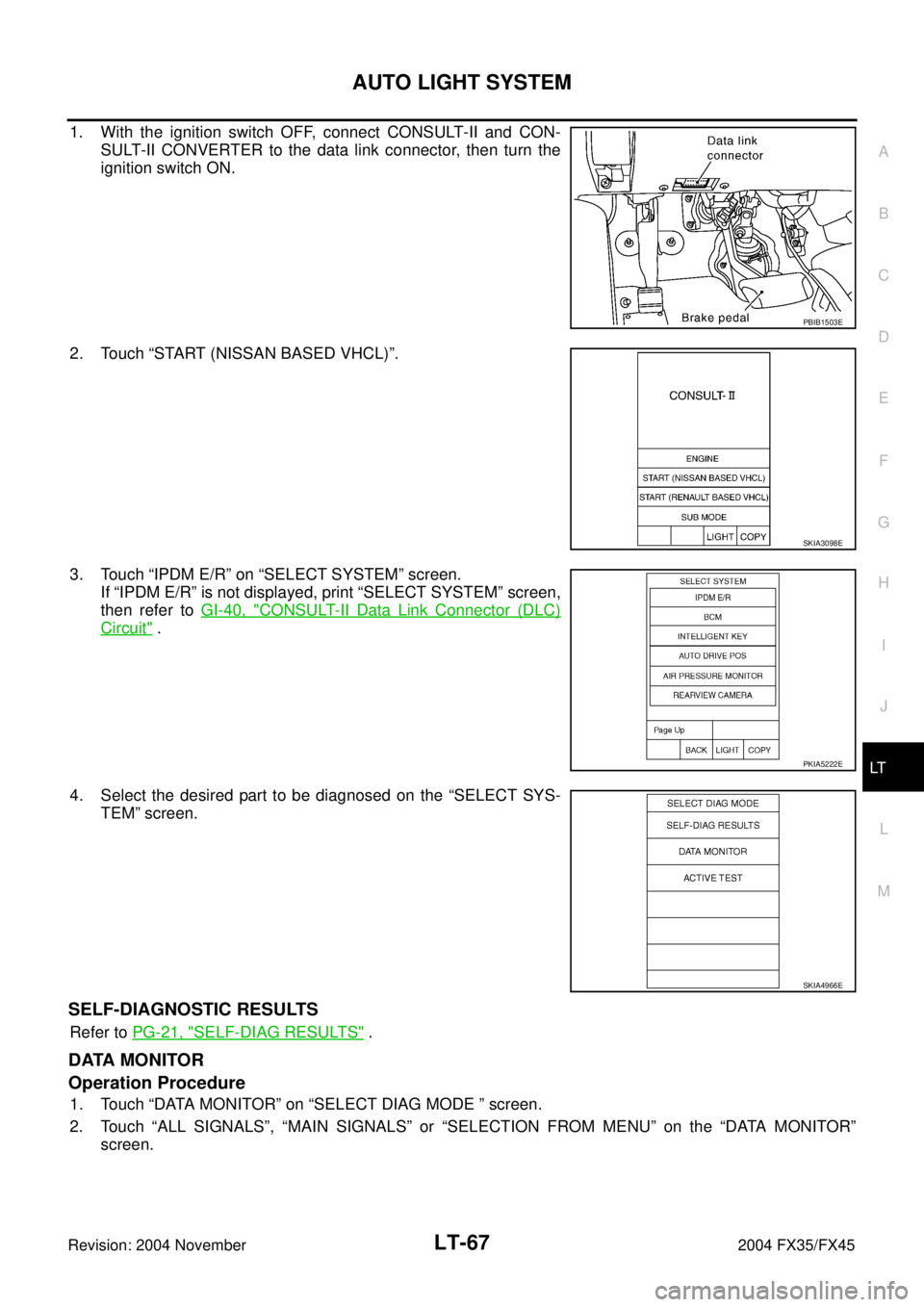
1. With the ignition switch OFF, connect CONSULT-II and CON-
SULT-II CONVERTER to the data link connector, then turn the
ignition switch ON.
2. Touch “START (NISSAN BASED VHCL)”.
3. Touch “IPDM E/R” on “SELECT SYSTEM” screen.
If “IPDM E/R” is not displayed, print “SELECT SYSTEM” screen,
then refer to GI-40, "
CONSULT-II Data Link Connector (DLC)
Circuit" .
4. Select the desired part to be diagnosed on the “SELECT SYS-
TEM” screen.
SELF-DIAGNOSTIC RESULTS
Refer to PG-21, "SELF-DIAG RESULTS" .
DATA MONITOR
Operation Procedure
1. Touch “DATA MONITOR” on “SELECT DIAG MODE ” screen.
2. Touch “ALL SIGNALS”, “MAIN SIGNALS” or “SELECTION FROM MENU” on the “DATA MONITOR”
screen.
PBIB1503E
SKIA3098E
PKIA5222E
SKIA4966E
Page 4167 of 4449
SE-38
AUTOMATIC DRIVE POSITIONER
Revision: 2004 November 2004 FX35/FX45
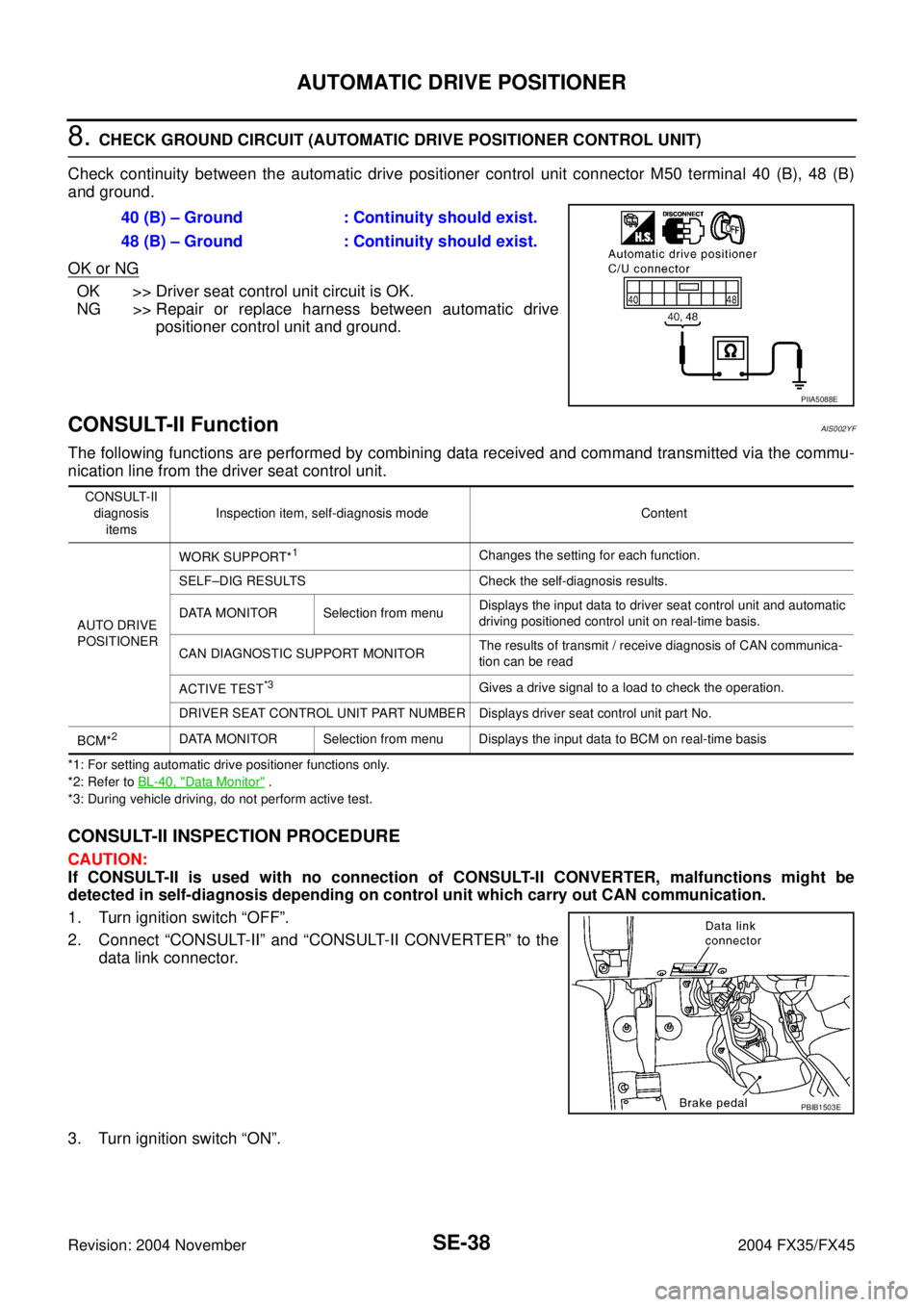
8. CHECK GROUND CIRCUIT (AUTOMATIC DRIVE POSITIONER CONTROL UNIT)
Check continuity between the automatic drive positioner control unit connector M50 terminal 40 (B), 48 (B)
and ground.
OK or NG
OK >> Driver seat control unit circuit is OK.
NG >> Repair or replace harness between automatic drive
positioner control unit and ground.
CONSULT-II FunctionAIS002YF
The following functions are performed by combining data received and command transmitted via the commu-
nication line from the driver seat control unit.
*1: For setting automatic drive positioner functions only.
*2: Refer to BL-40, "
Data Monitor" .
*3: During vehicle driving, do not perform active test.
CONSULT-II INSPECTION PROCEDURE
CAUTION:
If CONSULT-II is used with no connection of CONSULT-II CONVERTER, malfunctions might be
detected in self-diagnosis depending on control unit which carry out CAN communication.
1. Turn ignition switch “OFF”.
2. Connect “CONSULT-II” and “CONSULT-II CONVERTER” to the
data link connector.
3. Turn ignition switch “ON”.40 (B) – Ground : Continuity should exist.
48 (B) – Ground : Continuity should exist.
PIIA5088E
CONSULT-II
diagnosis
itemsInspection item, self-diagnosis mode Content
AUTO DRIVE
POSITIONERWORK SUPPORT*
1Changes the setting for each function.
SELF–DIG RESULTS Check the self-diagnosis results.
DATA MONITOR Selection from menuDisplays the input data to driver seat control unit and automatic
driving positioned control unit on real-time basis.
CAN DIAGNOSTIC SUPPORT MONITORThe results of transmit / receive diagnosis of CAN communica-
tion can be read
ACTIVE TEST
*3Gives a drive signal to a load to check the operation.
DRIVER SEAT CONTROL UNIT PART NUMBER Displays driver seat control unit part No.
BCM*
2DATA MONITOR Selection from menu Displays the input data to BCM on real-time basis
PBIB1503E
Page 4411 of 4449

WW-20
FRONT WIPER AND WASHER SYSTEM
Revision: 2004 November 2004 FX35/FX45
3. Touch “IPDM E/R” on “SELECT SYSTEM” screen.
If “IPDM E/R” is not displayed, print “SELECT SYSTEM” screen,
then refer to GI-40, "
CONSULT-II Data Link Connector (DLC)
Circuit" .
4. Select the desired part to be diagnosed on the “SELECT DIAG
MODE” screen.
SELF-DIAGNOSTIC RESULTS
Refer to PG-21, "SELF-DIAG RESULTS" .
DATA MONITOR
Operation Procedure
1. Touch “DATA MONITOR” on “SELECT DIAG MODE ” screen.
2. Touch “ALL SIGNALS”, “MAIN SIGNALS” or “SELECTION FROM MENU” on the “DATA MONITOR”
screen.
3. Touch “START”.
4. Touch the required monitoring item on “SELECTION FROM MENU”. In “ALL SIGNALS”, all items are
monitored. In “MAIN SIGNALS”, predetermined items are monitored.
5. Touch “RECORD” while monitoring to record the status of the item being monitored. To stop recording,
touch “STOP”.
All Signals, Main Signals, Selection From Menu
NOTE:
Perform monitoring of IPDM E/R data with the ignition switch ON. When the ignition switch is at ACC, the dis-
play may not be correct.
PKIA5222E
PKIA6016E
ALL SIGNALS All items will be monitored.
MAIN SIGNALS Monitor the predetermined item.
SELECTION FROM MENU Select any item for monitoring.
Item nameCONSULT-II
screen displayDisplay or unitMonitor item selection
Description
ALL
SIGNALSMAIN
SIGNALSSELECTION
FROM MENU
FR wiper request FR WIP REQ STOP/1LO/LO/HI×× ×Signal status input from BCM
Wiper auto stop WIP AUTO STOP ACT P/STOP P×× ×Output status of IPDM E/R
Wiper protection WIP PROT OFF/LS/HS/Block×× ×Control status of IPDM E/R