air INFINITI FX35 2004 Service Manual
[x] Cancel search | Manufacturer: INFINITI, Model Year: 2004, Model line: FX35, Model: INFINITI FX35 2004Pages: 4449, PDF Size: 99.66 MB
Page 1293 of 4449

DI-50
WARNING LAMPS
Revision: 2004 November 2004 FX35/FX45
3. CHECK OIL PRESSURE SWITCH CIRCUIT
1. Disconnect the IPDM E/R connector.
2. Check continuity between IPDM E/R harness connector E9 ter-
minal 57 (BR) and ground.
OK or NG
OK >> Replace IPDM E/R.
NG >> Repair harness or connector.
Component InspectionAKS005NH
OIL PRESSURE SWITCH
Check continuity between oil pressure switch and ground.Continuity should not exist.
SKIA5013E
Condition
Oil pressure kPa (kg/cm2 , psi)Continuity
Engine stopped Less than 29 (0.3, 4) Yes
Engine running More than 29 (0.3, 4) No
ELF0044D
Page 1297 of 4449

DI-54
A/T INDICATOR
Revision: 2004 November 2004 FX35/FX45
4. CHECK A/T DEVICE
Perform A/T device inspection. Refer to AT- 1 7 2 , "
DTC P1815 MANUAL MODE SWITCH" in AT section.
OK or NG
OK >> GO TO 5.
NG >> Repair the applicable parts.
5. CHECK TCM
Check TCM input/output signal. Refer to AT- 9 0 , "
TCM Input/Output Signal Reference Values" in AT section.
Self
-diagnostic results content
No malfunction detected>>Replace unified meter and A/C amp. Refer to DI-34, "Removal and Installation of
Unified Meter and A/C Amp." .
Malfunction detected>>Check applicable parts, and repair or replace corresponding parts.
Page 1307 of 4449
DI-64
WARNING CHIME
Revision: 2004 November 2004 FX35/FX45
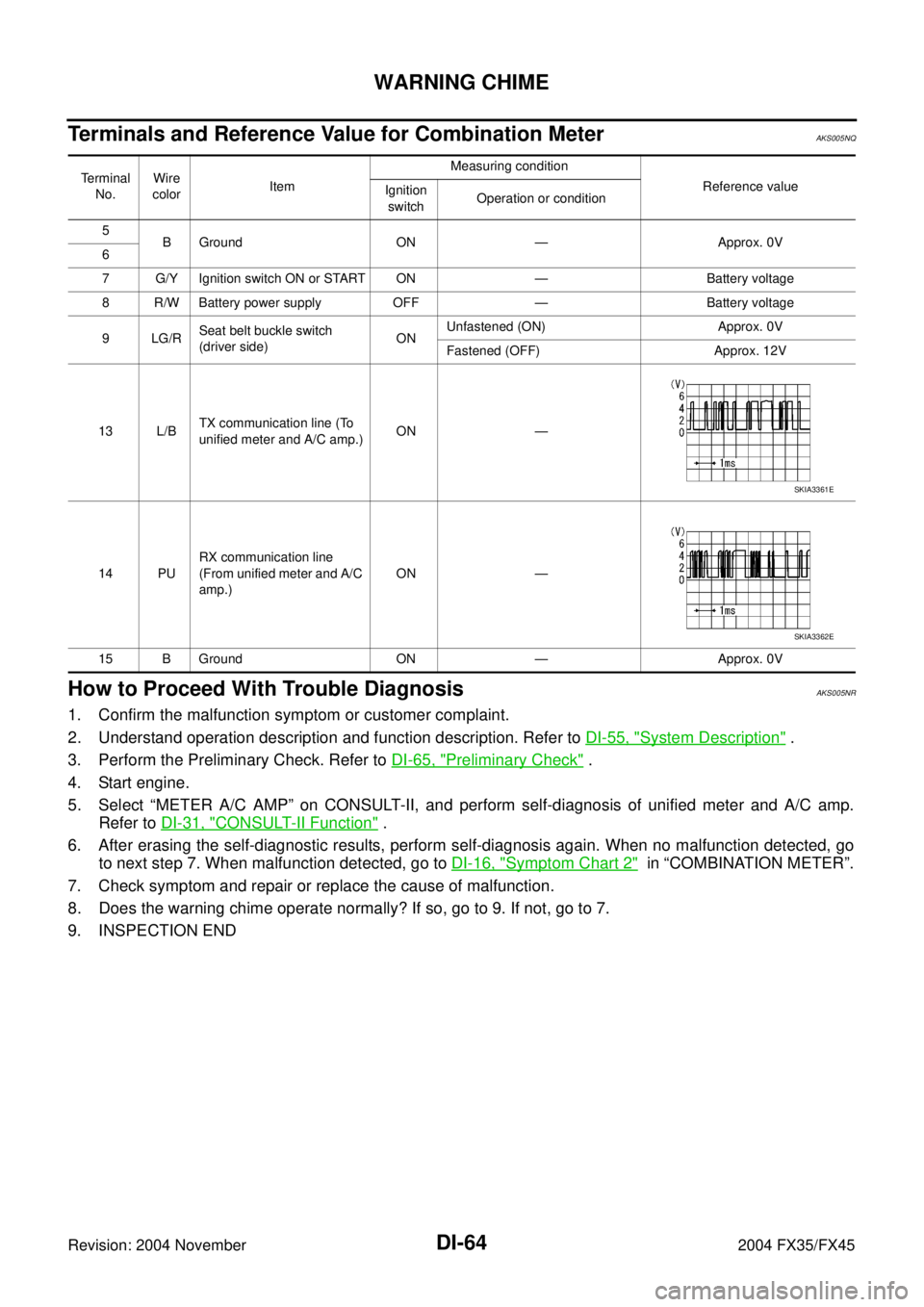
Terminals and Reference Value for Combination MeterAKS005NQ
How to Proceed With Trouble DiagnosisAKS005NR
1. Confirm the malfunction symptom or customer complaint.
2. Understand operation description and function description. Refer to DI-55, "
System Description" .
3. Perform the Preliminary Check. Refer to DI-65, "
Preliminary Check" .
4. Start engine.
5. Select “METER A/C AMP” on CONSULT-II, and perform self-diagnosis of unified meter and A/C amp.
Refer to DI-31, "
CONSULT-II Function" .
6. After erasing the self-diagnostic results, perform self-diagnosis again. When no malfunction detected, go
to next step 7. When malfunction detected, go to DI-16, "
Symptom Chart 2" in “COMBINATION METER”.
7. Check symptom and repair or replace the cause of malfunction.
8. Does the warning chime operate normally? If so, go to 9. If not, go to 7.
9. INSPECTION END
Terminal
No.Wire
colorItem Measuring condition
Reference value
Ignition
switchOperation or condition
5
B Ground ON — Approx. 0V
6
7 G/Y Ignition switch ON or START ON — Battery voltage
8 R/W Battery power supply OFF — Battery voltage
9LG/RSeat belt buckle switch
(driver side) ONUnfastened (ON) Approx. 0V
Fastened (OFF) Approx. 12V
13 L/BTX communication line (To
unified meter and A/C amp.)ON —
14 PURX communication line
(From unified meter and A/C
amp.)ON —
15 B Ground ON — Approx. 0V
SKIA3361E
SKIA3362E
Page 1308 of 4449

WARNING CHIME
DI-65
C
D
E
F
G
H
I
J
L
MA
B
DI
Revision: 2004 November 2004 FX35/FX45
Preliminary CheckAKS005NS
CHECK POWER SUPPLY AND GROUND CIRCUIT
1. CHECK FUSE AND FUSIBLE LINK
Check BCM fuses and fusible link for blown-out.
Refer to DI-59, "Wiring Diagram — CHIME —" .
OK or NG
OK >> GO TO 2.
NG >> If fuse or fusible link is blown, be sure to eliminate cause of malfunction before installing new fuse
or fusible link. Refer to PG-3, "
POWER SUPPLY ROUTING CIRCUIT" .
2. CHECK POWER SUPPLY CIRCUIT
1. Disconnect BCM connector.
2. Check voltage between BCM harness connector terminals and
ground.
OK or NG
OK >> GO TO 3.
NG >> Check harness for open between BCM and fuse or fusible link.
3. CHECK GROUND CIRCUIT
1. Turn ignition switch OFF.
2. Check continuity between BCM harness connector M4 terminals
49 (B), 52 (B) and ground.
OK or NG
OK >> INSPECTION END
NG >> Repair harness or connector.
Unit Power source Fuse and fusible link No.
BCMBatteryM
22
Ignition switch ON or START 1
Terminals Ignition switch position
(+)
(–) OFF ACC ON
ConnectorTerminal
(Wire color)
M455 (G)
GroundBattery
voltageBattery
voltageBattery
voltage
42 (L/R)Battery
voltageBattery
voltageBattery
voltage
M3 38 (W/L) 0V 0VBattery
voltage
Continuity should exist.
SKIA5041E
Page 1312 of 4449

WARNING CHIME
DI-69
C
D
E
F
G
H
I
J
L
MA
B
DI
Revision: 2004 November 2004 FX35/FX45
Key Warning Chime and Light Warning Chime Does Not Operate (Seat Belt
Warning Chime Does Operate)
AKS005NV
1. CHECK BCM INPUT SIGNAL
With CONSULT-ll
1. Select “BCM”.
2. With “DATA MONITOR” of “BUZZER”, confirm “DOOR SW-DR”
when the driver side door is operated.
Without CONSULT-ll
Check voltage between BCM harness connector B14 terminal 62
(W) and ground.
OK or NG
OK >> Replace BCM. Refer to BCS-15, "Removal and Installa-
tion of BCM" .
NG >> GO TO 2.
2. CHECK FRONT DOOR SWITCH (DRIVER SIDE) CIRCUIT
1. Turn ignition switch OFF.
2. Disconnect BCM connector and front door switch (driver side) connector.
3. Check continuity between BCM harness connector B14 terminal
62 (W) and front door switch (driver side) harness connector
B26 terminal 1 (W).
4. Check continuity between BCM harness connector B14 terminal
62 (W) and ground.
OK or NG
OK >> GO TO 3.
NG >> Repair harness or connector.When driver side door
is opened: DOOR SW-DR ON
When driver side door
is closed: DOOR SW-DR OFF
SKIA2003E
When driver side door is opened : Approx. 0V
When driver side door is closed : Approx. 12V
SKIA8220E
Continuity should exist.
Continuity should not exist.
SKIA5046E
Page 1313 of 4449

DI-70
WARNING CHIME
Revision: 2004 November 2004 FX35/FX45
3. CHECK FRONT DOOR SWITCH (DRIVER SIDE)
Check front door switch (driver side).
OK or NG
OK >> Replace BCM. Refer to BCS-15, "Removal and Installa-
tion of BCM" .
NG >> Replace front door switch (driver side).
Key Warning Chime Does Not Operate (Without Intelligent Key)AKS005NW
1. CHECK FUSE
Check if the key switch 15A fuse [No. 22, located in the fuse block (J/B)] is blown. Refer to DI-59, "
Wiring Dia-
gram — CHIME —" .
Is the fuse blown?
YES >> Replace fuse. Be sure to repair the cause of malfunction before installing new fuse.
NO >> GO TO 2.
2. CHECK WARNING CHIME OPERATION
Check the chime under conditions in exception of key warning chime (without Intelligent Key) operation.
Does warning chime sound?
YES >> GO TO 3.
NO >> Go to DI-68, "
All Warnings Are Not Operated" or DI-69, "Key Warning Chime and Light Warning
Chime Does Not Operate (Seat Belt Warning Chime Does Operate)" . When driver side door
switch is released: Continuity should exist.
When driver side door
switch is pushed: Continuity should not exist.
PKIA3718E
Page 1315 of 4449

DI-72
WARNING CHIME
Revision: 2004 November 2004 FX35/FX45
5. CHECK KEY SWITCH CIRCUIT
1. Disconnect BCM connector.
2. Check continuity between BCM harness connector M3 terminal
37 (B/W) and key switch harness connector M23 terminal 1 (B/
W).
3. Check continuity between BCM harness connector M3 terminal
37 (B/W) and ground.
OK or NG
OK >> GO TO 6.
NG >> Repair harness or connector.
6. CHECK KEY SWITCH POWER SUPPLY CIRCUIT
Check voltage between key switch harness connector M23 terminal
2 (L/R) and ground.
OK or NG
OK >> Replace BCM. Refer to BCS-15, "Removal and Installa-
tion of BCM" .
NG >> Check harness for open or short between key switch
and fuse.
Key Warning Chime Does Not Operate (With Intelligent Key, When Mechanical
Key Is Used)
AKS0079U
1. CHECK FUSE
Check if the key switch and ignition knob switch 10A fuse (No. 38, located in the fuse and fusible link box) is
blown. Refer to DI-59, "
Wiring Diagram — CHIME —" .
Is the fuse blown?
YES >> Replace fuse. Be sure to repair the cause of malfunction before installing new fuse.
NO >> GO TO 2.
2. CHECK WARNING CHIME OPERATION
Check the chime under conditions in exception of key warning chime (when mechanical key is used) opera-
tion.
Does warning chime sound?
YES >> GO TO 3.
NO >> Go to DI-68, "
All Warnings Are Not Operated" or DI-69, "Key Warning Chime and Light Warning
Chime Does Not Operate (Seat Belt Warning Chime Does Operate)" . Continuity should exist.
Continuity should not exist.
SKIA5050E
Battery voltage should exist.
SKIA5051E
Page 1317 of 4449

DI-74
WARNING CHIME
Revision: 2004 November 2004 FX35/FX45
6. CHECK KEY SWITCH CIRCUIT
1. Disconnect BCM connector.
2. Check continuity between BCM harness connector M3 terminal
37 (B/W) and key switch and ignition knob switch harness con-
nector M22 terminal 4 (B/W).
3. Check continuity between BCM harness connector M3 terminal
37 (B/W) and ground.
OK or NG
OK >> Replace BCM. Refer to BCS-15, "Removal and Installa-
tion of BCM" .
NG >> Repair harness or connector.
Key Warning Chime Does Not Operate (With Intelligent Key, When Intelligent
Key Is Carried With The Driver)
AKS0079V
1. CHECK WARNING CHIME OPERATION
Check the chime under conditions in exception of key warning chime (when Intelligent Key is carried with the
driver) operation.
Does warning chime sound?
YES >> GO TO 2.
NO >> Go to DI-68, "
All Warnings Are Not Operated" or DI-69, "Key Warning Chime and Light Warning
Chime Does Not Operate (Seat Belt Warning Chime Does Operate)" .
2. CHECK INTELLIGENT KEY UNIT SELF-DIAGNOSTIC
Perform the Intelligent Key unit self-diagnosis. Refer to BL-114, "
CONSULT-II Functions" .
OK or NG
OK >> GO TO 3.
NG >> Check the applicable parts.Continuity should exist.
Continuity should not exist.
SKIA5062E
Page 1319 of 4449

DI-76
WARNING CHIME
Revision: 2004 November 2004 FX35/FX45
6. CHECK IGNITION KNOB SWITCH CIRCUIT
1. Disconnect Intelligent Key unit connector.
2. Check continuity between Intelligent Key unit harness connector
M34 terminal 27 (L/W) and key switch and ignition knob switch
harness connector M22 terminal 2 (L/W).
3. Check continuity between Intelligent Key unit harness connector
M34 terminal 27 (L/W) and ground.
OK or NG
OK >> Replace Intelligent Key unit. Refer to BL-146, "Removal
and Installation of Intelligent Key Unit" .
NG >> Repair harness or connector.
Light Warning Chime Does Not OperateAKS007OJ
1. CHECK WARNING CHIME OPERATION
Check the chime under conditions in exception of light warning chime operation.
Dose warning chime sound?
YES >> GO TO 2.
NO >> Go to DI-68, "
All Warnings Are Not Operated" .
2. CHECK BCM INPUT SIGNAL
1. Select “BCM”.
2. With “DATA MONITOR” of “BUZZER”, confirm “TAIL LAMP SW”
when the lighting switch is operated.
OK or NG
OK >> Replace BCM. Refer to BCS-15, "Removal and Installa-
tion of BCM" .
NG >> Check the lighting switch. Refer to LT- 1 0 8 , "
Removal
and Installation" . Continuity should exist.
Continuity should not exist.
SKIA5067E
Lighting switch ON (1st
position): TAIL LAMP SW ON
Lighting switch OFF : TAIL LAMP SW OFF
SKIA2081E
Page 1321 of 4449
DI-78
WARNING CHIME
Revision: 2004 November 2004 FX35/FX45
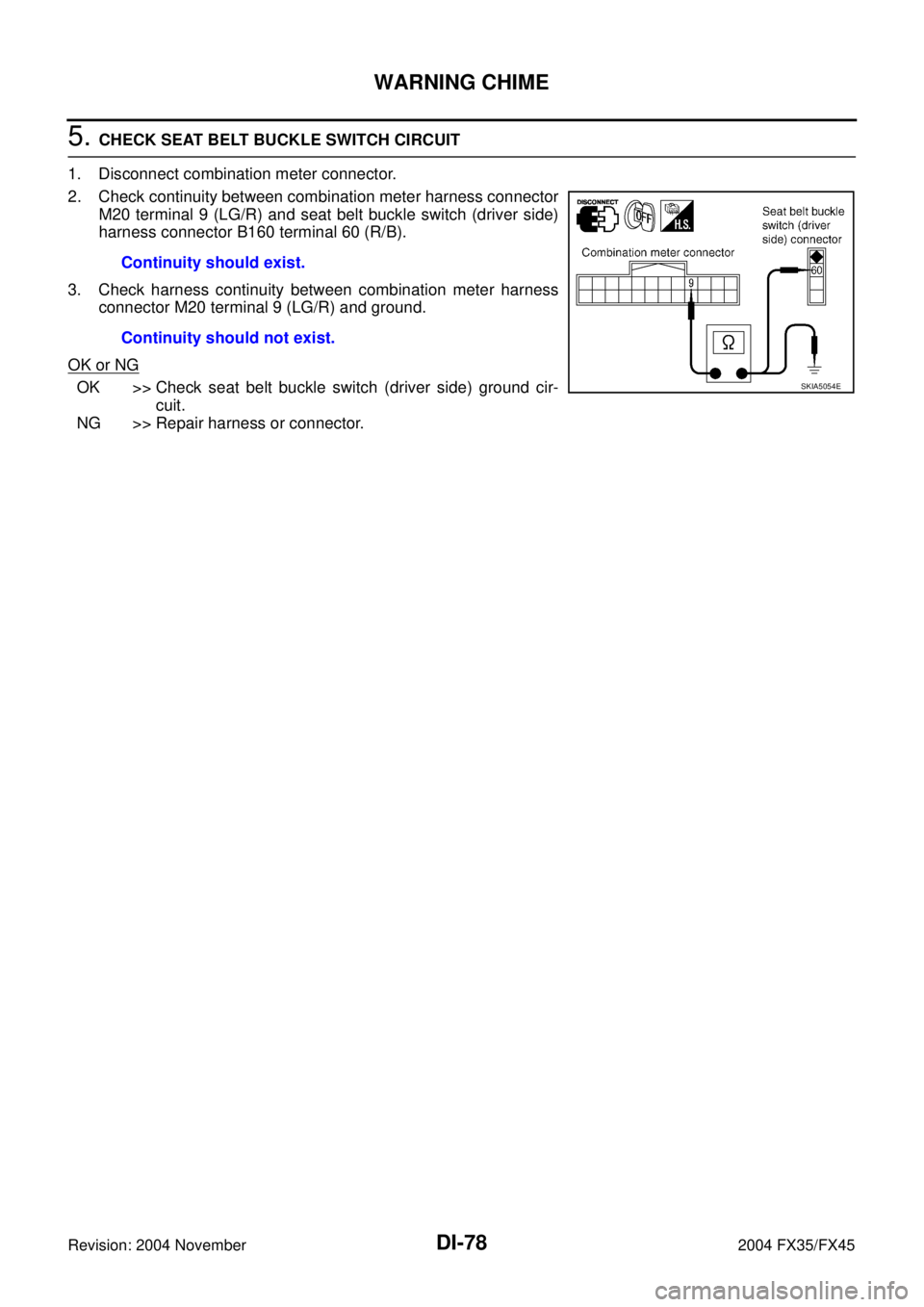
5. CHECK SEAT BELT BUCKLE SWITCH CIRCUIT
1. Disconnect combination meter connector.
2. Check continuity between combination meter harness connector
M20 terminal 9 (LG/R) and seat belt buckle switch (driver side)
harness connector B160 terminal 60 (R/B).
3. Check harness continuity between combination meter harness
connector M20 terminal 9 (LG/R) and ground.
OK or NG
OK >> Check seat belt buckle switch (driver side) ground cir-
cuit.
NG >> Repair harness or connector.Continuity should exist.
Continuity should not exist.SKIA5054E