lock INFINITI FX35 2008 Service Manual
[x] Cancel search | Manufacturer: INFINITI, Model Year: 2008, Model line: FX35, Model: INFINITI FX35 2008Pages: 3924, PDF Size: 81.37 MB
Page 853 of 3924

INTELLIGENT KEY SYSTEMBL-119
< SERVICE INFORMATION >
C
DE
F
G H
J
K L
M A
B
BL
N
O P
Check Door Request SwitchINFOID:0000000001327859
1.CHECK DOOR REQUEST SWITCH
With CONSULT-III
Display “DR REQ SW” (driver door), “AS REQ SW” (passenger door) and “BD/TR REQ SW” (back door) on
DATA MONITOR screen, and check if ON-OFF display is linked to door request switch operation.
OK or NG
OK >> Door request switch is OK.
NG >> GO TO 2.
2.CHECK DOOR REQUEST SWITCH SIGNAL
1. Turn ignition knob LOCK position.
2. Disconnect door request switch connector.
3. Check voltage between door request switch connecto r D12 (driver door), D42 (passenger door), D113
(back door) terminal 1 and ground.
OK or NG
OK >> GO TO 3.
NG >> GO TO 5.
3.CHECK DOOR REQUEST SWITCH OPERATION
Check continuity between door request switch D12 (driver door), D42 (passenger door), D113 (back door) ter-
minals 1 and 2.
OK or NG
OK >> GO TO 4.
NG >> Replace door request switch.
4.CHECK DOOR REQUEST SWITCH GROUND CIRCUIT
Check continuity between door request switch connector D12 (driver side), D42 (passenger side), D113 (back
door) terminal 2 (B) and ground. Press door request switch. : ON
Release door request switch. : OFF
Driver 1 (SB) - Ground : Approx. 5V
Passenger 1 (GY) - Ground : Approx. 5V
Back door 1 (GY) - Ground : Approx. 5V
PIIA6744E
Terminal Condition Continuity
12 Press door request switch Yes
Return door request switch No
PIIA9930E
3AA93ABC3ACD3AC03ACA3AC03AC63AC53A913A773A893A873A873A8E3A773A983AC73AC93AC03AC3
3A893A873A873A8F3A773A9D3AAF3A8A3A8C3A863A9D3AAF3A8B3A8C
Page 854 of 3924

BL-120
< SERVICE INFORMATION >
INTELLIGENT KEY SYSTEM
OK or NG
OK >> Check harness connection.
NG >> Repair or replace door request switch ground circuit.
5.CHECK DOOR REQUEST SWITCH CIRCUIT
1. Disconnect Intelligent Key unit connector.
2. Check continuity between Intelligent Key unit connector M34 terminals 5 (driver door), 25 (passenger door), and 29 (back door) and door request switch connector D12 (driver door), D42 (passenger door),
D113 (back door) terminal 1.
3. Check continuity between door request switch connector D12 (driver door), D42 (passenger door), D113 (back door) terminal
1 and ground.
OK or NG
OK >> Replace Intelligent Key unit.
NG >> Repair or replace harness between Intelligent Key unit and door request switch.
Check Intelligent Key Warning BuzzerINFOID:0000000001327860
1.CHECK INTELLIGENT KEY WARNING BUZZER POWER SUPPLY CIRCUIT
1. Turn ignition knob LOCK position.
2. Disconnect Intelligent Key warning buzzer connector.
3. Check voltage between Intelligent Key warning buzzer connector D11 (driver side), D41 (passenger side) terminal 1 (L) and ground.
OK or NG
OK >> GO TO 2.
NG >> Repair or replace Intelligent Key warning buzzer power supply circuit.
2.CHECK INTELLIGENT KEY WARNING BUZZER CIRCUIT
1. Disconnect Intelligent Key unit connector.
2. Check continuity between Intelligent Key unit c onnector M34 terminal 4 and Intelligent Key warning
buzzer connector D11 (driver side), D 41 (passenger side) terminal 2 (G).
2 (B) - Ground : Continuity should exist.
PIIA6746E
Driver 5 (W/L) - 1 (SB) :
Continuity should exist.
Passenger 25 (W/R) - 1 (GY) : Continuity should exist.
Back door 29 (GY) - 1 (GY) : Continuity should exist.
1 - Ground : Continuity should not exist.
PIIA6747E
1 (L) - Ground : Battery voltage
PIIA6748E
3AA93ABC3ACD3AC03ACA3AC03AC63AC53A913A773A893A873A873A8E3A773A983AC73AC93AC03AC3
3A893A873A873A8F3A773A9D3AAF3A8A3A8C3A863A9D3AAF3A8B3A8C
Page 858 of 3924

BL-124
< SERVICE INFORMATION >
INTELLIGENT KEY SYSTEM
3. Check continuity between inside key antenna connector M70,M153 (dash board), B68 (luggage room) terminals 1 and 2 and
ground.
OK or NG
OK >> Replace Intelligent Key unit.
NG >> Repair or replace harness between inside key antenna and Intelligent Key unit.
Check Steering Lock UnitINFOID:0000000001327863
1.CHECK STEERING LOCK UNIT POWER SUPPLY
1. Turn ignition knob LOCK position.
2. Disconnect steering lock unit connector.
3. Check voltage between steering lock uni t connector M26 terminal 1 (L/R) and ground.
OK or NG
OK >> GO TO 2.
NG >> Repair or replace steering lock unit power supply circuit.
2.CHECK STEERING LOCK UNIT GROUND CIRCUIT
Check continuity between steering lock unit connector M26 terminal 4 (Y/B) and ground.
OK or NG
OK >> GO TO 3.
NG >> GO TO 4.
Item Terminal Continuity
Inside key antenna-3 (Luggage room) 1 (OR/L) 13 (P)
Ye s
2 (W/L) 14 (L)
Inside key antenna-1 (Dash board) 1 (G) 15 (G)
2 (R) 16 (R)
Inside key antenna-2 (Dash board) 1 (LG) 35 (LG)
2 (PU) 36 (PU)
Item Terminal Continuity
Inside key antenna-3 (Luggage room) 1 (OR/L)
Ground No
2 (W/L)
Inside key antenna-1 (Dash board) 1 (G)
2 (R)
Inside key antenna-2 (Dash board) 1 (LG)
2 (PU)
PIIB8513E
1 (L/R) - Ground : Battery voltage
PIIA6797E
4 (Y/B) - Ground : Continuity should exist.
PIIA6798E
3AA93ABC3ACD3AC03ACA3AC03AC63AC53A913A773A893A873A873A8E3A773A983AC73AC93AC03AC3
3A893A873A873A8F3A773A9D3AAF3A8A3A8C3A863A9D3AAF3A8B3A8C
Page 859 of 3924

INTELLIGENT KEY SYSTEMBL-125
< SERVICE INFORMATION >
C
DE
F
G H
J
K L
M A
B
BL
N
O P
3.CHECK STEERING LOCK COMMUNICATION CIRCUIT
1. Connect steering lock unit connector.
2. Check voltage between Intelligent Key unit connector M34 terminal 1 (R/W) and ground.
3. Immediately after pushing ignition knob, use an oscilloscope to check voltage waveform between Intelli- gent Key unit connector M34 terminal 32 (R/B) and ground.
OK or NG
OK >> GO TO 4.
NG >> Replace Intelligent Key unit.
4.CHECK STEERING LOCK UNI T COMMUNICATION CIRCUIT
1. Disconnect Intelligent Key unit and steering lock unit connectors.
2. Check continuity between Intelligent Key unit c onnector M34 terminals 1, 31, 32 and steering lock unit
connector M26 terminals 2, 3, 4.
3. Check continuity between steering lock unit connector M26 ter- minals 2, 3, 4 and ground.
OK or NG
OK >> Replace steering lock unit. After replacing steering lock unit, perform regist ration procedure. Refer to “CONSULT-III Opera-
tion Manual NATS-IVIS/NVIS”.
NG >> Repair or replace harness between steering lock unit and Intelligent Key unit. 1 (R/W) - Ground : Approx. 5V
MIIB0385E
Te r m i n a l
(Wire color) Condition Signal
(Reference value)
(+) (-)
32
(R/B) Ground Immediately after ig-
nition knob pushing.
MIIB0386E
SIIA1911J
1 (R/W) - 2 (R/W) : Continuity should exist.
31 (Y/B) - 4 (Y/B) : Continuity should exist.
32 (R/B) - 3 (R/B) : Continuity should exist.
2 (R/W) - Ground : Continuity should not exist. 3 (R/B) - Ground : Continuity should not exist.4 (Y/B) - Ground : Continuity should not exist.
PIIA6799E
3AA93ABC3ACD3AC03ACA3AC03AC63AC53A913A773A893A873A873A8E3A773A983AC73AC93AC03AC3
3A893A873A873A8F3A773A9D3AAF3A8A3A8C3A863A9D3AAF3A8B3A8C
Page 860 of 3924

BL-126
< SERVICE INFORMATION >
INTELLIGENT KEY SYSTEM
Check Stop Lamp Switch
INFOID:0000000001327864
1.CHECK STOP LAMP SWIT CH POWER SUPPLY CIRCUIT
1. Disconnect stop lamp switch connector.
2. Check voltage between stop lamp switch connector E210 termi- nal 1 (GY) and ground.
OK or NG
OK >> GO TO 2.
NG >> Repair or replace harness between stop lamp switch and fuse.
2.CHECK STOP LAMP SWITCH OPERATION
Check continuity between stop la mp switch connector E210 terminal
1 and 2.
OK or NG
OK >> GO TO 3.
NG >> Replace stop lamp switch.
3.CHECK STOP LAMP SWITCH GROUND CIRCUIT
1. Check continuity between stop lamp switch connector E210 ter- minal 2 (P) and Intelligent Key unit connector M34 terminal 26
(P/L).
2. Check continuity between stop lamp switch connector E210 ter- minal 2 (P) and ground.
OK or NG
OK >> Stop lamp switch is OK.
NG >> Repair or replace harness.
Check Park Position SwitchINFOID:0000000001327865
1.CHECK PARK POSITION SWITCH INPUT SIGNAL
1. Turn ignition knob LOCK position.
2. Check voltage between Intelligent Key unit connector and ground. 1 (GY) - Ground : Battery voltage
PIIA6811E
1 - 2
Brake pedal depressed : Continuity should exist.
Brake pedal not de-
pressed
: Continuity should not exist.
PIIA6800E
2 (P) - 26 (P/L) : Continuity should exist.
2 (P) - Ground : Continuity should not exist.
PIIA6801E
3AA93ABC3ACD3AC03ACA3AC03AC63AC53A913A773A893A873A873A8E3A773A983AC73AC93AC03AC3
3A893A873A873A8F3A773A9D3AAF3A8A3A8C3A863A9D3AAF3A8B3A8C
Page 861 of 3924

INTELLIGENT KEY SYSTEMBL-127
< SERVICE INFORMATION >
C
DE
F
G H
J
K L
M A
B
BL
N
O P
OK or NG
OK >> Park position switch circuit is OK.
NG >> GO TO 2.
2.CHECK PARK POSITION SWITCH CIRCUIT
1. Disconnect A/T device (park position switch) connector.
2. Check voltage between A/T device (park position switch) con- nector M67 terminal 3 (R/Y) and ground. (Check harness for
open.)
3. Check continuity between A/T device (park position switch) con- nector M67 terminals 3 (R/Y) and ground. (Check harness for
short.)
OK or NG
OK >> GO TO 3.
NG >> Repair or replace harness.
3.CHECK PARK POSITION SWITCH
Check continuity between A/T device (p ark position switch) terminals 2 and 3.
OK or NG
OK >> GO TO 4.
NG >> Replace back A/T device (park position switch).
4.PARK POSITION SWITCH GROUND CIRCUIT INSPECTION
Connector Te r m i n a l
(Wire color) ConditionVoltage (V)
(Approx.)
(+) (-)
M34 39 (R/Y) Ground When selector lever is locked
at the “P” position
0
When selector lever is not
locked at the “P” position Battery voltage
PIIA6805E
3 (R/Y) – Ground : Battery voltage
PIIB9063E
3 (R/Y) – Ground : Continuity should not exist.
PIIB9064E
Terminal Condition Continuity
23 When selector lever is not
locked at the “P” position
No
When selector lever is
locked at the “P” position Ye s
PIIB9065E
3AA93ABC3ACD3AC03ACA3AC03AC63AC53A913A773A893A873A873A8E3A773A983AC73AC93AC03AC3
3A893A873A873A8F3A773A9D3AAF3A8A3A8C3A863A9D3AAF3A8B3A8C
Page 862 of 3924

BL-128
< SERVICE INFORMATION >
INTELLIGENT KEY SYSTEM
Check continuity between A/T device (park position switch) connec-
tor M67 terminal 2 (B) and ground.
OK or NG
OK >> Check harness connection.
NG >> Repair or replace harness.
Check Select Unlock RelayINFOID:0000000001327866
1.CHECK SELECT UNLOCK RELAY POWER SUPPLY
1. Turn ignition switch OFF.
2. Disconnect passenger side select unlock relay connector.
3. Check voltage between passenger side select unlock relay con- nector M30 terminal 1 and ground.
OK or NG
OK >> GO TO 2.
NG >> Repair or replace passenger side select unlock relay power supply circuit.
2.CHECK HARNESS
1. Disconnect Intelligent Key unit connector.
2. Check continuity between passenger side select unlock relay connector M30 terminal 2 and Intelligent Key unit connector
M34 terminal 40.
3. Check continuity between passenger side select unlock relay connector M30 terminal 2 and ground.
OK or NG
OK >> Replace passenger side select unlock relay.
NG >> Repair or replace harness between passenger side select unlock relay and Intelligent Key unit.
Check Hazard FunctionINFOID:0000000001327867
1.CHECK HAZARD WARNING LAMP
Does hazard warning lamp flash with hazard switch?
YES or NO
YES >> Hazard warning lamp circuit is OK.
NO >> Check hazard circuit. Refer to LT- 7 8
.
2 (B) – Ground : Continuity should exist.
PIIB9066E
1 (L/R) – Ground : Approx. 12V
PIIA6954E
2 (BR/W) – 40 (BR/W) : Continuity should exist.
2 (BR/W) – Ground : Conti
nuity should not exist.
PIIA6955E
3AA93ABC3ACD3AC03ACA3AC03AC63AC53A913A773A893A873A873A8E3A773A983AC73AC93AC03AC3
3A893A873A873A8F3A773A9D3AAF3A8A3A8C3A863A9D3AAF3A8B3A8C
Page 866 of 3924
BL-132
< SERVICE INFORMATION >
DOOR
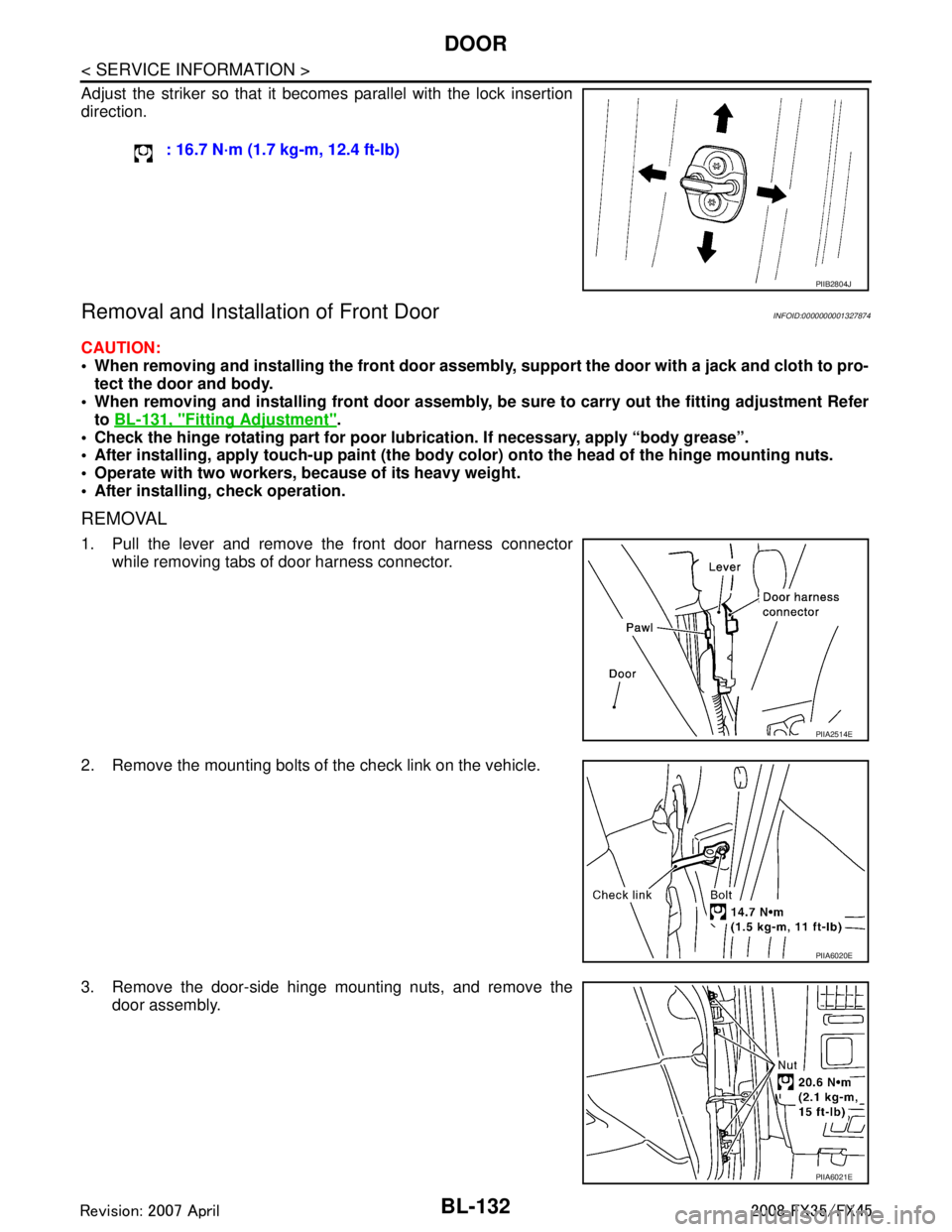
Adjust the striker so that it becomes parallel with the lock insertion
direction.
Removal and Installation of Front DoorINFOID:0000000001327874
CAUTION:
When removing and installing the front door assembl y, support the door with a jack and cloth to pro-
tect the door and body.
When removing and installing front door assembly, be sure to carry out the fitting adjustment Refer
to BL-131, "
Fitting Adjustment".
Check the hinge rotating part for poor lubrication. If necessary, apply “body grease”.
After installing, apply touch-up paint (the body color) onto the head of the hinge mounting nuts.
Operate with two workers, because of its heavy weight.
After installing, check operation.
REMOVAL
1. Pull the lever and remove the front door harness connector
while removing tabs of door harness connector.
2. Remove the mounting bolts of the check link on the vehicle.
3. Remove the door-side hinge mounting nuts, and remove the door assembly. : 16.7 N·m (1.7 kg-m, 12.4 ft-lb)
PIIB2804J
PIIA2514E
PIIA6020E
PIIA6021E
3AA93ABC3ACD3AC03ACA3AC03AC63AC53A913A773A893A873A873A8E3A773A983AC73AC93AC03AC3
3A893A873A873A8F3A773A9D3AAF3A8A3A8C3A863A9D3AAF3A8B3A8C
Page 869 of 3924

FRONT DOOR LOCKBL-135
< SERVICE INFORMATION >
C
DE
F
G H
J
K L
M A
B
BL
N
O P
FRONT DOOR LOCK
Removal and InstallationINFOID:0000000001327877
REMOVAL
1. Remove the front door finisher. Refer to EI-36, "Component Parts Location".
2. Disconnect the inside handle knob cable and lock knob cable from the back side of the front door finisher.
3. Remove the front door glass and front door module assembly. Refer to GW-50, "
Removal and Installa-
tion".
4. Remove door side grommet, and remove door key cylinder assembly (driver side) and outside handle escutcheon (passenger side) TORX bolt from grommet hole.
CAUTION:
1. Front gasket 2. Outside handle 3. Door key cylinder assembly (Driver
side)
Outside handle escutcheon (Pas-
senger side)
4. Rear gasket 5. Outside handle bracket 6. Grommet
7. TORX bolt 8. Key cylinder rod (Driver side only) 9. TORX bolt
10. Outside handle cable 11. Door lock assembly 12. Inside handle knob cable
13. Lock knob cable 14. Screw 15. Inside handle
PIIA6025E
PIIA4014E
3AA93ABC3ACD3AC03ACA3AC03AC63AC53A913A773A893A873A873A8E3A773A983AC73AC93AC03AC3
3A893A873A873A8F3A773A9D3AAF3A8A3A8C3A863A9D3AAF3A8B3A8C
Page 870 of 3924

BL-136
< SERVICE INFORMATION >
FRONT DOOR LOCK
Do not forcibly remove the TORX bolt.
5. Reach to separate the key cylinder rod connection (on the handle).
6. While pulling the outside handle, remove door key cylinder assembly (driver side) and outside handle escutcheon (passen-
ger side).
7. Disconnect the door request switch connector. (Intelligent Key only)
8. While pulling outside handle, slide toward rear of vehicle to remove outside handle.
9. Remove the front gasket and rear gasket.
PIIA3553E
PIIA3554E
PIIA3555E
PIIA3557E
3AA93ABC3ACD3AC03ACA3AC03AC63AC53A913A773A893A873A873A8E3A773A983AC73AC93AC03AC3
3A893A873A873A8F3A773A9D3AAF3A8A3A8C3A863A9D3AAF3A8B3A8C