phone INFINITI FX35 2008 User Guide
[x] Cancel search | Manufacturer: INFINITI, Model Year: 2008, Model line: FX35, Model: INFINITI FX35 2008Pages: 3924, PDF Size: 81.37 MB
Page 697 of 3924

AV-150
< SERVICE INFORMATION >
INFINITI MOBILE ENTERTAINMENT SYSTEM
6.CHECK CONTROL SIGNAL
Check voltage between DVD player harness connector M73 terminal
11 and ground.
OK or NG
OK >> Replace DVD player.
NG >> Replace audio unit.
Screen Is Not Shown (While So unds Come Out of an Audio Speaker, Did Not Do of a
Head Phone)
INFOID:0000000001328782
1.CHECK POWER SUPPLY CIRCUIT
1. Check voltage between DVD player harness connector B19 ter- minals 31, 32 and ground.
2. Turn ignition switch ACC.
3. Check voltage between DVD player harness connector B19 ter- minal 21 and ground.
OK or NG
OK >> GO TO 2.
NG >> Replace DVD player.
2.CHECK HARNESS
1. Turn ignition switch OFF.
2. Disconnect DVD display connector.
Te r m i n a l s
ConditionReference
value
(+) (–)
Connector Terminal Ground
M73 11 Ground Press “power”
switch of DVD play- er Approx. 5 V
SKIB0328E
31 , 32 – Ground : Battery voltage
SKIA5850E
21 – Ground : Approx. 5 V
SKIA7021E
3AA93ABC3ACD3AC03ACA3AC03AC63AC53A913A773A893A873A873A8E3A773A983AC73AC93AC03AC3
3A893A873A873A8F3A773A9D3AAF3A8A3A8C3A863A9D3AAF3A8B3A8C
Page 698 of 3924

INFINITI MOBILE ENTERTAINMENT SYSTEMAV-151
< SERVICE INFORMATION >
C
DE
F
G H
I
J
L
M A
B
AV
N
O P
3. Check continuity between DVD player harness connector B19 terminals 21, 31, 32 and DVD display harness connector B61
terminals 5, 15, 16.
4. Check continuity between DVD player harness connector B19 terminals 21, 31, 32 and ground.
5. Check continuity between DVD player harness connector B19 terminals 19, 27 and DVD display harness connector B61 termi-
nals 6, 10, 12.
6. Check continuity between DVD player harness connector B19 terminals 19, 27 and ground.
OK or NG
OK >> Replace DVD display.
NG >> Repair harness or connector.
Screen Is not Shown (Sounds Come Out of Both an Audio Speaker and a Head Phone)
INFOID:0000000001328783
1.CHECK HARNESS
1. Turn ignition switch OFF.
2. Disconnect DVD player and DVD display connectors.
3. Check continuity between DVD player harness connector B19 terminals 23, 24 and DVD display harness connector B61 termi-
nals 7, 8.
4. Check continuity between DVD player harness connector B19 terminals 23, 24 and ground.
OK or NG
OK >> GO TO 2.
NG >> Repair harness or connector.
2.CHECK VIDEO SIGNAL
1. Connect DVD player and DVD display connectors.
2. Turn ignition switch ACC. 21 – 5 : Continuity should exist.
31 – 15 : Continuity should exist.
32 – 16 : Continuity should exist.
21, 31, 32 – Ground : Cont
inuity should not exist.
19 – 6 : Continuity should exist.
27 – 10, 12 : Continuity should exist.
19, 27 – Ground : Contin uity should not exist.
SKIA7032E
PKIB6543E
23 – 7 : Continuity should exist.
24 – 8 : Continuity should exist.
23, 24 – Ground : Continuity should not exist.
SKIA7044E
3AA93ABC3ACD3AC03ACA3AC03AC63AC53A913A773A893A873A873A8E3A773A983AC73AC93AC03AC3
3A893A873A873A8F3A773A9D3AAF3A8A3A8C3A863A9D3AAF3A8B3A8C
Page 699 of 3924

AV-152
< SERVICE INFORMATION >
INFINITI MOBILE ENTERTAINMENT SYSTEM
3. Check the signal between DVD player harness connector B19terminal 23 and 24 with CONSULT-III or oscilloscope.
OK or NG
OK >> GO TO 3.
NG >> Replace DVD player.
3.CHECK HARNESS
1. Turn ignition switch OFF.
2. Disconnect DVD player and DVD display connectors.
3. Check continuity between DVD player harness connector B19 terminal 29 and DVD display harness connector B61 terminal
13.
4. Check continuity between DVD player harness connector B19 terminal 29 and ground.
OK or NG
OK >> GO TO 4.
NG >> Repair harness or connector.
4.CHECK DATA (DVD – LCD) SIGNAL
1. Connect DVD display and DVD player connectors.
2. Turn ignition switch ACC.
3. Check voltage between DVD display harness connector B61 ter- minal 13 and ground.
OK or NG
OK >> Replace DVD display.
NG >> Replace DVD player.
Head Phone Does Not SoundINFOID:0000000001328784
1.CHECK HEAD PHONE AND SIGNAL
Te r m i n a l Condition Reference value
(+) (–)
23 24 Play DVD video
SKIA7050E
SKIA8863J
29 – 13 : Continuity should exist.
29 – Ground : Continuity should not exist.
SKIB0333E
13 – 10:
SKIB0334ESKIB0322E
3AA93ABC3ACD3AC03ACA3AC03AC63AC53A913A773A893A873A873A8E3A773A983AC73AC93AC03AC3
3A893A873A873A8F3A773A9D3AAF3A8A3A8C3A863A9D3AAF3A8B3A8C
Page 700 of 3924

INFINITI MOBILE ENTERTAINMENT SYSTEMAV-153
< SERVICE INFORMATION >
C
DE
F
G H
I
J
L
M A
B
AV
N
O P
Check the inspection items below to diagnose the malfunction.
Check that the signal is received at the rear seat.
Check that transmission part has any seals or dirt that interrupts signal.
Check that the head phone battery has run down.
OK or NG
OK >> GO TO 2.
NG >> Receive signal with head phone at the rear seat. Remove seal or dirt that is interrupting signal.
If the battery has run down, replace it with new one.
2.CHECK HEAD PHONE
Check that sound is heard with another head phone.
OK or NG
OK >> Replace malfunction head phone.
NG >> GO TO 3.
3.CHECK HARNESS
1. Turn ignition switch OFF.
2. Disconnect DVD player and DVD display connectors.
3. Check continuity between DVD player harness connector B19 terminals 17, 18, 19, 20 and DVD display harness connector
B61 terminals 1, 2, 3, 4.
4. Check continuity between DVD player harness connector B19 terminals 17, 18, 19, 20 and ground.
OK or NG
OK >> GO TO 4.
NG >> Repair harness or connector.
4.CHECK MES SOUND SIGNAL
1. Connect DVD player and DVD display connectors.
2. Turn the ignition switch ACC and Press “POWER” switch of DVD player.
3. Check the signal between DVD player harness connector B19 terminals 17, 18, 20 and 19 with CONSULT-III or oscilloscope.
OK or NG
OK >> Replace DVD display.
NG >> Replace DVD player.
Remote Controller Does Not WorkINFOID:0000000001328785
1.CHECK DVD PLAYER OPERATION SWITCH
SKIA5852E
17 – 1 : Continuity should exist.
18 – 2 : Continuity should exist.
19 – 3 : Continuity should exist.
20 – 4 : Continuity should exist.
17, 18, 19, 20 – Ground : Co ntinuity should not exist.
SKIA7033E
Te r m i n a l
Condition Reference value
(+) (–)
17 19 Play CD or DVD video. Refer to
AV- 1 4 6 , "
Terminal and Ref-
erence Value for DVD Player".
18
20
SKIA7047E
3AA93ABC3ACD3AC03ACA3AC03AC63AC53A913A773A893A873A873A8E3A773A983AC73AC93AC03AC3
3A893A873A873A8F3A773A9D3AAF3A8A3A8C3A863A9D3AAF3A8B3A8C
Page 705 of 3924
AV-158
< SERVICE INFORMATION >
TELEPHONE
TELEPHONE
System DescriptionINFOID:0000000001328789
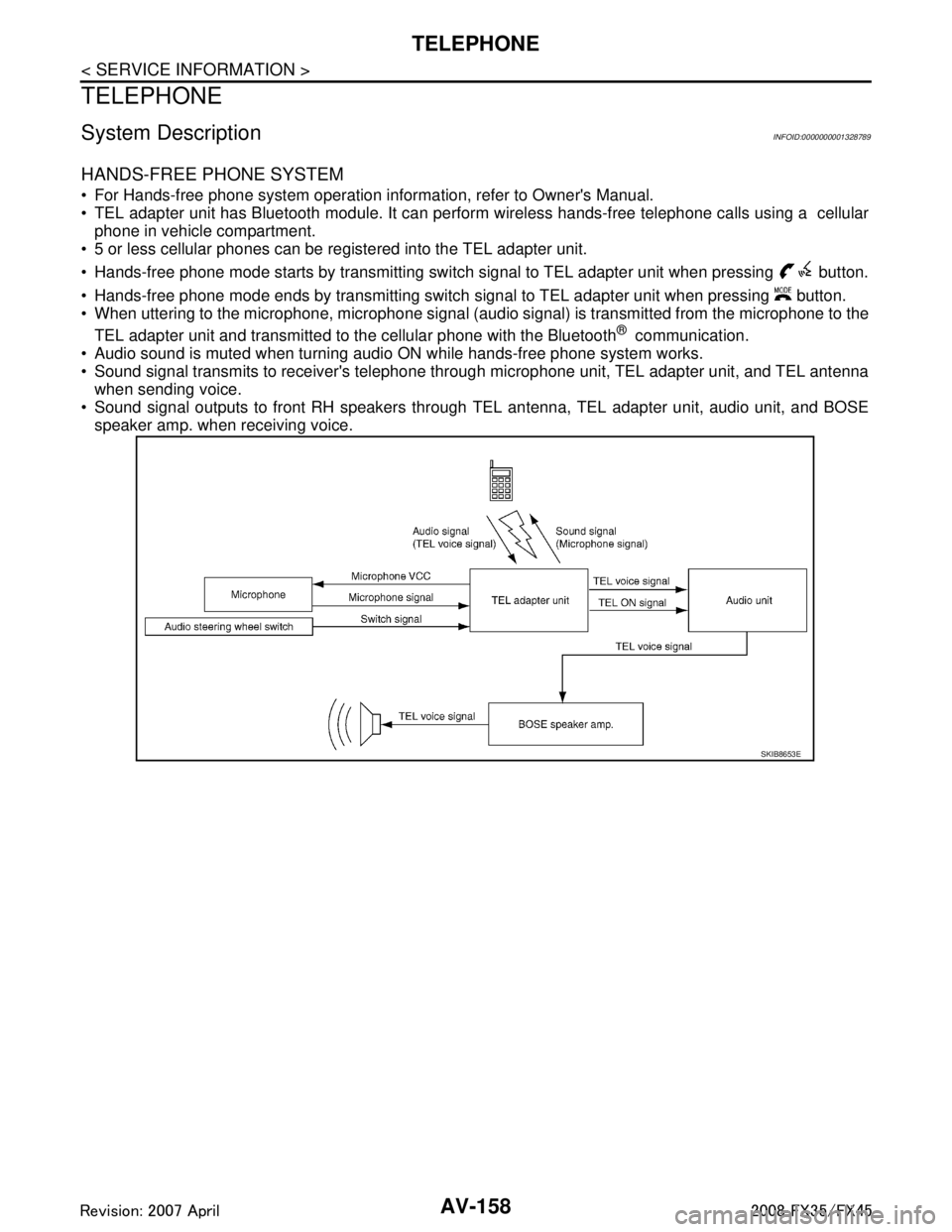
HANDS-FREE PHONE SYSTEM
For Hands-free phone system operation information, refer to Owner's Manual.
TEL adapter unit has Bluetooth module. It can perform wireless hands-free telephone calls using a cellularphone in vehicle compartment.
5 or less cellular phones can be registered into the TEL adapter unit.
Hands-free phone mode starts by transmitting switch signal to TEL adapter unit when pressing button.
Hands-free phone mode ends by transmitting switch signal to TEL adapter unit when pressing button.
When uttering to the microphone, microphone signal (audio signal) is transmitted from the microphone to the
TEL adapter unit and transmitted to the cellular phone with the Bluetooth
® communication.
Audio sound is muted when turning audio ON while hands-free phone system works.
Sound signal transmits to receiver's telephone through microphone unit, TEL adapter unit, and TEL antenna when sending voice.
Sound signal outputs to front RH speakers through TEL antenna, TEL adapter unit, audio unit, and BOSE
speaker amp. when receiving voice.
SKIB8653E
3AA93ABC3ACD3AC03ACA3AC03AC63AC53A913A773A893A873A873A8E3A773A983AC73AC93AC03AC3
3A893A873A873A8F3A773A9D3AAF3A8A3A8C3A863A9D3AAF3A8B3A8C
Page 706 of 3924
TELEPHONEAV-159
< SERVICE INFORMATION >
C
DE
F
G H
I
J
L
M A
B
AV
N
O P
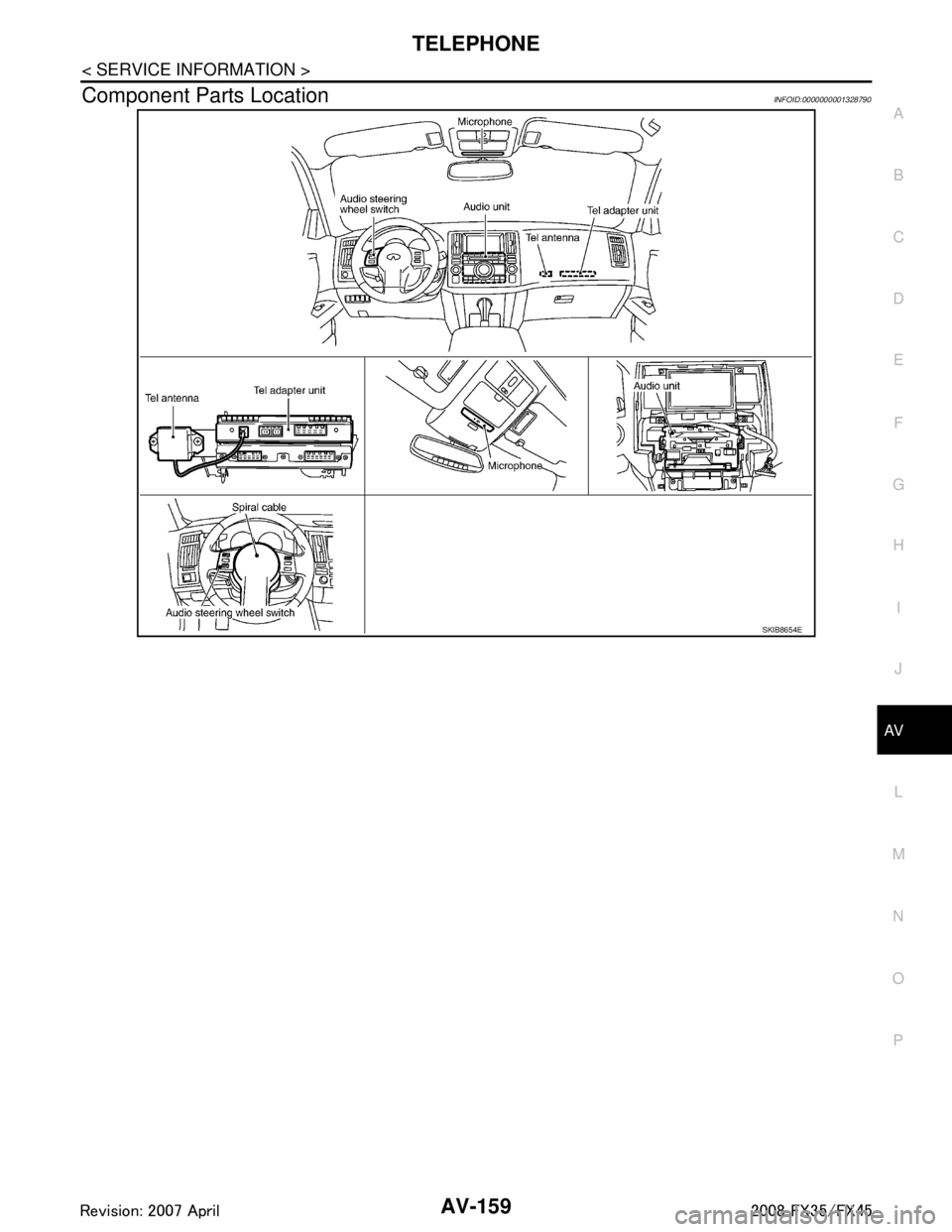
Component Parts LocationINFOID:0000000001328790
SKIB8654E
3AA93ABC3ACD3AC03ACA3AC03AC63AC53A913A773A893A873A873A8E3A773A983AC73AC93AC03AC3
3A893A873A873A8F3A773A9D3AAF3A8A3A8C3A863A9D3AAF3A8B3A8C
Page 707 of 3924
AV-160
< SERVICE INFORMATION >
TELEPHONE
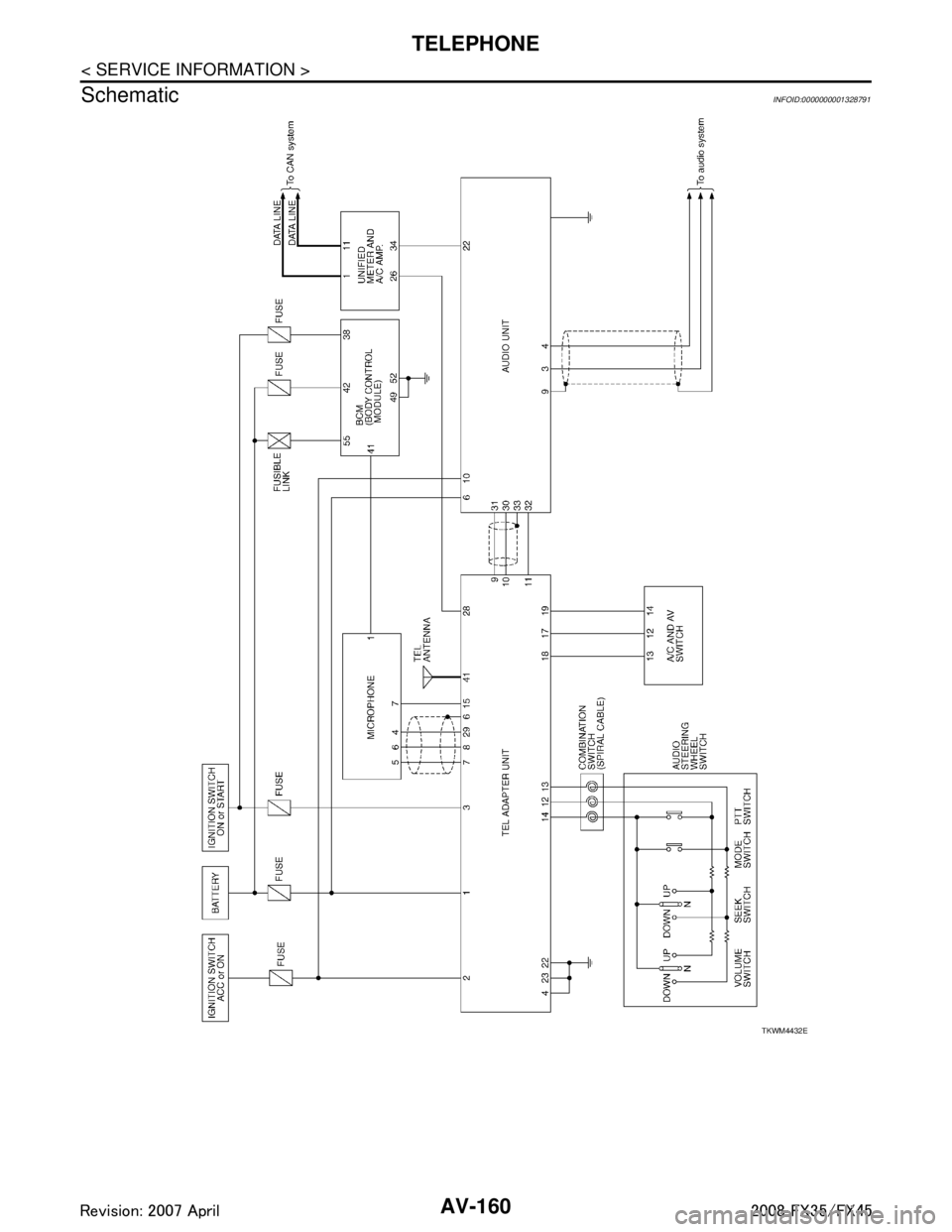
Schematic
INFOID:0000000001328791
TKWM4432E
3AA93ABC3ACD3AC03ACA3AC03AC63AC53A913A773A893A873A873A8E3A773A983AC73AC93AC03AC3
3A893A873A873A8F3A773A9D3AAF3A8A3A8C3A863A9D3AAF3A8B3A8C
Page 708 of 3924

TELEPHONEAV-161
< SERVICE INFORMATION >
C
DE
F
G H
I
J
L
M A
B
AV
N
O P
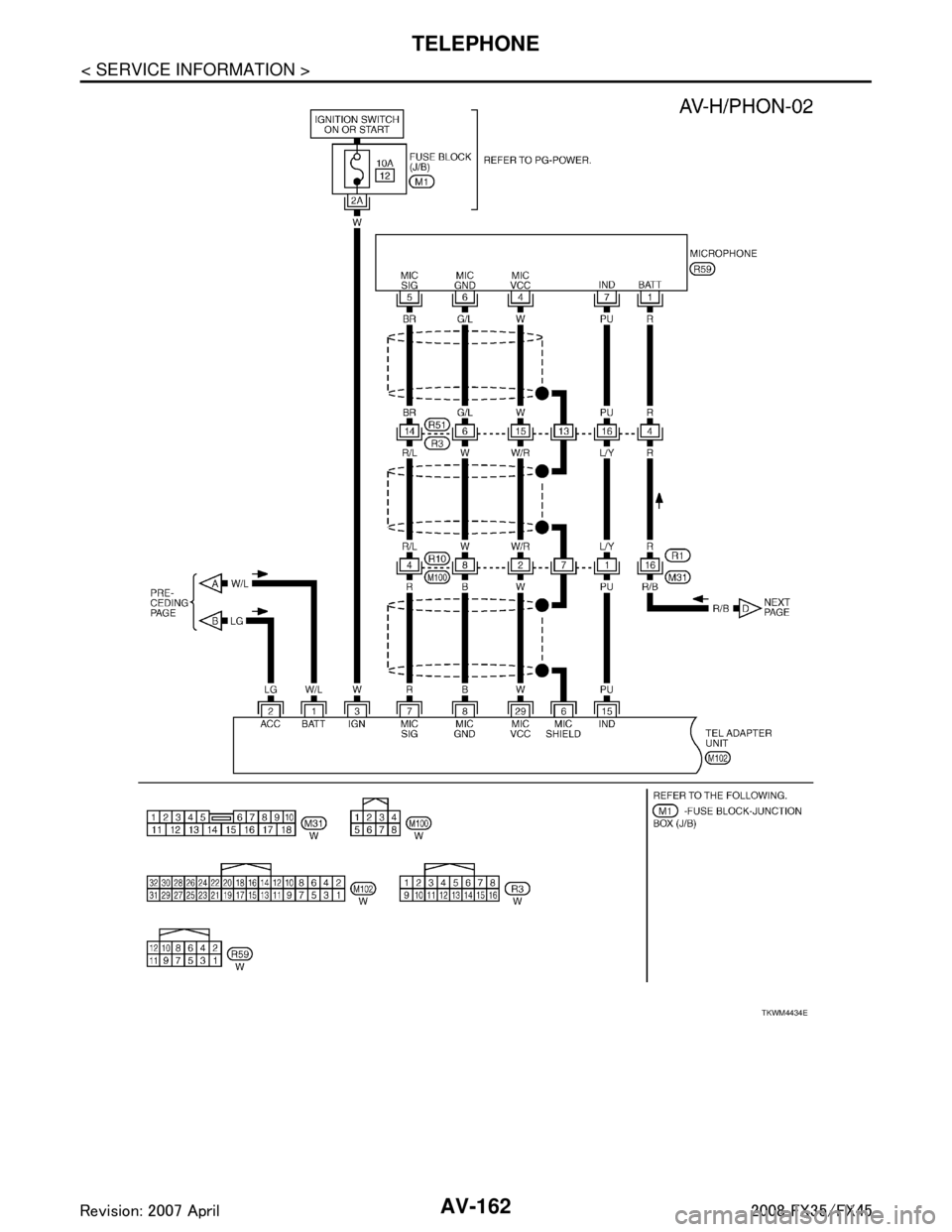
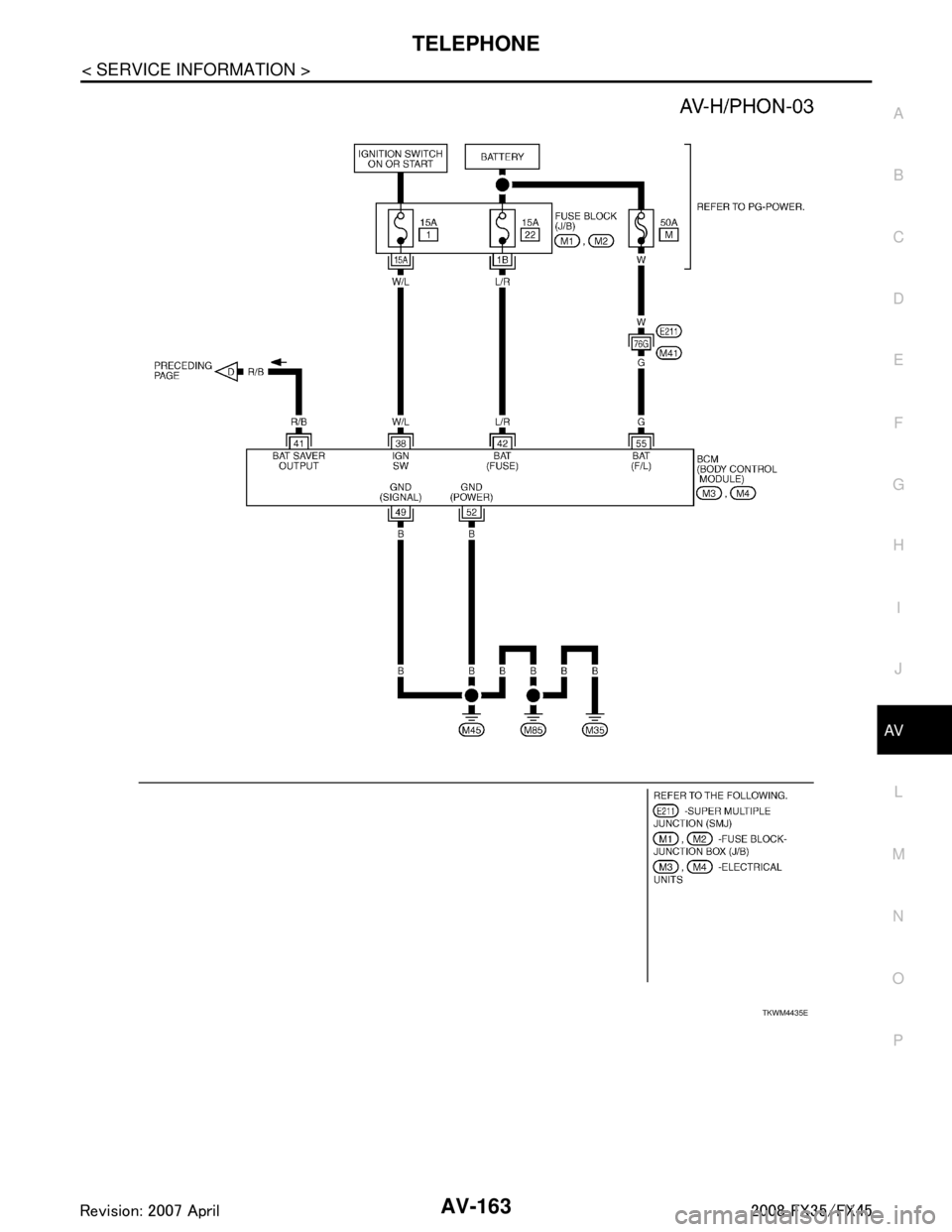
Wiring Diagram - H/PHON -INFOID:0000000001328792
TKWM4433E
3AA93ABC3ACD3AC03ACA3AC03AC63AC53A913A773A893A873A873A8E3A773A983AC73AC93AC03AC3
3A893A873A873A8F3A773A9D3AAF3A8A3A8C3A863A9D3AAF3A8B3A8C
Page 709 of 3924
AV-162
< SERVICE INFORMATION >
TELEPHONE
TKWM4434E
3AA93ABC3ACD3AC03ACA3AC03AC63AC53A913A773A893A873A873A8E3A773A983AC73AC93AC03AC3
3A893A873A873A8F3A773A9D3AAF3A8A3A8C3A863A9D3AAF3A8B3A8C
Page 710 of 3924
TELEPHONEAV-163
< SERVICE INFORMATION >
C
DE
F
G H
I
J
L
M A
B
AV
N
O P
TKWM4435E
3AA93ABC3ACD3AC03ACA3AC03AC63AC53A913A773A893A873A873A8E3A773A983AC73AC93AC03AC3
3A893A873A873A8F3A773A9D3AAF3A8A3A8C3A863A9D3AAF3A8B3A8C