ignition switch INFINITI FX35 2008 Service Manual
[x] Cancel search | Manufacturer: INFINITI, Model Year: 2008, Model line: FX35, Model: INFINITI FX35 2008Pages: 3924, PDF Size: 81.37 MB
Page 1212 of 3924
. Refer to \
BRC-26, \"CONSULT-III Func-
tions (ABS)\".
Self
-diagnosi")
DI-86
< SERVICE INFORMATION >
LANE DEPARTURE WARNING SYSTEM
Perform self-diagnosis of ABS actuator and electric unit (control unit). Refer to \
BRC-26, "CONSULT-III Func-
tions (ABS)".
Self
-diagnosis results
No malfunction detected >> GO TO 2.
Malfunction detected >> Check applicable parts, and repair or replace corresponding parts.
2.CHECK TCM (CONSULT-III)
Perform self-diagnosis of TCM. Refer to AT-84, "
CONSULT-III Function (TRANSMISSION)".
Self
-diagnosis results
No malfunction detected >> Replace LDW camera unit.
Malfunction detected >> Check applicable parts, and repair or replace corresponding parts.
DTC [C1B03] ABNRML TEMP DETECTINFOID:0000000001328507
1.COOLING CAMERA UNIT
1. Cooling camera unit.
2. Erase DTC and perform self-diagnosis the LDW camera unit.
Self
-diagnosis results
No malfunction detected >> INSPECTION END
Malfunction detected >> Replace LDW camera unit.
DTC [U1000] CAN COMM CIRCUITINFOID:0000000001328508
1.CHECK CAN COMMUNICATION
1. Turn ignition switch ON and wait for 2 seconds or more.
2. Check “Self Diagnostic Result” of “LDW”.
>> Go to “LAN SYSTEM”. Refer to LAN-43, "
CAN System Specification Chart".
DTC [U1010] CONTROL UNIT (CAN)INFOID:0000000001328509
Replace LDW camera unit, when “[U1010] CONTROL UNI T (CAN)” is displayed on self-diagnosis display.
LDW Chime Circuit InspectionINFOID:0000000001328510
1.CHECK LDW CHIME OPERATION
Check LDW chime operation “BUZZER DRIVE” in “Active Test” mode with CONSULT-III.
OK or NG
OK >> INSPECTION END
NG >> GO TO 2.
2.CHECK LDW CHIME POWER SUPPLY CIRCUIT
1. Turn ignition switch OFF.
2. Disconnect LDW chime connector.
3. Turn ignition switch ON. “BUZZER DRIVE”
Select “On” : LDW chime is activated.
Select “Off” : LDW chime is not activated.
3AA93ABC3ACD3AC03ACA3AC03AC63AC53A913A773A893A873A873A8E3A773A983AC73AC93AC03AC3
3A893A873A873A8F3A773A9D3AAF3A8A3A8C3A863A9D3AAF3A8B3A8C
Page 1213 of 3924
LANE DEPARTURE WARNING SYSTEMDI-87
< SERVICE INFORMATION >
C
DE
F
G H
I
J
L
M A
B
DI
N
O P
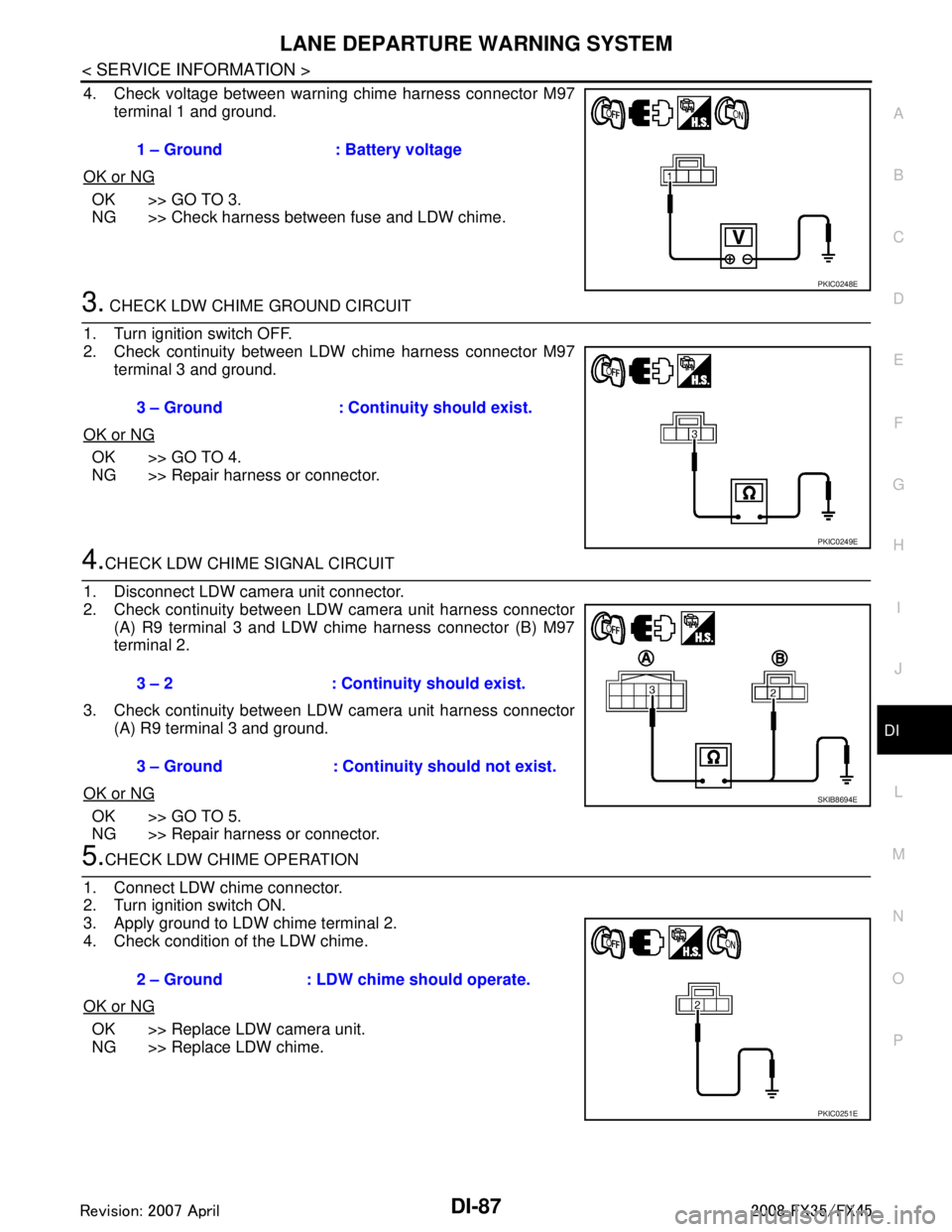
4. Check voltage between warning chime harness connector M97 terminal 1 and ground.
OK or NG
OK >> GO TO 3.
NG >> Check harness between fuse and LDW chime.
3. CHECK LDW CHIME GROUND CIRCUIT
1. Turn ignition switch OFF.
2. Check continuity between LDW chime harness connector M97 terminal 3 and ground.
OK or NG
OK >> GO TO 4.
NG >> Repair harness or connector.
4.CHECK LDW CHIME SIGNAL CIRCUIT
1. Disconnect LDW camera unit connector.
2. Check continuity between LDW camera unit harness connector (A) R9 terminal 3 and LDW chime harness connector (B) M97
terminal 2.
3. Check continuity between LDW camera unit harness connector (A) R9 terminal 3 and ground.
OK or NG
OK >> GO TO 5.
NG >> Repair harness or connector.
5.CHECK LDW CHIME OPERATION
1. Connect LDW chime connector.
2. Turn ignition switch ON.
3. Apply ground to LDW chime terminal 2.
4. Check condition of the LDW chime.
OK or NG
OK >> Replace LDW camera unit.
NG >> Replace LDW chime. 1 – Ground : Battery voltage
PKIC0248E
3 – Ground : Continuity should exist.
PKIC0249E
3 – 2 : Continui
ty should exist.
3 – Ground : Continuity should not exist.
SKIB8694E
2 – Ground : LDW chime should operate.
PKIC0251E
3AA93ABC3ACD3AC03ACA3AC03AC63AC53A913A773A893A873A873A8E3A773A983AC73AC93AC03AC3
3A893A873A873A8F3A773A9D3AAF3A8A3A8C3A863A9D3AAF3A8B3A8C
Page 1214 of 3924
DI-88
< SERVICE INFORMATION >
LANE DEPARTURE WARNING SYSTEM
LDW Switch Circuit Inspection
INFOID:0000000001328511
1.CHECK OPERATION OF LDW SYSTEM ON INDICATOR
1. Turn ignition switch ON.
2. Check LDW system ON indicator operation when LDW switch is ON/OFF.
OK or NG
OK >> INSPECTION END
NG >> GO TO 2.
2.CHECK LDW SWITCH SIGNAL INPUT
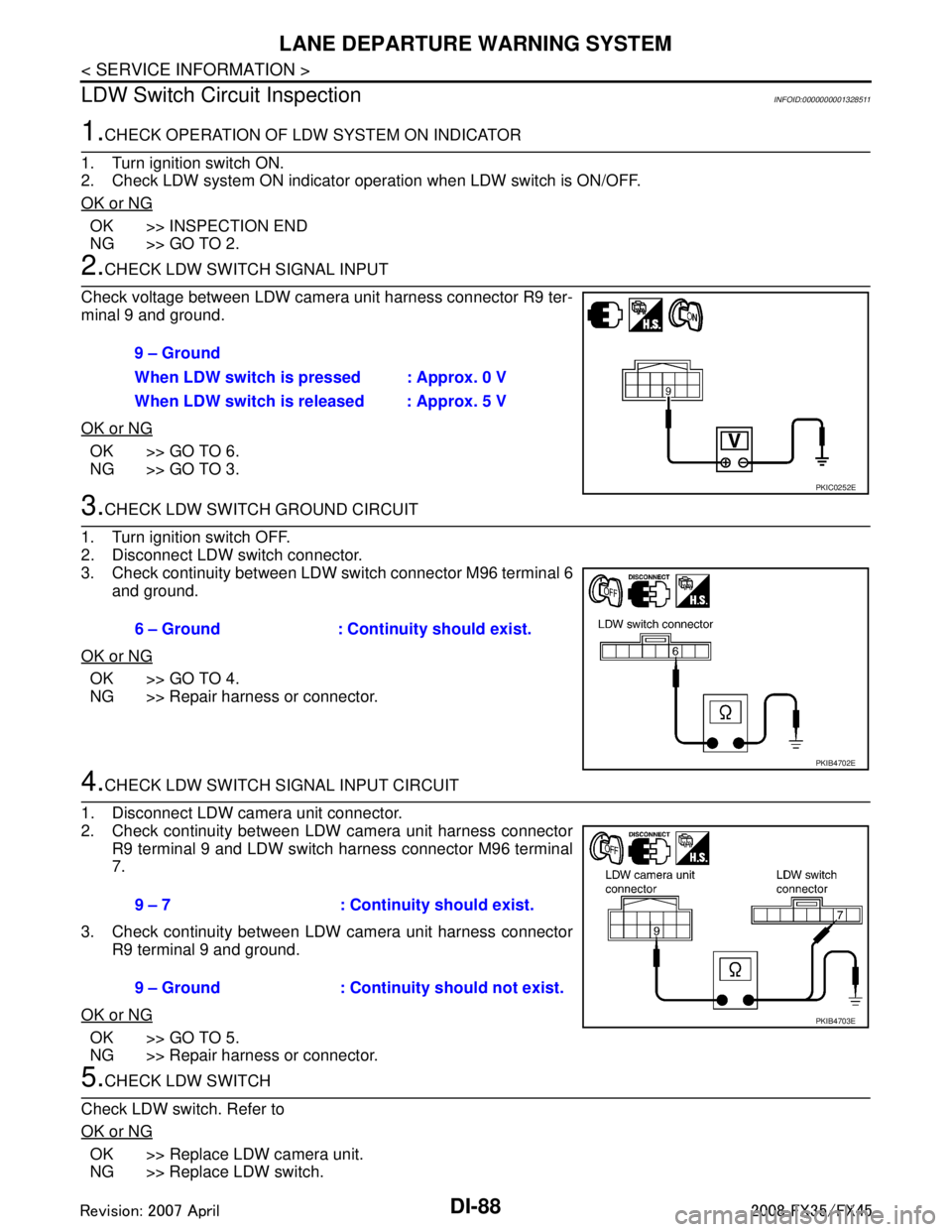
Check voltage between LDW camera unit harness connector R9 ter-
minal 9 and ground.
OK or NG
OK >> GO TO 6.
NG >> GO TO 3.
3.CHECK LDW SWITCH GROUND CIRCUIT
1. Turn ignition switch OFF.
2. Disconnect LDW switch connector.
3. Check continuity between LDW switch connector M96 terminal 6 and ground.
OK or NG
OK >> GO TO 4.
NG >> Repair harness or connector.
4.CHECK LDW SWITCH SIGNAL INPUT CIRCUIT
1. Disconnect LDW camera unit connector.
2. Check continuity between LDW camera unit harness connector R9 terminal 9 and LDW switch harness connector M96 terminal
7.
3. Check continuity between LDW camera unit harness connector R9 terminal 9 and ground.
OK or NG
OK >> GO TO 5.
NG >> Repair harness or connector.
5.CHECK LDW SWITCH
Check LDW switch. Refer to
OK or NG
OK >> Replace LDW camera unit.
NG >> Replace LDW switch. 9 – Ground
When LDW switch is pressed : Approx. 0 V
When LDW switch is released : Approx. 5 V
PKIC0252E
6 – Ground : Continuity should exist.
PKIB4702E
9 – 7 : Continuity should exist.
9 – Ground : Continuity should not exist.
PKIB4703E
3AA93ABC3ACD3AC03ACA3AC03AC63AC53A913A773A893A873A873A8E3A773A983AC73AC93AC03AC3
3A893A873A873A8F3A773A9D3AAF3A8A3A8C3A863A9D3AAF3A8B3A8C
Page 1215 of 3924
LANE DEPARTURE WARNING SYSTEMDI-89
< SERVICE INFORMATION >
C
DE
F
G H
I
J
L
M A
B
DI
N
O P
6.CHECK OPERATION OF LDW SYSTEM ON INDICATOR
Check LDW system ON indicator oper ation “SYSTEM ON LAMP DRIVE” in “Active Test” mode with CON-
SULT-III.
NOTE:
Perform “SYSTEM ON LAMP DRIVE” when LDW system ON indicator turns OFF.
OK or NG
OK >> Replace LDW camera unit.
NG >> GO TO 7.
7.CHECK LDW SYSTEM ON INDICATOR POWER SUPPLY CIRCUIT
1. Turn ignition switch OFF.
2. Disconnect LDW switch connector.
3. Turn ignition switch ON.
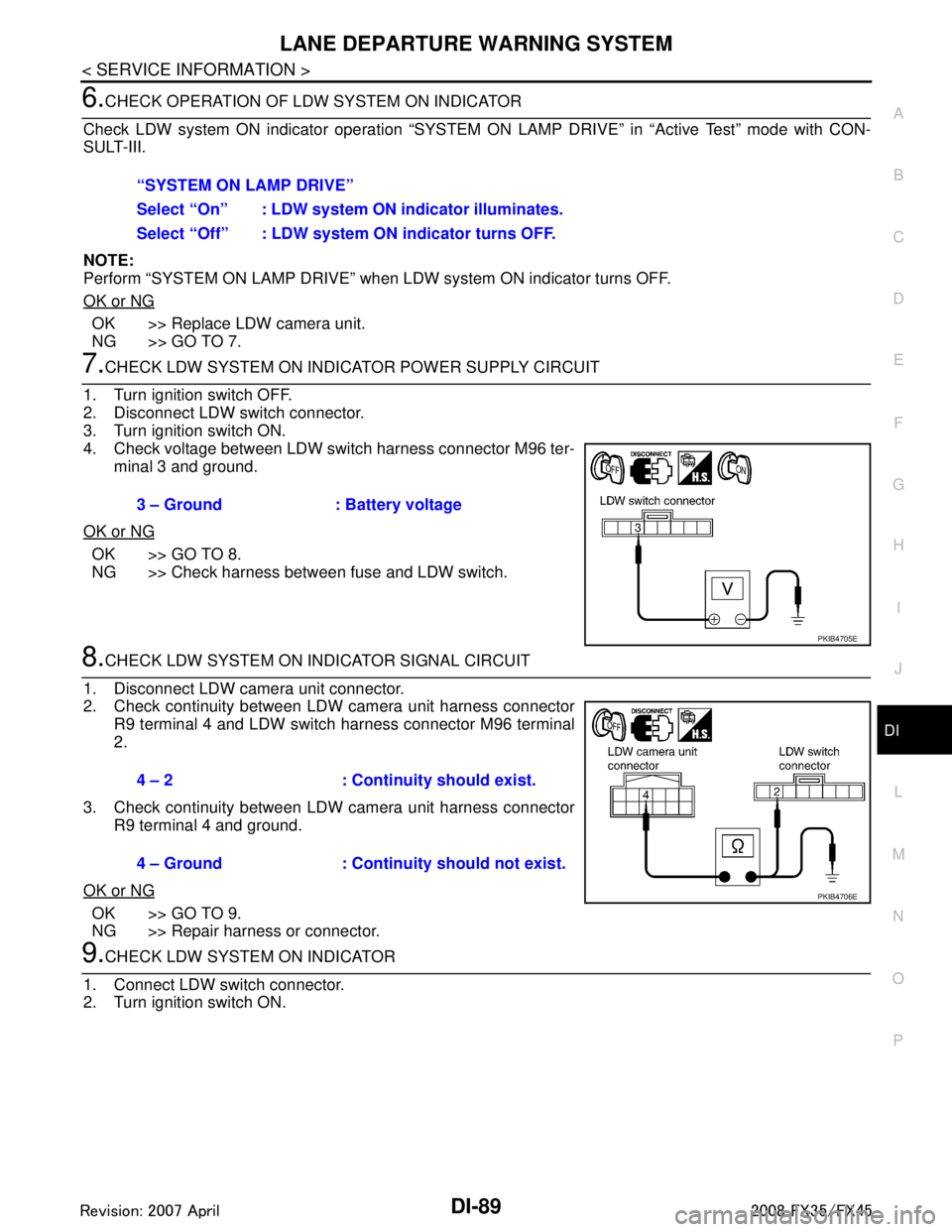
4. Check voltage between LDW switch harness connector M96 ter- minal 3 and ground.
OK or NG
OK >> GO TO 8.
NG >> Check harness between fuse and LDW switch.
8.CHECK LDW SYSTEM ON INDICATOR SIGNAL CIRCUIT
1. Disconnect LDW camera unit connector.
2. Check continuity between LDW camera unit harness connector R9 terminal 4 and LDW switch harness connector M96 terminal
2.
3. Check continuity between LDW camera unit harness connector R9 terminal 4 and ground.
OK or NG
OK >> GO TO 9.
NG >> Repair harness or connector.
9.CHECK LDW SYSTEM ON INDICATOR
1. Connect LDW switch connector.
2. Turn ignition switch ON. “SYSTEM ON LAMP DRIVE”
Select “On” : LDW system ON
indicator illuminates.
Select “Off” : LDW system ON indicator turns OFF.
3 – Ground : Battery voltage
PKIB4705E
4 – 2 : Continuity should exist.
4 – Ground : Continuity should not exist.
PKIB4706E
3AA93ABC3ACD3AC03ACA3AC03AC63AC53A913A773A893A873A873A8E3A773A983AC73AC93AC03AC3
3A893A873A873A8F3A773A9D3AAF3A8A3A8C3A863A9D3AAF3A8B3A8C
Page 1216 of 3924
DI-90
< SERVICE INFORMATION >
LANE DEPARTURE WARNING SYSTEM
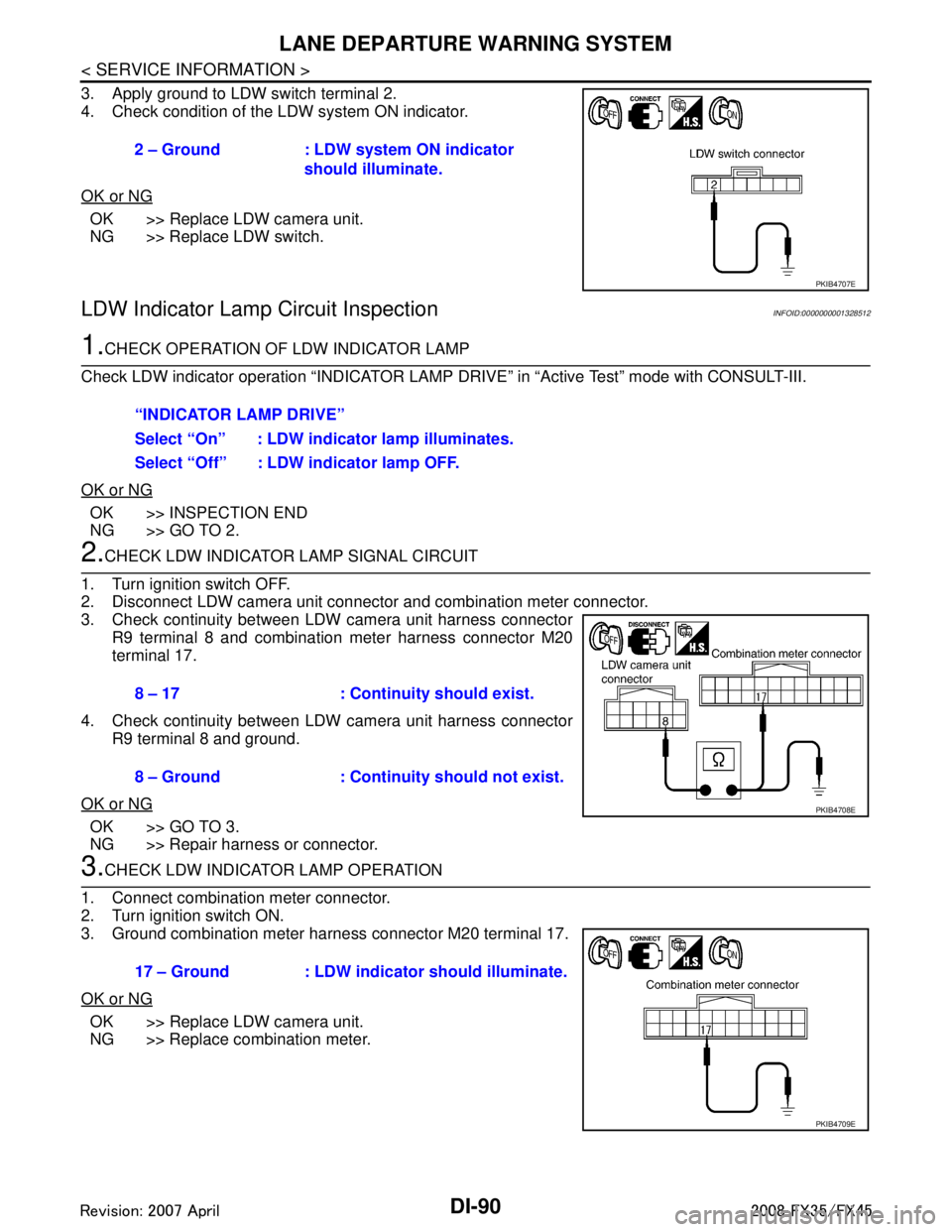
3. Apply ground to LDW switch terminal 2.
4. Check condition of the LDW system ON indicator.
OK or NG
OK >> Replace LDW camera unit.
NG >> Replace LDW switch.
LDW Indicator Lamp Circuit InspectionINFOID:0000000001328512
1.CHECK OPERATION OF LDW INDICATOR LAMP
Check LDW indicator operation “INDICATOR LAMP DR IVE” in “Active Test” mode with CONSULT-III.
OK or NG
OK >> INSPECTION END
NG >> GO TO 2.
2.CHECK LDW INDICATOR LAMP SIGNAL CIRCUIT
1. Turn ignition switch OFF.
2. Disconnect LDW camera unit connector and combination meter connector.
3. Check continuity between LDW camera unit harness connector R9 terminal 8 and combination meter harness connector M20
terminal 17.
4. Check continuity between LDW camera unit harness connector R9 terminal 8 and ground.
OK or NG
OK >> GO TO 3.
NG >> Repair harness or connector.
3.CHECK LDW INDICATOR LAMP OPERATION
1. Connect combination meter connector.
2. Turn ignition switch ON.
3. Ground combination meter harness connector M20 terminal 17.
OK or NG
OK >> Replace LDW camera unit.
NG >> Replace combination meter. 2 – Ground : LDW system ON indicator
should illuminate.
PKIB4707E
“INDICATOR LAMP DRIVE”
Select “On” : LDW indicator lamp illuminates.
Select “Off” : LDW indicator lamp OFF.
8 – 17 : Continuity should exist.
8 – Ground : Continuity should not exist.
PKIB4708E
17 – Ground : LDW indicator should illuminate.
PKIB4709E
3AA93ABC3ACD3AC03ACA3AC03AC63AC53A913A773A893A873A873A8E3A773A983AC73AC93AC03AC3
3A893A873A873A8F3A773A9D3AAF3A8A3A8C3A863A9D3AAF3A8B3A8C
Page 1226 of 3924

DI-100
< SERVICE INFORMATION >
REAR VIEW MONITOR
REAR VIEW MONITOR
System DescriptionINFOID:0000000001328529
The rear view monitor is equipped to check the rearward of the vehicle with display when A/T selector leveris in reverse position.
The lines of vehicle sides and the distance from the rear end of the vehicle are provided on display as a
guide. It allows the driver to know the distance bet ween the vehicle and a rearward object, and the width of
the vehicle much easier.
POWER SUPPLY AND GROUND
Power is supplied at all time
through 10A fuse [No. 19, located in fuse block (J/B)]
to rear view camera control unit terminal 1.
When ignition switch is in ACC or ON position, power is supplied
through 10A fuse [No. 6, located in fuse block (J/B)]
to rear view camera control unit terminal 2.
When ignition switch is in ON or START position, power is supplied
through 10A fuse (No. 83, located in IPDM E/R)
to back-up lamp relay terminals 1 and 3.
Ground is supplied
to rear view camera control unit terminal 3
through grounds M35, M45 and M85.
AV COMMUNICATION LINE
Rear view camera control unit is connected to the foll owing units with AV communication line. Each unit trans-
mits/receives data with AV communication line.
NAVI control unit
Display
Display control unit
A/C and AV switch
REAR VIEW CAMERA OPERATION
When A/T selector lever is reverse position, power is supplied
through back-up lamp relay terminal 2
to TCM terminal 7.
Then back-up lamp relay is energized,
from back-up lamp relay terminal 5
to rear view camera control unit terminal 4.
Then, rear view camera control unit is sent camera ON signal
through rear view camera control unit terminal 8
to rear view camera terminal 1.
An image taken by rear view camera is sent
through rear view camera terminals 3 and 4
to rear view camera control unit terminals 10 and 9.
Then an image is sent
through rear view camera control unit terminals 12 and 14
to the display terminals 15 and 16.
An image of rear view will be projected on the display.
Side Distance Guideline
When A/T selector lever is in reverse position, rear view camera control unit is sent rear view camera guideline
image
through rear view camera control unit terminals 12 and 14
to the display terminals 15 and 16.
Rear view camera guideline will be projected on the display.
Display shows image from rear view camera image and rear view camera guideline.
3AA93ABC3ACD3AC03ACA3AC03AC63AC53A913A773A893A873A873A8E3A773A983AC73AC93AC03AC3
3A893A873A873A8F3A773A9D3AAF3A8A3A8C3A863A9D3AAF3A8B3A8C
Page 1232 of 3924

DI-106
< SERVICE INFORMATION >
REAR VIEW MONITOR
Terminal and Reference Value for Rear View Camera Control Unit
INFOID:0000000001328533
CONSULT-III Function (REARVIEW CAMERA)INFOID:0000000001328534
CONSULT-III can display each diagnostic item using the diagnostic test modes shown following.
WORK SUPPORT
Te r m i n a l s
Item Condition
Reference value
Te r m i n a l
No. Wire
color Ignition
switch Operation
1 R/W Battery power supply OFF — Battery voltage
2 LG Ignition power supply ACC — Battery voltage
3 B Ground ON — Approx. 0 V
4 OR Reverse signal input ON A/T selector lever R range posi-
tion
Battery voltage
A/T selector lever in other than
R range position Approx. 0 V
5 G/Y CONTROL 1 ON — Approx. 0 V
6PUDDL — — —
8 R/W Camera power output ON A/T selector lever R range posi-
tion
Approx. 6 V
9 — Camera image input (–) ON — Approx. 0 V
10 W Camera image input (+) ON A/T selector lever R range posi-
tion
11 — Shield ground — — —
12 L Composite image output ON A/T selector lever R range posi-
tion
14 R Composite image synchroni-
zation signal output ONA/T selector lever R range posi-
tion
SKIA4894E
SKIA4896E
SKIA5896E
System Diagnosis mode Description
REARVIEW CAMERA Work Support
It can adjust the side distance guidelines which overlap the rear view monitor im-
age.
Data Monitor Displays rear view camera control unit input data in real time.
Ecu Identification Displays part number of rear view camera control unit.
3AA93ABC3ACD3AC03ACA3AC03AC63AC53A913A773A893A873A873A8E3A773A983AC73AC93AC03AC3
3A893A873A873A8F3A773A9D3AAF3A8A3A8C3A863A9D3AAF3A8B3A8C
Page 1234 of 3924

DI-108
< SERVICE INFORMATION >
REAR VIEW MONITOR
6. Select “SAVE”, and confirm the guide line.
7. Select “End”.
8. Select “ADJ GUIDELINE POSITION”.
9. Adjust the guide line selecting “X UP”, “X DOWN”, “Y UP” or “Y DOWN” so that the corrected line can fit
the guide line.
10. Touch “SAVE”, and confirm the guide line.
11. Touch “End” to finish correcting.
Power Supply and Ground Circuit InspectionINFOID:0000000001328536
1.CHECK FUSE
Make sure the fuses for rear view camera control unit is blown.
OK or NG
OK >> GO TO 2.
NG >> Be sure to eliminate cause of malfunction before installing new fuse. Refer to PG-3
.
2.CHECK POWER SUPPLY CIRCUIT
Check voltage between rear view camera control unit harness con-
nector M48 terminals 1, 2 and ground.
OK or NG
OK >> GO TO 3.
NG >> Check harness between rear view camera control unit and fuse.
3.CHECK REAR VIEW CAMERA CONTROL UNIT GROUND CIRCUIT
1. Turn ignition switch OFF.
2. Disconnect rear view camera control unit connector.
3. Check continuity between rear view camera control unit harness connector M48 terminal 3 and ground.
OK or NG
OK >> INSPECTION END
NG >> Repair harness or connector.
Rear View Is Not Displayed with the A/T Selector Lever in R-PositionINFOID:0000000001328537
1.BACK-UP LAMP INSPECTION
1. Turn ignition switch ON.
2. Shift A/T selector lever to R position.
Does back-up lamp illuminate?
Power source Fuse No.
Battery power supply 19 ACC power supply 6
Te r m i n a l s OFF ACC
(+)
(–)
Connector Terminal
M48 1 Ground Battery voltage Battery voltage
2 Ground 0 V Battery voltage
PKIB3580E
3 – Ground : Continuity should exist.
SKIA5081E
3AA93ABC3ACD3AC03ACA3AC03AC63AC53A913A773A893A873A873A8E3A773A983AC73AC93AC03AC3
3A893A873A873A8F3A773A9D3AAF3A8A3A8C3A863A9D3AAF3A8B3A8C
Page 1235 of 3924

REAR VIEW MONITORDI-109
< SERVICE INFORMATION >
C
DE
F
G H
I
J
L
M A
B
DI
N
O P
YES >> GO TO 2.
NO >> Check back-up lamp system. Refer to LT-116, "
Wiring Diagram - BACK/L -" in LT section.
2.CHECK REVERSE POSITION INPUT SIGNAL
With CONSULT-III
1. Select “Data Monitor” of “REARVIEW CAMERA”.
2. Operate ignition switch with “R POSI SIG” of “Data Monitor” and check operate status.
Without CONSULT-III
1. Turn ignition switch OFF.
2. Disconnect rear view camera control unit connector.
3. Turn ignition switch ON.
4. Shift A/T selector lever to R position.
5. Check voltage between rear view camera control unit harness
connector M48 terminal 4 and ground.
OK or NG
OK >> GO TO 3.
NG >> Check harness between rear view camera control unit and back-up lamp relay.
3.CHECK DISPLAY CONTROL UNIT OUTPUT SIGNAL
1. Turn ignition switch OFF.
2. Disconnect rear view camera control unit connector.
3. Turn ignition switch ON.
4. Check voltage between rear view camera control unit harness connector M48 terminal 5 and ground.
OK or NG
OK >> GO TO 5.
NG >> GO TO 4.
4.CHECK DISPLAY CO NTROL UNIT CIRCUIT
1. Turn ignition switch OFF.
2. Disconnect display control unit connector.
3. Check continuity between rear view camera control unit harness connector M48 terminal 5 and display control unit harness con-
nector M75 terminal 8.
4. Check continuity between rear view camera control unit harness connector M48 terminal 5 and ground.
OK or NG
OK >> Replace display control unit.
NG >> Repair harness or connector.
5.CHECK CONTROL 1 SIGNAL
1. Turn ignition switch OFF.
2. Connect rear view camera control unit connector. 4 – Ground : Battery voltage
SKIA5086E
5 – Ground : Approx. 5 V
SKIA7148E
5 – 8 : Continuity should exist.
5 – Ground : Continuity should not exist.
SKIA7149E
3AA93ABC3ACD3AC03ACA3AC03AC63AC53A913A773A893A873A873A8E3A773A983AC73AC93AC03AC3
3A893A873A873A8F3A773A9D3AAF3A8A3A8C3A863A9D3AAF3A8B3A8C
Page 1236 of 3924
DI-110
< SERVICE INFORMATION >
REAR VIEW MONITOR
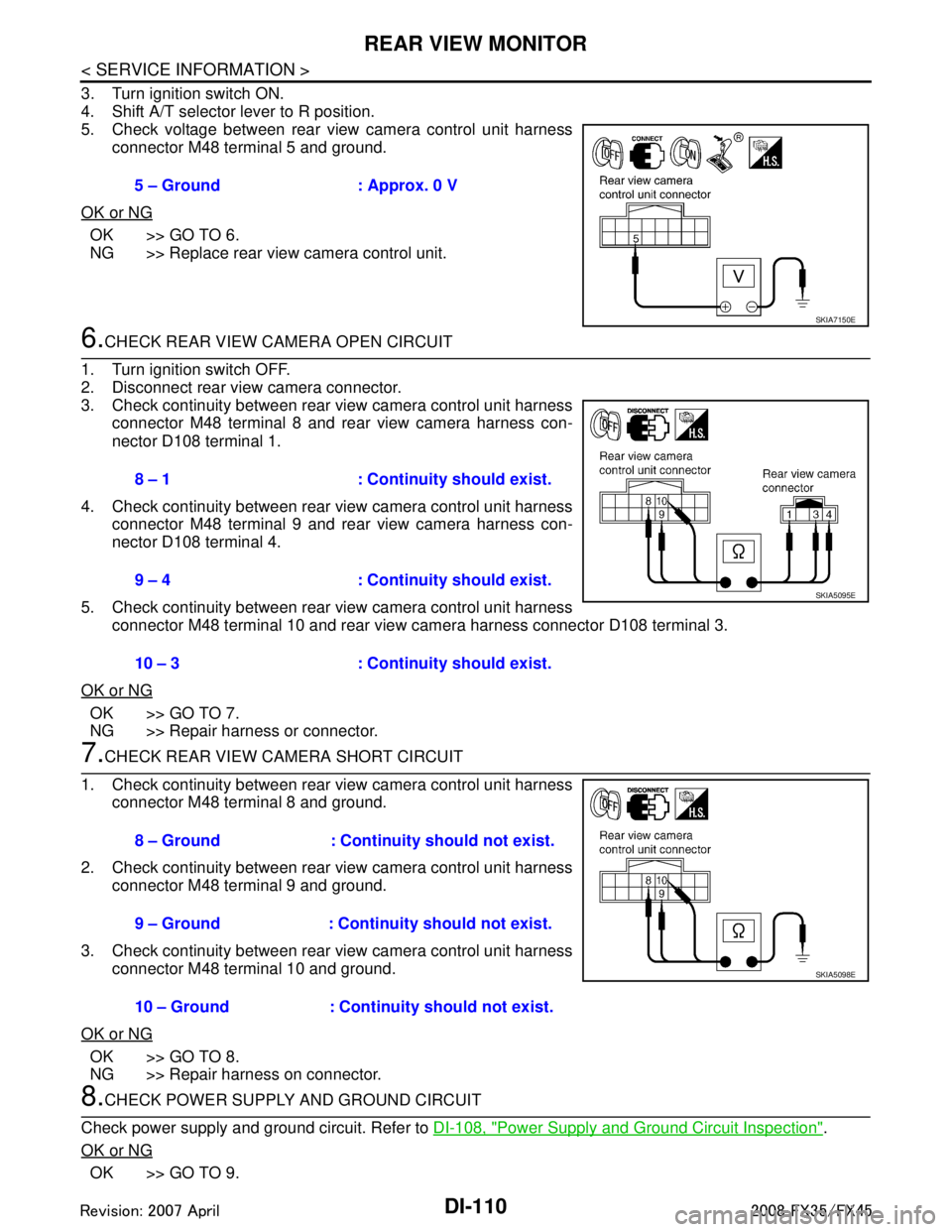
3. Turn ignition switch ON.
4. Shift A/T selector lever to R position.
5. Check voltage between rear view camera control unit harnessconnector M48 terminal 5 and ground.
OK or NG
OK >> GO TO 6.
NG >> Replace rear view camera control unit.
6.CHECK REAR VIEW CAMERA OPEN CIRCUIT
1. Turn ignition switch OFF.
2. Disconnect rear view camera connector.
3. Check continuity between rear view camera control unit harness connector M48 terminal 8 and rear view camera harness con-
nector D108 terminal 1.
4. Check continuity between rear view camera control unit harness connector M48 terminal 9 and rear view camera harness con-
nector D108 terminal 4.
5. Check continuity between rear view camera control unit harness connector M48 terminal 10 and rear view ca mera harness connector D108 terminal 3.
OK or NG
OK >> GO TO 7.
NG >> Repair harness or connector.
7.CHECK REAR VIEW CAMERA SHORT CIRCUIT
1. Check continuity between rear view camera control unit harness connector M48 terminal 8 and ground.
2. Check continuity between rear view camera control unit harness connector M48 terminal 9 and ground.
3. Check continuity between rear view camera control unit harness connector M48 terminal 10 and ground.
OK or NG
OK >> GO TO 8.
NG >> Repair harness on connector.
8.CHECK POWER SUPPLY AND GROUND CIRCUIT
Check power supply and ground circuit. Refer to DI-108, "
Power Supply and Ground Circuit Inspection".
OK or NG
OK >> GO TO 9. 5 – Ground : Approx. 0 V
SKIA7150E
8 – 1 : Continuity should exist.
9 – 4 : Continuity should exist.
10 – 3 : Continuity should exist.
SKIA5095E
8 – Ground : Continuity should not exist.
9 – Ground : Continuity should not exist.
10 – Ground : Continuity should not exist.
SKIA5098E
3AA93ABC3ACD3AC03ACA3AC03AC63AC53A913A773A893A873A873A8E3A773A983AC73AC93AC03AC3
3A893A873A873A8F3A773A9D3AAF3A8A3A8C3A863A9D3AAF3A8B3A8C