alarm INFINITI FX35 2008 Service Manual
[x] Cancel search | Manufacturer: INFINITI, Model Year: 2008, Model line: FX35, Model: INFINITI FX35 2008Pages: 3924, PDF Size: 81.37 MB
Page 727 of 3924
BCM (BODY CONTROL MODULE)BCS-7
< SERVICE INFORMATION >
C
DE
F
G H
I
J
L
M A
B
BCS
N
O P
- Door lock/unlock switch
- Front door switch (driver side, passenger side)
- Rear door switch (LH, RH)
- Back door opener switch
- Combination switch (passing, lighting switch 1ST position, front fog lamp)
- Key fob (lock/unlock signal)
- Key cylinder switch
When control performed only by BCM is required by switch, it shifts to CAN communication inactive mode.
Operation mode of combination switch reading function is changed.
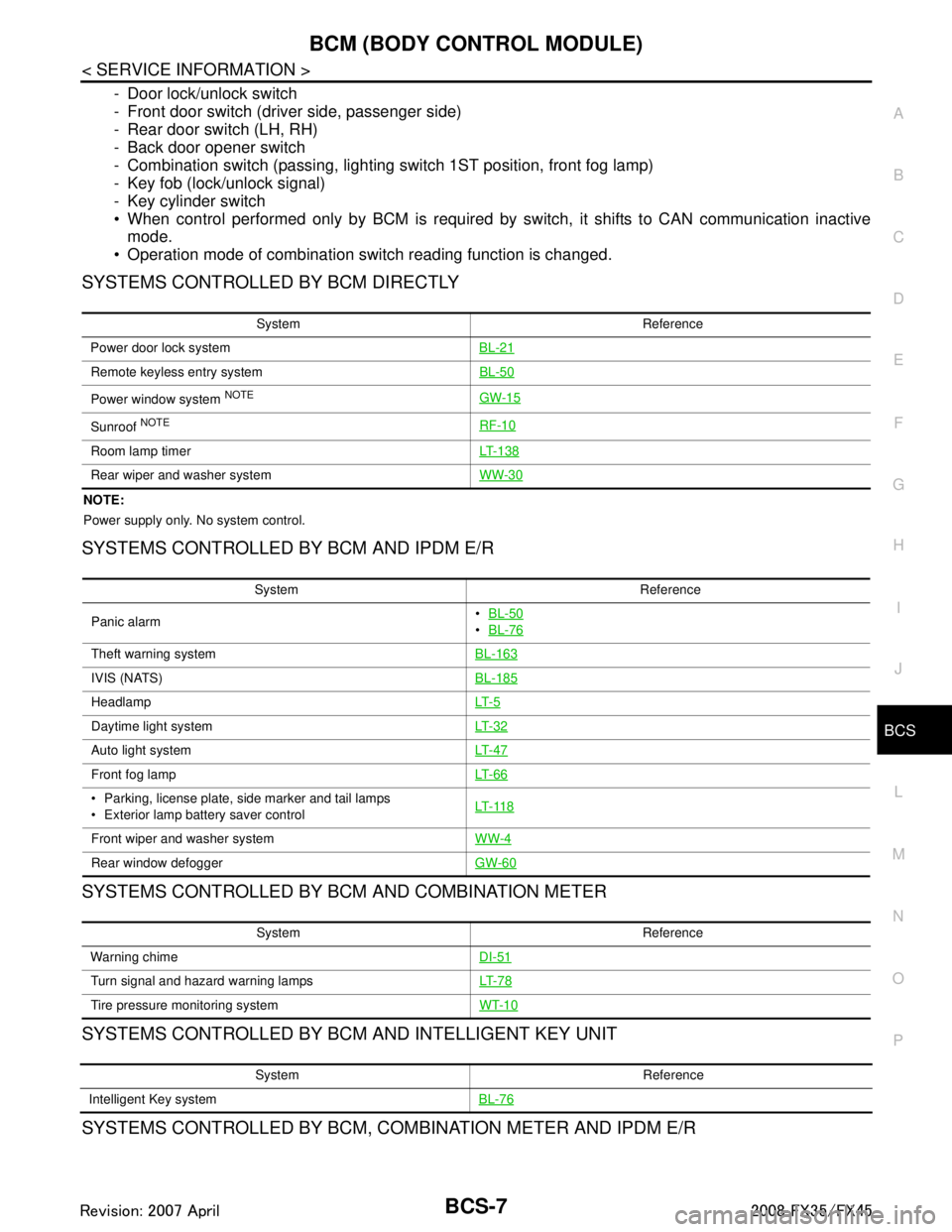
SYSTEMS CONTROLLED BY BCM DIRECTLY
NOTE:
Power supply only. No system control.
SYSTEMS CONTROLLED BY BCM AND IPDM E/R
SYSTEMS CONTROLLED BY BCM AND COMBINATION METER
SYSTEMS CONTROLLED BY BCM AND INTELLIGENT KEY UNIT
SYSTEMS CONTROLLED BY BCM, CO MBINATION METER AND IPDM E/R
System Reference
Power door lock system BL-21
Remote keyless entry systemBL-50
Power window system NOTEGW-15
Sunroof NOTERF-10
Room lamp timerLT- 1 3 8
Rear wiper and washer systemWW-30
System Reference
Panic alarm
BL-50
BL-76
Theft warning system BL-163
IVIS (NATS)BL-185
HeadlampLT- 5
Daytime light systemLT- 3 2
Auto light systemLT- 4 7
Front fog lampLT- 6 6
Parking, license plate, side marker and tail lamps
Exterior lamp battery saver control LT- 11 8
Front wiper and washer system
WW-4
Rear window defoggerGW-60
System Reference
Warning chime DI-51
Turn signal and hazard warning lampsLT- 7 8
Tire pressure monitoring systemWT-10
System Reference
Intelligent Key system BL-76
3AA93ABC3ACD3AC03ACA3AC03AC63AC53A913A773A893A873A873A8E3A773A983AC73AC93AC03AC3
3A893A873A873A8F3A773A9D3AAF3A8A3A8C3A863A9D3AAF3A8B3A8C
Page 728 of 3924

BCS-8
< SERVICE INFORMATION >
BCM (BODY CONTROL MODULE)
MAJOR COMPONENTS AND CONTROL SYSTEM
System Reference
Oil pressure warning lamp DI-34
System Input Output
Remote control entry system Key fob All-door locking actuator
Fuel lid Lock actuator
Turn signal lamp (LH, RH)
Combination meter
Intelligent Key system Intelligent Key unit All-door locking actuator
Fuel lid Lock actuator
Turn signal lamp (LH, RH)
Combination meter
Power door lock system Power window main switch
(door lock and unlock switch)
Power window sub switch (passenger side) (door lock and unlock switch) All-door locking actuator
Power supply (IGN) to power window, sunroof Ignition power supply Power window and sunroof system
Power supply (BAT) to power window, sunroof
and power seat Battery power supplyPower window, sunroof system and
power seat
Panic alarm Key switch
Key fobIPDM E/R
Theft warning system All-door switch
Hood switch
Key fob
Power window main switch (door lock and
unlock switch)
Power window sub switch (passenger side) (door lock and unlock switch) IPDM E/R
Security indicator lamp
Auto light system Optical sensor
Combination switch
Ignition switchIPDM E/R
Exterior lamp battery saver control Ignition switch
Combination switchIPDM E/R
Headlamp Combination switch IPDM E/R
Daytime light system Combination meter
ECM
Combination switch
Ignition switchIPDM E/R
Parking, license plate, side marker and tail
lamps Combination switch IPDM E/R
Front fog lamp Combination switch IPDM E/R
Turn signal lamp Combination switch
Ignition switch Turn signal lamp
Combination meter
Hazard lamp Hazard switch Turn signal lamp
Combination meter
Room lamp timer Key switch
Key fob
Power window main switch (door lock and
unlock switch)
Front door switch driver side
All-door switch Interior room lamp
Key warning chime Key switch
Front door switch driver sideCombination meter
(warning buzzer)
3AA93ABC3ACD3AC03ACA3AC03AC63AC53A913A773A893A873A873A8E3A773A983AC73AC93AC03AC3
3A893A873A873A8F3A773A9D3AAF3A8A3A8C3A863A9D3AAF3A8B3A8C
Page 732 of 3924

BCS-12
< SERVICE INFORMATION >
BCM (BODY CONTROL MODULE)
ITEMS OF EACH PART
BCM can perform the following functions for each system.
NOTE:
CONSULT-III displays systems equipped in the vehicle.
×:Applicable
NOTE:
*1: Vehicle with remote keyless entry system display this item.
*2: Vehicle with Intelligent Key system display this item.
*3: This item is displayed, but does not function.
WORK SUPPORT
Display Item List
BCM Diagnostic test item Check item, diagnostic test mode Content
Inspection by part WORK SUPPORT Changes setting of each function.
SELF-DIAG RESULTS BCM performs self-diagnosis of CAN communication.
DATA MONITOR Displays the input data of BCM in real time.
CAN DIAG SUPPORT MNTR
The transmit/receive diagnosis result of CAN communication can be
read.
ACTIVE TEST Gives a drive signal to a load to check the operation.
ECU PART NUMBER ECM part number can be read.
CONFIGURATION (Not be used)
System and item CONSULT-III display Diagnostic test mode (Inspection by part)
WORK SUPPORT DATA MONITOR ACTIVE TEST
BCM BCM ×
Power door lock system DOOR LOCK ×××
Rear window defogger REAR DEFOGGER ××
Warning chime BUZZER ××
Room lamp timer INT LAMP ×××
Remote keyless entry system*
1MULTI REMOTE ENT ×××
Headlamp HEAD LAMP ×××
Wiper WIPER ×××
Turn signal lamp
Hazard lamp FLASHER
××
Blower fan switch signal
A/C switch signal AIR CONDITONER
×
Intelligent Key system*
2INTELLIGENT KEY ×
Combination switch COMB SW ×
NVIS IMMU ××
Room lamp battery saver BATTERY SAVER ×× ×
Trunk lid TRUNK*
3××
Vehicle security system THEFT ALM ×××
Retained power control RETAINED PWR ×××
Oil pressure swit ch SIGNAL BUFFER ××
Low tire pressure warning system AIR PRESSURE MONITOR ×××
Panic system PANIC ALARM ×
3AA93ABC3ACD3AC03ACA3AC03AC63AC53A913A773A893A873A873A8E3A773A983AC73AC93AC03AC3
3A893A873A873A8F3A773A9D3AAF3A8A3A8C3A863A9D3AAF3A8B3A8C
Page 785 of 3924

REMOTE KEYLESS ENTRY SYSTEMBL-51
< SERVICE INFORMATION >
C
DE
F
G H
J
K L
M A
B
BL
N
O P
to BCM terminal 55
through 50A fusible link (letter M, located in the fuse and fusible link box).
to BCM terminal 42
through 15A fuse [No. 22, located in the fuse block (J/B)].
to Horn relay terminal 2
through 15A fuse (No. 34, located in the fuse and fusible link box).
When the key switch is ON (key is inserted in ignition key cylinder), power is supplied
to BCM terminal 37
through key switch terminal 1 and 2
through 15A fuse [No. 22, located in the fuse block (J/B)].
When the ignition switch is ACC or ON, power is supplied
to BCM terminal 11
through 10A fuse [No. 6, located in the fuse block (J/B)].
When the ignition switch is ON or START, power is supplied
to BCM terminal 38
through 15A fuse [No. 1, located in the fuse block (J/B)].
When the front door switch (driver side) is ON (door is OPEN), ground is supplied
to BCM terminal 62
through front door switch (driver side) terminal 1
through front door switch (driver side) case ground.
When the front door switch (passenger side) is ON (door is OPEN), ground is supplied
to BCM terminal 12
through front door switch (passenger side) terminal 1
through front door switch (passenger side) case ground.
When the rear door switch LH is ON (door is OPEN), ground is supplied
to BCM terminal 63
through rear door switch LH terminal 1
through rear door switch LH case ground.
When the rear door switch RH is ON (door is OPEN), ground is supplied
to BCM meter terminal 13
through rear door switch RH terminal 1
through rear door switch RH case ground.
When the back door switch is ON (door is open), ground is supplied
to BCM terminal 58
through back door closure motor (door switch) terminals 7 and 8
through body grounds B15 and B45
Key fob signal is inputted to remote keyless entry receiv er (the antenna of the system is built in remote keyless
entry receiver).
to BCM terminal 20
from remote keyless entry syst em controls operation of the
The remote keyless entry system controls operation of the
power door lock
hazard and horn reminder
auto door lock
panic alarm
keyless power window down (open)
room lamp and key ring illumination
OPERATED PROCEDURE
Power Door Lock Operation
BCM receives a LOCK signal from key fob. BCM locks all doors with input of LOCK signal from key fob.
When an UNLOCK signal is sent from key fob once, driver's door will be unlocked.
Then, if an UNLOCK signal is sent from key fob again within 5 seconds, all other door will be unlocked.
Power door lock operation mode can be changed using “DOOR LOCK-UNLOCK SET” mode in “WORK SUP-
PORT” of “POWER DOOR LOCK SYSTEM”.
Refer to BL-60, "
CONSULT-III Function (BCM)".
Power door lock operation mode can be changed also on the display.
Hazard and Horn Reminder
When the doors are locked or unlocked by key fob, power is supplied to hazard warning lamp and lamp flash
as follows
3AA93ABC3ACD3AC03ACA3AC03AC63AC53A913A773A893A873A873A8E3A773A983AC73AC93AC03AC3
3A893A873A873A8F3A773A9D3AAF3A8A3A8C3A863A9D3AAF3A8B3A8C
Page 786 of 3924

BL-52
< SERVICE INFORMATION >
REMOTE KEYLESS ENTRY SYSTEM
LOCK operation: C mode (flash twice) or S mode (flash twice)
UNLOCK operation: C mode (flash once) or S mode (do not flash)
BCM outputs to IPDM E/R for horn reminder signal as DATA LINE (CAN H line and CAN L line).
The hazard and horn reminder has C mode (horn chirp mode) and S mode (non-horn chirp mode).
Operating function of hazard and horn reminder
Hazard and horn reminder do not operate if any door switch is ON (any door is OPEN).
How to change hazard and horn reminder mode
With CONSULT-III
Hazard and horn reminder can be changed using “MULTI ANSWER BACK SET” mode in “WORK SUPPORT”.
Refer to BL-60, "
CONSULT-III Function (BCM)".
Without CONSULT-III
When LOCK and UNLOCK signals are sent from the key f ob for more than 2 seconds at the same time, the
hazard and horn reminder mode is changed and hazard warn ing lamp flashes and horn sounds as follows:
Auto Door Lock Operation
Auto lock function signal is sent for operation when any of the following signals are not sent within 1 minute
after the unlock signal is sent from the key fob:
when door switch is turned ON for open.
when the key switch is turned ON.
when the lock signal is sent from the key fob.
Auto door lock mode can be changed using “AUT O LOCK SET” mode in “WORK SUPPORT”.
Refer to BL-60, "
CONSULT-III Function (BCM)".
Auto door lock mode can be changed also on the display.
Panic Alarm Operation
When key switch is OFF (when ignition key is not inserted in key cylinder), BCM turns on and off horn and
headlamp intermittently with input of PANIC ALARM signal from key fob.
The alarm automatically turns off after 25 seconds or when BCM receives any signal from key fob.
Panic alarm operation mode can be changed using “P ANIC ALARM SET” mode in “WORK SUPPORT”.
Refer to BL-60, "
CONSULT-III Function (BCM)".
For detailed description, refer to BL-163
.
Keyless Power Window Down (Open) Operation
When key fob unlock switch is turned ON with ignition sw itch OFF, and key fob unlock switch is detected to be
on continuously for 3 seconds, the driver's door and passenger's door power windows are simultaneously
opened.
Power window is operated to open and the operation cont inues as long as the key fob unlock switch is
pressed.
Keyless power window down operation mode can be changed using “PW DOWN SE\
T” mode in “WORK SUP-
PORT”. Refer to BL-60, "
CONSULT-III Function (BCM)"
Room Lamp and Ignition Key Ring Illumination Operation
When the following conditions come:
condition of interior lamp switch is DOOR position;
C mode S mode
Remote controller oper-
ation Lock Unlock Lock Unlock
Hazard warning lamp
flash TwiceOnceTwice —
Horn sound Once — — —
SEL153WA
3AA93ABC3ACD3AC03ACA3AC03AC63AC53A913A773A893A873A873A8E3A773A983AC73AC93AC03AC3
3A893A873A873A8F3A773A9D3AAF3A8A3A8C3A863A9D3AAF3A8B3A8C
Page 794 of 3924

BL-60
< SERVICE INFORMATION >
REMOTE KEYLESS ENTRY SYSTEM
CONSULT-III Function (BCM)
INFOID:0000000001327820
*: Refer to LAN-43, "CAN System Specification Chart".
DATA MONITOR
ACTIVE TEST
BCM diagnosis
position Inspection items and diagnosis mode Description
BCM C/U* Self-diagnosis results Carries out the self-diagnosis.
DATA MONITOR Displays the input data to BCM on real-time basis.
CAN DIAG SUPPORT MNTR
Displays CAN communication system diagnosis, disabled
transmission status, and communication status of each unit
communicated with BCM.
MULTI REMOTE
ENT DATA MONITOR
Displays the input remote keyless entry system data to BCM on
real–time basis.
ACTIVE TEST Gives a drive to a load to check the operation.
WORK SUPPORT Changes the setting for each function.
Monitored Item Description
IGN ON SW Indicates [ON/OFF] condition of ignition switch in ON position.
KEY ON SW Indicates [ON/OFF] condition of key switch.
ACC ON SW Indicates [ON/OFF] condition of ignition switch in ACC position.
KEYLESS LOCK Indicates [ON/OFF] conditio n of lock signal from key fob.
KEYLWSS UNLOCK Indicates [ON/ OFF] condition of unlock signal from key fob.
KEYLESS PANIC Indicates [ON/ OFF] condition of panic signal from key fob.
KEYLESS TRUNK This is disp layed even when it is not equipped.
DOOR SW-DR Indicates [ON/OFF] conditio n of front door switch driver side.
DOOR SW-AS Indicates [ON/OFF] condition of door switch passenger side.
DOOR SW-RR Indicates [ON/OFF] condition of front door switch RH.
DOOR SW-RL Indicates [ON/OFF] condition of door switch LH.
BACK DOOR SW Indicates [ON/OFF] condition of back door switch.
TRUNK OPN MNTR This is displayed even when it is not equipped.
CDL LOCK SW Indicates [ON/OFF] condition of lock signal from door lock and unlock switch.
CDL UNLOCK SW Indicates [ON/OFF] condition of unlock signal from door lock and unlock switch.
RKE LCK-UNLOCK Indicates [ON/OFF] condition of simultaneous signal of lock and unlock from key fob.
RKE KEEP UNLK Indicates [ON/OFF] condition of unlock continuousness signal from key fob.
KEY CYL LK-SW Indicates [ON/OFF] condition of lock signal from door ke y cylinder switch.
KEY CYL UN-SW Indicates [ON/OFF] condition of unlo ck signal from door key cylinder switch.
Te s t I t e m D e s c r i p t i o n
FLASHER This test is able to check right hazard reminder operation. The right hazard lamp turns on when “ON” on CONSULT-III screen is touched.
POWER WINDOW DOWN This test is able to check power window open operation.
The front power windows activate for 10 second
s after “ON” on CONSULT-III screen is touched.
HORN This test is able to check panic alarm and horn reminder operations. The horn activate for 0.5 seconds after “ON” on CONSULT-III screen is touched.
3AA93ABC3ACD3AC03ACA3AC03AC63AC53A913A773A893A873A873A8E3A773A983AC73AC93AC03AC3
3A893A873A873A8F3A773A9D3AAF3A8A3A8C3A863A9D3AAF3A8B3A8C
Page 795 of 3924

REMOTE KEYLESS ENTRY SYSTEMBL-61
< SERVICE INFORMATION >
C
DE
F
G H
J
K L
M A
B
BL
N
O P
WORK SUPPORT
*: Perform this mode always in the state of C mode. Refer to BL-50, "System Description".
Horn Chirp Set*
*: Perform this mode always in the state of C mode. Refer to BL-50, "System Description".
This mode can be changed also on the display.
Hazard Lamp Set*
*: Perform this mode always in the state of C mode. Refer to BL-50, "System Description".
This mode can be changed also on the display.
Multi Answer Back Set
Auto Lock Set
Panic Alarm Set
DOOR LOCK This test is able to check door lock actuator operation. The all door lock actuator are locked when “ALL LOCK” on CONSULT-III screen is touched.
The all door lock actuator are unlocked when “ALL UNLOCK” on CONSULT-III screen is touched.
The door lock actuator (driver side) is unlocked when “DR UNLOCK” on CONSULT-III screen is touched.
The all door lock actuator (except driver side) are unlocked when “OTHER UNLOCK” on CONSULT- III screen is touched.
TRUNK/BACK DOOR This is displayed even when it is not equipped. Test Item Description
Test Item Description
HORN CHIRP SET* Horn reminder mode can be changed in this mode. The horn reminder mode will be changed
when “CHANGE SETT” on CONSULT-III screen is touched.
HAZARD LAMP SET* Hazard reminder mode can be changed in this mode. The hazard reminder mode will be
changed when “CHANGE SETT” on
CONSULT-III screen is touched.
MULTI ANSWER BACK SET Hazard and horn reminder mode can be changed in this mode. The hazard and horn remind-
er mode will be changed when “CHANGE SETT” on CONSULT-III screen is touched.
AUTO LOCK SET Auto locking function mode can be changed in this mode. The function mode will be changed
when “CHANGE SETT” on CONSULT-III screen is touched.
PANIC ALRM SET Panic alarm operation mode can be changed in this mode. The operation mode will be
changed when “CHANGE SETT” on
CONSULT-III screen is touched.
PW DOWN SET Keyless power window down (open) operation mode can be changed in this mode. The op-
eration mode will be changed when“CHANGE SETT” on CONSULT-III screen is touched.
Horn chirp function ON OFF
MODE1 MODE2 MODE3 MODE4
Hazard lamp operation mode Nothing Unlock only Lock only Lock and Unlock
MODE 1
(C mode) MODE 2
(S mode)
Key fob operation Lock Unlock Lock Unlock
Hazard warning lamp flash Twice Once Twice —
Horn sound Once ———
MODE 1 MODE 2 MODE 3
Auto locking function 1 minutes Nothing 5 minutes
MODE 1 MODE 2 MODE 3
Key fob operation 0.5 seconds Nothing 1.5 seconds
3AA93ABC3ACD3AC03ACA3AC03AC63AC53A913A773A893A873A873A8E3A773A983AC73AC93AC03AC3
3A893A873A873A8F3A773A9D3AAF3A8A3A8C3A863A9D3AAF3A8B3A8C
Page 797 of 3924
REMOTE KEYLESS ENTRY SYSTEMBL-63
< SERVICE INFORMATION >
C
DE
F
G H
J
K L
M A
B
BL
N
O P
Check Key Fob Battery and FunctionINFOID:0000000001327823
1.CHECK KEY FOB BATTERY
1. Remove key fob battery. Refer to BL-75, "
Key Fob Battery Replacement".
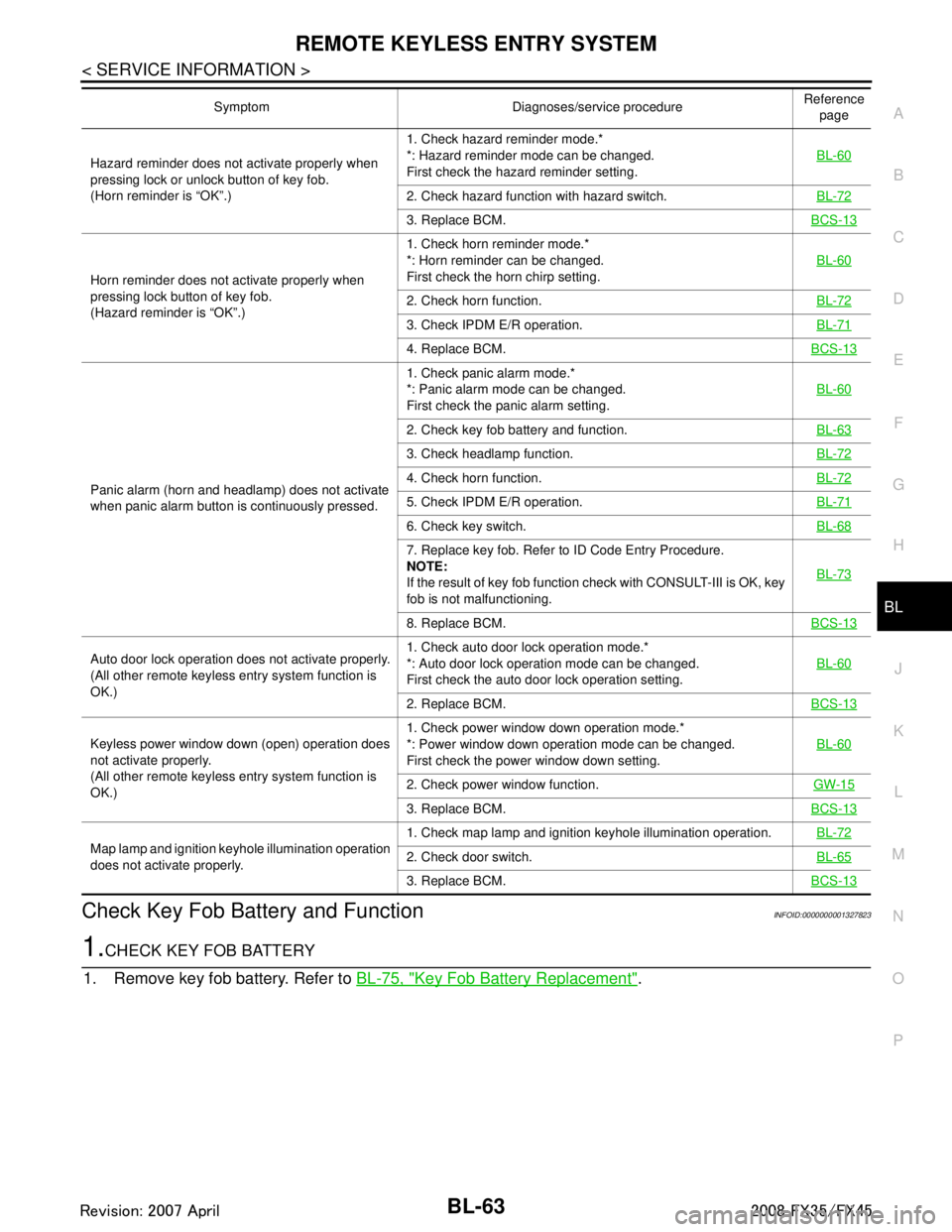
Hazard reminder does not activate properly when
pressing lock or unlock button of key fob.
(Horn reminder is “OK”.) 1. Check hazard reminder mode.*
*: Hazard reminder mode can be changed.
First check the hazard reminder setting.
BL-60
2. Check hazard function with hazard switch.
BL-72
3. Replace BCM.BCS-13
Horn reminder does not activate properly when
pressing lock button of key fob.
(Hazard reminder is “OK”.)1. Check horn reminder mode.*
*: Horn reminder can be changed.
First check the horn chirp setting.
BL-60
2. Check horn function.
BL-72
3. Check IPDM E/R operation.BL-71
4. Replace BCM.BCS-13
Panic alarm (horn and headlamp) does not activate
when panic alarm button is continuously pressed.1. Check panic alarm mode.*
*: Panic alarm mode can be changed.
First check the panic alarm setting.
BL-60
2. Check key fob battery and function.
BL-63
3. Check headlamp function.BL-72
4. Check horn function.BL-72
5. Check IPDM E/R operation.BL-71
6. Check key switch.BL-68
7. Replace key fob. Refer to ID Code Entry Procedure.
NOTE:
If the result of key fob function check with CONSULT-III is OK, key
fob is not malfunctioning.BL-73
8. Replace BCM.
BCS-13
Auto door lock operation does not activate properly.
(All other remote keyless entry system function is
OK.)1. Check auto door lock operation mode.*
*: Auto door lock operation mode can be changed.
First check the auto door lock operation setting.
BL-60
2. Replace BCM.
BCS-13
Keyless power window down (open) operation does
not activate properly.
(All other remote keyless entry system function is
OK.)1. Check power window down operation mode.*
*: Power window down operation mode can be changed.
First check the power window down setting.
BL-60
2. Check power window function.
GW-15
3. Replace BCM.BCS-13
Map lamp and ignition keyhole illumination operation
does not activate properly.1. Check map lamp and ignition keyhole illumination operation.
BL-722. Check door switch.BL-65
3. Replace BCM.BCS-13
Symptom Diagnoses/service procedure Reference
page
3AA93ABC3ACD3AC03ACA3AC03AC63AC53A913A773A893A873A873A8E3A773A983AC73AC93AC03AC3
3A893A873A873A8F3A773A9D3AAF3A8A3A8C3A863A9D3AAF3A8B3A8C
Page 814 of 3924

BL-80
< SERVICE INFORMATION >
INTELLIGENT KEY SYSTEM
door switch OFF (when all the doors are closed);
Remote control button of Intelligent Key turns on interior lamp (for 30 seconds) with input of UNLOCK signal
from Intelligent Key.
Panic Alarm Function
When key switch is OFF and ignition knob is not pushed (when mechanical key is not inserted in ignition
knob), BCM turns ON and OFF horn and headlamp intermit tently with input of PANIC ALARM signal from
Intelligent Key. The alarm automatically turns off after 25 seconds or when Intelligent Key unit receives any
signal from Intelligent Key.
Panic alarm operation mode can be changed using “WORK SUPPORT” mode in “PANIC ALARM DELAY”.
Refer to BL-104, "
CONSULT-III Application Item".
Remote Control Power Window Down (Open) Operation
When Intelligent Key unlock switch is turned ON with i gnition switch OFF, and Intelligent Key unlock switch is
detected to be on continuously for 3 seconds, the driver's door and passenger's door power windows are
simultaneously opened.
Power window is operated to open and the operation continues as long as the Intelligent Key unlock switch is
pressed.
Remote control power window down operation mode can be changed using “P/W DOWN DELAY” mode in
“WORK SUPPORT”. Refer to BL-104, "
CONSULT-III Application Item".
Key Reminder Function
As an operation verification function, when doors are lock ed or unlocked using Intelligent Key remote control-
ler button operation, hazard lamps flash and horn sounds.
ENGINE STARTUP FUNCTION
Operation Description
When ignition knob is pressed, Intelligent Key unit sends request signal from inside key antenna, key-ID ver- ification is conducted with Intelligent Key using two-wa y communication, and if verification is successful, an
ignition rotation prohibition latch release signal is sent to steering lock unit. Steering lock unit releases igni-
tion knob rotation prohibition latch. (Ignition knob can now be turned.)
When it becomes possible to rotate the ignition knob, “KEY” warning lamp in combination meter lights up green to notify driver that ignition knob can be turned.
NOTE:
When it becomes impossible to rotate the ignition knob, “KEY” warning lamp in combination meter lights up
red.
When key-ID verification is successful and ignition knob switch is in the ON state, Intelligent Key unit uses CAN communication to send engine start permission signal to BCM.
When BCM receives engine start permission signal, it uses CAN communication to sent starter request sig-
nal to IPDM E/R so that the engine will start when ignition knob is rotated to START position.
Operation Range
Engine can be started when Intelligent Key is in the v ehicle. However, sometimes engine might not start when
Intelligent Key is on instrument panel, rear parcel shelf, or in glove box.
NOTE:
luggage room can enable detection of Intelligent Key by a CONSULT-III function. Refer to BL-104, "
CON-
SULT-III Application Item".
Active Check Function
Confirm whether or not ignition knob can be rotated by checking the color of warning lamp in combination
meter.
WARNING AND ALARM FUNCTION
Vehicle operation Hazard lamp Horn
Door unlocking operation Once —
Door locking operation Twice Once
Condition Operation
Ignition knob rotation possib le “KEY” warning lamp in combin ation meter is lit up green.
Ignition rotation not possibl e “KEY” warning lamp in combin ation meter is lit up red.
3AA93ABC3ACD3AC03ACA3AC03AC63AC53A913A773A893A873A873A8E3A773A983AC73AC93AC03AC3
3A893A873A873A8F3A773A9D3AAF3A8A3A8C3A863A9D3AAF3A8B3A8C
Page 815 of 3924

INTELLIGENT KEY SYSTEMBL-81
< SERVICE INFORMATION >
C
DE
F
G H
J
K L
M A
B
BL
N
O P
Operation Description
The warnings and alarms are as follows and are given to the user as warning information and warnings using
combinations of Intelligent Key warning buzzer (in
driver door and passenger door), inside vehicle buzzer (in
combination meter), and warning lamps “KEY” and “LOCK.”
Ignition switch return forgotten warning
With the ignition in OFF or ACC position, if the driver door is opened, this warning is issued.
Selector lever return forgotten warning
With the ignition in OFF position, if the selector leve r is in except “P” position, this warning is issued.
Key left in ignition warning (when mechanical key used) With the mechanical key in the ignition knob and the igniti on switch is in the OFF, ACC, or LOCK position, if
the driver door is opened, this warning is issued.
Ignition switch OFF position warning (for inside car: when door closed) This warning is issued when the user forgets to return the ignition knob to the LOCK position.
Ignition switch OFF position warning (for outside car: when door opened/closed)
This warning is issued when the user leaves the car without returning the ignition knob to the LOCK position.
Warning for removal of Intelligent Key to outside the car (when door open/closed) This warning is issued if the Intelligent Key is taken outside the car while the engine is running.
Warning for removal of Intelligent Key to outside the car (from window) This warning is issued if the Intelligent Key is taken outside the car through a window while the engine is run-
ning.
Door lock non-operation warning This warning is issued if the door lock (lock) operation by a door request switch is not effected.
Intelligent Key low battery warning
This warning is issued when it is detected that the battery in the Intelligent Key has been used up.
Operation Condition
Warning and alarm names Operating conditions (when all the conditions below are met)
Ignition knob return forgotten warn-
ing The ignition switch is in the ACC, OFF, or LOCK position (knob pressed)
The driver door is opened.
Selector lever retu rn forgotten warn-
ing The ignition switch is in the OFF position.
The selector lever is except “P” position.
Ignition key warning
(When mechanical key used) The mechanical key is inserted in the ignition knob (key switch: ON)
The ignition switch is in the ACC, OFF, or LOCK position.
The driver door is opened
Ignition knob OFF position warning
(for inside car: when door closed) The ignition switch is in the OFF or LOCK position (knob pressed)
In the above state, when the ACC switch is changed from ON to OFF and 1 second pass-
es. (However, this warning is not issued if the mechanical key is inserted in the ignition
knob, ignition knob is turned except OFF position or ignition or ignition knob is not
pushed.)
Ignition knob OFF position warning
(for outside car: when door opened/
closed) The ignition switch is in the OFF or LOCK position (knob pressed)
In the above state, when the ACC switch is changed from ON to OFF and 1 second pass-
es. (However, this warning is not issued if the mechanical key is inserted in the ignition
knob, ignition knob is turned except OFF position or ignition or ignition knob is not
pushed.)
Driver door open → closed
Warning for take out of Intelligent
Key to outside the car (when door
open/closed) When Any of the Following Conditions Are Met
When the ignition knob is pressed in so that it can be rotated (or has been rotated), if any
of the doors has been opened, when all the doors are closed, the Intelligent Key unit com-
pares the key-ID with that of the Intelligent Key using the inside key antenna, if the results
of the comparison are NG (the Intelligent Key is not found)
When the ignition knob is pressed in so that it can be rotated (or has been rotated), if any of the doors is open, the Intelligent Key unit compares the key-ID with that of the Intelligent
Key every 5 seconds using the inside key antenna (center console), if the results of the
comparison are NG (the Intelligent Key is not found)
NOTE:
However, this warning is not issued if the mechanical key is inserted in the ignition knob.
3AA93ABC3ACD3AC03ACA3AC03AC63AC53A913A773A893A873A873A8E3A773A983AC73AC93AC03AC3
3A893A873A873A8F3A773A9D3AAF3A8A3A8C3A863A9D3AAF3A8B3A8C