display INFINITI G-CONVERTIBLE 2012 Owners Manual
[x] Cancel search | Manufacturer: INFINITI, Model Year: 2012, Model line: G-CONVERTIBLE, Model: INFINITI G-CONVERTIBLE 2012Pages: 474, PDF Size: 3.63 MB
Page 247 of 474
4-76Monitor, climate, audio, phone and voice recognition systems
REPEAT (RPT), RANDOM (RDM):GUID-D73A39BF-43C8-459F-9C24-47B7F579C407When the RPT·RDM button is pushed while
a track is being played, the play pattern
can be changed as follows:
(Normal)?1 Album Repeat ?1 Track
Repeat ?1 Album Random ?All Random
? (Normal)
Tag Track (models with navigation sys-
tem):
GUID-D73A39BF-43C8-459F-9C24-47B7F579C407Select “Tag Track” key on the screen when
a track is being played. A menu will show
the 5 available playlists. Select one of the
playlists to add the current song to that
playlist. If a playlist is not selectable (text
is grayed out), it means the song already
exists in that playlist.
SAA2516
Models with navigation system
SAA2725
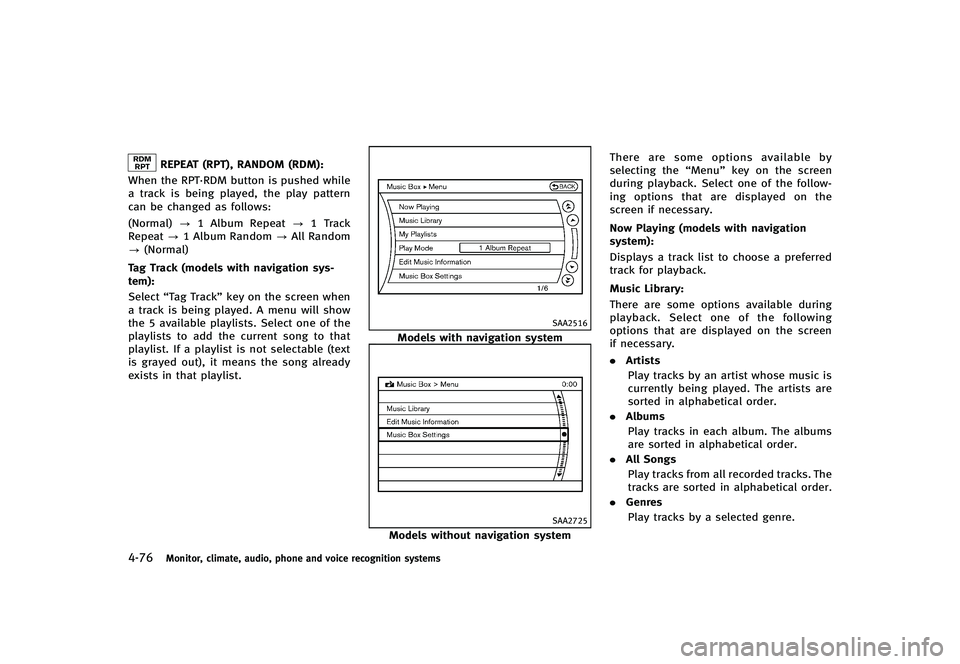
Models without navigation system There are some options available by
selecting the
“Menu”key on the screen
during playback. Select one of the follow-
ing options that are displayed on the
screen if necessary.
Now Playing (models with navigation
system):
GUID-D73A39BF-43C8-459F-9C24-47B7F579C407Displays a track list to choose a preferred
track for playback.
Music Library:
GUID-D73A39BF-43C8-459F-9C24-47B7F579C407There are some options available during
playback. Select one of the following
options that are displayed on the screen
if necessary.
. Artists
Play tracks by an artist whose music is
currently being played. The artists are
sorted in alphabetical order.
. Albums
Play tracks in each album. The albums
are sorted in alphabetical order.
. All Songs
Play tracks from all recorded tracks. The
tracks are sorted in alphabetical order.
. Genres
Play tracks by a selected genre.
Page 248 of 474
My Playlists (models with navigation
system):
GUID-D73A39BF-43C8-459F-9C24-47B7F579C407Displays the Playlist and edits the Playlist
if necessary.
Select the“Edit”key.
The following items are available
. Add Current Songs
Add a current track to the Playlist.
. Add Songs by Album
Displays a list of albums in alphabetical
order. Selecting an album displays all
of the tracks in the album. Select tracks
from the list to add to the Playlist.
. Add Songs by Artist
Displays a list of artists in alphabetical
order. Selecting an artist displays all of
the tracks by the artist. Select tracks
from the list to add to the Playlist.
. Edit Songs Order
Reorder the tracks in the Playlist by
selecting a track and specifying the
order.
. Edit Name
Edit the name of the Playlist using the
keypad displayed on the screen. (See
“How to use INFINITI controller” (P.4-5).).
Delete Songs
Delete tracks in the Playlist by selecting
from the displayed song list.
Play Mode (models with navigation sys-
tem):
GUID-D73A39BF-43C8-459F-9C24-47B7F579C407Choose the preferred play mode from the
following items.
. Normal
. 1 Album Repeat
. 1 Track Repeat
. 1 Playlist Random
. 1 Artist Random
. 1 Album Random
. 1 All Track Random
. 1 All Random
Edit Music Information:
GUID-D73A39BF-43C8-459F-9C24-47B7F579C407Displays the following information about
the Music Box®hard drive/flash memory
to edit if necessary.
. Edit Information of Current Song (mod-
els with navigation system)
Edit the “Track”,“Artist”and“Genre”
information of the current track using
the keypad displayed on the screen.
(See “How to use touch screen (models
with navigation system)” (P.4-5).)
Edit the “Mode”information by select- ing from the list.
. Edit Information by Album (models with
navigation system)
Edit the displayed name and of a
selected album and the track informa-
tion in the album.
. Update Gracenote from USB Device
(models with navigation system)/
Transfer Titles from USB (models with-
out navigation system)
Update the in-vehicle Gracenote Data-
base using a USB memory. Search the
title from a information acquired on the
Internet.
Visit www.InfinitiUSA.com/music-up-
date/ for details.
. Transfer Missing Titles to USB
Transfer the information of an album
recorded without titles to a USB mem-
ory.
Visit www.InfinitiUSA.com/music-up-
date/ for details.
. Update Gracenote from HDD
Search the title using the database on
the hard drive/flash memory.
Monitor, climate, audio, phone and voice recognition systems4-77
Page 249 of 474
4-78Monitor, climate, audio, phone and voice recognition systems
SAA2517
Models with navigation system
SAA2438
Models without navigation system
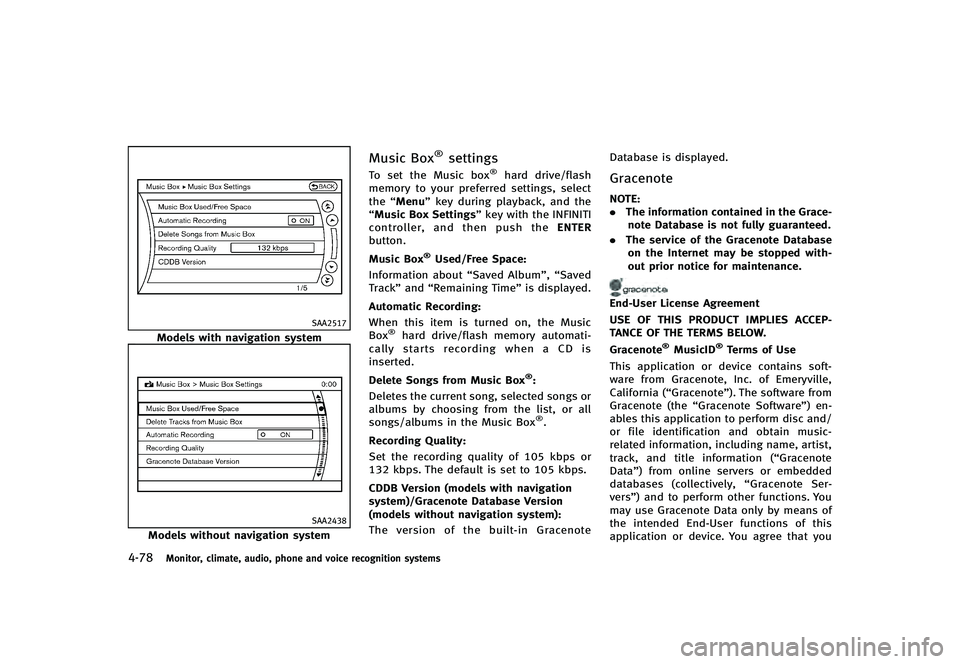
Music Box®settingsGUID-1BDB90BB-BD01-455A-9770-9C72B168C140To set the Music box®hard drive/flash
memory to your preferred settings, select
the “Menu” key during playback, and the
“Music Box Settings” key with the INFINITI
controller, and then push the ENTER
button.
Music Box
®Used/Free Space:GUID-D73A39BF-43C8-459F-9C24-47B7F579C407Information about “Saved Album”,“Saved
Track” and“Remaining Time” is displayed.
Automatic Recording:
GUID-D73A39BF-43C8-459F-9C24-47B7F579C407When this item is turned on, the Music
Box®hard drive/flash memory automati-
cally starts recording when a CD is
inserted.
Delete Songs from Music Box
®:GUID-D73A39BF-43C8-459F-9C24-47B7F579C407Deletes the current song, selected songs or
albums by choosing from the list, or all
songs/albums in the Music Box
®.
Recording Quality:
GUID-D73A39BF-43C8-459F-9C24-47B7F579C407Set the recording quality of 105 kbps or
132 kbps. The default is set to 105 kbps.
CDDB Version (models with navigation
system)/Gracenote Database Version
(models without navigation system):
GUID-D73A39BF-43C8-459F-9C24-47B7F579C407The version of the built-in Gracenote Database is displayed.
GracenoteGUID-74A72B68-B6DB-4D13-893E-4B704A681EBE
NOTE:
.
The information contained in the Grace-
note Database is not fully guaranteed.
. The service of the Gracenote Database
on the Internet may be stopped with-
out prior notice for maintenance.
End-User License Agreement
USE OF THIS PRODUCT IMPLIES ACCEP-
TANCE OF THE TERMS BELOW.
Gracenote
®MusicID®Terms of Use
This application or device contains soft-
ware from Gracenote, Inc. of Emeryville,
California (“Gracenote”). The software from
Gracenote (the “Gracenote Software”) en-
ables this application to perform disc and/
or file identification and obtain music-
related information, including name, artist,
track, and title information (“Gracenote
Data”) from online servers or embedded
databases (collectively, “Gracenote Ser-
vers”) and to perform other functions. You
may use Gracenote Data only by means of
the intended End-User functions of this
application or device. You agree that you
Page 252 of 474
SAA2923
Models with navigation system
SAA2924
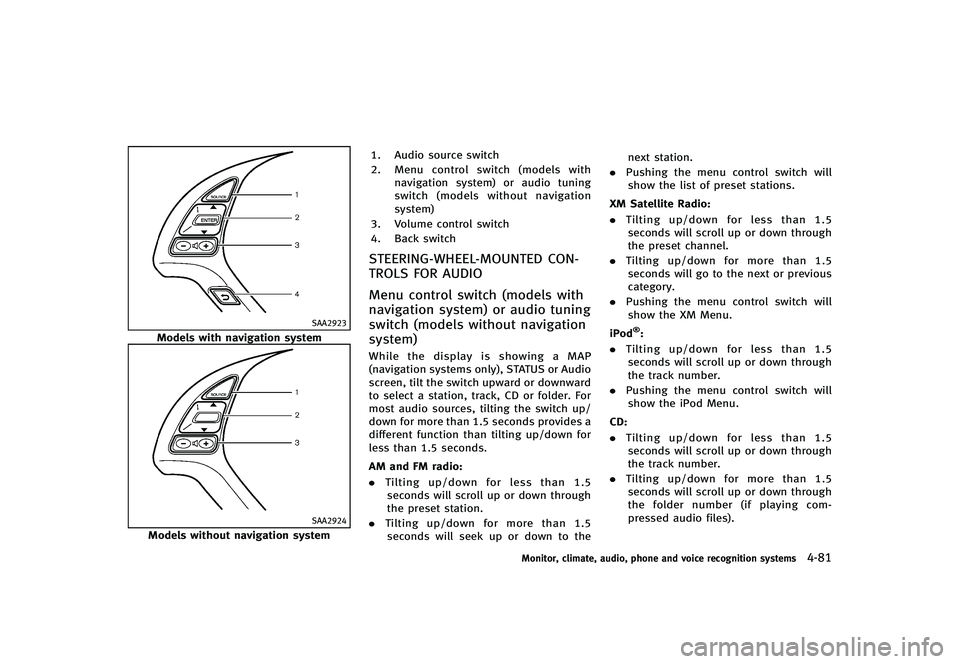
Models without navigation system1. Audio source switch
2.
Menu control switch (models with
navigation system) or audio tuning
switch (models without navigation
system)
3. Volume control switch
4. Back switch
STEERING-WHEEL-MOUNTED CON-
TROLS FOR AUDIO
GUID-4820B186-8980-44B6-9B20-125862858412
Menu control switch (models with
navigation system) or audio tuning
switch (models without navigation
system)
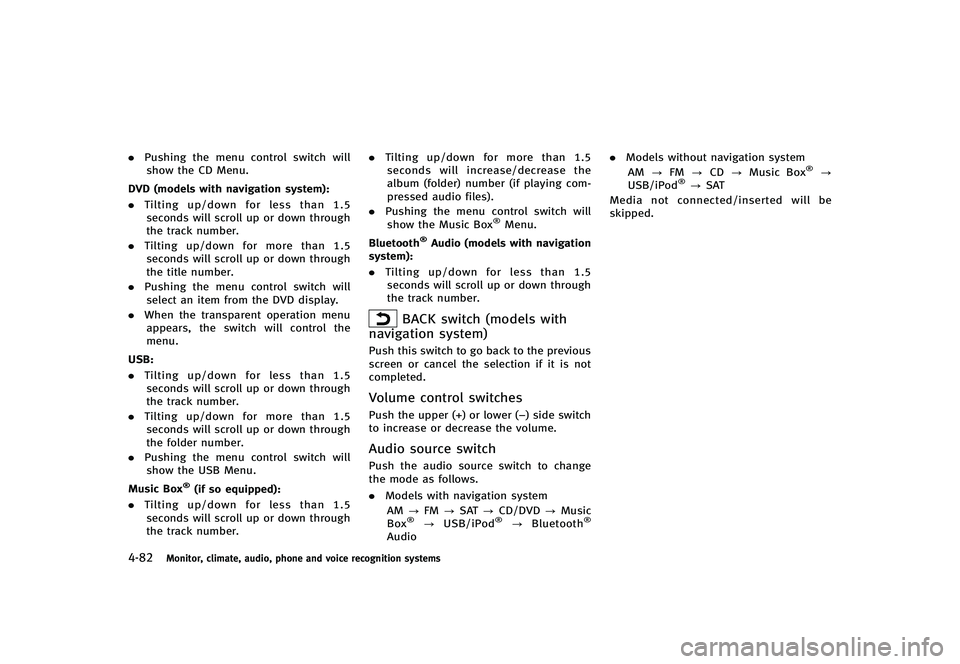
GUID-F3E17E1A-BA75-41FC-85DE-DF431F4DD2A1While the display is showing a MAP
(navigation systems only), STATUS or Audio
screen, tilt the switch upward or downward
to select a station, track, CD or folder. For
most audio sources, tilting the switch up/
down for more than 1.5 seconds provides a
different function than tilting up/down for
less than 1.5 seconds.
AM and FM radio:
GUID-D73A39BF-43C8-459F-9C24-47B7F579C407. Tilting up/down for less than 1.5
seconds will scroll up or down through
the preset station.
. Tilting up/down for more than 1.5
seconds will seek up or down to the next station.
. Pushing the menu control switch will
show the list of preset stations.
XM Satellite Radio:
GUID-D73A39BF-43C8-459F-9C24-47B7F579C407. Tilting up/down for less than 1.5
seconds will scroll up or down through
the preset channel.
. Tilting up/down for more than 1.5
seconds will go to the next or previous
category.
. Pushing the menu control switch will
show the XM Menu.
iPod
®:GUID-D73A39BF-43C8-459F-9C24-47B7F579C407. Tilting up/down for less than 1.5
seconds will scroll up or down through
the track number.
. Pushing the menu control switch will
show the iPod Menu.
CD:
GUID-D73A39BF-43C8-459F-9C24-47B7F579C407. Tilting up/down for less than 1.5
seconds will scroll up or down through
the track number.
. Tilting up/down for more than 1.5
seconds will scroll up or down through
the folder number (if playing com-
pressed audio files).
Monitor, climate, audio, phone and voice recognition systems4-81
Page 253 of 474
4-82Monitor, climate, audio, phone and voice recognition systems
.Pushing the menu control switch will
show the CD Menu.
DVD (models with navigation system):
GUID-D73A39BF-43C8-459F-9C24-47B7F579C407. Tilting up/down for less than 1.5
seconds will scroll up or down through
the track number.
. Tilting up/down for more than 1.5
seconds will scroll up or down through
the title number.
. Pushing the menu control switch will
select an item from the DVD display.
. When the transparent operation menu
appears, the switch will control the
menu.
USB:
GUID-D73A39BF-43C8-459F-9C24-47B7F579C407. Tilting up/down for less than 1.5
seconds will scroll up or down through
the track number.
. Tilting up/down for more than 1.5
seconds will scroll up or down through
the folder number.
. Pushing the menu control switch will
show the USB Menu.
Music Box
®(if so equipped):GUID-D73A39BF-43C8-459F-9C24-47B7F579C407. Tilting up/down for less than 1.5
seconds will scroll up or down through
the track number. .
Tilting up/down for more than 1.5
seconds will increase/decrease the
album (folder) number (if playing com-
pressed audio files).
. Pushing the menu control switch will
show the Music Box
®Menu.
Bluetooth
®Audio (models with navigation
system):
GUID-D73A39BF-43C8-459F-9C24-47B7F579C407. Tilting up/down for less than 1.5
seconds will scroll up or down through
the track number.
BACK switch (models with
navigation system)
GUID-3B07DDA8-CC86-46AC-831F-55C8A05B961APush this switch to go back to the previous
screen or cancel the selection if it is not
completed.
Volume control switchesGUID-04A08ABC-84B0-4775-BD48-9C647A6FB6D1Push the upper (+) or lower (−) side switch
to increase or decrease the volume.
Audio source switchGUID-F00D58E3-398C-40B8-8A4B-ED5342DD00D6Push the audio source switch to change
the mode as follows.
. Models with navigation system
AM ?FM ?SAT ?CD/DVD ?Music
Box
®? USB/iPod®?Bluetooth®
Audio .
Models without navigation system
AM ?FM ?CD ?Music Box
®?
USB/iPod®? SAT
Media not connected/inserted will be
skipped.
Page 256 of 474
tions.
. Set up the wireless connection between
a compatible cellular phone and the in-
vehicle phone module before using the
Bluetooth
®Hands-Free Phone System.
. Some Bluetooth®enabled cellular
phones may not be recognized by the
in-vehicle phone module. Please visit
www.InfinitiUSA.com/bluetooth for a
recommended phone list.
. You will not be able to use a hands-free
phone under the following conditions:
— Your vehicle is outside of the tele-
phone service area.
— Your vehicle is in an area where it is
difficult to receive radio waves; such
as in a tunnel, in an underground
parking garage, behind a tall build-
ing or in a mountainous area.
— Your cellular phone is locked in
order not to be dialed.
. When the radio wave condition is not
ideal or ambient sound is too loud, it
may be difficult to hear the other
person’s voice during a call.
. Immediately after the ignition switch is
pushed to the ON position, it may be
impossible to receive a call for a short
period of time. .
Do not place the cellular phone in an
area surrounded by metal or far away
from the in-vehicle phone module to
prevent tone quality degradation and
wireless connection disruption.
. While a cellular phone is connected
through the Bluetooth®wireless con-
nection, the battery power of the
cellular phone may discharge quicker
than usual.
. If the Bluetooth
®Hands-Free Phone
System seems to be malfunctioning,
please visit www.InfinitiUSA.com/blue-
tooth for troubleshooting help.
. Some cellular phones or other devices
may cause interference or a buzzing
noise to come from the audio system
speakers. Storing the device in a
different location may reduce or elim-
inate the noise.
. Refer to the cellular phone Owner’s
Manual regarding the telephone pairing
procedure specific to your phone,
battery charging, cellular phone anten-
na, etc.
. The antenna display on the monitor will
not coincide with the antenna display
of some cellular phones. .
Keep the interior of the vehicle as quiet
as possible to hear the caller ’s voice
clearly as well as to minimize its
echoes.
. If reception between callers is unclear,
adjusting the incoming or outgoing call
volume may improve the clarity.
REGULATORY INFORMATIONGUID-49BB3921-8EAE-431C-BCBB-D9EB05EBA15C
FCC Regulatory informationGUID-4A9AA894-E2FD-4071-B175-B2E63B9BEA96. CAUTION: To maintain compliance with
FCC’s RF exposure guidelines, use only
the supplied antenna. Unauthorized
antenna, modification, or attachments
could damage the transmitter and may
violate FCC regulations.
. Operation is subject to the following
two conditions:
1. this device may not cause interference and
2. this device must accept any interfer- ence, including interference that may
cause undesired operation of the de-
vice
IC Regulatory informationGUID-D483B9DE-B0D8-4C3C-B96F-2C882ED246B4.Operation is subject to the following
two conditions: (1) this device may not
cause interference, and (2) this device
Monitor, climate, audio, phone and voice recognition systems4-85
Page 258 of 474
SAA2520
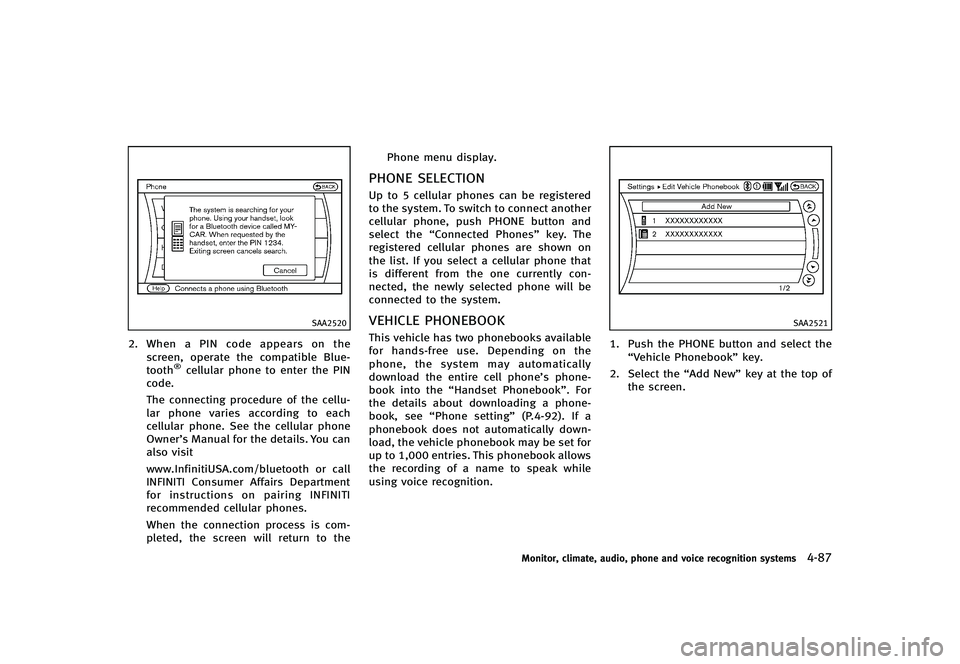
2.When a PIN code appears on the
screen, operate the compatible Blue-
tooth
®cellular phone to enter the PIN
code.
The connecting procedure of the cellu-
lar phone varies according to each
cellular phone. See the cellular phone
Owner’s Manual for the details. You can
also visit
www.InfinitiUSA.com/bluetooth or call
INFINITI Consumer Affairs Department
for instructions on pairing INFINITI
recommended cellular phones.
When the connection process is com-
pleted, the screen will return to the Phone menu display.
PHONE SELECTIONGUID-5AAF93AD-7C4F-43CE-9B72-01C52C15915AUp to 5 cellular phones can be registered
to the system. To switch to connect another
cellular phone, push PHONE button and
select the
“Connected Phones” key. The
registered cellular phones are shown on
the list. If you select a cellular phone that
is different from the one currently con-
nected, the newly selected phone will be
connected to the system.
VEHICLE PHONEBOOKGUID-22334FBC-406F-47E8-92A3-EF7276FA3EB9This vehicle has two phonebooks available
for hands-free use. Depending on the
phone, the system may automatically
download the entire cell phone’s phone-
book into the “Handset Phonebook”. For
the details about downloading a phone-
book, see “Phone setting” (P.4-92). If a
phonebook does not automatically down-
load, the vehicle phonebook may be set for
up to 1,000 entries. This phonebook allows
the recording of a name to speak while
using voice recognition.
SAA2521
1. Push the PHONE button and select the
“Vehicle Phonebook” key.
2. Select the “Add New”key at the top of
the screen.
Monitor, climate, audio, phone and voice recognition systems4-87
Page 260 of 474
SAA2620
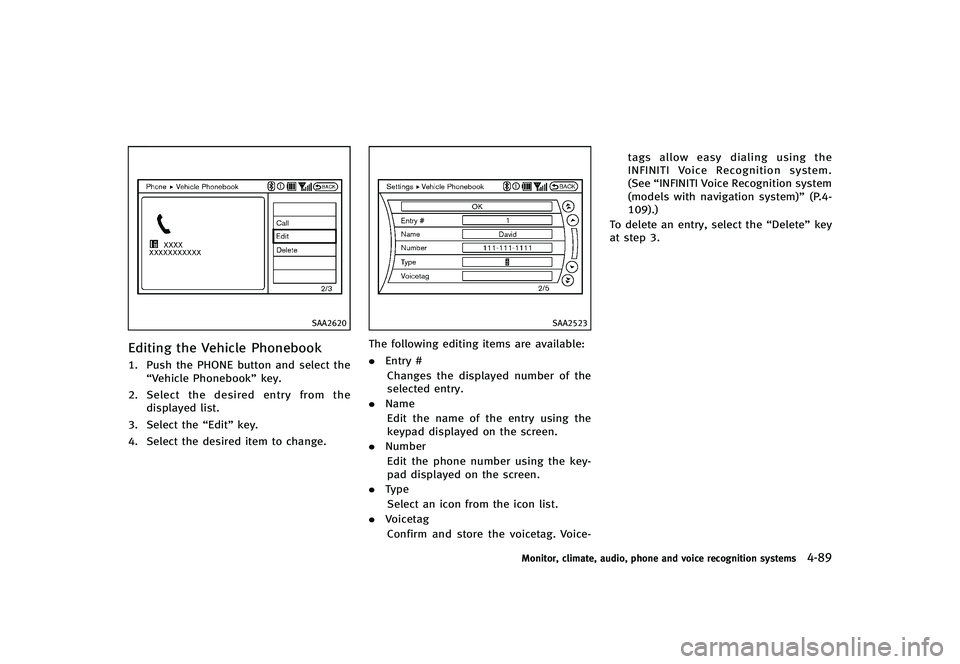
Editing the Vehicle PhonebookGUID-E492FF0A-ACD1-4059-8D15-827F0445F98A1. Push the PHONE button and select the“Vehicle Phonebook” key.
2. Select the desired entry from the
displayed list.
3. Select the “Edit”key.
4. Select the desired item to change.
SAA2523
The following editing items are available:
. Entry #
Changes the displayed number of the
selected entry.
. Name
Edit the name of the entry using the
keypad displayed on the screen.
. Number
Edit the phone number using the key-
pad displayed on the screen.
. Type
Select an icon from the icon list.
. Voicetag
Confirm and store the voicetag. Voice- tags allow easy dialing using the
INFINITI Voice Recognition system.
(See
“INFINITI Voice Recognition system
(models with navigation system)” (P.4-
109).)
To delete an entry, select the “Delete”key
at step 3.
Monitor, climate, audio, phone and voice recognition systems4-89
Page 261 of 474
4-90Monitor, climate, audio, phone and voice recognition systems
SAA2524
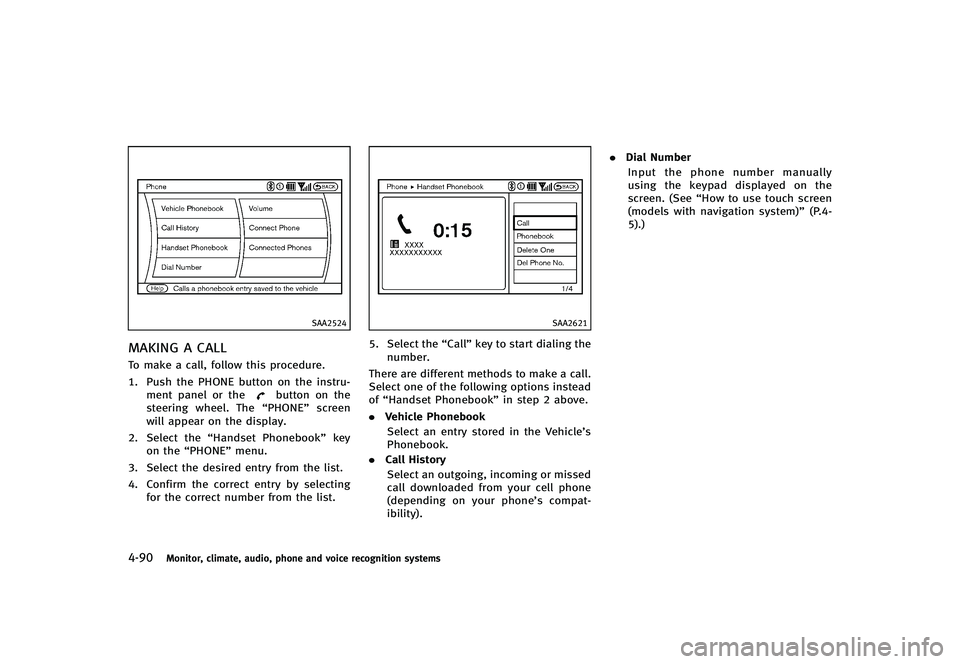
MAKING A CALLGUID-2E7E8611-809B-4127-BD47-48B53F202C97To make a call, follow this procedure.
1. Push the PHONE button on the instru-ment panel or the
button on the
steering wheel. The “PHONE”screen
will appear on the display.
2. Select the “Handset Phonebook” key
on the “PHONE” menu.
3. Select the desired entry from the list.
4. Confirm the correct entry by selecting for the correct number from the list.
SAA2621
5. Select the “Call”key to start dialing the
number.
There are different methods to make a call.
Select one of the following options instead
of “Handset Phonebook” in step 2 above.
. Vehicle Phonebook
Select an entry stored in the Vehicle’s
Phonebook.
. Call History
Select an outgoing, incoming or missed
call downloaded from your cell phone
(depending on your phone’s compat-
ibility). .
Dial Number
Input the phone number manually
using the keypad displayed on the
screen. (See “How to use touch screen
(models with navigation system)” (P.4-
5).)
Page 262 of 474
SAA2525
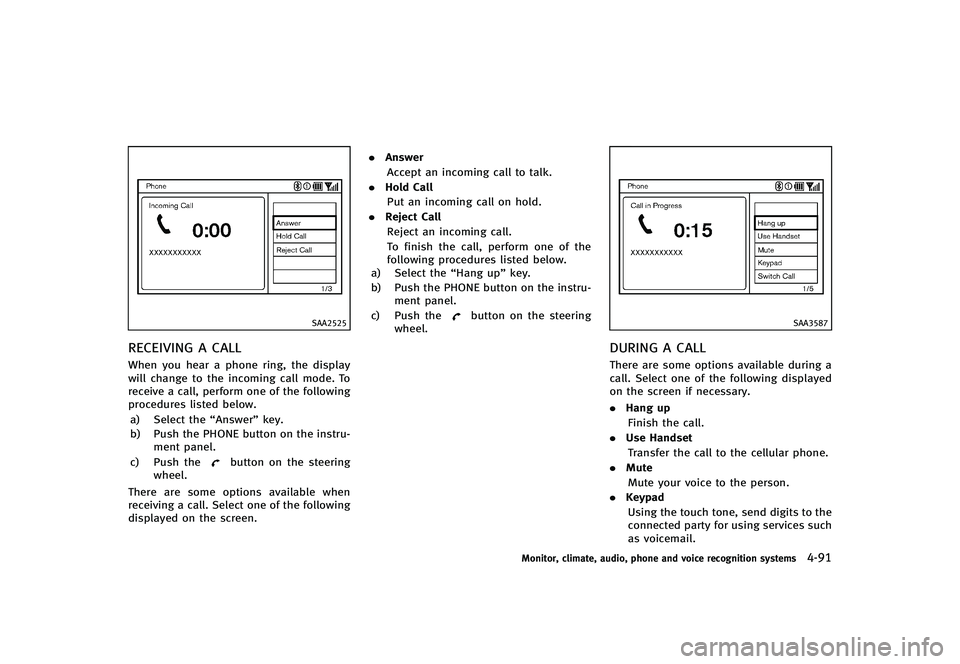
RECEIVING A CALLGUID-1FBE7D7A-7A71-43C8-BC65-6E8B61003665When you hear a phone ring, the display
will change to the incoming call mode. To
receive a call, perform one of the following
procedures listed below.a) Select the “Answer”key.
b) Push the PHONE button on the instru- ment panel.
c) Push the
button on the steering
wheel.
There are some options available when
receiving a call. Select one of the following
displayed on the screen. .
Answer
Accept an incoming call to talk.
. Hold Call
Put an incoming call on hold.
. Reject Call
Reject an incoming call.
To finish the call, perform one of the
following procedures listed below.
a) Select the “Hang up”key.
b) Push the PHONE button on the instru- ment panel.
c) Push the
button on the steering
wheel.SAA3587
DURING A CALLGUID-17CC281B-49FE-43FF-99A2-90542F5EA6C8There are some options available during a
call. Select one of the following displayed
on the screen if necessary.
. Hang up
Finish the call.
. Use Handset
Transfer the call to the cellular phone.
. Mute
Mute your voice to the person.
. Keypad
Using the touch tone, send digits to the
connected party for using services such
as voicemail.
Monitor, climate, audio, phone and voice recognition systems4-91