mirror INFINITI G-CONVERTIBLE 2012 User Guide
[x] Cancel search | Manufacturer: INFINITI, Model Year: 2012, Model line: G-CONVERTIBLE, Model: INFINITI G-CONVERTIBLE 2012Pages: 474, PDF Size: 3.63 MB
Page 165 of 474
3-36Pre-driving checks and adjustments
The indicator light will turn off. Push the“I”
switch
*Dto turn the system on.
Do not allow any object to cover the
sensors
*Eor apply glass cleaner on
them. Doing so will reduce the sensitivity
of the sensor, resulting in improper
operation.
For the HomeLink
®Universal Transceiver (if
so equipped) operation, see “HomeLink®
Universal Transceiver”(P.2-53).
SPA2309
OUTSIDE MIRRORSGUID-6F52A95C-0B73-41C8-998E-F096A254E170
WARNING
Objects viewed in the outside mirror on the
passenger side are closer than they appear.
Be careful when moving to the right. Using
only this mirror could cause an accident.
Use the inside mirror or glance over your
shoulder to properly judge distances to
other objects.
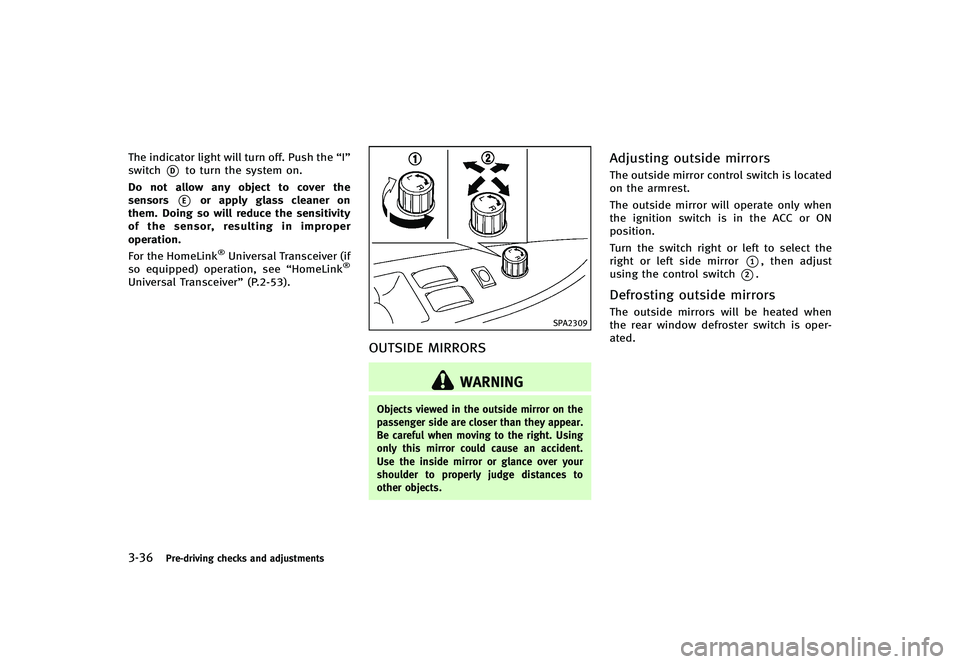
Adjusting outside mirrorsGUID-F6C40348-C87B-475F-A9A3-73964F05FB99The outside mirror control switch is located
on the armrest.
The outside mirror will operate only when
the ignition switch is in the ACC or ON
position.
Turn the switch right or left to select the
right or left side mirror
*1, then adjust
using the control switch
*2.
Defrosting outside mirrorsGUID-C468B597-65A8-40CE-9C16-2935D2F48E8FThe outside mirrors will be heated when
the rear window defroster switch is oper-
ated.
Page 166 of 474
SPA2310
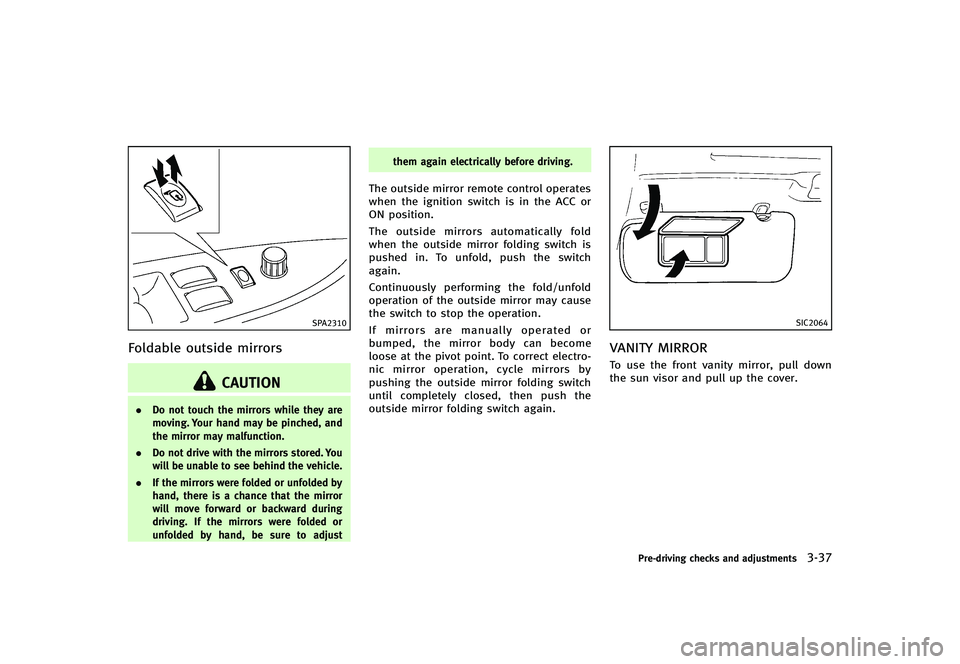
Foldable outside mirrorsGUID-31E29DCB-D8DB-4F40-BD10-D100BC40CCD3
CAUTION
.Do not touch the mirrors while they are
moving. Your hand may be pinched, and
the mirror may malfunction.
. Do not drive with the mirrors stored. You
will be unable to see behind the vehicle.
. If the mirrors were folded or unfolded by
hand, there is a chance that the mirror
will move forward or backward during
driving. If the mirrors were folded or
unfolded by hand, be sure to adjust them again electrically before driving.
The outside mirror remote control operates
when the ignition switch is in the ACC or
ON position.
The outside mirrors automatically fold
when the outside mirror folding switch is
pushed in. To unfold, push the switch
again.
Continuously performing the fold/unfold
operation of the outside mirror may cause
the switch to stop the operation.
If mirrors are manually operated or
bumped, the mirror body can become
loose at the pivot point. To correct electro-
nic mirror operation, cycle mirrors by
pushing the outside mirror folding switch
until completely closed, then push the
outside mirror folding switch again.
SIC2064
VANITY MIRRORGUID-8D0C8150-DDB3-43E1-9392-CF35EFC27E39To use the front vanity mirror, pull down
the sun visor and pull up the cover.
Pre-driving checks and adjustments3-37
Page 167 of 474
3-38Pre-driving checks and adjustments
GUID-AC446E91-1F9B-43A2-9329-094E9765C780The automatic drive positioner system has
two features:
.Seat synchronization function
. Memory storage
SPA2659
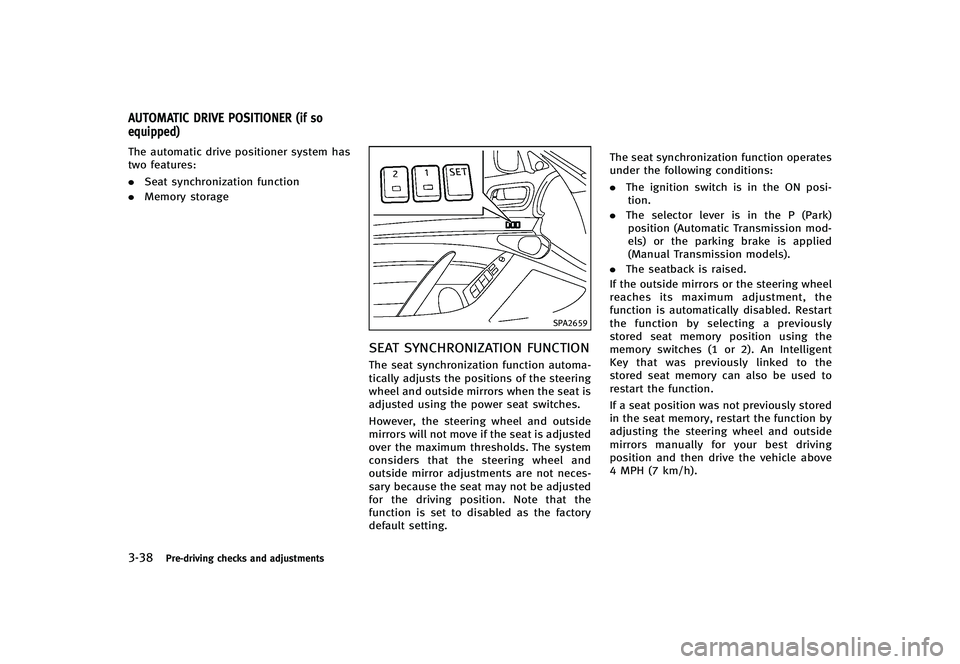
SEAT SYNCHRONIZATION FUNCTIONGUID-CC5EAD91-1CB1-41A4-AE89-0E4A71BE361FThe seat synchronization function automa-
tically adjusts the positions of the steering
wheel and outside mirrors when the seat is
adjusted using the power seat switches.
However, the steering wheel and outside
mirrors will not move if the seat is adjusted
over the maximum thresholds. The system
considers that the steering wheel and
outside mirror adjustments are not neces-
sary because the seat may not be adjusted
for the driving position. Note that the
function is set to disabled as the factory
default setting. The seat synchronization function operates
under the following conditions:
.
The ignition switch is in the ON posi-
tion.
. The selector lever is in the P (Park)
position (Automatic Transmission mod-
els) or the parking brake is applied
(Manual Transmission models).
. The seatback is raised.
If the outside mirrors or the steering wheel
reaches its maximum adjustment, the
function is automatically disabled. Restart
the function by selecting a previously
stored seat memory position using the
memory switches (1 or 2). An Intelligent
Key that was previously linked to the
stored seat memory can also be used to
restart the function.
If a seat position was not previously stored
in the seat memory, restart the function by
adjusting the steering wheel and outside
mirrors manually for your best driving
position and then drive the vehicle above
4 MPH (7 km/h).
AUTOMATIC DRIVE POSITIONER (if so
equipped)
Page 168 of 474
Cancel or activate seat synchroni-
zation function
GUID-8DECD39E-AC7D-4729-ACFB-A937B6048CF2For Automatic Transmission models:
The selector lever must be in the P (Park)
position with the ignition switch in the ACC
position.
For Manual Transmission models:
The parking brake must be applied with
the ignition switch in the ACC position.
The seat synchronization function can be
activated or canceled by pushing and
holding the SET switch for more than 10
seconds while the ignition switch is in the
ACC position.
The indicator lights on the memory
switches (1 and 2) will blink once when
the function is canceled, and the indicator
lights will blink twice when the function is
activated. Note that the indicator lights
may illuminate after 5 seconds while
holding the SET switch. This indicates
readiness for linking the Intelligent Key to
a stored memory position. Keep the SET
switch pushed for more than 10 seconds to
turn on or off the seat synchronization
function.
MEMORY STORAGEGUID-476C2856-A4A1-4174-8516-4637D097B016Two positions for the driver’s seat, steering
column and outside mirrors can be stored
in the automatic drive positioner memory.
Follow these procedures to use the mem-
ory system.
1.Automatic transmission models:
Move the selector lever to the P (Park)
position.
Manual transmission models:
Apply the parking brake.
2. Raise the seatback.
3. Push the ignition switch to the ON position.
4. Adjust the driver’s seat, steering col- umn and outside mirrors to the desired
positions by manually operating each
adjusting switch. For additional infor-
mation, see “Seats”(P.1-2) and “Tilt/
telescopic steering” (P.3-34) and“Out-
side mirrors” (P.3-36).
5. Push the SET switch and, within 5
seconds, push the memory switch (1
or 2) fully for at least 1 second.
The indicator light for the pushed
memory switch will stay on for approxi-
mately 5 seconds after pushing the switch.
If memory is stored in the same
memory switch, the previous memory
will be deleted.
Linking Intelligent Key to a stored
memory position
GUID-B42750B2-32B8-4F63-911A-31754F14E4C8The Intelligent Key can be linked to a
stored memory position with the following
procedure.
1. Follow the steps for storing a memory
position.
2. While the indicator light for the memory switch being set is illuminated for 5
seconds, push the
button on the
Intelligent Key. If the indicator light
blinks, the Intelligent Key is linked to
that memory setting.
Push the ignition switch to the OFF posi-
tion, and then push the
button on the
Intelligent Key. The driver’s seat, steering
wheel and outside mirrors will move to the
memorized position.
Confirming memory storageGUID-6E1221EC-C865-4145-BB90-6DE497A8E201. Push the ignition switch to the ON
position and push the SET switch. If
the main memory has not been stored,
the indicator light will come on for
Pre-driving checks and adjustments3-39
Page 169 of 474
3-40Pre-driving checks and adjustments
approximately 0.5 second. When the
memory has stored in position, the
indicator light will stay on for approxi-
mately 5 seconds.
. If the battery cable is disconnected, or if
the fuse opens, the memory will be
canceled. In this case, reset the desired
position using the previous procedure.
. If optional Intelligent Keys are added to
your vehicle, the memory storage pro-
cedure to switch 1 or 2 and linking
Intelligent Key procedure to a stored
memory position should be performed
again for each Intelligent Key. For
additional Intelligent Key information,
see “Keys” (P.3-3).
Selecting the memorized positionGUID-B4225C04-5594-4362-9498-D7E86BCA5C7E1.Automatic transmission models:
Move the selector lever to the P (Park)
position.
Manual transmission models:
Apply the parking brake.
2. Raise the seatback.
3. Use one of the following methods to move the driver’s seat, the outside
mirrors and the steering wheel.
.Push the ignition switch to the ONposition and push the memory
switch (1 or 2) fully for at least 1
second.
.Within 45 seconds of opening the
driver’s door, push the memory
switch (1 or 2) fully for at least 1
second.
The driver’s seat, steering column
and outside mirrors will move to the
memorized position with the indica-
tor light flashing, and then the light
will stay on for approximately 5
seconds.
For manual transmission models, the
memory positions can be selected even
when the engine is running. In this case,
move the shift lever to the N (Neutral)
position and apply the parking brake.
Then, perform step 2.
SYSTEM OPERATIONGUID-3F1DB0D1-D958-41C0-A873-328B8F9FBECBThe automatic drive positioner system will
not work or will stop operating under the
following conditions:
. When the vehicle speed is above 4 MPH
(7 km/h).
. When the adjusting switch for the
driver’s seat and steering column is
turned on while the automatic drive positioner is operating.
. When the memory switch 1 or 2 is not
pushed for at least 1 second.
. When the seat, steering column and
outside mirrors have already been
moved to the memorized position.
. When no position is stored in the
memory switch.
. When the parking brake is released (MT
models).
. When the speed is above 4 MPH (7
km/h) while the parking brake is
applied (MT models).
. To restart the drive positioner system,
move the parking brake to off and on.
. When the engine is started while
moving the automatic drive positioner.
. When the driver’s door remains open
for more than 45 seconds and the
ignition switch is not in the ON posi-
tion.
. When the seatback is folded.
. While the walk-in function operates.
. The seat synchronization function is
automatically disabled if the outside
mirrors or steering wheel reaches its
maximum adjustment.
Page 194 of 474

GUID-4C4EAC36-8904-46AA-BF80-175BFCB591CBWhen the selector/shift lever is shifted into
the R (Reverse) position, the monitor dis-
play shows view to the rear of the vehicle.
The system is designed as an aid to the
driver in detecting large stationary objects
to help avoid damaging the vehicle. The
system will not detect small objects below
the bumper and may not detect objects
close to the bumper or on the ground.
WARNING
.The rearview monitor is a convenience
but it is not a substitute for proper
vehicle operation because it has areas
where objects cannot be viewed. Always
look out the windows and check mirrors
to be sure that it is safe to move before
operating the vehicle. Always operate
the vehicle slowly.
. Objects viewed in the RearView Monitor
differ from actual distance because a
wide-angle lens is used. Objects in the
RearView Monitor will appear visually
opposite like ones viewed in the inside
and outside mirrors.
. Make sure that the trunk is securely
closed when backing up. .
Underneath the bumper and the corner
areas of the bumper cannot be viewed on
the rearview monitor because of its
monitoring range limitation.
. Do not put anything on the rearview
camera. The rearview camera is installed
above the license plate.
. When washing the vehicle with high-
pressure water, be sure not to spray it
around the camera. Otherwise, water
may enter the camera unit causing water
condensation on the lens, a malfunction,
fire or an electric shock.
. Do not strike the camera. It is a precision
instrument. Otherwise, it may malfunc-
tion or cause damage resulting in a fire
or an electric shock.
CAUTION
There is a plastic cover over the camera. Do
not scratch the cover when cleaning dirt or
snow from the cover.
SAA1896
HOW TO READ DISPLAYED LINESGUID-F617C0B6-2D80-4172-9E23-A48B33131CFDGuiding lines which indicate the vehicle
width and distances to objects with re-
ference to the bumper line
*Aare dis-
played on the monitor.
Distance guide lines:
Indicate distances from the bumper.
. Red line
*1: approx. 1.5 ft (0.5 m)
. Yellow line
*2: approx. 3 ft (1 m)
. Green line
*3: approx. 7 ft (2 m)
. Green line
*4: approx. 10 ft (3 m)
Vehicle width guide lines
*5:
Indicate the vehicle width when backing
Monitor, climate, audio, phone and voice recognition systems4-23
REARVIEW MONITOR
Page 195 of 474

4-24Monitor, climate, audio, phone and voice recognition systems
up.
Predicted course lines
*6:
Indicate the predicted course when back-
ing up. The predicted course lines will be
displayed on the monitor when the selec-
tor/shift lever is in the R (Reverse) position
and the steering wheel is turned. The
predicted course lines will move depend-
ing on how much the steering wheel is
turned and will not be displayed while the
steering wheel is in the neutral position.
HOW TO PARK WITH PREDICTED
COURSE LINES
GUID-CAF0F865-CEBD-48A9-9D4B-E5FF3C8B14DE
WARNING
. Always turn and check that it is safe to
park your car before backing up. Always
back up slowly.
. Use the displayed lines as a reference.
The lines are highly affected by the
number of occupants, fuel level, vehicle
position, road condition and road grade.
. If the tires are replaced with different
sized tires, the predicted course line
may not be displayed correctly. .
On a snow-covered or slippery road,
there may be a difference between the
predicted course line and the actual
course line.
. If the battery is disconnected or be-
comes discharged, the predicted course
lines may be displayed incorrectly. If this
occurs, drive the vehicle on a straight
road for more than 5 minutes.
. The displayed lines will appear slightly
off to the right because the rearview
camera is not installed in the rear center
of the vehicle.
. The distance guide line and the vehicle
width guide line should be used as a
reference only when the vehicle is on a
level paved surface. The distance viewed
on the monitor is for reference only and
may be different than the actual distance
between the vehicle and displayed ob-
jects.
. When backing up the vehicle up a hill,
objects viewed in the monitor are further
than they appear. When backing up the
vehicle down a hill, objects viewed in the
monitor are closer than they appear. Use
the inside mirror or glance over your
shoulder to properly judge distances to other objects.
The vehicle width and predicted course
lines are wider than the actual width and
course.
Page 202 of 474
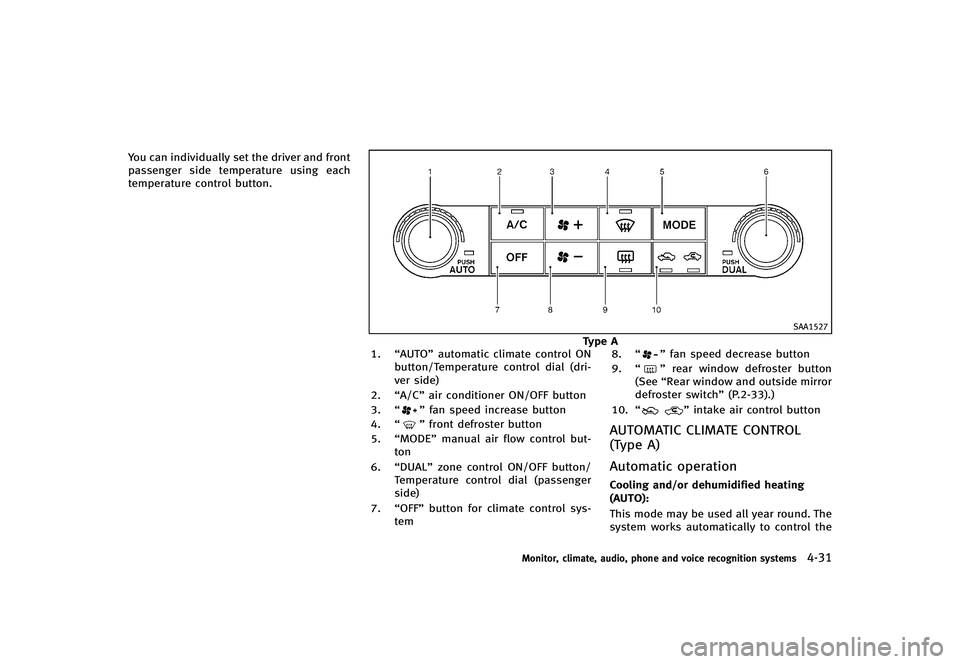
You can individually set the driver and front
passenger side temperature using each
temperature control button.
SAA1527
Type A
1. “AUTO” automatic climate control ON
button/Temperature control dial (dri-
ver side)
2. “A/C” air conditioner ON/OFF button
3. “
”fan speed increase button
4. “
”front defroster button
5. “MODE” manual air flow control but-
ton
6. “DUAL” zone control ON/OFF button/
Temperature control dial (passenger
side)
7. “OFF” button for climate control sys-
tem 8.
“
”fan speed decrease button
9. “
”rear window defroster button
(See “Rear window and outside mirror
defroster switch” (P.2-33).)
10. “
”intake air control button
AUTOMATIC CLIMATE CONTROL
(Type A)
GUID-A9101F1B-037E-4149-835E-8604F034756F
Automatic operationGUID-BB3B5174-0002-49A8-80C1-3587CBEF198FCooling and/or dehumidified heating
(AUTO):
GUID-D73A39BF-43C8-459F-9C24-47B7F579C407This mode may be used all year round. The
system works automatically to control the
Monitor, climate, audio, phone and voice recognition systems4-31
Page 205 of 474
4-34Monitor, climate, audio, phone and voice recognition systems
SAA2972
Type B
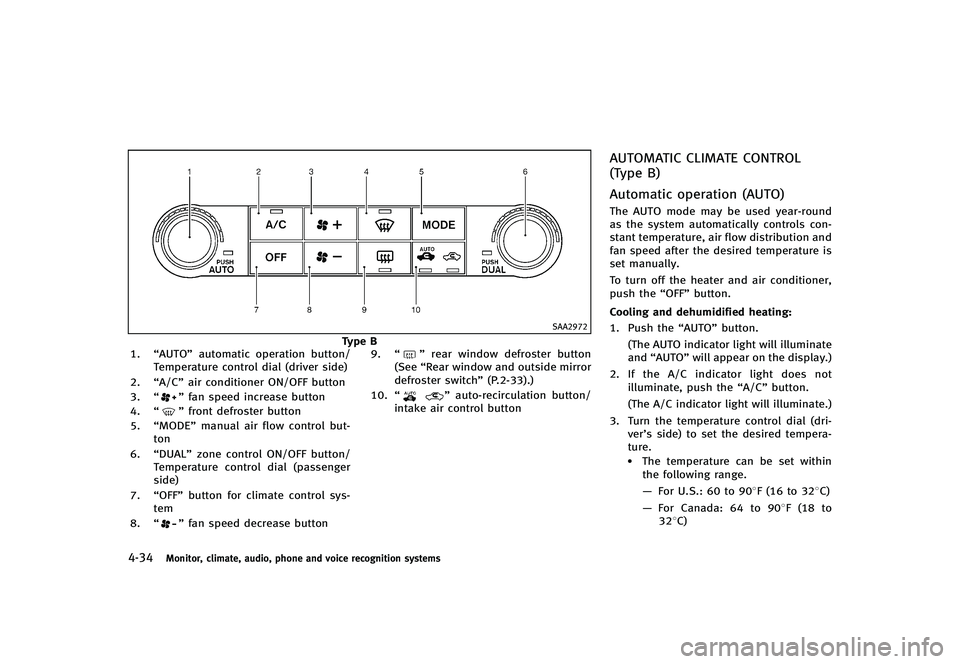
1. “AUTO” automatic operation button/
Temperature control dial (driver side)
2. “A/C” air conditioner ON/OFF button
3. “
”fan speed increase button
4. “
”front defroster button
5. “MODE” manual air flow control but-
ton
6. “DUAL” zone control ON/OFF button/
Temperature control dial (passenger
side)
7. “OFF” button for climate control sys-
tem
8. “
”fan speed decrease button 9.
“
”rear window defroster button
(See “Rear window and outside mirror
defroster switch” (P.2-33).)
10. “
”auto-recirculation button/
intake air control button
AUTOMATIC CLIMATE CONTROL
(Type B)
GUID-5DF4AF3C-A6D9-4B2C-B9CC-1DB12FBCAB04
Automatic operation (AUTO)GUID-5C7B0530-32E5-4C67-A9C5-F917A7709924The AUTO mode may be used year-round
as the system automatically controls con-
stant temperature, air flow distribution and
fan speed after the desired temperature is
set manually.
To turn off the heater and air conditioner,
push the “OFF”button.
Cooling and dehumidified heating:
GUID-D73A39BF-43C8-459F-9C24-47B7F579C4071. Push the “AUTO”button.
(The AUTO indicator light will illuminate
and “AUTO” will appear on the display.)
2. If the A/C indicator light does not
illuminate, push the “A/C”button.
(The A/C indicator light will illuminate.)
3. Turn the temperature control dial (dri- ver’s side) to set the desired tempera-
ture.
.The temperature can be set withinthe following range.
— For U.S.: 60 to 908F (16 to 328C)
— For Canada: 64 to 908F (18 to
328C)
Page 266 of 474
GUID-BAA627FB-6E3C-4128-9FC3-8BE95D79BD95
WARNING
.Use a phone after stopping your vehicle
in a safe location. If you have to use a
phone while driving, exercise extreme
caution at all times so full attention may
be given to vehicle operation.
. If you find yourself unable to devote full
attention to vehicle operation while
talking on the phone, pull off the road
to a safe location and stop your vehicle
before doing so.
CAUTION
To avoid draining the vehicle battery, use a
phone after starting the engine.
Your vehicle is equipped with Bluetooth®
Hands-Free Phone System. If you are an
owner of a Bluetooth®enabled cellular
phone, you can set up the wireless
connection between your cellular phone
and the in-vehicle phone module. With
Bluetooth
®wireless technology, you can
make or receive a telephone call with your
cellular phone in your pocket. Once your cellular phone is paired to the
in-vehicle phone module, no phone con-
necting procedure is required. Your phone
is automatically connected with the in-
vehicle phone module when the ignition
switch is pushed to the
“ON”position with
the registered cellular phone turned on
and carried in the vehicle.
You can register up to 5 different Blue-
tooth
®cellular phones in the in-vehicle
phone module. However, you can talk on
only one cellular phone at a time.
When a call is active, the audio system and
microphone (located in the ceiling in front
of the rearview mirror) are used for the
handsfree communications.
If the audio system is being used at the
time, the audio mode will mute and will
stay muted until the active call is ended.
The INFINITI Voice Recognition system
supports the phone commands, so dialing
a phone number using your voice is
possible.
Before using the Bluetooth
®Hands-Free
Phone System, refer to the following notes.
. Wireless LAN (Wi-Fi) and the Bluetooth
®
functions share the same frequency
band (2.4 GHz). Using the Bluetooth®
and the wireless LAN functions at the
same time may slow down or discon-
nect the communication and cause
undesired noise. It is recommended
that you turn off the wireless LAN (Wi-
Fi) when using the Bluetooth
®func-
tions.
. Set up the wireless connection between
a cellular phone and the in-vehicle
phone module before using the Blue-
tooth
®Hands-Free Phone System.
. Some Bluetooth®enabled cellular
phones may not be recognized by the
in-vehicle phone module.
. You will not be able to use a hands-free
phone under the following conditions:
— Your vehicle is outside of the tele-
phone service area.
— Your vehicle is in an area where it is
difficult to receive radio waves; such
as in a tunnel, in an underground
parking garage, behind a tall build-
ing or in a mountainous area.
— Your cellular phone is locked in
order not to be dialed.
. When the radio wave condition is not
ideal or ambient sound is too loud, it
may be difficult to hear the other
person’s voice during a call.
Monitor, climate, audio, phone and voice recognition systems4-95
Bluetooth®HANDS-FREE PHONE SYSTEM
(models without navigation system)