ignition INFINITI G-CONVERTIBLE 2012 Owner's Manual
[x] Cancel search | Manufacturer: INFINITI, Model Year: 2012, Model line: G-CONVERTIBLE, Model: INFINITI G-CONVERTIBLE 2012Pages: 474, PDF Size: 3.63 MB
Page 87 of 474

2-16Instruments and controls
install the cap and continue to drive the
vehicle. Thelight should turn off
after a few driving trips. If thelight
does not turn off after a few driving
trips, have the vehicle inspected by an
INFINITI retailer. You do not need to
have your vehicle towed to the retailer.
. Malfunction indicator light blinking —
An engine misfire has been detected
which may damage the emission con-
trol system.
To reduce or avoid emission control
system damage:
a) Do not drive at speeds above 45 MPH (72 km/h).
b) Avoid hard acceleration or decelera- tion.
c) Avoid steep uphill grades.
d) If possible, reduce the amount of
cargo being hauled or towed.
The malfunction indicator light may
stop blinking and remain on.
Have the vehicle inspected by an
INFINITI retailer. You do not need to
have your vehicle towed to the retailer.CAUTION
Continued vehicle operation without having
the emission control system checked and
repaired as necessary could lead to poor
driveability, reduced fuel economy, and
possible damage to the emission control
system.
Security indicator lightGUID-5C1A30CC-C304-47F2-9017-21DB6C86EF88The light blinks when the ignition switch is
in the ACC, OFF or LOCK position. This
function indicates the security system
equipped on the vehicle is operational.
If the security system is malfunctioning,
this light will remain on while the ignition
switch is in the ON position. For additional
information, see “Security systems” (P.2-
27).
Low beam indicator lightGUID-74BD5266-0D40-44BC-B993-5808317E4C38The light comes on when the front park,
side marker, tail and license plate lights
are on.
Turn signal/hazard indicator
lights
GUID-00B1B086-3725-450B-94DE-085F076508AEThe light flashes when the turn signal
switch lever or hazard switch is turned on.
Vehicle Dynamic Control (VDC)
off indicator light
GUID-5CBCDD2A-ACCA-4B6D-8B1E-B27C7F5AB078The light comes on when the vehicle
dynamic control off switch is pushed to
OFF. This indicates that the vehicle dynamic
control system and traction control system
are not operating.
AUDIBLE REMINDERSGUID-E1144D4E-396B-40A8-884E-447992E83ED5
Key reminder chimeGUID-E43BBD4C-3A1F-483C-9D44-524733918052A chime will sound if the driver side door is
opened while the ignition switch is pushed
to the ACC position or pushed to the OFF or
LOCK position with the Intelligent Key left
in the Intelligent Key port. Make sure the
ignition switch is pushed to the OFF
position, and take the Intelligent Key with
you when leaving the vehicle.
Light reminder chimeGUID-8624C04E-DC02-4067-8A90-B91AF097C12CA chime will sound when the driver side
door is opened with the light switch in the
orposition and the ignition switch
in the ACC, OFF or LOCK position.
Page 88 of 474
Turn the light switch off when you leave the
vehicle.
Parking brake reminder chimeGUID-EDB23543-6254-4F4C-99B1-CA1825499CF1The parking brake reminder chime will
sound if the vehicle is driven at more than
4 MPH (7 km/h) with the parking brake
applied. Stop the vehicle and release the
parking brake.
Brake pad wear warningGUID-97586C77-B2B4-4D32-AA76-DF460CACF31EThe disc brake pads have audible wear
warnings. When a brake pad requires
replacement, it will make a high pitched
scraping sound when the vehicle is in
motion. This scraping sound will first occur
only when the brake pedal is depressed.
After the wear of the brake pad is
increased, the sound will be heard all the
time even if the brake pedal is not
depressed. Have the brakes checked as
soon as possible if the warning sound is
heard.
Seat belt warning chimeGUID-0160A1CA-0F2F-4D1A-B495-E7DCB264CBAFThe seat belt warning chime will sound for
about 6 seconds unless the driver’s seat
belt is securely fastened.
GUID-CF20BAB9-FD7E-48A6-8C2B-BF546667BDDB
SIC4293
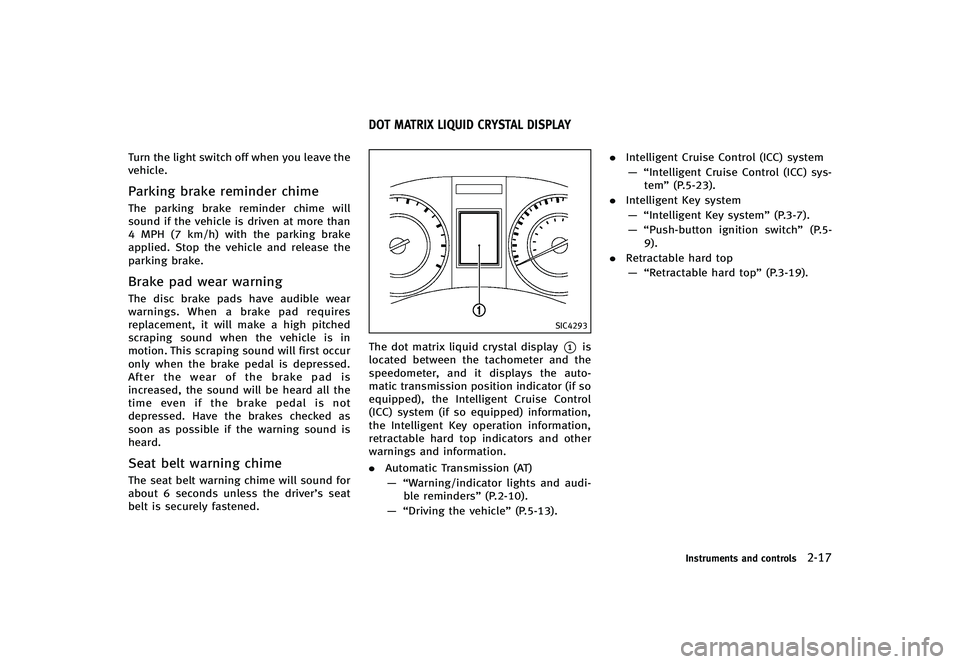
The dot matrix liquid crystal display*1is
located between the tachometer and the
speedometer, and it displays the auto-
matic transmission position indicator (if so
equipped), the Intelligent Cruise Control
(ICC) system (if so equipped) information,
the Intelligent Key operation information,
retractable hard top indicators and other
warnings and information.
. Automatic Transmission (AT)
— “Warning/indicator lights and audi- ble reminders” (P.2-10).
— “Driving the vehicle” (P.5-13)..
Intelligent Cruise Control (ICC) system
— “Intelligent Cruise Control (ICC) sys- tem” (P.5-23).
. Intelligent Key system
— “Intelligent Key system” (P.3-7).
— “Push-button ignition switch” (P.5-
9).
. Retractable hard top
— “Retractable hard top” (P.3-19).
Instruments and controls2-17
DOT MATRIX LIQUID CRYSTAL DISPLAY
Page 90 of 474

INDICATORS FOR OPERATIONGUID-84272A4A-6052-4263-A664-20875F6F8605
1. Engine start operation indicator
(Automatic Transmission models)
GUID-74EE5B61-DBFA-4EFB-88A8-FD4791368814This indicator appears when the selector
lever is in the P (Park) position.
This indicator means that the engine will
start by pushing the ignition switch with
the brake pedal depressed.
2. Intelligent Key insertion indicatorGUID-7EC3CC20-055E-4748-89E9-546659B16DD2This indicator appears when the Intelligent
Key needs to be inserted into the Intelli-
gent Key port. (For example, the Intelligent
Key battery is discharged.)
If this indicator appears, insert the Intelli-
gent Key into the Intelligent Key port in the
correct direction. (See“Push-button igni-
tion switch” (P.5-9).)
3. Intelligent Key removal indicatorGUID-E97F2B44-59D7-4F86-B805-87D935322322This indicator appears when the driver’s
door is opened with the ignition switch in
the OFF or LOCK position and the Intelli-
gent Key placed in the Intelligent Key port.
A key reminder chime also sounds.
If this indicator appears, remove the
Intelligent Key from the Intelligent Key port
and take it with you when leaving the vehicle.
4. NO KEY warningGUID-0E088D23-797D-4BCD-9EFA-5D18EF48BB60This warning appears in either of the
following conditions.
No key inside the vehicle:
GUID-D73A39BF-43C8-459F-9C24-47B7F579C407The warning appears when the door is
closed with the Intelligent Key left outside
the vehicle and the ignition switch in the
ACC or ON position. Make sure that the
Intelligent Key is inside the vehicle.
Unregistered Intelligent Key:
GUID-D73A39BF-43C8-459F-9C24-47B7F579C407The warning appears when the ignition
switch is pushed from the LOCK position
and the Intelligent Key cannot be recog-
nized by the system. You cannot start the
engine with an unregistered key. Use the
registered Intelligent Key.
See
“Intelligent Key system” (P.3-7) for
more details.
5. SHIFT “P”warning (Automatic
Transmission models)
GUID-A045BF12-21D3-44A7-9F90-25A880A7D4E9This warning appears when the ignition
switch is pushed to stop the engine with
the selector lever in any position except
the P (Park) position.
If this warning appears, move the selector lever to the P (Park) position or push the
ignition switch to the ON position.
An inside warning chime will also sound.
(See
“Intelligent Key system” (P.3-7).)
6.“PUSH” warning (Automatic
Transmission models)
GUID-4EE96F9F-D3F9-4370-9B3A-8092BAFA67C5This warning appears when the selector
lever is moved to the P (Park) position with
the ignition switch in the ACC position after
the SHIFT “P”warning appears.
To push the ignition switch to the OFF
position, perform the following procedure:
SHIFT “P”warning ?(Move the selector
lever to “P”)?PUSH warning ?(Push the
ignition switch ?ignition switch position
is turned to ON) ?PUSH warning ?(Push
the ignition switch ?ignition switch
position is turned to OFF)
7. Intelligent Key battery discharge
indicator
GUID-D9ACD27D-F570-46C6-BB77-0666392B3024This indicator appears when the Intelligent
Key battery is running out of power.
If this indicator appears, replace the
battery with a new one. (See “Intelligent
Key battery replacement” (P.8-24).)
Instruments and controls2-19
Page 91 of 474

2-20Instruments and controls
8. Engine start operation indicator
(Manual Transmission models)
GUID-DBDAE3A2-CB00-42CF-830F-56CFC89016D9This indicator means that the engine will
start by pushing the ignition switch with
the clutch pedal depressed.
9. Parking brake release warningGUID-A29E560B-AC65-45EF-BD61-D46B01E8D317This warning appears when the vehicle
speed is above 4 MPH (7 km/h) and the
parking brake is applied.
10. Low fuel warningGUID-C398ED0E-471A-4276-8E87-41D8B1B5D7C6This warning appears when the fuel level in
the tank is getting low. Refuel as soon as it
is convenient, preferably before the fuel
gauge reaches the empty (E) position.
There is a small reserve of fuel remaining
in the tank when the fuel gauge reaches
the empty (E) position.
11. Low washer fluid warningGUID-4B511101-A790-47D3-8A2A-05D513567AC2This warning appears when the washer
tank fluid is at a low level. Add washer fluid
as necessary. (See“Window washer fluid”
(P.8-14).)
12. Door/trunk open warning (igni-
tion switch is in the ON position)
GUID-D73931C6-CD04-450C-81A1-47A834D609C5This warning appears if any of the doors and/or the trunk lid are open or not closed
securely. The vehicle icon indicates which
door or the trunk lid is open on the display.
13. Loose fuel cap warningGUID-BFE458ED-BCA7-4335-B8F7-73E37C39ABB7This warning appears when the fuel-filler
cap is not tightened correctly after the
vehicle has been refueled. (See
“Fuel-filler
cap ”(P.3-32).)
14. Check tire pressure warningGUID-4F8F90C9-1D1A-4B19-84DE-FB30ADE966CCThis warning appears when the low tire
pressure warning light in the meter illumi-
nates and low tire pressure is detected. If
this warning appears, stop the vehicle and
adjust the tire pressure to the recom-
mended COLD tire pressure shown on the
Tire and Loading Information label. (See
“Low tire pressure warning light” (P.2-12)
and “Tire Pressure Monitoring System
(TPMS)” (P.5-4).)
15.“Time to rest” indicatorGUID-ED5D6E04-83A9-4A18-A337-1F03BC066E77This indicator appears when the set “time
to rest” indicator activates. You can set the
time for up to 6 hours. (See “Trip
computer” (P.2-25).)
16. Low outside temperature warn-
ing
GUID-780F773F-FB50-4944-8B7B-E69CA36895B2This warning appears if the outside tem-
perature is below 378F (38C). The warning
can be set not to be displayed. (See “Trip
computer” (P.2-25).)
17. Cruise indicatorGUID-3760C120-A3D7-4293-8781-3D4A6A9A5294Cruise main switch indicator:GUID-D73A39BF-43C8-459F-9C24-47B7F579C407The indicator is displayed when the cruise
control main switch is pushed. When the
main switch is pushed again, the indicator
disappears. When the cruise control main
switch indicator is displayed, the cruise
control system is operational.
Cruise set switch indicator:
GUID-D73A39BF-43C8-459F-9C24-47B7F579C407The indicator is displayed while the vehicle
speed is controlled by the cruise control
system. If the indicator blinks while the
engine is running, it may indicate that the
cruise control system is not functioning
properly. Have the system checked by an
INFINITI retailer.
See“Cruise control” (P.5-21) for details.
Page 96 of 474
SIC3264
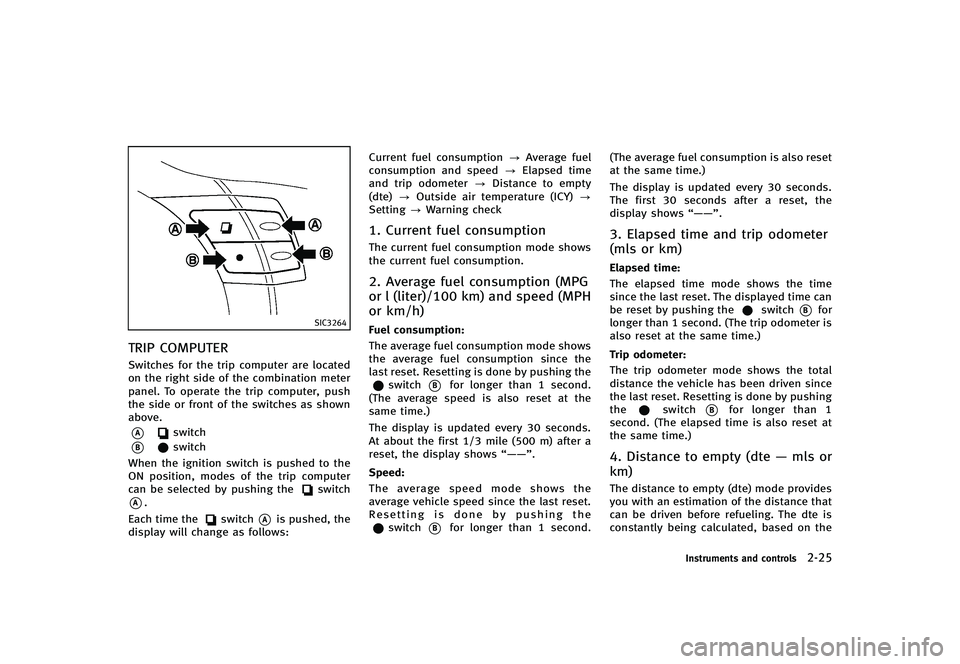
TRIP COMPUTERGUID-E86FA79B-4523-49BD-B7FB-265F7EA8B983Switches for the trip computer are located
on the right side of the combination meter
panel. To operate the trip computer, push
the side or front of the switches as shown
above.
*Aswitch
*Bswitch
When the ignition switch is pushed to the
ON position, modes of the trip computer
can be selected by pushing the
switch
*A.
Each time the
switch*Ais pushed, the
display will change as follows: Current fuel consumption
?Average fuel
consumption and speed ?Elapsed time
and trip odometer ?Distance to empty
(dte) ?Outside air temperature (ICY) ?
Setting ?Warning check
1. Current fuel consumptionGUID-ABC17DA4-87D5-491E-9006-86109C97C09BThe current fuel consumption mode shows
the current fuel consumption.
2. Average fuel consumption (MPG
or l (liter)/100 km) and speed (MPH
or km/h)
GUID-03411336-C2A8-48AF-A1CE-A01E97029F8EFuel consumption:GUID-D73A39BF-43C8-459F-9C24-47B7F579C407The average fuel consumption mode shows
the average fuel consumption since the
last reset. Resetting is done by pushing the
switch*Bfor longer than 1 second.
(The average speed is also reset at the
same time.)
The display is updated every 30 seconds.
At about the first 1/3 mile (500 m) after a
reset, the display shows “——”.
Speed:
GUID-D73A39BF-43C8-459F-9C24-47B7F579C407The average speed mode shows the
average vehicle speed since the last reset.
Resetting is done by pushing the
switch*Bfor longer than 1 second. (The average fuel consumption is also reset
at the same time.)
The display is updated every 30 seconds.
The first 30 seconds after a reset, the
display shows
“——”.
3. Elapsed time and trip odometer
(mls or km)
GUID-3CDBC135-59EB-440E-AE5F-83D095F69D8BElapsed time:GUID-D73A39BF-43C8-459F-9C24-47B7F579C407The elapsed time mode shows the time
since the last reset. The displayed time can
be reset by pushing the
switch*Bfor
longer than 1 second. (The trip odometer is
also reset at the same time.)
Trip odometer:
GUID-D73A39BF-43C8-459F-9C24-47B7F579C407The trip odometer mode shows the total
distance the vehicle has been driven since
the last reset. Resetting is done by pushing
the
switch*Bfor longer than 1
second. (The elapsed time is also reset at
the same time.)
4. Distance to empty (dte —mls or
km)
GUID-679DBA77-D4B2-48C9-88C8-C64B75AC9DF2The distance to empty (dte) mode provides
you with an estimation of the distance that
can be driven before refueling. The dte is
constantly being calculated, based on the
Instruments and controls2-25
Page 97 of 474

2-26Instruments and controls
amount of fuel in the fuel tank and the
actual fuel consumption.
The display is updated every 30 seconds.
The dte mode includes a low range warning
feature. If the fuel level is low, the warning
is displayed on the screen.
When the fuel level drops even lower, the
dte display will change to“——”.
. If the amount of fuel added is small, the
display just before the ignition switch
is pushed to the OFF position may
continue to be displayed.
. When driving uphill or rounding curves,
the fuel in the tank shifts, which may
momentarily change the display.
5. Outside air temperature (ICY —8F
or 8C)
GUID-34491345-E055-48F3-AB44-5EB401652C23The outside air temperature is displayed in
8F or 8C in the range of −22 to 1318F (−30
to 558C).
The outside air temperature mode includes
a low temperature warning feature. If the
outside air temperature is below 378F
(38C), the warning is displayed on the
screen.
The outside temperature sensor is located
in front of the radiator. The sensor may be affected by road or engine heat, wind
directions and other driving conditions.
The display may differ from the actual
outside temperature or the temperature
displayed on various signs or billboards.
6. SettingGUID-6491617F-C802-4BA5-83F8-4FEBEE69CF78Setting cannot be made while driving. A
message
“Setting can only be operated
when stopped” is also displayed on the
dot matrix crystal display.
The
switch*Aandswitch*Bare
used in the setting mode to select and
decide a menu.
SKIP:
GUID-D73A39BF-43C8-459F-9C24-47B7F579C407Push theswitch*Ato move to the
warning check mode.
Push the
switch*Bto select other
menus.
ALERT:
GUID-D73A39BF-43C8-459F-9C24-47B7F579C407There are 3 submenus under the alert
menu.
. BACK
Select this submenu to return to the top
page of the setting mode.
. TIME TO REST
Select this submenu to specify when the
“time to rest” indicator activates.
. ICY
Select this submenu to display the low
outside temperature warning.
MAINTENANCE:
GUID-D73A39BF-43C8-459F-9C24-47B7F579C407There are 5 submenus under the main-
tenance menu.
. BACK
Select this submenu to return to the top
page of the setting mode.
. ENGINE OIL
Select this submenu to set or reset the
distance for changing the engine oil.
. OIL FILTER
Select this submenu to set or reset the
distance for replacing the oil filter.
. TIRE
Select this submenu to set or reset the
distance for replacing tires.
. OTHER
Select this submenu and set or reset
the distance for replacing items other
than the engine oil, oil filter and tires.
DISPLAY:
GUID-D73A39BF-43C8-459F-9C24-47B7F579C407There are 3 submenus under the display
menu.
Page 99 of 474
2-28Instruments and controls
SIC2045
How to arm the vehicle security
system
GUID-CE9139D0-6229-4D12-B5B7-B83BCD0085811. Close all windows.The system can be armed even if the
windows are open.
2. Push the ignition switch to the OFF position.
3. Remove the Intelligent Key from the vehicle.
4. Close all doors, hood and trunk. Lock all doors. The doors can be locked with
the Intelligent Key, door handle request
switch, power door lock switch or
mechanical key. 5. Confirm that the security indicator light
comes on. The security indicator light
stays on for about 30 seconds. The
vehicle security system is now pre-
armed. After about 30 seconds the
vehicle security system automatically
shifts into the armed phase. The
security light begins to flash once every
approximately 3 seconds. If, during this
30-second pre-arm time period, the
door is unlocked, or the ignition switch
is pushed to ACC or ON, the system will
not arm.
Even when the driver and/or passengers
are in the vehicle, the system will activate
with all doors, hood, and trunk lid locked
with the ignition switch in the LOCK
position. When pushing the ignition switch
to the ACC or ON position, the system will
be released.
Vehicle security system activationGUID-54D57BB8-9F18-4163-B041-408144181E15The vehicle security system will give the
following alarm:
. The headlights blink and the horn
sounds intermittently.
. The alarm automatically turns off after
approximately 1 minute. However, the
alarm reactivates if the vehicle is tampered with again.
The alarm is activated by:
. Unlocking the door or opening the trunk
lid without using the button on the
Intelligent Key, the door handle request
switch or the mechanical key. (Even if
the door is opened by releasing the
door inside lock knob, the alarm will
activate.)
. Opening the hood.
How to stop an activated alarmGUID-C1AF44C3-20AE-4AC5-8638-2FC58DC203BFThe alarm will stop by unlocking a door by
pushing the unlock button on the Intelli-
gent Key, the door handle request switch
or using the mechanical key, or when the
ignition switch is pushed to the ACC or ON
position.
If the system does not operate as de-
scribed above, have it checked by an
INFINITI retailer.
Page 100 of 474
INFINITI VEHICLE IMMOBILIZER
SYSTEM
GUID-647D2782-9A26-48B8-9751-98B3D7C60900The INFINITI Vehicle Immobilizer System
will not allow the engine to start without
the use of the registered Intelligent Key.
Never leave these keys in the vehicle.
Statement related to section 15 of FCC
rules for INFINITI Vehicle Immobilizer
System (CONT ASSY - CARD SLOT)
FCC Notice:
For USA:
This device complies with Part 15 of the
FCC Rules. Operation is subject to the
following two conditions: (1) This device
may not cause harmful interference, and
(2) this device must accept any interfer-
ence received, including interference that
may cause undesired operation.
NOTE:
Changes or modifications not expressly
approved by the party responsible for
compliance could void the user’s authority
to operate the equipment.For Canada:
This device complies with RSS-210 of
Industry Canada. Operation is subject to
the following two conditions: (1) this
device may not cause interference, and
(2) this device must accept any interfer-
ence, including interference that may
cause undesired operation of the device.
SIC2045
Security indicator lightGUID-305489EB-3C88-4628-802E-60E54C33A510The security indicator light is located on
the meter panel. It indicates the status of
the INFINITI Vehicle Immobilizer System.
The light blinks after the ignition switch
was in the LOCK position. This function
indicates the security systems equipped on
the vehicle are operational.
If the INFINITI Vehicle Immobilizer System
is malfunctioning, this light will remain on
while the ignition switch is in the ON
position.
Instruments and controls2-29
Page 102 of 474
SIC3238
Type A
SIC4281
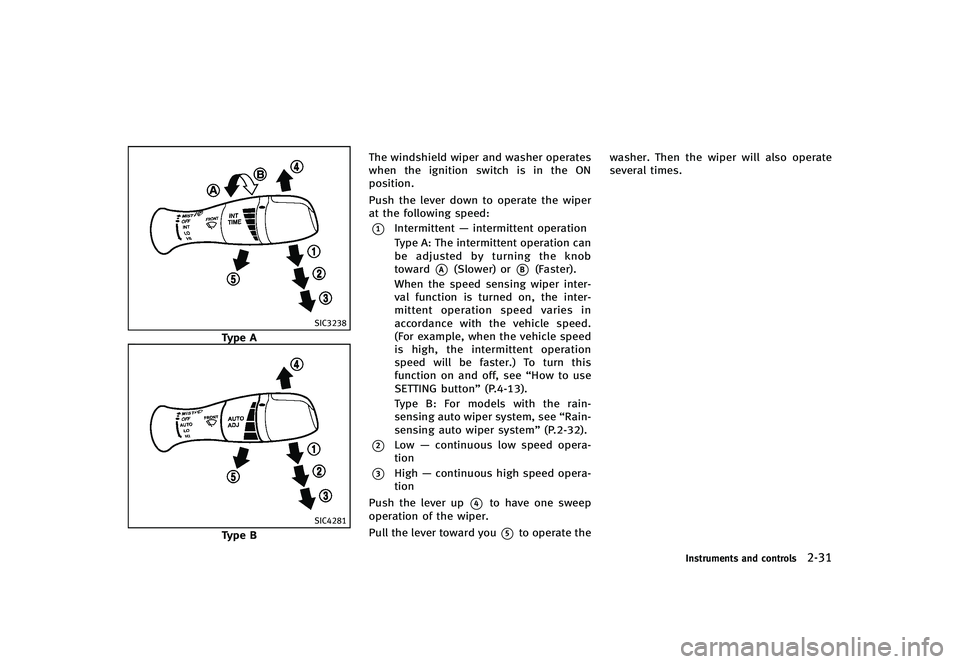
Type BThe windshield wiper and washer operates
when the ignition switch is in the ON
position.
Push the lever down to operate the wiper
at the following speed:
*1Intermittent
—intermittent operation
Type A: The intermittent operation can
be adjusted by turning the knob
toward
*A(Slower) or*B(Faster).
When the speed sensing wiper inter-
val function is turned on, the inter-
mittent operation speed varies in
accordance with the vehicle speed.
(For example, when the vehicle speed
is high, the intermittent operation
speed will be faster.) To turn this
function on and off, see “How to use
SETTING button” (P.4-13).
Type B: For models with the rain-
sensing auto wiper system, see “Rain-
sensing auto wiper system” (P.2-32).
*2Low—continuous low speed opera-
tion
*3High —continuous high speed opera-
tion
Push the lever up
*4to have one sweep
operation of the wiper.
Pull the lever toward you
*5to operate the washer. Then the wiper will also operate
several times.
Instruments and controls2-31
Page 103 of 474
2-32Instruments and controls
SIC4190
RAIN-SENSING AUTO WIPER SYS-
TEM (if so equipped)
GUID-EB521BF0-F37C-4C72-84C3-DC52EDE8D8E0The rain-sensing auto wiper system can
automatically turn on the wipers and
adjust the wiper speed depending on the
rainfall and the vehicle speed by using the
rain sensor located on the upper part of
the windshield.
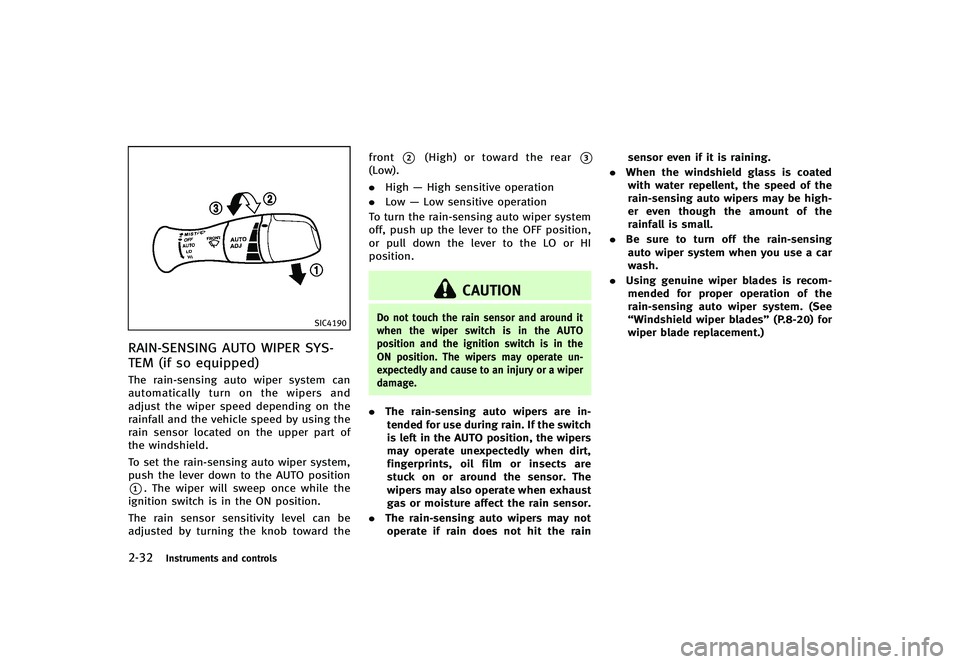
To set the rain-sensing auto wiper system,
push the lever down to the AUTO position
*1. The wiper will sweep once while the
ignition switch is in the ON position.
The rain sensor sensitivity level can be
adjusted by turning the knob toward the front
*2(High) or toward the rear*3(Low).
.
High —High sensitive operation
. Low —Low sensitive operation
To turn the rain-sensing auto wiper system
off, push up the lever to the OFF position,
or pull down the lever to the LO or HI
position.
CAUTION
Do not touch the rain sensor and around it
when the wiper switch is in the AUTO
position and the ignition switch is in the
ON position. The wipers may operate un-
expectedly and cause to an injury or a wiper
damage.
. The rain-sensing auto wipers are in-
tended for use during rain. If the switch
is left in the AUTO position, the wipers
may operate unexpectedly when dirt,
fingerprints, oil film or insects are
stuck on or around the sensor. The
wipers may also operate when exhaust
gas or moisture affect the rain sensor.
. The rain-sensing auto wipers may not
operate if rain does not hit the rain sensor even if it is raining.
. When the windshield glass is coated
with water repellent, the speed of the
rain-sensing auto wipers may be high-
er even though the amount of the
rainfall is small.
. Be sure to turn off the rain-sensing
auto wiper system when you use a car
wash.
. Using genuine wiper blades is recom-
mended for proper operation of the
rain-sensing auto wiper system. (See
“Windshield wiper blades” (P.8-20) for
wiper blade replacement.)