trunk INFINITI G-CONVERTIBLE 2012 Owner's Guide
[x] Cancel search | Manufacturer: INFINITI, Model Year: 2012, Model line: G-CONVERTIBLE, Model: INFINITI G-CONVERTIBLE 2012Pages: 474, PDF Size: 3.63 MB
Page 160 of 474
SPA2634
INTERIOR TRUNK LID RELEASEGUID-43118355-A2BE-47B2-AE4B-C9EDBD8FE3F1
WARNING
Closely supervise children when they are
around cars to prevent them from playing
and becoming locked in the trunk where
they could be seriously injured. Keep the car
locked, with the trunk lid securely latched,
when not in use, and prevent children’s
access to Intelligent Keys.
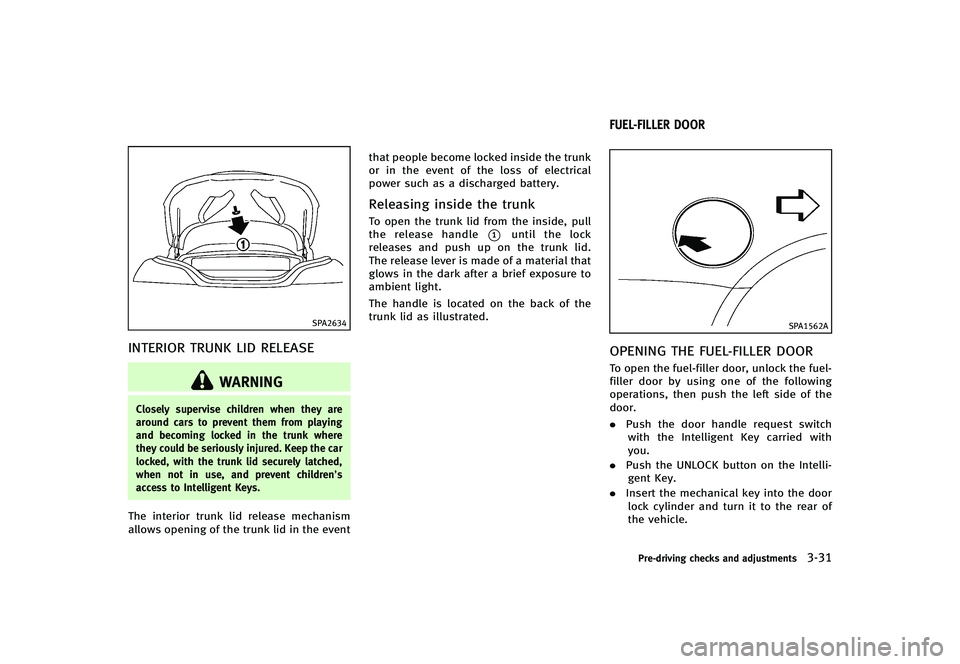
The interior trunk lid release mechanism
allows opening of the trunk lid in the eventthat people become locked inside the trunk
or in the event of the loss of electrical
power such as a discharged battery.
Releasing inside the trunkGUID-8700F542-4FA5-4066-91EE-6957D524695DTo open the trunk lid from the inside, pull
the release handle
*1until the lock
releases and push up on the trunk lid.
The release lever is made of a material that
glows in the dark after a brief exposure to
ambient light.
The handle is located on the back of the
trunk lid as illustrated.
GUID-C93CB90B-FCA1-4E06-9CF0-901012CD5248
SPA1562A
OPENING THE FUEL-FILLER DOORGUID-8DEF451E-464E-42B1-BD5E-8B67AD064BE3To open the fuel-filler door, unlock the fuel-
filler door by using one of the following
operations, then push the left side of the
door.
. Push the door handle request switch
with the Intelligent Key carried with
you.
. Push the UNLOCK button on the Intelli-
gent Key.
. Insert the mechanical key into the door
lock cylinder and turn it to the rear of
the vehicle.
Pre-driving checks and adjustments3-31
FUEL-FILLER DOOR
Page 194 of 474

GUID-4C4EAC36-8904-46AA-BF80-175BFCB591CBWhen the selector/shift lever is shifted into
the R (Reverse) position, the monitor dis-
play shows view to the rear of the vehicle.
The system is designed as an aid to the
driver in detecting large stationary objects
to help avoid damaging the vehicle. The
system will not detect small objects below
the bumper and may not detect objects
close to the bumper or on the ground.
WARNING
.The rearview monitor is a convenience
but it is not a substitute for proper
vehicle operation because it has areas
where objects cannot be viewed. Always
look out the windows and check mirrors
to be sure that it is safe to move before
operating the vehicle. Always operate
the vehicle slowly.
. Objects viewed in the RearView Monitor
differ from actual distance because a
wide-angle lens is used. Objects in the
RearView Monitor will appear visually
opposite like ones viewed in the inside
and outside mirrors.
. Make sure that the trunk is securely
closed when backing up. .
Underneath the bumper and the corner
areas of the bumper cannot be viewed on
the rearview monitor because of its
monitoring range limitation.
. Do not put anything on the rearview
camera. The rearview camera is installed
above the license plate.
. When washing the vehicle with high-
pressure water, be sure not to spray it
around the camera. Otherwise, water
may enter the camera unit causing water
condensation on the lens, a malfunction,
fire or an electric shock.
. Do not strike the camera. It is a precision
instrument. Otherwise, it may malfunc-
tion or cause damage resulting in a fire
or an electric shock.
CAUTION
There is a plastic cover over the camera. Do
not scratch the cover when cleaning dirt or
snow from the cover.
SAA1896
HOW TO READ DISPLAYED LINESGUID-F617C0B6-2D80-4172-9E23-A48B33131CFDGuiding lines which indicate the vehicle
width and distances to objects with re-
ference to the bumper line
*Aare dis-
played on the monitor.
Distance guide lines:
Indicate distances from the bumper.
. Red line
*1: approx. 1.5 ft (0.5 m)
. Yellow line
*2: approx. 3 ft (1 m)
. Green line
*3: approx. 7 ft (2 m)
. Green line
*4: approx. 10 ft (3 m)
Vehicle width guide lines
*5:
Indicate the vehicle width when backing
Monitor, climate, audio, phone and voice recognition systems4-23
REARVIEW MONITOR
Page 254 of 474
SAA2374
ANTENNAGUID-E929A074-E922-4F6F-8C6B-5ACD93B76C87
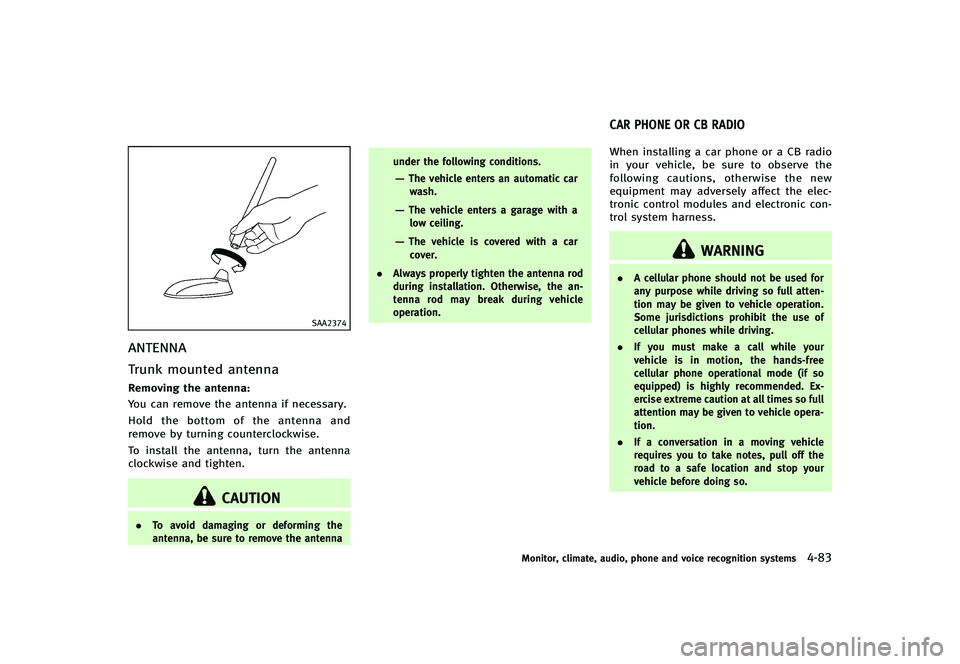
Trunk mounted antennaGUID-3430BA38-0248-4AD5-BFEB-31F654C06665Removing the antenna:GUID-D73A39BF-43C8-459F-9C24-47B7F579C407You can remove the antenna if necessary.
Hold the bottom of the antenna and
remove by turning counterclockwise.
To install the antenna, turn the antenna
clockwise and tighten.
CAUTION
.To avoid damaging or deforming the
antenna, be sure to remove the antenna under the following conditions.
—The vehicle enters an automatic car
wash.
—The vehicle enters a garage with alow ceiling.
—The vehicle is covered with a car
cover.
. Always properly tighten the antenna rod
during installation. Otherwise, the an-
tenna rod may break during vehicle
operation.
GUID-83EDA816-F1DE-40F3-B4B3-6A62A8CA567BWhen installing a car phone or a CB radio
in your vehicle, be sure to observe the
following cautions, otherwise the new
equipment may adversely affect the elec-
tronic control modules and electronic con-
trol system harness.
WARNING
.A cellular phone should not be used for
any purpose while driving so full atten-
tion may be given to vehicle operation.
Some jurisdictions prohibit the use of
cellular phones while driving.
. If you must make a call while your
vehicle is in motion, the hands-free
cellular phone operational mode (if so
equipped) is highly recommended. Ex-
ercise extreme caution at all times so full
attention may be given to vehicle opera-
tion.
. If a conversation in a moving vehicle
requires you to take notes, pull off the
road to a safe location and stop your
vehicle before doing so.
Monitor, climate, audio, phone and voice recognition systems4-83
CAR PHONE OR CB RADIO
Page 312 of 474
GUID-44782A6F-CDF3-4C7B-81AC-D0330BCF5D5C
WARNING
.Do not leave children or adults who
would normally require the support of
others alone in your vehicle. Pets should
not be left alone either. They could
accidentally injure themselves or others
through inadvertent operation of the
vehicle. Also, on hot, sunny days,
temperatures in a closed vehicle could
quickly become high enough to cause
severe or possibly fatal injuries to
people or animals.
. Closely supervise children when they are
around cars to prevent them from play-
ing and becoming locked in the trunk
where they could be seriously injured.
Keep the car locked, with the rear
seatback and trunk lid securely latched
when not in use, and prevent children’s
access to car keys.
EXHAUST GAS (carbon monoxide)GUID-9B424B2E-81F3-4BA1-BF2D-AD3661BD7EB5
WARNING
.Do not breathe exhaust gases; they
contain colorless and odorless carbon
monoxide. Carbon monoxide is danger-
ous. It can cause unconsciousness or
death.
. If you suspect that exhaust fumes are
entering the vehicle, drive with all
windows fully open, and have the
vehicle inspected immediately.
. Do not run the engine in closed spaces
such as a garage.
. Do not park the vehicle with the engine
running for any extended length of time.
. Keep the trunk lid closed while driving,
otherwise exhaust gases could be drawn
into the passenger compartment. If you
must drive with the trunk lid open,
follow these precautions:
1) Open all the windows.
2) Set the
air recirculation to off
and the fan control to high to
circulate the air. .
If electrical wiring or other cable con-
nections must pass to a trailer through
the seal on the trunk lid or the body,
follow the manufacturer’s recommenda-
tion to prevent carbon monoxide entry
into the vehicle.
. The exhaust system and body should be
inspected by a qualified mechanic when-
ever:
—The vehicle is raised for service.
—You suspect that exhaust fumes are
entering into the passenger compart-
ment.
—You notice a change in the sound of
the exhaust system.
—You have had an accident involvingdamage to the exhaust system,
underbody, or rear of the vehicle.
Starting and driving5-3
PRECAUTIONS WHEN STARTING AND
DRIVING
Page 318 of 474
GUID-9692F8EC-FD81-44A9-AE26-36DF5189174D
WARNING
Do not operate the push-button ignition
switch while driving the vehicle except in an
emergency. (The engine will stop when the
ignition switch is pushed 3 consecutive
times or the ignition switch is pushed and
held for more than 2 seconds.) If the engine
stops while the vehicle is being driven, this
could lead to a crash and serious injury.
Before operating the push-button ignition
switch, be sure to move the selector lever
to the P (Park) position (for automatic
transmission model) or the shift lever to
the N (Neutral) position (for manual trans-
mission model).SSD0872
OPERATING RANGE FOR ENGINE
START FUNCTION
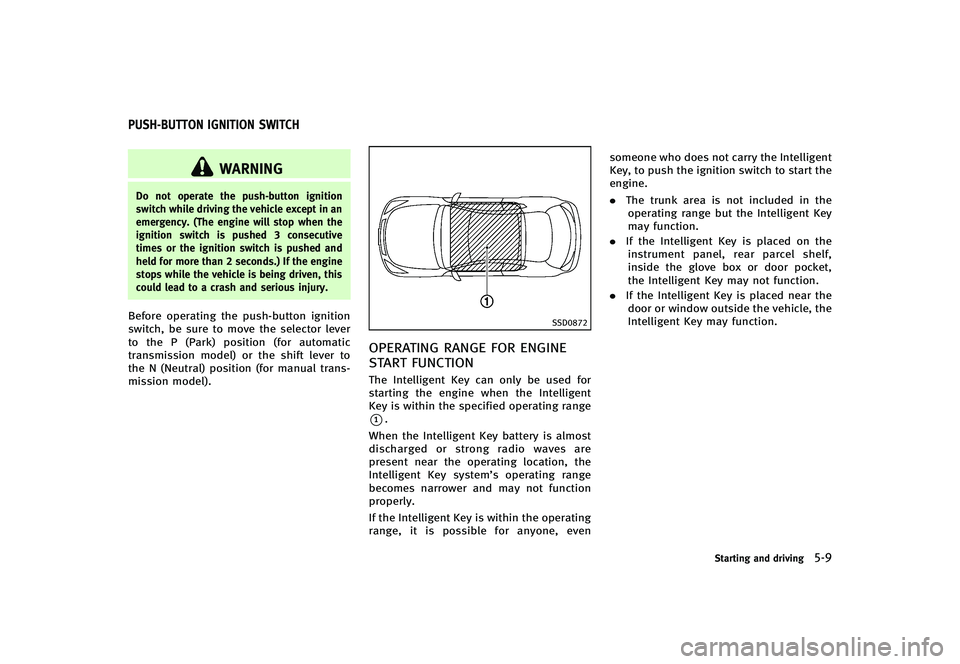
GUID-82AE93E8-C60A-486E-8A4F-84A4026B2494The Intelligent Key can only be used for
starting the engine when the Intelligent
Key is within the specified operating range
*1.
When the Intelligent Key battery is almost
discharged or strong radio waves are
present near the operating location, the
Intelligent Key system’s operating range
becomes narrower and may not function
properly.
If the Intelligent Key is within the operating
range, it is possible for anyone, even someone who does not carry the Intelligent
Key, to push the ignition switch to start the
engine.
.
The trunk area is not included in the
operating range but the Intelligent Key
may function.
. If the Intelligent Key is placed on the
instrument panel, rear parcel shelf,
inside the glove box or door pocket,
the Intelligent Key may not function.
. If the Intelligent Key is placed near the
door or window outside the vehicle, the
Intelligent Key may function.
Starting and driving5-9
PUSH-BUTTON IGNITION SWITCH
Page 336 of 474
VEHICLE-TO-VEHICLE DISTANCE
CONTROL MODE OPERATION
GUID-C59C0E1C-58CB-446E-BFDE-56FE6CA41124Always pay attention to the operation of
the vehicle and be ready to manually
control the proper following distance. The
vehicle-to-vehicle distance control mode of
the Intelligent Cruise Control (ICC) system
may not be able to maintain the selected
distance between vehicles (following dis-
tance) or selected vehicle speed under
some circumstances.
The vehicle-to-vehicle distance control
mode uses a sensor
*Alocated on the
front of the vehicle to detect vehicles
traveling ahead. The sensor generally
detects the signals returned from the
reflectors on a vehicle ahead. Therefore, if
the sensor cannot detect the reflector on
the vehicle ahead, the ICC system may not
maintain the selected distance.
The following are some conditions in which
the sensor cannot detect the signals:
. When the reflector of the vehicle ahead
is positioned high on the vehicle
(trailer, etc.)
. When the reflector on the vehicle ahead
is missing, damaged or covered .
When the reflector of the vehicle ahead
is covered with dirt, snow and road
spray
. When the snow or road spray from
traveling vehicles reduces the sensor’s
visibility
. When dense exhaust or other smoke
(black smoke) from vehicles reduces
the sensor’s visibility
. When excessively heavy baggage is
loaded in the rear seat or the trunk of
your vehicle
The ICC system is designed to automati-
cally check the sensor’s operation within
the limitations of the system. When the
sensor is covered with dirt or obstructs, the
system will automatically be canceled. If
the sensor is covered with ice, a transpar-
ent or translucent vinyl bag, etc., the ICC
system may not detect them. In these
instances, the vehicle-to-vehicle distance
control mode may not cancel and may not
be able to maintain the selected following
distance from the vehicle ahead. Be sure to
check and clean the sensor regularly.
The vehicle-to-vehicle distance control
mode is designed to maintain a selected
distance and reduce the speed to match
the slower vehicle ahead; the system will decelerate the vehicle as necessary. How-
ever, the ICC system can only apply up to
25% of the vehicles total braking power.
This system should only be used when
traffic conditions allow vehicle speeds to
remain fairly constant or when vehicle
speeds change gradually. If a vehicle
moves into the traveling lane ahead or if
a vehicle traveling ahead rapidly decele-
rates, the distance between vehicles may
become closer because the ICC system
cannot decelerate the vehicle quickly en-
ough. If this occurs, the ICC system will
sound a warning chime and blink the
system display to notify the driver to take
necessary action.
The system will cancel and a warning
chime will sound if the speed falls below
approximately 20 MPH (32 km/h). The
system will also disengage below the 20
MPH (32 km/h) cut-off speed or over the
maximum set speed.
See
“Approach warning” (P.5-37).
The following items are controlled in the
vehicle-to-vehicle distance control mode:
. When there are no vehicles traveling
ahead, the vehicle-to-vehicle distance
control mode maintains the speed set
by the driver. The set speed range is
Starting and driving5-27
Page 371 of 474
6-4In case of emergency
transmission into P (Park).
. Never change tires when the vehicle is
on a slope, ice or slippery areas. This is
hazardous.
. Never change tires if oncoming traffic is
close to your vehicle. Wait for profes-
sional road assistance.
MCE0001A
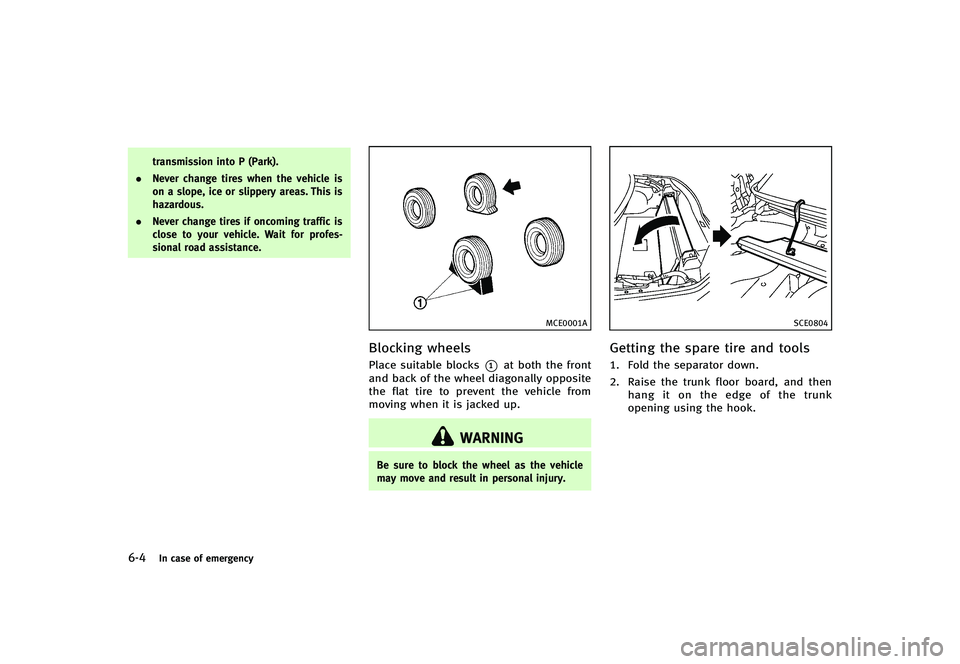
Blocking wheelsGUID-6A1DB770-53B2-4BFA-9588-B3D65FB9B9D7Place suitable blocks*1at both the front
and back of the wheel diagonally opposite
the flat tire to prevent the vehicle from
moving when it is jacked up.
WARNING
Be sure to block the wheel as the vehicle
may move and result in personal injury.
SCE0804
Getting the spare tire and toolsGUID-7DD2B12D-5730-4E55-BF75-F324EB9A62F61. Fold the separator down.
2. Raise the trunk floor board, and then
hang it on the edge of the trunk
opening using the hook.
Page 374 of 474
SCE0661
Installing the spare tireGUID-003A0190-9B2C-45A9-A542-11B8BA923B48The T-type spare tire is designed for
emergency use. (See specific instructions
under the heading“Wheels and tires” (P.8-
29).)
1. Clean any mud or dirt from the surface between the wheel and hub.
2. Carefully put the spare tire on and tighten the wheel nuts finger tight.
Check that all the wheel nuts contact
the wheel surface horizontally.
When replacing a front tire, make sure
that the hole in the spare tire wheel is
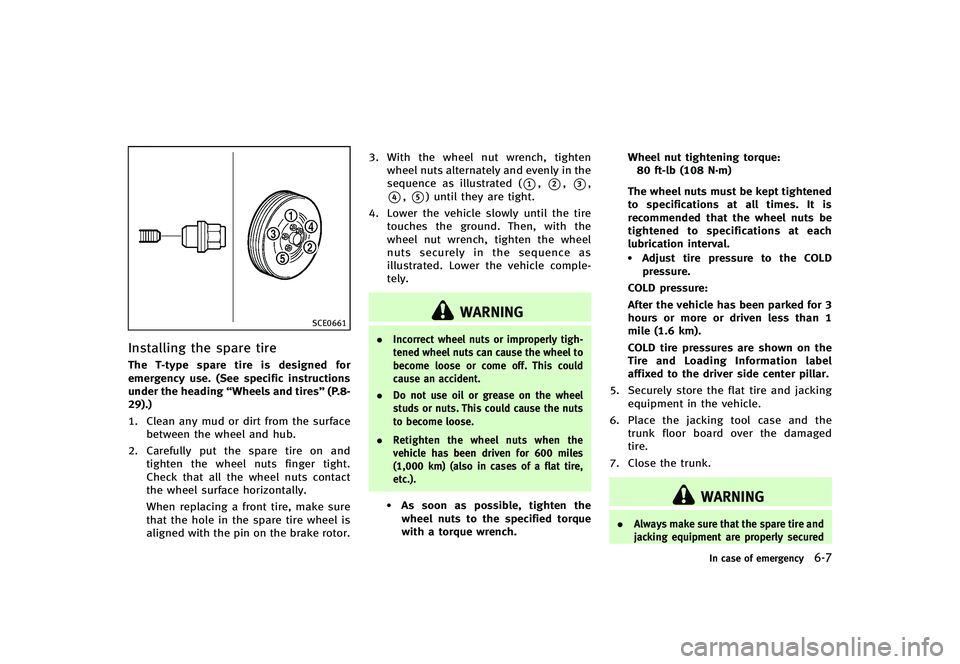
aligned with the pin on the brake rotor. 3. With the wheel nut wrench, tighten
wheel nuts alternately and evenly in the
sequence as illustrated (
*1,*2,*3,
*4,*5) until they are tight.
4. Lower the vehicle slowly until the tire touches the ground. Then, with the
wheel nut wrench, tighten the wheel
nuts securely in the sequence as
illustrated. Lower the vehicle comple-
tely.
WARNING
. Incorrect wheel nuts or improperly tigh-
tened wheel nuts can cause the wheel to
become loose or come off. This could
cause an accident.
. Do not use oil or grease on the wheel
studs or nuts. This could cause the nuts
to become loose.
. Retighten the wheel nuts when the
vehicle has been driven for 600 miles
(1,000 km) (also in cases of a flat tire,
etc.).
.As soon as possible, tighten the
wheel nuts to the specified torque
with a torque wrench. Wheel nut tightening torque:
80 ft-lb (108 N·m)
The wheel nuts must be kept tightened
to specifications at all times. It is
recommended that the wheel nuts be
tightened to specifications at each
lubrication interval.
.Adjust tire pressure to the COLD pressure.
COLD pressure:
After the vehicle has been parked for 3
hours or more or driven less than 1
mile (1.6 km).
COLD tire pressures are shown on the
Tire and Loading Information label
affixed to the driver side center pillar.
5. Securely store the flat tire and jacking equipment in the vehicle.
6. Place the jacking tool case and the trunk floor board over the damaged
tire.
7. Close the trunk.
WARNING
. Always make sure that the spare tire and
jacking equipment are properly secured
In case of emergency6-7
Page 376 of 474
attached to the bottle)
—when the cut or the puncture isapproximately 0.25 in (6 mm) or
longer
—when the tire sidewall is damaged
—when the vehicle has been drivenwith extremely low tire pressure
—when the tire has come off theinside or the outside of the wheel.
—when the tire wheel is damaged
—when two or more tires are flat
Stopping the vehicleGUID-6C84A54D-4B5D-4178-B441-FBBC7590315C1. Safely move the vehicle off the road
and away from traffic.
2. Turn on the hazard warning flashers.
3. Park on a level surface and apply the parking brake.
4. Automatic Transmission models:
Move the selector lever to the P (Park)
position.
Manual Transmission models:
Move the shift lever to the R (Reverse)
position. 5. Turn off the engine.
6. Raise the hood to warn other traffic and
to signal professional road assistance
personnel that you need assistance.
7. Have all passengers get out of the vehicle and stand in a safe place, away
from traffic and clear of the vehicle.
WARNING
Make sure the parking brake is securely
applied and the manual transmission is
shifted into R (Reverse) or the automatic
transmission into P (Park).
. Never repair tires when the vehicle is on
a slope, ice or slippery areas. This is
hazardous.
. Never repair tires if oncoming traffic is
close to your vehicle. Wait for profes-
sional road assistance.
SCE0887
Getting emergency tire puncture
repair kit
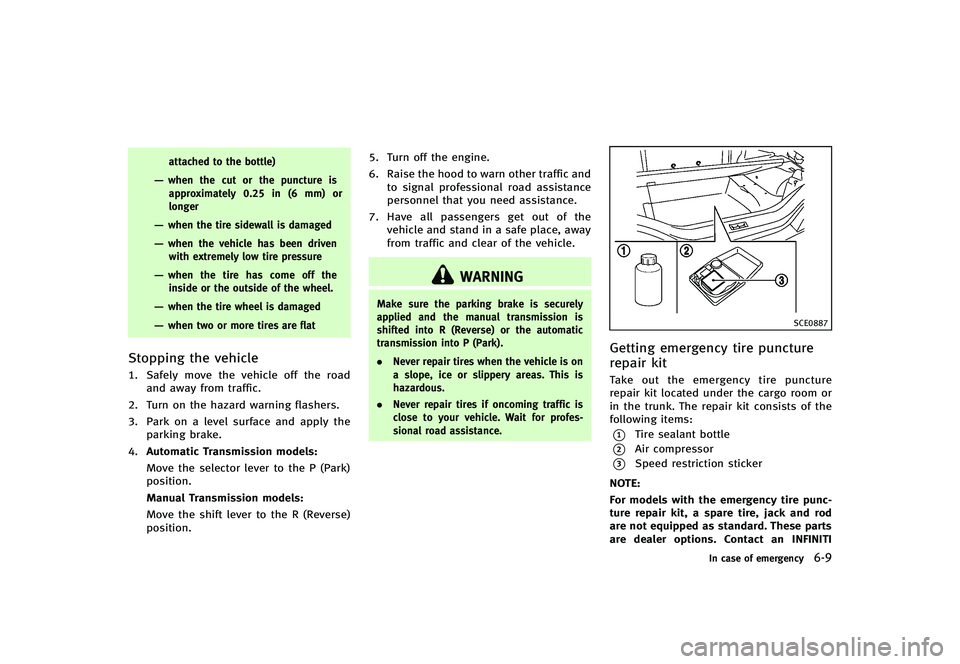
GUID-16CB7F23-E591-4102-B36C-83255DD3FB7FTake out the emergency tire puncture
repair kit located under the cargo room or
in the trunk. The repair kit consists of the
following items:
*1Tire sealant bottle
*2Air compressor
*3Speed restriction sticker
NOTE:
For models with the emergency tire punc-
ture repair kit, a spare tire, jack and rod
are not equipped as standard. These parts
are dealer options. Contact an INFINITI
In case of emergency6-9
Page 379 of 474
6-12In case of emergency
SCE0871
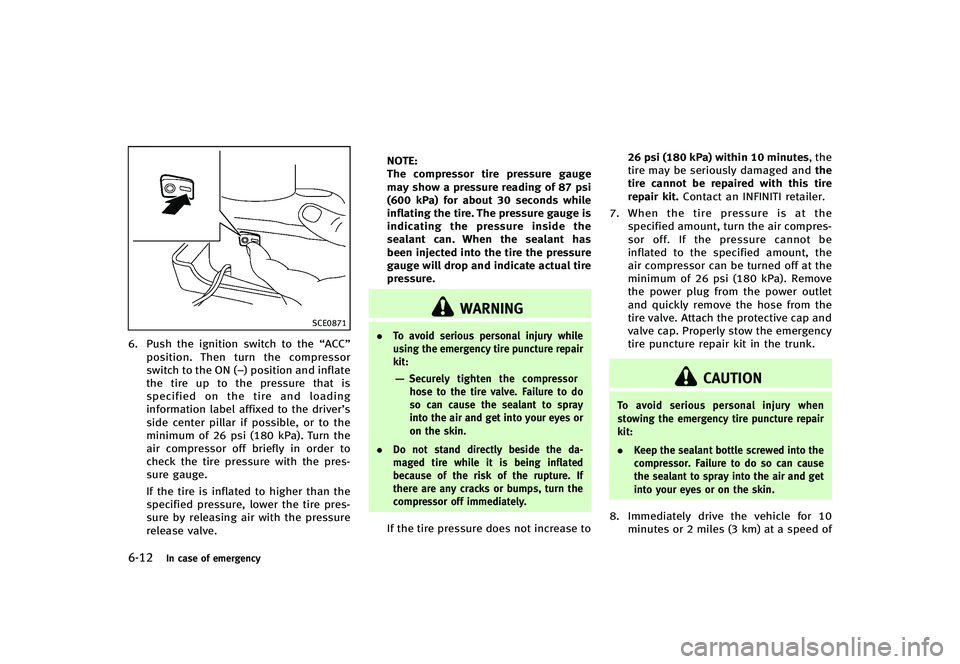
6. Push the ignition switch to the“ACC”
position. Then turn the compressor
switch to the ON (−) position and inflate
the tire up to the pressure that is
specified on the tire and loading
information label affixed to the driver’s
side center pillar if possible, or to the
minimum of 26 psi (180 kPa). Turn the
air compressor off briefly in order to
check the tire pressure with the pres-
sure gauge.
If the tire is inflated to higher than the
specified pressure, lower the tire pres-
sure by releasing air with the pressure
release valve. NOTE:
The compressor tire pressure gauge
may show a pressure reading of 87 psi
(600 kPa) for about 30 seconds while
inflating the tire. The pressure gauge is
indicating the pressure inside the
sealant can. When the sealant has
been injected into the tire the pressure
gauge will drop and indicate actual tire
pressure.
WARNING
.
To avoid serious personal injury while
using the emergency tire puncture repair
kit:
—Securely tighten the compressor
hose to the tire valve. Failure to do
so can cause the sealant to spray
into the air and get into your eyes or
on the skin.
. Do not stand directly beside the da-
maged tire while it is being inflated
because of the risk of the rupture. If
there are any cracks or bumps, turn the
compressor off immediately.
If the tire pressure does not increase to 26 psi (180 kPa) within 10 minutes, the
tire may be seriously damaged and
the
tire cannot be repaired with this tire
repair kit. Contact an INFINITI retailer.
7. When the tire pressure is at the
specified amount, turn the air compres-
sor off. If the pressure cannot be
inflated to the specified amount, the
air compressor can be turned off at the
minimum of 26 psi (180 kPa). Remove
the power plug from the power outlet
and quickly remove the hose from the
tire valve. Attach the protective cap and
valve cap. Properly stow the emergency
tire puncture repair kit in the trunk.
CAUTION
To avoid serious personal injury when
stowing the emergency tire puncture repair
kit:
. Keep the sealant bottle screwed into the
compressor. Failure to do so can cause
the sealant to spray into the air and get
into your eyes or on the skin.
8. Immediately drive the vehicle for 10
minutes or 2 miles (3 km) at a speed of