ABS INFINITI G-COUPE 2012 User Guide
[x] Cancel search | Manufacturer: INFINITI, Model Year: 2012, Model line: G-COUPE, Model: INFINITI G-COUPE 2012Pages: 490, PDF Size: 3.73 MB
Page 375 of 490

5-54Starting and driving
How to handle the sensor
The sensor for the Preview Function is
common with Intelligent Cruise Control and
is located below the front bumper.
To keep the Preview Function operating
properly, be sure to observe the following:
.Always keep the sensor clean. Wipe
with a soft cloth carefully so as not to
damage the sensor.
. Do not strike or damage the areas
around the sensor. Do not touch or
remove the screw located on the
sensor. Doing so could cause failure
or malfunction. If the sensor is da-
maged due to an accident, contact an
INFINITI retailer.
. Do not attach a sticker (including
transparent material) or install an
accessory near the sensor. This could
cause failure or malfunction.
ANTI-LOCK BRAKING SYSTEM (ABS)
WARNING
. The Anti-lock Braking System (ABS) is a
sophisticated device, but it cannot pre-
vent accidents resulting from careless or
dangerous driving techniques. It can
help maintain vehicle control during
braking on slippery surfaces. Remember
that stopping distances on slippery
surfaces will be longer than on normal
surfaces even with ABS. Stopping dis-
tances may also be longer on rough,
gravel or snow covered roads, or if you
are using tire chains. Always maintain a
safe distance from the vehicle in front of
you. Ultimately, the driver is responsible
for safety.
. Tire type and condition may also affect
braking effectiveness.
—When replacing tires, install the
specified size of tires on all four
wheels.
—When installing a spare tire, make
sure that it is the proper size and
type as specified on the Tire and
Loading Information label. See “Tireand loading information label”
(P.9-
14) of this manual.
—For detailed information, see “Wheels and tires” (P.8-33) of this
manual.
The Anti-lock Braking System (ABS) con-
trols the brakes so the wheels do not lock
during hard braking or when braking on
slippery surfaces. The system detects the
rotation speed at each wheel and varies
the brake fluid pressure to prevent each
wheel from locking and sliding. By pre-
venting each wheel from locking, the
system helps the driver maintain steering
control and helps to minimize swerving
and spinning on slippery surfaces.
Using the system
Depress the brake pedal and hold it down.
Depress the brake pedal with firm steady
pressure, but do not pump the brakes. The
ABS will operate to prevent the wheels
from locking up. Steer the vehicle to avoid
obstacles.
Page 376 of 490

WARNING
Do not pump the brake pedal. Doing so may
result in increased stopping distances.
Self-test feature
The ABS includes electronic sensors, elec-
tric pumps, hydraulic solenoids and a
computer. The computer has a built-in
diagnostic feature that tests the system
each time you start the engine and move
the vehicle at a low speed in forward or
reverse. When the self-test occurs, you may
hear a“clunk” noise and/or feel a pulsa-
tion in the brake pedal. This is normal and
does not indicate a malfunction. If the
computer senses a malfunction, it switches
the ABS off and illuminates the ABS
warning light on the instrument panel.
The brake system then operates normally,
but without anti-lock assistance.
If the ABS warning light illuminates during
the self-test or while driving, have the
vehicle checked by an INFINITI retailer.
Normal operation
The ABS operates at speeds above 3 to 6
MPH (5 to 10 km/h).
When the ABS senses that one or more
wheels are close to locking up, the actuator
rapidly applies and releases hydraulic
pressure. This action is similar to pumping
the brakes very quickly. You may feel a
pulsation in the brake pedal and hear a
noise from under the hood or feel a
vibration from the actuator when it is
operating. This is normal and indicates
that the ABS is operating properly. How-
ever, the pulsation may indicate that road
conditions are hazardous and extra care is
required while driving. The Vehicle Dynamic Control (VDC) system
uses various sensors to monitor driver
inputs and vehicle motion. Under certain
driving conditions, the VDC system helps
to perform the following functions.
.
Controls brake pressure to reduce
wheel slip on one slipping drive wheel
so power is transferred to a non
slipping drive wheel on the same axle.
. Controls brake pressure and engine
output to reduce drive wheel slip based
on vehicle speed (traction control func-
tion).
. Controls brake pressure at individual
wheels and engine output to help the
driver maintain control of the vehicle in
the following conditions:
— understeer (vehicle tends to not
follow the steered path despite
increased steering input)
— oversteer (vehicle tends to spin due
to certain road or driving condi-
tions).
The VDC system can help the driver to
maintain control of the vehicle, but it
cannot prevent loss of vehicle control in
all driving situations.
When the VDC system operates, the VDC
warning light
in the instrument panel
Starting and driving5-55
VEHICLE DYNAMIC CONTROL (VDC) SYSTEM
Page 377 of 490
5-56Starting and driving
flashes so note the following:
.The road may be slippery or the system
may determine some action is required
to help keep the vehicle on the steered
path.
. You may feel a pulsation in the brake
pedal and hear a noise or vibration
from under the hood. This is normal
and indicates that the VDC system is
working properly.
. Adjust your speed and driving to the
road conditions.
See “Vehicle Dynamic Control (VDC) warn-
ing light” (P.2-17).
If a malfunction occurs in the system, the
VDC warning light
illuminates in the
instrument panel. The VDC system auto-
matically turns off.
The VDC OFF switch is used to turn off the
VDC system. The VDC off indicator
illuminates to indicate the VDC system is
off. When the VDC switch is used to turn off
the system, the VDC system still operates
to prevent one drive wheel from slipping by
transferring power to a non slipping drive
wheel. The VDC warning light
flashes if
this occurs. All other VDC functions are off,
and the VDC warning light
will not
flash. The VDC system is automatically reset to on when the ignition switch is
placed in the off position then back to the
on position.
See
“Vehicle Dynamic Control (VDC) warn-
ing light” (P.2-17) and “Vehicle Dynamic
Control (VDC) off indicator light” (P.2-19).
The computer has a built-in diagnostic
feature that tests the system each time you
start the engine and move the vehicle
forward or in reverse at a slow speed.
When the self-test occurs, you may hear a
“clunk” noise and/or feel a pulsation in the
brake pedal. This is normal and is not an
indication of a malfunction.
WARNING
. The VDC system is designed to help the
driver maintain stability but does not
prevent accidents due to abrupt steering
operation at high speeds or by careless
or dangerous driving techniques. Reduce
vehicle speed and be especially careful
when driving and cornering on slippery
surfaces and always drive carefully.
. Do not modify the vehicle’s suspension.
If suspension parts such as shock
absorbers, struts, springs, stabilizer bars, bushings and wheels are not
INFINITI recommended for your vehicle
or are extremely deteriorated, the VDC
system may not operate properly. This
could adversely affect vehicle handling
performance, and the VDC warning light
may illuminate.
. If brake related parts such as brake
pads, rotors and calipers are not INFINITI
recommended or are extremely deterio-
rated, the VDC system may not operate
properly and the VDC warning light
may illuminate.
. If engine control related parts are not
INFINITI recommended or are extremely
deteriorated, the VDC warning light
may illuminate.
. When driving on extremely inclined
surfaces such as higher banked corners,
the VDC system may not operate prop-
erly and the VDC warning light
may
illuminate. Do not drive on these types
of roads.
. When driving on an unstable surface
such as a turntable, ferry, elevator or
ramp, the VDC warning light
may
illuminate. This is not a malfunction.
Restart the engine after driving onto a
Page 433 of 490
8-26Maintenance and do-it-yourself
case, remove the extended storage switch
and replace it with a new fuse of the same
rating.
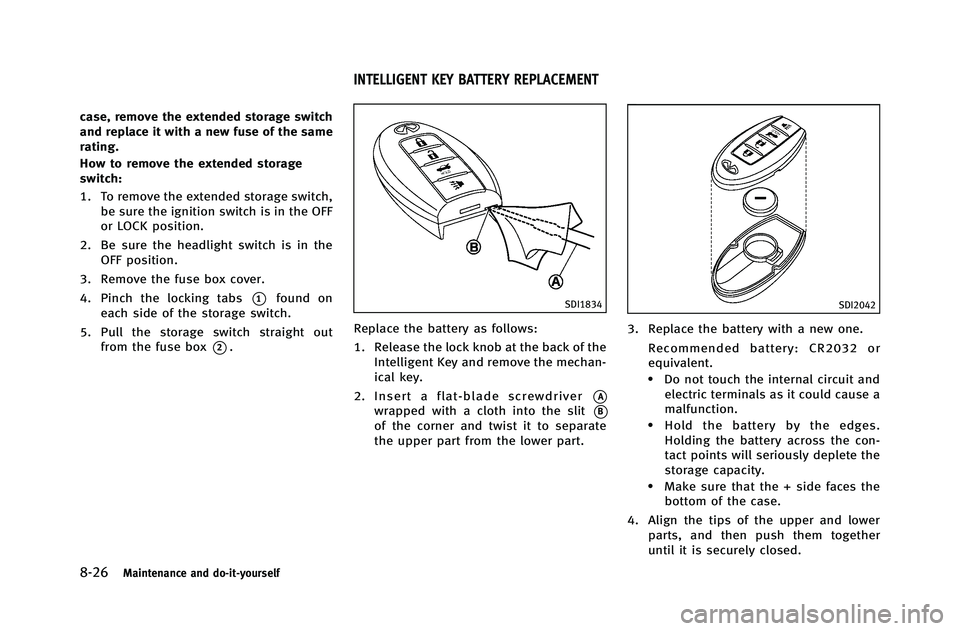
How to remove the extended storage
switch:
1. To remove the extended storage switch,be sure the ignition switch is in the OFF
or LOCK position.
2. Be sure the headlight switch is in the OFF position.
3. Remove the fuse box cover.
4. Pinch the locking tabs
*1found on
each side of the storage switch.
5. Pull the storage switch straight out from the fuse box
*2.
SDI1834
Replace the battery as follows:
1. Release the lock knob at the back of the
Intelligent Key and remove the mechan-
ical key.
2. Insert a flat-blade screwdriver
*A
wrapped with a cloth into the slit*B
of the corner and twist it to separate
the upper part from the lower part.
SDI2042
3. Replace the battery with a new one.
Recommended battery: CR2032 or
equivalent.
.Do not touch the internal circuit andelectric terminals as it could cause a
malfunction.
.Hold the battery by the edges.
Holding the battery across the con-
tact points will seriously deplete the
storage capacity.
.Make sure that the + side faces thebottom of the case.
4. Align the tips of the upper and lower parts, and then push them together
until it is securely closed.
INTELLIGENT KEY BATTERY REPLACEMENT
Page 480 of 490
10 Index
Number
4 Wheel Active Steer (4WAS) system ................. 5-57
4 Wheel Active Steer (4WAS) warning light ....... 2-14
A
ABS (Anti-lock Braking System) ......................... 5-54
Advanced air bag system .................................. 1-46
Air bag systemAdvanced air bag system ............................. 1-46
Front passenger air bag and status light ...... 1-49
Front-seat mounted side-impact supplemental
air bag system ............................................. 1-52
Roof-mounted curtain side-impact
supplemental air bag system ....................... 1-52
Air bag warning labels ...................................... 1-55
Air bag warning light ............................... 1-55, 2-17
Air cleaner housing filter ................................... 8-21
Air conditioner Air conditioner service ................................. 4-41
Air conditioner specification label ................ 9-14
Air conditioning system refrigerant and
lubricant recommendations .................. 4-41, 9-7
Automatic climate control ............................ 4-31
In-cabin microfilter ....................................... 4-40
Alarm, How to stop alarm (see vehicle
security system) ................................................ 2-29
Alcohol, drugs and driving .................................. 5-8
All-wheel drive (AWD) ........................................ 5-45 All-wheel drive (AWD) driving
safety precautions .............................................. 5-8
All-wheel drive (AWD) warning light .................. 2-12
Antenna ............................................................ 4-89
Anti-lock Braking System (ABS) ......................... 5-54
Anti-lock braking system (ABS) warning light .... 2-13
Appearance care
Exterior appearance care ................................ 7-2
Interior appearance care ................................ 7-4
Armrest ............................................................. 1-13
Ashtrays (See cigarette lighter and ashtrays) .... 2-44
Audible reminders ............................................ 2-19
Audio operation precautions ............................. 4-41
Audio system .................................................... 4-41
Steering wheel audio controls ...................... 4-87
Autolight system ............................................... 2-35
Automatic
Automatic adjusting function
(front windows) ............................................ 2-54
Automatic climate control .................. 4-32, 4-34
Automatic transmission fluid (ATF) ............... 8-14
Climate control ............................................ 4-31
Door locks ..................................................... 3-6
Drive positioner ........................................... 3-31
Driving with automatic transmission ............ 5-14
Moonroof ..................................................... 2-55
Seat positioner ............................................ 3-31
Average fuel consumption and speed ................ 2-26
Avoiding collision and rollover ............................ 5-6
B
Battery .............................................................. 8-17
Battery saver system ................................... 2-37
Intelligent Key .............................................. 8-26
Variable voltage control system ................... 8-19
Before starting the engine ................................ 5-12
Belts (See drive belts) ....................................... 8-19
Bluetooth
®hands-free phone system
(models with navigation system) ....................... 4-90
Bluetooth
®hands-free phone system
(models without navigation system) ................ 4-100
Bluetooth
®streaming audio ............................. 4-70
Brake Anti-lock Braking System (ABS) .................... 5-54
Brake and clutch fluid .................................. 8-15
Brake fluid ................................................... 8-15
Brake system ............................................... 5-51
Parking brake operation ............................... 5-20
Warning light ............................................... 2-13
Break-in schedule ............................................. 5-45
Brightness control Display ON/OFF button .................................. 4-9
Instrument panel ......................................... 2-38
Bulb check/instrument panel ............................ 2-12
Bulb replacement .............................................. 8-28
Page 487 of 490
10-8
W
Walk-in mechanism ............................................. 1-6
WarningDot matrix display ....................................... 2-20
Hazard warning flasher switch ..................... 2-39
Lights .......................................................... 2-12
Tire pressure monitoring
system (TPMS) ....................................... 5-4, 6-2
Warning/indicator lights and
audible reminders ........................................ 2-12
Warning labels, Air bag warning labels ............. 1-55
Warning light Air bag warning light ......................... 1-55, 2-17
All-wheel drive (AWD) warning light ............. 2-12
Anti-lock braking system (ABS)
warning light ............................................... 2-13
Brake warning light ...................................... 2-13
Intelligent Key warning light ........................ 2-15
Low tire pressure warning light .................... 2-15
Seat belt warning light and chime ............... 2-17
Warranty, Emission control system warranty ..... 9-25
Washer switch, Windshield wiper and
washer switch ................................................... 2-31
Washing ............................................................. 7-2
Waxing ............................................................... 7-2
Wheel/tire size ................................................... 9-9
Wheels and tires ............................................... 8-33 Care of wheels ............................................... 7-3
Cleaning aluminum alloy wheels .................... 7-3
Window washer fluid ........................................ 8-16 Window(s)
Automatic adjusting function ....................... 2-54
Cleaning ........................................................ 7-3
Power windows ............................................ 2-52
Windshield wiper and washer switch ................ 2-31
Wiper Rain-sensing auto wiper system ................... 2-33
Windshield wiper and washer switch ........... 2-31
Wiper blades ............................................... 8-22
X
Xenon headlights .............................................. 2-34