USB INFINITI G-COUPE 2012 User Guide
[x] Cancel search | Manufacturer: INFINITI, Model Year: 2012, Model line: G-COUPE, Model: INFINITI G-COUPE 2012Pages: 490, PDF Size: 3.73 MB
Page 230 of 490

Troubleshooting guide:
SymptomCause and Countermeasure
Cannot play Check if the disc or USB device was inserted correctly.
Check if the disc is scratched or dirty.
Check if there is condensation inside the player, and if there is, wait until the condensation is gone (about 1 hour) before using the
player.
If there is a temperature increase error, the player will play correctly after it returns to the normal temperature.
If there is a mixture of music CD files (CD-DA data) and compressed audio files on a CD, only the music CD files (CD-DA data) will be
played.
Files with extensions other than
“.MP3 (.mp3)”,“.WMA (.wma)”, “.AAC (.aac)”,“.M4A (.m4a)”,or “.AA3 (.aa3)”cannot be played. In
addition, the character codes and number of characters for folder names and file names should be in compliance with the
specifications.
Check if the disc or the file is generated in an irregular format. This may occur depending on the variation or the setting of
compressed audio writing applications or other text editing applications.
Check if the finalization process, such as session close and disc close, is done for the disc.
Check if the disc or USB device is protected by copyright.
Poor sound quality Check if the disc is scratched or dirty.
It takes a relatively long time before
the music starts playing. If there are many folder or file levels on the disc or USB device, some time may be required before the music starts playing.
Music cuts off or skips The writing software and hardware combination might not match, or the writing speed, writing depth, writing width, etc., might not
match the specifications. Try using the slowest writing speed.
Skipping with high bit rate files Skipping may occur with large quantities of data, such as for high bit rate data.
Move immediately to the next song
when playing. If an unsupported compressed audio file has been given a supported extension like .MP3, or when play is prohibited by copyright
protection, the player will skip to the next song.
The songs do not play back in the
desired order. The playback order is the order in which the files were written by the writing software, so the files might not play in the desired order.
Random/Shuffle may be active on the audio system or on a USB device.
Monitor, climate, audio, phone and voice recognition systems4-51
Page 232 of 490
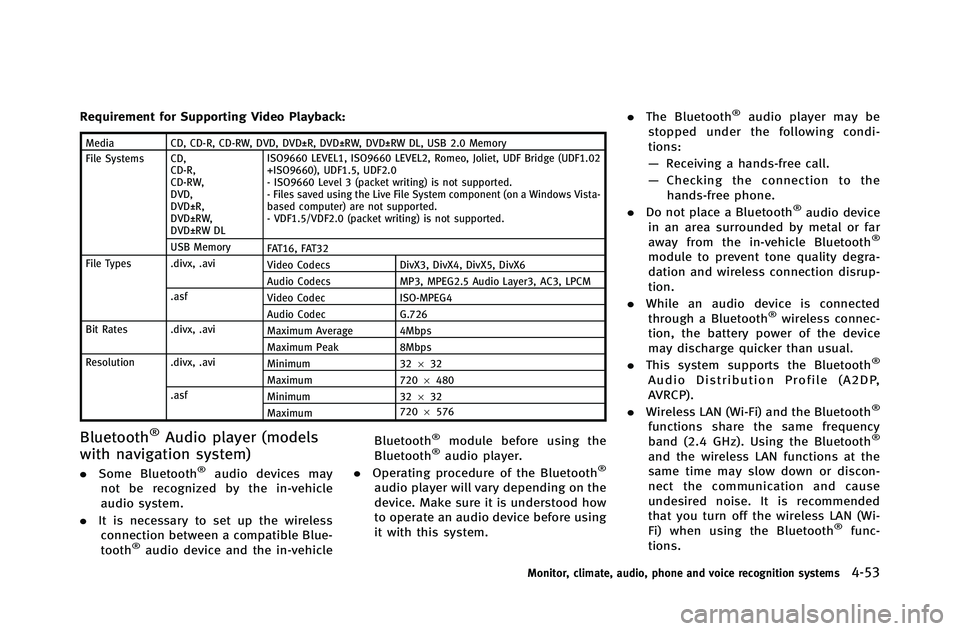
Requirement for Supporting Video Playback:
MediaCD, CD-R, CD-RW, DVD, DVD±R, DVD±RW, DVD±RW DL, USB 2.0 Memory
File Systems CD, CD-R,
CD-RW,
DVD,
DVD±R,
DVD±RW,
DVD±RW DL ISO9660 LEVEL1, ISO9660 LEVEL2, Romeo, Joliet, UDF Bridge (UDF1.02
+ISO9660), UDF1.5, UDF2.0
- ISO9660 Level 3 (packet writing) is not supported.
- Files saved using the Live File System component (on a Windows Vista-
based computer) are not supported.
- VDF1.5/VDF2.0 (packet writing) is not supported.
USB Memory FAT16, FAT32
File Types .divx, .avi Video Codecs DivX3, DivX4, DivX5, DivX6
Audio Codecs MP3, MPEG2.5 Audio Layer3, AC3, LPCM
.asf Video Codec ISO-MPEG4
Audio Codec G.726
Bit Rates .divx, .avi Maximum Average 4Mbps
Maximum Peak 8Mbps
Resolution .divx, .avi Minimum 32632
Maximum 7206480
.asf Minimum 32632
Maximum 720
6576
Bluetooth®Audio player (models
with navigation system)
. Some Bluetooth®audio devices may
not be recognized by the in-vehicle
audio system.
. It is necessary to set up the wireless
connection between a compatible Blue-
tooth
®audio device and the in-vehicle Bluetooth
®module before using the
Bluetooth®audio player.
. Operating procedure of the Bluetooth®
audio player will vary depending on the
device. Make sure it is understood how
to operate an audio device before using
it with this system. .
The Bluetooth
®audio player may be
stopped under the following condi-
tions:
— Receiving a hands-free call.
— Checking the connection to the
hands-free phone.
. Do not place a Bluetooth
®audio device
in an area surrounded by metal or far
away from the in-vehicle Bluetooth
®
module to prevent tone quality degra-
dation and wireless connection disrup-
tion.
. While an audio device is connected
through a Bluetooth
®wireless connec-
tion, the battery power of the device
may discharge quicker than usual.
. This system supports the Bluetooth
®
Audio Distribution Profile (A2DP,
AVRCP).
. Wireless LAN (Wi-Fi) and the Bluetooth
®
functions share the same frequency
band (2.4 GHz). Using the Bluetooth®
and the wireless LAN functions at the
same time may slow down or discon-
nect the communication and cause
undesired noise. It is recommended
that you turn off the wireless LAN (Wi-
Fi) when using the Bluetooth
®func-
tions.
Monitor, climate, audio, phone and voice recognition systems4-53
Page 237 of 490

4-58Monitor, climate, audio, phone and voice recognition systems
desired setting. For the other setting
methods, see“How to use SETTING button”
(P.4-14).
This vehicle has some sound effect func-
tions as follows:
. Speed Sensitive Vol.
. Precision Phased Audio (if so equipped)
. Driver’s Audio Stage (if so equipped)
For more details, see “How to use SETTING
button” (P.4-14).
Switching the display (Type A):
. Models with navigation system
Pushing the DISC·AUX button will switch
the displays as follows:
iPod
®/USB ?CD/DVD ?Music Box®?
Bluetooth®Audio ?iPod®/USB
. Models without navigation system
Pushing the DISC button will switch the
display as follows:
CD ?Music Box
®?CD
Pushing the AUX button will switch the
display as follows:
USB/iPod ?XM1 ?XM2 ?XM3 ?USB/
iPod
FM-AM-SAT radio operation
When the radio band select button is
pushed while the ignition switch is in the
ACC or ON position, the radio will come on
at the channel last played.
The last channel played will also come on
when the ON·OFF button is pushed to ON.
The satellite radio is not available in
Alaska, Hawaii and Guam.
If another audio source is playing when the
radio or satellite band select button is
turned to ON, the audio source will
automatically be turned off and the last
radio channel played will come on.
When the stereo broadcast signal is weak,
the radio will automatically change from
stereo to monaural reception.
orradio (FM/AM/SAT) band
select (Type A):
Pushing the RADIO AM·FM or FM·AM radio
band select button will change the band as
follows:
. Models with navigation system
AM ?FM1 ?FM2 ?XM1 ?XM2 ?XM3
? AM .
Models without navigation system
AM ?FM1 ?FM2 ?AM
radio (SAT) band select (Type A):
Push the satellite band select button to
select the satellite radio mode XM1, XM2
or XM3.
radio (FM/AM/SAT) band select
(Type B):
Pushing the radio band select button will
change the band as follows:
AM ?FM ?XM ?AM
When the radio band select button is
pushed while the ignition switch is in the
ACC or ON position, the radio will come on
at the station last played.
TUNE (Tuning):
. For AM and FM radio
Turn the radio TUNE knob for manual
tuning.
. For XM Satellite Radio
Turn the radio TUNE knob to seek
channels from all of the categories
when any category is not selected.
Page 245 of 490
4-66Monitor, climate, audio, phone and voice recognition systems
USB INPUT OPERATION (if so
equipped)
Audio main operation
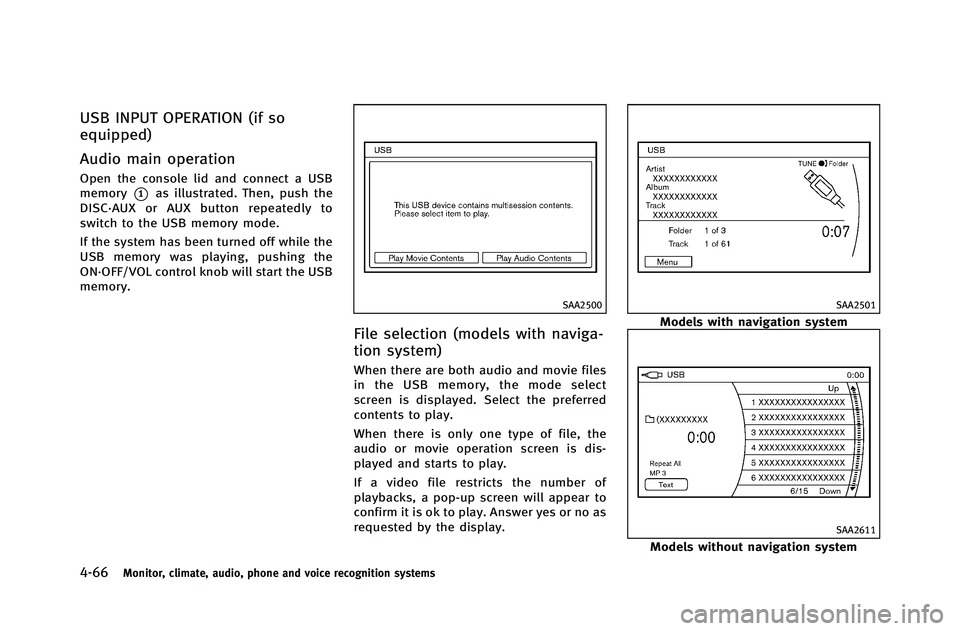
Open the console lid and connect a USB
memory
*1as illustrated. Then, push the
DISC·AUX or AUX button repeatedly to
switch to the USB memory mode.
If the system has been turned off while the
USB memory was playing, pushing the
ON·OFF/VOL control knob will start the USB
memory.
SAA2500
File selection (models with naviga-
tion system)
When there are both audio and movie files
in the USB memory, the mode select
screen is displayed. Select the preferred
contents to play.
When there is only one type of file, the
audio or movie operation screen is dis-
played and starts to play.
If a video file restricts the number of
playbacks, a pop-up screen will appear to
confirm it is ok to play. Answer yes or no as
requested by the display.
SAA2501
Models with navigation system
SAA2611
Models without navigation system
Page 246 of 490
Audio file operation
orPLAY:
When the DISC·AUX or AUX button is
pushed with the system off and the USB
memory inserted, the system will turn on.
If another audio source is playing and a
USB memory is inserted, push the
DISC·AUX or AUX button repeatedly until
the center display changes to the USB
memory mode.
Next/Previous File and Fast
Forward/Rewind:
When the
orbutton is pushed for
more than 1.5 seconds while a USB
memory is being played, the USB memory
will play while forwarding or rewinding.
When the button is released, the USB
memory will return to normal play speed.
When the
orbutton is pushed for
less than 1.5 seconds while the USB
memory is being played, the next track or
the beginning of the current track on the
USB memory will be played.
When the REW button is pushed for less
than 1.5 seconds within 3 seconds after
the current track started playing, the previous track will be played.
When the REW button is pushed for less
than 1.5 seconds after 3 seconds from
when the current track started playing, the
beginning of the current track will be
played.
The INFINITI controller can also be used to
select tracks when the USB memory is
being played.
Folder selection:
To change to another folder in the USB
memory, turn the folder selector or choose
a folder displayed on the screen using the
INFINITI controller.
REPEAT (RPT), RANDOM (RDM):
When the RPT button is pushed while the
USB memory is played, the play pattern
can be change as follows.
To change the play mode, push the RPT
button repeatedly and the mode will
change as follows.
Normal ?1 Folder Repeat ?1 Track
Repeat ?All Random ?1 Folder Random
? Normal Text (models without navigation system):
When the “Text”key is selected on the
screen using the INFINITI controller and
then the ENTER button is pushed while a
USB memory is being played, the music
information listed below will be displayed
on the screen.
. Folder title
. File title
. Song title
. Album Title
. Artist
Monitor, climate, audio, phone and voice recognition systems4-67
Page 247 of 490
4-68Monitor, climate, audio, phone and voice recognition systems
SAA2502
Menu (models with navigation system):
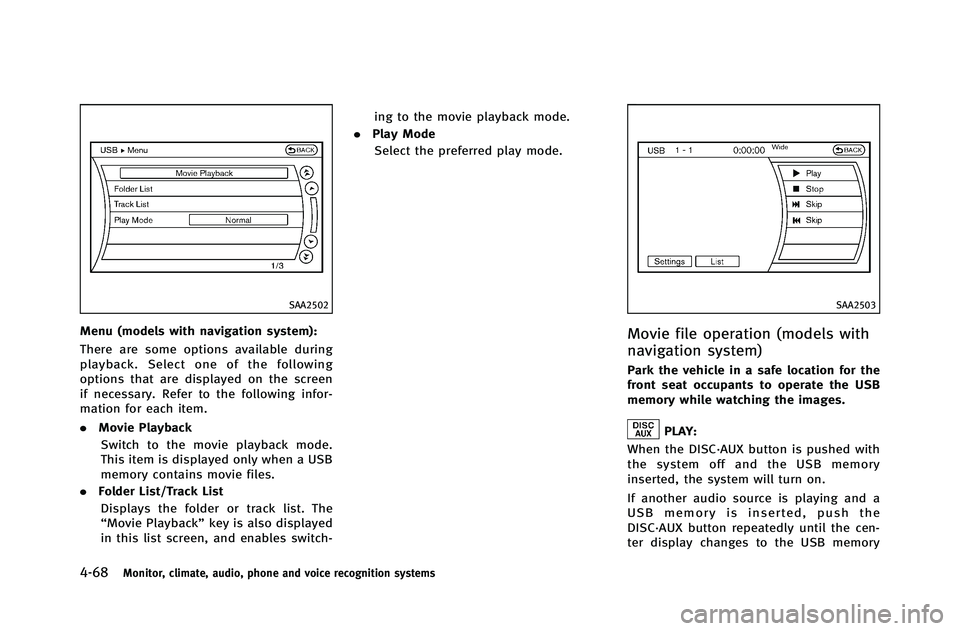
There are some options available during
playback. Select one of the following
options that are displayed on the screen
if necessary. Refer to the following infor-
mation for each item.
.Movie Playback
Switch to the movie playback mode.
This item is displayed only when a USB
memory contains movie files.
. Folder List/Track List
Displays the folder or track list. The
“Movie Playback” key is also displayed
in this list screen, and enables switch- ing to the movie playback mode.
. Play Mode
Select the preferred play mode.
SAA2503
Movie file operation (models with
navigation system)
Park the vehicle in a safe location for the
front seat occupants to operate the USB
memory while watching the images.
PLAY:
When the DISC·AUX button is pushed with
the system off and the USB memory
inserted, the system will turn on.
If another audio source is playing and a
USB memory is inserted, push the
DISC·AUX button repeatedly until the cen-
ter display changes to the USB memory
Page 248 of 490
mode.
Operation keys:
To operate the USB memory, select the
desired key displayed on the operation
screen using the INFINITI controller.
Pause
Select the “
”key to pause the movie
file. To resume playing the movie file,
select the “
”key.
Play
Select the “
”key to start playing a
movie file, for example, after pausing a
movie file.
STOP
Select the “
”key to stop playing a
movie file.
Skip (Next chapter)
Select the “
”key to skip the chapter(s)
of the disc forward. The chapters will
advance the number of times the ENTER
button is pushed.
Skip (Previous chapter)
Select the “
”key to skip the chapter(s)
of the disc backward. The chapters will go
back the number of times the “
”key is
selected.
List:
Select the “List”key on the movie file
operation screen to display the file list.
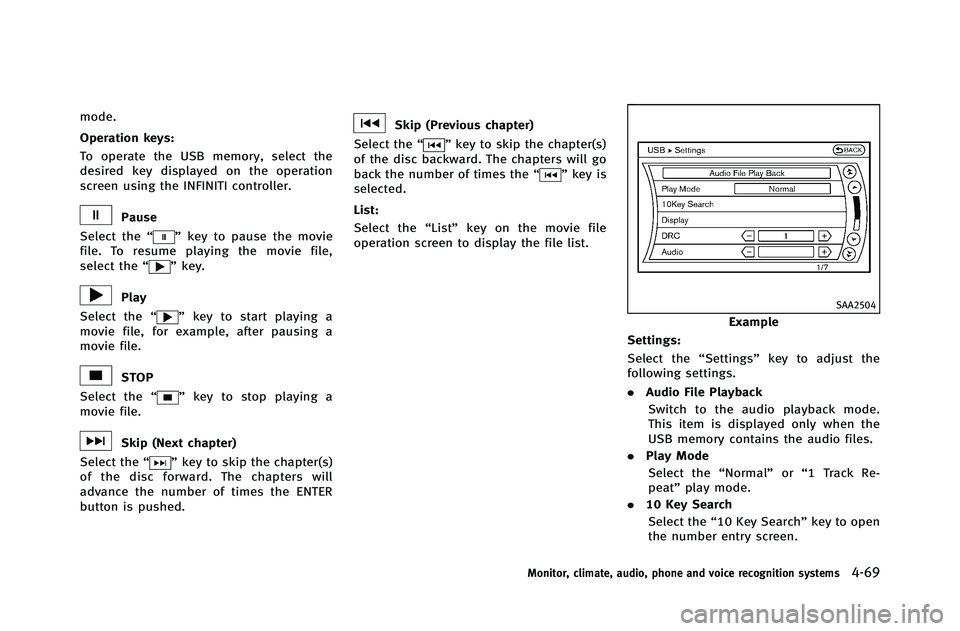
SAA2504
Example
Settings:
Select the “Settings”key to adjust the
following settings.
. Audio File Playback
Switch to the audio playback mode.
This item is displayed only when the
USB memory contains the audio files.
. Play Mode
Select the “Normal”or“1 Track Re-
peat” play mode.
. 10 Key Search
Select the “10 Key Search” key to open
the number entry screen.
Monitor, climate, audio, phone and voice recognition systems4-69
Page 254 of 490
see“Bluetooth®Hands-Free Phone System
(models with navigation system)” (P.4-90).
SAA2974
Automatic transmission models
SAA2426
Manual transmission models
iPod®PLAYER OPERATION (if so
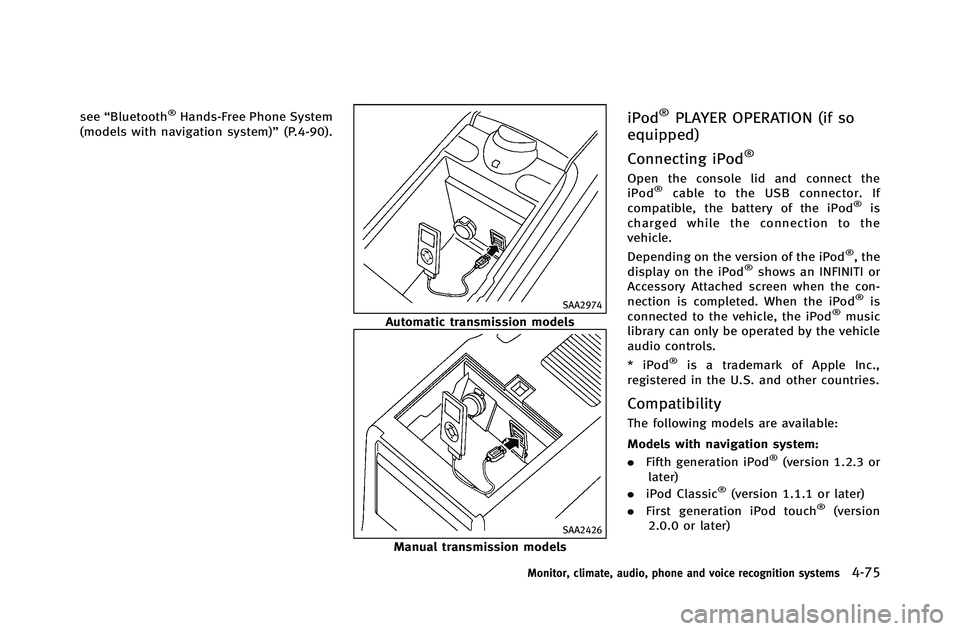
equipped)
Connecting iPod
®
Open the console lid and connect the
iPod®cable to the USB connector. If
compatible, the battery of the iPod®is
charged while the connection to the
vehicle.
Depending on the version of the iPod
®, the
display on the iPod®shows an INFINITI or
Accessory Attached screen when the con-
nection is completed. When the iPod
®is
connected to the vehicle, the iPod®music
library can only be operated by the vehicle
audio controls.
* iPod
®is a trademark of Apple Inc.,
registered in the U.S. and other countries.
Compatibility
The following models are available:
Models with navigation system:
. Fifth generation iPod
®(version 1.2.3 or
later)
. iPod Classic
®(version 1.1.1 or later)
. First generation iPod touch®(version
2.0.0 or later)
Monitor, climate, audio, phone and voice recognition systems4-75
Page 259 of 490
4-80Monitor, climate, audio, phone and voice recognition systems
Playing recorded songs
Select the Music Box®audio system by
using one of the following methods.
. Push the audio source switch on the
steering wheel repeatedly until the
center display changes to the Music
Box
®mode. (See “Steering-wheel-
mounted controls for audio” (P.4-87).)
. Push the DISC·AUX or DISC button
repeatedly until the center display
changes to the Music Box
®mode.
. Give voice commands (models with
navigation system). (See “INFINITI Voice
Recognition system (models with navi-
gation system)” (P.4-114).)
Stopping playback:
The system stops playing when: a. another mode (radio, CD, DVD, USB memory or iPod) is selected.
b. the audio system is turned off.
c. the ignition switch is pushed to the LOCK position.
Next/Previous Track and Fast
Forward/Rewind:
When the
orbutton is pushed for
more than 1.5 seconds while a track is being played, the track will play while fast
forwarding or rewinding. When the button
is released, the track will return to the
normal play speed.
When the
orbutton is pushed for
less than 1.5 seconds while a track is
being played, the next track or the begin-
ning of the current track will be played.
When the REW button is pushed for less
than 1.5 seconds within 3 seconds after
the current track started playing, the
previous track will be played.
When the REW button is pushed for less
than 1.5 seconds after 3 seconds from
when the current track started playing, the
beginning of the current track will be
played.
The INFINITI controller can also be used to
select tracks when a track is being played.
Play mode selection:
The TUNE/FOLDER knob will skip from
album to album unless it is playing “All
Songs” from the Music Library menu. When
playing “All Songs”, the knob will change
the track instead of the album. The upper
right corner of the main screen will indicate
if the TUNE knob is changing by track or
album.
REPEAT (RPT), RANDOM (RDM):
When the RPT·RDM button is pushed while
a track is being played, the play pattern
can be changed as follows:
(Normal) ?1 Album Repeat ?1 Track
Repeat ?1 Album Random ?All Random
? (Normal)
Tag Track (models with navigation sys-
tem):
Select “Tag Track” key on the screen when
a track is being played. A menu will show
the 5 available playlists. Select one of the
playlists to add the current song to that
playlist. If a playlist is not selectable (text
is grayed out), it means the song already
exists in that playlist.
Page 261 of 490
4-82Monitor, climate, audio, phone and voice recognition systems
.Delete Songs
Delete tracks in the Playlist by selecting
from the displayed song list.
Play Mode (models with navigation sys-
tem):
Choose the preferred play mode from the
following items.
. Normal
. 1 Album Repeat
. 1 Track Repeat
. 1 Playlist Random
. 1 Artist Random
. 1 Album Random
. 1 All Track Random
. 1 All Random
Edit Music Information:
Displays the following information about
the Music Box
®hard drive/flash memory
to edit if necessary.
. Edit Information of Current Song (mod-
els with navigation system)
Edit the “Track”,“Artist”and“Genre”
information of the current track using
the keypad displayed on the screen.
(See “How to use touch screen (models
with navigation system)” (P.4-5).)
Edit the “Mode”information by select- ing from the list.
. Edit Information by Album (models with
navigation system)
Edit the displayed name and of a
selected album and the track informa-
tion in the album.
. Update Gracenote from USB Device
(models with navigation system)/
Transfer Titles from USB (models with-
out navigation system)
Update the in-vehicle Gracenote Data-
base using a USB memory. Search the
title from a information acquired on the
Internet.
Visit www.InfinitiUSA.com/music-up-
date/ for details.
. Transfer Missing Titles to USB
Transfer the information of an album
recorded without titles to a USB mem-
ory.
Visit www.InfinitiUSA.com/music-up-
date/ for details.
. Update Gracenote from HDD (models
with navigation system)/Update Miss-
ing Titles (models without navigation
system)
The title information is acquired from
the database stored on the hard drive/ flash memory.