change time INFINITI G-COUPE 2012 User Guide
[x] Cancel search | Manufacturer: INFINITI, Model Year: 2012, Model line: G-COUPE, Model: INFINITI G-COUPE 2012Pages: 490, PDF Size: 3.73 MB
Page 208 of 490
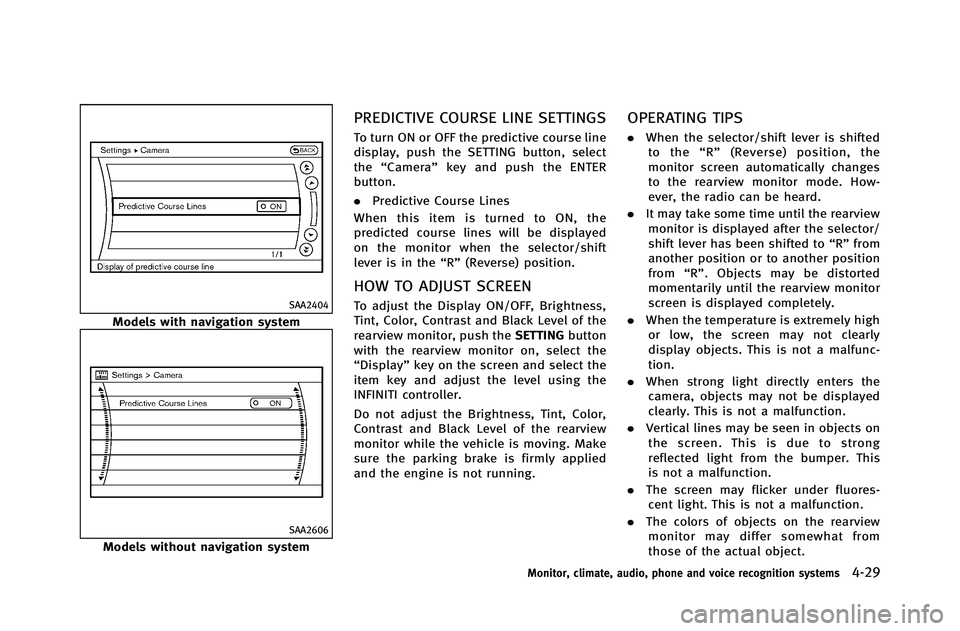
SAA2404
Models with navigation system
SAA2606
Models without navigation system
PREDICTIVE COURSE LINE SETTINGS
To turn ON or OFF the predictive course line
display, push the SETTING button, select
the“Camera” key and push the ENTER
button.
. Predictive Course Lines
When this item is turned to ON, the
predicted course lines will be displayed
on the monitor when the selector/shift
lever is in the “R”(Reverse) position.
HOW TO ADJUST SCREEN
To adjust the Display ON/OFF, Brightness,
Tint, Color, Contrast and Black Level of the
rearview monitor, push the SETTINGbutton
with the rearview monitor on, select the
“Display” key on the screen and select the
item key and adjust the level using the
INFINITI controller.
Do not adjust the Brightness, Tint, Color,
Contrast and Black Level of the rearview
monitor while the vehicle is moving. Make
sure the parking brake is firmly applied
and the engine is not running.
OPERATING TIPS
. When the selector/shift lever is shifted
to the “R ” (Reverse) position, the
monitor screen automatically changes
to the rearview monitor mode. How-
ever, the radio can be heard.
. It may take some time until the rearview
monitor is displayed after the selector/
shift lever has been shifted to “R”from
another position or to another position
from “R”. Objects may be distorted
momentarily until the rearview monitor
screen is displayed completely.
. When the temperature is extremely high
or low, the screen may not clearly
display objects. This is not a malfunc-
tion.
. When strong light directly enters the
camera, objects may not be displayed
clearly. This is not a malfunction.
. Vertical lines may be seen in objects on
the screen. This is due to strong
reflected light from the bumper. This
is not a malfunction.
. The screen may flicker under fluores-
cent light. This is not a malfunction.
. The colors of objects on the rearview
monitor may differ somewhat from
those of the actual object.
Monitor, climate, audio, phone and voice recognition systems4-29
Page 236 of 490

SAA1533
Models with navigation system
1. Radio band select button
2. DISC·AUX button
SAA2922
Models without navigation system
1. AUX/Satellite band select button
2. Radio band select button
3. DISC button
FM-AM-SAT RADIO WITH COMPACT
DISC (CD) PLAYER
For all operation precautions, see “Audio
operation precautions” (P.4-41).
The satellite radio mode requires an active
XM Satellite Radio subscription. The satel-
lite radio is not available in Alaska, Hawaii
and Guam.
It may take some time to receive the
activation signal after subscribing the XM Satellite Radio. After receiving the activa-
tion signal, an available channel list will be
automatically updated in the radio. For XM,
push the ignition switch from LOCK to ACC
to update the channel list.
Audio main operation
Head unit:
The auto loudness circuit enhances the low
and high frequency ranges automatically in
both radio reception and CD playback.
ON·OFF/Volume control:
Push the ignition switch to the ACC or ON
position, and then push the ON·OFF button
while the system is off to turn on the last
audio source, which was playing immedi-
ately before the system was turned off.
While the system is on, pushing the
ON·OFF button turns the system off.
Turn the VOL control knob to adjust the
volume.
Adjusting tone quality and speaker bal-
ance:
To adjust Bass, Treble, Balance and Fade,
push the Audio control knob. When the
display shows the setting you want to
change (Bass, Treble, Balance and Fade),
rotate the Audio control knob to set the
Monitor, climate, audio, phone and voice recognition systems4-57
Page 241 of 490

4-62Monitor, climate, audio, phone and voice recognition systems
REPEAT (RPT), RANDOM (RDM) (Type
A):
When the RPT button is pushed while the
CD is played, the play pattern can be
changed as follows:
(CD)
(CD with compressed audio files)
REPEAT (RPT) (Type B):
When the SCAN·RPT button is pushed while
the CD is played, the play pattern can be
changed as follows:
(CD)
(CD with MP3 or WMA)
CD EJECT:
When the CD EJECT button is pushed with
the CD loaded, the CD will be ejected.
When this button is pushed while the CD is
being played, the CD will be ejected.
If the CD comes out and is not removed, it
will be pulled back into the slot to protect
it.
DVD (Digital Versatile Disc) PLAYER
OPERATION (models with naviga-
tion system)
Precautions
Start the engine when using the DVD
entertainment system.
Movies will not be shown on the front
display while the vehicle is in any drive
position to reduce driver distraction. Audio
is available when a movie is played. To
view movies in the front display, stop the
vehicle in a safe location, move the
selector lever to the P (Park) position
(Automatic Transmission models) or apply
the parking brake (Manual Transmission
models).
WARNING
. The driver must not attempt to operate
the DVD system or wear the headphones
while the vehicle is in motion so that full
attention may be given to vehicle opera-
tion.
. Do not attempt to modify the system to
display a movie on the front screen while
the vehicle is being driven. Doing so may
distract the driver and may cause a
collision and serious personal injury or
death.
CAUTION
.Only operate the DVD while the vehicle
engine is running. Operating the DVD for
extended periods of time with the
engine OFF can discharge the vehicle
battery.
. Do not allow the system to get wet.
Excessive moisture such as spilled
liquids may cause the system to mal-
function.
. While playing VIDEO-CD media, this DVD
Page 242 of 490

player does not guarantee complete
functionality of all VIDEO-CD formats.
Display settings
To adjust the front display mode, push the
SETTING button while the DVD is being
played, select the“Others”key and then
select the “Display”key.
To adjust the display ON/OFF, brightness,
tint, color and contrast, select the “Display
Adjustment” key and then select each key.
Then you can adjust each item using the
INFINITI controller. After changes have
been made push the BACK button to save
the setting.
SAA2497
Playing a DVD
DISC·AUX button:
Park the vehicle in a safe location for the
front seat occupants to operate the DVD
drive while watching the images.
Push the DISC·AUX button on the instru-
ment panel and turn the display to the DVD
mode.
When a DVD is loaded, it will be replayed
automatically.
The operation screen will be turned on
when the DISC·AUX button located on the
instrument panel is pushed while a DVD is
being played, and it will turn off auto- matically after a period of time. To turn it
on again, push the DISC·AUX button again.
DVD operation keys:
When the DVD is playing without the
operation screen being shown, you may
use the touch screen to select items from
the displayed video. You may also use the
INFINITI controller to select an item from
the displayed video. When the operation
screen is being shown, use the INFINITI
controller or touch screen to select an item
from the displayed menus.
PAUSE:
Select the “
”key to pause the DVD. To
resume playing the DVD, use the “PLAY”
key.
PLAY:
Select the “
”key to start playing the
DVD, for example, after pausing the DVD.
STOP:
Select the “
”key to stop playing the
DVD.
Monitor, climate, audio, phone and voice recognition systems4-63
Page 243 of 490
4-64Monitor, climate, audio, phone and voice recognition systems
/Next/Previous Chapter:
Select the “
”or “”key to skip the
chapter(s) of the disc forward/backward.
The chapters will advance/go back the
number of times this key is selected.
/Commercial Skip:
This function is only for DVD-VIDEO, DVD-
VR. Select the “
”or “”key to skip
forward or backwards by the set amount as
defined in the DVD Settings menu.
Top Menu:
When the “Top Menu” key is selected in
the screen while a DVD is being played, the
top menu specific to each disc will be
displayed. For details, see the instructions
on the disc.
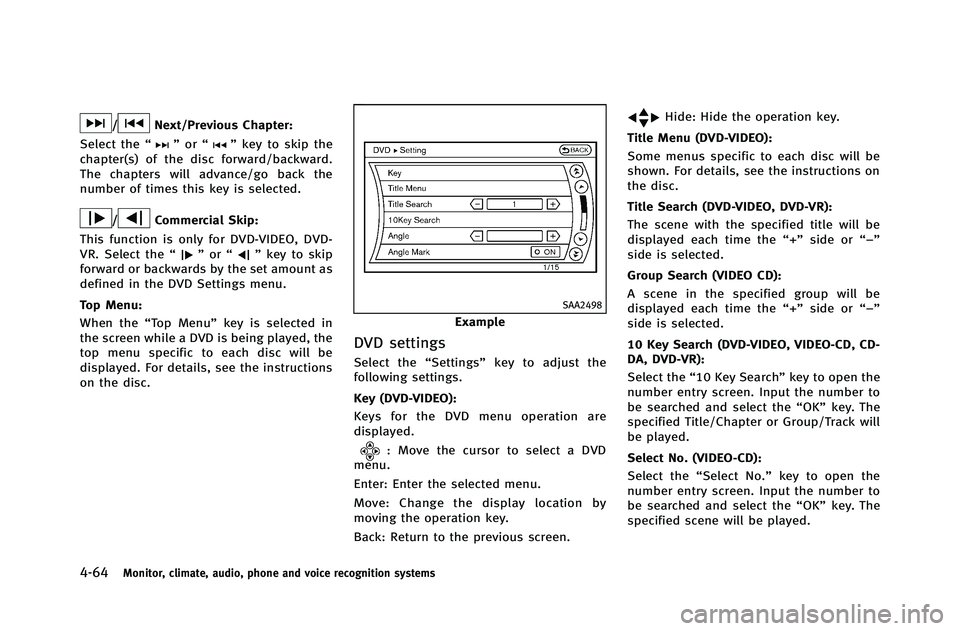
SAA2498
Example
DVD settings
Select the “Settings”key to adjust the
following settings.
Key (DVD-VIDEO):
Keys for the DVD menu operation are
displayed.
: Move the cursor to select a DVD
menu.
Enter: Enter the selected menu.
Move: Change the display location by
moving the operation key.
Back: Return to the previous screen.
Hide: Hide the operation key.
Title Menu (DVD-VIDEO):
Some menus specific to each disc will be
shown. For details, see the instructions on
the disc.
Title Search (DVD-VIDEO, DVD-VR):
The scene with the specified title will be
displayed each time the “+”side or “−”
side is selected.
Group Search (VIDEO CD):
A scene in the specified group will be
displayed each time the “+”side or “−”
side is selected.
10 Key Search (DVD-VIDEO, VIDEO-CD, CD-
DA, DVD-VR):
Select the “10 Key Search” key to open the
number entry screen. Input the number to
be searched and select the “OK”key. The
specified Title/Chapter or Group/Track will
be played.
Select No. (VIDEO-CD):
Select the “Select No.” key to open the
number entry screen. Input the number to
be searched and select the “OK”key. The
specified scene will be played.
Page 244 of 490
Angle (DVD-VIDEO):
If the DVD contains different angles (such
as moving images), the current image
angle can be switched to another one.
Select the“Angle” key. The angle will
change each time the “+”side or “−”side
is selected.
Angle Mark (DVD-VIDEO):
When this item is turned on, an angle mark
will be shown on the bottom of the screen
if the scene can be seen from a different
angle.
Menu Skip (DVD-VIDEO):
DVD menus are automatically configured
and the contents will be played directly
when the “Menu Skip” key is turned on.
Note that some discs may not be played
directly even if this item is turned on.
CM Skip (DVD-VIDEO):
Select the “CM Skip” key. Choose the
setting time from 15, 30 or 60 seconds by
selecting the “+”side or “−”side.
DRC (DVD-VIDEO, DVD-VR):
DRC (Dynamic Range Compression) auto-
matically adjusts the soundtrack volume
level to maintain a more even sound to the
speakers. DVD Language (DVD-VIDEO, VIDEO-CD):
Select the
“DVD Language” key to open the
number entry screen. Input the number
corresponding to the preferred language
and select the “OK”key. The DVD top menu
language will be changed to the one
specified.
Display:
To adjust the image quality of the screen,
select the preferred adjustment items.
Audio:
Select the preferred language for audio.
Subtitle (DVD-VIDEO, DVD-VR):
Select the preferred language for subtitles.
Display Mode (DVD-VIDEO, VIDEO-CD, DVD-
VR):
Select from the “Full”,“Wide”, “Normal” or
“Cinema” modes.
Title List (DVD-VR):
Select the preferred title from the list.
Play Mode:
Select the preferred play mode.
PG/PL Mode (DVD-VR):
Select the “PG”or“PL” mode.
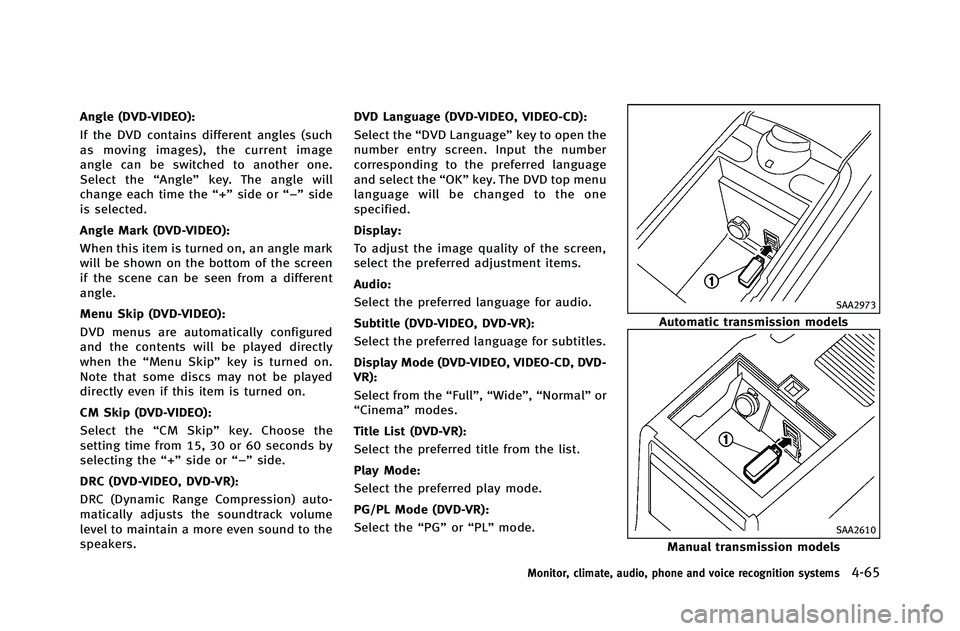
SAA2973
Automatic transmission models
SAA2610
Manual transmission models
Monitor, climate, audio, phone and voice recognition systems4-65
Page 257 of 490
4-78Monitor, climate, audio, phone and voice recognition systems
SAA2513
Models with navigation system
SAA2612
Models without navigation system
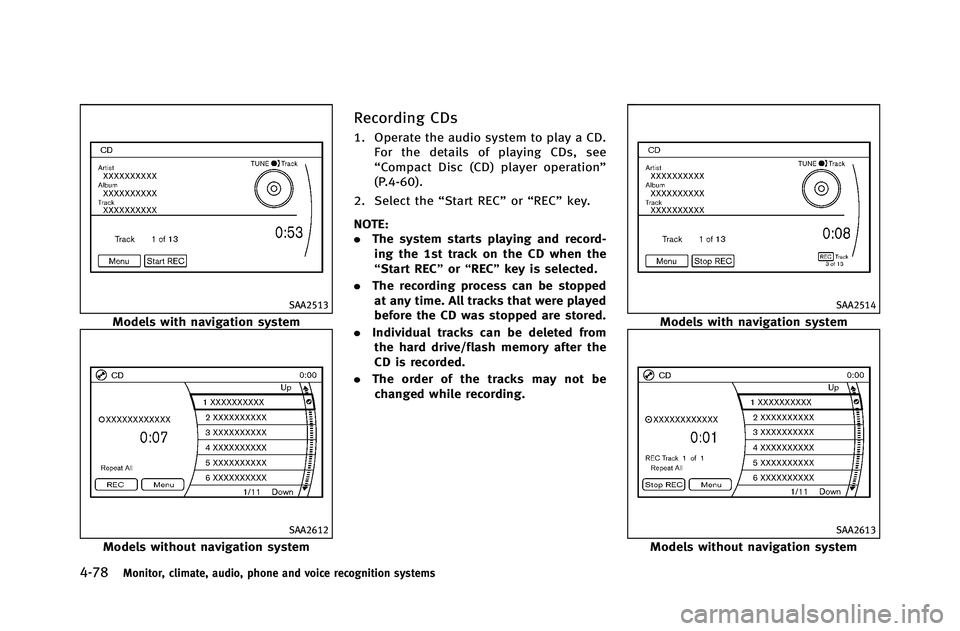
Recording CDs
1. Operate the audio system to play a CD.For the details of playing CDs, see
“Compact Disc (CD) player operation”
(P.4-60).
2. Select the “Start REC”or“REC” key.
NOTE:
. The system starts playing and record-
ing the 1st track on the CD when the
“Start REC” or“REC ”key is selected.
. The recording process can be stopped
at any time. All tracks that were played
before the CD was stopped are stored.
. Individual tracks can be deleted from
the hard drive/flash memory after the
CD is recorded.
. The order of the tracks may not be
changed while recording.
SAA2514
Models with navigation system
SAA2613
Models without navigation system
Page 263 of 490
4-84Monitor, climate, audio, phone and voice recognition systems
will use Gracenote Data, the Gracenote
Software, and Gracenote Servers for your
own personal non-commercial use only.
You agree not to assign, copy, transfer or
transmit the Gracenote Software or any
Gracenote Data to any third party. YOU
AGREE NOT TO USE OR EXPLOIT GRACE-
NOTE DATA, THE GRACENOTE SOFTWARE,
OR GRACENOTE SERVERS, EXCEPT AS EX-
PRESSLY PERMITTED HEREIN.
You agree that your non-exclusive license
to use the Gracenote Data, the Gracenote
Software, and Gracenote Servers will ter-
minate if you violate these restrictions. If
your license terminates, you agree to cease
any and all use of the Gracenote Data, the
Gracenote Software, and Gracenote Ser-
vers. Gracenote reserves all rights in
Gracenote Data, the Gracenote Software,
and the Gracenote Servers, including all
ownership rights. Under no circumstances
will Gracenote become liable for any
payment to you for any information that
you provide.
You agree that Gracenote, Inc. may enforce
its rights under this Agreement against you
directly in its own name.
The Gracenote service uses a unique
identifier to track queries for statisticalpurposes. The purpose of a randomly
assigned numeric identifier is to allow the
Gracenote service to count queries without
knowing anything about who you are. For
more information, see the web page for the
Gracenote Privacy Policy for the Gracenote
service.
The Gracenote Software and each item of
Gracenote Data are licensed to you
“AS
IS.” Gracenote makes no representations
or warranties, express or implied, regard-
ing the accuracy of any Gracenote Data
from in the Gracenote Servers. Gracenote
reserves the right to delete data from the
Gracenote Servers or to change data
categories for any cause that Gracenote
deems sufficient. No warranty is made that
the Gracenote Software or Gracenote Ser-
vers are error-free or that functioning of
Gracenote Software or Gracenote Servers
will be uninterrupted. Gracenote is not
obligated to provide you with new en-
hanced or additional data types or cate-
gories that Gracenote may provide in the
future and is free to discontinue its
services at any time.
GRACENOTE DISCLAIMS ALL WARRANTIES
EXPRESS OR IMPLIED, INCLUDING, BUT NOT
LIMITED TO, IMPLIED WARRANTIES OF MERCHANTABILITY, FITNESS FOR A PARTI-
CULAR PURPOSE, TITLE, AND NON-INFRIN-
GEMENT. GRACENOTE DOES NOT WARRANT
THE RESULTS THAT WILL BE OBTAINED BY
YOUR USE OF THE GRACENOTE SOFTWARE
OR ANY GRACENOTE SERVER. IN NO CASE
WILL GRACENOTE BE LIABLE FOR ANY
CONSEQUENTIAL OR INCIDENTAL DAMAGES
OR FOR ANY LOST PROFITS OR LOST
REVENUES.
Copyright:
Music recognition technology and related
data are provided by Gracenote
®. Grace-
note is the industry standard in music
recognition technology and related content
delivery. For more information, please visit
www.gracenote.com.
CD and music-related data from Gracenote,
Inc., copyright © 2000-2009 Gracenote.
Gracenote Software, copyright © 2000-
2009 Gracenote. This product and service
may practice one or more of the following
U.S. Patents: #5,987,525; #6,061,680;
#6,154,773, #6,161,132, #6,230,192,
#6,230,207, #6,240,459, #6,330,593,
and other patents issued or pending. Some
services supplied under license from Open
Globe, Inc. for U.S. Patent: #6,304,523.
Page 292 of 490
existing phone. If the user tries to
connect a phone that has already been
connected to the vehicle system, the
system announces the name that the
phone is already using. The connecting
procedure will then be cancelled.
The Add Phone command is not avail-
able when the vehicle is moving.
. Select Phone
Use the Select Phone command to
select a phone of lesser priority when
two or more phones connected with
Bluetooth
®Hands-Free Phone System
are in the vehicle at the same time.
The system asks the user to name the
phone and confirm the selection.
Once the selection is confirmed, the
selected phone remains active until the
ignition switch is turned OFF or a new
phone is selected.
. Delete Phone
Use the Delete Phone command to
delete a specific phone or all phones
from Bluetooth
®Hands-Free Phone
System. The system announces the
names of the phones already paired
with the system and their priority level.
The system then gives the option to
delete a specific phone, all phones or listen to the list again. Once the user
chooses to delete a phone or all
phones, the system asks the user to
confirm.
NOTE:
When the user deletes a phone, the
associated phone book for that phone will
also be deleted.
. Replace Phone
Use the Replace Phone command to
change the priority level of the active
phone.
The priority level determines which
phone is active when more than one
paired Bluetooth
®phone is in the
vehicle.
The system states the priority level of
the active phone and asks for a new
priority level (1, 2, 3, 4, 5).
If the new priority level is already being
used for another phone, the two
phones will swap priority levels.
For example, if the current priority
levels are:
Priority Level 1 = Phone A
Priority Level 2 = Phone B
Priority Level 3 = Phone C and you change the priority level of
Phone C to Level 1, then:
Priority Level 1 = Phone C
Priority Level 2 = Phone B
Priority Level 3 = Phone A
. Bluetooth On/Off
Use the Bluetooth On/Off command to
turn on/off Bluetooth
®Hands-Free
Phone System.
. Help
The system announces the available
commands.
VOICE ADAPTATION MODE
The Voice Adaptation mode allows up to
two users with different dialects to train
the system to improve recognition accu-
racy. By repeating a number of commands,
the users can create a voice model of their
own voice that is stored in the system. The
system is capable of storing a different
voice adaptation model for each connected
phone.
Training procedure
1. Position the vehicle in a reasonably quiet outdoor location.
2. Sit in the driver’s seat with the engine running, the parking brake on, and the
Monitor, climate, audio, phone and voice recognition systems4-113
Page 324 of 490
WARNING
.Do not leave children or adults who
would normally require the support of
others alone in your vehicle. Pets should
not be left alone either. They could
accidentally injure themselves or others
through inadvertent operation of the
vehicle. Also, on hot, sunny days,
temperatures in a closed vehicle could
quickly become high enough to cause
severe or possibly fatal injuries to
people or animals.
. Closely supervise children when they are
around cars to prevent them from play-
ing and becoming locked in the trunk
where they could be seriously injured.
Keep the car locked, with the rear
seatback and trunk lid securely latched
when not in use, and prevent children’s
access to car keys.
EXHAUST GAS (carbon monoxide)
WARNING
.Do not breathe exhaust gases; they
contain colorless and odorless carbon
monoxide. Carbon monoxide is danger-
ous. It can cause unconsciousness or
death.
. If you suspect that exhaust fumes are
entering the vehicle, drive with all
windows fully open, and have the
vehicle inspected immediately.
. Do not run the engine in closed spaces
such as a garage.
. Do not park the vehicle with the engine
running for any extended length of time.
. Keep the trunk lid closed while driving,
otherwise exhaust gases could be drawn
into the passenger compartment. If you
must drive with the trunk lid open,
follow these precautions:
1) Open all the windows.
2) Set the
air recirculation to off
and the fan control to high to
circulate the air. .
If electrical wiring or other cable con-
nections must pass to a trailer through
the seal on the trunk lid or the body,
follow the manufacturer’s recommenda-
tion to prevent carbon monoxide entry
into the vehicle.
. The exhaust system and body should be
inspected by a qualified mechanic when-
ever:
—The vehicle is raised for service.
—You suspect that exhaust fumes are
entering into the passenger compart-
ment.
—You notice a change in the sound of
the exhaust system.
—You have had an accident involvingdamage to the exhaust system,
underbody, or rear of the vehicle.
Starting and driving5-3
PRECAUTIONS WHEN STARTING AND
DRIVING