ignition INFINITI G COUPE 2013 Owner's Guide
[x] Cancel search | Manufacturer: INFINITI, Model Year: 2013, Model line: G COUPE, Model: INFINITI G COUPE 2013Pages: 490, PDF Size: 7.25 MB
Page 135 of 490
2-54Instruments and controls
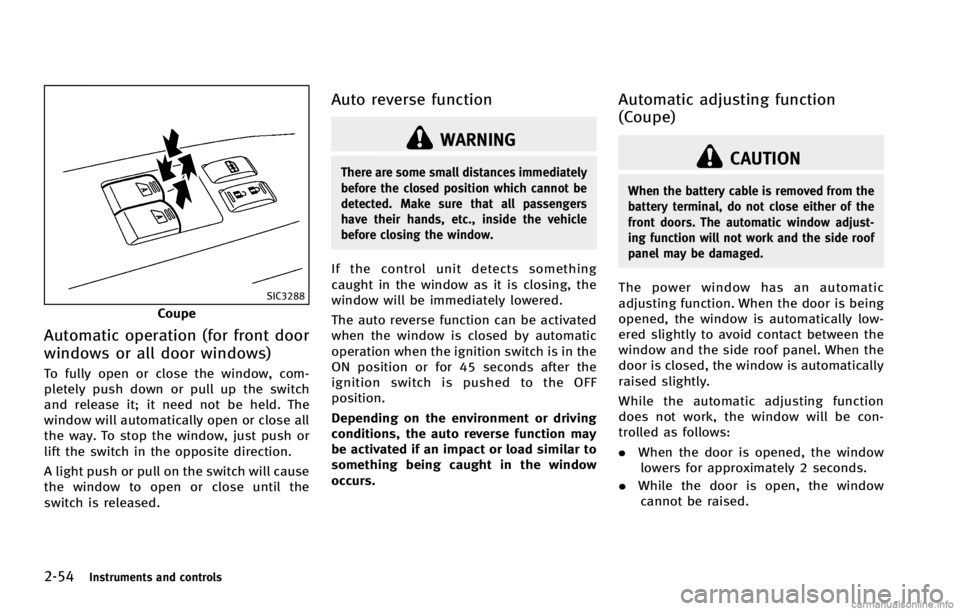
SIC3288
Coupe
Automatic operation (for front door
windows or all door windows)
GUID-9BF62CC8-4855-4483-8A55-EA5AB10E4305
WARNING
There are some small distances immediately
before the closed position which cannot be
detected. Make sure that all passengers
have their hands, etc., inside the vehicle
before closing the window.
If the control unit detects something
caught in the window as it is closing, the
window will be immediately lowered.
The auto reverse function can be activated
when the window is closed by automatic
operation when the ignition switch is in the
ON position or for 45 seconds after the
ignition switch is pushed to the OFF
position.
Depending on the environment or driving
conditions, the auto reverse function may
be activated if an impact or load similar to
something being caught in the window
occurs.
Automatic adjusting function
(Coupe)
GUID-D2D30762-25BF-4EE0-B27E-BB7D8BB3ADD2
CAUTION
When the battery cable is removed from the
battery terminal, do not close either of the
front doors. The automatic window adjust-
ing function will not work and the side roof
panel may be damaged.
The power window has an automatic
adjusting function. When the door is being
opened, the window is automatically low-
ered slightly to avoid contact between the
window and the side roof panel. When the
door is closed, the window is automatically
raised slightly.
While the automatic adjusting function
does not work, the window will be con-
trolled as follows:
.When the door is opened, the window
lowers for approximately 2 seconds.
. While the door is open, the window
cannot be raised.
Page 137 of 490

2-56Instruments and controls
SIC3243
SunshadeGUID-CCF4E2B3-EA7A-402A-90AA-2F546B19823D
*1side of the moonroof
switch and release it; it need not be held.
To tilt down the moonroof, push the DOWN
*2side.
Sliding the moonroofGUID-A3EE336A-96B8-48A3-A291-DA88029A9E74
*1or OPEN*2side of the moonroof switch and release it; it need
not be held. The roof will automatically
open or close all the way. To stop the roof,
push the switch once more while it is
opening or closing.
Auto reverse functionGUID-1665A219-159C-4E8B-97CC-F44A3889C13D
WARNING
There are some small distances immediately
before the closed position which cannot be
detected. Make sure that all passengers
have their hands, etc., inside the vehicle
before closing the moonroof.
If the control unit detects something
caught in the moonroof when it is closing,
the moonroof will be immediately opened.
The auto reverse function can be activated
when the moonroof is closed by automatic
operation when the ignition switch is in the
ON position or for about 45 seconds after
the ignition switch is pushed to the OFF
position.
If the moonroof cannot be closed auto-
matically when the auto reverse function
activates due to a malfunction, push and
hold the CLOSE
*1side of the moonroof switch.
Depending on the environment or driving
conditions, the auto reverse function may
be activated if an impact or load similar to
something being caught in the moonroof
occurs.
If the moonroof does not operateGUID-235A4682-A88E-47F9-9907-4A08FACA91CE
*1side of the moonroof switch to tilt the
moonroof up.
2. Push and hold the CLOSE
*1side
of the moonroof switch.
3. Release the moonroof switch after the moonroof moves slightly up and down.
4. Push and hold the OPEN
*2side of
the moonroof switch to fully tilt the
moonroof down.
5. Check if the moonroof switch operates normally.
If the moonroof does not operate properly
after performing the procedure above, have
your vehicle checked by an INFINITI retailer.
Page 151 of 490

3-6Pre-driving checks and adjustments
door, push the power door lock switch to
the unlock position
*2.
Lockout protectionGUID-F17FC232-6651-4027-B680-5A82DB2977B3
position (UNLOCK) for
more than 5 seconds.
4. When activated, the hazard indicator will flash twice. When deactivated, the
hazard indicator will flash once.
5. The ignition switch must be placed in the OFF and ON position again between
each setting change.
When the automatic door unlock system is
deactivated, the doors do not unlock when
the ignition switch is placed in the OFF
position. To unlock the door manually, use
the inside lock knob or the power door lock
switch (driver’s or front passenger’s side).
SPA2470
CHILD SAFETY REAR DOOR LOCK
(Sedan)
GUID-DE27EA42-B974-4087-AC65-39A603A3ECDA
Page 152 of 490
GUID-E775A3D7-CE8E-4FE0-9FB8-238232937EE5
WARNING
.Radio waves could adversely affect
electric medical equipment. Those who
use a pacemaker should contact the
electric medical equipment manufacturer
for the possible influences before use.
. The Intelligent Key transmits radio
waves when the buttons are pushed.
The FAA advises that the radio waves
may affect aircraft navigation and com-
munication systems. Do not operate the
Intelligent Key while on an airplane.
Make sure the buttons are not operated
unintentionally when the unit is stored
during a flight.
The Intelligent Key system can operate all
the doors and the trunk lid using the
remote controller function or pushing the
request switch on the vehicle without
taking the key out from a pocket or purse.
The operating environment and/or condi-
tions may affect the Intelligent Key system
operation.
Be sure to read the following before using
the Intelligent Key system.
CAUTION
.Be sure to carry the Intelligent Key with
you when operating the vehicle.
. Never leave the Intelligent Key in the
vehicle when you leave the vehicle.
The Intelligent Key is always communicat-
ing with the vehicle as it receives radio
waves. The Intelligent Key system trans-
mits weak radio waves. Environmental
conditions may interfere with the operation
of the Intelligent Key system under the
following operating conditions.
.When operating near a location where
strong radio waves are transmitted,
such as a TV tower, power station and
broadcasting station.
. When in possession of wireless equip-
ment, such as a cellular telephone,
transceiver, and CB radio.
. When the Intelligent Key is in contact
with or covered by metallic materials.
. When any type of radio wave remote
control is used nearby.
. When the Intelligent Key is placed near
an electric appliance such as a perso- nal computer.
. When the vehicle is parked near a
parking meter.
In such cases, correct the operating condi-
tions before using the Intelligent Key
function or use the mechanical key.
Although the life of the battery varies
depending on the operating conditions,
the battery’s life is approximately 2 years.
If the battery is discharged, replace it with
a new one.
When the Intelligent Key battery is almost
discharged, insert the Intelligent Key into
the Intelligent Key port to start the engine.
Replace the discharged battery with a new
one as soon as possible. For more details,
see “Push-button ignition switch” (P.5-9).
Since the Intelligent Key is continuously
receiving radio waves, if the key is left near
equipment which transmits strong radio
waves, such as signals from a TV and
personal computer, the battery life may
become shorter.
For information regarding replacement of a
battery, see “Intelligent Key battery repla-
cement” (P.8-27).
As many as 4 Intelligent Keys can be
registered and used with one vehicle. For
Pre-driving checks and adjustments3-7
INTELLIGENT KEY SYSTEM
Page 160 of 490

Locking doors and fuel-filler doorGUID-A1ED2141-D2A2-4C18-9403-59DB4C719650
button*1on the
Intelligent Key.
4. All the doors and fuel-filler door will lock.
5. The hazard indicator flashes twice and the horn chirps once.
*: Doors will lock with the Intelligent Key
while the ignition switch is in the ACC or
ON position.
Operate the door handles to confirm that
the doors have been securely locked.
Unlocking doors and fuel-filler doorGUID-337B912E-F7DF-44D8-9546-848D7FB4BC8Dbutton*2on the
Intelligent Key once.
2. The hazard indicator flashes once. The driver’s door and fuel-filler door will
unlock.
3. Push the UNLOCK
button on the
Intelligent Key again within 1 minute.
4. The hazard indicator flashes once
again. All the doors will unlock. All doors will be locked automatically
unless one of the following operations is
performed within 1 minute after pushing
the UNLOCK
button on the Intelligent
Key while the doors are locked. If during
this 1-minute time period, the UNLOCK
button on the Intelligent Key is pushed, all
doors will be locked automatically after
another 1 minute.
. Opening any door
. Pushing the ignition switch
. Inserting the Intelligent Key into the
Intelligent Key port.
During this 1-minute time period, if the
UNLOCK
button on the Intelligent Key
is pushed, all doors will be locked auto-
matically after another 1 minute.
Opening windowsGUID-DFAF51D2-F77E-429A-B2B3-4704C432A052*2button operation also
allows you to open the window that is
equipped with the automatic open/close
function. (See “Power windows” (P.2-52)).
To open the window, push the door
UNLOCK
button on the Intelligent Key
for about 3 seconds after the door is
unlocked.
To stop opening, release the UNLOCK
button. If the window open operation is stopped in
mid-operation while pushing the UNLOCK
button, release and push the UNLOCKbutton again until the window opens
completely.
Window cannot be closed using the In-
telligent Key.
The door window can also be operated by
turning the mechanical key in a door lock.
(See “Doors” (P.3-4).)
Opening trunk lidGUID-6B0C7E6B-21C5-491B-9405-C60A2288D5EDbutton*3on the
Intelligent Key for more than 1 second.
2. The trunk will unlatch.
3. Raise the trunk lid to open the trunk.
Using panic alarmGUID-DFDC4598-37EC-49D5-968F-B7FA5F92DB59
button*4on the
key for more than 1 second.
2. The theft warning alarm and headlights will stay on for 25 seconds.
3. The panic alarm stops when:
.It has run for 25 seconds, or
Pre-driving checks and adjustments3-15
Page 177 of 490

3-32Pre-driving checks and adjustments
The seat synchronization function operates
under the following conditions:
.The ignition switch is in the ON posi-
tion.
. The selector lever is in the P (Park)
position (Automatic Transmission mod-
els) or the parking brake is applied
(Manual Transmission models).
. The seatback is raised (Coupe).
If the outside mirrors or the steering wheel
reaches its maximum adjustment, the
function is automatically disabled. Restart
the function by selecting a previously
stored seat memory position using the
memory switches (1 or 2). An Intelligent
Key that was previously linked to the
stored seat memory can also be used to
restart the function.
If a seat position was not previously stored
in the seat memory, restart the function by
adjusting the steering wheel and outside
mirrors manually for your best driving
position and then drive the vehicle above
4 MPH (7 km/h).Cancel or activate seat synchroni-
zation function
GUID-9FA1381E-62FE-4338-8BE9-EF06F61AFC12
Page 178 of 490

switch.
If memory is stored in the same
memory switch, the previous memory
will be deleted.
Linking Intelligent Key to a stored
memory position
GUID-260E8272-8777-4E19-9288-E40B723FABBA
button on the
Intelligent Key. If the indicator light
blinks, the Intelligent Key is linked to
that memory setting.
Push the ignition switch to the OFF posi-
tion, and then push the
button on the
Intelligent Key. The driver’s seat, steering
wheel and outside mirrors will move to the
memorized position.
Confirming memory storageGUID-E5D175B3-57DC-4C96-A449-0B72F25D2264
Page 179 of 490

3-34Pre-driving checks and adjustments
positioner is operating.
. When the memory switch 1 or 2 is not
pushed for at least 1 second.
. When the seat, steering column and
outside mirrors have already been
moved to the memorized position.
. When no position is stored in the
memory switch.
. When the parking brake is released (MT
models).
. When the speed is above 4 MPH (7
km/h) while the parking brake is
applied (MT models).
To restart the drive positioner system,
move the parking brake to off and on.
. When the engine is started while
moving the automatic drive positioner.
. When the AT selector lever is moved
from the P (Park) position to any other
position. (However, it will not be
canceled if the switch is pushed while
the seat and steering column are
returning to the previous positions
(entry/exit function).)
. When the driver’s door remains open
for more than 45 seconds and the
ignition switch is not in the ON posi-
tion. .
When the seatback is folded (Coupe).
. While the walk-in function operates
(Coupe).
. The seat synchronization function is
automatically disabled if the outside
mirrors or steering wheel reaches its
maximum adjustment.
. The seat synchronization function will
not operate if the seat is adjusted over
one of the following maximum thresh-
olds:
— Seat sliding: 3.0 in (76 mm)
— Seatback reclining: 9.1 degrees
— Seat lifter (rear side): 0.8 in (20 mm)
Page 183 of 490

4-4Monitor, climate, audio, phone and voice recognition systems
SAA1524
Models without navigation system
1. “AUX” button (P.4-41)
2. “RADIO AM·FM” band selector button
(P.4-41)
3. INFINITI controller (P.4-5)
4. “
OFF” brightness control and
display ON/OFF button (P.4-9)
5. “INFO” vehicle information button
(P.4-9)
6. “DISC” selector button (P.4-41)
7. “STATUS” status display button
(P.4-9)
8. “SETTING” button (P.4-14)
When you use this system, make sure the
engine is running. If you use the system with the engine not
running (ignition ON or ACC) for a long
time, it will use up all the battery power,
and the engine will not start.
SAA1541
Models with navigation system
SAA1508
Models without navigation system
Page 192 of 490

The Reminder will be automatically dis-
played when the specified distance has
been driven and every time the ignition
switch is pushed to the ACC or ON position.
The reminder will not appear while driving.
Select the“OK”key to hide the reminder
for the rest of the current drive.
To stop the reminder from appearing,
perform one of the following actions:
. Select the “Reset Distance”.
. Deactivate the “Reminder”.
. Increase the “Interval”distance to be
more than the current distance being
tracked.
SAA2483
Others information (models with
navigation system)
GUID-9F534085-BC7A-4AD1-8E18-3219FFD95CE9
SAA2484
Models with navigation system
JVH0261M
Models without navigation system
Monitor, climate, audio, phone and voice recognition systems4-13