brake light INFINITI G35 2003 Owners Manual
[x] Cancel search | Manufacturer: INFINITI, Model Year: 2003, Model line: G35, Model: INFINITI G35 2003Pages: 256, PDF Size: 3.37 MB
Page 63 of 256

or Anti-lock brake warning light Low washer fluid warning light High beam indicator light (Blue)
Automatic transmission check warning
light Seat belt warning light Malfunction indicator lamp (MIL)
or Brake warning light Supplemental air bag warning light Slip indicator light
Charge warning light or Automatic transmission posi-
tion indicator light Vehicle dynamics control off indicator
light
Door open warning light Cruise main switch indicator light Turn signal/hazard indicator lights
Engine oil pressure warning light Cruise set switch indicator light
CHECKING BULBS Apply the parking brake and turn the ignition
key to ON without starting the engine. The
following lights will come on:
, or , ,
The following lights come on briefly and then
go off:
, or , , ,
If any light fails to come on, it may indicate a
burned-out bulb or an open circuit in the elec-
trical system. Have the system repaired
promptly. WARNING LIGHTS
or Anti-lock brake
warning lightIf the light comes on while the engine is
running, it may indicate the anti-lock brake
system is not functioning properly. Have the
system checked by your INFINITI retailer.
If an abnormality occurs in the system, the
anti-lock function will cease but the ordinary
brakes will continue to operate normally.
If the light comes on while you are driving,
contact your INFINITI retailer for repair. Automatic transmission check
warning light When the ignition switch is turned ON, the light
comes on for 2 seconds. If the light blinks for
approximately 8 seconds, it may indicate the
automatic transmission system is not function-
ing properly. Have your INFINITI retailer check
and repair the transmission.
or Brake warning light This light functions for both the parking brake
and the foot brake systems.WARNING/INDICATOR LIGHTS
AND AUDIBLE REMINDERS
Instruments and controls
2-9
Z 02.7.29/V35-D/V5.0
X
Page 64 of 256
Parking brake indicator:
When the ignition key is in the ON position, the
light comes on when the parking brake is
applied.
Low brake fluid warning light:
The light warns of a low brake fluid level. If the
light comes on while the engine is running with
the parking brake not applied, stop the vehicle
and perform the following:
1. Check the brake fluid level. Add brake fluid
as necessary. See ªBrake fluidº in the ª8.
Do-it-yourselfº section.
WARNINGO Your brake system may not be work-
ing properly if the warning light is on.
Driving could be dangerous. If you
judge it to be safe, drive carefully to
the nearest service station for re-
pairs. Otherwise, have your vehicle
towed because driving it could be
dangerous.
O Pressing the brake pedal with the
engine stopped and/or low brake fluid level may increase your stopping dis-
tance and braking will require greater
pedal effort as well as greater pedal
travel.
O If the brake fluid level is below the
MIN mark on the brake fluid reservoir,
do not drive until the brake system
has been checked at an INFINITI re-
tailer.
2. If the brake fluid level is correct, have the
warning system checked by an INFINITI
retailer.
ABS component warning light:
The electronic component of ABS does not
work properly, if the light comes on together
with the anti-lock brake warning light when the
brake fluid is correct and the parking brake is
released. Have the system checked by an
INFINITI retailer. Drive vehicle at speeds and
avoid abrupt braking.
Charge warning light If the light comes on while the engine is
running, it may indicate that the charging sys-
tem is not functioning properly. Turn the en-
gine off and check the alternator belt. If the belt is loose, broken, missing or if the light remains
on, see your INFINITI retailer immediately.
CAUTION Do not continue driving if the belt is
loose, broken or missing.
Door open warning light This light comes on when any of the doors are
not closed securely while the ignition key is
ON.
Engine oil pressure warning
light This light warns of low engine oil pressure. If
the light flickers or comes on during normal
driving, pull off the road in a safe area, stop the
engine immediately and call an INFINITI re-
tailer or other authorized repair shop.
The engine oil pressure warning light is not
designed to indicate a low oil level. Use the
dipstick to check the oil level. See ªEngine
oilº in the ª8. Do-it-yourselfº section.
2-10 Instruments and controls
Z 02.7.29/V35-D/V5.0
X
Page 67 of 256

control off switch is pushed to OFF. This
indicates the vehicle dynamics control system
and traction control system are not operating.
When the vehicle dynamics control off indica-
tor light and slip indicator light come on with
the vehicle dynamics control system turned
on, this light alerts the driver to the fact that the
vehicle dynamics control system's fail-safe
mode is operating, i.e. the vehicle dynamics
control system may not be functioning prop-
erly. Have the system checked by your
INFINITI retailer. If an abnormality occurs in
the system, the vehicle dynamics control sys-
tem function will be canceled but the vehicle is
still driveable. For additional information, see
ªVehicle dynamics control system (VDC)º in
the ª5. Starting and drivingº section of this
manual.
Turn signal/hazard indicator
lightsThe light flashes when the turn signal switch
lever or hazard switch is turned on.
AUDIBLE REMINDERS
Key reminder chime The chime will sound if the driver's side door is
opened while the key is left in the ignition
switch (ignition switch is turned off). Remove the key and take it with you when leaving the
vehicle.
Light reminder chime The chime will sound when the front door is
opened with the headlight switch on unless the
ignition key is in the ON position.
Make sure to turn the light switch off when you
leave the vehicle.
Brake pad wear warning The disc brake pads have audible wear warn-
ings. When a brake pad requires replacement,
it will make a high pitched scraping sound
when the vehicle is in motion whether or not
the brake pedal is depressed. Have the brakes
checked as soon as possible if the warning
sound is heard. Your vehicle has two types of security sys-
tems, as follows:
O Vehicle Security System
O Infiniti Vehicle Immobilizer System
The security condition will be shown by the
security indicator light.
VEHICLE SECURITY SYSTEM The vehicle security system provides visual
and audio alarm signals if parts of the vehicle
are disturbed.SECURITY SYSTEMS
Instruments and controls
2-13
Z 02.7.29/V35-D/V5.0
X
Page 73 of 256

Instrument brightness control The instrument brightness control operates
when the light switch is in the or
position.
Turn the control to adjust the brightness of
instrument panel lights and clock (except
power window switch lights).
When the control is turned upward until it
stops, the light intensity will be at maximum.
When the control is turned downward until it
stops, the light will be turned off. Headlight beam select To select the high beam, push the lever for-
ward. Pull it back to select the low beam.
Flashing signal Pulling the lever toward you will flash the
headlight high beam.
Daytime running light system
(Canada only) The headlights automatically illuminate at a
reduced intensity when the engine is started
with the parking brake released. The daytime
running lights operate with the headlight switch
in the OFF position or in the position.
Turn the headlight switch to the position
for full illumination when driving at night.
If the parking brake is applied before the
engine is started, the daytime running lights do
not illuminate. The daytime running lights illu-
minate once the parking brake is released.
The daytime running lights will remain on until
the ignition switch is turned off. WARNING When the daytime running light system
is active, tail lights on your vehicle are
not on. It is necessary at dusk to turn on
your headlights. Failure to do so could
cause an accident injuring yourself and
others.
TURN SIGNAL SWITCH
Turn signal Move the lever up or down to signal the turning
direction. When the turn is completed, the turn
signals cancel automatically.
Lane change signal To indicate a lane change, move the lever up
or down to the point where lights begin flash-
ing.SIC0922
Instruments and controls
2-19
Z 02.7.29/V35-D/V5.0
X
Page 114 of 256
any positions other than ON.
4. Push the SET switch and, within 5 seconds,
push the memory switch 1 or 2 fully for at
least 1 second.
The indicator light for the pushed memory
switch will come on and stay on for approxi-
mately 5 seconds after pushing the switch.
After the indicator light goes off, the se-
lected positions are stored in the selected
memory (1 or 2).
If memory is stored in the same memory
switch, the previous memory will be de-
leted.
Confirming memory storage O Turn the ignition ON and push the SET
switch. If the main memory has not been
stored, the indicator light will come on for
approximately 0.5 seconds. When the
memory has stored the position, the indica-
tor light will stay on for approximately 5
seconds.
O If the battery cable is disconnected, or if the
fuse blows, the memory will be canceled. In
such a case, reset the desired positions
using the following procedures.
1. Open and close the driver's door more than two times with the ignition key in the LOCK
position.
2. Reset the desired position using the previ-
ous procedure.
Selecting the memorized position 1. A/T models:
Set the automatic transmission selector le-
ver to the P (Park) position.
M/T models:
Apply the parking brake securely when the
vehicle is stopped.
2. Turn the ignition ON.
3. Push the memory switch 1 or 2 fully for at
least 1 second.
The driver's seat will move to the memo-
rized position with the indicator light flash-
ing. Then the light will stay on for approxi-
mately 5 seconds.
When memory switch 1 or 2 is pushed with the
driver's door open and then the key inserted
into the ignition switch within approximately 1
minute, the driver's seat will move to the
memorized position. (AT models only) System operation The automatic drive positioner system will not
work or will stop operating under the following
conditions:
O when the vehicle speed is above 4 MPH (7
km/h).
O when any two or more of the memory
switches are simultaneously pressed while
the automatic drive positioner is operating.
O when the adjusting switch for the driver's
seat is turned on while the automatic drive
positioner is operating.
O when the cancel switch is pushed to cancel.
O when the memory switch 1 or 2 is not
pushed for at least 1 second.
O when the seat has already been moved to
the memorized position.
O when no seat position is stored in the
memory switch.
O when the parking brake is not applied. Ð
M/T models
O when the vehicle speed is above 4 MPH (7
km/h) while the parking brake is applied. Ð
M/T models
To restart the drive positioner system,
move the parking brake to off and on.
3-20 Pre-driving checks and adjustments
Z 02.7.29/V35-D/V5.0
X
Page 139 of 256
LOCK position, proceed as follows to remove
the key:
1. Move the selector lever into the P (Park)
position.
2. Turn the ignition key slightly in the ON
direction.
3. Turn the key toward the LOCK position.
4. Remove the key.
If the key is removed from the ignition switch,
the selector lever cannot be moved from P
(Park) position. The selector lever can be
moved if the ignition switch is in the ON
position and the foot brake pedal is de-
pressed.
There is an OFF position in between LOCK
and ACC, although it does not show on the
lock cylinder. When the ignition is in OFF the
steering wheel is not locked.
In order for the steering wheel to be locked, it
must be turned about 1/6 of a turn counter-
clockwise from the straight up position.
To lock the steering wheel, turn the key to
the LOCK position. Remove the key. To
unlock the steering wheel, insert the key
and turn it gently while rotating the steer-
ing wheel slightly right and left. WARNING Never remove or turn the key to the
LOCK position while driving. The steer-
ing wheel will lock. This may cause the
driver to lose control of the vehicle and
could result in serious vehicle damage
and/or personal injury.
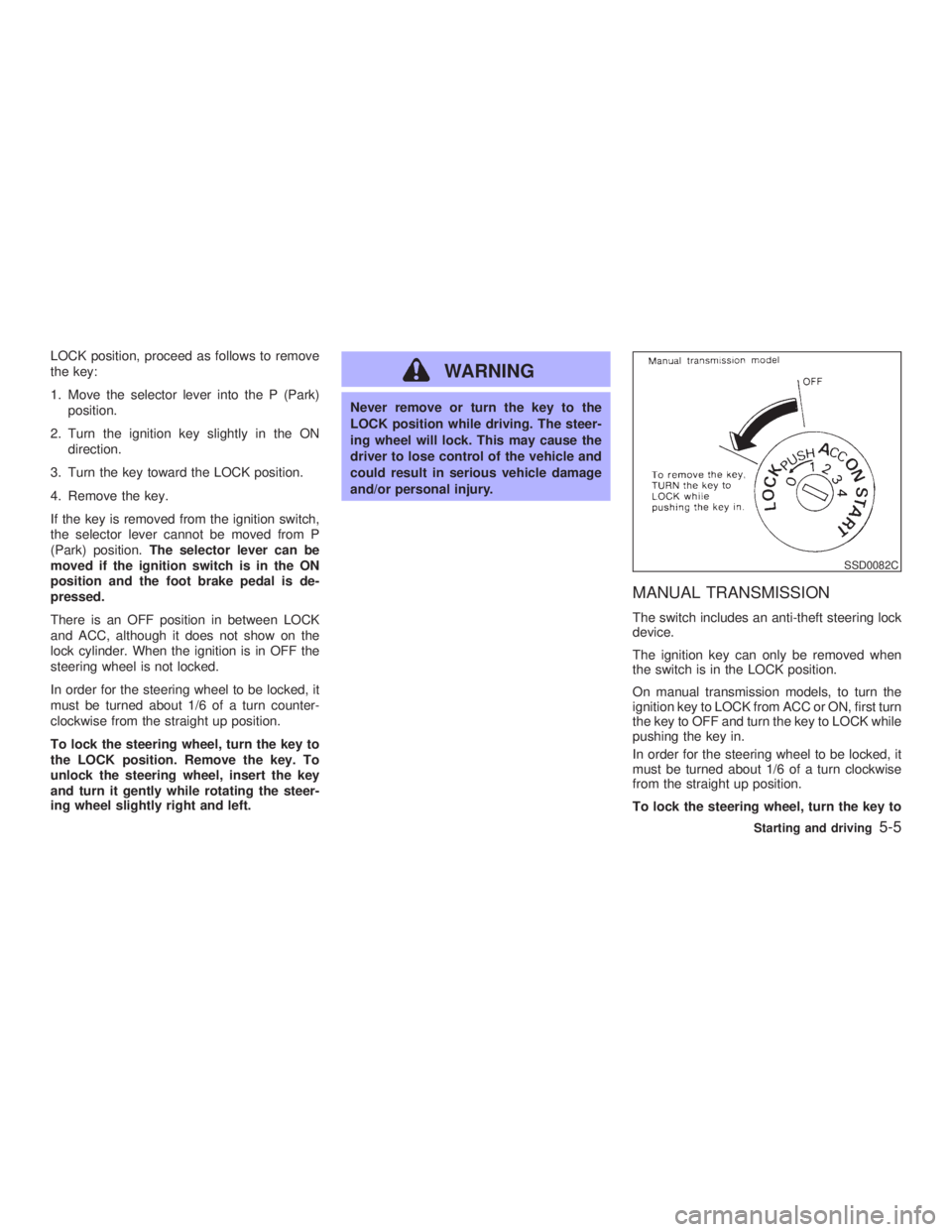
MANUAL TRANSMISSION The switch includes an anti-theft steering lock
device.
The ignition key can only be removed when
the switch is in the LOCK position.
On manual transmission models, to turn the
ignition key to LOCK from ACC or ON, first turn
the key to OFF and turn the key to LOCK while
pushing the key in.
In order for the steering wheel to be locked, it
must be turned about 1/6 of a turn clockwise
from the straight up position.
To lock the steering wheel, turn the key to SSD0082C
Starting and driving
5-5
Z 02.7.29/V35-D/V5.0
X
Page 141 of 256
O Make sure the area around the vehicle is
clear.
O Maintenance items should be checked pe-
riodically, e.g., each time you check engine
oil.
O Check that all windows and lights are clean.
O Visually inspect tires for their appearance
and condition. Also, check tires for proper
inflation.
O Lock all doors.
O Position seat and adjust head restraints.
O Adjust inside and outside mirrors.
O Fasten seat belts and ask all passengers to
do likewise.
O Check the operation of warning lights when
key is turned to the ON (3) position. 1. Apply the parking brake.
2. Automatic transmission:
Move the selector lever to P (Park) or N
(Neutral). (P preferred.)
The starter is designed not to operate if the
selector lever is in one of the driving posi-
tions.
Manual transmission:
Move the shift lever to N (Neutral) position,
and depress the clutch pedal to the floor
while cranking the engine.
The starter is designed not to operate un-
less the clutch pedal is fully depressed.
3. Crank the engine with your foot off the
accelerator pedal by turning the ignition
key to START. Release the key when the
engine starts. If the engine starts, but fails
to run, repeat the above procedure.
O If the engine is very hard to start in ex-
tremely cold weather or when restarting,
depress the accelerator pedal a little (ap-
proximately 1/5 to the floor) and hold it then
crank the engine. Release the key and the
accelerator pedal when the engine starts.
O If the engine is very hard to start because it
is flooded, depress the accelerator pedal all the way to the floor and hold it. Crank the
engine for 5 to 6 seconds. After cranking
the engine, release the accelerator pedal.
Crank the engine with your foot off the
accelerator pedal by turning the ignition
key to START. Release the key when the
engine starts. If the engine starts, but fails
to run, repeat the above procedure.
CAUTION Do not operate the starter for more than
15 seconds at a time. If the engine does
not start, turn the key off and wait 10
seconds before cranking again, other-
wise the starter could be damaged.
4. Warm-up
Allow the engine to idle for at least 30
seconds after starting. Drive at moderate
speed for a short distance first, especially in
cold weather.BEFORE STARTING THE ENGINE STARTING THE ENGINE
Starting and driving
5-7
Z 02.7.29/V35-D/V5.0
X
Page 147 of 256

If it is difficult to move the shift lever into R
(Reverse) or 1 (Low gear), shift into N (Neu-
tral), then release the clutch pedal and shift
into R or 1 again.
WARNINGO Do not downshift abruptly on slippery
roads. This may cause a loss of con-
trol.
O Do not over-rev the engine when
shifting to a lower gear. This may
cause a loss of control or engine
damage.
CAUTIONO Do not rest your foot on the clutch
pedal while driving. This may damage
the clutch.
O Stop your vehicle completely before
shifting into R (Reverse).
O When the vehicle is stopped for a
period of time, for example at a stop
light, shift to N (Neutral) and release the clutch pedal with the foot brake
applied.
Suggested up-shift speeds Shown below are suggested vehicle speeds
for shifting into a higher gear. These sugges-
tions relate to fuel economy and vehicle per-
formance. Actual up-shift speeds will vary ac-
cording to road conditions, the weather and
individual driving habits.
For normal acceleration in low altitude areas
[less than 4,000 ft (1,219 m)]:
Gear change MPH (km/h)
1st to 2nd 8 (13)
2nd to 3rd 16 (26)
3rd to 4th 25 (40)
4th to 5th 28 (45)
5th to 6th 33 (53)
For quick acceleration in low altitude areas or
in high altitude areas [over 4,000 ft (1,219 m)]:
Gear change MPH (km/h)
1st to 2nd 15 (24)
2nd to 3rd 25 (40)
3rd to 4th 40 (64)
4th to 5th 45 (72)
5th to 6th 50 (80) Suggested maximum speed in each
gear Downshift to a lower gear if the engine is not
running smoothly, or if you need to accelerate.
Do not exceed the maximum suggested speed
(shown below) in any gear. For level road
driving, use the highest gear suggested for
that speed. Always observe posted speed
limits, and drive according to the road condi-
tions, which will ensure safe operation. Do not
over-rev the engine when shifting to a lower
gear as it may cause engine damage or loss of
vehicle control.
Gear MPH (km/h)
1st 35 (56)
2nd 60 (96)
3rd 85 (136)
4th Ð
5th Ð
6th Ð
Starting and driving
5-13
Z 02.7.29/V35-D/V5.0
X
Page 148 of 256

Automatic transmission model To apply: Fully depress the parking brake
pedal.
To release:
1. Firmly apply the foot brake.
2. Depress the parking brake pedal and the
parking brake will be released.
3. Before driving, be sure the brake warning
light goes out. Manual transmission model To apply: Pull the lever up.
To release:
1. Firmly apply foot brake.
2. Place the shift lever in the N (Neutral)
position.
3. While pulling up on the lever slightly, push
the button and lower completely.
4. Before driving, be sure the brake warning
light goes out. WARNING O Be sure the parking brake is fully
released before driving. Failure to do
so can cause brake failure and lead to
an accident.
O Do not release the parking brake from
outside the vehicle.
O Do not use the gear shift in place of
the parking brake. When parking, be
sure the parking brake is fully en-
gaged.
O Do not leave children unattended in a
vehicle. They could release the park-
ing brake and cause an accident.SPA1286 PD1001M
PARKING BRAKE
5-14 Starting and driving
Z 02.7.29/V35-D/V5.0
X
Page 150 of 256

To set at cruising speed, accelerate your
vehicle to the desired speed, push the
COAST/SET switch and release it. (The SET
indicator light will come on.) Take your foot off
the accelerator pedal. Your vehicle will main-
tain the set speed.
O To pass another vehicle, depress the
accelerator pedal. When you release the
pedal, the vehicle will return to the previ-
ously set speed.
O The vehicle may not maintain the set speed
when going up or down steep hills. If this
happens, drive without the cruise control.
To cancel the preset speed, follow either of
these three methods:
a) Push the cancel switch; The SET indicator
light will go out.
b) Tap the brake pedal; The SET indicator
light will go out.
c) Turn the main switch off. Both the CRUISE
indicator and SET indicator lights will go
out.
O If you depress the brake pedal while push-
ing the RES/ACCEL set switch and reset at
the cruising speed, turn the main switch off
once and then turn it on again.
O The cruise control will automatically be can- celled if the vehicle slows down below
approximately 8 MPH (13 km/h).
O Depress the clutch pedal (manual transmis-
sion), or move the selector lever to N (Neu-
tral) position (automatic transmission). The
SET indicator light will go out.
To reset at a faster cruising speed, use one
of the following three methods:
a) Depress the accelerator pedal. When the
vehicle attains the desired speed, push and
release the COAST/SET switch.
b) Push and hold the RES/ACCEL set switch.
When the vehicle attains the speed you
desire, release the switch.
c) Push, then quickly release the RES/ACCEL
set switch. Each time you do this, the set
speed will increase by about 1 MPH (1.6
km/h).
To reset at a slower cruising speed, use one
of the following three methods:
a) Lightly tap the brake pedal. When the ve-
hicle attains the desired speed, push the
COAST/SET switch and release it.
b) Push and hold the COAST/SET switch.
Release the switch when the vehicle slows
down to the desired speed. c) Push, then quickly release the COAST/
SET switch. Each time you do this, the set
speed will decrease by about 1 MPH (1.6
km/h).
To resume the preset speed, push and re-
lease the RES/ACCEL set switch. The vehicle
will resume the last set cruising speed when
the vehicle speed is over 25 MPH (40 km/h).
5-16 Starting and driving
Z 02.7.29/V35-D/V5.0
X