instrument panel INFINITI G35 2006 User Guide
[x] Cancel search | Manufacturer: INFINITI, Model Year: 2006, Model line: G35, Model: INFINITI G35 2006Pages: 344, PDF Size: 6.81 MB
Page 86 of 344
tened. At the same time, the chime will
sound for about 6 seconds unless the
driver's seat belt is securely fastened.
The seat belt warning light may also illu-
minate if the front passenger's seat belt
is not fastened when the front passen-
ger's seat is occupied (if so equipped).
For 5 seconds after the ignition switch is
in the ON position, the system does not
activate the warning light for the front
passenger.
If the light blinks or illuminates even if
the driver's and front passenger's seat
belts are fastened, it may indicate that
the pre-crash seat belt system (if so
equipped) has a malfunction. Have an
INFINITI dealer check and repair the
system.
See ªSeat beltsº in the ª1. Safety Ð
Seats, seat belts and supplemental re-
straint systemº section for precautions on
seat belt usage.
Supplemental air bag
warning lightAfter turning the ignition switch to the ON
position, the supplemental air bag
warning light will illuminate. The supple-
mental air bag warning light will turn off after about 7 seconds if the system is op-
erational.
If any of the following conditions occur,
the supplemental front air bag, supple-
mental side air bag and curtain side-
impact air bag systems, and pre-tensioner
seat belt need servicing and your vehicle
must be taken to your an INFINITI dealer.
O The supplemental air bag warning
light remains on after approximately 7
seconds.
O The supplemental air bag warning
light flashes intermittently.
O The supplemental air bag warning
light does not come on at all.
Unless checked and repaired, the Supple-
mental Restraint System and/or the pre-
tensioner seat belt may not function prop-
erly. For additional information, see
ªSupplemental restraint systemº in the
ª1. Safety Ð Seats, restraints and supple-
mental restraint systemº section.
WARNING If the supplemental air bag warning light is
on, it could mean that the supplemental front air bag, supplemental side air bag, cur-
tain side-impact air bag systems and/or pre-
tensioner seat belt systems will not operate
in an accident. To help avoid injury to your-
self or others, have your vehicle checked by
an INFINITI dealer as soon as possible.
INDICATOR LIGHTS
Automatic transmission
position indicator light When the ignition switch is turned to the
ON position, the indicator in the instru-
ment panel shows the automatic trans-
mission selector lever position. See ªDriv-
ing with automatic transmissionº in the
ª5. Starting and drivingº section.
Cruise main switch
indicator light The light comes on when the cruise con-
trol main switch is pushed. The light goes
out when the main switch is pushed
again. When the cruise main switch indi-
cator light comes on, the cruise control
system is operational.
2-14 Instruments and controls
w 06.1.4/V35-D/V5.0
X
Page 95 of 344

Be sure not to put anything on top of the
photo sensor
q A
located on the top left-
hand side of the instrument panel. The
photo sensor controls the autolamp; if it is
covered, the photo sensor reacts as if it is
dark and the headlights will illuminate.
Headlight beam select
q 1
To select the low beam, put the lever
in the neutral position as shown.
q 2
To select the high beam, push the
lever forward while the switch is in the
position. Pull it back to select the
low beam.
q 3
Pulling the lever toward you will flash
the headlight high beam even when
the headlight switch is in the OFF posi-
tion. Battery saver system O When the headlight switch is in the
or position while the igni-
tion switch is in the ON position, the
lights (including the front fog light)
will automatically turn off 5 minutes
after the ignition switch has been
turned to the OFF position.
O When the headlight switch remains in
the or position after the
lights automatically turn off, the lights
will turn on for 5 minutes when the
headlight switch is turned to the OFF
position and then turned to the
or position.
CAUTION Even though the battery saver feature auto-
matically turns off the headlights after a pe-
riod of time, you should turn the headlight
switch to the OFF position when the engine
is not running to avoid discharging the ve-
hicle battery.SIC1230C SIC2230
Instruments and controls
2-23
w 06.1.4/V35-D/V5.0
X
Page 96 of 344
Daytime running light system
(Canada only) The headlights automatically illuminate at
a reduced intensity when the engine is
started with the parking brake released.
The daytime running lights operate with
the headlight switch in the OFF position
or in the position. Turn the headlight
switch to the position for full illumi-
nation when driving at night.
If the parking brake is applied before the
engine is started, the daytime running
lights do not illuminate. The daytime run-
ning lights illuminate once the parking
brake is released. The daytime running
lights will remain on until the ignition
switch is turned off.
WARNINGWhen the daytime running light system is
active, tail lights on your vehicle are not on.
It is necessary at dusk to turn on your head-
lights. Failure to do so could cause an acci-
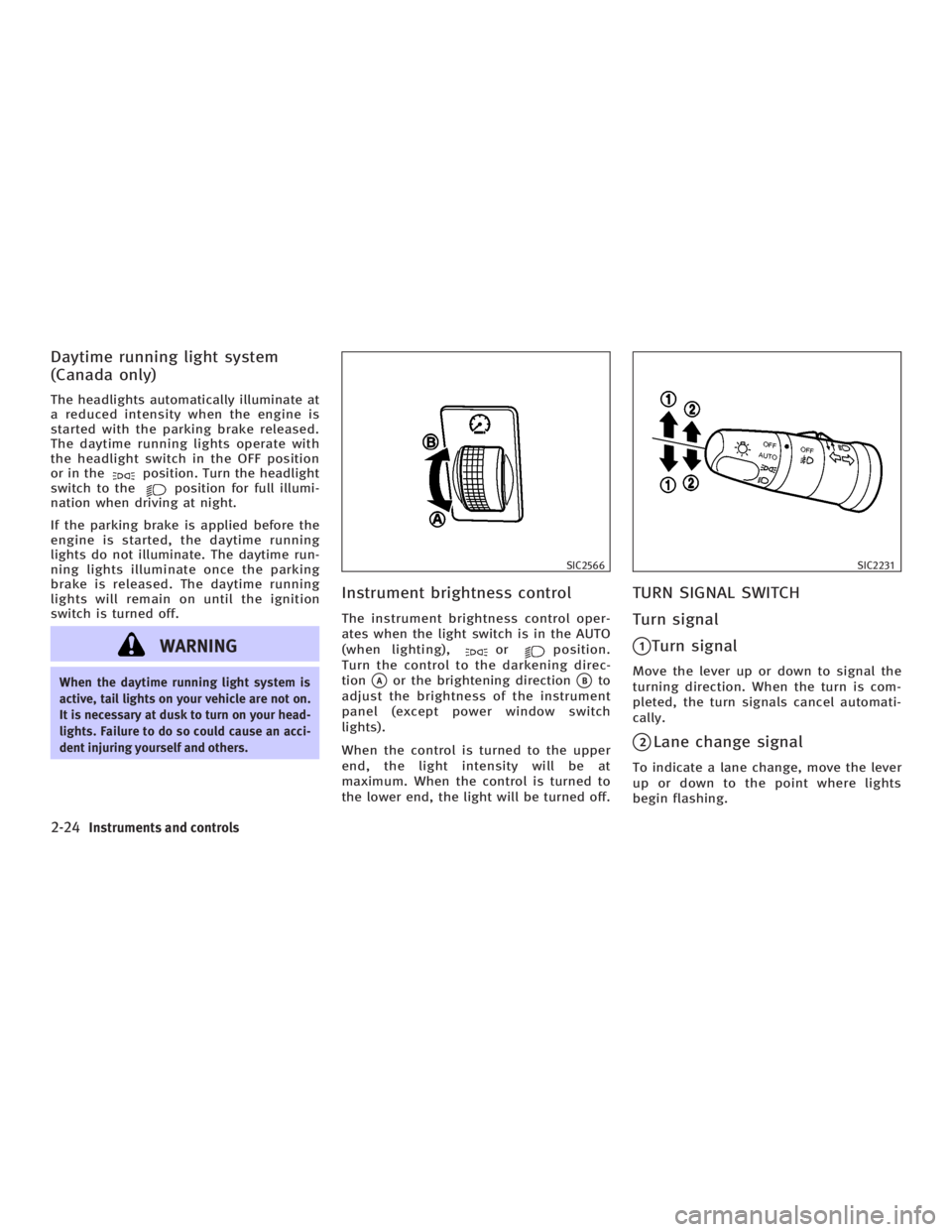
dent injuring yourself and others. Instrument brightness control The instrument brightness control oper-
ates when the light switch is in the AUTO
(when lighting), or position.
Turn the control to the darkening direc-
tion
q A
or the brightening direction
q B
to
adjust the brightness of the instrument
panel (except power window switch
lights).
When the control is turned to the upper
end, the light intensity will be at
maximum. When the control is turned to
the lower end, the light will be turned off. TURN SIGNAL SWITCH
Turn signal
q 1
Turn signal Move the lever up or down to signal the
turning direction. When the turn is com-
pleted, the turn signals cancel automati-
cally.
q 2
Lane change signal To indicate a lane change, move the lever
up or down to the point where lights
begin flashing. SIC2566 SIC2231
2-24 Instruments and controls
w 06.1.4/V35-D/V5.0
X
Page 99 of 344

CAUTIONO The battery could run down if the seat
heater is operated while the engine is
not running.
O Do not use the seat heater for extended
periods or when no one is using the seat.
O Do not put anything on the seat which in-
sulates heat, such as a blanket, cushion,
seat cover, etc. Otherwise, the seat may
become overheated.
O Do not place anything hard or heavy on
the seat or pierce it with a pin or similar
object. This may result in damage to the
heater.
O Any liquid spilled on the heated seat
should be removed immediately with a
dry cloth.
O When cleaning the seat, never use gaso-
line, benzine, thinner, or any similar
materials. O If any abnormalities are found or the
heated seat does not operate, turn the
switch off and have the system checked
by an INFINITI dealer.
For driving or starting the vehicle on
snowy roads or slippery areas, push the
SNOW mode switch to the ON position
and then the indicator light in the switch
and the SNOW indicator light in the in-
strument panel will illuminate.
When the SNOW mode is activated, en-
gine output is controlled to reduce wheel
spin. SIC2660
SNOW MODE SWITCH (if so equipped)
Instruments and controls
2-27
w 06.1.4/V35-D/V5.0
X
Page 100 of 344

CAUTIONWhen turning the vehicle in SNOW mode on
paved roads, you may feel a braking effect.
This is a normal condition of the AWD model.
The vehicle should be driven with the Ve-
hicle Dynamic Control (VDC) system on for
most driving conditions.
If the vehicle is stuck in mud or snow, the
VDC system reduces the engine output to
reduce wheel spin. The engine speed will
be reduced even if the accelerator is de-
pressed to the floor. If maximum engine
power is needed to free a stuck vehicle,
turn the VDC system off.
To turn off the Vehicle Dynamic Control
(VDC) system, push the VDC OFF switch (lo-
cated on the lower side of the instrument
panel). The indicator will come on. Push the VDC OFF switch again or restart
the engine to turn on the system. See
ªVehicle Dynamic Control (VDC) systemº
in the ª5. Starting and drivingº section.
SIC1881
VEHICLE DYNAMIC CONTROL (VDC) OFF
SWITCH
2-28 Instruments and controls
w 06.1.4/V35-D/V5.0
X
Page 113 of 344
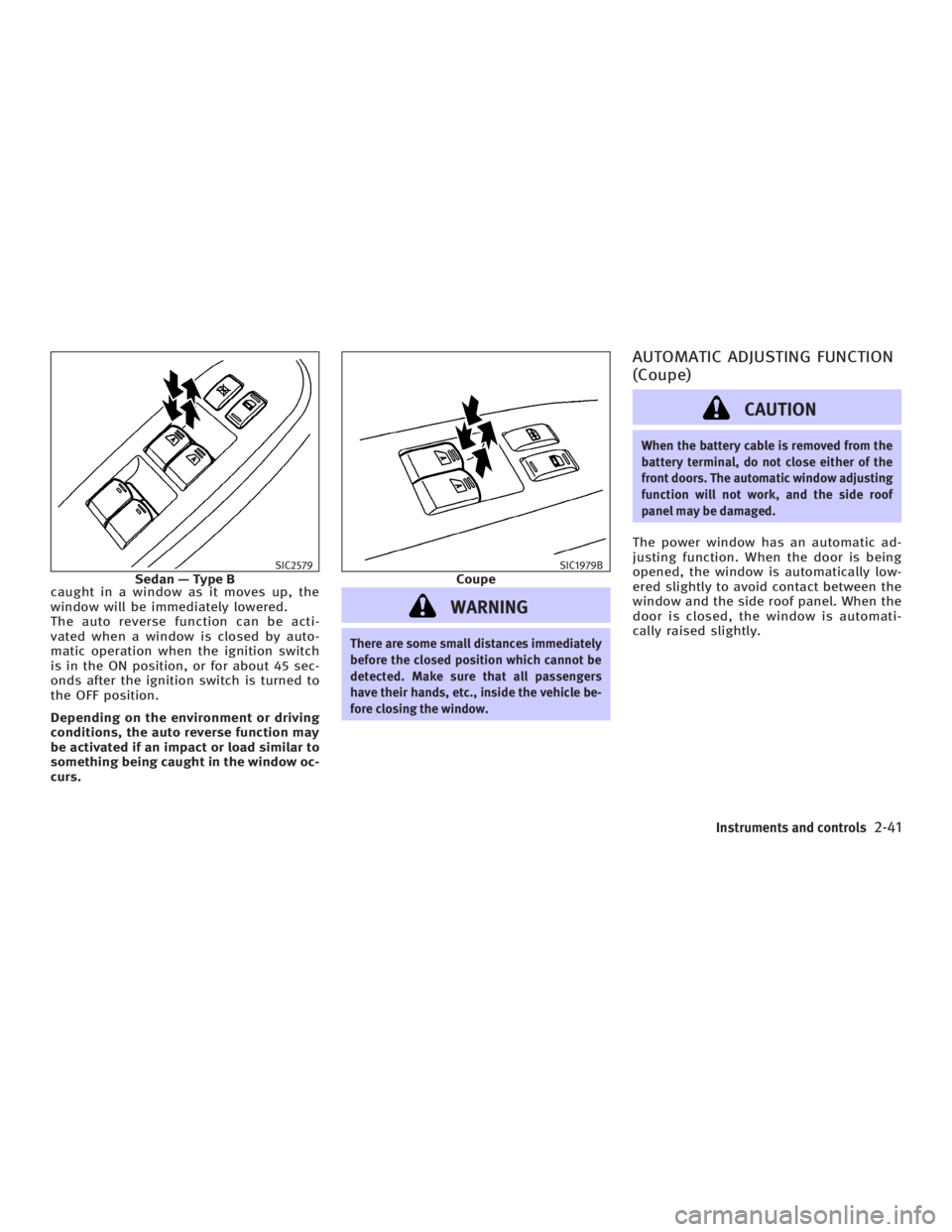
caught in a window as it moves up, the
window will be immediately lowered.
The auto reverse function can be acti-
vated when a window is closed by auto-
matic operation when the ignition switch
is in the ON position, or for about 45 sec-
onds after the ignition switch is turned to
the OFF position.
Depending on the environment or driving
conditions, the auto reverse function may
be activated if an impact or load similar to
something being caught in the window oc-
curs.
WARNING There are some small distances immediately
before the closed position which cannot be
detected. Make sure that all passengers
have their hands, etc., inside the vehicle be-
fore closing the window. AUTOMATIC ADJUSTING FUNCTION
(Coupe)
CAUTION When the battery cable is removed from the
battery terminal, do not close either of the
front doors. The automatic window adjusting
function will not work, and the side roof
panel may be damaged.
The power window has an automatic ad-
justing function. When the door is being
opened, the window is automatically low-
ered slightly to avoid contact between the
window and the side roof panel. When the
door is closed, the window is automati-
cally raised slightly.SIC2579
Sedan Ð Type B SIC1979B
Coupe
Instruments and controls
2-41
w 06.1.4/V35-D/V5.0
X
Page 137 of 344
CAUTIONDo not leave the vehicle with the ignition
switch in ACC or ON position when the en-
gine is not running for an extended period.
This can discharge the battery.
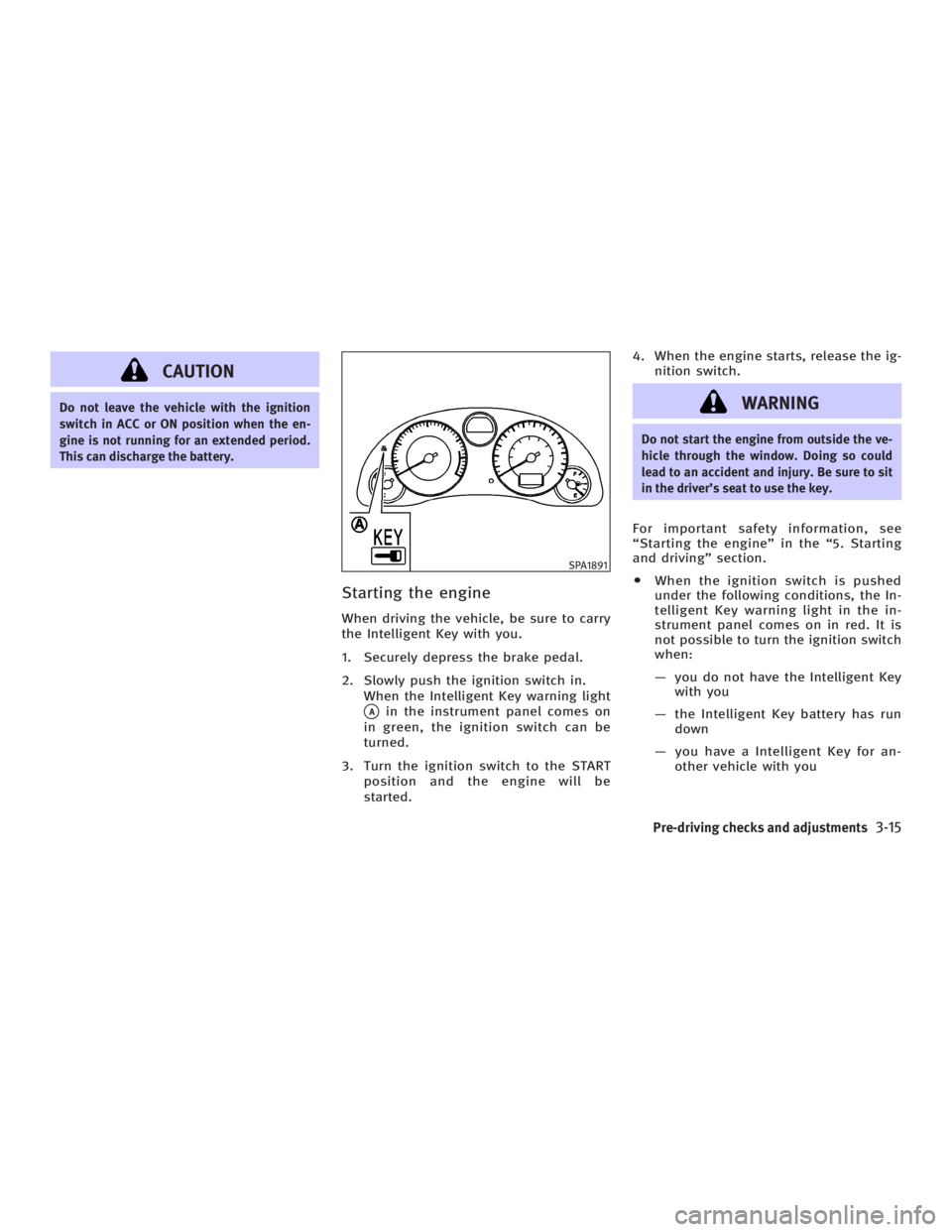
Starting the engine When driving the vehicle, be sure to carry
the Intelligent Key with you.
1. Securely depress the brake pedal.
2. Slowly push the ignition switch in.
When the Intelligent Key warning light
q A
in the instrument panel comes on
in green, the ignition switch can be
turned.
3. Turn the ignition switch to the START
position and the engine will be
started. 4. When the engine starts, release the ig-
nition switch.
WARNING Do not start the engine from outside the ve-
hicle through the window. Doing so could
lead to an accident and injury. Be sure to sit
in the driver's seat to use the key.
For important safety information, see
ªStarting the engineº in the ª5. Starting
and drivingº section.
O When the ignition switch is pushed
under the following conditions, the In-
telligent Key warning light in the in-
strument panel comes on in red. It is
not possible to turn the ignition switch
when:
Ð you do not have the Intelligent Key
with you
Ð the Intelligent Key battery has run
down
Ð you have a Intelligent Key for an-
other vehicle with you SPA1891
Pre-driving checks and adjustments
3-15
w 06.1.4/V35-D/V5.0
X
Page 138 of 344

O Slowly turn the ignition switch after
the Intelligent Key warning light
comes on in green. If it is turned
quickly, it may stick and be difficult to
turn.
O The engine may not start if the Intelli-
gent Key is placed:
Ð inside the glove box or the door
pocket
Ð on the instrument panel
Ð in the corner of interior compart-
ment.
O If it is difficult to turn the ignition
switch, perform the following:
Ð Push the ignition switch and turn it
to the left and then to the right.
Ð Turn the ignition switch while
gently turning the steering wheel to
the left or right.
Stopping the engine 1. Shift the selector lever to the P posi-
tion.
2. Turn the ignition switch to the ACC po-
sition. WARNING When you leave the vehicle, be sure to ob-
serve the following:
O Shift the selector lever to P. (In other po-
sitions, the ignition switch will not re-
turn to LOCK.)
O Securely return the ignition switch to
LOCK.
O Set the parking brake. Failure to do so
could result in unexpected vehicle move-
ment and could lead to severe injury.
INTELLIGENT KEY OPERATING
RANGE The Intelligent Key functions can be used
only when you carry the key with you and
operate as specified in the operating
range inside or outside the vehicle.
When the Intelligent Key battery runs
down or where there are strong radio
waves or noise, the operating range may
be narrower or the key may be inopera-
tive.
Operating range of the door or
trunk lock/unlock function The outside sensors are in the front out-
side door handles and the trunk. SPA1900
3-16 Pre-driving checks and adjustments
w 06.1.4/V35-D/V5.0
X
Page 140 of 344
Alarm and warning when the
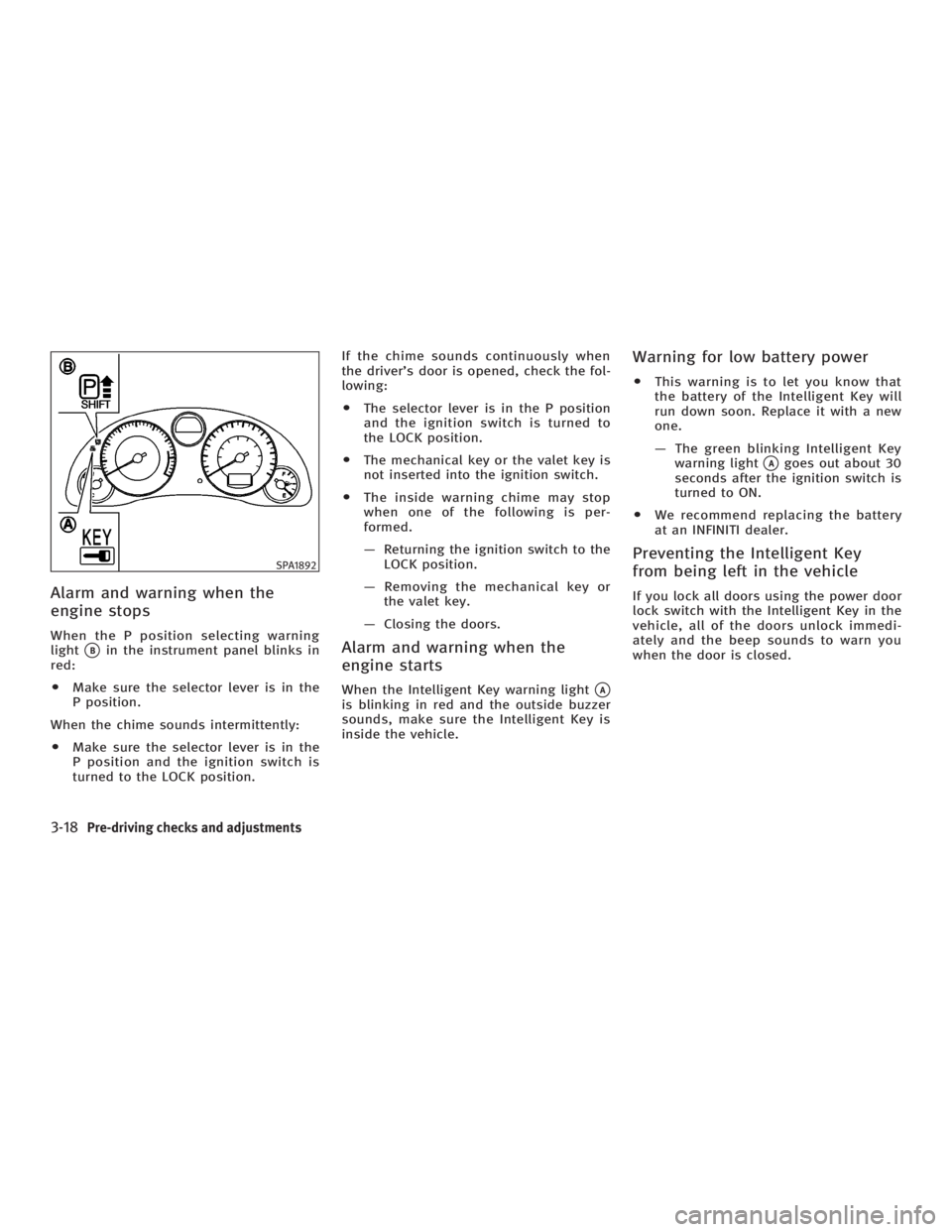
engine stops When the P position selecting warning
light
q B
in the instrument panel blinks in
red:
O Make sure the selector lever is in the
P position.
When the chime sounds intermittently:
O Make sure the selector lever is in the
P position and the ignition switch is
turned to the LOCK position. If the chime sounds continuously when
the driver's door is opened, check the fol-
lowing:
O The selector lever is in the P position
and the ignition switch is turned to
the LOCK position.
O The mechanical key or the valet key is
not inserted into the ignition switch.
O The inside warning chime may stop
when one of the following is per-
formed.
Ð Returning the ignition switch to the
LOCK position.
Ð Removing the mechanical key or
the valet key.
Ð Closing the doors.
Alarm and warning when the
engine starts When the Intelligent Key warning light
q A
is blinking in red and the outside buzzer
sounds, make sure the Intelligent Key is
inside the vehicle. Warning for low battery power O This warning is to let you know that
the battery of the Intelligent Key will
run down soon. Replace it with a new
one.
Ð The green blinking Intelligent Key
warning light
q A
goes out about 30
seconds after the ignition switch is
turned to ON.
O We recommend replacing the battery
at an INFINITI dealer.
Preventing the Intelligent Key
from being left in the vehicle If you lock all doors using the power door
lock switch with the Intelligent Key in the
vehicle, all of the doors unlock immedi-
ately and the beep sounds to warn you
when the door is closed.SPA1892
3-18 Pre-driving checks and adjustments
w 06.1.4/V35-D/V5.0
X
Page 141 of 344
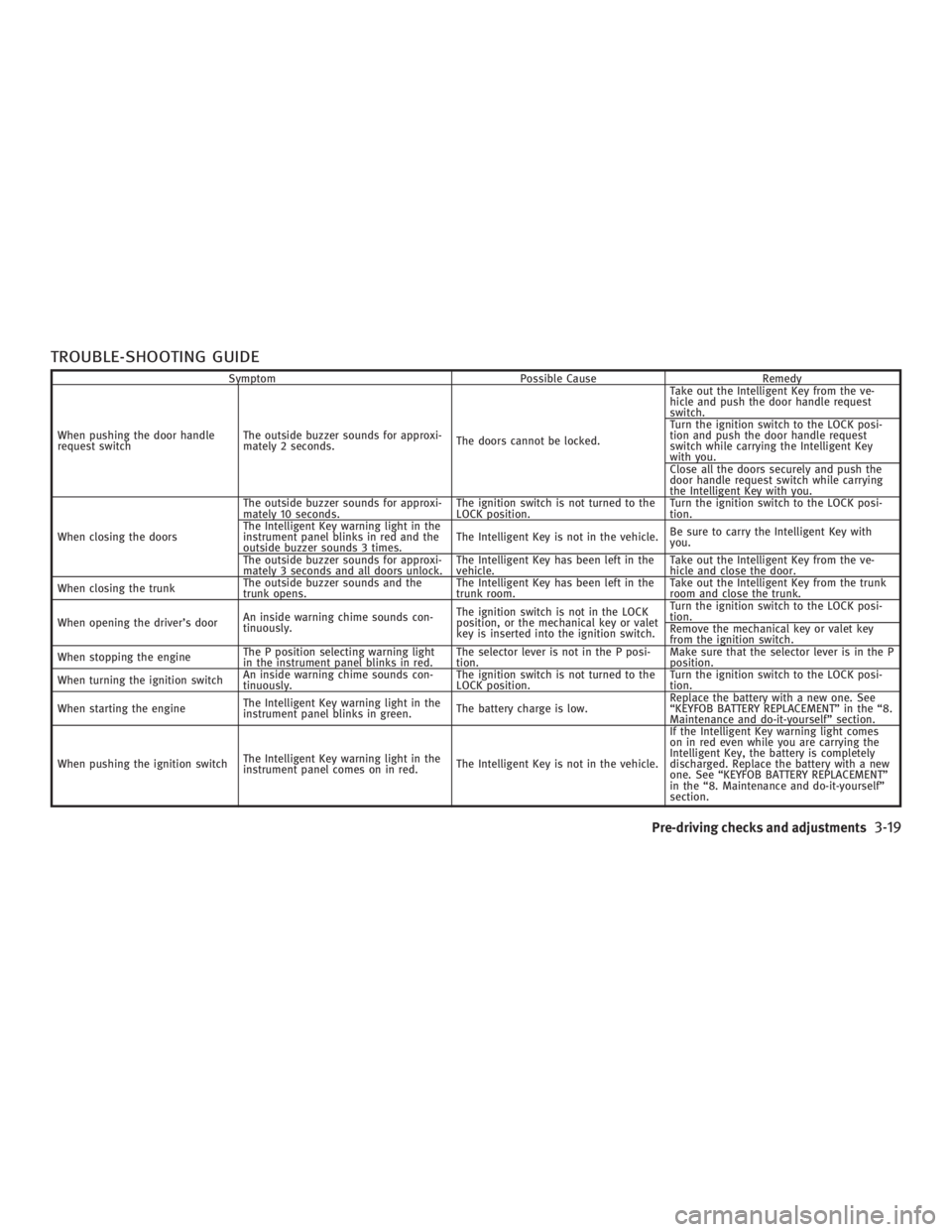
TROUBLE-SHOOTING GUIDE Symptom Possible Cause Remedy
When pushing the door handle
request switch The outside buzzer sounds for approxi-
mately 2 seconds. The doors cannot be locked. Take out the Intelligent Key from the ve-
hicle and push the door handle request
switch.
Turn the ignition switch to the LOCK posi-
tion and push the door handle request
switch while carrying the Intelligent Key
with you.
Close all the doors securely and push the
door handle request switch while carrying
the Intelligent Key with you.
When closing the doors The outside buzzer sounds for approxi-
mately 10 seconds. The ignition switch is not turned to the
LOCK position. Turn the ignition switch to the LOCK posi-
tion.
The Intelligent Key warning light in the
instrument panel blinks in red and the
outside buzzer sounds 3 times. The Intelligent Key is not in the vehicle. Be sure to carry the Intelligent Key with
you.
The outside buzzer sounds for approxi-
mately 3 seconds and all doors unlock. The Intelligent Key has been left in the
vehicle. Take out the Intelligent Key from the ve-
hicle and close the door.
When closing the trunk The outside buzzer sounds and the
trunk opens. The Intelligent Key has been left in the
trunk room. Take out the Intelligent Key from the trunk
room and close the trunk.
When opening the driver's door An inside warning chime sounds con-
tinuously. The ignition switch is not in the LOCK
position, or the mechanical key or valet
key is inserted into the ignition switch. Turn the ignition switch to the LOCK posi-
tion.
Remove the mechanical key or valet key
from the ignition switch.
When stopping the engine The P position selecting warning light
in the instrument panel blinks in red. The selector lever is not in the P posi-
tion. Make sure that the selector lever is in the P
position.
When turning the ignition switch An inside warning chime sounds con-
tinuously. The ignition switch is not turned to the
LOCK position. Turn the ignition switch to the LOCK posi-
tion.
When starting the engine The Intelligent Key warning light in the
instrument panel blinks in green. The battery charge is low. Replace the battery with a new one. See
ªKEYFOB BATTERY REPLACEMENTº in the ª8.
Maintenance and do-it-yourselfº section.
When pushing the ignition switch The Intelligent Key warning light in the
instrument panel comes on in red. The Intelligent Key is not in the vehicle. If the Intelligent Key warning light comes
on in red even while you are carrying the
Intelligent Key, the battery is completely
discharged. Replace the battery with a new
one. See ªKEYFOB BATTERY REPLACEMENTº
in the ª8. Maintenance and do-it-yourselfº
section.
Pre-driving checks and adjustments
3-19
w 06.1.4/V35-D/V5.0
X