heater INFINITI G35 2006 Owner's Manual
[x] Cancel search | Manufacturer: INFINITI, Model Year: 2006, Model line: G35, Model: INFINITI G35 2006Pages: 344, PDF Size: 6.81 MB
Page 176 of 344
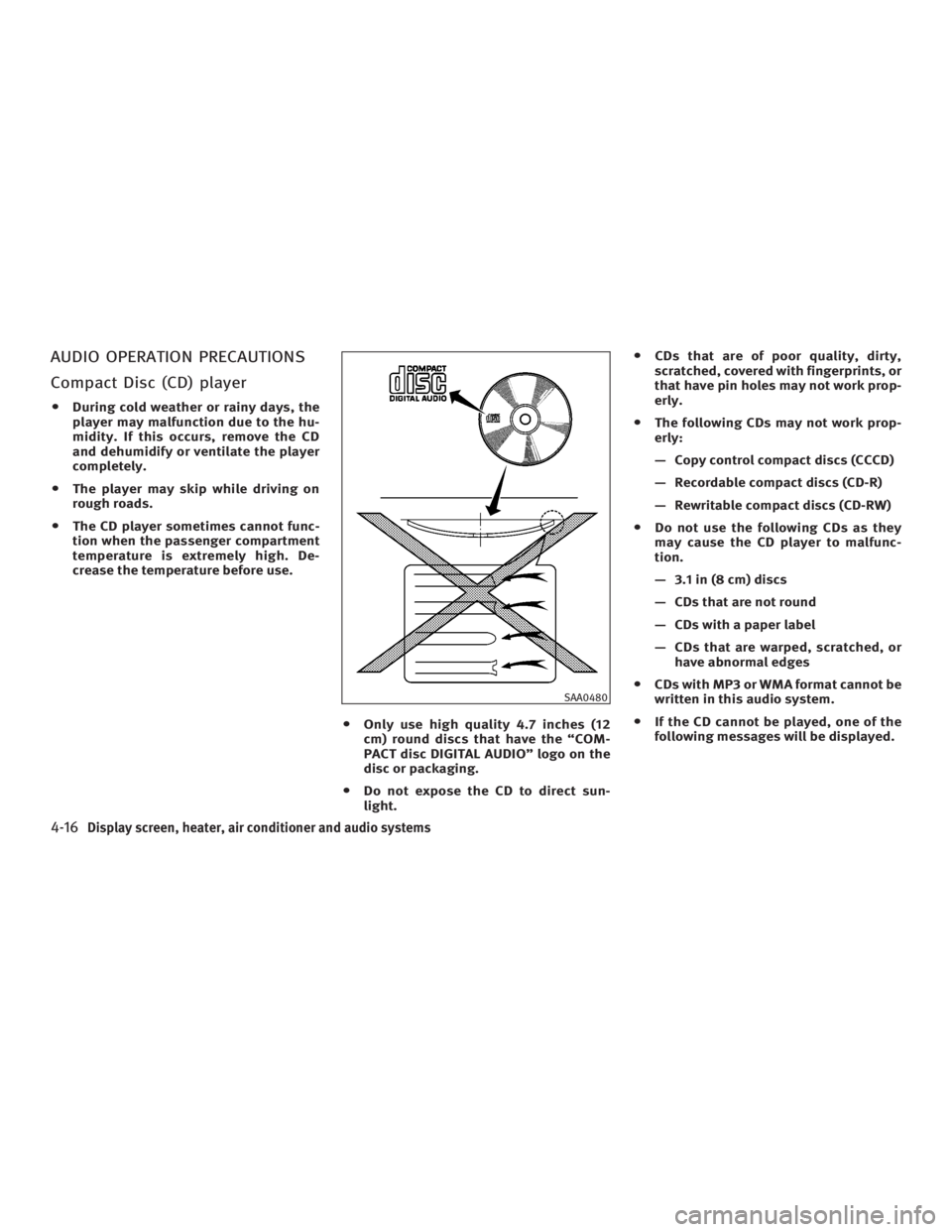
AUDIO OPERATION PRECAUTIONS
Compact Disc (CD) player O During cold weather or rainy days, the
player may malfunction due to the hu-
midity. If this occurs, remove the CD
and dehumidify or ventilate the player
completely.
O The player may skip while driving on
rough roads.
O The CD player sometimes cannot func-
tion when the passenger compartment
temperature is extremely high. De-
crease the temperature before use.
O Only use high quality 4.7 inches (12
cm) round discs that have the ªCOM-
PACT disc DIGITAL AUDIOº logo on the
disc or packaging.
O Do not expose the CD to direct sun-
light. O CDs that are of poor quality, dirty,
scratched, covered with fingerprints, or
that have pin holes may not work prop-
erly.
O The following CDs may not work prop-
erly:
Ð Copy control compact discs (CCCD)
Ð Recordable compact discs (CD-R)
Ð Rewritable compact discs (CD-RW)
O Do not use the following CDs as they
may cause the CD player to malfunc-
tion.
Ð 3.1 in (8 cm) discs
Ð CDs that are not round
Ð CDs with a paper label
Ð CDs that are warped, scratched, or
have abnormal edges
O CDs with MP3 or WMA format cannot be
written in this audio system.
O If the CD cannot be played, one of the
following messages will be displayed. SAA0480
4-16 Display screen, heater, air conditioner and audio systems
w 06.1.4/V35-D/V5.0
X
Page 177 of 344

CHECK DISC:
· Confirm that the CD is inserted cor-
rectly (the label side is facing up,
etc.).
· Confirm that the CD is not bent or
warped and it is free of scratches.
PUSH EJECT:
This is a malfunction due to excessive
temperature inside the player. Remove
the CD by pushing the EJECT button. Af-
ter a short time, reinsert the CD. The CD
can be played when the temperature of
the player returns to normal.
UNPLAYABLE:
The file is unplayable in this audio sys-
tem (only MP3 or WMA CD). Compact Disc (CD) with MP3 or
WMA Explanation of terms:
O MP3 Ð MP3 is short for Moving Pic-
tures Experts Group Audio Layer 3.
MP3 is the most well-known com-
pressed digital audio file format. This
format allows for near ªCD qualityº
sound, but at a fraction of the size of
normal audio files. MP3 conversion of
an audio track from CD-ROM can re-
duce the file size by approximately
10:1 ratio with virtually no perceptible
loss in quality. MP3 compression re-
moves the redundant and irrelevant
parts of a sound signal that the
human ear doesn't hear.
O WMA Ð Windows Media Audio (WMA)
is a compressed audio format created
by Microsoft as an alternative to MP3.
The WMA codec offers greater file
compression than the MP3 codec, en-
abling storage of more digital audio
tracks in the same amount of space
when compared to MP3s at the same
level of quality.
O Bit rate Ð Bit rate denotes the number
of bits per second used by a digital
music file. The size and quality of a compressed digital audio file is deter-
mined by the bit rate used when en-
coding the file.
O Sampling frequency Ð Sampling fre-
quency is the rate at which the
samples of a signal are converted
from analog to digital (A/D conversion)
per second.
O Multisession Ð Multisession is one of
the methods for writing data to media.
Writing data once to the media is
called a single session, and writing
more than once is called a multises-
sion.
O ID3/WMA Tag Ð The ID3 tag is the
part of the encoded MP3 or WMA file
that contains information about the
digital music file such as song title,
artist, album title, encoding bit rate,
track time duration, etc. ID3 tag infor-
mation is displayed on the
Album/Artist/Track title line on the
display.
* Windows and Windows Media are
either registered trademarks or trade-
marks of Microsoft Corporation in the
United States and/or other countries.
Display screen, heater, air conditioner and audio systems
4-17
w 06.1.4/V35-D/V5.0
X
Page 178 of 344
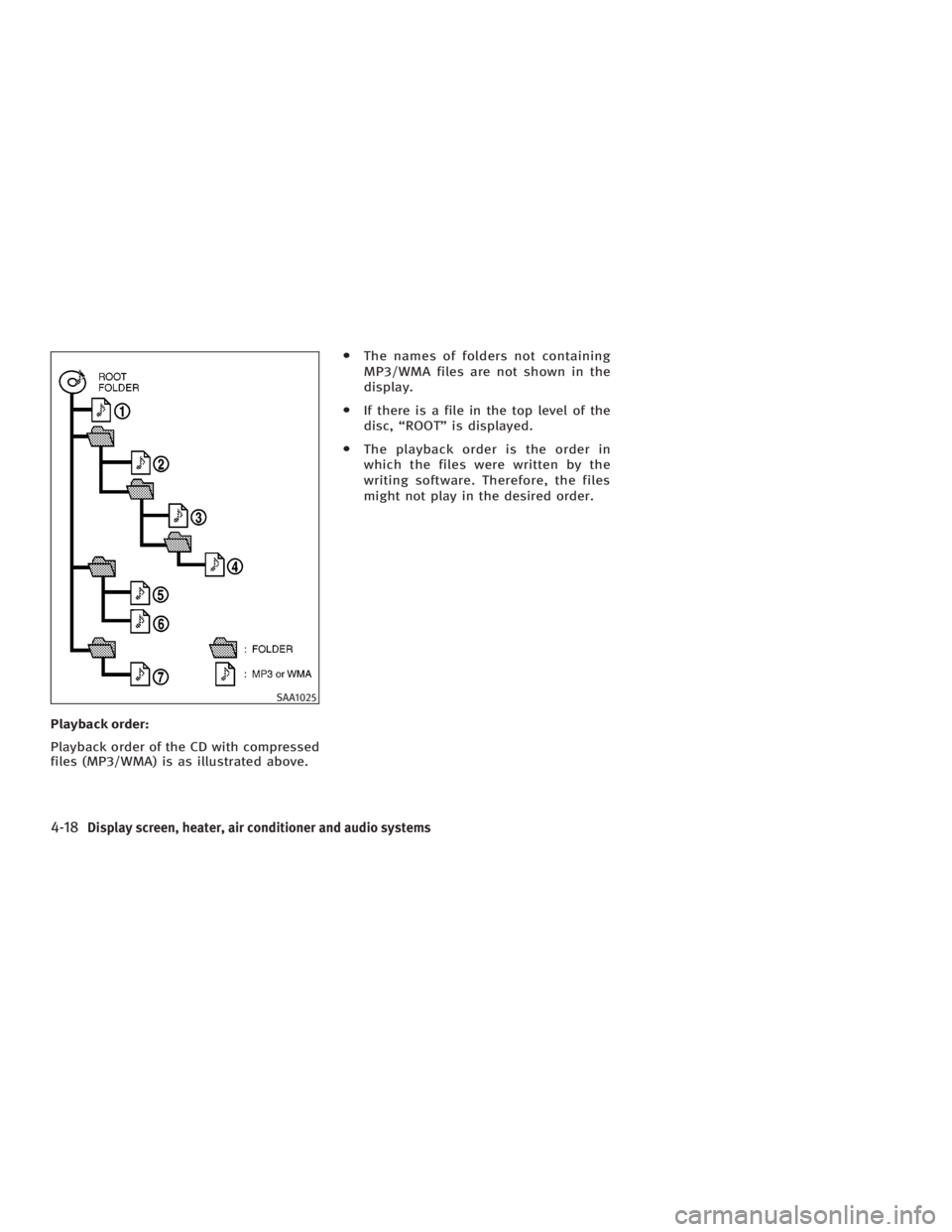
Playback order:
Playback order of the CD with compressed
files (MP3/WMA) is as illustrated above. O The names of folders not containing
MP3/WMA files are not shown in the
display.
O If there is a file in the top level of the
disc, ªROOTº is displayed.
O The playback order is the order in
which the files were written by the
writing software. Therefore, the files
might not play in the desired order.
SAA1025
4-18 Display screen, heater, air conditioner and audio systems
w 06.1.4/V35-D/V5.0
X
Page 179 of 344
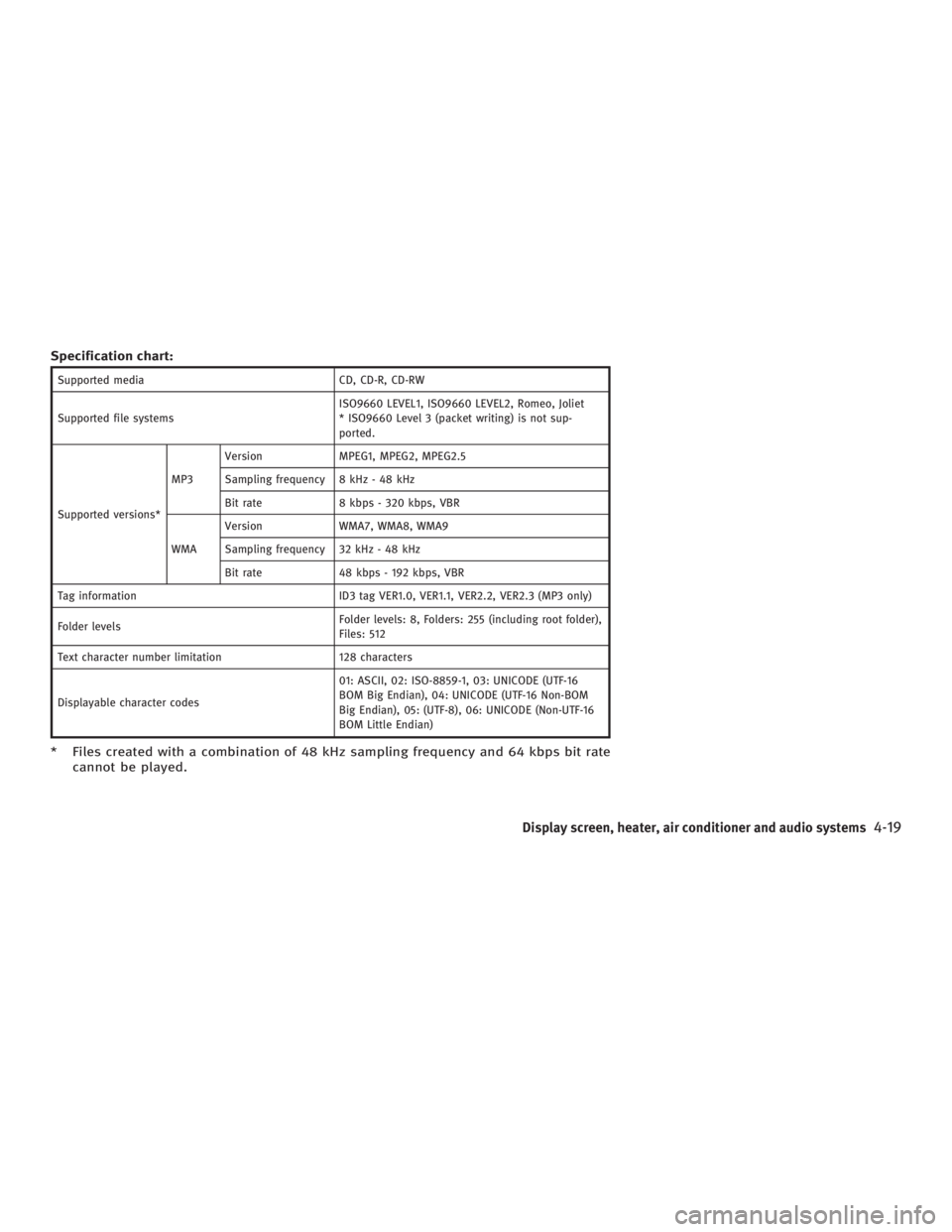
Specification chart: Supported media CD, CD-R, CD-RW
Supported file systems ISO9660 LEVEL1, ISO9660 LEVEL2, Romeo, Joliet
* ISO9660 Level 3 (packet writing) is not sup-
ported.
Supported versions* MP3 Version MPEG1, MPEG2, MPEG2.5
Sampling frequency 8 kHz - 48 kHz
Bit rate 8 kbps - 320 kbps, VBR
WMA Version WMA7, WMA8, WMA9
Sampling frequency 32 kHz - 48 kHz
Bit rate 48 kbps - 192 kbps, VBR
Tag information ID3 tag VER1.0, VER1.1, VER2.2, VER2.3 (MP3 only)
Folder levels Folder levels: 8, Folders: 255 (including root folder),
Files: 512
Text character number limitation 128 characters
Displayable character codes 01: ASCII, 02: ISO-8859-1, 03: UNICODE (UTF-16
BOM Big Endian), 04: UNICODE (UTF-16 Non-BOM
Big Endian), 05: (UTF-8), 06: UNICODE (Non-UTF-16
BOM Little Endian)
* Files created with a combination of 48 kHz sampling frequency and 64 kbps bit rate
cannot be played.
Display screen, heater, air conditioner and audio systems
4-19
w 06.1.4/V35-D/V5.0
X
Page 180 of 344
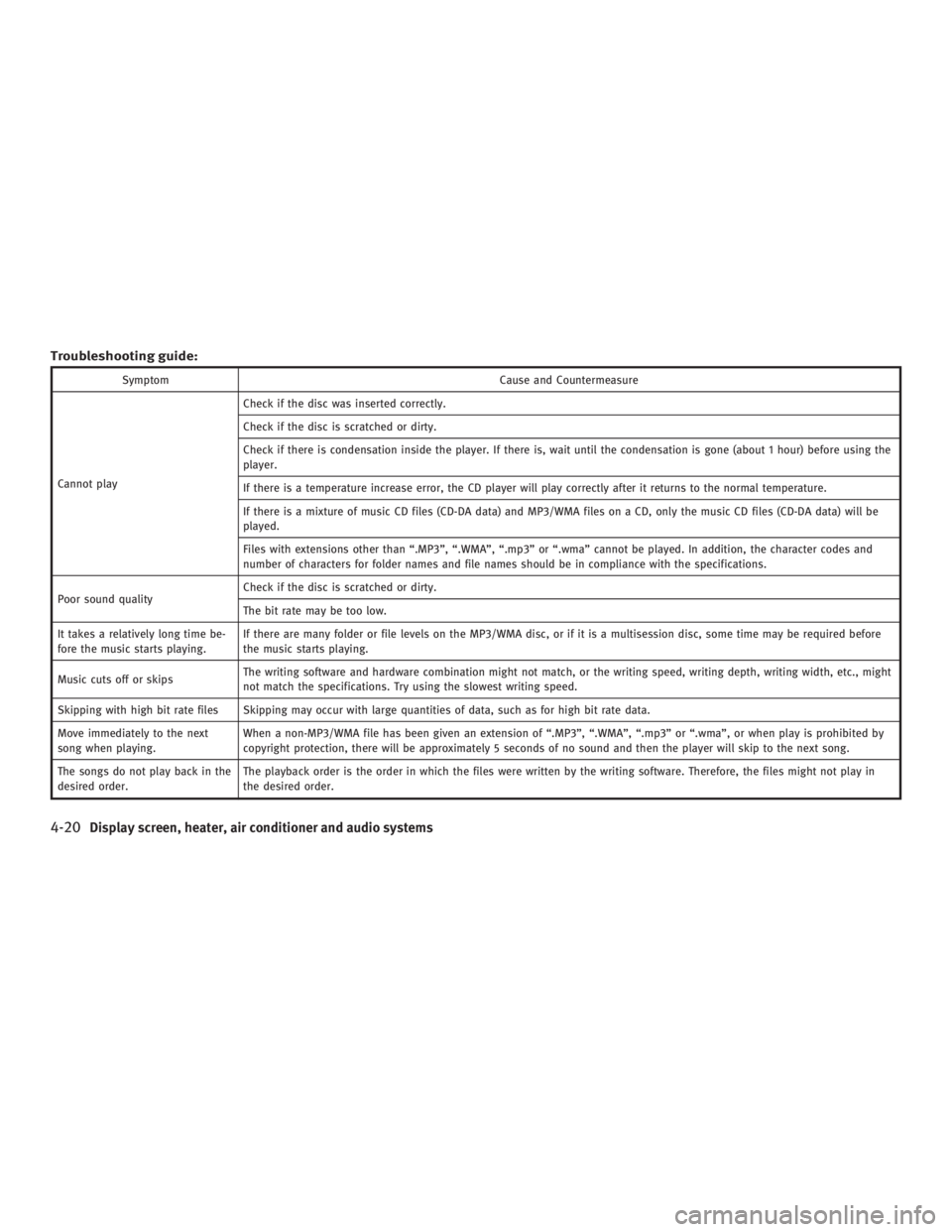
Troubleshooting guide: Symptom Cause and Countermeasure
Cannot play Check if the disc was inserted correctly.
Check if the disc is scratched or dirty.
Check if there is condensation inside the player. If there is, wait until the condensation is gone (about 1 hour) before using the
player.
If there is a temperature increase error, the CD player will play correctly after it returns to the normal temperature.
If there is a mixture of music CD files (CD-DA data) and MP3/WMA files on a CD, only the music CD files (CD-DA data) will be
played.
Files with extensions other than ª.MP3º, ª.WMAº, ª.mp3º or ª.wmaº cannot be played. In addition, the character codes and
number of characters for folder names and file names should be in compliance with the specifications.
Poor sound quality Check if the disc is scratched or dirty.
The bit rate may be too low.
It takes a relatively long time be-
fore the music starts playing. If there are many folder or file levels on the MP3/WMA disc, or if it is a multisession disc, some time may be required before
the music starts playing.
Music cuts off or skips The writing software and hardware combination might not match, or the writing speed, writing depth, writing width, etc., might
not match the specifications. Try using the slowest writing speed.
Skipping with high bit rate files Skipping may occur with large quantities of data, such as for high bit rate data.
Move immediately to the next
song when playing. When a non-MP3/WMA file has been given an extension of ª.MP3º, ª.WMAº, ª.mp3º or ª.wmaº, or when play is prohibited by
copyright protection, there will be approximately 5 seconds of no sound and then the player will skip to the next song.
The songs do not play back in the
desired order. The playback order is the order in which the files were written by the writing software. Therefore, the files might not play in
the desired order.
4-20 Display screen, heater, air conditioner and audio systems
w 06.1.4/V35-D/V5.0
X
Page 181 of 344
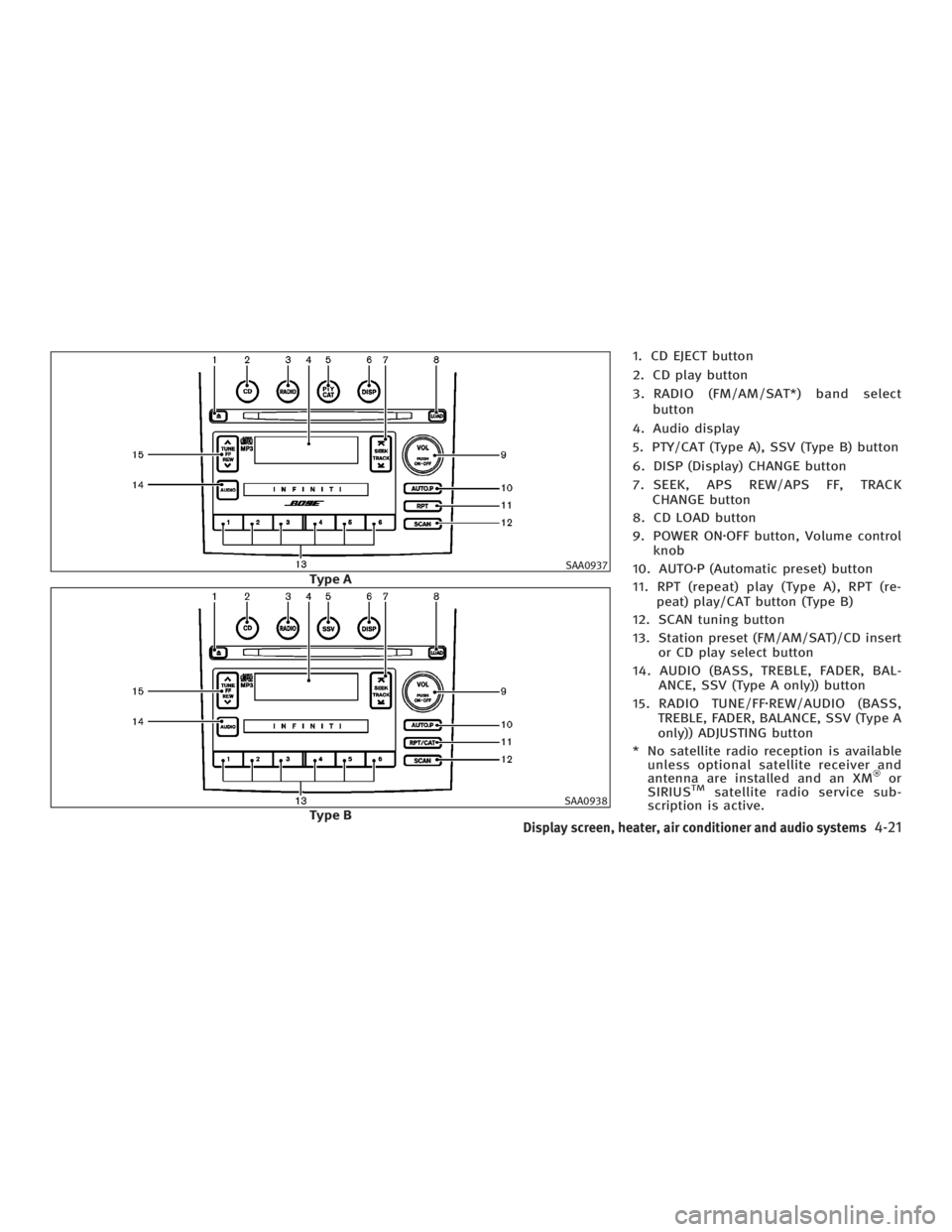
1. CD EJECT button
2. CD play button
3. RADIO (FM/AM/SAT*) band select
button
4. Audio display
5. PTY/CAT (Type A), SSV (Type B) button
6. DISP (Display) CHANGE button
7. SEEK, APS REW/APS FF, TRACK
CHANGE button
8. CD LOAD button
9. POWER ON z OFF button, Volume control
knob
10. AUTO z P (Automatic preset) button
11. RPT (repeat) play (Type A), RPT (re-
peat) play/CAT button (Type B)
12. SCAN tuning button
13. Station preset (FM/AM/SAT)/CD insert
or CD play select button
14. AUDIO (BASS, TREBLE, FADER, BAL-
ANCE, SSV (Type A only)) button
15. RADIO TUNE/FF z REW/AUDIO (BASS,
TREBLE, FADER, BALANCE, SSV (Type A
only)) ADJUSTING button
* No satellite radio reception is available
unless optional satellite receiver and
antenna are installed and an XM or
SIRIUS TM
satellite radio service sub-
scription is active. SAA0937
Type A
SAA0938
Type B
Display screen, heater, air conditioner and audio systems
4-21
w 06.1.4/V35-D/V5.0
X
Page 182 of 344
It may take some time to receive the acti-
vation signal after subscribing to the XM
or SIRIUS TM
satellite radio provider. After
receiving the activation signal, an avail-
able channel list will be automatically up-
dated in the radio. For XM , turn the igni-
tion switch from the LOCK to ACC position
to update the channel list.
Satellite radio is not available in Alaska
and Hawaii.
FM-AM-SATELLITE RADIO WITH
COMPACT DISC (CD) CHANGER
Audio main operation Head unit:
The radio has an FM diversity reception
system, which employs two antennas
printed on the rear window. This system
automatically switches to the antenna
which is receiving less interference.
The auto loudness circuit enhances the
low frequency range automatically in both
radio reception and CD playback.
POWER on/off:
Turn the ignition switch to the ACC or ON
position, and then push the POWER
on/off button while the system is off to call up the mode (radio, tape or CD) which
was playing immediately before the
system was turned off. When no CD or
tape is loaded, the radio will come on.
While the system is on, pushing the
POWER on/off button turns the system
off.
Volume control:
Turn the volume control knob to adjust
the volume.
This vehicle has Speed Sensitive control
Volume (SSV) for audio . The audio volume
changes as the driving speed changes.
AUDIO button (BASS, TREBLE, FADER,
BALANCE, SSV (Type A only)):
Push the AUDIO button to change the se-
lecting mode as follows.
BASS ! TREBLE ! FADER ! BALANCE !
SSV (Type A only) ! (Normal) ! BASS
To adjust Bass, Treble, Fader and Bal-
ance, push the AUDIO button until the de-
sired mode BASS, TREBLE, FADER or BAL-
ANCE appears in the display. Push the
TUNE
( or ) button to adjust Bass and
Treble to the desired level. Use the
or button also to adjust Fader or Balance modes. Fader adjusts the
sound level between the front and rear
speakers and Balance adjusts the sound
between the right and left speakers.
To change the SSV mode to OFF, LOW,
MID or HIGH, push the or (TUNE)
button (Type A) or push the SSV button
(Type B).
After 10 seconds, the radio, or CD display
reappears. Once the sound quality is set
to the desired level, push the AUDIO but-
ton repeatedly until the radio, or CD dis-
play appears.
DISPLAY CHANGE:
This button will work during FM radio, sat-
ellite radio (if so equipped) and CD opera-
tion. Find the detailed function in the de-
scription of each item.
FM-AM-SAT radio operation RADIO (FM/AM/SAT) band select:
Pushing the band select button will
change the band as follows:
(Without satellite radio)
AM ! FM1 ! FM2 ! AM
4-22 Display screen, heater, air conditioner and audio systems
w 06.1.4/V35-D/V5.0
X
Page 183 of 344

(With satellite radio)
AM ! FM1 ! FM2 ! SAT1 ! SAT2 ! AM
No satellite radio reception is available
unless optional satellite receiver and an-
tenna are installed and an XM or SIRI-
US TM
satellite radio service subscription
is active.
Satellite radio is not available in Alaska
and Hawaii.
When the RADIO band select button is
pushed while the ignition switch is in the
ACC or ON position, the radio will come
on at the station last played.
The last station/channel played will also
come on when the ON z OFF/VOL control
knob is pushed to ON.
If another audio source is playing when
the RADIO button is turned to ON, the
other audio source will automatically be
turned off and the last radio station
played will come on.
The FM stereo indicator ST will glow
during FM stereo reception. When the ste-
reo broadcast signal is weak, the radio
will automatically change from stereo to
monaural reception. TUNE (Tuning):
WARNING The radio should not be tuned while driving
so full attention may be given to vehicle op-
eration.
Push these buttons for manual tuning. To
move quickly through the channels, push
and hold either of the TUNE buttons down
for more than 0.5 second.
SEEK tuning:
For AM and FM radio:
Push the SEEK button or ,to
tune from high to low or low to high fre-
quencies and stops at the next broadcast-
ing station.
For satellite radio:
Push the SEEK button or to
seek channels of the next or previous cat-
egory. SCAN tuning:
Push the SCAN tuning button to tune from
low to high frequencies and stops at each
broadcasting station for 5 seconds. Push-
ing the button again during this 5 sec-
onds period will stop SCAN tuning and
the radio will remain tuned to that sta-
tion.
If the SCAN tuning button is not pushed
within 5 seconds, SCAN tuning moves to
the next station.
DISPLAY:
O By pushing the DISP button for more
than 1.5 seconds while receiving FM
radio waves, ªPS NAMEº switches be-
tween ON and OFF (Type A only).
O Pushing the DISP button will display
additional information about the satel-
lite radio broadcast (for example:
Artist name, Title).
Keep pushing the DISP button, and it
will change the information of the sat-
ellite radio broadcast to be displayed
as follows:
CH Number ! CH Name ! Artist
Name ! Song Title ! CH Number
Display screen, heater, air conditioner and audio systems
4-23
w 06.1.4/V35-D/V5.0
X
Page 184 of 344
Station memory operations:
Twelve stations/channels can be set for
the FM band (six for FM1, six for FM2),
twelve for satellite radio (six for SAT1, six
for SAT2) and six stations can be set for
the AM band.
1. Tune to the desired station using the
SEEK, SCAN or TUNE button.
2. Select the desired station/channel
and keep pushing any of the desired
station preset buttons (1 to 6) until a
beep sound is heard. (The radio mutes
when the select button is pushed.)
3. The channel indicator will then come
on and the sound will resume. Memo-
rizing is now complete.
4. Other buttons can be set in the same
manner.
If the battery cable is disconnected, or if
the fuse blows, the preset station memory
will be erased. In that case, reset the de-
sired stations.
Automatic preset:
To select the preset FM, AM, SAT or PTY
station/channel, push the AUTO.P button
for less than 1.5 seconds. To preset the FM, AM, SAT or PTY
station/channel, push the AUTO.P button
for more than 1.5 seconds.
Program type/category (Type A)
Repeat/category (Type B):
When the PTY button is pushed for more
than 1.5 seconds during FM mode, the PTY
name of the current tuned station is dis-
played (Type A only). During this time if
the PTY data code is zero, or the data is
unreadable; the display will show NONE.
When the PTY (CAT) Ð type A, or RPT (CAT)
Ð Type B, button is pushed for more than
1.5 seconds during the satellite radio
mode, the category name of the current
channel is displayed.
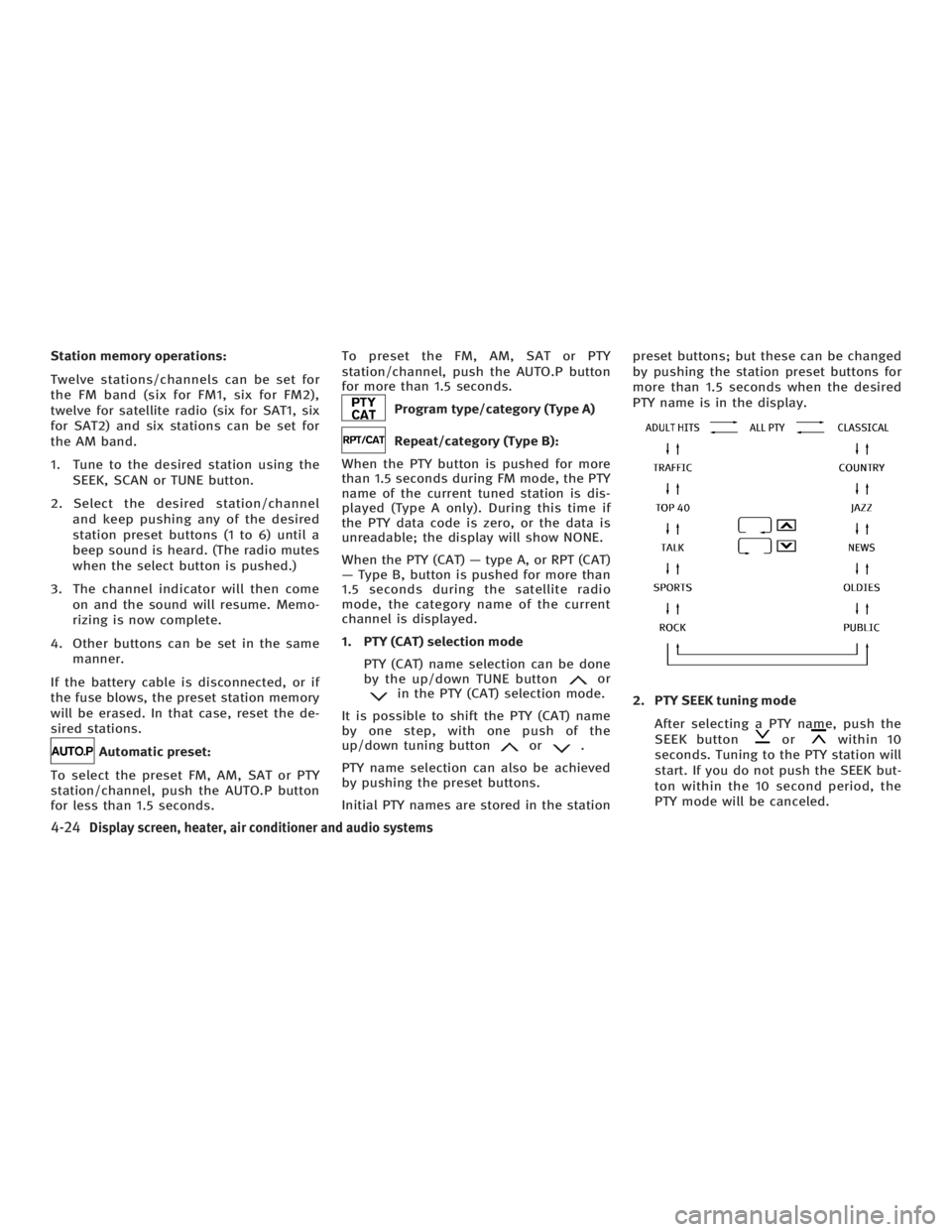
1. PTY (CAT) selection mode
PTY (CAT) name selection can be done
by the up/down TUNE button or
in the PTY (CAT) selection mode.
It is possible to shift the PTY (CAT) name
by one step, with one push of the
up/down tuning button or .
PTY name selection can also be achieved
by pushing the preset buttons.
Initial PTY names are stored in the station preset buttons; but these can be changed
by pushing the station preset buttons for
more than 1.5 seconds when the desired
PTY name is in the display.
2. PTY SEEK tuning mode
After selecting a PTY name, push the
SEEK button or within 10
seconds. Tuning to the PTY station will
start. If you do not push the SEEK but-
ton within the 10 second period, the
PTY mode will be canceled.
4-24 Display screen, heater, air conditioner and audio systems
w 06.1.4/V35-D/V5.0
X
Page 185 of 344

3. PTY SCAN tuning mode
Push the SCAN tuning button to tune
the PTY name station, and stop at
each broadcasting station for 5 sec-
onds. Pushing the button again during
this 5 second period will stop SCAN
tuning and the radio will remain tuned
to that station. If the SCAN tuning but-
ton is not pushed within 5 seconds,
SCAN tuning moves to the next sta-
tion.
Compact disc (CD) changer
operation Turn the ignition switch to the ACC or ON
position, push the LOAD button and insert
the compact disc into the slot with the la-
bel side facing up. The CD will be guided
automatically into the slot and start play-
ing.
After loading the disc, the number of
tracks on the disc and the play time will
appear on the display.
If the radio is already operating, it will au-
tomatically turn off and the CD will play. CAUTION O Do not force the compact disc into the
slot. This could damage the player.
O Do not use 3.1 in (8 cm) discs.
If the system has been turned off while
the CD was playing, pushing the
ON z OFF/VOL control button will start the
compact disc.
CD LOAD:
To insert a CD in the CD changer, push
the LOAD button for less than 1.5 sec-
onds. Select the loading slot by pushing
the CD insert select button (1 to 6), then
insert the CD.
To insert 6 CDs to the CD changer in suc-
cession, push the LOAD button for more
than 1.5 seconds.
The inserted slot numbers will illuminate
on the display.
PLAY:
When the CD button is pushed with the
system off and the compact disc loaded,
the system will turn on and the compact
disc will start to play. When the CD button is pushed with the
CD loaded with the radio playing, the
radio will automatically be turned off and
the compact disc will start to play.
DISPLAY:
When the display button is pushed for
more than 1.5 seconds while the CD is be-
ing played, the music information dis-
played can be changed in the following
order.
CD:
CD with MP3 or WMA:
FF (Fast Forward), REW
(Rewind):
CD:
When the (fast forward) or (re-
wind) button is pushed while the compact
disc is being played, the CD will play
while fast forwarding or rewinding. When
Display screen, heater, air conditioner and audio systems
4-25
w 06.1.4/V35-D/V5.0
X