light switch INFINITI G35 2006 Repair Manual
[x] Cancel search | Manufacturer: INFINITI, Model Year: 2006, Model line: G35, Model: INFINITI G35 2006Pages: 344, PDF Size: 6.81 MB
Page 193 of 344
O Speak in a natural voice without paus-
ing between words.
Giving voice commands To operate INFINITI Voice Recognition,
push and release the button located
on the steering wheel. The light on the
overhead console flashes to signal you
have entered a voice recognition (VR) ses-
sion. After the tone sounds, speak a com-
mand.
The command given is picked up by the
microphone, and voice feedback is given
when the command is accepted.
O If you need to hear the available com-
mands for the current menu again, say
ªHelpº and the system will repeat
them.
O If a command is not recognized, the
system announces, ªCommand not
recognized. Please try again.º Repeat
the command in a clear voice.
O If you want to go back to the previous
command, you can say ªGo backº or
ªCorrectionº anytime the system is
waiting for a response.
O You can cancel a command when the
system is waiting for a response by saying, ªCancelº or ªQuit.º The system
announces ªCancelº and ends the VR
session. You can also push the
button on the steering wheel at
any time. Whenever the VR session is
cancelled, a double beep is played to
indicate you have exited the system.
O If you want to adjust the volume of the
voice feedback, push the volume con-
trol switches (+ or -) on the steering
wheel while being provided with feed-
back. You can also use the radio
volume control knob.
How to say numbers
INFINITI Voice Recognition requires a cer-
tain way to speak numbers in voice com-
mands. Refer to the rules and examples
below.
O Either ªzeroº or ªohº can be used for
ª0º.
Example: 1-800-662-6200
Ð ªOne eight oh oh six six two six two
oh ohº, or
Ð ªOne eight zero zero six six two six
two oh ohº
O Words can be used for the first 4 dig-
its places only. Example: 1-800-662-6200
Ð ªOne eight hundred six six two six
two oh ohº,
Ð NOT ªOne eight hundred six six two
sixty two hundred, and
Ð NOT ªOne eight oh oh six six two
sixty two hundred.
O Numbers can be spoken in small
groups. The system will prompt you to
continuing entering digits, if desired.
Example: 1-800-662-6200
Ð ªOne eight oh ohº
The system repeats the numbers and
prompts you to enter more.
Ð ªsix six twoº
The system repeats the numbers and
prompts you to enter more.
Ð ªsix two oh ohº
O You can say ªStarº for * and ªPoundº
for # at anytime in any position of the
phone number.
Example: 1-555-1212 *123
Ð ªOne five five five one two one two
star one two threeº
Display screen, heater, air conditioner and audio systems
4-33
w 06.1.4/V35-D/V5.0
X
Page 205 of 344
5 Starting and driving Precautions when starting and driving .............. 5-2
Exhaust gas (Carbon monoxide) .................. 5-2
Three way catalyst....................................... 5-3
Tire pressure monitoring system (TPMS) ..... 5-3
Avoiding collision and rollover..................... 5-5
Drinking alcohol/drugs and driving ............. 5-5
All-wheel drive (AWD) driving safety
precautions (for AWD models) .................... 5-6
Ignition switch (except Intelligent Key
system)............................................................. 5-6
Automatic transmission ............................... 5-6
Manual transmission .................................. 5-7
Key positions .............................................. 5-8
INFINITI Vehicle Immobilizer System ............ 5-8
Ignition switch (models with the Intelligent
Key system) ...................................................... 5-9
Ignition switch positions ............................. 5-9
INFINITI Vehicle Immobilizer System .......... 5-10
Before starting the engine............................... 5-10
Starting the engine .......................................... 5-11
Driving the vehicle .......................................... 5-12
Automatic transmission.............................. 5-12
Manual transmission ................................ 5-16
Parking brake .................................................. 5-19 Cruise control ................................................. 5-20
Precautions on cruise control .................... 5-20
Cruise control operations .......................... 5-20
Break-in schedule ........................................... 5-22
Increasing fuel economy ................................. 5-22
All-wheel drive (AWD) (if so equipped) ............ 5-23
All-wheel drive (AWD) warning light ........... 5-23
Parking/parking on hills ................................. 5-24
Power steering ................................................ 5-25
Brake system .................................................. 5-26
Braking precautions .................................. 5-26
Anti-lock brake system (ABS)..................... 5-26
Vehicle Dynamic Control (VDC) system .......... 5-28
Rear active steer (RAS) system (if so
equipped) ....................................................... 5-29
Cold weather driving....................................... 5-30
Freeing a frozen door lock ......................... 5-30
Anti-freeze ................................................. 5-30
Battery ...................................................... 5-30
Draining of coolant water .......................... 5-30
Tire equipment .......................................... 5-30
Special winter equipment........................... 5-31
Driving on snow or ice ............................... 5-31
Engine block heater (if so equipped) ......... 5-32
w 06.1.13/V35-D/V5.0
X
Page 211 of 344
When the key cannot be turned toward
the LOCK position, proceed as follows to
remove the key:
1. Move the selector lever into the P po-
sition.
2. Turn the ignition key slightly toward
the ON direction.
3. Turn the key to the LOCK position.
4. Remove the key.
If the key is removed from the ignition
switch, the selector lever cannot be
moved from the P position. The selector
lever can be moved if the ignition switch is
in the ON position and the foot brake pedal
is depressed.
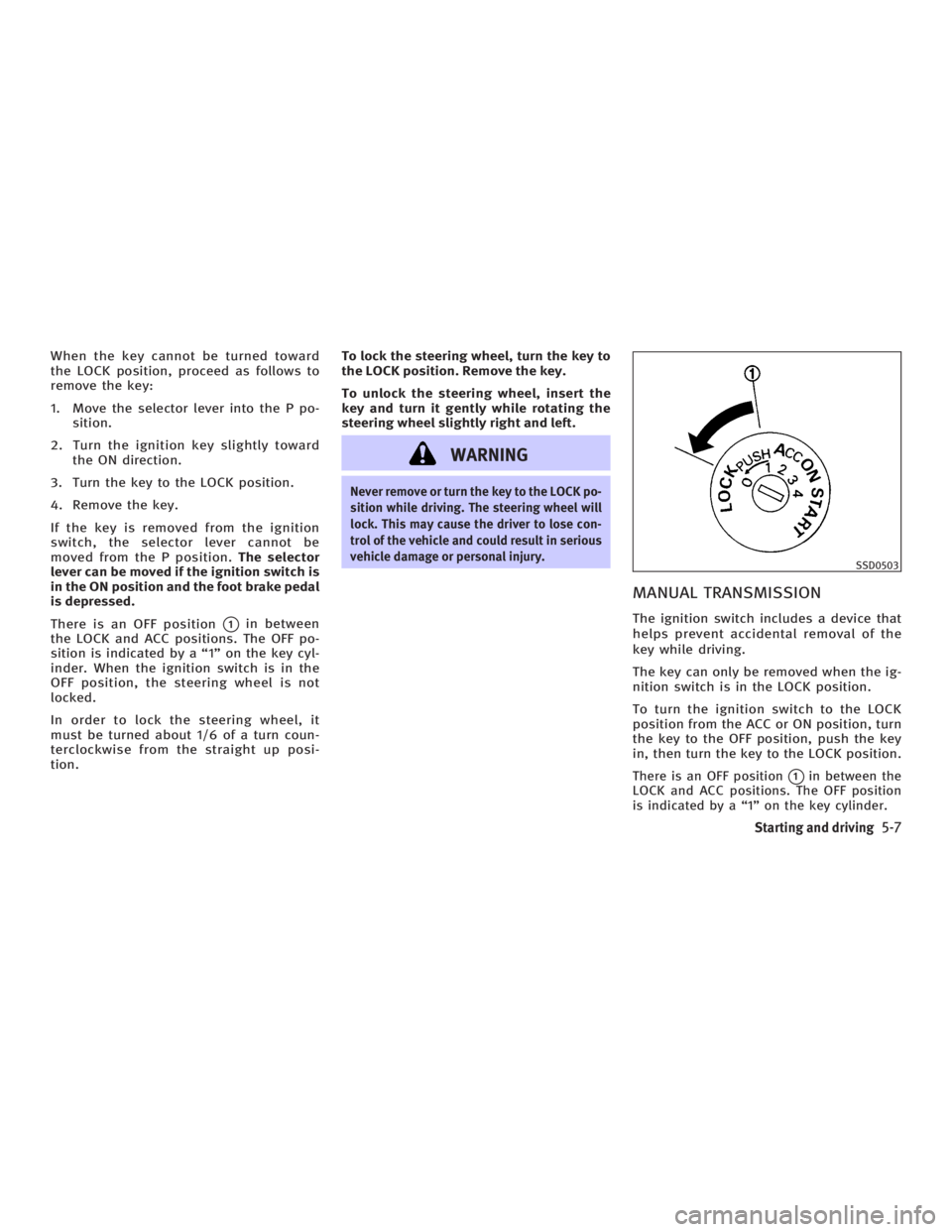
There is an OFF position
q 1
in between
the LOCK and ACC positions. The OFF po-
sition is indicated by a ª1º on the key cyl-
inder. When the ignition switch is in the
OFF position, the steering wheel is not
locked.
In order to lock the steering wheel, it
must be turned about 1/6 of a turn coun-
terclockwise from the straight up posi-
tion. To lock the steering wheel, turn the key to
the LOCK position. Remove the key.
To unlock the steering wheel, insert the
key and turn it gently while rotating the
steering wheel slightly right and left.
WARNING Never remove or turn the key to the LOCK po-
sition while driving. The steering wheel will
lock. This may cause the driver to lose con-
trol of the vehicle and could result in serious
vehicle damage or personal injury.
MANUAL TRANSMISSION The ignition switch includes a device that
helps prevent accidental removal of the
key while driving.
The key can only be removed when the ig-
nition switch is in the LOCK position.
To turn the ignition switch to the LOCK
position from the ACC or ON position, turn
the key to the OFF position, push the key
in, then turn the key to the LOCK position.
There is an OFF position
q 1
in between the
LOCK and ACC positions. The OFF position
is indicated by a ª1º on the key cylinder. SSD0503
Starting and driving
5-7
w 06.1.4/V35-D/V5.0
X
Page 212 of 344
In order for the steering wheel to be
locked, it must be turned about 1/6 of a
turn clockwise from the straight up posi-
tion.
To lock the steering wheel, turn the key to
the LOCK position. Remove the key.
To unlock the steering wheel, insert the
key and turn it gently while rotating the
steering wheel slightly right and left.
WARNINGNever remove or turn the key to the LOCK po-
sition while driving. The steering wheel will
lock. This may cause the driver to lose con-
trol of the vehicle and could result in serious
vehicle damage and/or personal injury.
KEY POSITIONS The ignition switch includes an anti-theft
steering lock device.
LOCK (Normal parking position) (0)
The ignition key can only be removed
when the ignition switch is in this posi-
tion. OFF (1)
The engine can be turned off without
locking the steering wheel.
The ignition lock is designed so that the
key cannot be turned to the LOCK position
and removed until the selector lever is
moved to the P position (for automatic
transmission) or the key is pushed in
while turning the key between the ACC
and LOCK positions.
ACC (Accessories) (2)
This position activates electrical accesso-
ries when the engine is not running.
ON (Normal operating position) (3)
This position activates ignition system in
addition to electrical accessories.
START (4)
This position activates the starter motor,
starting the engine.
INFINITI VEHICLE IMMOBILIZER
SYSTEM The INFINITI Vehicle Immobilizer System
will not allow the engine to start without
the use of the registered key. If the engine fails to start using a regis-
tered key (for example, when interference
is caused by another registered key, an
automated toll road device or automated
payment device on the key ring), restart
the engine using the following proce-
dures:
1. Leave the ignition switch in the ON po-
sition for approximately 5 seconds.
2. Turn the ignition switch to the OFF or
LOCK position and wait approximately
10 seconds.
3. Repeat steps 1 and 2.
4. Restart the engine while holding the
device (which may have caused the in-
terference) away from the registered
key.
If this procedure allows the engine to
start, INFINITI recommends placing the
registered key on a separate key ring to
avoid interference from other devices.
5-8 Starting and driving
w 06.1.4/V35-D/V5.0
X
Page 213 of 344
The ignition lock is designed so that the
ignition switch cannot be turned to the
LOCK position and removed until the se-
lector lever is moved to the P (Park) posi-
tion.
When turning the ignition switch, make
sure the selector lever is in the P position.
If the selector lever is not returned to the
P position, the ignition switch cannot be
moved toward the LOCK position.
When the ignition switch cannot be
turned toward the LOCK position, proceed
as follows: 1. Move the selector lever into the P po-
sition.
2. Turn the ignition switch slightly in the
ON direction.
3. Turn the key toward the LOCK posi-
tion.
The selector lever can be moved from the P
position if the ignition switch is in the ON
position and the foot brake pedal is de-
pressed.
There is an OFF position in between the
LOCK and ACC positions, although it does
not show on the lock cylinder. When the
ignition is in the OFF position the steering
wheel is not locked.
In order for the steering wheel to be
locked, it must be turned about 1/6 of a
turn counterclockwise from the straight
up position.
To lock the steering wheel, turn the igni-
tion switch to the LOCK position. To unlock
the steering wheel, push the ignition
switch in and turn it gently while rotating
the steering wheel slightly right and left.
If the battery of the vehicle equipped with
the Intelligent Key system is discharged,
the ignition switch cannot be turned from the LOCK position, even using the me-
chanical key or valet key.
WARNING Never turn the ignition switch to the LOCK
position while driving. The steering wheel
will lock. This may cause the driver to lose
control of the vehicle and could result in se-
rious vehicle damage and/or personal injury.
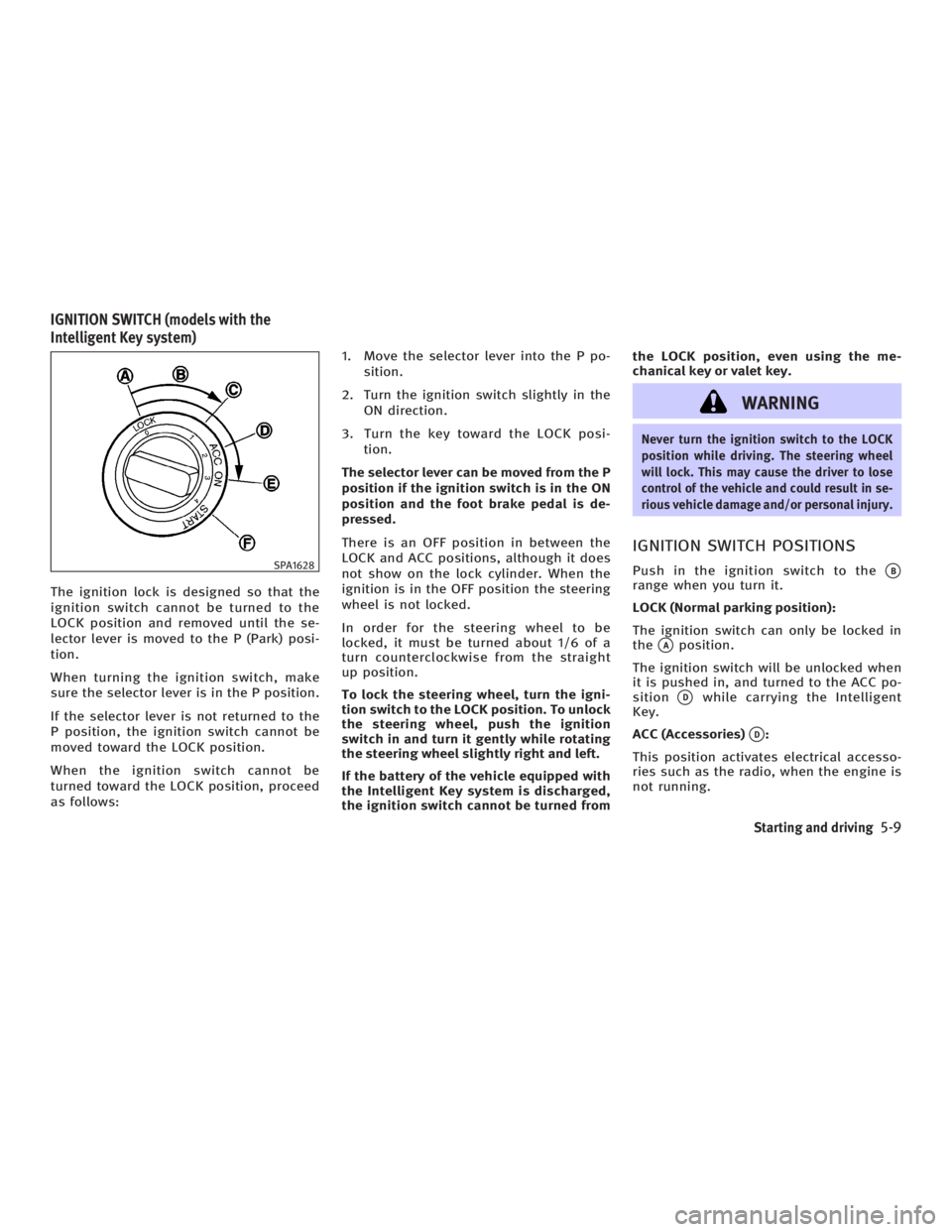
IGNITION SWITCH POSITIONS Push in the ignition switch to the
q B
range when you turn it.
LOCK (Normal parking position):
The ignition switch can only be locked in
the
q A
position.
The ignition switch will be unlocked when
it is pushed in, and turned to the ACC po-
sition
q D
while carrying the Intelligent
Key.
ACC (Accessories)
q D
:
This position activates electrical accesso-
ries such as the radio, when the engine is
not running.SPA1628
IGNITION SWITCH (models with the
Intelligent Key system)
Starting and driving
5-9
w 06.1.4/V35-D/V5.0
X
Page 214 of 344
ON (Normal operating position)
q E
:
This position turns on the ignition system
and electrical accessories.
START
q F
:
This position starts the engine. As soon
as the engine has started, release the
switch immediately. It will automatically
return to the ON position.
For important safety information, see ªIg-
nition switchº in the ª5. Starting and driv-
ingº section.
The ignition switch cannot be turned back
to the LOCK position unless the shift lever
is in P position. (It can be turned to only
q C
.)
CAUTIONDo not leave the vehicle with the ignition
switch in ACC or ON position when the en-
gine is not running for an extended period.
This can discharge the battery. INFINITI VEHICLE IMMOBILIZER
SYSTEM The INFINITI Vehicle Immobilizer System
will not allow the engine to start without
the use of the registered key.
If the engine does not start using a regis-
tered key (for example, when interference
is caused by another registered key, an
automated toll road device or an auto-
mated payment device on the key ring),
restart the engine using the following pro-
cedures:
1. Leave the ignition switch in the ON po-
sition for approximately 5 seconds.
2. Turn the ignition switch to the OFF or
LOCK position and wait approximately
10 seconds.
3. Repeat steps 1 and 2.
4. Restart the engine while holding the
device (which may have caused the in-
terference) separate from the regis-
tered key.
If this procedure allows the engine to
start, INFINITI recommends placing the
registered key on a separate key ring to
avoid interference from other devices. O Make sure the area around the vehicle
is clear.
O Maintenance items should be checked
periodically, for example, each time
you check engine oil.
O Check that all windows and lights are
clean.
O Visually inspect tires for their appear-
ance and condition. Also check tires
for proper inflation.
O Lock all doors.
O Position seat and adjust head re-
straints.
O Adjust inside and outside mirrors.
O Fasten seat belts and ask all passen-
gers to do likewise.
O Check the operation of warning lights
when the ignition key is turned to the
ON position. See ªWarning/indicator
lights and audible remindersº in the
ª2. Instruments and controlsº section.BEFORE STARTING THE ENGINE
5-10 Starting and driving
w 06.1.4/V35-D/V5.0
X
Page 221 of 344

Up-shift indicator The manual transmission up-shift indi-
cator is located in the meter and shows
the driver the timing to shift into a higher
gear by illuminating. The use of the up-
shift indicator will help you to upshift at a
constant engine speed (rpm) from any
gear.
The up-shift indicator will start flashing
when the engine speed is within about
500 rpm of the set figure while driving,
and then illuminate after the engine
speed reaches the set figure. Use the up-shift indicator when driving as
follows:
O If the maximum engine speed is de-
sired, set the figure at 7,000 rpm. (The
indicator starts flashing from about
6,500 rpm and comes on steady at
7,000 rpm.)
O If the maximum engine torque is de-
sired, set the figure at 4,800 rpm.
(The indicator starts flashing from
about 4,300 rpm and comes on steady
at 4,800 rpm.)
O If you want to break in your vehicle,
use of the up-shift indicator with a
rather low figure will help you to avoid
the high engine speed.
To make the up-shift indicator not come
on, set the figure at above 7,900 rpm.
There may be a slight difference between
the timing of the up-shift indicator illumi-
nation and the tachometer indication. Up-shift indicator setting:
The desired engine speed (rpm) for the
up-shift indicator can be set while the up-
shift indicator setting mode is selected.
Change the display to the up-shift indica-
tor mode by pushing the trip odometer
reset switch
q 1
. When the up-shift indica-
tor setting mode is selected, the engine
speed currently set is displayed. (The ini-
tial factory setting is 8,000 rpm.) The fig-
ure can be changed between 2,000 and
8,000 rpm.SSD0432 SSD0433
Starting and driving
5-17
w 06.1.4/V35-D/V5.0
X
Page 224 of 344
WARNINGDo not use the cruise control when driving
under the following conditions:
O When it is not possible to keep the ve-
hicle at a set speed.
O In heavy traffic or in traffic that varies in
speed.
O On winding or hilly roads.
O On slippery roads (rain, snow, ice, etc.).
O In very windy areas.
Doing so could cause a loss of vehicle con-
trol and result in an accident.
CAUTIONOn manual transmission models, do not shift
into N (Neutral) without depressing the
clutch pedal when the cruise control is set.
Should this occur, depress the clutch pedal
and turn the main switch off immediately.
Failure to do so may cause engine damage. PRECAUTIONS ON CRUISE
CONTROL O If the cruise control system malfunc-
tions, it cancels automatically. The
SET indicator light on the instrument
panel then blinks to warn the driver.
O If the engine coolant temperature be-
comes excessively high, the cruise
control system will be canceled auto-
matically.
O If the SET indicator light blinks, turn
the cruise control MAIN switch off and
have the system checked by an
INFINITI dealer.
O The SET indicator light may blink when
the cruise control MAIN switch is
turned on while pushing the
RESUME/ACCELERATE, SET/COAST, or
CANCEL switch. To properly set the
cruise control system, perform the fol-
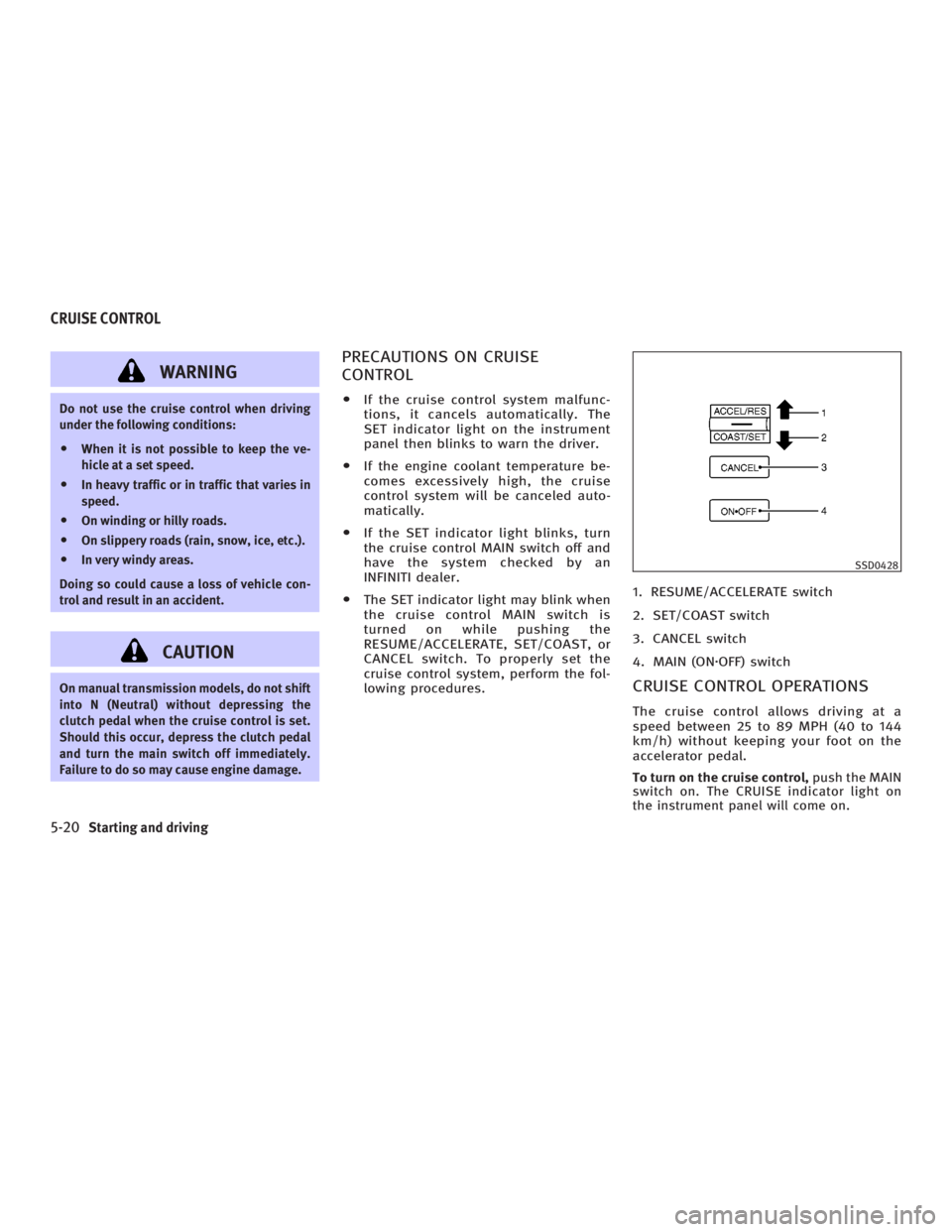
lowing procedures. 1. RESUME/ACCELERATE switch
2. SET/COAST switch
3. CANCEL switch
4. MAIN (ON z OFF) switch
CRUISE CONTROL OPERATIONS The cruise control allows driving at a
speed between 25 to 89 MPH (40 to 144
km/h) without keeping your foot on the
accelerator pedal.
To turn on the cruise control, push the MAIN
switch on. The CRUISE indicator light on
the instrument panel will come on. SSD0428
CRUISE CONTROL
5-20 Starting and driving
w 06.1.4/V35-D/V5.0
X
Page 225 of 344
To set at cruising speed, accelerate your
vehicle to the desired speed, push the
SET/COAST switch and release it. (The
SET indicator light will come on.) Take
your foot off the accelerator pedal. Your
vehicle will maintain the set speed.
O To pass another vehicle, depress the
accelerator pedal. When you release
the pedal, the vehicle will return to
the previously set speed.
O The vehicle may not maintain the set
speed when going up or down steep
hills. If this happens, drive without the
cruise control.
To cancel the preset speed, follow either of
these three methods:
a) Push the CANCEL switch. The SET indi-
cator light will go out.
b) Tap the brake pedal. The SET indicator
light will go out.
c) Turn the MAIN switch off. Both the
CRUISE indicator and SET indicator
lights will go out.
O If you depress the brake pedal while
pushing the RESUME/ACCELERATE
switch and reset at the cruising speed,
turn the MAIN switch off once and
then turn it on again. O The cruise control will automatically
be cancelled if the vehicle slows down
below approximately 8 MPH (13 km/h).
O If you depress the clutch pedal
(manual transmission), or move the
selector lever to the N (Neutral) posi-
tion (automatic transmission), the
cruise control will be canceled.
To reset at a faster cruising speed, use one
of the following methods:
a) Depress the accelerator pedal. When
the vehicle reaches the desired speed,
push and release the SET/COAST
switch.
b) Push and hold the RESUME/
ACCELERATE switch. When the vehicle
reaches the speed you desire, release
the switch.
c) Push, then quickly release the
RESUME/ACCELERATE set switch. This
will increase the vehicle speed by
about 1 MPH (1.6 km/h). To reset at a slower cruising speed, use
one of the following methods:
a) Lightly tap the brake pedal. When the
vehicle reaches the desired speed,
push the SET/COAST switch and re-
lease it.
b) Push and hold the SET/COAST switch.
Release the switch when the vehicle
slows down to the desired speed.
c) Push, then quickly release the SET/
COAST switch. This will decrease the
vehicle speed by about 1 MPH (1.6
km/h).
To resume the preset speed, push and re-
lease the RESUME/ACCELERATE switch.
The vehicle will resume the last set cruis-
ing speed when the vehicle speed is over
25 MPH (40 km/h).
Starting and driving
5-21
w 06.1.4/V35-D/V5.0
X
Page 227 of 344
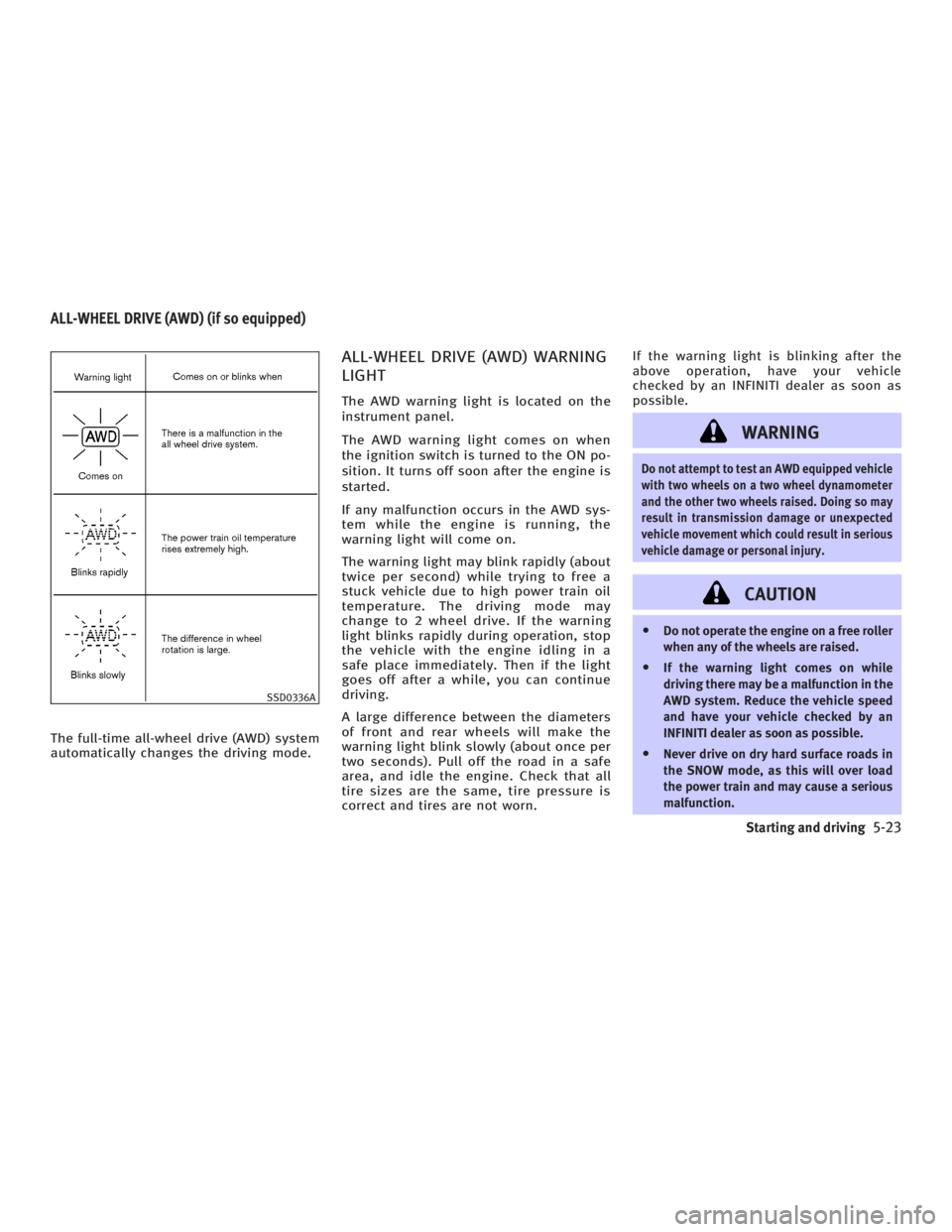
The full-time all-wheel drive (AWD) system
automatically changes the driving mode. ALL-WHEEL DRIVE (AWD) WARNING
LIGHT The AWD warning light is located on the
instrument panel.
The AWD warning light comes on when
the ignition switch is turned to the ON po-
sition. It turns off soon after the engine is
started.
If any malfunction occurs in the AWD sys-
tem while the engine is running, the
warning light will come on.
The warning light may blink rapidly (about
twice per second) while trying to free a
stuck vehicle due to high power train oil
temperature. The driving mode may
change to 2 wheel drive. If the warning
light blinks rapidly during operation, stop
the vehicle with the engine idling in a
safe place immediately. Then if the light
goes off after a while, you can continue
driving.
A large difference between the diameters
of front and rear wheels will make the
warning light blink slowly (about once per
two seconds). Pull off the road in a safe
area, and idle the engine. Check that all
tire sizes are the same, tire pressure is
correct and tires are not worn. If the warning light is blinking after the
above operation, have your vehicle
checked by an INFINITI dealer as soon as
possible.
WARNING Do not attempt to test an AWD equipped vehicle
with two wheels on a two wheel dynamometer
and the other two wheels raised. Doing so may
result in transmission damage or unexpected
vehicle movement which could result in serious
vehicle damage or personal injury.
CAUTION O Do not operate the engine on a free roller
when any of the wheels are raised.
O If the warning light comes on while
driving there may be a malfunction in the
AWD system. Reduce the vehicle speed
and have your vehicle checked by an
INFINITI dealer as soon as possible.
O Never drive on dry hard surface roads in
the SNOW mode, as this will over load
the power train and may cause a serious
malfunction.SSD0336AALL-WHEEL DRIVE (AWD) (if so equipped)
Starting and driving
5-23
w 06.1.4/V35-D/V5.0
X