clock INFINITI G35 2006 Owners Manual
[x] Cancel search | Manufacturer: INFINITI, Model Year: 2006, Model line: G35, Model: INFINITI G35 2006Pages: 344, PDF Size: 6.81 MB
Page 15 of 344

1. Headlight, fog light and turn signal
switch (P.2-21)
2. Security indicator light (P.2-19)
3. Steering wheel switch for audio control
(P.4-28) or steering wheel switch for
Bluetooth Hands-Free Phone System
(if so equipped) (P.4-30) 4. Driver's supplemental front air bag
(P.1-36)/Horn (P.2-26)
5. Meters/gauges (P.2-3)
6. Cruise control main/set switch (P.5-20)
7. Windshield wiper/washer switch
(P.2-19)
8. Center ventilator (P.4-9) 9. Center display - Compass, Air condi-
tioner, Ambient temperature, Front
passenger air bag status light (P.1-44)
10. Rear window and outside mirror de-
fogger switch (P.2-20)
11. Heater/air conditioner control (P.4-10)
12. Clock (P.2-29)
13. Navigation system* (if so equipped)
(P.4-2)
14. Passenger's supplemental front air
bag (P.1-36)
15. Upper glove box (except for Naviga-
tion system equipped models)
(P.2-35)
16. Side ventilator (P.4-9)
17. Hood lock release handle (P.3-24)
18. Trunk lid release switch (P.3-25)
19. Vehicle Dynamic Control (VDC) off
switch (P.2-28)
20. Instrument brightness control
(P.2-24)
21. Outside mirror remote control switch
(P.3-33)
22. Fuse box (P.8-27)
23. Electric steering column control (if so
equipped) (P.3-31)
24. Manual steering column control
(P.3-30)
25. Ignition switch/steering lock (P.5-6)
26. SNOW mode switch (if so equipped)
(P.2-27)
27. Audio system (P.4-14)
28. Ashtray/Cigarette lighter (P.2-30)
29. Heated seat switch (P.2-26) SSI0159INSTRUMENT PANEL
Illustrated table of contents
0-9
w 06.1.4/V35-D/V5.0
X
Page 24 of 344
The seatback may also be reclined to
allow occupants to rest when the vehicle
is parked.
WARNINGO Do not ride in a moving vehicle when the
seatback is reclined. This can be danger-
ous. The shoulder belt will not be
against your body. In an accident, you
could be thrown into it and receive neck
or other serious injuries. You could also
slide under the lap belt and receive se-
rious internal injuries.
O For the most effective protection when
the vehicle is in motion, the seat should
be upright. Always sit well back in the
seat and adjust the seat belt properly.
See ªPrecautions on seat belt usageº
later in this section.
O After adjustment, gently rock in the seat
to make sure it is securely locked.
Folding Sedan:
The rear center seatback can be folded to
allow access to the trunk from inside the
vehicle. To access the trunk:
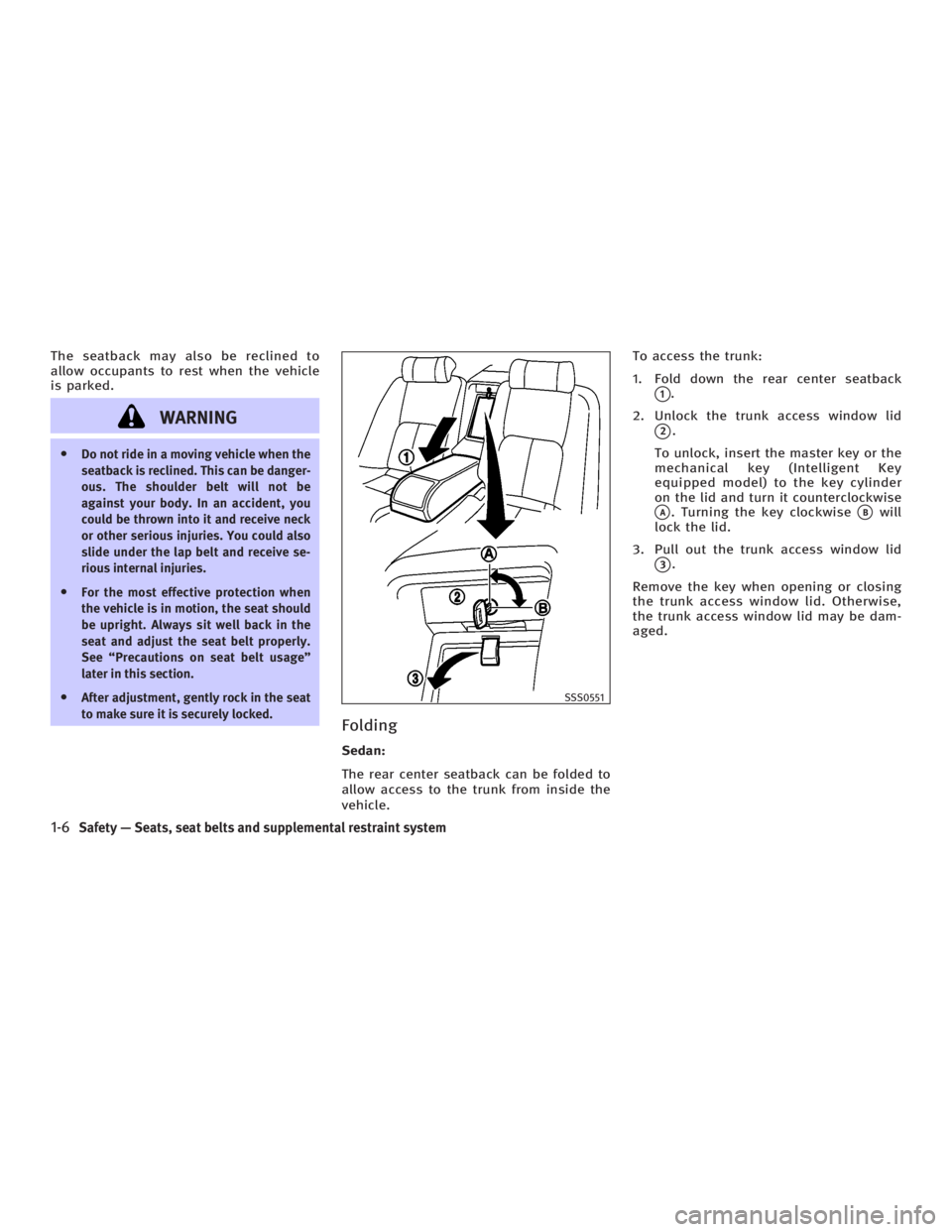
1. Fold down the rear center seatback
q 1
.
2. Unlock the trunk access window lid
q 2
.
To unlock, insert the master key or the
mechanical key (Intelligent Key
equipped model) to the key cylinder
on the lid and turn it counterclockwise
q A
. Turning the key clockwise
q B
will
lock the lid.
3. Pull out the trunk access window lid
q 3
.
Remove the key when opening or closing
the trunk access window lid. Otherwise,
the trunk access window lid may be dam-
aged. SSS0551
1-6 Safety Ð Seats, seat belts and supplemental restraint system
w 06.1.4/V35-D/V5.0
X
Page 72 of 344
2 Instruments and controls Instrument panel .............................................. 2-2
Meters and gauges ........................................... 2-3
Speedometer and odometer ........................ 2-3
Tachometer ................................................. 2-4
Engine coolant temperature gauge .............. 2-4
Fuel gauge .................................................. 2-5
Compass display .............................................. 2-6
Warning/indicator lights and audible
reminders ......................................................... 2-9
Checking bulbs ........................................... 2-9
Warning lights............................................. 2-9
Indicator lights .......................................... 2-14
Audible reminders ..................................... 2-16
Security systems ............................................. 2-17
Vehicle security system.............................. 2-17
INFINITI Vehicle Immobilizer System .......... 2-18
Windshield wiper and washer switch .............. 2-19
Rear window and outside mirror defroster
switch ............................................................ 2-20
Headlight and turn signal switch..................... 2-21
Xenon headlights ....................................... 2-21
Headlight switch ........................................ 2-21
Turn signal switch ..................................... 2-24
Fog light switch ......................................... 2-25 Hazard warning flasher switch ........................ 2-25
Horn ............................................................... 2-26
Heated seats .................................................. 2-26
SNOW mode switch (if so equipped) ............... 2-27
Vehicle Dynamic Control (VDC) off switch ....... 2-28
Clock .............................................................. 2-29
Adjusting the time..................................... 2-29
Power outlet ................................................... 2-29
Cigarette lighter and ashtray .......................... 2-30
Front ......................................................... 2-30
Rear .......................................................... 2-30
Storage ........................................................... 2-31
Door pocket .............................................. 2-31
Instrument pocket (except for navigation
system equipped models) .......................... 2-31
Sunglasses holder .................................... 2-32
Cup holder ................................................ 2-32
Glove box .................................................. 2-35
Upper glove box (except for navigation
system equipped models).......................... 2-35
Console box .............................................. 2-36
Rear armrest pocket (Sedan) ..................... 2-37
Card holder (driver's side) ......................... 2-38
Coat hook (Coupe) .................................... 2-38
w 06.1.5/V35-D/V5.0
X
Page 74 of 344

1. Headlight, fog light and turn signal
switch
2. Security indicator light
3. Steering wheel switch for audio control
or steering wheel switch for Bluetooth Hands-Free Phone System
(if so equipped)
4. Driver supplemental air bag/Horn
5. Meters/gauges
6. Cruise control main/set switch
7. Windshield wiper/washer switch 8. Center ventilator
9. Center display - Compass, Air condi-
tioner, Ambient temperature, Front
passenger air bag status light
10. Rear window and outside mirror de-
fogger switch
11. Heater/air conditioner control
12. Clock
13. Navigation system* (if so equipped)
14. Passenger supplemental air bag
15. Upper glove box (except for Naviga-
tion system equipped models)
16. Side ventilator
17. Hood lock release handle
18. Trunk lid release switch
19. Vehicle Dynamic Control (VDC) off
switch
20. Instrument brightness control
21. Outside mirror remote control switch
22. Fuse box
23. Electric steering column control (if so
equipped)
24. Manual steering column control
25. Ignition switch/steering lock
26. Snow mode switch (if so equipped)
27. Audio system
28. Ashtray/Cigarette lighter
29. Heated seat switch
30. Hazard warning flasher switch
31. Glove box
*: Refer to the separate Navigation System
Owner's Manual. SSI0159INSTRUMENT PANEL
2-2 Instruments and controls
w 06.1.4/V35-D/V5.0
X
Page 101 of 344

If the power supply is disconnected, the
clock will not indicate the correct time. Re-
adjust the time.
ADJUSTING THE TIME To move the time forward, push the
button
q 1
.
To move the time backward, push the
button
q 2
.
Push and hold each adjusting switch to
move the time forward or backward con-
tinuously. The power outlet is for powering electrical
accessories such as cellular telephones.
CAUTION O The outlet and plug may be hot during or
immediately after use.
O This power outlet is not designed for use
with a cigarette lighter unit.
O Do not use with accessories that exceed a
12 volt, 120W (10A) power draw. Do not
use double adapters or more than one
electrical accessory. O Use power outlets with the engine running
to avoid discharging the vehicle battery.
O Avoid using power outlets when the air
conditioner, headlights or rear window de-
froster is on.
O Before inserting or disconnecting a plug,
be sure the electrical accessory being used
is turned OFF.
O Push the plug in as far as it will go. If good
contact is not made, the plug may overheat
or the internal temperature fuse may open.
O When not in use, be sure to close the cap.
Do not allow water to contact the outlet.SIC2568 SIC1840B
Automatic transmission model SIC2673
Manual transmission modelsCLOCK POWER OUTLET
Instruments and controls
2-29
w 06.1.5/V35-D/V5.0
X
Page 151 of 344
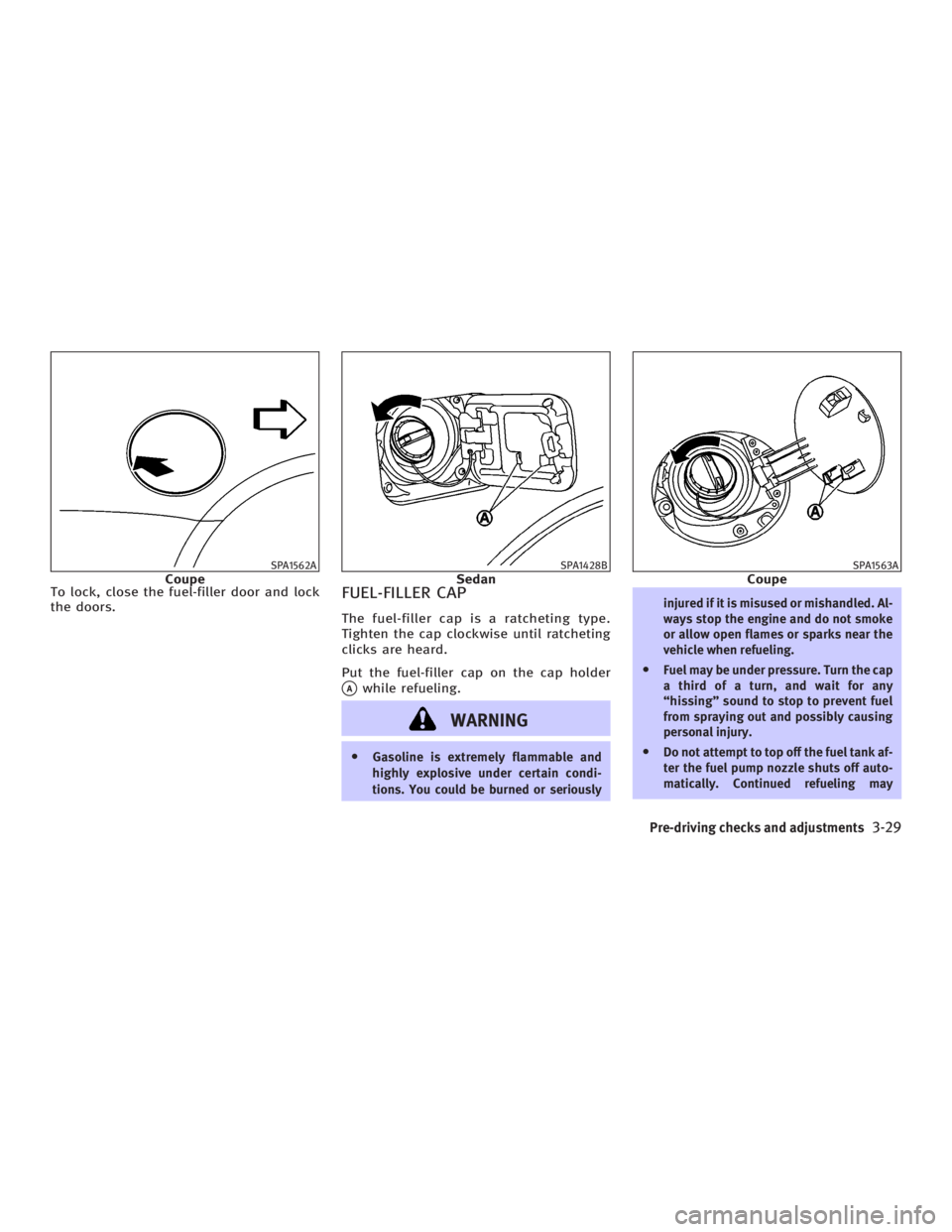
To lock, close the fuel-filler door and lock
the doors.
FUEL-FILLER CAP The fuel-filler cap is a ratcheting type.
Tighten the cap clockwise until ratcheting
clicks are heard.
Put the fuel-filler cap on the cap holder
q A
while refueling.
WARNING O Gasoline is extremely flammable and
highly explosive under certain condi-
tions. You could be burned or seriously injured if it is misused or mishandled. Al-
ways stop the engine and do not smoke
or allow open flames or sparks near the
vehicle when refueling.
O Fuel may be under pressure. Turn the cap
a third of a turn, and wait for any
ªhissingº sound to stop to prevent fuel
from spraying out and possibly causing
personal injury.
O Do not attempt to top off the fuel tank af-
ter the fuel pump nozzle shuts off auto-
matically. Continued refueling maySPA1562A
Coupe SPA1428B
Sedan SPA1563A
Coupe
Pre-driving checks and adjustments
3-29
w 06.1.4/V35-D/V5.0
X
Page 168 of 344

Clock settings The following display will appear when
pushing the ªSETTINGº button, selecting
the ª Clock º key and pushing the ªENTERº
button.
On-screen Clock:
When this item is turned to ON, a clock is
always displayed in the upper right corner
of the screen.
This clock will indicate the time almost
exactly because it is always adjusted by
the GPS system. Clock Format:
Choose either the 12-hour clock display or
the 24-hour clock display.
Offset Adjust:
Adjust the time by increasing or de-
creasing per minute.
Daylight Saving Time:
Turn this item to ON for daylight saving
time application.
Time Zone:
Choose the time zone from the following
O Pacific
O Mountain
O Central
O Eastern
O Atlantic
O Newfoundland
Language/Units settings The Language/Units setting screen will
appear when selecting the ª Language/
Units º key and pushing the ªENTERº
button.SAA1091 SAA1295
4-8 Display screen, heater, air conditioner and audio systems
w 06.1.4/V35-D/V5.0
X
Page 175 of 344
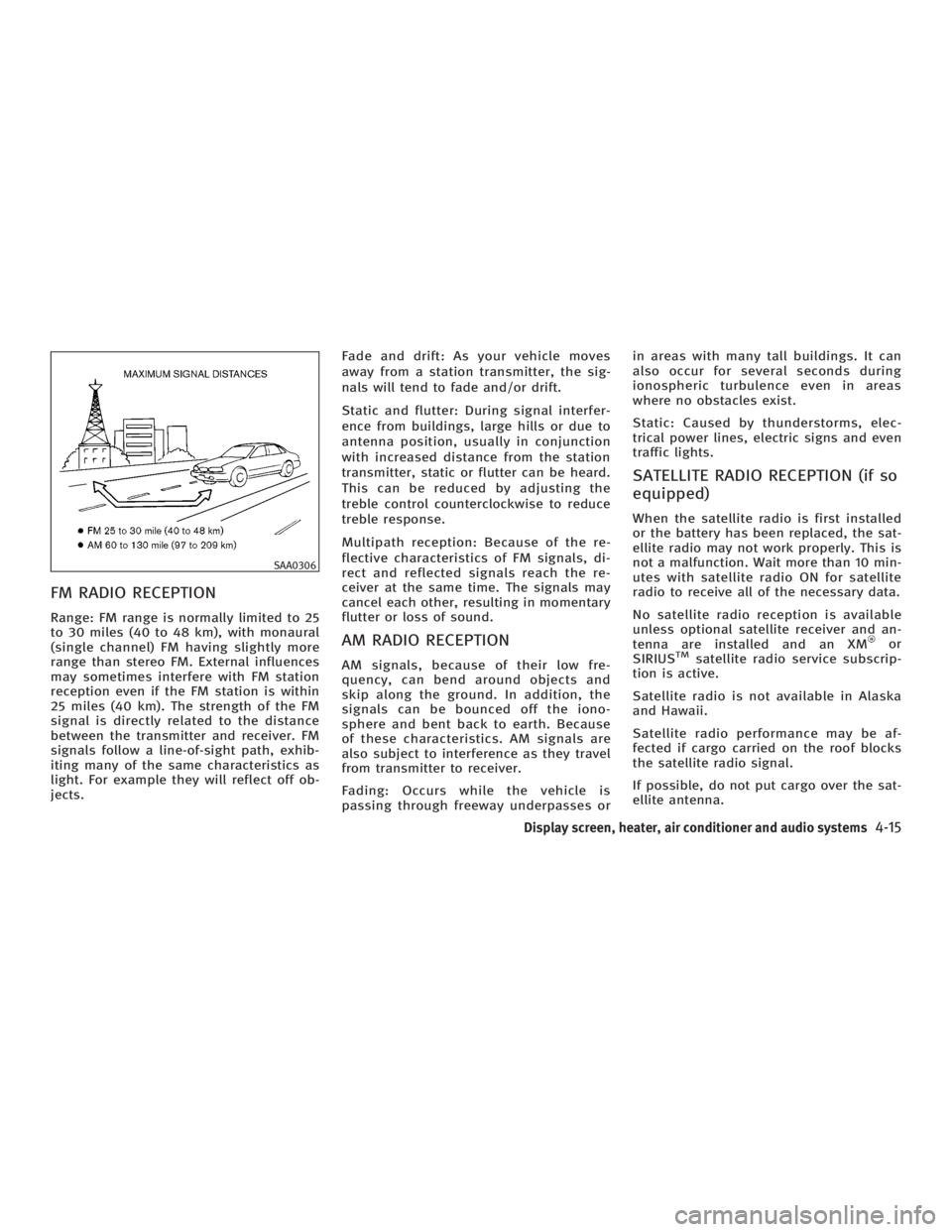
FM RADIO RECEPTION Range: FM range is normally limited to 25
to 30 miles (40 to 48 km), with monaural
(single channel) FM having slightly more
range than stereo FM. External influences
may sometimes interfere with FM station
reception even if the FM station is within
25 miles (40 km). The strength of the FM
signal is directly related to the distance
between the transmitter and receiver. FM
signals follow a line-of-sight path, exhib-
iting many of the same characteristics as
light. For example they will reflect off ob-
jects. Fade and drift: As your vehicle moves
away from a station transmitter, the sig-
nals will tend to fade and/or drift.
Static and flutter: During signal interfer-
ence from buildings, large hills or due to
antenna position, usually in conjunction
with increased distance from the station
transmitter, static or flutter can be heard.
This can be reduced by adjusting the
treble control counterclockwise to reduce
treble response.
Multipath reception: Because of the re-
flective characteristics of FM signals, di-
rect and reflected signals reach the re-
ceiver at the same time. The signals may
cancel each other, resulting in momentary
flutter or loss of sound.
AM RADIO RECEPTION AM signals, because of their low fre-
quency, can bend around objects and
skip along the ground. In addition, the
signals can be bounced off the iono-
sphere and bent back to earth. Because
of these characteristics. AM signals are
also subject to interference as they travel
from transmitter to receiver.
Fading: Occurs while the vehicle is
passing through freeway underpasses or in areas with many tall buildings. It can
also occur for several seconds during
ionospheric turbulence even in areas
where no obstacles exist.
Static: Caused by thunderstorms, elec-
trical power lines, electric signs and even
traffic lights.
SATELLITE RADIO RECEPTION (if so
equipped) When the satellite radio is first installed
or the battery has been replaced, the sat-
ellite radio may not work properly. This is
not a malfunction. Wait more than 10 min-
utes with satellite radio ON for satellite
radio to receive all of the necessary data.
No satellite radio reception is available
unless optional satellite receiver and an-
tenna are installed and an XM or
SIRIUS TM
satellite radio service subscrip-
tion is active.
Satellite radio is not available in Alaska
and Hawaii.
Satellite radio performance may be af-
fected if cargo carried on the roof blocks
the satellite radio signal.
If possible, do not put cargo over the sat-
ellite antenna.SAA0306
Display screen, heater, air conditioner and audio systems
4-15
w 06.1.4/V35-D/V5.0
X
Page 211 of 344
When the key cannot be turned toward
the LOCK position, proceed as follows to
remove the key:
1. Move the selector lever into the P po-
sition.
2. Turn the ignition key slightly toward
the ON direction.
3. Turn the key to the LOCK position.
4. Remove the key.
If the key is removed from the ignition
switch, the selector lever cannot be
moved from the P position. The selector
lever can be moved if the ignition switch is
in the ON position and the foot brake pedal
is depressed.
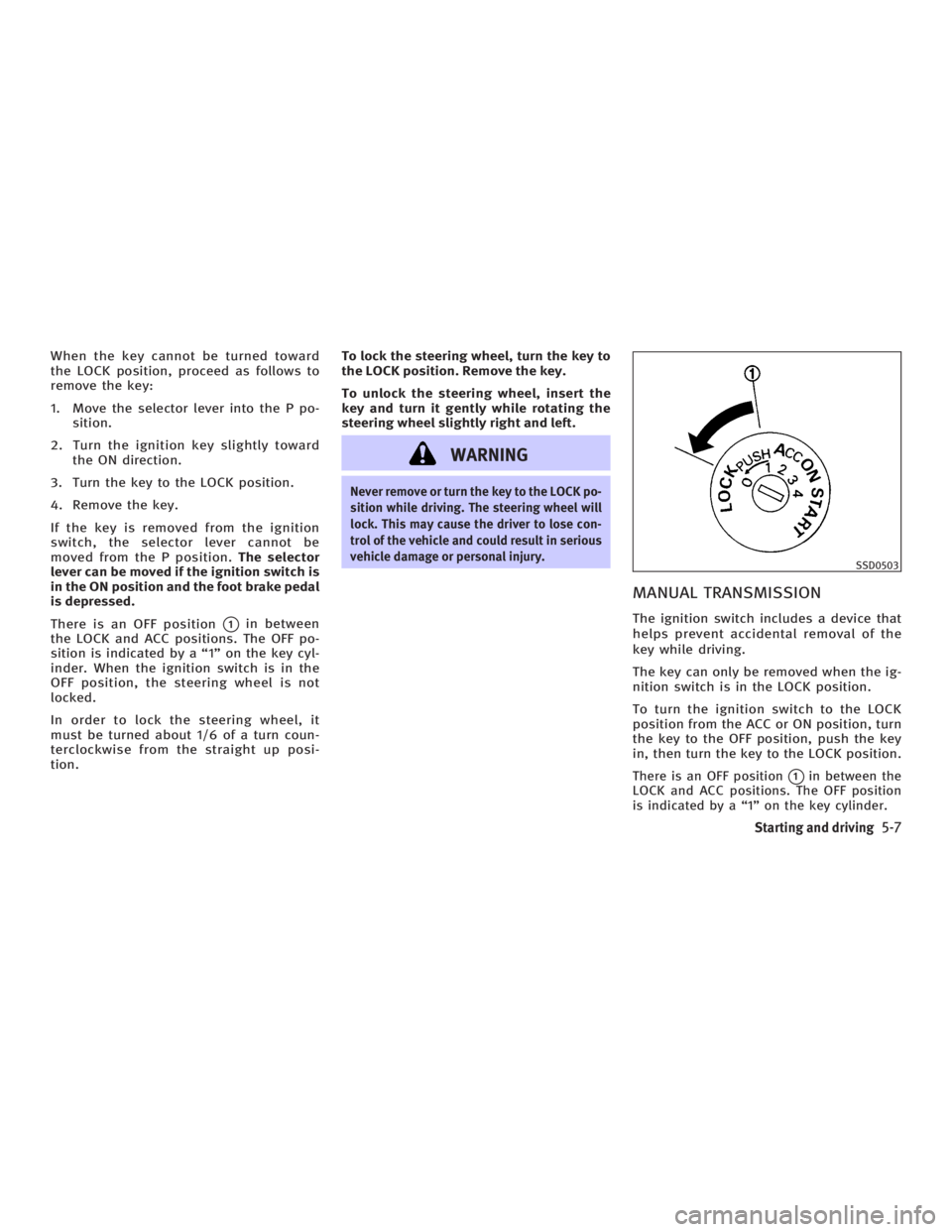
There is an OFF position
q 1
in between
the LOCK and ACC positions. The OFF po-
sition is indicated by a ª1º on the key cyl-
inder. When the ignition switch is in the
OFF position, the steering wheel is not
locked.
In order to lock the steering wheel, it
must be turned about 1/6 of a turn coun-
terclockwise from the straight up posi-
tion. To lock the steering wheel, turn the key to
the LOCK position. Remove the key.
To unlock the steering wheel, insert the
key and turn it gently while rotating the
steering wheel slightly right and left.
WARNING Never remove or turn the key to the LOCK po-
sition while driving. The steering wheel will
lock. This may cause the driver to lose con-
trol of the vehicle and could result in serious
vehicle damage or personal injury.
MANUAL TRANSMISSION The ignition switch includes a device that
helps prevent accidental removal of the
key while driving.
The key can only be removed when the ig-
nition switch is in the LOCK position.
To turn the ignition switch to the LOCK
position from the ACC or ON position, turn
the key to the OFF position, push the key
in, then turn the key to the LOCK position.
There is an OFF position
q 1
in between the
LOCK and ACC positions. The OFF position
is indicated by a ª1º on the key cylinder. SSD0503
Starting and driving
5-7
w 06.1.4/V35-D/V5.0
X
Page 212 of 344
In order for the steering wheel to be
locked, it must be turned about 1/6 of a
turn clockwise from the straight up posi-
tion.
To lock the steering wheel, turn the key to
the LOCK position. Remove the key.
To unlock the steering wheel, insert the
key and turn it gently while rotating the
steering wheel slightly right and left.
WARNINGNever remove or turn the key to the LOCK po-
sition while driving. The steering wheel will
lock. This may cause the driver to lose con-
trol of the vehicle and could result in serious
vehicle damage and/or personal injury.
KEY POSITIONS The ignition switch includes an anti-theft
steering lock device.
LOCK (Normal parking position) (0)
The ignition key can only be removed
when the ignition switch is in this posi-
tion. OFF (1)
The engine can be turned off without
locking the steering wheel.
The ignition lock is designed so that the
key cannot be turned to the LOCK position
and removed until the selector lever is
moved to the P position (for automatic
transmission) or the key is pushed in
while turning the key between the ACC
and LOCK positions.
ACC (Accessories) (2)
This position activates electrical accesso-
ries when the engine is not running.
ON (Normal operating position) (3)
This position activates ignition system in
addition to electrical accessories.
START (4)
This position activates the starter motor,
starting the engine.
INFINITI VEHICLE IMMOBILIZER
SYSTEM The INFINITI Vehicle Immobilizer System
will not allow the engine to start without
the use of the registered key. If the engine fails to start using a regis-
tered key (for example, when interference
is caused by another registered key, an
automated toll road device or automated
payment device on the key ring), restart
the engine using the following proce-
dures:
1. Leave the ignition switch in the ON po-
sition for approximately 5 seconds.
2. Turn the ignition switch to the OFF or
LOCK position and wait approximately
10 seconds.
3. Repeat steps 1 and 2.
4. Restart the engine while holding the
device (which may have caused the in-
terference) away from the registered
key.
If this procedure allows the engine to
start, INFINITI recommends placing the
registered key on a separate key ring to
avoid interference from other devices.
5-8 Starting and driving
w 06.1.4/V35-D/V5.0
X