trunk INFINITI G35 2006 Owners Manual
[x] Cancel search | Manufacturer: INFINITI, Model Year: 2006, Model line: G35, Model: INFINITI G35 2006Pages: 344, PDF Size: 6.81 MB
Page 9 of 344
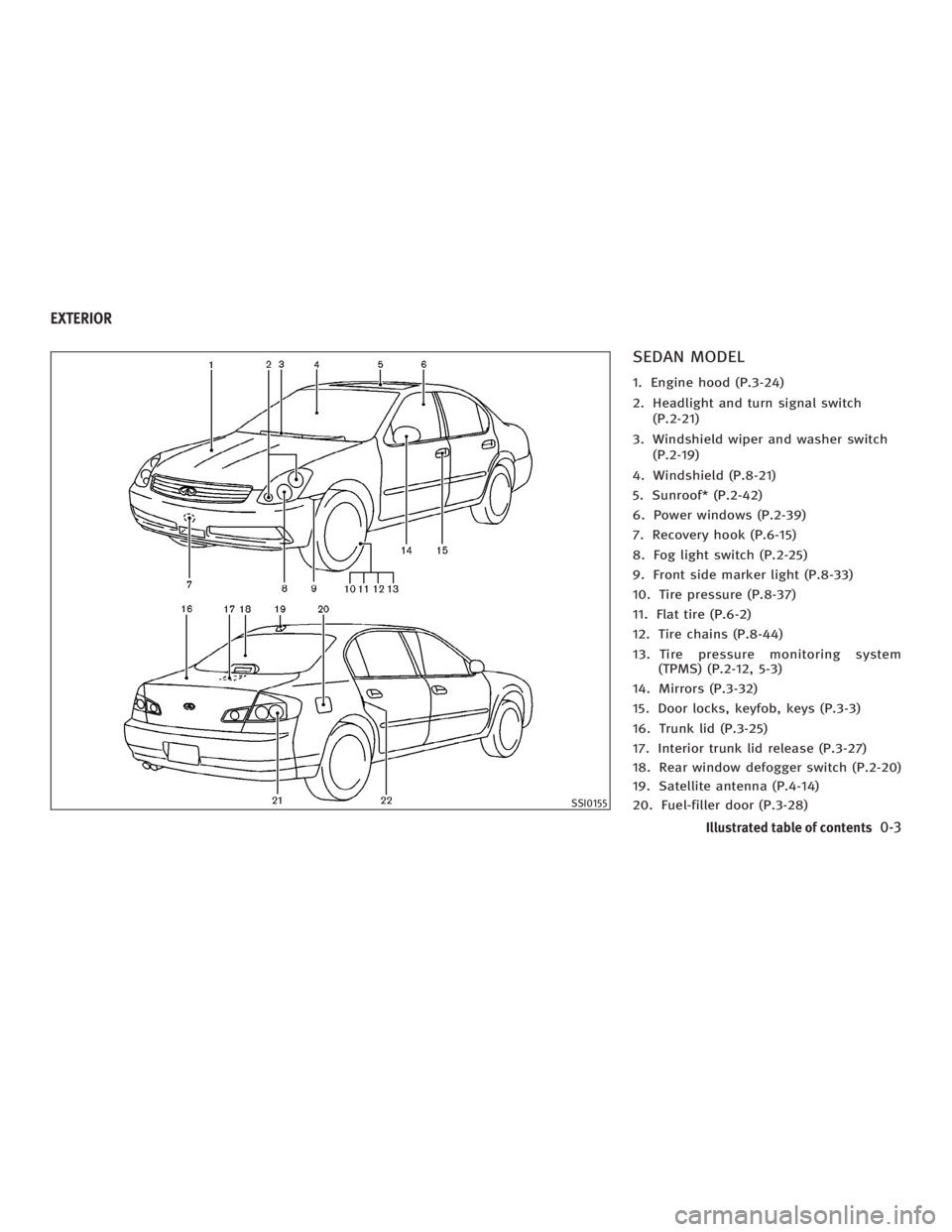
SEDAN MODEL 1. Engine hood (P.3-24)
2. Headlight and turn signal switch
(P.2-21)
3. Windshield wiper and washer switch
(P.2-19)
4. Windshield (P.8-21)
5. Sunroof* (P.2-42)
6. Power windows (P.2-39)
7. Recovery hook (P.6-15)
8. Fog light switch (P.2-25)
9. Front side marker light (P.8-33)
10. Tire pressure (P.8-37)
11. Flat tire (P.6-2)
12. Tire chains (P.8-44)
13. Tire pressure monitoring system
(TPMS) (P.2-12, 5-3)
14. Mirrors (P.3-32)
15. Door locks, keyfob, keys (P.3-3)
16. Trunk lid (P.3-25)
17. Interior trunk lid release (P.3-27)
18. Rear window defogger switch (P.2-20)
19. Satellite antenna (P.4-14)
20. Fuel-filler door (P.3-28) SSI0155EXTERIOR
Illustrated table of contents
0-3
w 06.1.4/V35-D/V5.0
X
Page 11 of 344
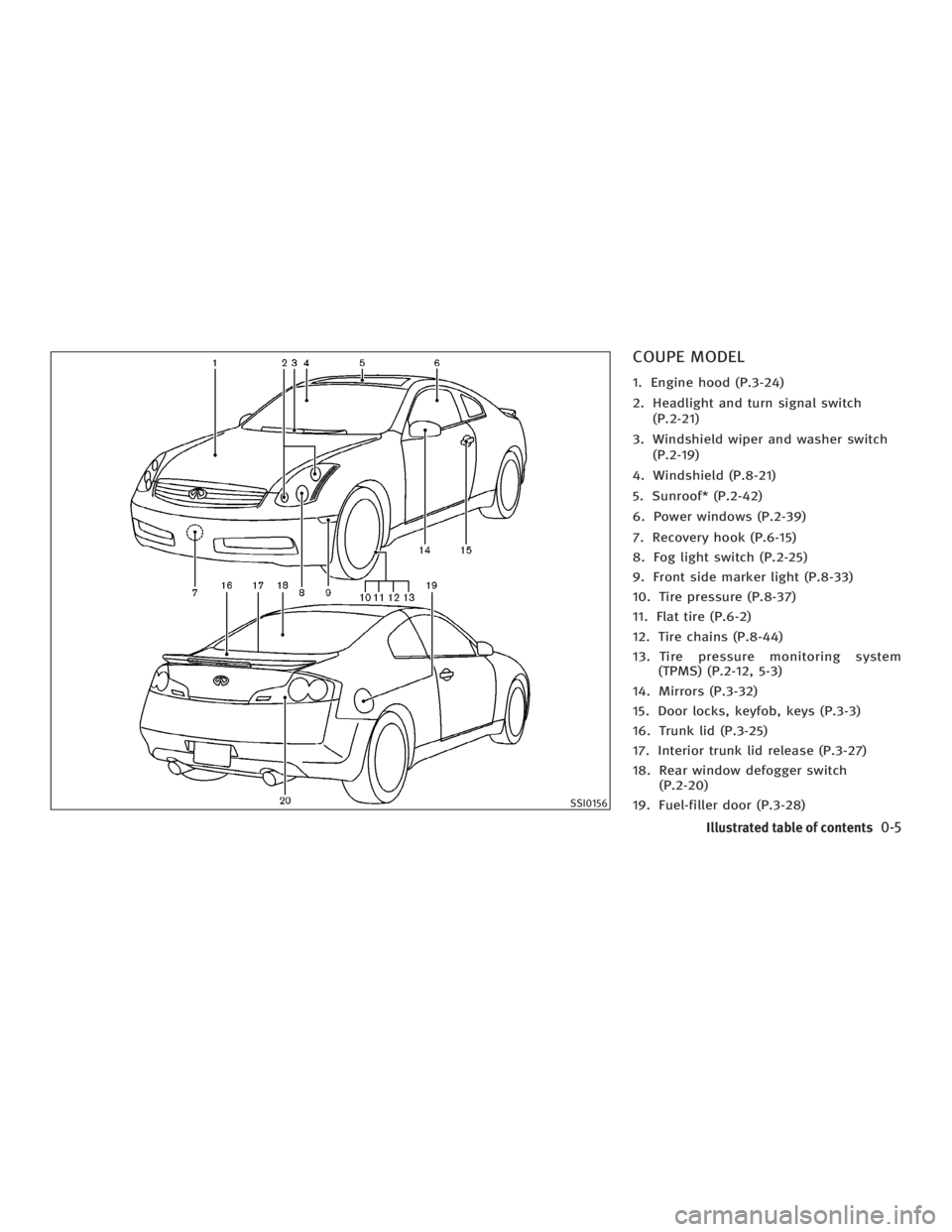
COUPE MODEL 1. Engine hood (P.3-24)
2. Headlight and turn signal switch
(P.2-21)
3. Windshield wiper and washer switch
(P.2-19)
4. Windshield (P.8-21)
5. Sunroof* (P.2-42)
6. Power windows (P.2-39)
7. Recovery hook (P.6-15)
8. Fog light switch (P.2-25)
9. Front side marker light (P.8-33)
10. Tire pressure (P.8-37)
11. Flat tire (P.6-2)
12. Tire chains (P.8-44)
13. Tire pressure monitoring system
(TPMS) (P.2-12, 5-3)
14. Mirrors (P.3-32)
15. Door locks, keyfob, keys (P.3-3)
16. Trunk lid (P.3-25)
17. Interior trunk lid release (P.3-27)
18. Rear window defogger switch
(P.2-20)
19. Fuel-filler door (P.3-28) SSI0156
Illustrated table of contents
0-5
w 06.1.4/V35-D/V5.0
X
Page 15 of 344

1. Headlight, fog light and turn signal
switch (P.2-21)
2. Security indicator light (P.2-19)
3. Steering wheel switch for audio control
(P.4-28) or steering wheel switch for
Bluetooth Hands-Free Phone System
(if so equipped) (P.4-30) 4. Driver's supplemental front air bag
(P.1-36)/Horn (P.2-26)
5. Meters/gauges (P.2-3)
6. Cruise control main/set switch (P.5-20)
7. Windshield wiper/washer switch
(P.2-19)
8. Center ventilator (P.4-9) 9. Center display - Compass, Air condi-
tioner, Ambient temperature, Front
passenger air bag status light (P.1-44)
10. Rear window and outside mirror de-
fogger switch (P.2-20)
11. Heater/air conditioner control (P.4-10)
12. Clock (P.2-29)
13. Navigation system* (if so equipped)
(P.4-2)
14. Passenger's supplemental front air
bag (P.1-36)
15. Upper glove box (except for Naviga-
tion system equipped models)
(P.2-35)
16. Side ventilator (P.4-9)
17. Hood lock release handle (P.3-24)
18. Trunk lid release switch (P.3-25)
19. Vehicle Dynamic Control (VDC) off
switch (P.2-28)
20. Instrument brightness control
(P.2-24)
21. Outside mirror remote control switch
(P.3-33)
22. Fuse box (P.8-27)
23. Electric steering column control (if so
equipped) (P.3-31)
24. Manual steering column control
(P.3-30)
25. Ignition switch/steering lock (P.5-6)
26. SNOW mode switch (if so equipped)
(P.2-27)
27. Audio system (P.4-14)
28. Ashtray/Cigarette lighter (P.2-30)
29. Heated seat switch (P.2-26) SSI0159INSTRUMENT PANEL
Illustrated table of contents
0-9
w 06.1.4/V35-D/V5.0
X
Page 24 of 344
The seatback may also be reclined to
allow occupants to rest when the vehicle
is parked.
WARNINGO Do not ride in a moving vehicle when the
seatback is reclined. This can be danger-
ous. The shoulder belt will not be
against your body. In an accident, you
could be thrown into it and receive neck
or other serious injuries. You could also
slide under the lap belt and receive se-
rious internal injuries.
O For the most effective protection when
the vehicle is in motion, the seat should
be upright. Always sit well back in the
seat and adjust the seat belt properly.
See ªPrecautions on seat belt usageº
later in this section.
O After adjustment, gently rock in the seat
to make sure it is securely locked.
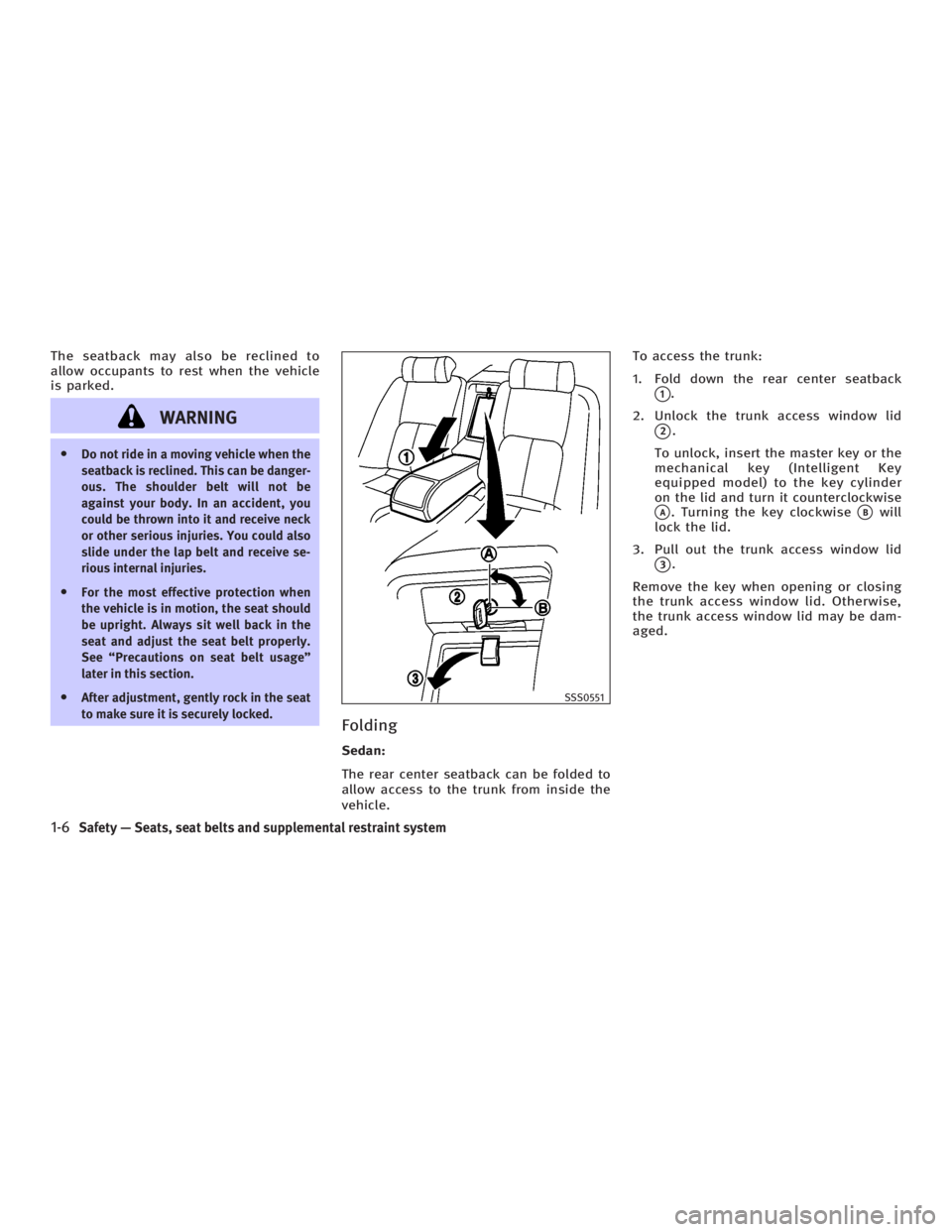
Folding Sedan:
The rear center seatback can be folded to
allow access to the trunk from inside the
vehicle. To access the trunk:
1. Fold down the rear center seatback
q 1
.
2. Unlock the trunk access window lid
q 2
.
To unlock, insert the master key or the
mechanical key (Intelligent Key
equipped model) to the key cylinder
on the lid and turn it counterclockwise
q A
. Turning the key clockwise
q B
will
lock the lid.
3. Pull out the trunk access window lid
q 3
.
Remove the key when opening or closing
the trunk access window lid. Otherwise,
the trunk access window lid may be dam-
aged. SSS0551
1-6 Safety Ð Seats, seat belts and supplemental restraint system
w 06.1.4/V35-D/V5.0
X
Page 25 of 344
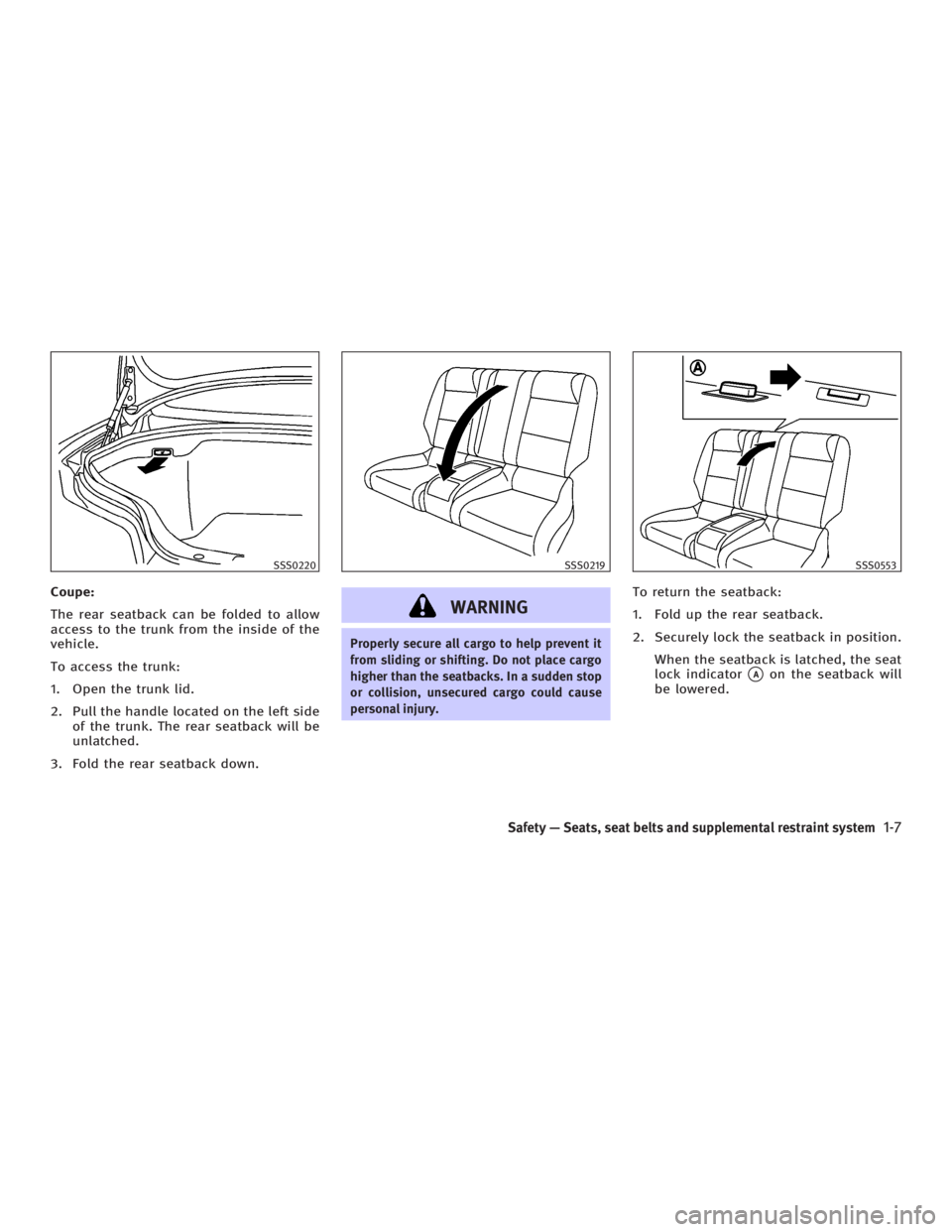
Coupe:
The rear seatback can be folded to allow
access to the trunk from the inside of the
vehicle.
To access the trunk:
1. Open the trunk lid.
2. Pull the handle located on the left side
of the trunk. The rear seatback will be
unlatched.
3. Fold the rear seatback down.
WARNING Properly secure all cargo to help prevent it
from sliding or shifting. Do not place cargo
higher than the seatbacks. In a sudden stop
or collision, unsecured cargo could cause
personal injury. To return the seatback:
1. Fold up the rear seatback.
2. Securely lock the seatback in position.
When the seatback is latched, the seat
lock indicator
q A
on the seatback will
be lowered.SSS0220 SSS0219 SSS0553
Safety Ð Seats, seat belts and supplemental restraint system
1-7
w 06.1.4/V35-D/V5.0
X
Page 73 of 344
Stowing golf bags (Coupe) ........................ 2-39
Windows......................................................... 2-39
Power windows ......................................... 2-39
Automatic adjusting function (Coupe) ........ 2-41
Sunroof (if so equipped) ................................. 2-42
Automatic sunroof ..................................... 2-42
Interior lights ................................................. 2-44
Room light ................................................ 2-44
Map lights................................................. 2-44
Personal lights ......................................... 2-45
Vanity mirror light (if so equipped)................. 2-46
Trunk light...................................................... 2-46 HomeLink
Universal Transceiver (if so
equipped) ....................................................... 2-46
Programming HomeLink
........................... 2-47
Programming HomeLink
for Canadian
customers ................................................. 2-48
Operating the HomeLink
Universal
Transceiver ................................................ 2-49
Programming trouble-diagnosis ................. 2-49
Clearing the programmed information ....... 2-49
Reprogramming a single HomeLink
button ....................................................... 2-49
If your vehicle is stolen ............................. 2-50
w 06.1.5/V35-D/V5.0
X
Page 74 of 344

1. Headlight, fog light and turn signal
switch
2. Security indicator light
3. Steering wheel switch for audio control
or steering wheel switch for Bluetooth Hands-Free Phone System
(if so equipped)
4. Driver supplemental air bag/Horn
5. Meters/gauges
6. Cruise control main/set switch
7. Windshield wiper/washer switch 8. Center ventilator
9. Center display - Compass, Air condi-
tioner, Ambient temperature, Front
passenger air bag status light
10. Rear window and outside mirror de-
fogger switch
11. Heater/air conditioner control
12. Clock
13. Navigation system* (if so equipped)
14. Passenger supplemental air bag
15. Upper glove box (except for Naviga-
tion system equipped models)
16. Side ventilator
17. Hood lock release handle
18. Trunk lid release switch
19. Vehicle Dynamic Control (VDC) off
switch
20. Instrument brightness control
21. Outside mirror remote control switch
22. Fuse box
23. Electric steering column control (if so
equipped)
24. Manual steering column control
25. Ignition switch/steering lock
26. Snow mode switch (if so equipped)
27. Audio system
28. Ashtray/Cigarette lighter
29. Heated seat switch
30. Hazard warning flasher switch
31. Glove box
*: Refer to the separate Navigation System
Owner's Manual. SSI0159INSTRUMENT PANEL
2-2 Instruments and controls
w 06.1.4/V35-D/V5.0
X
Page 89 of 344
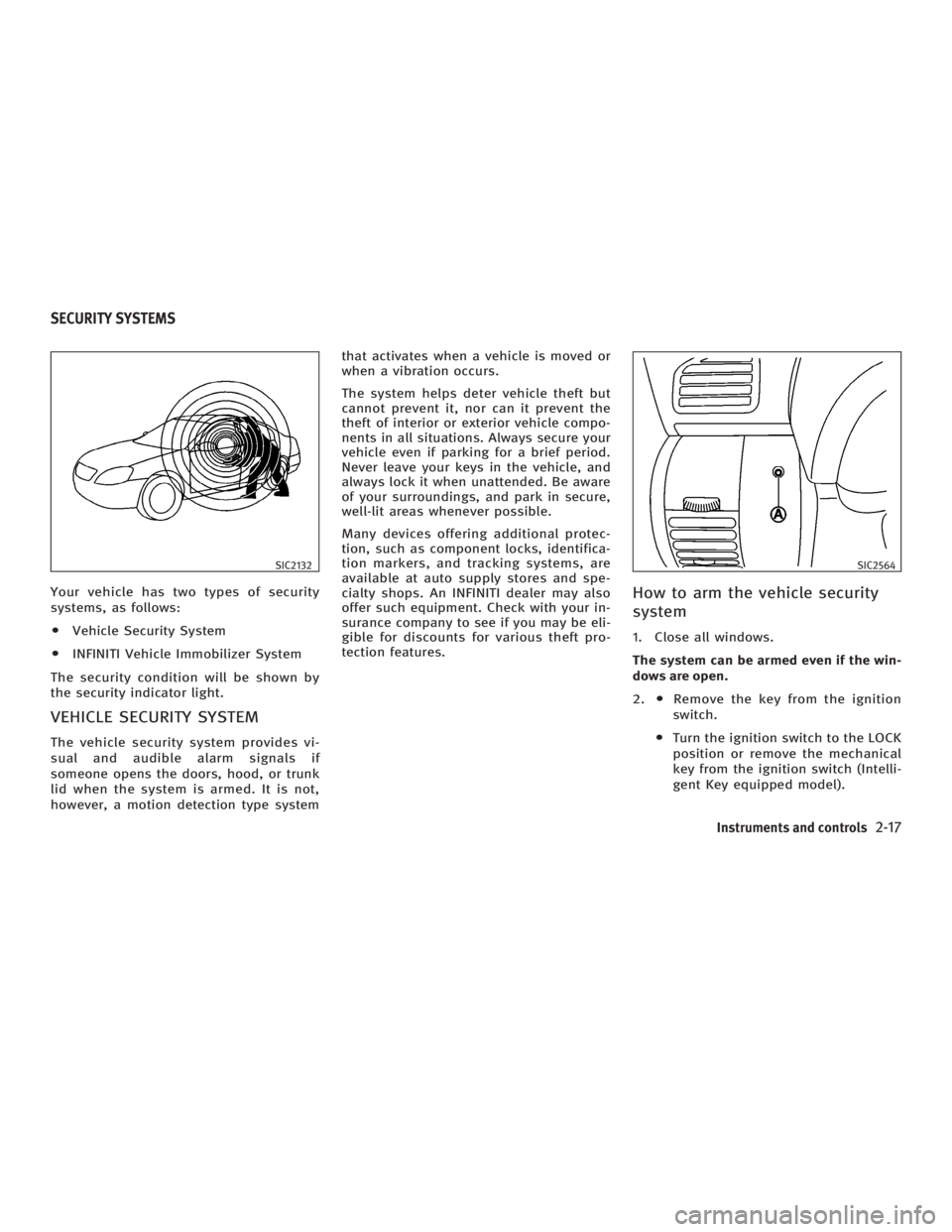
Your vehicle has two types of security
systems, as follows:
O Vehicle Security System
O INFINITI Vehicle Immobilizer System
The security condition will be shown by
the security indicator light.
VEHICLE SECURITY SYSTEM The vehicle security system provides vi-
sual and audible alarm signals if
someone opens the doors, hood, or trunk
lid when the system is armed. It is not,
however, a motion detection type system that activates when a vehicle is moved or
when a vibration occurs.
The system helps deter vehicle theft but
cannot prevent it, nor can it prevent the
theft of interior or exterior vehicle compo-
nents in all situations. Always secure your
vehicle even if parking for a brief period.
Never leave your keys in the vehicle, and
always lock it when unattended. Be aware
of your surroundings, and park in secure,
well-lit areas whenever possible.
Many devices offering additional protec-
tion, such as component locks, identifica-
tion markers, and tracking systems, are
available at auto supply stores and spe-
cialty shops. An INFINITI dealer may also
offer such equipment. Check with your in-
surance company to see if you may be eli-
gible for discounts for various theft pro-
tection features.
How to arm the vehicle security
system 1. Close all windows.
The system can be armed even if the win-
dows are open.
2. O Remove the key from the ignition
switch.
O Turn the ignition switch to the LOCK
position or remove the mechanical
key from the ignition switch (Intelli-
gent Key equipped model).SIC2132 SIC2564
SECURITY SYSTEMS
Instruments and controls
2-17
w 06.1.4/V35-D/V5.0
X
Page 90 of 344

3. Close and lock all doors, hood and
trunk lid.
Lock all doors by pushing the LOCK
button on the keyfob, the Intelli-
gent Key or by pushing any front door
handle request switch or turning the
door key. When using the remote key-
less entry, the hazard indicators will
operate as shown in ªRemote keyless
entry systemº or ªIntelligent Key
systemº in the ª3. Pre-driving checks
and adjustmentsº section.
4. Confirm that the security indicator
light
q A
comes on. The security indica-
tor light glows for about 30 seconds
and then blinks. The system is now
armed. If, during this 30-second time
period, the door is unlocked by the
key, the remote keyless entry or the
front door request switch, or the igni-
tion switch is turned to the ACC or ON
position, the system will not be
armed.
Even when the driver and/or passengers
are in the vehicle, the system will be
armed with all doors, hood and trunk lid
locked and ignition switch off. Turn the ig-
nition switch to the ACC position to turn off
the system. Vehicle security system activation The security system will give the following
alarm:
O The headlights blink and the horn
sounds intermittently.
O The alarm automatically turns off after
approximately 50 seconds. However,
the alarm reactivates if the vehicle is
tampered with again. The alarm can
be shut off by unlocking a door with
the key, by pushing any front door
handle request switch or by pushing
the UNLOCK button on the keyfob
or Intelligent Key.
The alarm is activated by:
O Opening the door without using the
key or keyfob or Intelligent Key.
O Opening the trunk lid without using
the keyfob or Intelligent Key.
O Opening the hood.
How to stop an activated alarm The alarm will stop only by unlocking a
door with the key, by pushing any door
handle request switch or by pushing the
UNLOCK button on keyfob or Intelli-
gent Key. The alarm will not stop if the ig- nition switch is turned to the ACC or ON
position.
If the system does not operate as de-
scribed above, have it checked by an
INFINITI dealer.
INFINITI VEHICLE IMMOBILIZER
SYSTEM The INFINITI Vehicle Immobilizer System
will not allow the engine to start without
the use of the registered key.
If the engine fails to start using the regis-
tered key (for example, when interference
is caused by another registered key, an
automated toll road device or automated
payment device on the key ring), restart
the engine using the following proce-
dures:
1. Leave the ignition switch in the ON po-
sition for approximately 5 seconds.
2. Turn the ignition switch to the OFF or
LOCK position and wait approximately
10 seconds.
3. Repeat steps 1 and 2.
4. Restart the engine while holding the
device (which may have caused the in-
2-18 Instruments and controls
w 06.1.4/V35-D/V5.0
X
Page 111 of 344
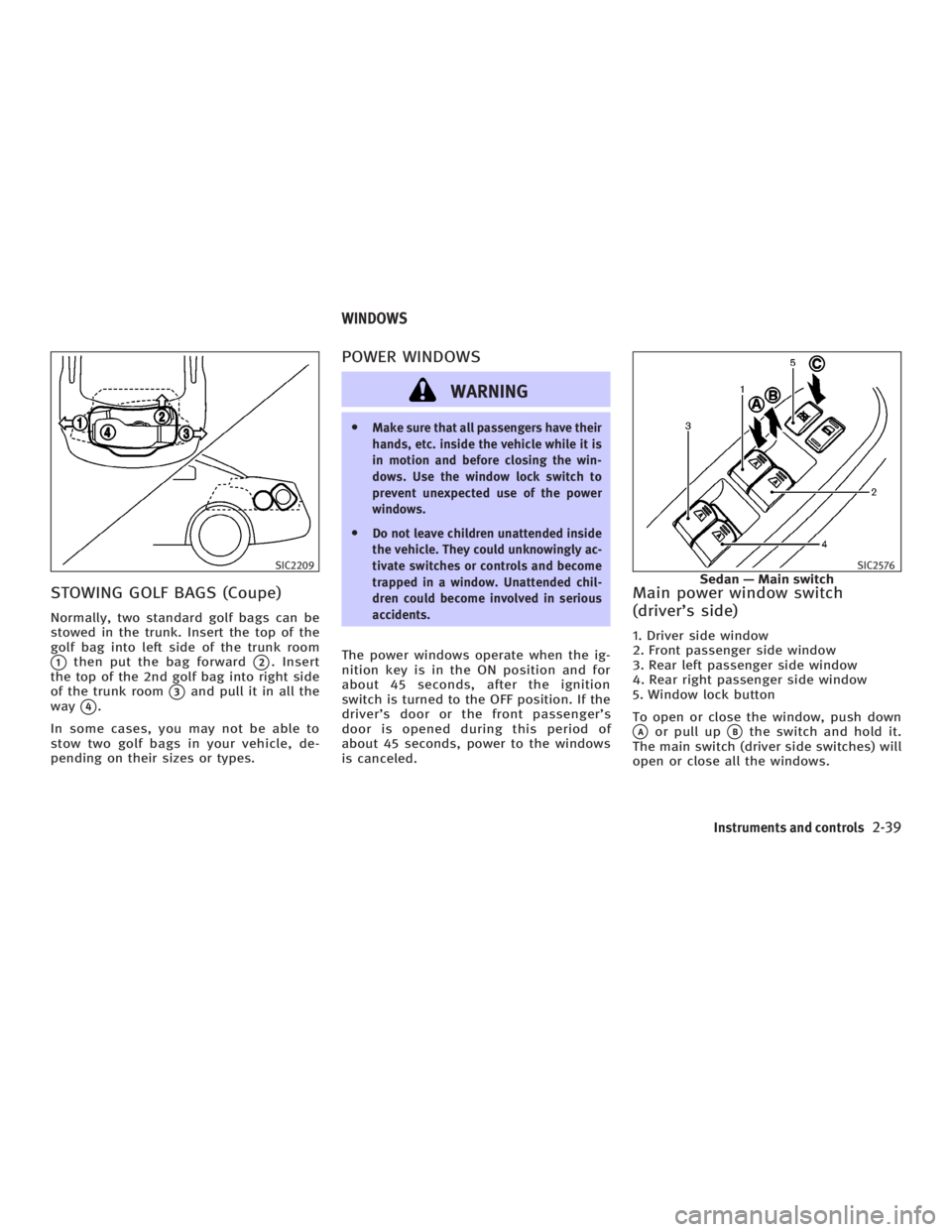
STOWING GOLF BAGS (Coupe) Normally, two standard golf bags can be
stowed in the trunk. Insert the top of the
golf bag into left side of the trunk room
q 1
then put the bag forward
q 2
. Insert
the top of the 2nd golf bag into right side
of the trunk room
q 3
and pull it in all the
way
q 4
.
In some cases, you may not be able to
stow two golf bags in your vehicle, de-
pending on their sizes or types. POWER WINDOWS
WARNING O Make sure that all passengers have their
hands, etc. inside the vehicle while it is
in motion and before closing the win-
dows. Use the window lock switch to
prevent unexpected use of the power
windows.
O Do not leave children unattended inside
the vehicle. They could unknowingly ac-
tivate switches or controls and become
trapped in a window. Unattended chil-
dren could become involved in serious
accidents.
The power windows operate when the ig-
nition key is in the ON position and for
about 45 seconds, after the ignition
switch is turned to the OFF position. If the
driver's door or the front passenger's
door is opened during this period of
about 45 seconds, power to the windows
is canceled. Main power window switch
(driver's side) 1. Driver side window
2. Front passenger side window
3. Rear left passenger side window
4. Rear right passenger side window
5. Window lock button
To open or close the window, push down
q A
or pull up
q B
the switch and hold it.
The main switch (driver side switches) will
open or close all the windows.SIC2209 SIC2576
Sedan Ð Main switchWINDOWS
Instruments and controls
2-39
w 06.1.4/V35-D/V5.0
X