trailer INFINITI JX 2013 User Guide
[x] Cancel search | Manufacturer: INFINITI, Model Year: 2013, Model line: JX, Model: INFINITI JX 2013Pages: 554, PDF Size: 5.48 MB
Page 429 of 554
– When excessively heavy baggage isloaded in the rear seat or the luggage
room of your vehicle.
– When abruptly accelerating or decelerating.
– On a steep downhill slope or on roads with sharp curves.
– When there is a highly reflective ob- ject near the vehicle ahead (for ex-
ample, being very close to another
vehicle, signboard, etc.)
– When you are towing a trailer.
● Depending on certain road conditions
(curved or beginning of a curve) , vehicle
conditions (steering position or vehicle
position) , or the preceding vehicle’s
conditions (position in lane, etc.) , the
system may not function properly. The
system may detect highly reflective ob-
jects such as signs and other stationary
objects on the road or near the traveling
lane and provide unnecessary warning.
● The system may not function in offset
conditions.
● The system may not function when the
distance to the vehicle ahead is ex-
tremely close. ●
The system is designed to automati-
cally check the sensor’s functionality. If
the sensor area of the front bumper is
covered with ice, a transparent or trans-
lucent bag, etc., the system may not
detect them. In these instances, the sys-
tem may not be able to warn the driver
properly. Be sure to check and clean the
sensor area of the front bumper
regularly.
● Excessive noise will interfere with the
warning chime sound, and the chime
may not be heard.
● A sudden appearance of a vehicle in
front (for example, it abruptly cuts in)
may not be detected and the system
may not warn the driver soon enough.
● The system will be cancelled automati-
cally with a beep sound and a message
will pop up under the following
conditions:
– When the sensor area of the front bumper is dirty
– When the system malfunctions If the system cancels and a message pops up
with a beep sound, pull off the road to a safe
location, stop the vehicle and turn the engine off.
Check to see if the sensor area of the front
bumper is blocked. If the sensor area of the front
bumper is blocked, remove the object blocking
and restart the engine.
If the sensor is malfunctioning, have the system
checked by an INFINITI retailer.
5-80Starting and driving
Page 432 of 554
PRECAUTIONS ON IBA SYSTEM
WARNING
●The IBA system is not a collision avoid-
ance system. It is the driver’s responsi-
bility to stay alert, drive safely and be in
control of the vehicle at all times.
● As there is a performance limit, the sys-
tem may not provide a warning or brak-
ing in certain conditions.
● The system will not detect the following
objects:
– Pedestrians, animals or obstacles in the roadway
– Oncoming vehicles in the same lane
● The sensor generally detects the sig-
nals returned from the vehicle ahead.
Therefore, the system may not function
properly under the following
conditions:
– When the sensor area of the front bumper gets dirty and it is impos-
sible to detect the distance from the
vehicle ahead.
– When radar signal is temporarily interrupted. – When visibility is low (such as rain,
fog, snow, etc.) .
– When snow or road spray from trav- eling vehicles is splashed.
– When excessively heavy baggage is loaded in the rear seat or the luggage
room of your vehicle.
– When abruptly accelerating or decelerating.
– On a steep downhill slope or on roads with sharp curves.
– When there is a highly reflective ob- ject near the vehicle ahead (for ex-
ample, being very close to another
vehicle, signboard, etc.)
– When you are towing a trailer.
● Depending on certain road conditions
(curved or beginning of a curve) , vehicle
conditions (steering position or vehicle
position) , or the preceding vehicle’s
conditions (position in lane, etc.) , the
system may not function properly. The
system may detect highly reflective ob-
jects such as signs and other stationary
objects on the road or near the traveling
lane and provide unnecessary warning. ●
The system may not function in offset
conditions.
● The system may not function when the
distance to the vehicle ahead is ex-
tremely close.
WARNING
●In extreme conditions, detection of
these objects may cause the system to
function.
● The system is designed to automati-
cally check the sensor’s functionality. If
the sensor area of the front bumper is
covered with ice, a transparent or trans-
lucent bag, etc., the system may not
detect them. In these instances the sys-
tem may not be able to warn the driver
properly. Be sure to check and clean the
sensor area of the front bumper
regularly.
● Excessive noise will interfere with the
warning chime sound, and the chime
may not be heard.
● A sudden appearance of a vehicle in
front (for example, it abruptly cuts in)
may not be detected and the system
may not warn the driver soon enough.
Starting and driving5-83
Page 433 of 554
●The system will be cancelled automati-
cally with a beep sound and the IBA
warning light will illuminate under the
following conditions:
– When the sensor area of the front bumper is dirty
– When the system malfunctions
If the IBA OFF indicator light illuminates with a
beep sound, pull off the road to a safe location,
stop the vehicle and turn the engine off. Check to
see if the sensor area of the front bumper is dirty.
If the sensor area of the front bumper is dirty,
clean it with a soft cloth and restart the engine. If
the sensor window is not dirty, restart the engine.
If the IBA OFF indicator light continues to illumi-
nate even if the IBA system is turned on, have the
system checked by an INFINITI retailer.
IBA SYSTEM OPERATION
The IBA system will function when your vehicle is
driven at speeds of approximately 10 MPH
(15 km/h) or above, and when the vehicle’s
speed is approximately 10 MPH (15 km/h) faster
than that of the vehicle ahead.
To turn the system on/off:
1. Push the
button to enter the “Set-
tings” menu in the vehicle information dis-
play, then select using the ENTER button. 2. Use the
buttons to select “Driver As-
sistance”, then press the ENTER button.
3. Use the
buttons to select “Intelligent
Brake Assist”, using the ENTER button the
system can be turned On or Off.
The IBA system will remain in the last ON or OFF
state it was left in until it is changed in the vehicle
information display, see “Driver Assistance” in the
“Instrument and controls” section.
Illumination of the IBA OFF indicator light without
the warning chime sound is an indication that the
IBA system is temporarily unavailable. It will occur
under the following conditions:
When the radar signal is temporarily interrupted.
The IBA OFF indicator light will turn off when the
system returns to its normal operating conditions.
For the sensor maintenance, see “Intelligent
Cruise Control (ICC) system (Full speed range)”.
CAUTION
During the first 1,200 miles (2,000 km),
follow these recommendations to obtain
maximum engine performance and en-
sure the future reliability and economy of
your new vehicle. Failure to follow these
recommendations may result in short-
ened engine life and reduced engine
performance.
● Avoid driving for long periods at constant
speed, either fast or slow, and do not run the
engine over 4,000 rpm.
● Do not accelerate at full throttle in any gear.
● Avoid quick starts.
● Avoid hard braking as much as possible.
● Do not tow a trailer for the first 500 miles
(800 km) . Your engine, axle or other parts
could be damaged.
BREAK-IN SCHEDULE
5-84Starting and driving
Page 514 of 554
9 Technical and consumer information
Capacities and recommended fuel/lubricants.........9-2
Fuel recommendation ...........................9-3
Engine oil and oil filter recommendations ..........9-5
Air conditioner system refrigerant and oil
recommendations ..............................9-6
Specifications .....................................9-7
Engine ........................................9-7
Wheels and tires ...............................9-8
Dimensions and weights ........................9-8
When traveling or registering your vehicle in
another country ...................................9-9
Vehicle identification ...............................9-9
Vehicle identification number (VIN) plate ..........9-9
Vehicle identification number
(chassis number) ...............................9-9
Engine serial number ........................... 9-10
F.M.V.S.S./C.M.V.S.S. certification label ..........9-10
Emission control information label ...............9-10
Tire and loading information label ................9-11Air conditioner specification label
................9-11
Installing front license plate ........................9-12
Vehicle loading information ........................9-13
Terms ........................................ 9-13
Vehicle load capacity .......................... 9-14
Securing the load .............................. 9-16
Loading tips . . . ............................... 9-16
Measurement of weights .......................9-17
Towing a trailer ................................... 9-17
Maximum load limits ........................... 9-18
Towing load/specification .......................9-21
Towing safety ................................. 9-21
Flat towing .................................... 9-28
Uniform tire quality grading ........................9-28
Emission control system warranty ..................9-29
Reporting safety defects .......................... 9-30
Readiness for inspection/maintenance (I/M) test .....9-31
Event Data Recorders (EDR) .......................9-31
Owner’s Manual/Service Manual order information . . . 9-32
Page 519 of 554
Your engine was filled with a high-quality engine
oil when it was built. You do not have to change
the oil before the first recommended change
interval. Oil and filter change intervals depend
upon how you use your vehicle.
Operation under the following conditions may
require more frequent oil and filter changes:● repeated short distance driving at cold out-
side temperatures
● driving in dusty conditions
● extensive idling
● towing a trailer
● stop and go commuting
Refer to the “INFINITI Service and Maintenance
Guide” for the maintenance schedule.
AIR CONDITIONER SYSTEM
REFRIGERANT AND OIL
RECOMMENDATIONS
The air conditioner system in your INFINITI
vehicle must be charged with the refriger-
ant HFC-134a (R-134a) and the oil, NISSAN
A/C system oil DH-PS or the exact equiva-
lents.
CAUTION
The use of any other refrigerant or oil will
cause severe damage to the air condition-
ing system and will require the replace-
ment of all air conditioner system
components.
The refrigerant HFC-134a (R-134a) in your
INFINITI vehicle does not harm the earth’s ozone
layer. Although this refrigerant does not affect the
earth’s atmosphere, certain government regula-
tions require the recovery and recycling of any
refrigerant during automotive air conditioner sys-
tem service. An INFINITI retailer has the trained
technicians and equipment needed to recover
and recycle your air conditioner system refriger-
ant.
Contact an INFINITI retailer when servicing your
air conditioner system.
9-6Technical and consumer information
Page 527 of 554
●GVW (Gross Vehicle Weight) - curb
weight plus the combined weight of
passengers and cargo.
● GVWR (Gross Vehicle Weight Rat-
ing) - maximum total combined
weight of the unloaded vehicle, pas-
sengers, luggage, hitch, trailer
tongue load and any other optional
equipment. This information is lo-
cated on the F.M.V.S.S./C.M.V.S.S.
certification label.
● GAWR (Gross Axle Weight Rating) -
maximum weight (load) limit specified
for the front or rear axle. This informa-
tion is located on the
F.M.V.S.S./C.M.V.S.S. certification
label.
● GCWR (Gross Combined Weight
rating) - The maximum total weight
rating of the vehicle, passengers,
cargo, and trailer. ●
Vehicle Capacity Weight, Load limit,
Total load capacity - maximum total
weight limit specified of the load
(passengers and cargo) for the ve-
hicle. This is the maximum combined
weight of occupants and cargo that
can be loaded into the vehicle. If the
vehicle is used to tow a trailer, the
trailer tongue weight must be in-
cluded as part of the cargo load. This
information is located on the Tire and
Loading Information label.
● Cargo capacity - permissible weight
of cargo, the subtracted weight of
occupants from the load limit.
VEHICLE LOAD CAPACITY
Do not exceed the load limit of your ve-
hicle shown as “The combined weight of
occupants and cargo” on the Tire and
Loading Information label. Do not exceed
the number of occupants shown as
“Seating Capacity” on the Tire and Load-
ing Information label. To get “the combined weight of occu-
pants and cargo”, add the weight of all
occupants, then add the total luggage
weight. Examples are shown in the follow-
ing illustration.
9-14
Technical and consumer information
Page 529 of 554
5. Determine the combined weight ofluggage and cargo being loaded on
the vehicle. That weight may not
safely exceed the available cargo and
luggage load capacity calculated in
Step 4.
6. If your vehicle will be towing a trailer, load from your trailer will be trans-
ferred to your vehicle. Consult this
manual to determine how this re-
duces the available cargo and lug-
gage load capacity of your vehicle.
Before driving a loaded vehicle, confirm
that you do not exceed the Gross Vehicle
Weight Rating (GVWR) or the Gross Axle
Weight Rating (GAWR) for your vehicle.
See “Measurement of weights” later in
this section.
Also check tires for proper inflation pres-
sures. See the Tire and Loading Informa-
tion label.
SECURING THE LOAD
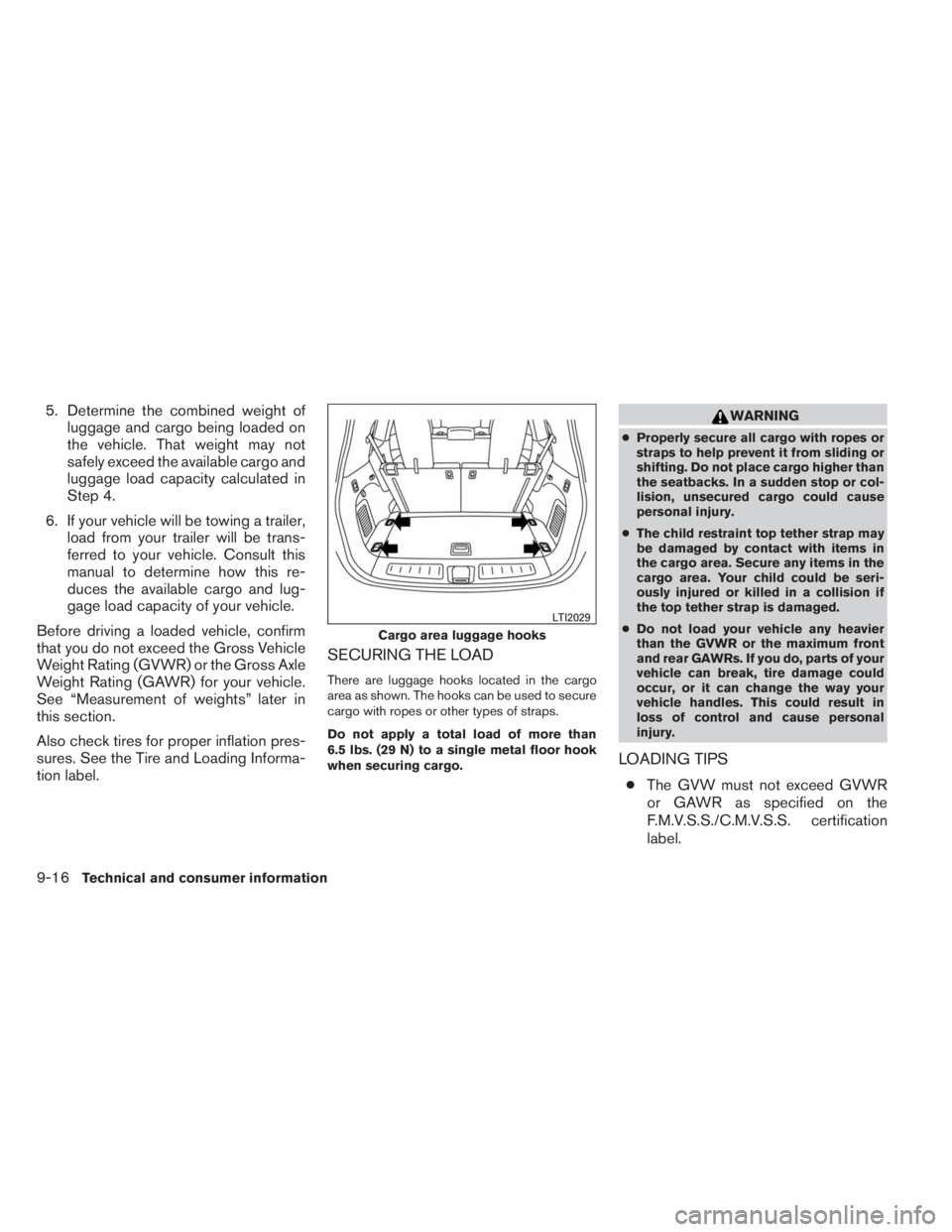
There are luggage hooks located in the cargo
area as shown. The hooks can be used to secure
cargo with ropes or other types of straps.
Do not apply a total load of more than
6.5 lbs. (29 N) to a single metal floor hook
when securing cargo.
WARNING
● Properly secure all cargo with ropes or
straps to help prevent it from sliding or
shifting. Do not place cargo higher than
the seatbacks. In a sudden stop or col-
lision, unsecured cargo could cause
personal injury.
● The child restraint top tether strap may
be damaged by contact with items in
the cargo area. Secure any items in the
cargo area. Your child could be seri-
ously injured or killed in a collision if
the top tether strap is damaged.
● Do not load your vehicle any heavier
than the GVWR or the maximum front
and rear GAWRs. If you do, parts of your
vehicle can break, tire damage could
occur, or it can change the way your
vehicle handles. This could result in
loss of control and cause personal
injury.
LOADING TIPS
● The GVW must not exceed GVWR
or GAWR as specified on the
F.M.V.S.S./C.M.V.S.S. certification
label.
Cargo area luggage hooks
LTI2029
9-16Technical and consumer information
Page 530 of 554
●Do not load the front and rear axle to
the GAWR. Doing so will exceed the
GVWR.
WARNING
● Properly secure all cargo with
ropes or straps to help prevent it
from sliding or shifting. Do not
place cargo higher than the seat-
backs. In a sudden stop or colli-
sion, unsecured cargo could
cause personal injury.
● Do not load your vehicle any
heavier than the GVWR or the
maximum front and rear GAWRs.
If you do, parts of your vehicle
can break, tire damage could oc-
cur, or it can change the way your
vehicle handles. This could result
in loss of control and cause per-
sonal injury. ●
Overloading not only can shorten
the life of your vehicle and the
tire, but can also cause unsafe
vehicle handling and longer brak-
ing distances. This may cause a
premature tire failure which
could result in a serious accident
and personal injury. Failures
caused by overloading are not
covered by the vehicle’s
warranty.
MEASUREMENT OF WEIGHTS
Secure loose items to prevent weight
shifts that could affect the balance of your
vehicle. When the vehicle is loaded, drive
to a scale and weigh the front and the rear
wheels separately to determine axle
loads. Individual axle loads should not ex-
ceed either of the gross axle weight rat-
ings (GAWR) . The total of the axle loads
should not exceed the gross vehicle
weight rating (GVWR) . These ratings are
given on the vehicle certification label. If
weight ratings are exceeded, move or re-
move items to bring all weights below the
ratings.
WARNING
Overloading or improper loading of a
trailer and its cargo can adversely affect
vehicle handling, braking and perfor-
mance and may lead to accidents.
CAUTION
●Do not tow a trailer or haul a heavy load
for the first 500 miles (800 km) . Your
engine, axle or other parts could be
damaged.
● For the first 500 miles (800 km) that you
tow a trailer, do not drive over 50 mph
(80 km/h) and do not make starts at full
throttle. This helps the engine and other
parts of your vehicle wear in at the
heavier loads.
Your new vehicle was designed to be used pri-
marily to carry passengers and cargo. Remember
that towing a trailer places additional loads on
your vehicle’s engine, drive train, steering, brak-
ing and other systems.
An INFINITI Towing Guide (U.S. only) is available
on the website at www.InfinitiUSA.com. This
guide includes information on trailer towing ca-
pability and the special equipment required for
proper towing.
TOWING A TRAILER
Technical and consumer information9-17
Page 531 of 554
MAXIMUM LOAD LIMITS
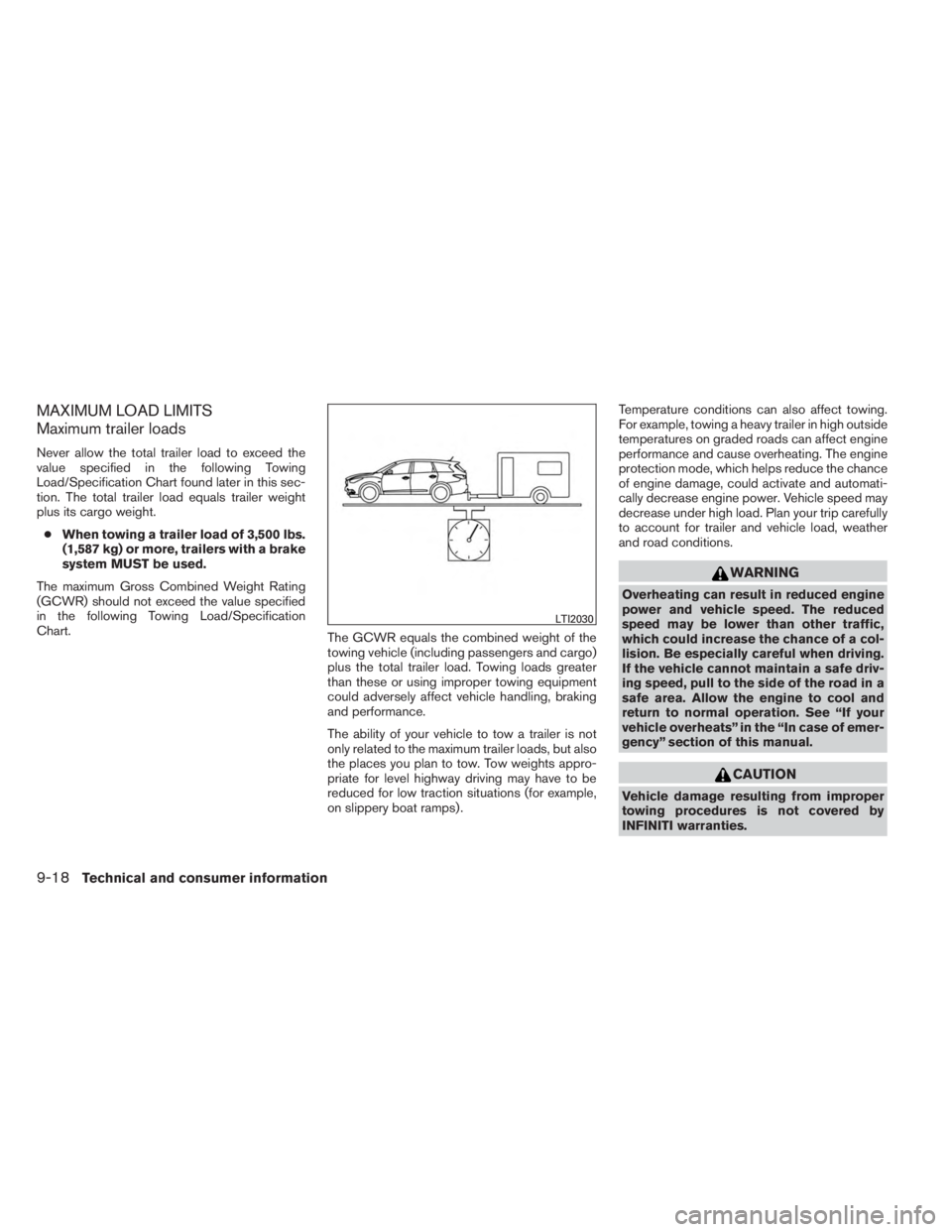
Maximum trailer loads
Never allow the total trailer load to exceed the
value specified in the following Towing
Load/Specification Chart found later in this sec-
tion. The total trailer load equals trailer weight
plus its cargo weight.● When towing a trailer load of 3,500 lbs.
(1,587 kg) or more, trailers with a brake
system MUST be used.
The maximum Gross Combined Weight Rating
(GCWR) should not exceed the value specified
in the following Towing Load/Specification
Chart. The GCWR equals the combined weight of the
towing vehicle (including passengers and cargo)
plus the total trailer load. Towing loads greater
than these or using improper towing equipment
could adversely affect vehicle handling, braking
and performance.
The ability of your vehicle to tow a trailer is not
only related to the maximum trailer loads, but also
the places you plan to tow. Tow weights appro-
priate for level highway driving may have to be
reduced for low traction situations (for example,
on slippery boat ramps) .Temperature conditions can also affect towing.
For example, towing a heavy trailer in high outside
temperatures on graded roads can affect engine
performance and cause overheating. The engine
protection mode, which helps reduce the chance
of engine damage, could activate and automati-
cally decrease engine power. Vehicle speed may
decrease under high load. Plan your trip carefully
to account for trailer and vehicle load, weather
and road conditions.
WARNING
Overheating can result in reduced engine
power and vehicle speed. The reduced
speed may be lower than other traffic,
which could increase the chance of a col-
lision. Be especially careful when driving.
If the vehicle cannot maintain a safe driv-
ing speed, pull to the side of the road in a
safe area. Allow the engine to cool and
return to normal operation. See “If your
vehicle overheats” in the “In case of emer-
gency” section of this manual.
CAUTION
Vehicle damage resulting from improper
towing procedures is not covered by
INFINITI warranties.
LTI2030
9-18Technical and consumer information
Page 532 of 554
Tongue load
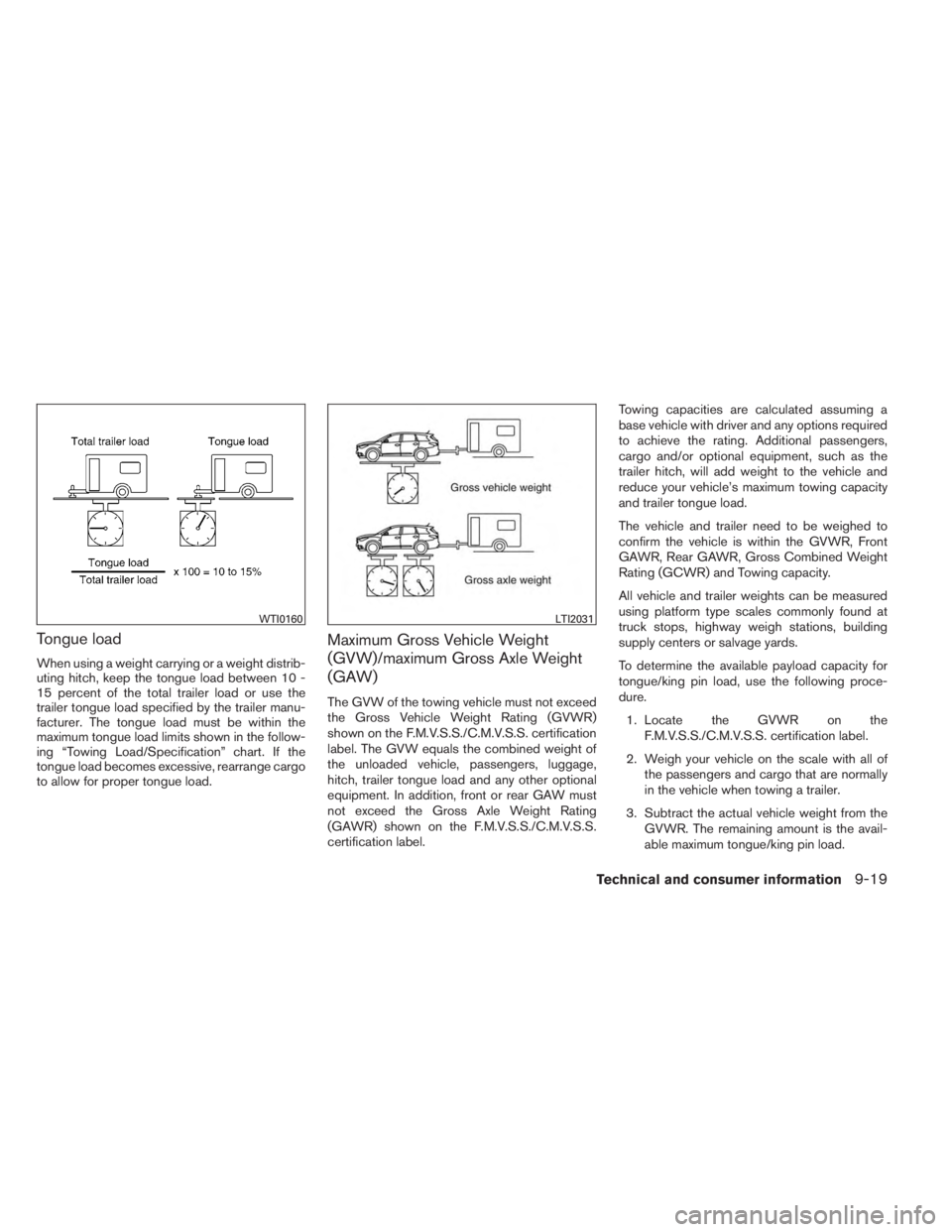
When using a weight carrying or a weight distrib-
uting hitch, keep the tongue load between 10 -
15 percent of the total trailer load or use the
trailer tongue load specified by the trailer manu-
facturer. The tongue load must be within the
maximum tongue load limits shown in the follow-
ing “Towing Load/Specification” chart. If the
tongue load becomes excessive, rearrange cargo
to allow for proper tongue load.
Maximum Gross Vehicle Weight
(GVW)/maximum Gross Axle Weight
(GAW)
The GVW of the towing vehicle must not exceed
the Gross Vehicle Weight Rating (GVWR)
shown on the F.M.V.S.S./C.M.V.S.S. certification
label. The GVW equals the combined weight of
the unloaded vehicle, passengers, luggage,
hitch, trailer tongue load and any other optional
equipment. In addition, front or rear GAW must
not exceed the Gross Axle Weight Rating
(GAWR) shown on the F.M.V.S.S./C.M.V.S.S.
certification label.Towing capacities are calculated assuming a
base vehicle with driver and any options required
to achieve the rating. Additional passengers,
cargo and/or optional equipment, such as the
trailer hitch, will add weight to the vehicle and
reduce your vehicle’s maximum towing capacity
and trailer tongue load.
The vehicle and trailer need to be weighed to
confirm the vehicle is within the GVWR, Front
GAWR, Rear GAWR, Gross Combined Weight
Rating (GCWR) and Towing capacity.
All vehicle and trailer weights can be measured
using platform type scales commonly found at
truck stops, highway weigh stations, building
supply centers or salvage yards.
To determine the available payload capacity for
tongue/king pin load, use the following proce-
dure.
1. Locate the GVWR on the F.M.V.S.S./C.M.V.S.S. certification label.
2. Weigh your vehicle on the scale with all of the passengers and cargo that are normally
in the vehicle when towing a trailer.
3. Subtract the actual vehicle weight from the GVWR. The remaining amount is the avail-
able maximum tongue/king pin load.
WTI0160LTI2031
Technical and consumer information9-19