phone INFINITI M 2010 Owners Manual
[x] Cancel search | Manufacturer: INFINITI, Model Year: 2010, Model line: M, Model: INFINITI M 2010Pages: 445, PDF Size: 6.15 MB
Page 274 of 445

5. Highlight a category using the INFINITIcontroller and push the ENTERbutton. 6. Highlight an item using the INFINITI con-
troller and push the ENTERbutton.
7. If necessary, scroll the screen using the INFINITI controller to view the entire list.
8. Press the BACKbutton to return to the
previous screen.
SAA1901SAA2031
Monitor, climate, audio, phone and voice recognition systems4-111
wÐ
Ð
05/15/09Ðpattie
X
Page 275 of 445
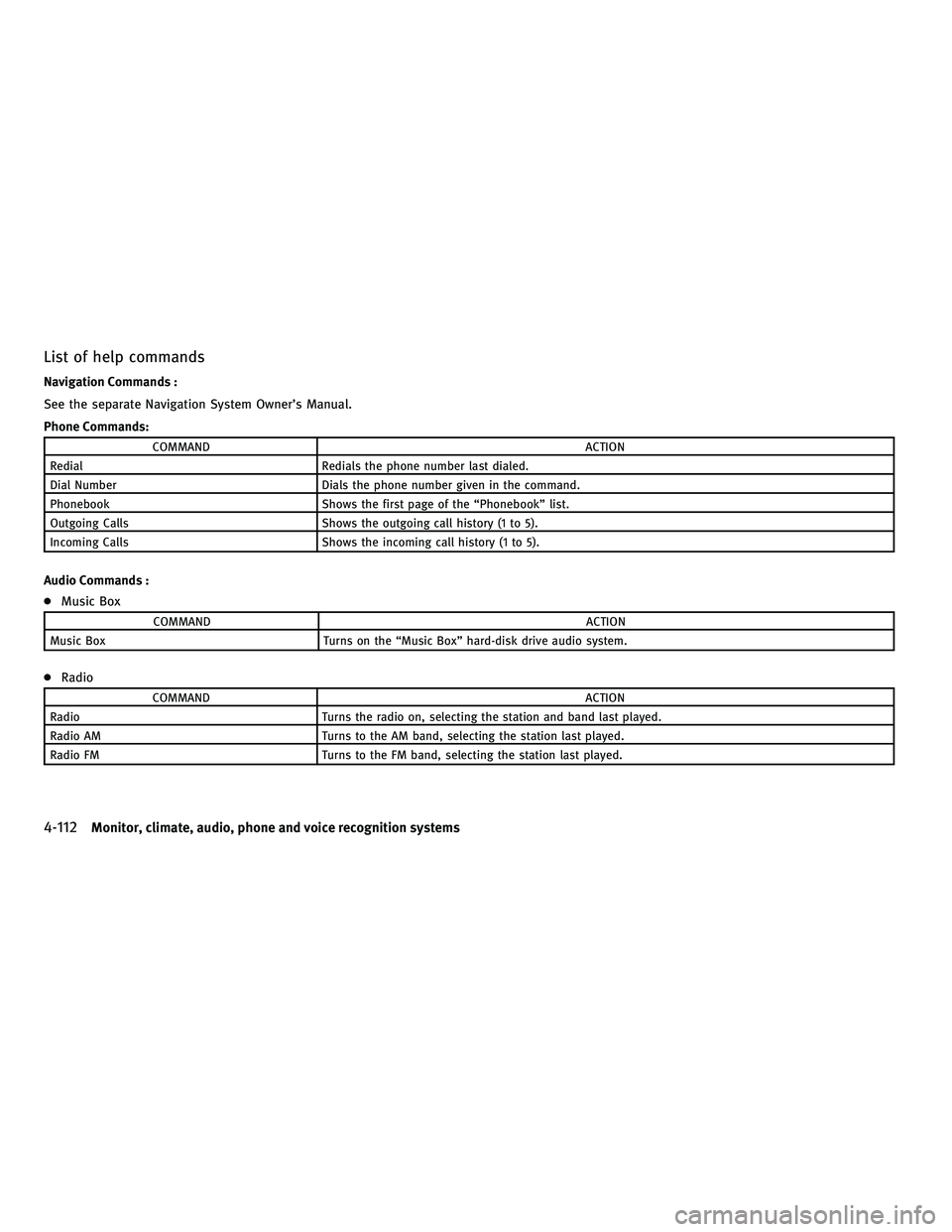
List of help commands
Navigation Commands :
See the separate Navigation System Owner's Manual.
Phone Commands:
COMMANDACTION
Redial Redials the phone number last dialed.
Dial Number Dials the phone number given in the command.
Phonebook Shows the first page of the ªPhonebookº list.
Outgoing Calls Shows the outgoing call history (1 to 5).
Incoming Calls Shows the incoming call history (1 to 5).
Audio Commands :
cMusic Box
COMMAND ACTION
Music Box Turns on the ªMusic Boxº hard-disk drive audio system.
cRadio
COMMAND ACTION
Radio Turns the radio on, selecting the station and band last played.
Radio AM Turns to the AM band, selecting the station last played.
Radio FM Turns to the FM band, selecting the station last played.
4-112Monitor, climate, audio, phone and voice recognition systems
wÐ
Ð
05/15/09Ðpattie
X
Page 276 of 445

cSatellite
COMMAND ACTION
Satellite Radio Turns the SAT radio on, selecting the station and band last played.
cCD
COMMAND ACTION
CD Starts to play a CD.
cAudio
COMMAND ACTION
Audio OFF Turns the audio system off.
ciPodT
COMMAND ACTION
iPodT Turns the iPodTsystem on.
Vehicle Information Commands:
COMMAND ACTION
Traffic Info. Turns the traffic information system ON and OFF.
Fuel Economy Displays the Fuel Economy screen.
Trip Computer Displays the Trip Computer screen.
Maintenance Displays the Maintenance screen.
Tire Pressure Displays the Tire Pressure screen.
Monitor, climate, audio, phone and voice recognition systems4-113
wÐ
Ð
05/15/09Ðpattie
X
Page 277 of 445

Climate Commands:
COMMANDACTION
Climate Control Turns the climate control system on and operates it in the AUTO mode.
Climate Control OFF Turns the climate control system off.
4-114Monitor, climate, audio, phone and voice recognition systems
wÐ
Ð
05/15/09Ðpattie
X
Page 278 of 445

Displaying user guide
You can confirm how to use voice commands by
accessing a simplified User Guide, which con-
tains basic instructions and tutorials for several
voice commands.
1. Push theINFObutton on the instrument
panel.
2. Highlight the ªOthersº key using the INFINITI controller and push the ENTER
button. 3. Highlight the ªVoice Recognitionº key us-
ing the INFINITI controller and push the
ENTER button.
You can skip steps 1 to 3 above if you say
ªHelpº.
4. Highlight the ªUser Guideº key using the
INFINITI controller and push the ENTER
button.
5. Highlight an item using the INFINITI con-troller and push the ENTERbutton.
Available items :
cGetting Started
Describe the basics of how to operate the
INFINITI Voice Recognition system.
c Using the Address Book
Refer to Navigation System Owner's Manual.
c Finding a Street Address (if so equipped)
Refer to Navigation System Owner's Manual.
c Placing Calls
Tutorial for making a phone call by voice
command operation.
SAA1783SAA2170
Monitor, climate, audio, phone and voice recognition systems4-115
wÐ
Ð
05/15/09Ðpattie
X
Page 279 of 445

cHelp on Speaking
Displays useful tips for how to correctly
speak commands in order for them to be
properly recognized by the system.
c Voice Recognition Settings
Describes the available voice recognition
settings.
c Speaker Adaptation
Tutorial adapting the system to your voice.
USING THE SYSTEM
Initialization
When the ignition switch is pushed to the ON
position, INFINITI Voice Recognition is initial-
ized, which takes a few seconds. When com-
pleted, the system is ready to accept voice
commands. If the TALK
switch is pushed
before the initialization completes the display
will show the message: ªPhonetic data down-
loaded. Please wait.º or a beep sounds.
Before starting
To get the best performance from INFINITI Voice
Recognition, observe the following:
c Keep the interior of the vehicle as quiet as
possible. Close the windows to eliminate the
surrounding noises (traffic noises, vibration
sounds, etc.), which may prevent the system
from recognizing the voice commands cor-
rectly.
c When the climate control is in the AUTO
mode, the fan speed decreases automati-
cally for easy recognition.
c Wait until a tone sounds before speaking a
command.
c Speak in a natural voice without pausing
between words.
Giving voice command
1. Push and release the TALKswitch
located on the steering wheel.
SAA1113
4-116Monitor, climate, audio, phone and voice recognition systems
wÐ
Ð
05/15/09Ðpattie
X
Page 280 of 445

2. A list of commands appears on thescreen, and the system announces,
ªPlease say a commandº.
3. After the tone sounds and the icon on the screen changes from
to,
speak a command.
Operating tips :
c Voice commands cannot be accepted when
the icon is
.
c The list displayed can be scrolled by tilting
the ENTER switch on the steering wheel.
c If the command is not recognized, the sys-
tem announces, ªPlease say againº. Repeat
the command in a clear voice. c
Push the BACKbutton once to return to the
previous screen.
c If you want to cancel the command, push
and hold the TALK
switch for 1 sec-
ond. The message ªVoice canceledº will be
announced.
c Push the TALK
switch again to pause
the operation. Push the TALK
switch
to restart the operation.
c If you want to adjust the volume of the
system feedback, push the volume control
buttons (+ or 2) on the steering wheel or use
the audio system volume knob while the
system is making an announcement.
How to speak numbers :
INFINITI Voice Recognition requires a certain
way to speak numbers when giving voice com-
mands. Refer to the following examples.
General rule
Only single digits 0 (zero) to 9 can be used. (For
example, if you would like to say 500, ªfive zero
zeroº can be used, but ªfive hundredº cannot. Phone numbers
Speak phone numbers according to the follow-
ing examples:
c
1-800-662-6200
± ªDial one eight zero zero six six two six two zero zero.º
Note 1: For the best voice recognition phone
dialing results, say phone numbers as single
digits.
Note 2: You cannot say 555-6000 as ªfive five
five six thousandsº.
Note 3: When speaking a house number, speak
the number ª0º as ªzeroº. If the letter ªo (Oh)º
is included in the house number, it will not be
recognized as the number ª0 (zero)º even if you
speak ªohº instead of ªzeroº. You can only say
ªzeroº for ª0 (Zero)º. You can say either ªzeroº
or ªohº for ªo (Oh)º.
SAA1932
Monitor, climate, audio, phone and voice recognition systems4-117
wÐ
Ð
05/15/09Ðpattie
X
Page 281 of 445

Speaker adaptation function
The voice recognition system has a function to
learn the user's voice for better voice recogni-
tion performance. The system can memorize the
voices of up to three persons.
Having the system learn the user's voice:
1. Push theSETTINGbutton on the instru-
ment panel, highlight the ªOthersº key on
the display and then push the ENTER
button.
2. Highlight the ªVoice Recognitionº key and then push the ENTERbutton.
3. Highlight the ªSpeaker Adaptationº key and then push the ENTERbutton. 4. Select the user whose voice is memorized
by the system and push the ENTERbut-
ton. 5. Select a category to be learned by the
system from the following list and then
push the ENTERbutton.
cNavigation
c Phone
c Audio
c Information
c Climate
The voice commands in the category are
displayed.
6. Select a voice command and then push
the ENTER button.
The voice recognition system starts.
SAA1907SAA1918SAA2171
4-118Monitor, climate, audio, phone and voice recognition systems
wÐ
Ð
05/15/09Ðpattie
X
Page 282 of 445
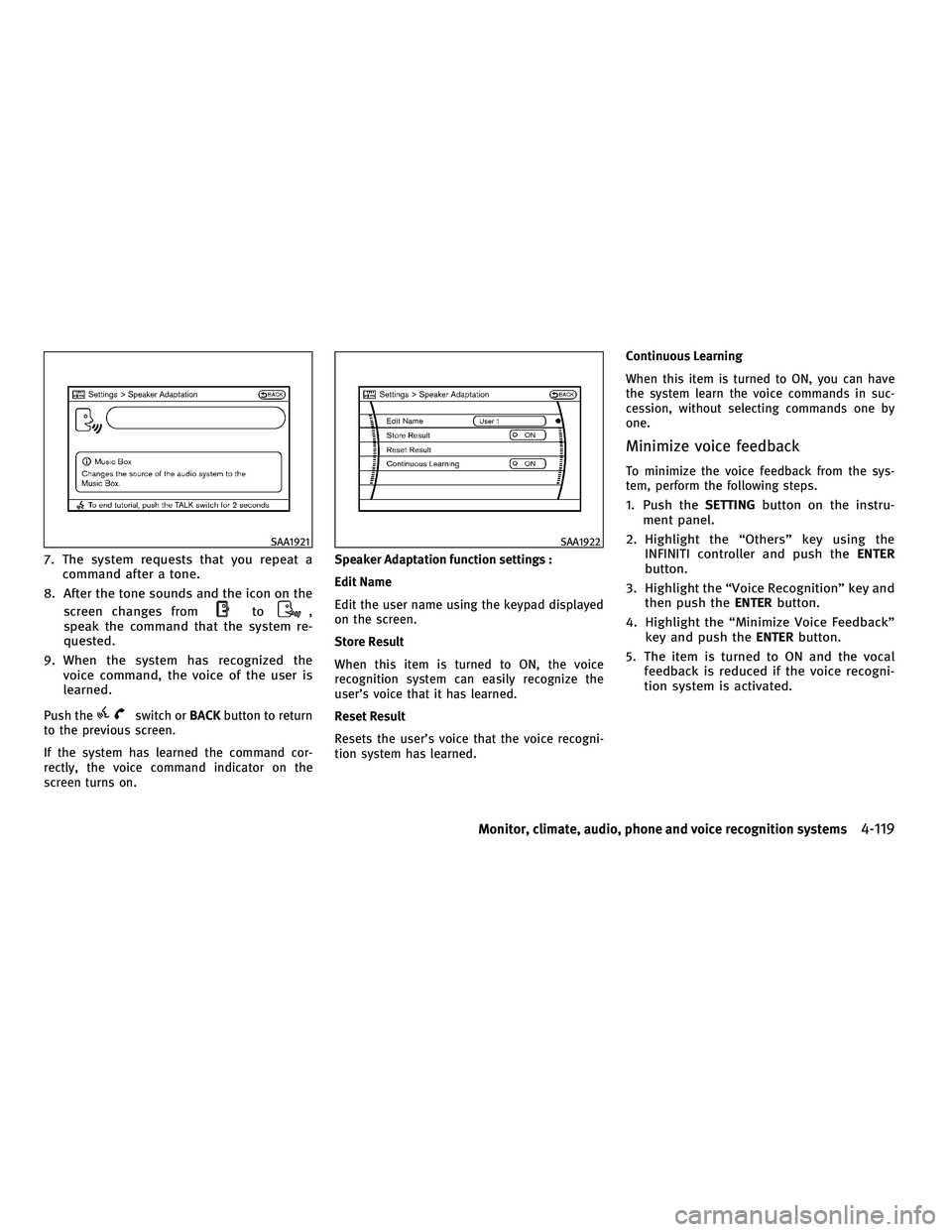
7. The system requests that you repeat acommand after a tone.
8. After the tone sounds and the icon on the screen changes from
to,
speak the command that the system re-
quested.
9. When the system has recognized the voice command, the voice of the user is
learned.
Push theswitch or BACKbutton to return
to the previous screen.
If the system has learned the command cor-
rectly, the voice command indicator on the
screen turns on. Speaker Adaptation function settings :
Edit Name
Edit the user name using the keypad displayed
on the screen.
Store Result
When this item is turned to ON, the voice
recognition system can easily recognize the
user's voice that it has learned.
Reset Result
Resets the user's voice that the voice recogni-
tion system has learned.Continuous Learning
When this item is turned to ON, you can have
the system learn the voice commands in suc-
cession, without selecting commands one by
one.
Minimize voice feedback
To minimize the voice feedback from the sys-
tem, perform the following steps.
1. Push the
SETTINGbutton on the instru-
ment panel.
2. Highlight the ªOthersº key using the INFINITI controller and push the ENTER
button.
3. Highlight the ªVoice Recognitionº key and then push the ENTERbutton.
4. Highlight the ªMinimize Voice Feedbackº key and push the ENTERbutton.
5. The item is turned to ON and the vocal feedback is reduced if the voice recogni-
tion system is activated.
SAA1921SAA1922
Monitor, climate, audio, phone and voice recognition systems4-119
wÐ
Ð
05/15/09Ðpattie
X
Page 283 of 445

TROUBLESHOOTING GUIDE
The system should respond correctly to all voice commands without difficulty. If problems are encountered, follow the solutions given in this guide for
the appropriate error.
Where the solutions are listed by number, try each solution in turn, starting with number one, until the problem is resolved.
Symptom/error messageSolution
Displays ªCOMMAND NOT RECOGNIZEDº or the
system fails to interpret the command correctly. 1. Ensure that the command format is valid, see ªCommand Listº earlier in this section.
2. Speak clearly without pausing between words and at a level appropriate to the ambient noise level.
3. Ensure that the ambient noise level is not excessive, for example, windows open or defrost on.
NOTE:
If it is too noisy to use the phone, it is likely that voice commands will not be recognized.
4. If optional words of the command have been omitted, then the command should be tried with these
in place.
The system consistently selects the wrong voic-
etag in the phonebook. 1. Ensure that the voicetag requested matches what was originally stored. (See ªBLUETOOTH
THANDS-
FREE PHONE SYSTEM WITH NAVIGATION SYSTEMº earlier in this section; page 4-74.)
2. Replace one of the voicetags being confused with a different voicetag.
4-120Monitor, climate, audio, phone and voice recognition systems
wÐ
Ð
05/15/09Ðpattie
X